ECU Lexus ES350 2009 Owner's Guide
[x] Cancel search | Manufacturer: LEXUS, Model Year: 2009, Model line: ES350, Model: Lexus ES350 2009Pages: 475, PDF Size: 6.2 MB
Page 172 of 475
170
2-5. Driving information
ES350_U_(L/O_0808)
CAUTION
■Storage precautions
Observe the following precautions.
Failing to do so may result in death or serious injury.
●Do not place cargo or luggage in or on the following locations as the item may
get under the brake or accelerator pedal and prevent the pedals from being
depressed properly, block the driver’s vision, or hit the driver or passengers,
causing an accident.
• Driver’s feet
• Front passenger or rear seats (when stacking items)
• Package tray
• Instrument panel
• Dashboard
●Secure all items in the occupant compartment, as they may shift and injure some-
one during sudden braking, sudden swerving or an accident.
■Capacity and distribution
●Do not exceed the maximum axle weight rating or the total vehicle weight rating.
●Even if the total load of occupant's weight and the cargo load is less than the total
load capacity, do not apply the load unevenly.
Improper loading may cause deterioration of steering or braking control which
may cause death or serious injury.
Page 182 of 475
180
2-5. Driving information
ES350_U_(L/O_0808)
■Before towing
●Ensure that your vehicle’s tires are properly inflated. (→P. 3 3 4 )
●Trailer tires should be inflated according to the trailer manufacturer's recom-
mendation.
●All trailer lights work to be legal.
●Confirm all lights work each time you connect them.
●Check that your vehicle remains level when a loaded or unloaded trailer is
hitched. Do not drive if the vehicle is not level, and check for improper tongue
load, overloading, worn suspension, or other possible causes.
●Make sure the trailer cargo is securely loaded.
●Check that your rear view mirrors conform to any federal, state/provincial or
local regulations. If they do not, install rear view mirrors appropriate for towing
purposes.
■Break-in schedule
Lexus recommends that you do not use a new vehicle or a vehicle with any new
power train components (engine, transmission, differential, wheel bearings, etc.) to
tow a trailer for the first 500 miles (800 km) of driving.
■Maintenance
●If you tow a trailer, your vehicle will require more frequent maintenance due to
the additional load. (See “Warranty and Services Guide/Owner's Manual Sup-
plement/ Scheduled Maintenance”.)
●Retighten the fixing bolts of the towing ball and bracket after approximately
600 miles (1000 km) of trailer towing.
CAUTION
■To avoid accident or injury
●The total trailer weight (trailer weight plus the weight of cargo) must not exceed
1000 lb. (450 kg).
●Do not exceed the trailer hitch assembly weight, gross vehicle weight, gross axle
weight and trailer tongue load capacities.
●Never load more weight in the back than in the front of the trailer. About 60% of
the load should be in the front half of the trailer, and the remaining 40% in the
r e a r.
Page 183 of 475
181
2-5. Driving information
2
When driving
ES350_U_(L/O_0808)
CAUTION
■Hitches
Trailer hitch assemblies have different weight capacities established by the hitch
manufacturer. Even though the vehicle may be physically capable of towing a
higher weight, the operator must never exceed the maximum weight rating speci-
fied for the trailer hitch.
●If you wish to install a trailer hitch, your Lexus dealer should be consulted.
●Use only a hitch that conforms to the total trailer weight requirement.
●Follow the directions supplied by the hitch manufacturer.
●Lubricate the hitch ball with a light coat of grease.
●Remove the trailer hitch whenever you are not towing a trailer. After removing
the hitch, seal any mounting holes in the vehicle body to prevent entry of any sub-
stances into the vehicle.
■When towing a trailer
●Never tap into your vehicle's hydraulic system, as this will lower the vehicle's
braking effectiveness.
●Never tow a trailer without using a safety chain securely attached to both the
trailer and the vehicle. If damage occurs to the coupling unit or hitch ball, there is
danger of the trailer wandering into another lane.
●Do not use cruise control/dynamic radar cruise control.
Doing so may result in inappropriate control of speed and could cause serious or
fatal accident.
NOTICE
■When installing a trailer hitch
●Use only the position recommended by your Lexus dealer. Do not install the
trailer hitch on the bumper; this may cause body damage.
●Do not use axle-mounted hitches, as they can cause damage to the axle housing,
wheel bearings, wheels or tires.
■Brakes
Lexus recommends trailers with brakes that conform to any applicable federal and
state/provincial regulations.
Page 189 of 475
Interior features3
187
ES350_U_(L/O_0808)
3-1. Using the air conditioning system and defogger
Automatic air conditioning system ..................................... 188
Rear window and outside rear view mirror
defoggers ............................... 195
3-2. Using the audio system Audio system type................... 196
Using the radio......................... 198
Using the CD player ............ 205
Playing back MP3 and
WMA discs.............................. 211
Optimal use of the audio system ...................................... 219
Using the AUX adapter ....... 222
Using the steering wheel audio switches ..................... 223
3-3. Using the hands-free phone system
(for cellular phone)
Hands-free phone system features
(for cellular phone) ............. 225
Using the hands-free phone system
(for cellular phone) ............ 228
Making a phone call .............. 236
Setting a cellular phone ....... 240
Security and system setup ... 244
Using the phone book........... 247 3-4. Using the interior lights
Interior lights list .................... 253
• Interior lights ........................ 255
• Personal lights ..................... 255
3-5. Using the storage features List of storage features......... 256
• Glove box .............................. 256
• Console box ......................... 257
• Overhead console.............. 259
• Cup holders .......................... 260
• Auxiliary box ........................ 262
3-6. Other interior features Sun visors ................................. 263
Vanity mirror ........................... 264
Clock ......................................... 265
Ashtray ..................................... 266
Cigarette lighter ..................... 267
Power outlet ............................ 268
Seat heaters ............................ 269
Seat heaters and ventilators ............................... 271
Armrest .................................... 273
Rear sunshade ......................... 274
Extended trunk........................ 276
Floor mat ................................... 277
Trunk features ......................... 278
Garage door opener ............ 280
Compass .................................. 286
Page 205 of 475
203
3-2. Using the audio system
3
Interior features
ES350_U_(L/O_0808)
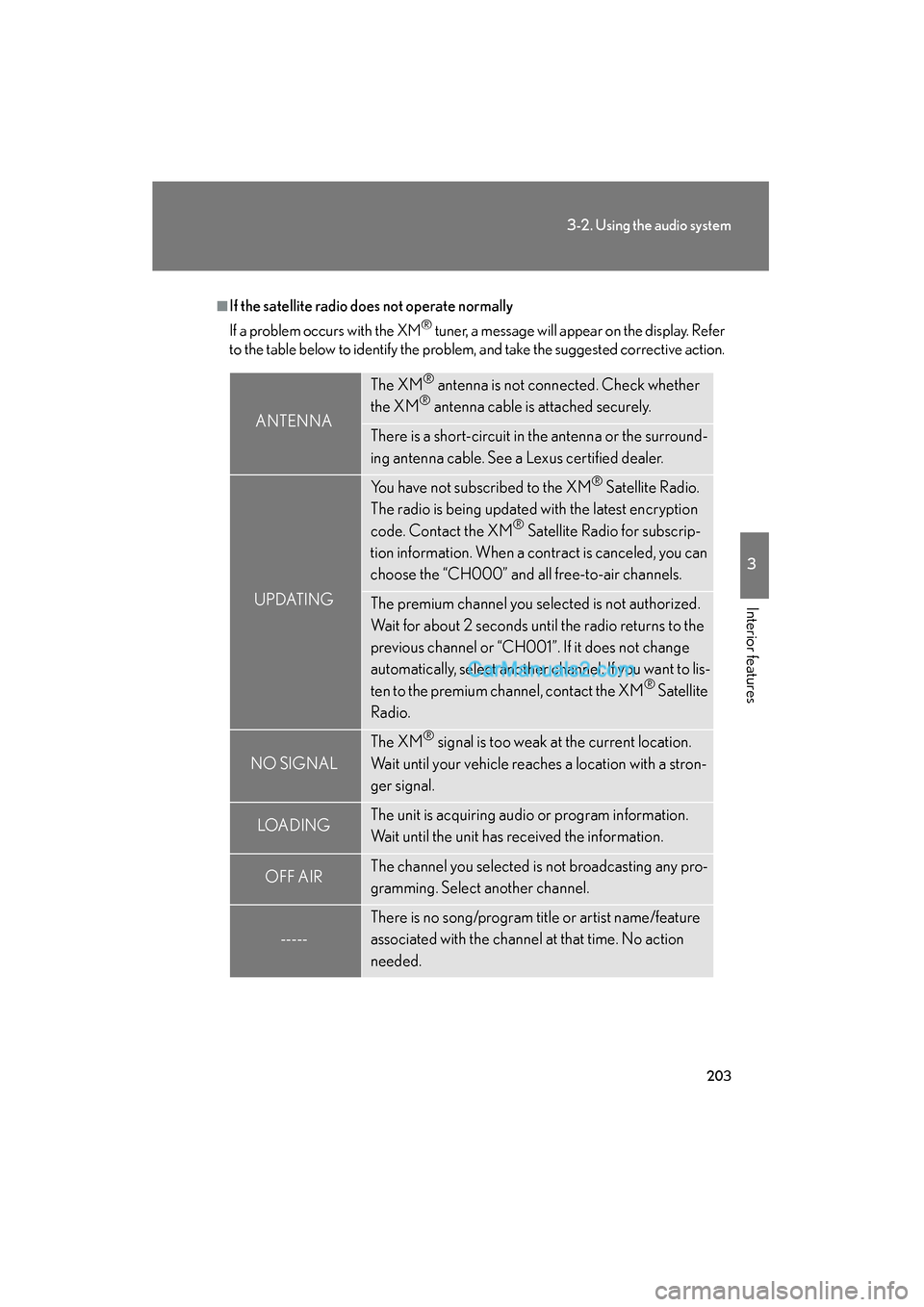
■If the satellite radio does not operate normally
If a problem occurs with the XM
® tuner, a message will appear on the display. Refer
to the table below to identify the problem, and take the suggested corrective action.
ANTENNA
The XM® antenna is not connected. Check whether
the XM® antenna cable is attached securely.
There is a short-circuit in the antenna or the surround-
ing antenna cable. See a Lexus certified dealer.
UPDATING
You have not subscribed to the XM® Satellite Radio.
The radio is being updated with the latest encryption
code. Contact the XM
® Satellite Radio for subscrip-
tion information. When a contract is canceled, you can
choose the “CH000” and all free-to-air channels.
The premium channel you selected is not authorized.
Wait for about 2 seconds until the radio returns to the
previous channel or “CH001”. If it does not change
automatically, select another channel. If you want to lis-
ten to the premium channel, contact the XM
® Satellite
Radio.
NO SIGNAL
The XM® signal is too weak at the current location.
Wait until your vehicle reaches a location with a stron-
ger signal.
LOAD INGThe unit is acquiring audio or program information.
Wait until the unit has received the information.
OFF AIRThe channel you selected is not broadcasting any pro-
gramming. Select another channel.
-----
There is no song/program title or artist name/feature
associated with the channel at that time. No action
needed.
Page 227 of 475
225
3
Interior features
ES350_U_(L/O_0808)
3-3. Using the hands-free phone system (for cellular phone)
Hands-free phone system features (for cellular phone)∗
■Conditions affecting operation
The hands-free phone system may not operate normally in the following situations:
●The cellular phone is turned off, or located outside the service area.
●The cellular phone has a low battery.
●The cellular phone is not connected to the system.
●The cellular phone is behind the seat or in the glove box, or metal material cov-
ers or touches the phone.
■When transferring ownership of the vehicle
Be sure to initialize the system to prevent the personal data from being improperly
accessed.
■Required profiles for the cellular phone
●HFP (Hands Free Profile) Ver. 1.0
●OPP (Object Push Profile) Ver. 1.1
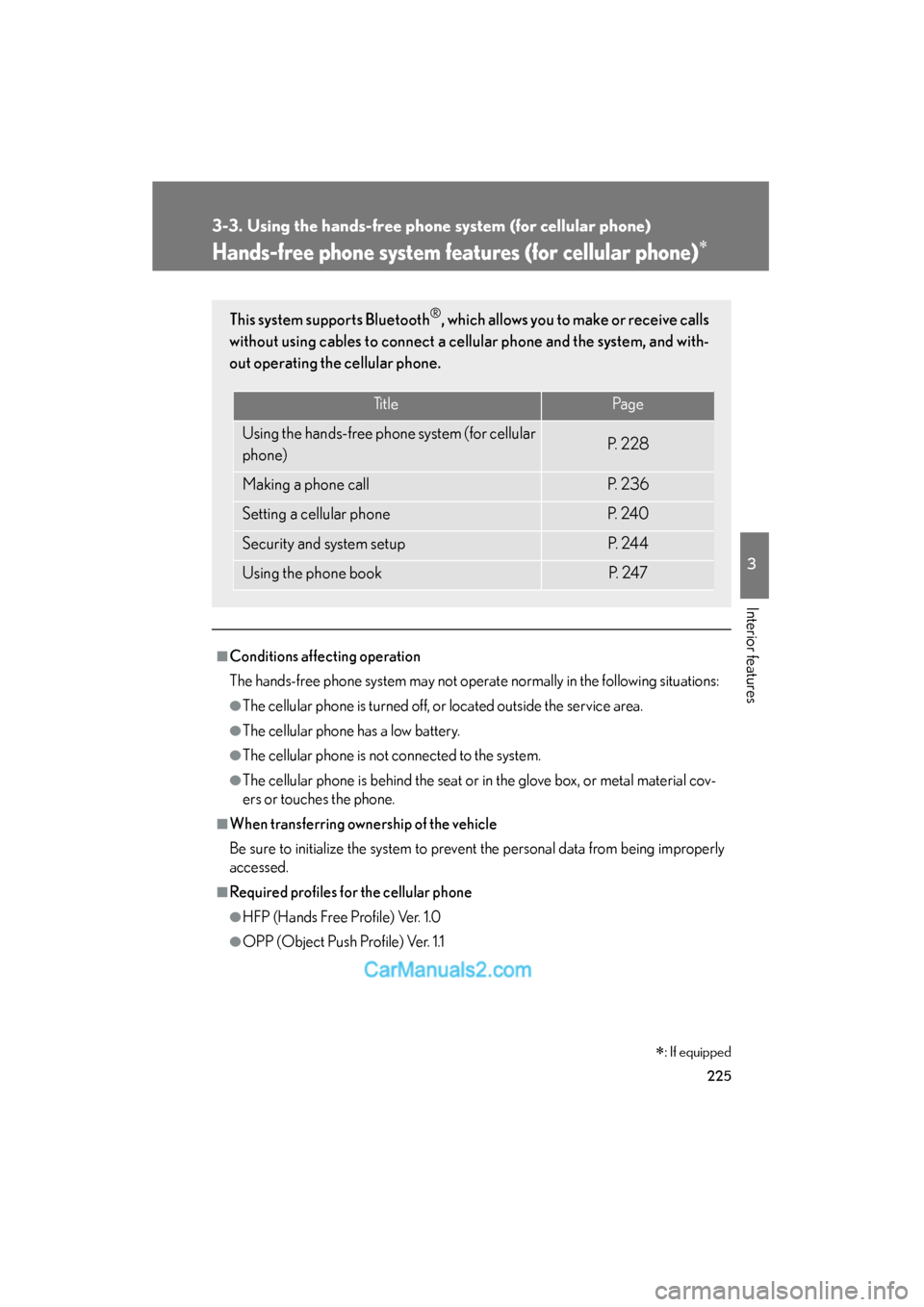
This system supports Bluetooth®, which allows you to make or receive calls
without using cables to connect a cellular phone and the system, and with-
out operating the cellular phone.
TitlePa g e
Using the hands-free phone system (for cellular
phone)P. 2 2 8
Making a phone callP. 2 3 6
Setting a cellular phoneP. 2 4 0
Security and system setupP. 2 4 4
Using the phone bookP. 2 4 7
∗: If equipped
Page 235 of 475
233
3-3. Using the hands-free phone system (for cellular phone)
3
Interior features
ES350_U_(L/O_0808)
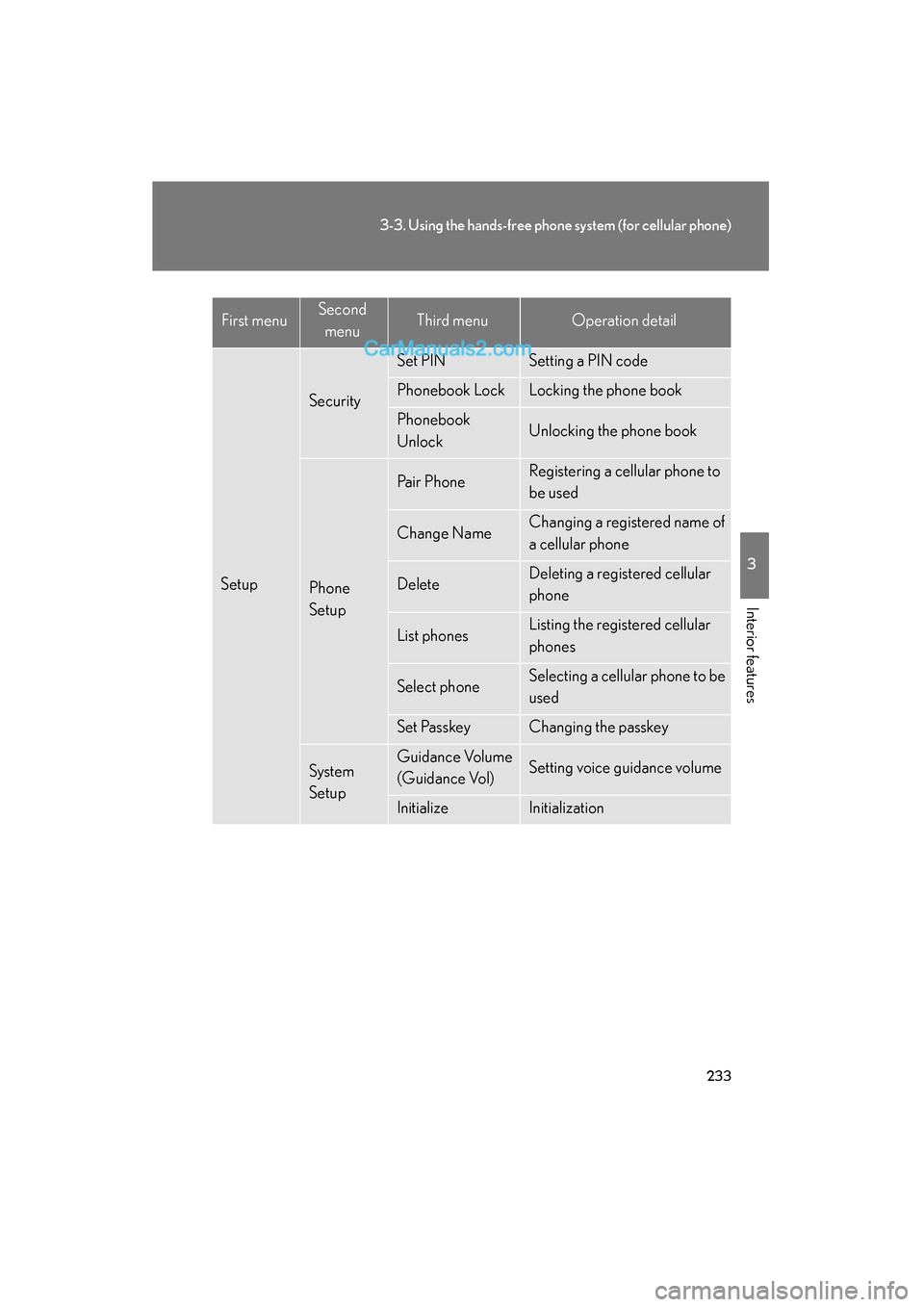
Setup
Security
Set PINSetting a PIN code
Phonebook LockLocking the phone book
Phonebook
UnlockUnlocking the phone book
Phone
Setup
Pa i r P h o n eRegistering a cellular phone to
be used
Change NameChanging a registered name of
a cellular phone
DeleteDeleting a registered cellular
phone
List phonesListing the registered cellular
phones
Select phoneSelecting a cellular phone to be
used
Set PasskeyChanging the passkey
System
SetupGuidance Volume
(Guidance Vol)Setting voice guidance volume
InitializeInitialization
First menuSecond menuThird menuOperation detail
Page 246 of 475
244
3-3. Using the hands-free phone system (for cellular phone)
ES350_U_(L/O_0808)
Security and system setup
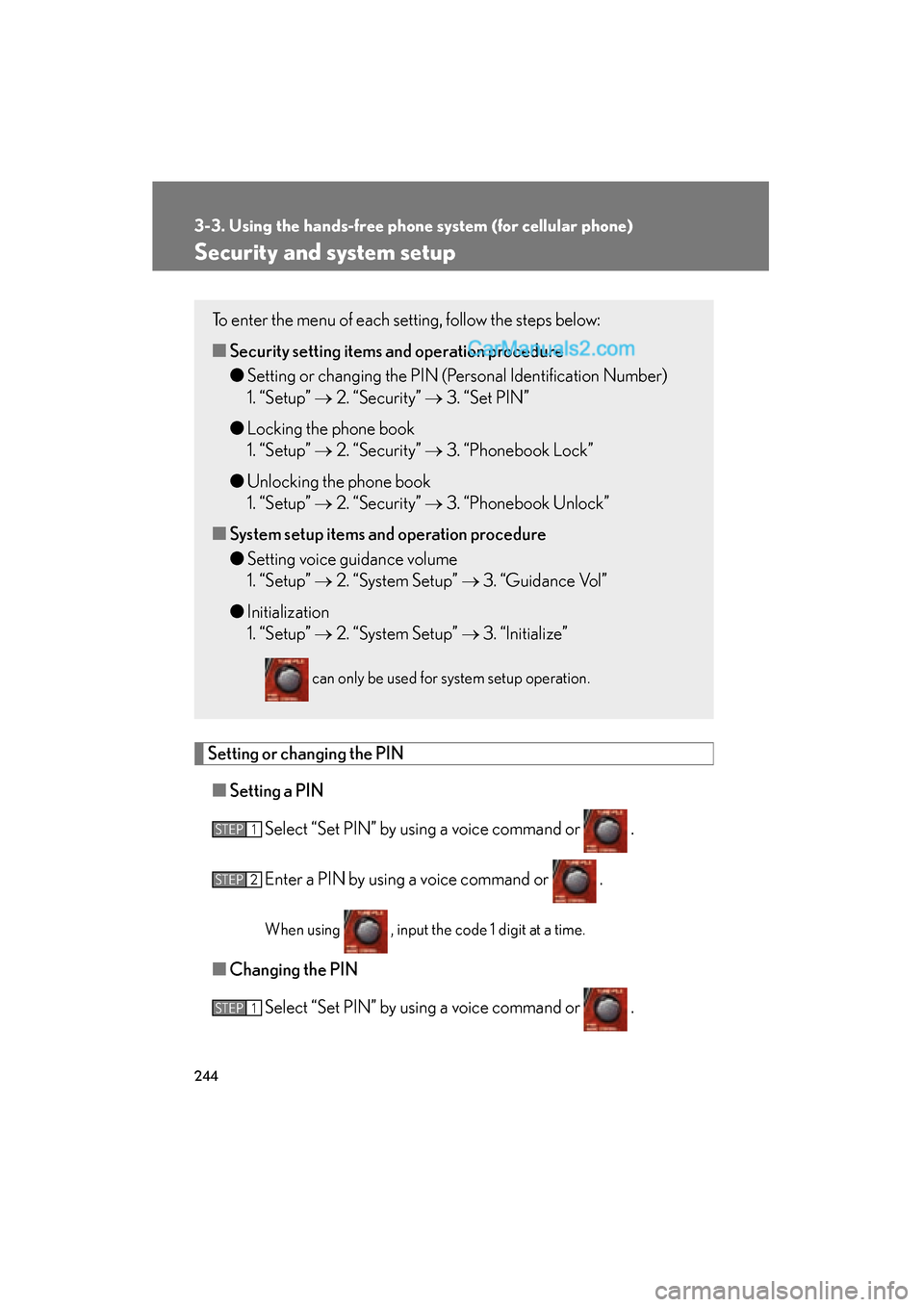
Setting or changing the PIN■ Setting a PIN
Select “Set PIN” by using a voice command or .
Enter a PIN by using a voice command or .
When using , input the code 1 digit at a time.
■Changing the PIN
Select “Set PIN” by using a voice command or .
To enter the menu of each setting, follow the steps below:
■Security setting items an d operation procedure
● Setting or changing the PIN (Personal Identification Number)
1. “Setup” → 2. “Security” → 3. “Set PIN”
● Locking the phone book
1. “Setup” → 2. “Security” → 3. “Phonebook Lock”
● Unlocking the phone book
1. “Setup” → 2. “Security” → 3. “Phonebook Unlock”
■ System setup items and operation procedure
● Setting voice guidance volume
1. “Setup” → 2. “System Setup” → 3. “Guidance Vol”
● Initialization
1. “Setup” → 2. “System Setup” → 3. “Initialize”
can only be used for system setup operation.
STEP1
STEP2
STEP1
Page 248 of 475
246
3-3. Using the hands-free phone system (for cellular phone)
ES350_U_(L/O_0808)
InitializationSelect “Initialize” and then “Confirm” by using .
Select “Confirm” by using again.
■Initialization
●The following data in the system can be initialized:
• Phone book
• Outgoing and incoming history
• Speed dial
• Registered cellular phone data
• Security code
●Once the initialization has been completed, the data cannot be restored to its
original state.
■When the phone book is locked
The following functions cannot be used:
●Dialing by inputting a name
●Speed dialing
●Dialing a number stored in the call history memory
●Using the phone book
STEP1
STEP2
Page 279 of 475
277
3-6. Other interior features
3
Interior features
ES350_U_(L/O_0808)
Floor mat
CAUTION
■When inserting the floor mat
Observe the following precautions.
Failure to do so may result in the floor mat slipping and interfering with the move-
ment of the pedals during driving, resulting in an accident.
●Make sure the floor mat is properly placed on the vehicle carpet and the correct
side faces upward.
●Do not place floor mats on top of existing mats.
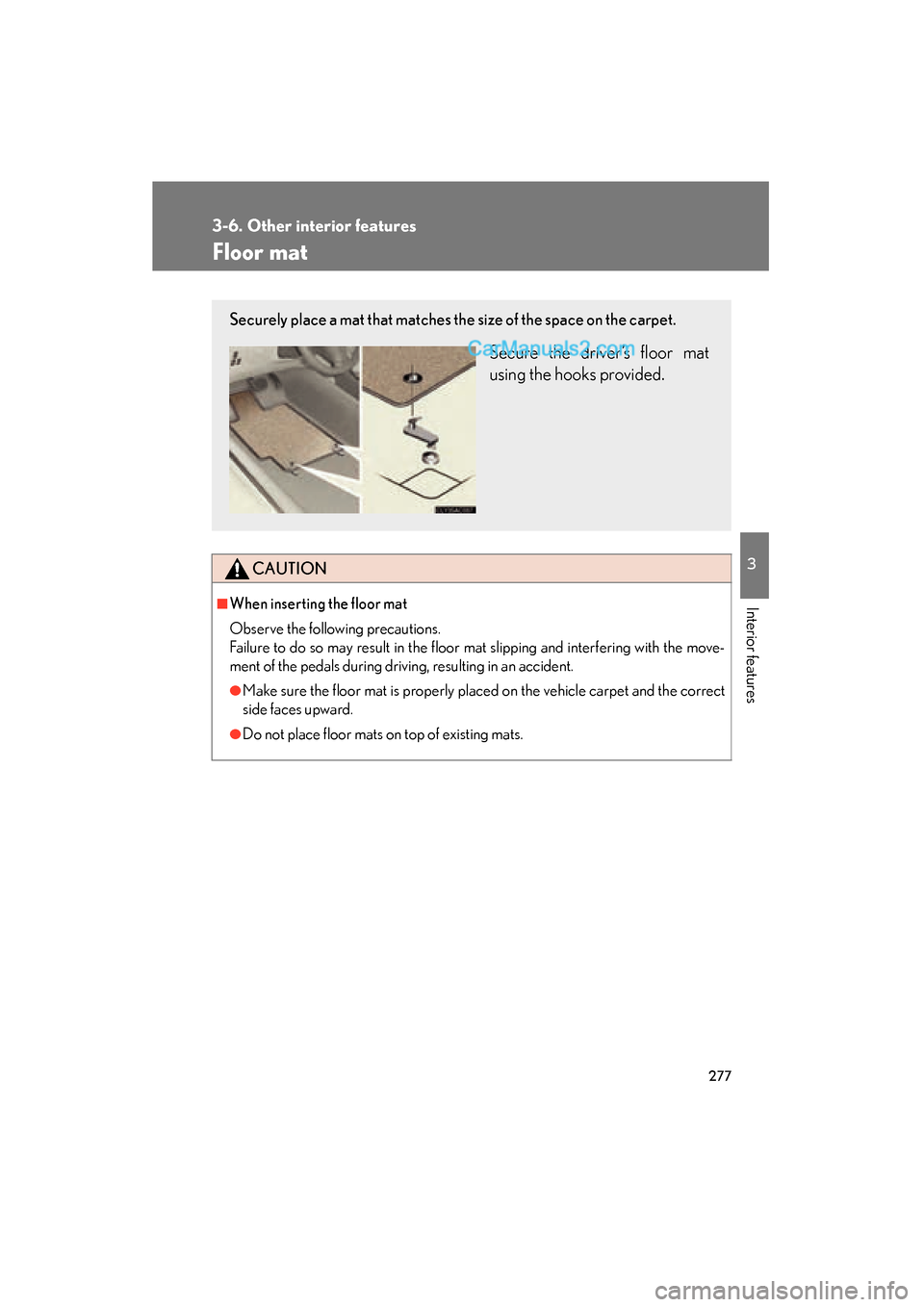
Securely place a mat that matches the size of the space on the carpet.
Secure the driver’s floor mat
using the hooks provided.