parking Lexus ES350 2009 Owner's Guide
[x] Cancel search | Manufacturer: LEXUS, Model Year: 2009, Model line: ES350, Model: Lexus ES350 2009Pages: 475, PDF Size: 6.2 MB
Page 158 of 475
156
2-4. Using other driving systems
ES350_U_(L/O_0808)
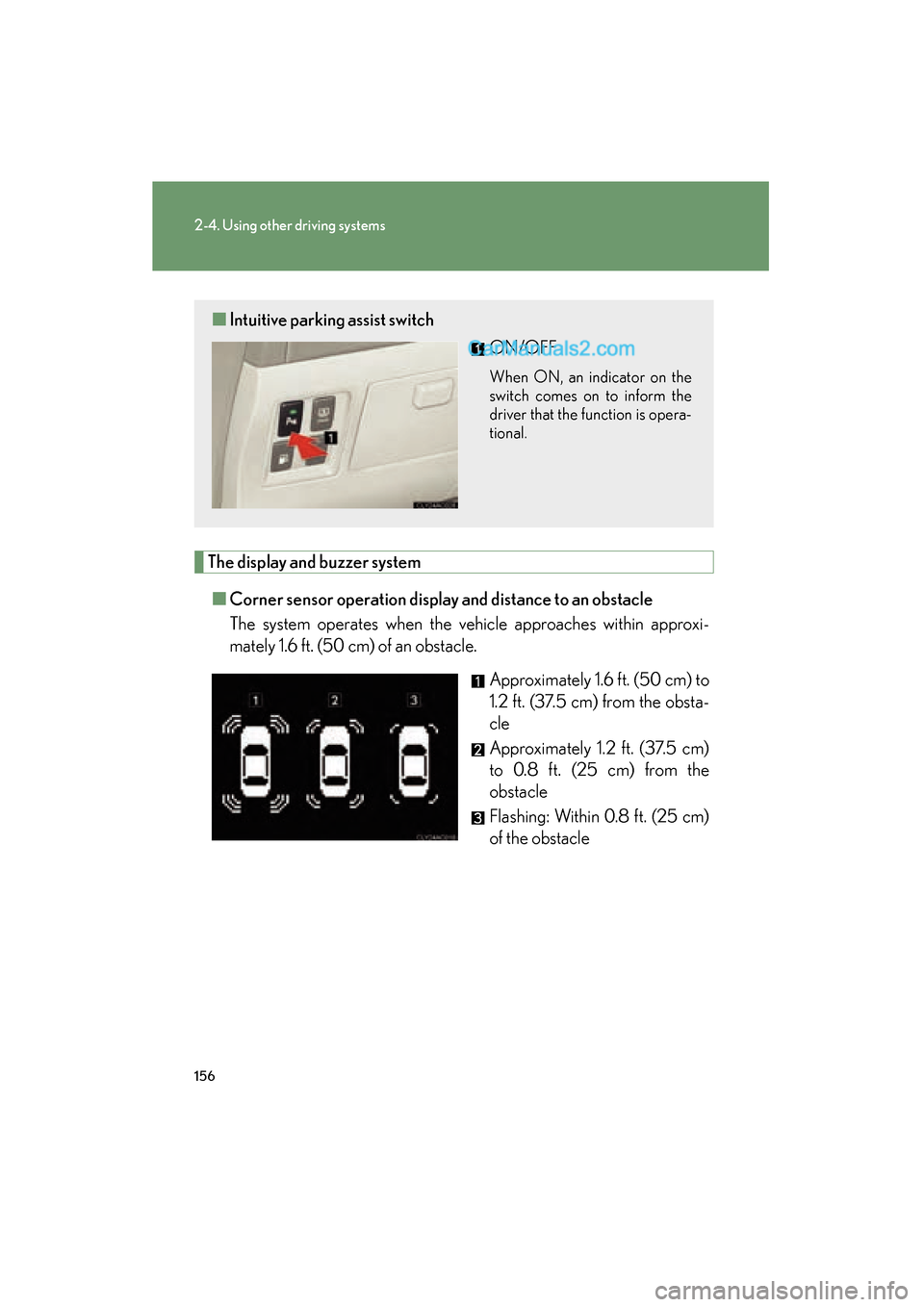
The display and buzzer system■ Corner sensor operation displa y and distance to an obstacle
The system operates when the vehicle approaches within approxi-
mately 1.6 ft. (50 c m) of an obstacle.
Approximately 1.6 ft. (50 cm) to
1.2 ft. (37.5 cm) from the obsta-
cle
Approximately 1.2 ft. (37.5 cm)
to 0.8 ft. (25 cm) from the
obstacle
Flashing: Within 0.8 ft. (25 cm)
of the obstacle
■Intuitive parking assist switch
ON/OFF
When ON, an indicator on the
switch comes on to inform the
driver that the function is opera-
tional.
Page 161 of 475
159
2-4. Using other driving systems
2
When driving
ES350_U_(L/O_0808)
■Sensor detection information
●Certain vehicle conditions and the surrounding environment may affect the
ability of the sensor to correctly detect obstacles. Particular instances where this
may occur are listed below.
• There is dirt, snow or ice on the sensor.
• The sensor is frozen.
• The sensor is covered in any way.
• The vehicle is leaning considerably to one side.
• On an extremely bumpy road, on an incline, on gravel, or on grass
• The vicinity of the vehicle is noisy due to vehicle horns, motorcycle engines,air brakes of large vehicles, or other loud noises producing ultrasonic waves.
• There is another vehicle equipped with parking assist sensors in the vicinity.
• The sensor is coated with a sheet of spray or heavy rain
• The vehicle is equipped with a fender pole or wireless antenna.
• Towing eyelets are installed.
• The bumper or sensor receives a strong impact.
• The vehicle is approaching a tall or curved curb.
• In harsh sunlight or intense cold weather
In addition to the examples above, there are instances in which, because of their
shapes, signs and other objects may be judged by the sensor to be closer than they
are.
●The shape of the obstacle may prevent the sensor from detecting it. Pay particu-
lar attention to the following obstacles.
• Wires, fences, ropes etc.
• Cotton, snow and other materials that absorb radio waves
• Sharply-angled objects
• Low obstacles
• Tall obstacles with upper sections projecting outwards in the direction of your
vehicle
Page 162 of 475
160
2-4. Using other driving systems
ES350_U_(L/O_0808)
■When the display flashes and a message is displayed
→P. 3 8 6
■Certification
For vehicles sold in U.S.A.
This device complies with Part 15 of the FCC Rules.
Operation is subject to the following two conditions: (1) This device may not cause
harmful interference, and (2) this device must accept any interference received,
including interference that may cause undesired operation. For vehicles sold in Canada
This ISM device complies with Canadian ICES-001.
Cet appareil ISM est conforme a la norme NMB-001 du Canada.
■Customization that can be configured at Lexus dealer
Settings (e.g. buzzer volume) can be changed. (Customizable features →P. 4 4 7 )
CAUTION
■Caution when using the intuitive parking assist
Observe the following precautions.
Failing to do so may result in the vehicle being unable to be driven safely and possi-
bly cause an accident.
●Do not use the sensor at speeds in excess of 6 mph (10 km/h).
●Do not attach any accessories within the sensor range.
NOTICE
■Notes when washing the vehicle
Do not apply intensive bursts of water or steam to the sensor area.
Doing so may result in the sensor malfunctioning.
Page 175 of 475
173
2-5. Driving information
2
When driving
ES350_U_(L/O_0808)
■Before driving the vehicle
Perform the following according to the driving conditions.
●Do not try to forcibly open a window or move a wiper that is fro-
zen. Pour warm water over the frozen area to melt the ice. Wipe
away the water immediately to prevent it from freezing.
● To ensure proper operation of the climate control system fan,
remove any snow that has accumulated on the air inlet vents in
front of the windshield.
● Remove any ice that has accumulated on the vehicle chassis.
● Periodically check for and remove any excess ice or snow that
may have accumulated in the wheel well or on the brakes.
■ When driving the vehicle
Accelerate the vehicle slowly and drive at a reduced speed suitable
to road conditions.
■ When parking the vehicle
Park the vehicle and move the shift lever to P without setting the
parking brake. The parking brake may freeze up, preventing it from
being released.
Page 186 of 475
184
2-5. Driving information
ES350_U_(L/O_0808)●
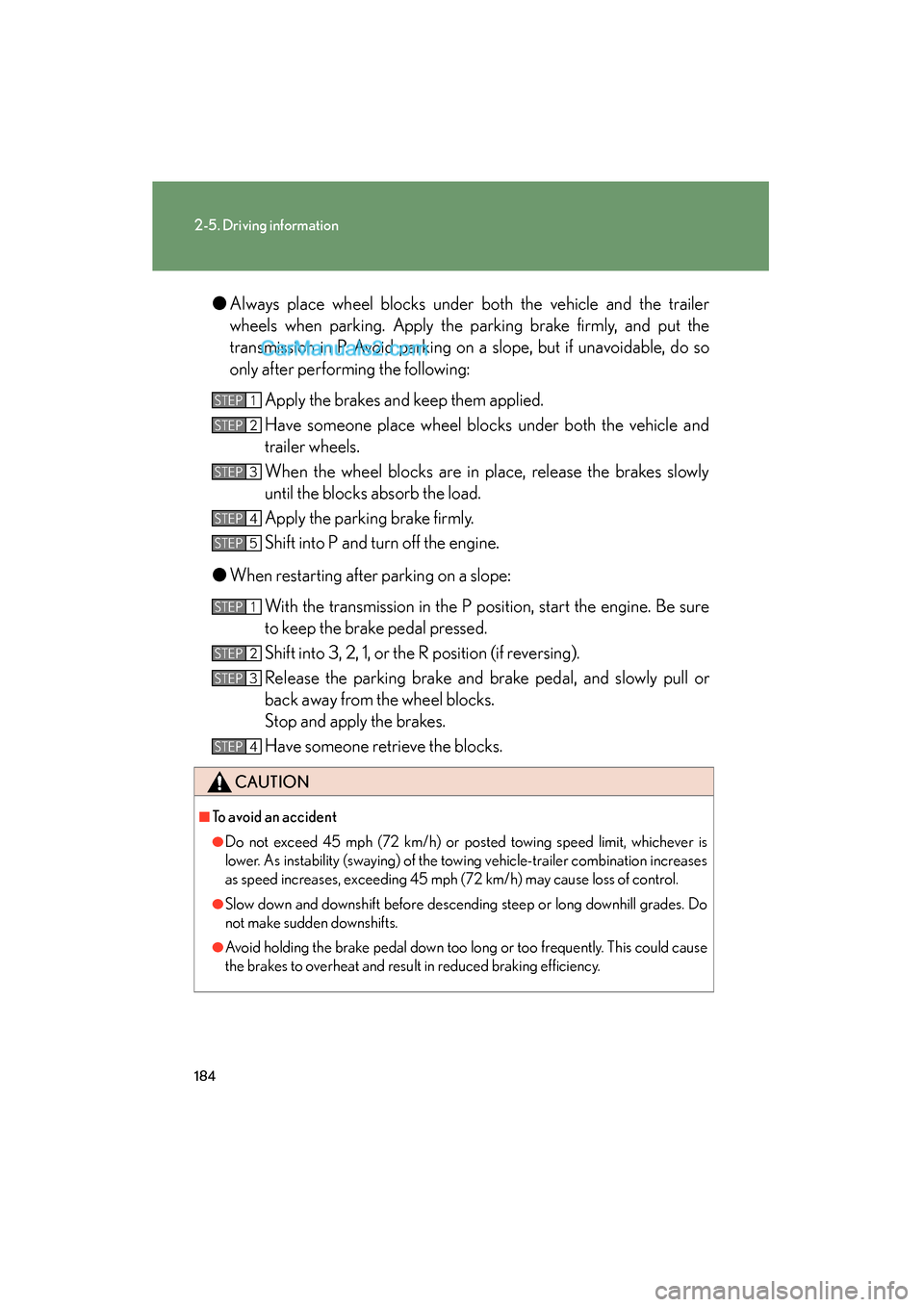
Always place wheel blocks under both the vehicle and the trailer
wheels when parking. Apply the parking brake firmly, and put the
transmission in P. Avoid parking on a slope, but if unavoidable, do so
only after performing the following:
Apply the brakes and keep them applied.
Have someone place wheel blocks under both the vehicle and
trailer wheels.
When the wheel blocks are in place, release the brakes slowly
until the blocks absorb the load.
Apply the parking brake firmly.
Shift into P and turn off the engine.
● When restarting after parking on a slope:
With the transmission in the P position, start the engine. Be sure
to keep the brake pedal pressed.
Shift into 3, 2, 1, or the R position (if reversing).
Release the parking brake and brake pedal, and slowly pull or
back away from the wheel blocks.
Stop and apply the brakes.
Have someone retrieve the blocks.
CAUTION
■To avoid an accident
●Do not exceed 45 mph (72 km/h) or posted towing speed limit, whichever is
lower. As instability (swaying) of the towing vehicle-trailer combination increases
as speed increases, exceeding 45 mph (72 km/h) may cause loss of control.
●Slow down and downshift before descending steep or long downhill grades. Do
not make sudden downshifts.
●Avoid holding the brake pedal down too long or too frequently. This could cause
the brakes to overheat and result in reduced braking efficiency.
STEP1
STEP2
STEP3
STEP4
STEP5
STEP1
STEP2
STEP3
STEP4
Page 291 of 475
289
3-6. Other interior features
3
Interior features
ES350_U_(L/O_0808)
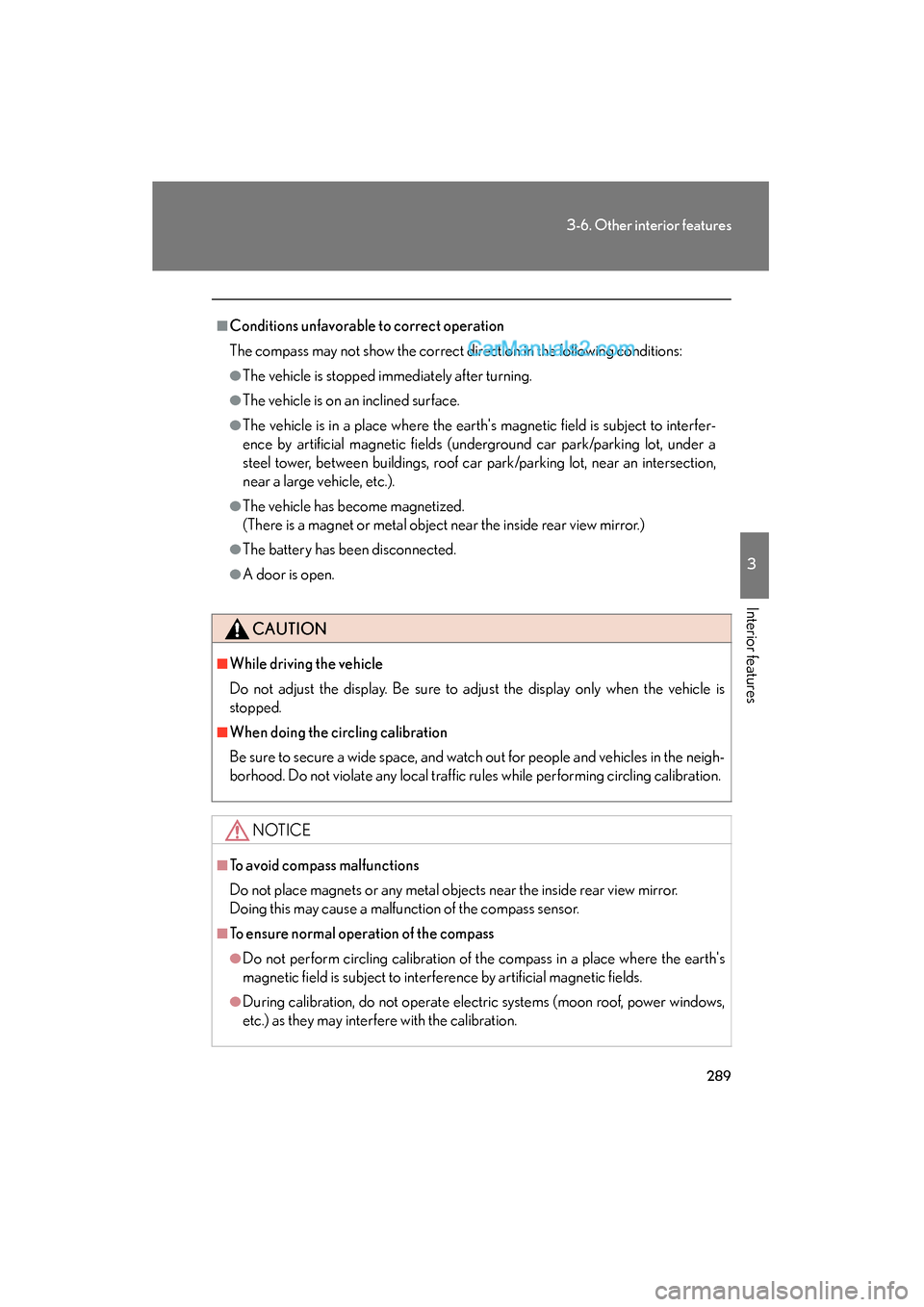
■Conditions unfavorable to correct operation
The compass may not show the correct direction in the following conditions:
●The vehicle is stopped immediately after turning.
●The vehicle is on an inclined surface.
●The vehicle is in a place where the earth's magnetic field is subject to interfer-
ence by artificial magnetic fields (underground car park/parking lot, under a
steel tower, between buildings, roof car park/parking lot, near an intersection,
near a large vehicle, etc.).
●The vehicle has become magnetized.
(There is a magnet or metal object near the inside rear view mirror.)
●The battery has been disconnected.
●A door is open.
CAUTION
■While driving the vehicle
Do not adjust the display. Be sure to adjust the display only when the vehicle is
stopped.
■When doing the circling calibration
Be sure to secure a wide space, and watch out for people and vehicles in the neigh-
borhood. Do not violate any local traffic rules while performing circling calibration.
NOTICE
■To avoid compass malfunctions
Do not place magnets or any metal objects near the inside rear view mirror.
Doing this may cause a malfunction of the compass sensor.
■To ensure normal operation of the compass
●Do not perform circling calibration of the compass in a place where the earth's
magnetic field is subject to interference by artificial magnetic fields.
●During calibration, do not operate electric systems (moon roof, power windows,
etc.) as they may interfere with the calibration.
Page 303 of 475
301
4-2. Maintenance
4
Maintenance and care
ES350_U_(L/O_0808)
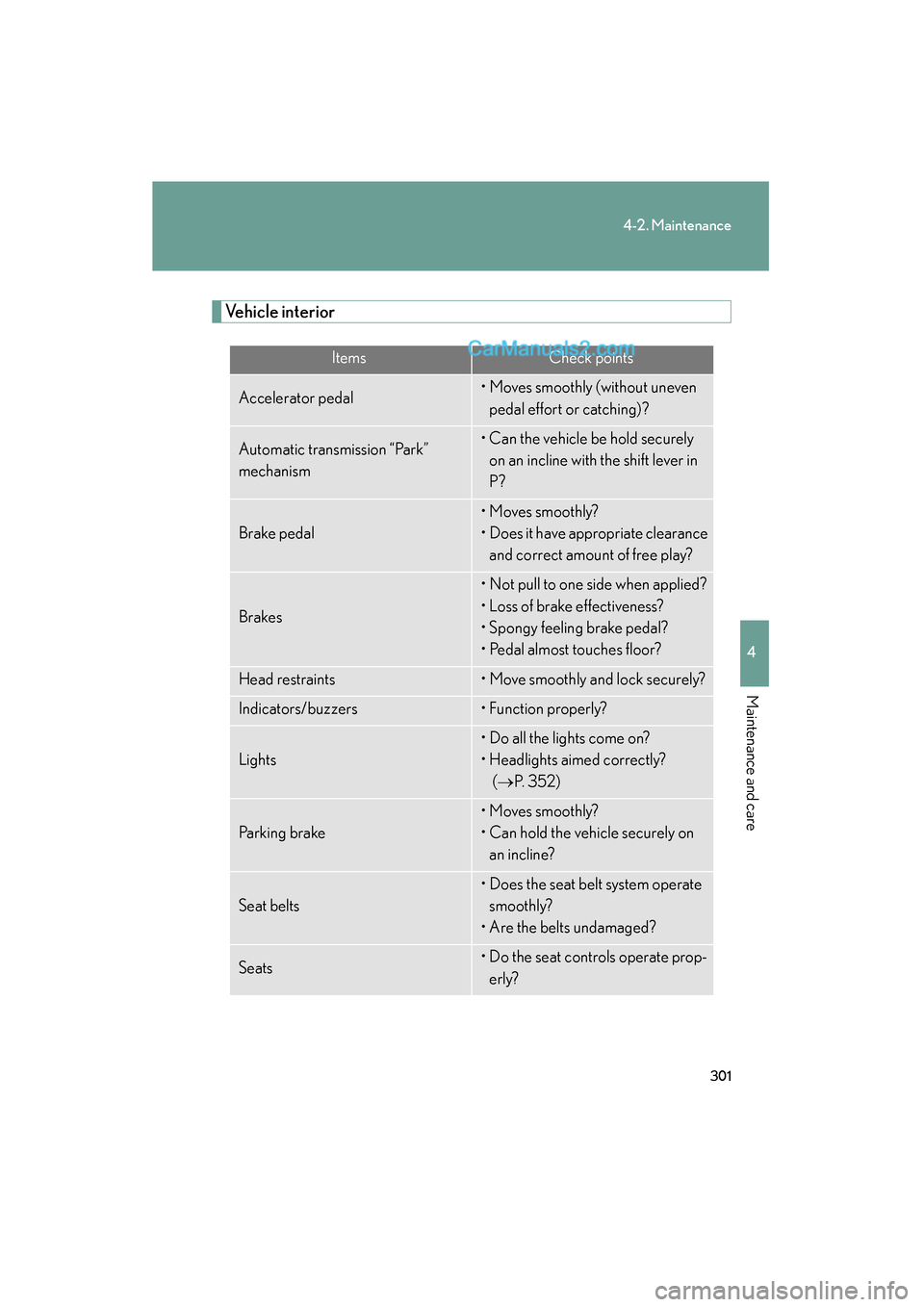
Vehicle interior
ItemsCheck points
Accelerator pedal• Moves smoothly (without uneven pedal effort or catching)?
Automatic transmission “Park”
mechanism• Can the vehicle be hold securely on an incline with the shift lever in
P?
Brake pedal
• Moves smoothly?
• Does it have appropriate clearance and correct amount of free play?
Brakes
• Not pull to one side when applied?
• Loss of brake effectiveness?
• Spongy feeling brake pedal?
• Pedal almost touches floor?
Head restraints• Move smoothly and lock securely?
Indicators/buzzers• Function properly?
Lights
• Do all the lights come on?
• Headlights aimed correctly? (→ P. 3 5 2 )
Parking brake
• Moves smoothly?
• Can hold the vehicle securely on
an incline?
Seat belts
• Does the seat belt system operate smoothly?
• Are the belts undamaged?
Seats• Do the seat controls operate prop- erly?
Page 304 of 475
302
4-2. Maintenance
ES350_U_(L/O_0808)
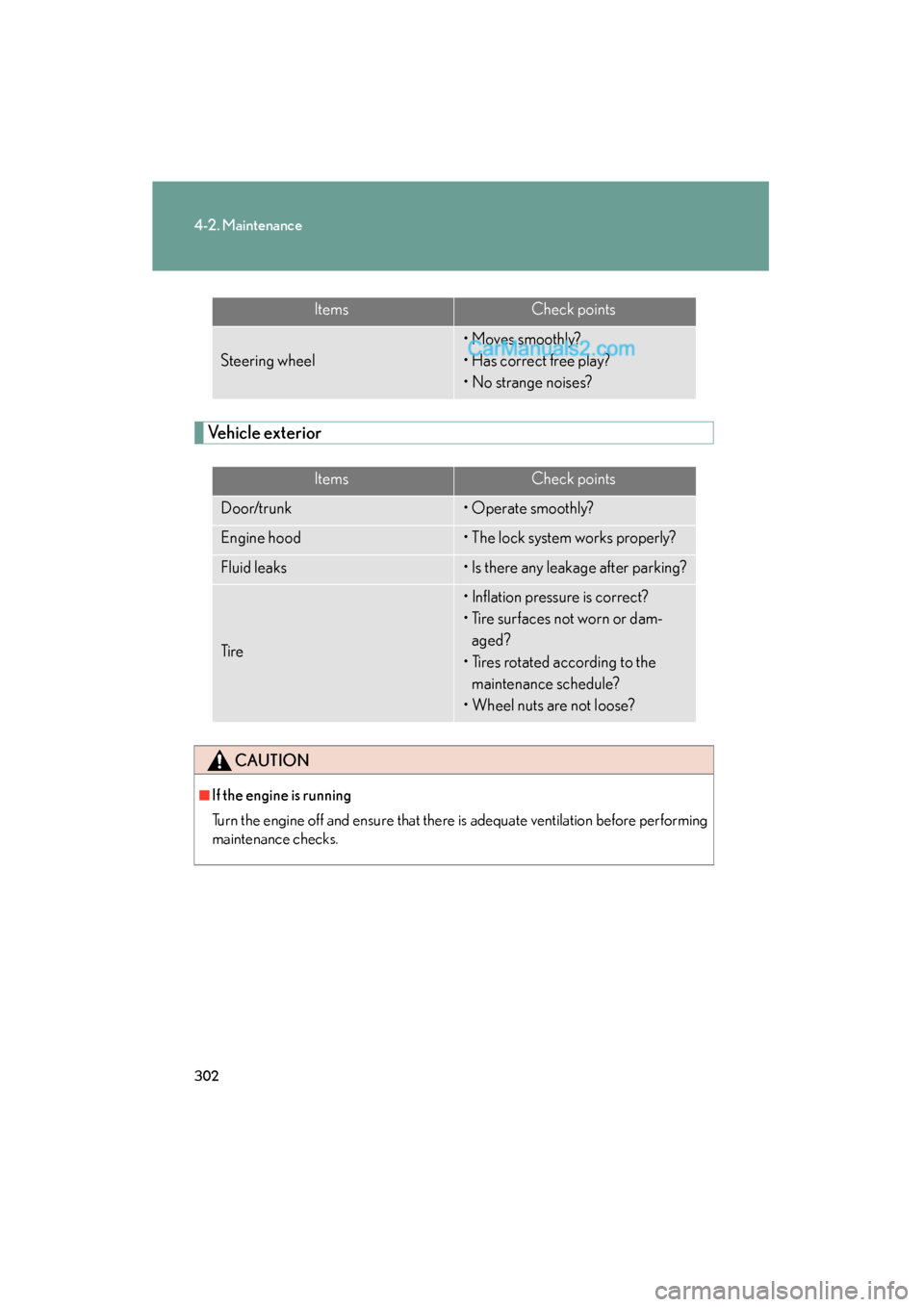
Vehicle exterior
ItemsCheck points
Steering wheel
• Moves smoothly?
• Has correct free play?
• No strange noises?
ItemsCheck points
Door/trunk• Operate smoothly?
Engine hood• The lock system works properly?
Fluid leaks• Is there any leakage after parking?
Ti r e
• Inflation pressure is correct?
• Tire surfaces not worn or dam-aged?
• Tires rotated according to the maintenance schedule?
• Wheel nuts are not loose?
CAUTION
■If the engine is running
Turn the engine off and ensure that there is adequate ventilation before performing
maintenance checks.
Page 312 of 475
310
4-3. Do-it-yourself maintenance
ES350_U_(L/O_0808)
CAUTION
■When raising your vehicle:
Make sure to observe the following to reduce the possibility of death or serious
injury.
●Do not use the jack that was supplied with your vehicle.
●Do not put any part of your body or get underneath the vehicle supported only by
the floor jack.
Always use automotive jack stands on a solid, level surface.
●Do not start the engine while the vehicle is supported by the floor jack.
●Stop the vehicle on level firm ground, firmly set the parking brake and put the shift
lever in P.
●Make sure to set the floor jack properly at the jack point.
Raising the vehicle with an improperly positioned floor jack will damage the vehi-
cle and may cause the vehicle to fall off the floor jack.
●Do not raise the vehicle while someone is in the vehicle.
●When raising the vehicle, do not place any objects on top of or underneath the
floor jack.
●Lift up the vehicle using a floor jack such as
the one shown in the illustration.
Page 356 of 475
354
4-3. Do-it-yourself maintenance
ES350_U_(L/O_0808)
Light bulbs
You may replace the following bulbs yourself. For more information about
replacing other light bulbs, contact your Lexus dealer.
■Prepare a replacement light bulb.
Check the wattage of the light bulb being replaced. ( →P. 4 3 1 )
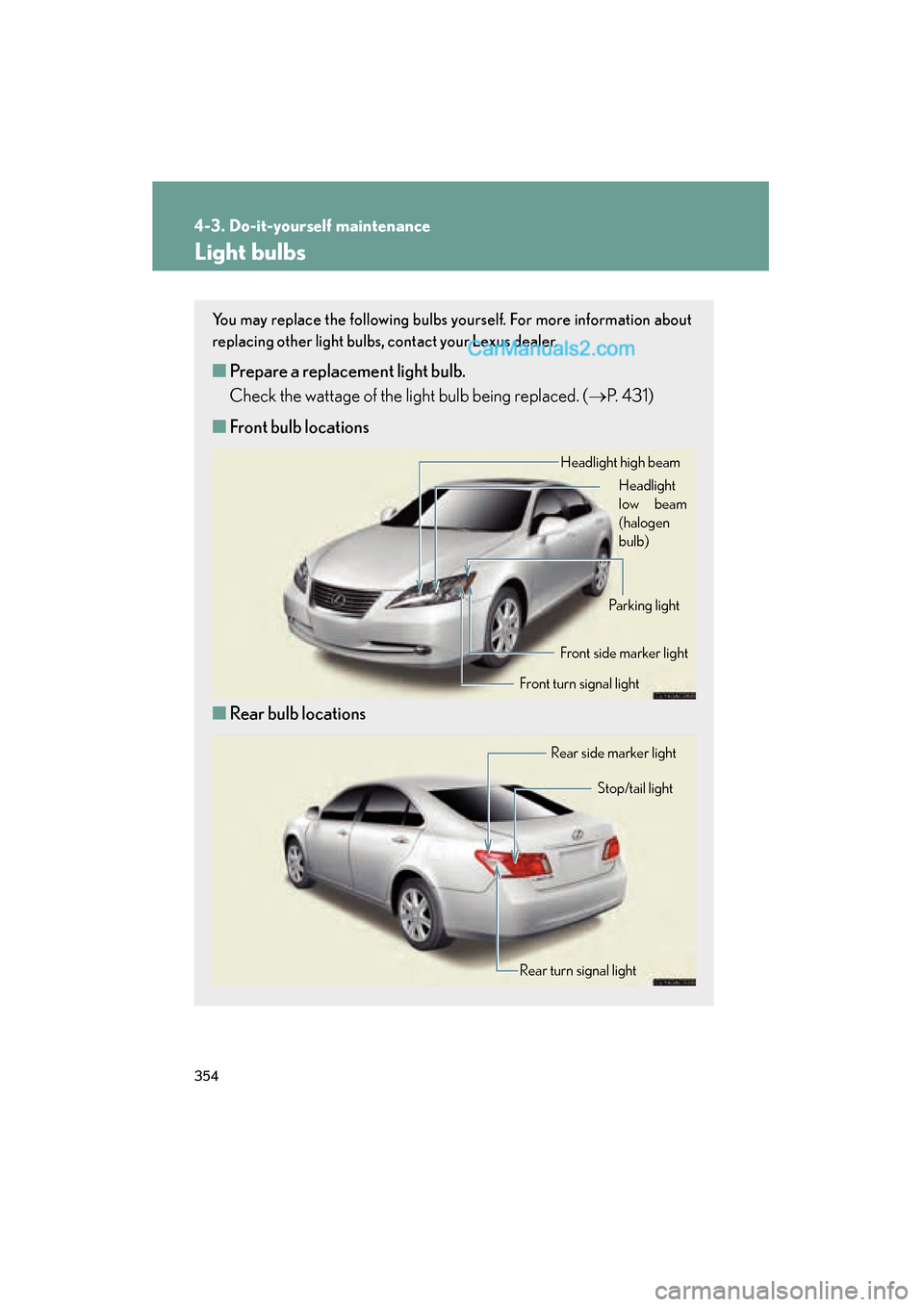
■ Front bulb locations
■ Rear bulb locations
Headlight high beam
Headlight
low beam
(halogen
bulb)
Front turn signal lightFront side marker light
Parking light
Rear turn signal light Stop/tail light
Rear side marker light