lock Lexus ES350 2009 Repair Manual
[x] Cancel search | Manufacturer: LEXUS, Model Year: 2009, Model line: ES350, Model: Lexus ES350 2009Pages: 475, PDF Size: 6.2 MB
Page 186 of 475
184
2-5. Driving information
ES350_U_(L/O_0808)●
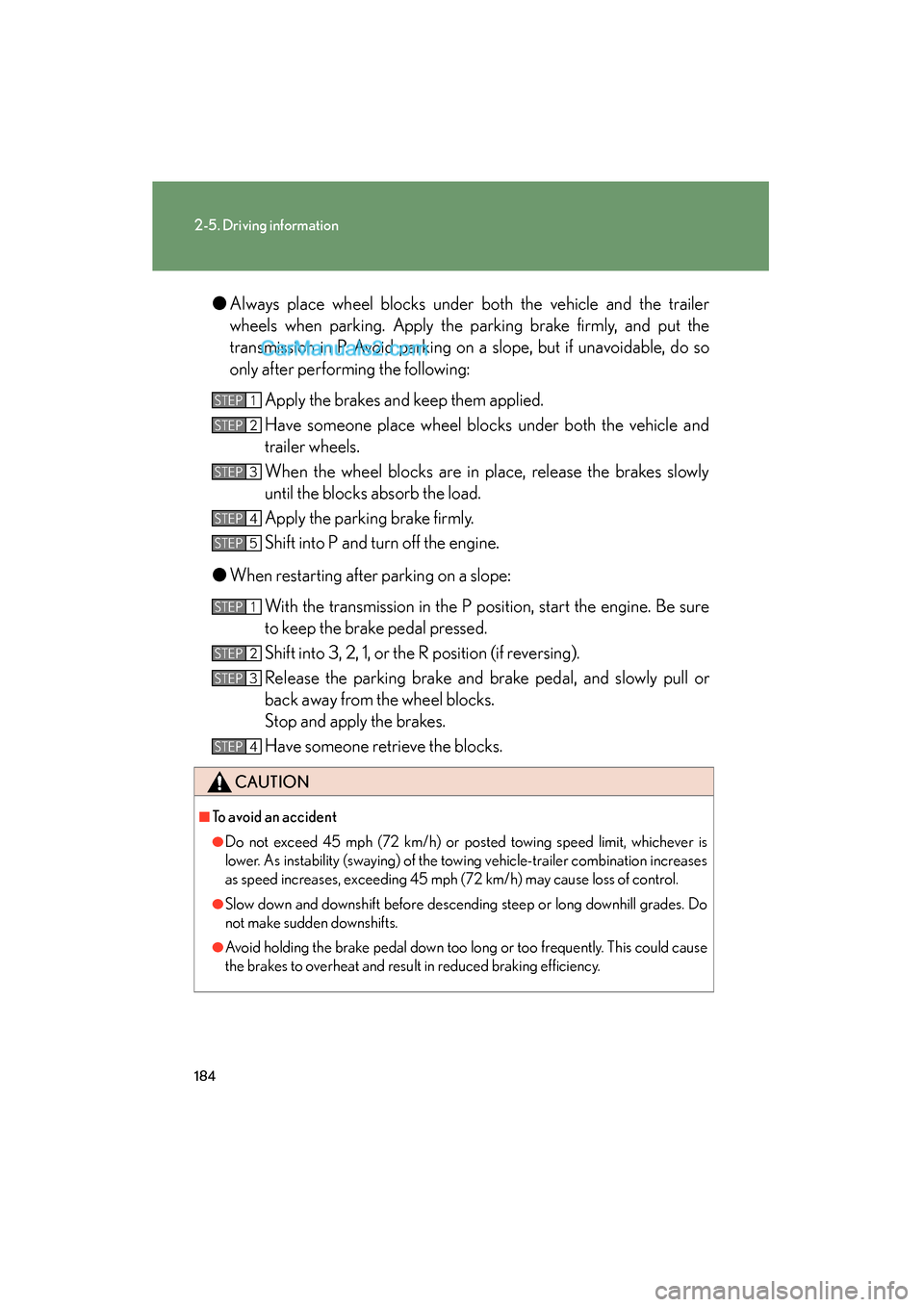
Always place wheel blocks under both the vehicle and the trailer
wheels when parking. Apply the parking brake firmly, and put the
transmission in P. Avoid parking on a slope, but if unavoidable, do so
only after performing the following:
Apply the brakes and keep them applied.
Have someone place wheel blocks under both the vehicle and
trailer wheels.
When the wheel blocks are in place, release the brakes slowly
until the blocks absorb the load.
Apply the parking brake firmly.
Shift into P and turn off the engine.
● When restarting after parking on a slope:
With the transmission in the P position, start the engine. Be sure
to keep the brake pedal pressed.
Shift into 3, 2, 1, or the R position (if reversing).
Release the parking brake and brake pedal, and slowly pull or
back away from the wheel blocks.
Stop and apply the brakes.
Have someone retrieve the blocks.
CAUTION
■To avoid an accident
●Do not exceed 45 mph (72 km/h) or posted towing speed limit, whichever is
lower. As instability (swaying) of the towing vehicle-trailer combination increases
as speed increases, exceeding 45 mph (72 km/h) may cause loss of control.
●Slow down and downshift before descending steep or long downhill grades. Do
not make sudden downshifts.
●Avoid holding the brake pedal down too long or too frequently. This could cause
the brakes to overheat and result in reduced braking efficiency.
STEP1
STEP2
STEP3
STEP4
STEP5
STEP1
STEP2
STEP3
STEP4
Page 189 of 475
Interior features3
187
ES350_U_(L/O_0808)
3-1. Using the air conditioning system and defogger
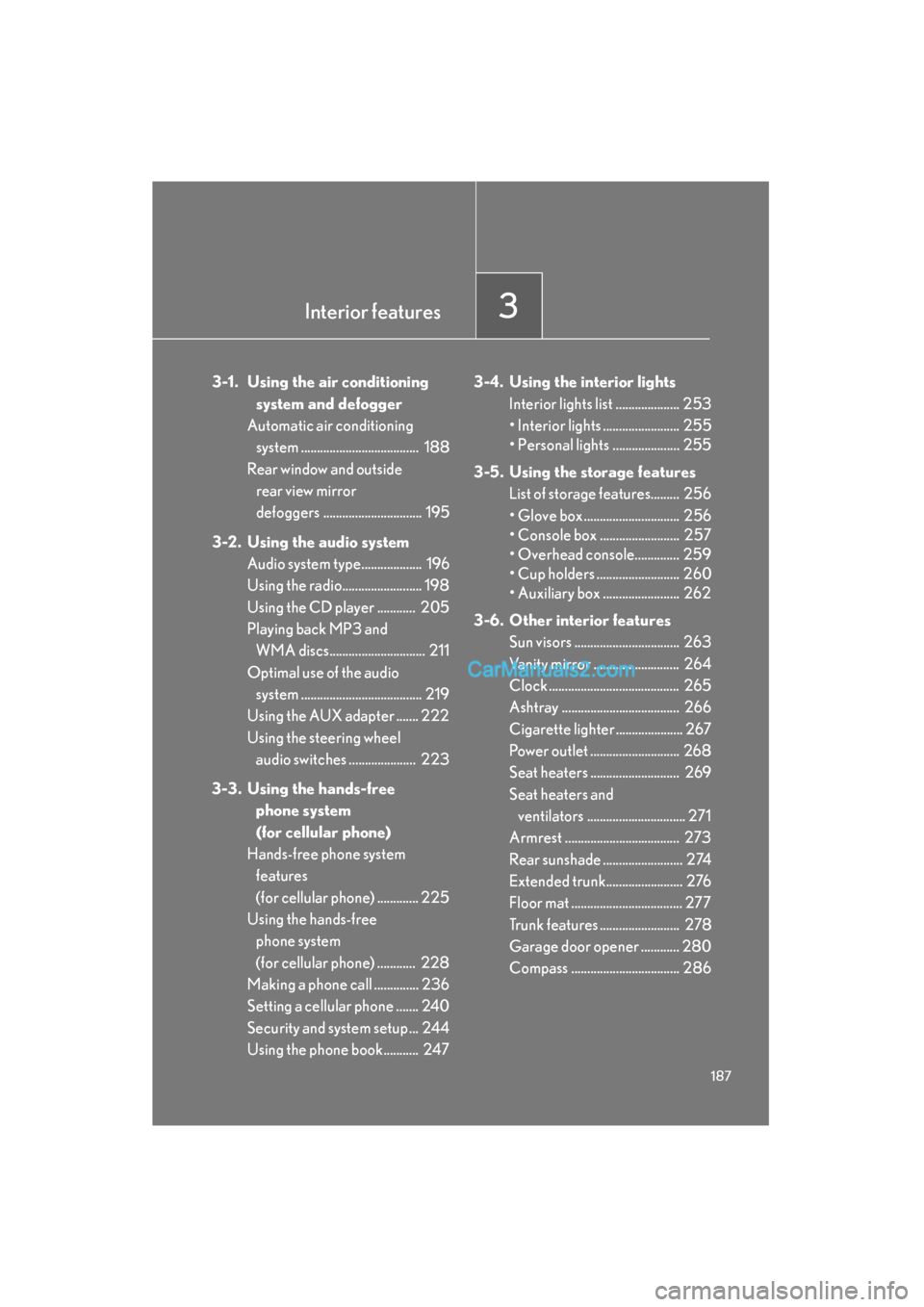
Automatic air conditioning system ..................................... 188
Rear window and outside rear view mirror
defoggers ............................... 195
3-2. Using the audio system Audio system type................... 196
Using the radio......................... 198
Using the CD player ............ 205
Playing back MP3 and
WMA discs.............................. 211
Optimal use of the audio system ...................................... 219
Using the AUX adapter ....... 222
Using the steering wheel audio switches ..................... 223
3-3. Using the hands-free phone system
(for cellular phone)
Hands-free phone system features
(for cellular phone) ............. 225
Using the hands-free phone system
(for cellular phone) ............ 228
Making a phone call .............. 236
Setting a cellular phone ....... 240
Security and system setup ... 244
Using the phone book........... 247 3-4. Using the interior lights
Interior lights list .................... 253
• Interior lights ........................ 255
• Personal lights ..................... 255
3-5. Using the storage features List of storage features......... 256
• Glove box .............................. 256
• Console box ......................... 257
• Overhead console.............. 259
• Cup holders .......................... 260
• Auxiliary box ........................ 262
3-6. Other interior features Sun visors ................................. 263
Vanity mirror ........................... 264
Clock ......................................... 265
Ashtray ..................................... 266
Cigarette lighter ..................... 267
Power outlet ............................ 268
Seat heaters ............................ 269
Seat heaters and ventilators ............................... 271
Armrest .................................... 273
Rear sunshade ......................... 274
Extended trunk........................ 276
Floor mat ................................... 277
Trunk features ......................... 278
Garage door opener ............ 280
Compass .................................. 286
Page 195 of 475
193
3-1. Using the air conditioning system and defogger
3
Interior features
ES350_U_(L/O_0808)
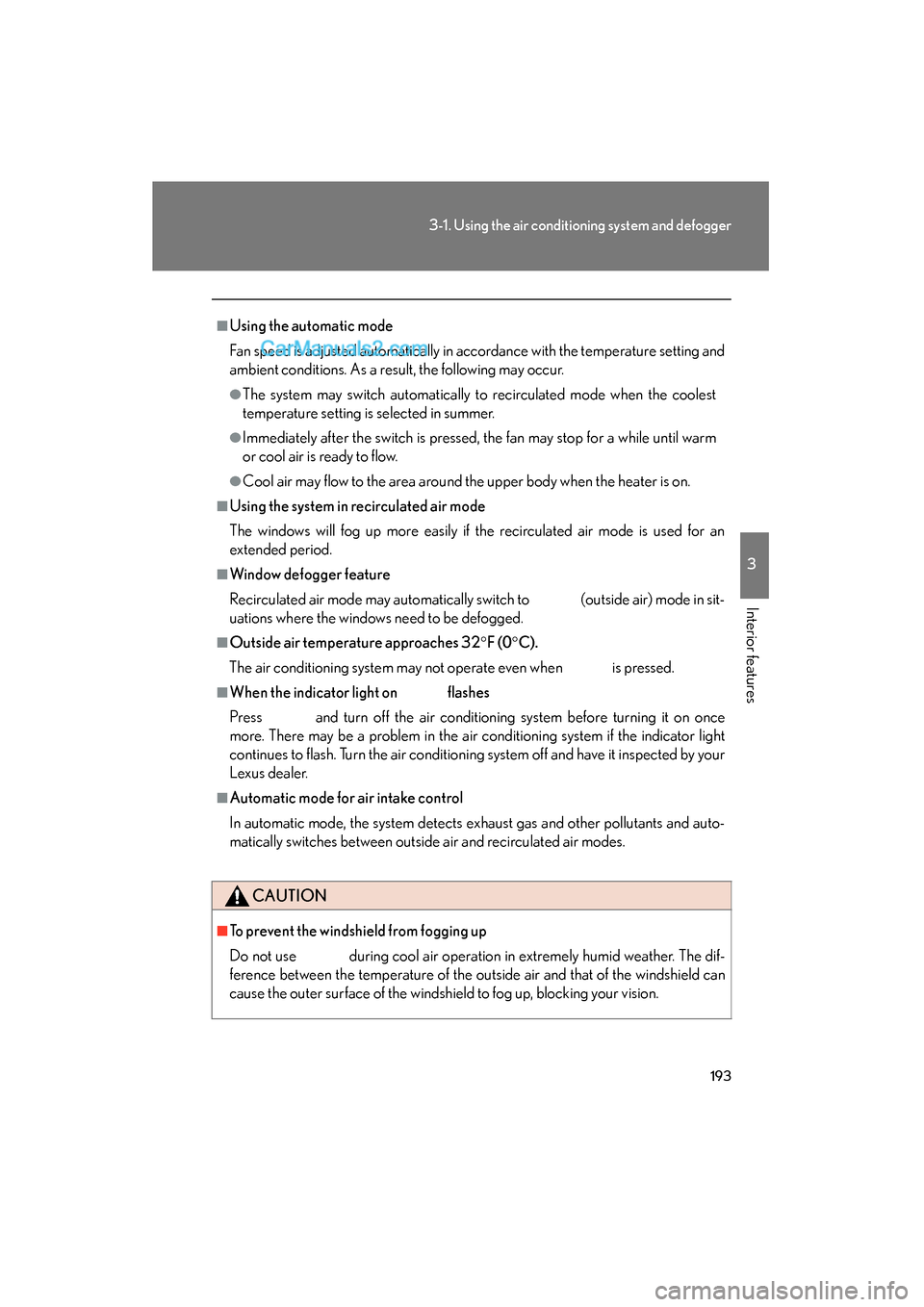
■Using the automatic mode
Fan speed is adjusted automatically in accordance with the temperature setting and
ambient conditions. As a result, the following may occur.
●The system may switch automatically to recirculated mode when the coolest
temperature setting is selected in summer.
●Immediately after the switch is pressed, the fan may stop for a while until warm
or cool air is ready to flow.
●Cool air may flow to the area around the upper body when the heater is on.
■Using the system in recirculated air mode
The windows will fog up more easily if the recirculated air mode is used for an
extended period.
■Window defogger feature
Recirculated air mode may automatically switch to
(outside air) mode in sit-
uations where the windows need to be defogged.
■Outside air temperature approaches 32 °F (0 °C).
The air conditioning system may not operate even when
is pressed.
■When the indicator light on flashes
Press
and turn off the air conditioning system before turning it on once
more. There may be a problem in the air conditioning system if the indicator light
continues to flash. Turn the air conditioning system off and have it inspected by your
Lexus dealer.
■Automatic mode for air intake control
In automatic mode, the system detects exhaust gas and other pollutants and auto-
matically switches between outside air and recirculated air modes.
CAUTION
■To prevent the windshield from fogging up
Do not use during cool air operation in extremely humid weather. The dif-
ference between the temperature of the outside air and that of the windshield can
cause the outer surface of the windshield to fog up, blocking your vision.
Page 235 of 475
233
3-3. Using the hands-free phone system (for cellular phone)
3
Interior features
ES350_U_(L/O_0808)
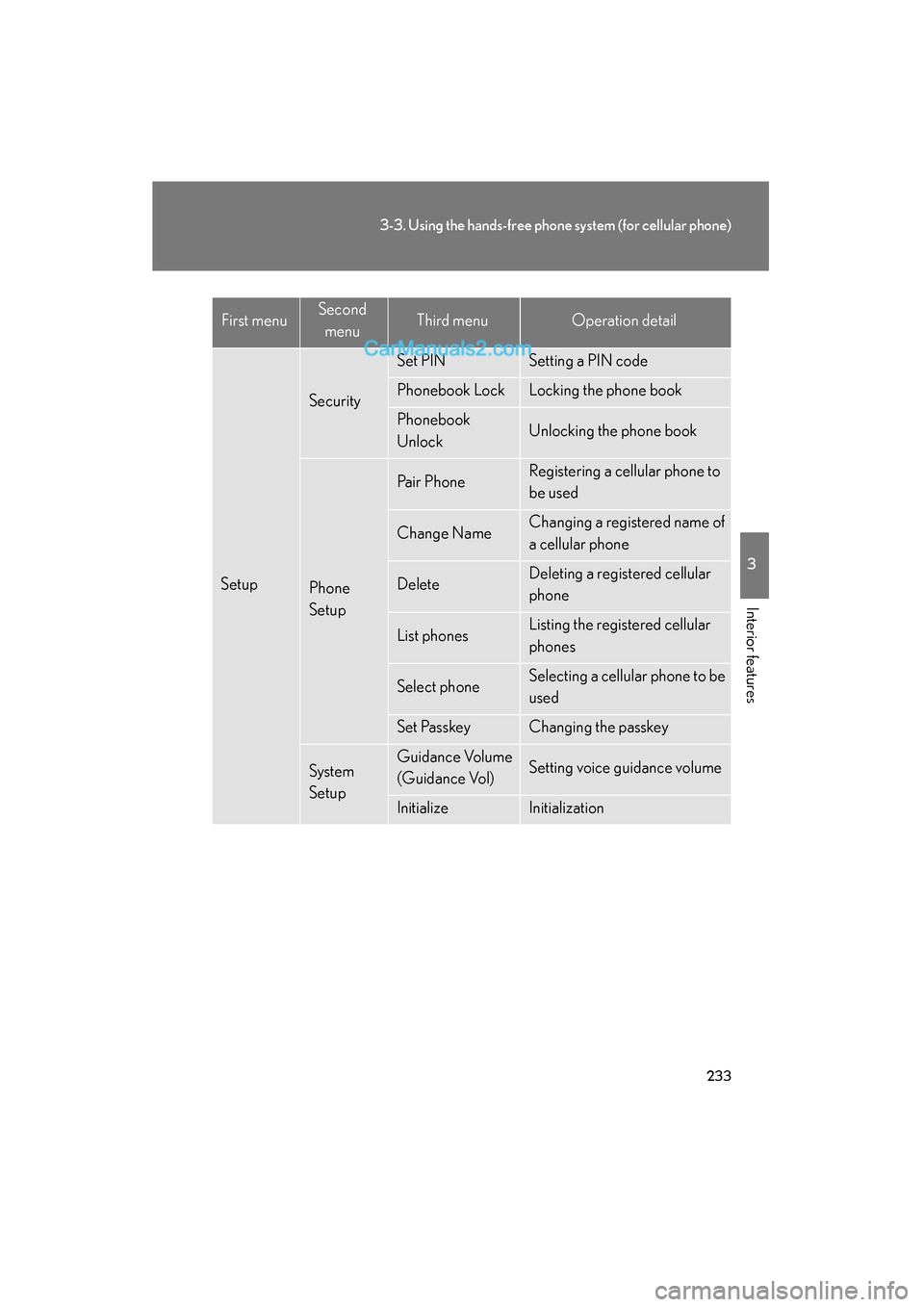
Setup
Security
Set PINSetting a PIN code
Phonebook LockLocking the phone book
Phonebook
UnlockUnlocking the phone book
Phone
Setup
Pa i r P h o n eRegistering a cellular phone to
be used
Change NameChanging a registered name of
a cellular phone
DeleteDeleting a registered cellular
phone
List phonesListing the registered cellular
phones
Select phoneSelecting a cellular phone to be
used
Set PasskeyChanging the passkey
System
SetupGuidance Volume
(Guidance Vol)Setting voice guidance volume
InitializeInitialization
First menuSecond menuThird menuOperation detail
Page 236 of 475
234
3-3. Using the hands-free phone system (for cellular phone)
ES350_U_(L/O_0808)■
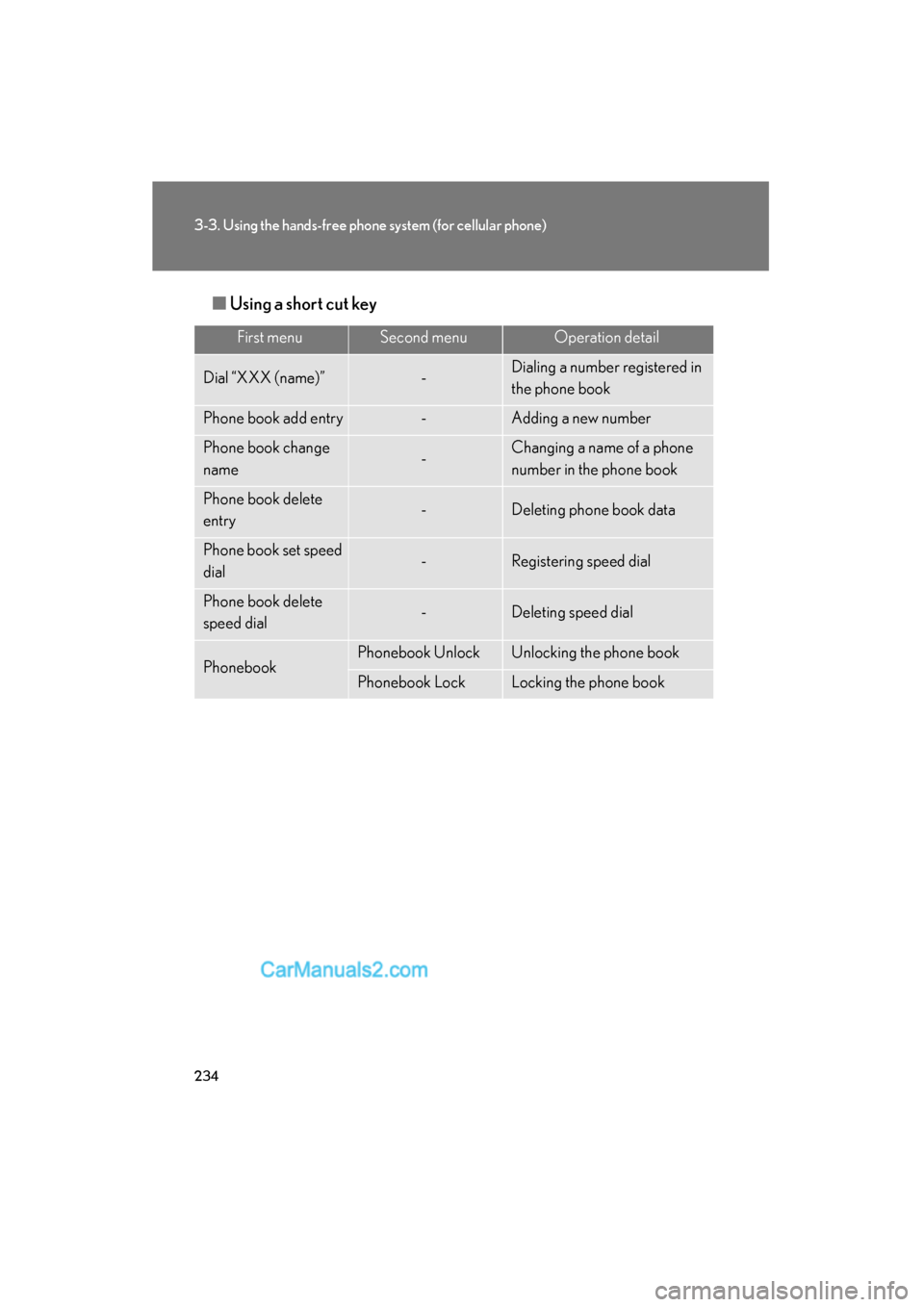
Using a short cut key
First menuSecond menuOperation detail
Dial “XXX (name)”-Dialing a number registered in
the phone book
Phone book add entry-Adding a new number
Phone book change
name-Changing a name of a phone
number in the phone book
Phone book delete
entry-Deleting phone book data
Phone book set speed
dial-Registering speed dial
Phone book delete
speed dial-Deleting speed dial
PhonebookPhonebook UnlockUnlocking the phone book
Phonebook LockLocking the phone book
Page 246 of 475
244
3-3. Using the hands-free phone system (for cellular phone)
ES350_U_(L/O_0808)
Security and system setup
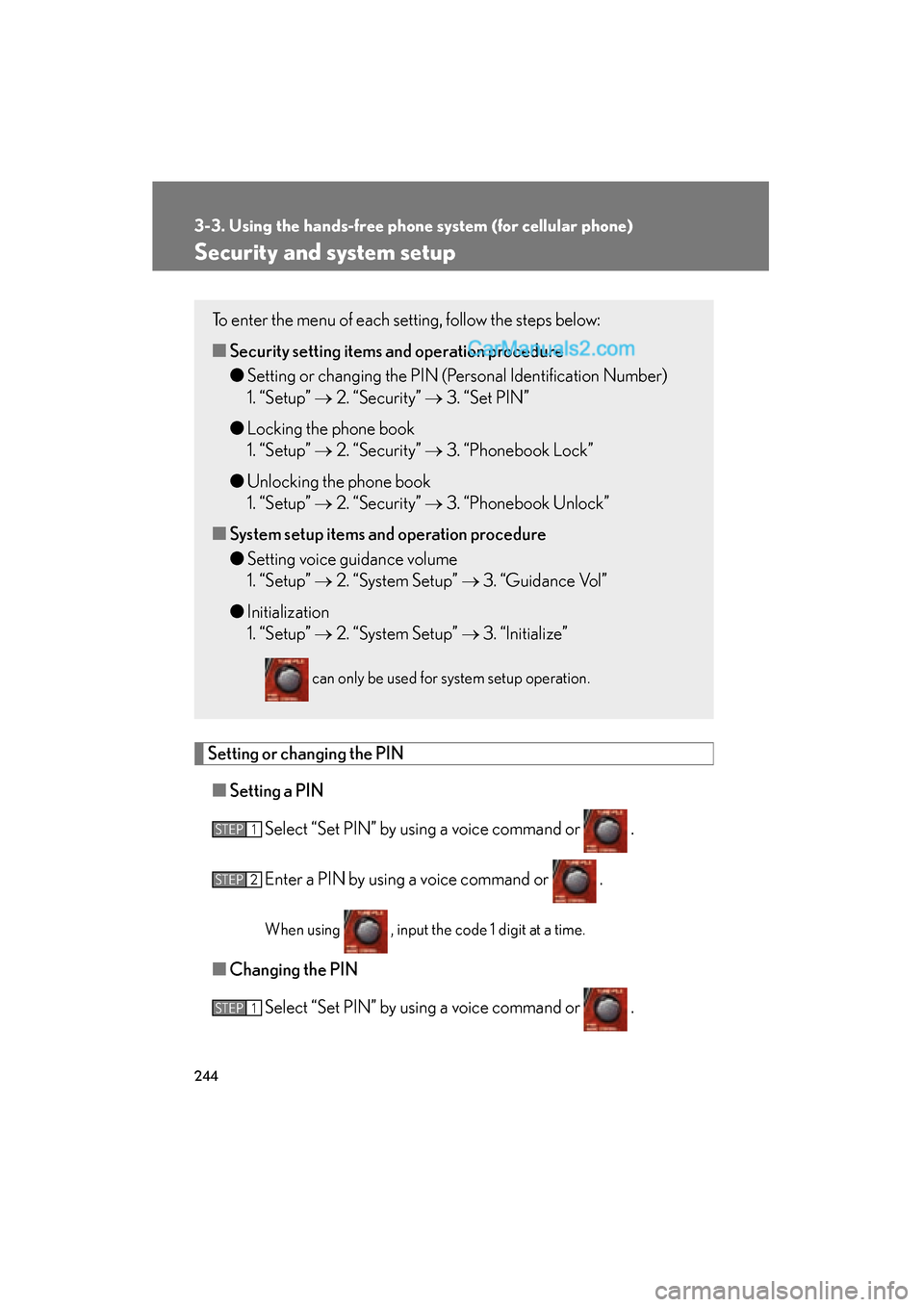
Setting or changing the PIN■ Setting a PIN
Select “Set PIN” by using a voice command or .
Enter a PIN by using a voice command or .
When using , input the code 1 digit at a time.
■Changing the PIN
Select “Set PIN” by using a voice command or .
To enter the menu of each setting, follow the steps below:
■Security setting items an d operation procedure
● Setting or changing the PIN (Personal Identification Number)
1. “Setup” → 2. “Security” → 3. “Set PIN”
● Locking the phone book
1. “Setup” → 2. “Security” → 3. “Phonebook Lock”
● Unlocking the phone book
1. “Setup” → 2. “Security” → 3. “Phonebook Unlock”
■ System setup items and operation procedure
● Setting voice guidance volume
1. “Setup” → 2. “System Setup” → 3. “Guidance Vol”
● Initialization
1. “Setup” → 2. “System Setup” → 3. “Initialize”
can only be used for system setup operation.
STEP1
STEP2
STEP1
Page 247 of 475
245
3-3. Using the hands-free phone system (for cellular phone)
3
Interior features
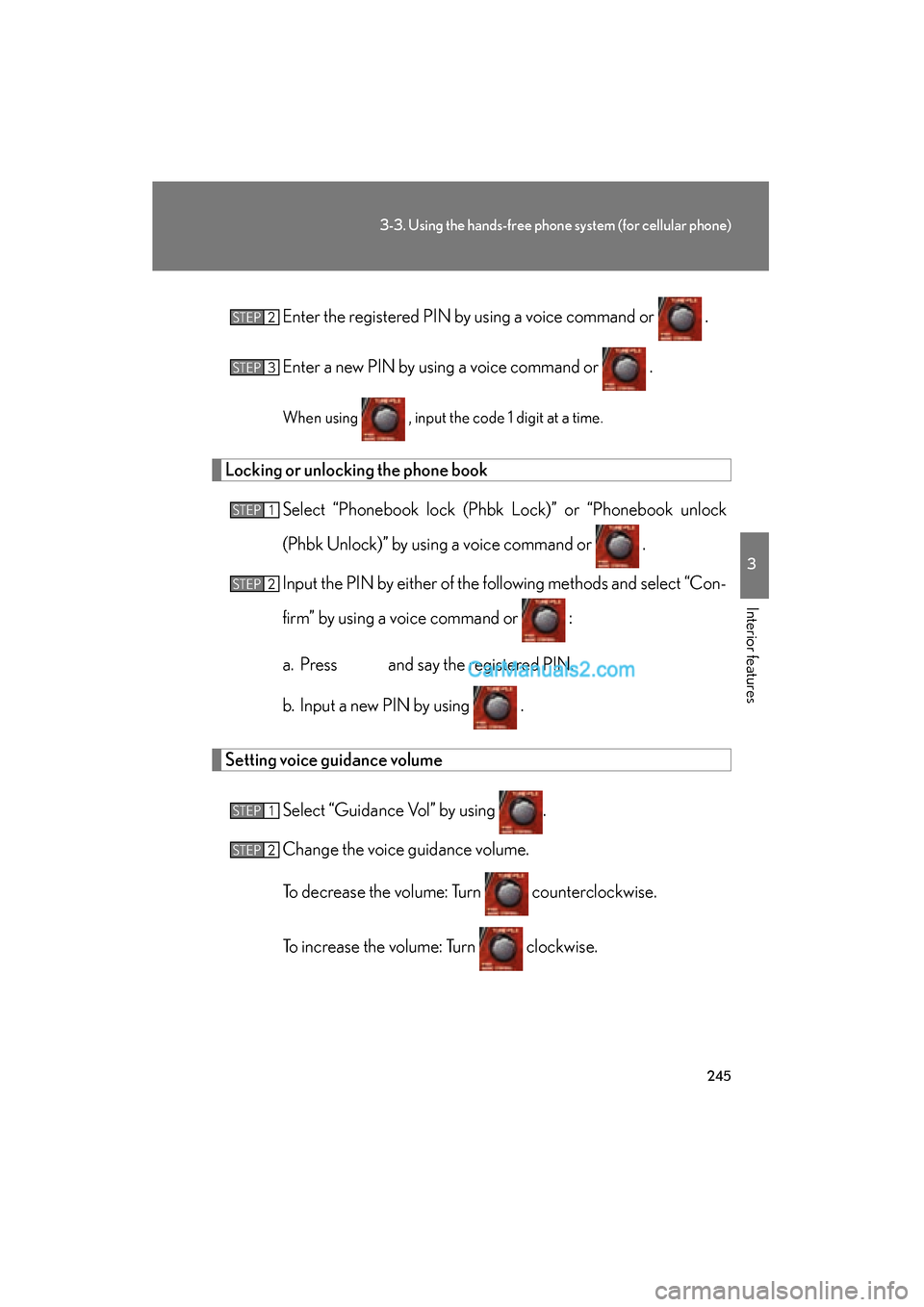
ES350_U_(L/O_0808)Enter the registered PIN by
using a voice command or .
Enter a new PIN by using a voice command or .
When using , input the code 1 digit at a time.
Locking or unlocking the phone book Select “Phonebook lock (Phbk Lock)” or “Phonebook unlock
(Phbk Unlock)” by using a voice command or .
Input the PIN by either of the following methods and select “Con-
firm” by using a voice command or :
a. Press and say the registered PIN.
b. Input a new PIN by using .
Setting voice guidance volume
Select “Guidance Vol” by using .
Change the voice guidance volume.
To decrease the volume: Turn counterclockwise.
To increase the volume: Turn clockwise.
STEP2
STEP3
STEP1
STEP2
STEP1
STEP2
Page 248 of 475
246
3-3. Using the hands-free phone system (for cellular phone)
ES350_U_(L/O_0808)
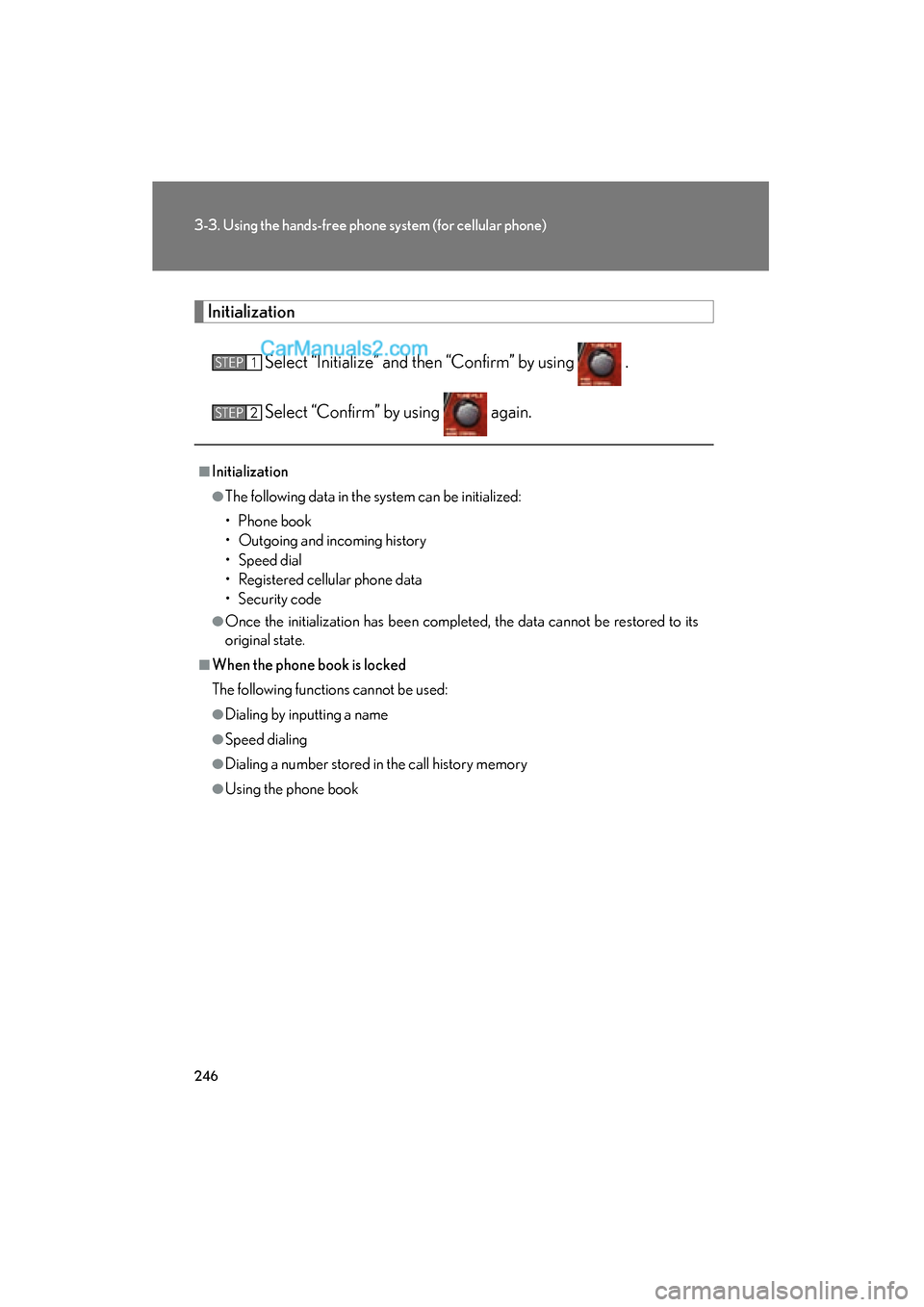
InitializationSelect “Initialize” and then “Confirm” by using .
Select “Confirm” by using again.
■Initialization
●The following data in the system can be initialized:
• Phone book
• Outgoing and incoming history
• Speed dial
• Registered cellular phone data
• Security code
●Once the initialization has been completed, the data cannot be restored to its
original state.
■When the phone book is locked
The following functions cannot be used:
●Dialing by inputting a name
●Speed dialing
●Dialing a number stored in the call history memory
●Using the phone book
STEP1
STEP2
Page 255 of 475
253
3
Interior features
ES350_U_(L/O_0808)
3-4. Using the interior lights
Interior lights list
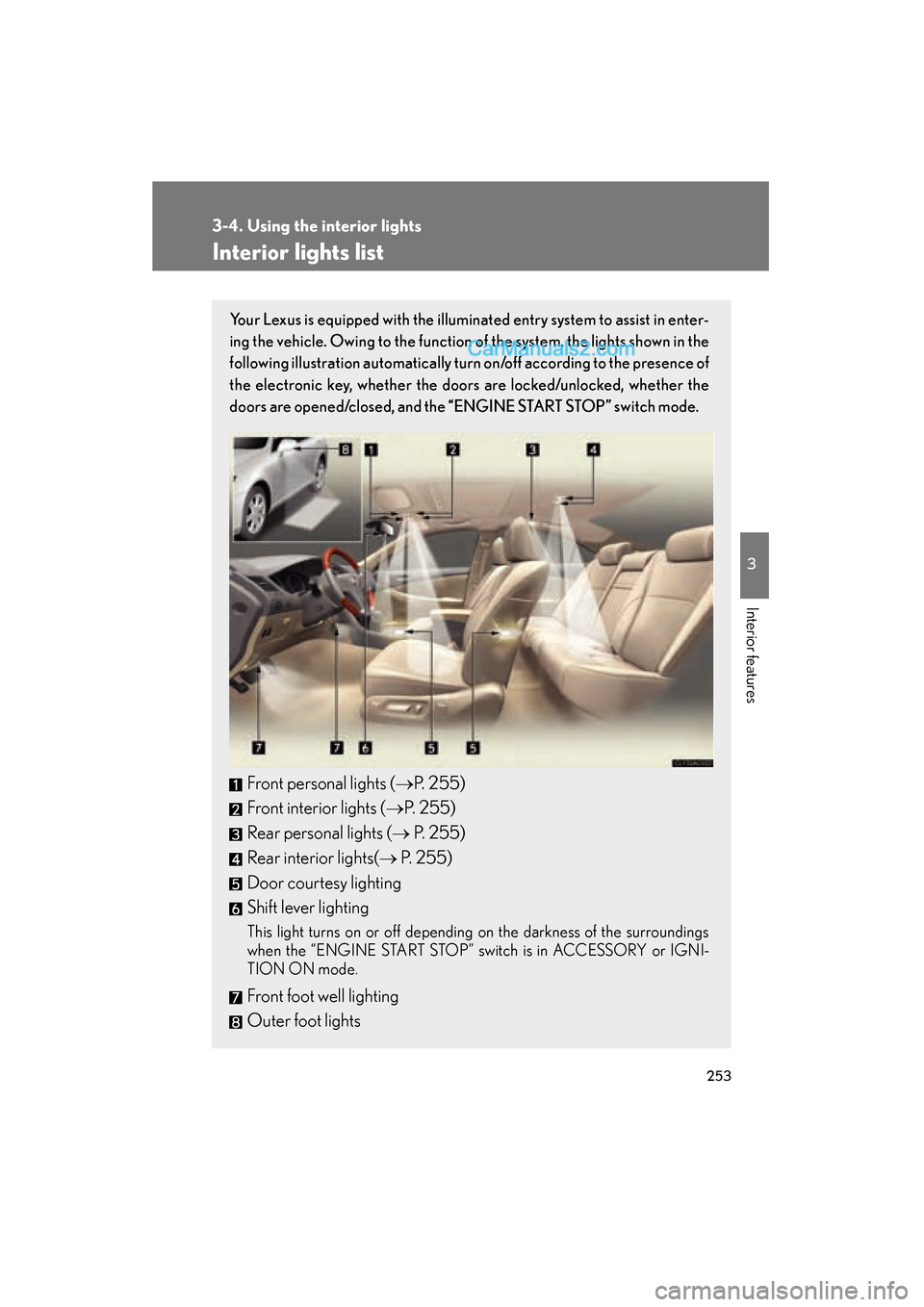
Your Lexus is equipped with the illuminated entry system to assist in enter-
ing the vehicle. Owing to the function of the system, the lights shown in the
following illustration automatically turn on/off according to the presence of
the electronic key, whether the door s are locked/unlocked, whether the
doors are opened/closed, and the “ENGINE START STOP” switch mode.
Front personal lights (→P. 255)
Front interior lights ( →P. 2 5 5 )
Rear personal lights (→ P. 2 5 5 )
Rear interior lights( → P. 2 5 5 )
Door courtesy lighting
Shift lever lighting
This light turns on or off depending on the darkness of the surroundings
when the “ENGINE START STOP” switch is in ACCESSORY or IGNI-
TION ON mode.
Front foot well lighting
Outer foot lights
Page 257 of 475
255
3-4. Using the interior lights
3
Interior features
ES350_U_(L/O_0808)
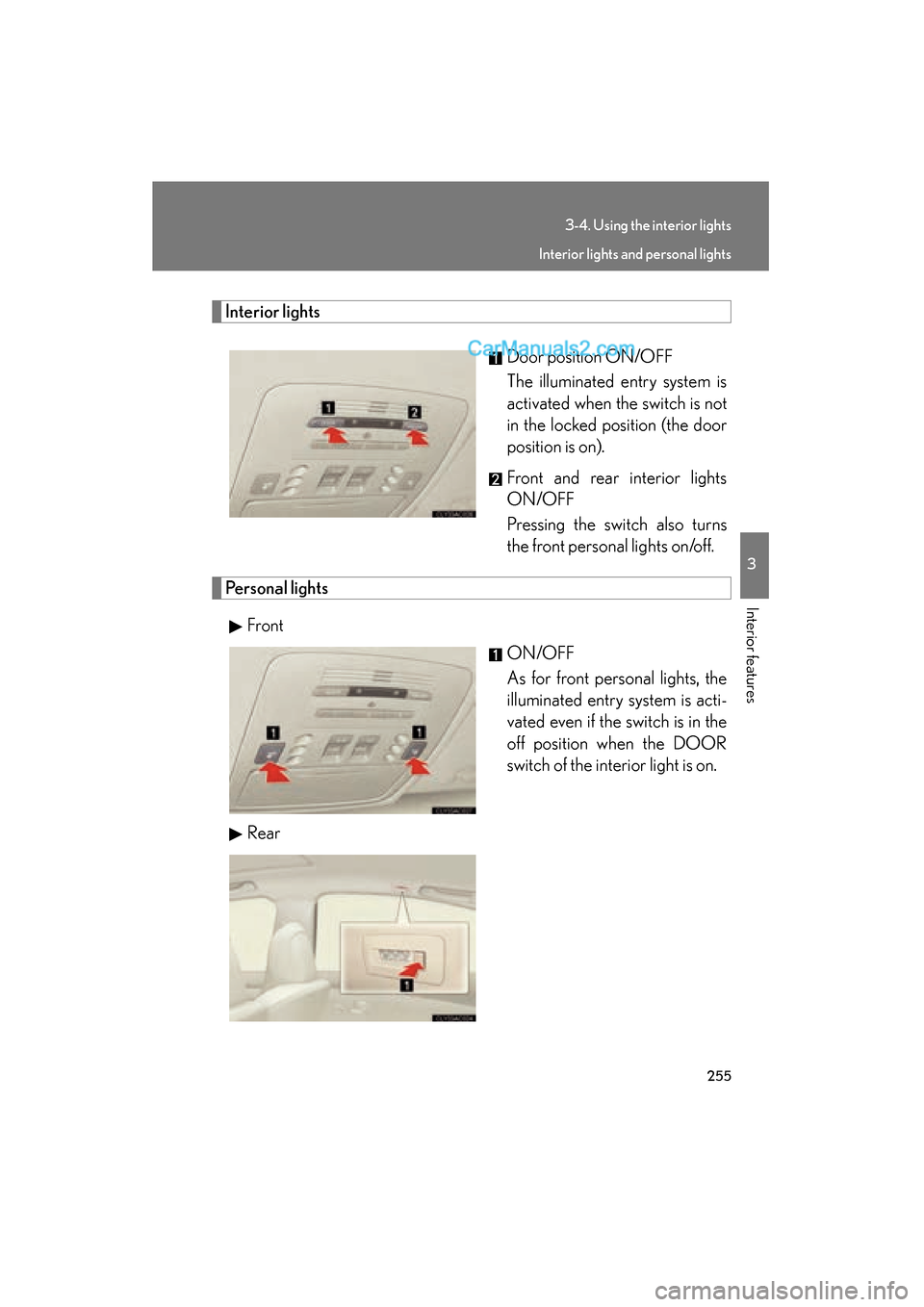
Interior lightsDoor position ON/OFF
The illuminated entry system is
activated when the switch is not
in the locked position (the door
position is on).
Front and rear interior lights
ON/OFF
Pressing the switch also turns
the front personal lights on/off.
Personal lightsFront ON/OFF
As for front personal lights, the
illuminated entry system is acti-
vated even if the switch is in the
off position when the DOOR
switch of the interior light is on.
Rear
Interior lights and personal lights