ESP Lexus ES350 2010 s Owner's Guide
[x] Cancel search | Manufacturer: LEXUS, Model Year: 2010, Model line: ES350, Model: Lexus ES350 2010Pages: 543, PDF Size: 6.54 MB
Page 180 of 543
178
2-4. Using other driving systems
ES350_U
■CertificationFor vehicles sold in U.S.A.
FCC ID: HYQDNMWR005
This device complies with Part 15 of the FCC Rules. Operation is subject to the fol-
lowing two conditions;
(1) This device may not cause harmful interference, and
(2) This device must accept any interference received, including interference that
may cause undesired operation.
FCC WARNING:
Changes or modifications not expressly approved by the party responsible for
compliance could void the user's authority to operate the equipment.
Radio frequency radiation exposure Information:
This equipment complies with FCC radiation exposure limits set forth for an uncon-
trolled environment.
This equipment should be installed and operated with minimum distance of 20 cm
between the radiator and your body.
This transmitter must not be co-located or operating in conjunction with any other
antenna or transmitter For vehicles sold in Canada
Operation is subject to the following two conditions;
(1) This device may not cause interference, and
(2) This device must accept any interference, including interference that may cause
undesired operation of the device.
Page 197 of 543
195
2-5. Driving information
2
When driving
ES350_U●
Avoid sudden braking as you may skid, resulting in jackknifing and loss
of control. This is especially true on wet or slippery surfaces.
● Avoid jerky starts or sudden acceleration.
● Avoid jerky steering and sharp turns, and slow down before making a
turn.
● Note that when making a turn, the trailer wheels will be closer than the
vehicle wheels to the inside of the turn. Compensate by making a
larger than normal turning radius.
● Crosswinds and rough roads will adversely affect handling of your
vehicle and trailer, causing sway. Periodically check the rear to prepare
for being passed by large trucks or buses, which may cause your vehi-
cle and trailer to sway. If swaying occurs, firmly grip the steering wheel,
reduce speed immediately but gradually, and steer straight ahead.
Never increase speed. If you make no extreme correction with the
steering or brakes, your vehicle and trailer will stabilize.
● Take care when passing other vehicles. Passing requires considerable
distance. After passing a vehicle, do not forget the length of your
trailer, and be sure you have plenty of room before changing lanes.
● In order to maintain efficient engine braking and electrical charging
performance, do not use overdrive. Transmission shift range position
must be in 4, in the S mode.
● Due to the added load of the trailer, your vehicle's engine may over-
heat on hot days (at temperatures over 85°F [30°C]) when driving up
a long or steep grade. If the engine coolant temperature gauge indi-
cates overheating, immediately turn off the air conditioning (if in use),
pull your vehicle off the road and stop in a safe spot. See “If you vehicle
overheats”. ( oP. 480)
Page 211 of 543
209
3-2. Using the audio system
3
Interior features
ES350_U
■Using mobile phones
Interference may be heard through the audio system’s speakers if a mobile phone is
being used inside or close to the vehicle while the audio system is operating.
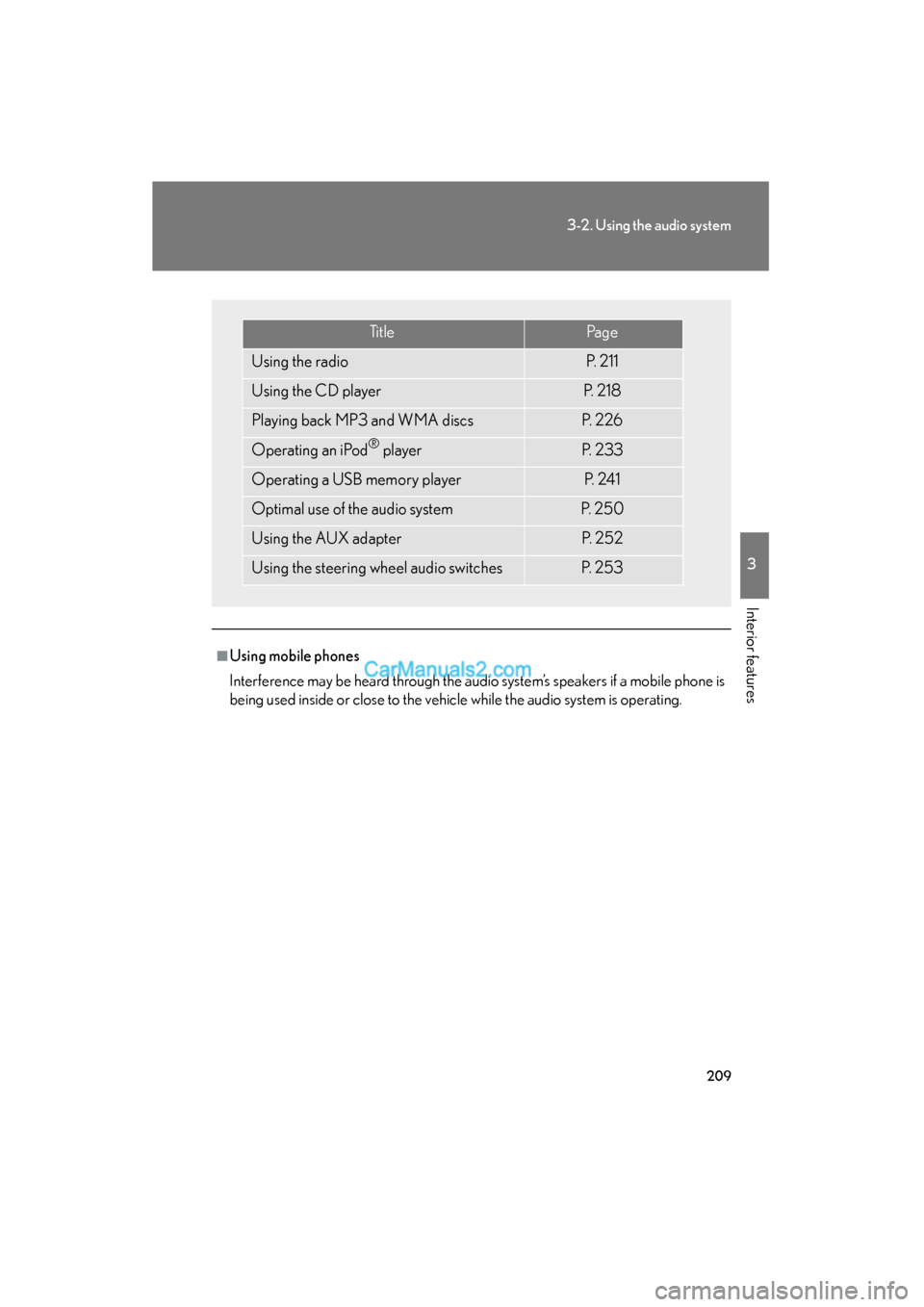
Ti t l ePa g e
Using the radioP. 2 1 1
Using the CD playerP. 2 1 8
Playing back MP3 and WMA discsP. 2 2 6
Operating an iPod® playerP. 2 3 3
Operating a USB memory playerP. 2 4 1
Optimal use of the audio systemP. 2 5 0
Using the AUX adapterP. 2 5 2
Using the steering wheel audio switchesP. 2 5 3
Page 248 of 543
246
3-2. Using the audio system
ES350_U
■USB memory
●Compatible devices
USB memory that can be used for MP3 and WMA playback
●Compatible device formats
The following device formats can be used:
• USB communication formats: USB2.0 FS (12mbps)
• File formats: FAT16 /32 (Windows)
• Correspondence class: Mass storage class
MP3 and WMA files written in any format other than those listed above may not
play correctly, and their file names and folder names may not be displayed cor-
re ct l y.
Items related to standards and limitations are as follows:
• Maximum directory hierarchy: 8 levels
• Maximum number of folders in a device: 999 (including the root)
• Maximum number of files in a device: 65025
• Maximum number of files per folder: 255
●MP3 and WMA files
MP3 (MPEG Audio LAYER 3) is a standard audio compression format.
Files can be compressed to approximately 1 /10 of their original size using MP3
compression.
WMA (Windows Media
TM Audio) is a Microsoft audio compression format.
This format compresses audio data to a size smaller than that of the MP3 format.
There is a limit to the MP3 and WMA file standards that can be used and to the
media/formats on which the files are recorded.
Page 259 of 543
257
3-3. Using the Bluetooth® audio system
3
Interior features
ES350_U
■When transferring ownership of the vehicle
Be sure to initialize the system to prevent personal data from being improperly
accessed. (oP. 300)
■About Bluetooth®
■Compatible models
●Bluetooth® specifications:
Ver. 1.1, or higher (Recommended: Ver. 1.2 or higher)
●Following Profiles:
• A2DP (Advanced Audio Distribution Profile) Ver. 1.0, or higher (Conformed:
Ver. 1.2)
• AVRCP (Audio/Video Remote Control Profile) Ver. 1.0 or higher (Con- formed: Ver. 1.3)
Portable players must correspond to the above specifications in order to be con-
nected to the Bluetooth
® audio system. However, please note that some functions
may be limited depending on the type of portable player.
■Certification for the Bluetooth® audio system
FCC ID: AJDK018
IC ID: 775E-K018
MADE IN JAPAN
This device complies with Part 15 of the FCC Rules and RSS-Gen and RSS-210 of
IC Rules. Operation is subject to the follo wing two conditions: (1) This device may
not cause harmful interference, and (2) This device must accept any interference
received, including interference that may cause undesired operation. Bluetooth is a registered trademark of
Bluetooth SIG. Inc.
Page 260 of 543
258
3-3. Using the Bluetooth® audio system
ES350_U
CAUTION
■FCC WARNING
Changes or modifications not expressly approved by the party responsible for
compliance could void the user's authority to operate the equipment.
Radio Frequency Radiation Exposure. This equipment complies with FCC radiation
exposure limits set forth for uncontrolled equipment and meets the FCC radio fre-
quency (RF) Exposure Guidelines in Supplement C to OET65. This equipment has
very low levels of RF energy that it deemed to comply without maximum permissive
exposure evaluation (MPE). But it is desirable that it should be installed and oper-
ated with at least 7.9 in. (20 cm) and more between the radiator and person’s body
(excluding extremities: hands, wrists, feet and ankles).
This transmitter must not be co-located or operated in conjunction with any other
antenna or transmitter.
■Caution while driving
Do not connect portable players or operate the controls.
NOTICE
■To prevent damage to portable players
Do not leave portable players in the vehicle. The temperature inside the vehicle
may become high, resulting in damage to the player.
Page 279 of 543
277
3-4. Using the hands-free system (for mobile phone)
3
Interior features
ES350_U
■Compatible models
Compatible with HFP (Hands Free Profile) Ver. 1.0 or higher (Conformed: Ver. 1.5)
and OPP (Object Push Profile) Ver. 1.1.
If your mobile phone does not support HFP, you cannot enter the Bluetooth
®
phone. If your mobile phone supports OPP alone, you cannot use the Bluetooth®
phone.
■Certification for the hands-free system
FCC ID: AJDK018
IC ID: 775E-K018
MADE IN JAPAN
This device complies with Part 15 of the FCC Rules and RSS-Gen and RSS-210 of
IC Rules. Operation is subject to the following two conditions: (1) This device may
not cause harmful interference, and (2) This device must accept any interference
received, including interference that may cause undesired operation.
CAUTION
■FCC WARNING
Changes or modifications not expressly approved by the party responsible for
compliance could void the user's authority to operate the equipment.
Radio Frequency Radiation Exposure. This equipment complies with FCC radiation
exposure limits set forth for uncontrolled equipment and meets the FCC radio fre-
quency (RF) Exposure Guidelines in Supplement C to OET65. This equipment has
very low levels of RF energy that it deemed to comply without maximum permissive
exposure evaluation (MPE). But it is desirable that it should be installed and oper-
ated with at least 7.9 in. (20 cm) and more between the radiator and person’s body
(excluding extremities: hands, wrists, feet and ankles).
This transmitter must not be co-located or operated in conjunction with any other
antenna or transmitter.
■Caution while driving
Do not use a mobile phone or connect the Bluetooth
® phone.
Page 348 of 543
346
3-7. Other interior features
ES350_U
Safety Connect∗
∗: If equipped
Safety Connect is a subscription-based telematics service that uses Global
Positioning System (GPS) data and embedded cellular technology to pro-
vide safety and security features to subscribers. Safety Connect is sup-
ported by Lexus’ designated response center, which operates 24 hours per
day, 7 days per week.
Safety Connect service is available by subscription on select, telematics
hardware-equipped vehicles.
By using the Safety Connect service, you are agreeing to be bound by the
Telematics Subscription Service Agreement and its Terms and Conditions,
as in effect and amended from time to time, a current copy of which is avail-
able at Lexus.com. All use of the Safety Connect service is subject to such
then-applicable Terms and Conditions.
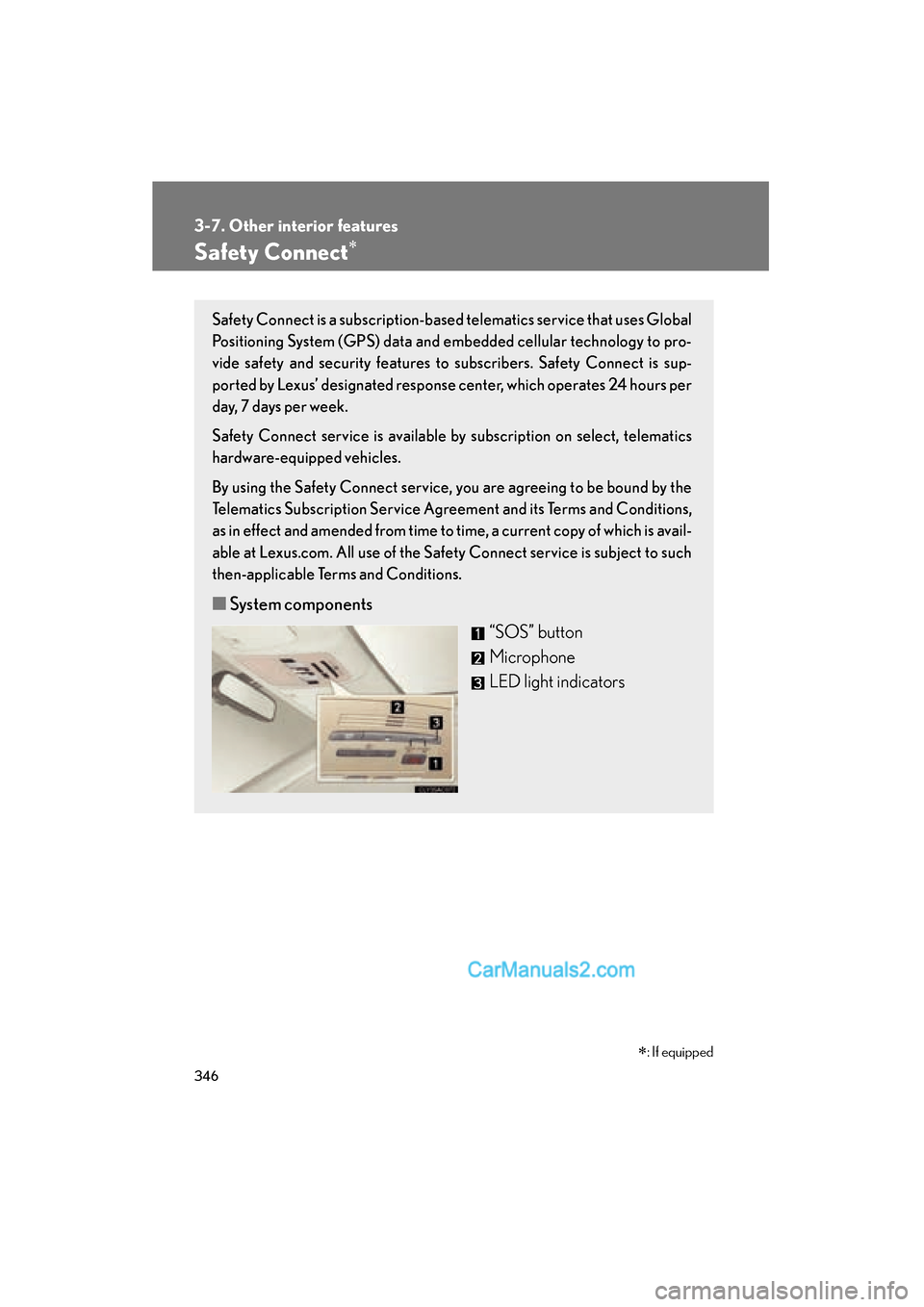
■ System components
“SOS” button
Microphone
LED light indicators
Page 349 of 543
347
3-7. Other interior features
3
Interior features
ES350_U
■Services
Subscribers have the following Safety Connect services available:
●Automatic Collision Notification
*
Helps drivers receive necessary response from emergency ser-
vice providers. ( oP. 3 4 9 )
*: U.S. Patent No. 7,508,298 B2
●Stolen Vehicle Location
Helps drivers in the event of vehicle theft. ( oP. 3 5 0 )
● Emergency Assistance Button (SOS)
Connects drivers to response-center support. ( oP. 3 5 0 )
● Enhanced Roadside Assistance
Provides drivers various on-road assistance. ( oP. 3 5 0 )
■ Subscription
After you have signed the Telematics Subscription Service Agree-
ment and are enrolled, you can begin receiving services.
A variety of subscription terms is available for purchase. Contact
your Lexus dealer, call 1-800-25-LEXUS (1-800-255-3987) or
push the “SOS” button in your vehicle for further subscription
details.
Page 350 of 543
348
3-7. Other interior features
ES350_U
■Safety Connect Services Information
●Phone calls using the vehicles Bluetooth® technology will not be possible dur-
ing Safety Connect.
●Safety Connect is available beginning Fall 2009 on select Lexus models. Con-
tact with the Safety Connect response center is dependent upon the telematics
device being in operative condition, cellular connection availability, and GPS
satellite signal reception, which can limit the ability to reach the response center
or receive emergency service support. Enrollment and Telematics Subscription
Service Agreement required. A variety of subscription terms is available;
charges vary by subscription term selected.
●Safety Connect services will function in the United States, including Hawaii and
Alaska, and in Canada. The services will not function outside of the United
States in countries other than Canada. For details about the service, contact
your Lexus dealer.
●Safety Connect services are not subject to section 255 of the Telecommunica-
tions Act and the device is not TTY compatible.
■Languages
The Safety Connect response center will offer support in multiple languages. The
Safety Connect system will offer voice prompts in English and Spanish. Please indi-
cate your language of choice when enrolling.
■When contacting the response center
You may be unable to contact the response center if the network is busy.