ECO mode Lexus ES350 2011 s User Guide
[x] Cancel search | Manufacturer: LEXUS, Model Year: 2011, Model line: ES350, Model: Lexus ES350 2011Pages: 563, PDF Size: 6.72 MB
Page 85 of 563
83
1-6. Theft deterrent system
1
Before driving
ES350_U
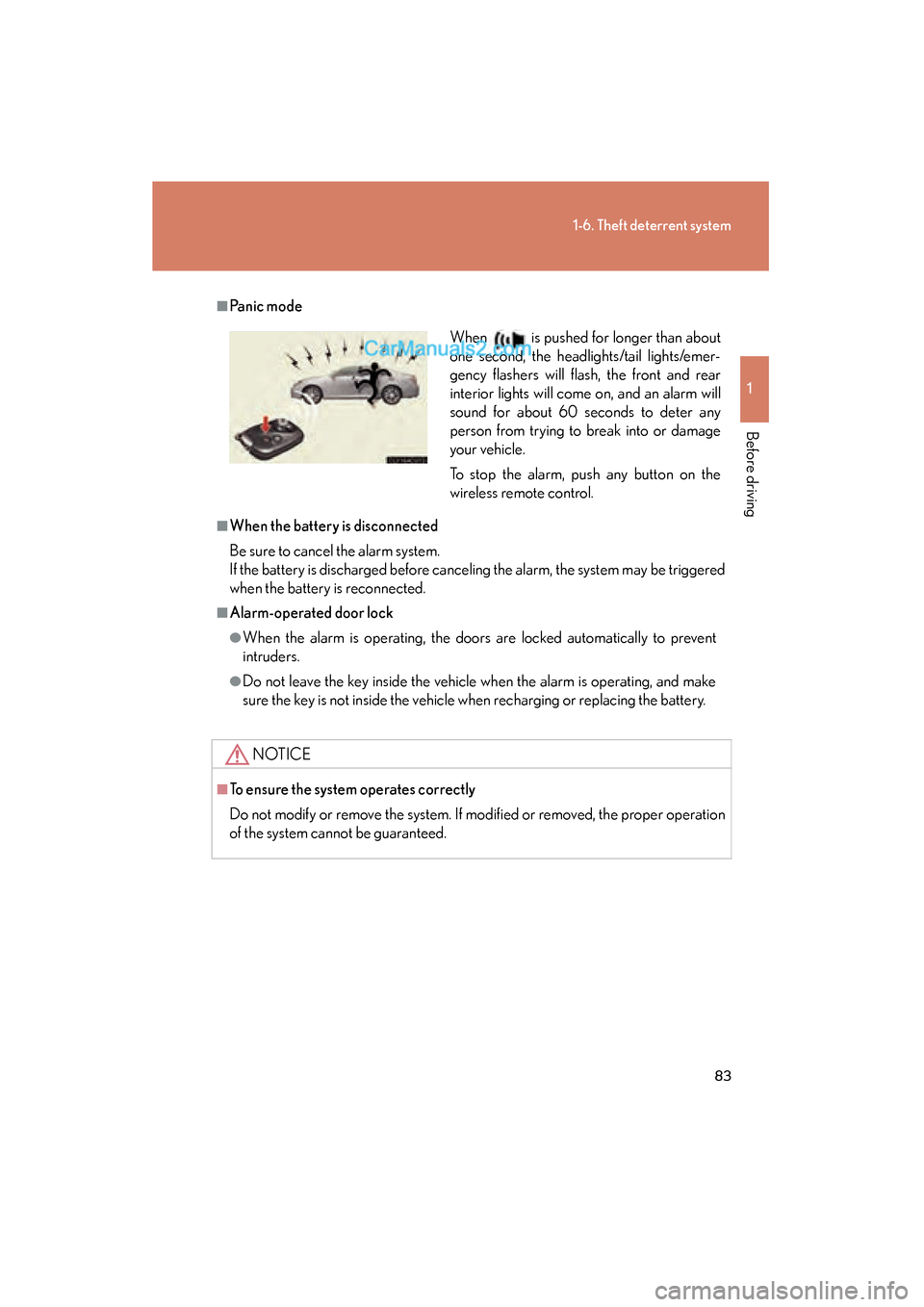
■Panic mode
■When the battery is disconnected
Be sure to cancel the alarm system.
If the battery is discharged before canceling the alarm, the system may be triggered
when the battery is reconnected.
■Alarm-operated door lock
●When the alarm is operating, the doors are locked automatically to prevent
intruders.
●Do not leave the key inside the vehicle when the alarm is operating, and make
sure the key is not inside the vehicle when recharging or replacing the battery.
NOTICE
■To ensure the system operates correctly
Do not modify or remove the system. If modified or removed, the proper operation
of the system cannot be guaranteed.
When is pushed for longer than about
one second, the headlights/tail lights/emer-
gency flashers will flash, the front and rear
interior lights will come on, and an alarm will
sound for about 60 seconds to deter any
person from trying to break into or damage
your vehicle.
To stop the alarm, push any button on the
wireless remote control.
Page 130 of 563
128
2-1. Driving procedures
ES350_U
■Auto power OFF function
If the vehicle is left in ACCESSORY mode for more than an hour with the shift lever
in P, the “ENGINE START STOP” switch will automatically turn off.
■Electronic key battery depletion
→P. 3 2
■When the electronic key battery is discharged
→P. 4 1 1
■Conditions affecting operation
→P. 3 0
■Note for the entry function
→P. 3 3
CAUTION
■When starting the engine
Always start the engine while sitting in the driver’s seat. Do not press the accelera-
tor pedal while starting the engine under any circumstances.
Doing so may cause an accident resulting in death or serious injury.
■Stopping the engine in an emergency
If you want to stop the engine in an emergency while driving the vehicle, press and
hold the “ENGINE START STOP” switch for more than 3 seconds, or press it
briefly 3 times or more in succession.
However, do not touch the “ENGINE START STOP” switch while driving except in
an emergency. Turning the engine off while driving will not cause loss of steering or
braking control, but the power assist to these systems will be lost. This will make it
more difficult to steer and brake, so you should pull over and stop the vehicle as
soon as it is safe to do so.
Page 131 of 563
129
2-1. Driving procedures
2
When driving
ES350_U
NOTICE
■To prevent battery discharge
Do not leave the “ENGINE START STOP” switch in ACCESSORY or IGNITION
ON mode for long periods without the engine running.
■When starting the engine
●Do not race a cold engine.
●If the engine becomes difficult to start or stalls frequently, have the engine
checked immediately.
Page 133 of 563
131
2-1. Driving procedures
2
When driving
ES350_U
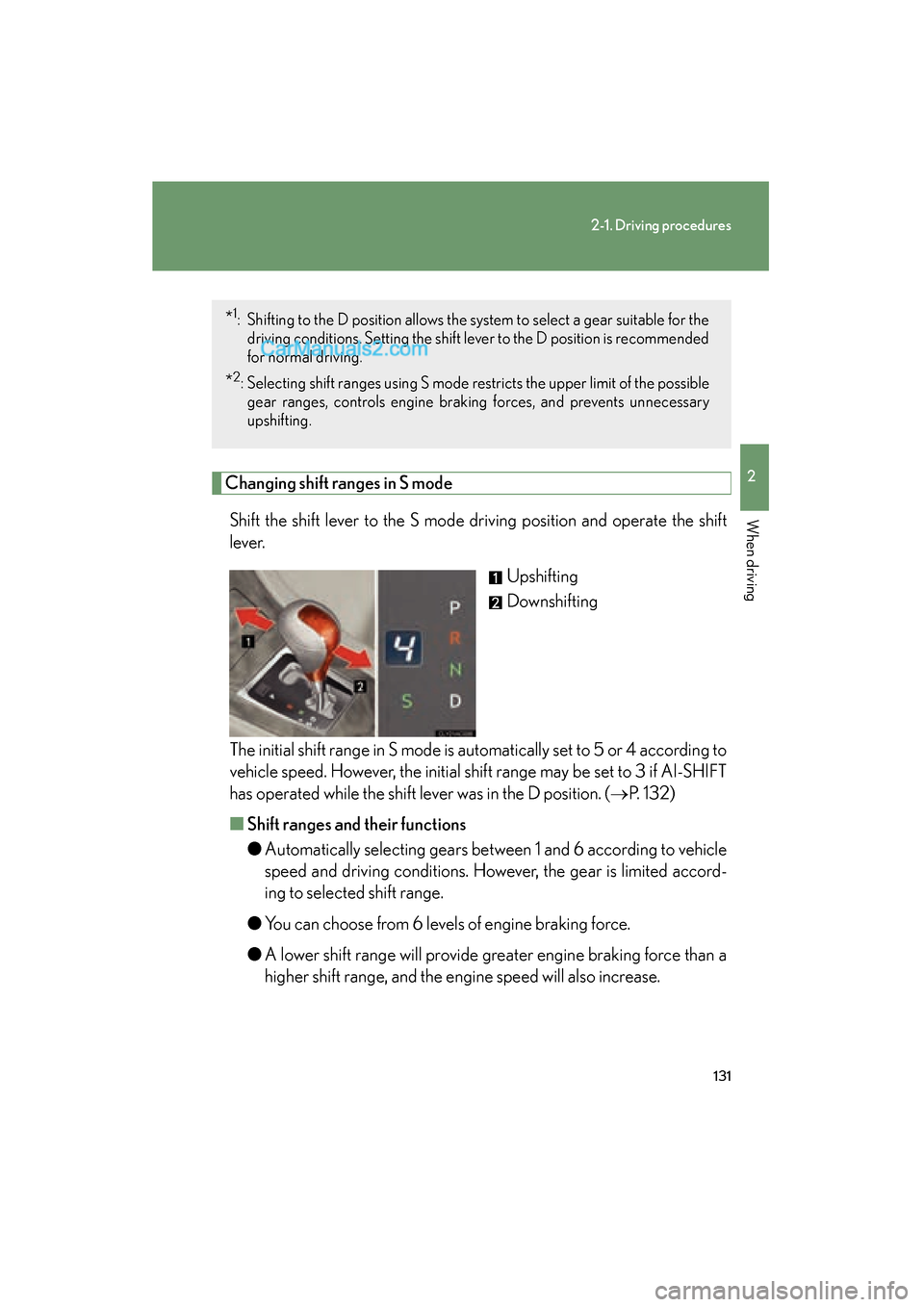
Changing shift ranges in S modeShift the shift lever to the S mode driving position and operate the shift
l e v e r. Upshifting
Downshifting
The initial shift range in S mode is automatically set to 5 or 4 according to
vehicle speed. However, the initial shift range may be set to 3 if AI-SHIFT
has operated while the shift lever was in the D position. ( →P. 1 3 2 )
■ Shift ranges and their functions
●Automatically selecting gears between 1 and 6 according to vehicle
speed and driving conditions. However, the gear is limited accord-
ing to selected shift range.
● You can choose from 6 levels of engine braking force.
● A lower shift range will provide greater engine braking force than a
higher shift range, and the engine speed will also increase.
*1: Shifting to the D position allows the system to select a gear suitable for the
driving conditions. Setting the shift le ver to the D position is recommended
for normal driving.
*2: Selecting shift ranges using S mode restricts the upper limit of the possible gear ranges, controls engine brak ing forces, and prevents unnecessary
upshifting.
Page 134 of 563
132
2-1. Driving procedures
ES350_U
■Downshifting restrictions warning buzzer (in the S mode)
To help ensure safety and driving performance, downshifting operation may some-
times be restricted. In some circumstances, downshifting may not be possible even
when the shift lever is operated. (The warning buzzer will sound twice.)
■When driving with the cruise control system or dynamic radar cruise control sys-
tem
The engine brake will not operate in the S mode, even when downshifting to 5 or 4.
( → P. 155, 158)
■If the shift lever cannot be shifted from P
→P. 4 7 8
■If the indicator does not come on even after shifting the shift lever to S
mode driving position
This may indicate a malfunction in the automatic transmission system. Have the
vehicle inspected by your Lexus dealer immediately.
(In this situation, the transmission will operate in the same as manner as when the
shift lever is in D.)
■S mode
●When the shift range is 5 or lower, holding the shift lever toward “+” sets the shift
range to 6.
●To prevent excessive engine speed, a function was adopted that automatically
selects a higher shift range before engine speed becomes too high.
●To protect the automatic transmission, a function is adopted that automatically
selects a higher shift range when the fluid temperature is high.
■AI-SHIFT
AI-SHIFT automatically selects the suitable gear according to driver performance
and driving conditions.
AI-SHIFT automatically operates when the shift lever is in the D position. (Shifting
the shift lever to the S mode driving position cancels the function.)
Page 147 of 563

145
2-2. Instrument cluster
2
When driving
ES350_U■
Current fuel consumption
■ Eco Driving Indicator Zone Display
→ P. 1 4 6
■ Eco Driving Indicator Light customization
■ Average vehicle speed
■ Elapsed time
Displays the current rate of fuel consumption.
Eco Driving Indicator Light can be deactivated. This
customization can only be performed when the vehi-
cle is stopped.
Eco Driving Indicator Light can be activated or deacti-
vated by pressing the “DISP” switch for longer than 1
second when Eco Driving Indicator Light customization
screen is displayed.
Displays the average vehicle speed since the engine
was started or the function was reset.
Displays the elapsed time since the engine was
started.
■System check display
After switching the “ENGINE START STOP” switch to IGNITION ON mode,
is displayed while system operation is checked. When the system check is
complete, is displayed before returning to the normal screen.
Page 151 of 563

149
2-3. Operating the lights and windshield wipers
2
When driving
ES350_U
■Daytime running light system
●To make your vehicle more visible to other drivers, the headlights turn on auto-
matically (at a reduced intensity) whenever the engine is started and the parking
brake is released. Daytime running lights are not designed for use at night.
●Compared to turning on the headlights, the daytime running light system offers
greater durability and consumes less electricity, so it can help improve fuel
economy.
■Headlight control sensor
■Automatic light off system
●When the headlights come on: The headlights and tail lights turn off 30 seconds
after all doors are closed with the “ENGINE START STOP” switch switched to
ACCESSORY mode or turned OFF. (The light turns off immediately if
the button on the key is pressed after all doors are locked.)
●When only the tail lights come on: The tail lights turn off automatically if the
“ENGINE START STOP” switch is switched to ACCESSORY mode or turned
OFF and driver’s door is opened.
To turn the lights on again, switch to IGNITION ON mode, or turn the light switch
OFF once and then back to the
or position.
■Automatic headlight leveling system (vehicles with discharge headlights)
The level of the headlights is automatically adjusted according to the number of
passengers and the loading condition of the vehicle to ensure that the headlights do
not interfere with other road users.
■If the indicator flashes... (vehicles with discharge headlights)
It may indicate a malfunction in the system. Contact your Lexus dealer. The sensor may not function properly if an
object is placed on the sensor, or anything
that blocks the sensor is affixed to the wind-
shield.
Doing so interferes with the sensor detecting
the level of ambient light and may cause the
automatic headlight control system to mal-
function.
Page 156 of 563
154
2-3. Operating the lights and windshield wipers
ES350_U
CAUTION
■Caution regarding the use of windshield wipers in AUTO mode
The windshield wipers may operate unexpectedly if the sensor is touched or the
windshield is subjected to vibration in AUTO mode. Take care that your fingers or
anything else do not become caught in the windshield wipers.
NOTICE
■When the windshield is dry
Do not use the wipers, as they may damage the windshield.
■When there is no washer fluid spray from the nozzle
Damage to the washer fluid pump may be caused if the lever is pulled toward you
and held continually.
■When a nozzle becomes blocked
In this case, contact your Lexus dealer.
Do not try to clear it with a pin or other object. The nozzle will be damaged.
Page 216 of 563
214
3-1. Using the air conditioning system and defogger
ES350_U
■Air conditioning odors
●During use, various odors from inside and outside the vehicle may enter into
and accumulate in the air conditioning system. This may then cause odor to be
emitted from the vents.
●To reduce potential odors from occurring:
• It is recommended that the air conditioning system be set to outside air modeprior to turning the vehicle off.
• The start timing of the blower may be delayed for a short period of time
immediately after the air conditioning system is started in automatic mode.
CAUTION
■To prevent the windshield from fogging up
Do not use during cool air operation in extremely humid weather. The dif-
ference between the temperature of the outside air and that of the windshield can
cause the outer surface of the windshield to fog up, blocking your vision.
NOTICE
■To prevent battery discharge
Do not leave the automatic air conditioning system on longer than necessary when
the engine is stopped.
Page 221 of 563
219
3-2. Using the audio system
3
Interior features
ES350_U
Using the radio
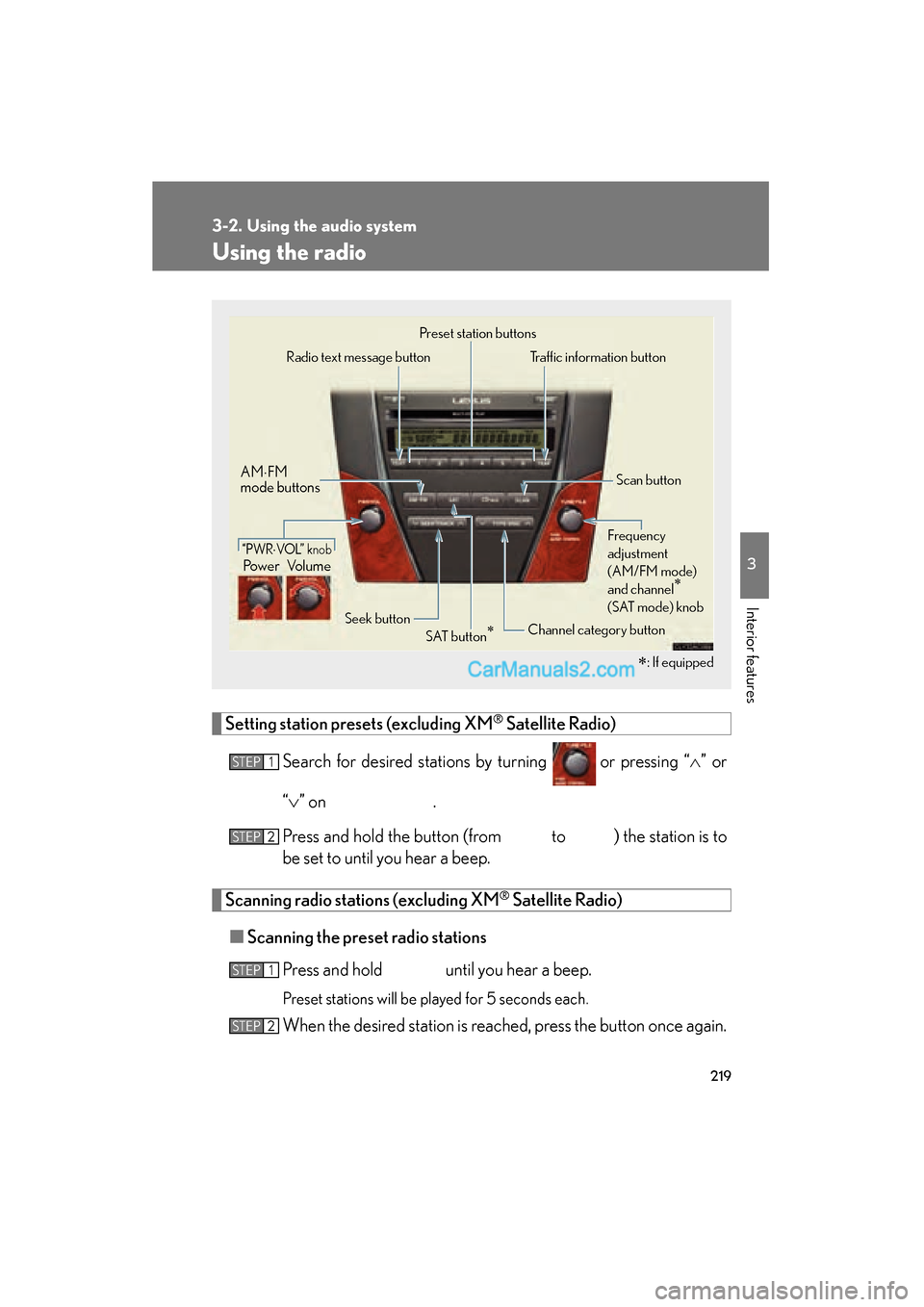
Setting station presets (excluding XM® Satellite Radio)
Search for desired stations by turning or pressing “∧” or
“ ∨ ” on
.
Press and hold the button (from
to ) the station is to
be set to until you hear a beep.
Scanning radio stations (excluding XM® Satellite Radio)
■ Scanning the preset radio stations
Press and hold
until you hear a beep.
Preset stations will be played for 5 seconds each.
When the desired station is reached, press the button once again.
∗: If equipped
Power Volume
AM
⋅FM
mode buttons
Preset station buttons
Channel category button
“PWR⋅VO L” k n o b
Scan button
Seek button
Radio text message button
Traffic information button
Frequency
adjustment
(AM/FM mode)
and channel
∗
(SAT mode) knob
SAT button∗
STEP1
STEP2
STEP1
STEP2