navigation system Lexus ES350 2011 s User Guide
[x] Cancel search | Manufacturer: LEXUS, Model Year: 2011, Model line: ES350, Model: Lexus ES350 2011Pages: 563, PDF Size: 6.72 MB
Page 218 of 563
216
ES350_U
3-2. Using the audio system
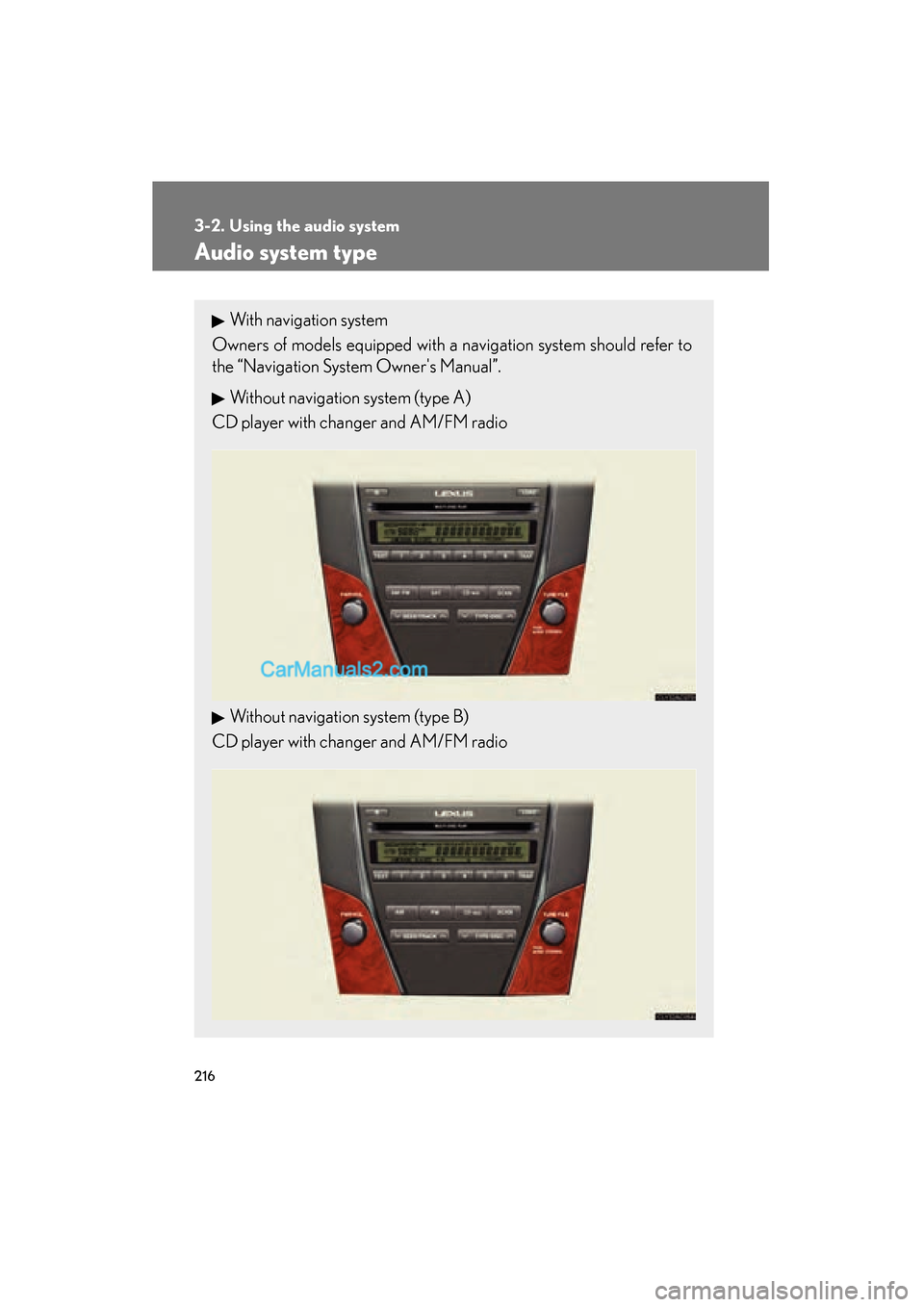
Audio system type
With navigation system
Owners of models equipped with a navigation system should refer to
the “Navigation System Owner's Manual”.
Without navigation system (type A)
CD player with changer and AM/FM radio
Without navigation system (type B)
CD player with changer and AM/FM radio
Page 264 of 563
262
ES350_U
3-3. Using the Bluetooth® audio system
Bluetooth® audio system
■Conditions under which the system will not operate
●If using a portable player that does not support Bluetooth®
●If the portable player is switched off
●If the portable player is not connected
●If the portable player’s battery is low
●If the portable player is behind the seat or in the glove box or console box
●If metal is covering or touching the portable player
The Bluetooth® audio system enables you to enjoy music played on a por-
table digital audio player (portable player) from the vehicle speakers via
wireless communication.
This audio system supports Bluetooth
®, a wireless data system capable of
playing portable audio music without cables. If your portable player does
not support Bluetooth
®, the Bluetooth® audio system will not function.
Vehicles with a navigation system
Owners of models equipped with a navigation system should refer to
the “Navigation System Owner's Manual”.
Vehicles without a navigation system
TitlePa g e
Using the Bluetooth® audio systemP. 2 6 5
Operating a Bluetooth® enabled portable playerP. 2 7 0
Setting up a Bluetooth® enabled portable playerP. 2 7 3
Bluetooth® audio system setupP. 2 8 0
Page 283 of 563
281
3
Interior features
ES350_U
3-4. Using the hands-free system (for mobile phone)
Hands-free system for mobile phones
The hands-free system is a function that allows you to use your mobile
phone without touching it.
This system supports Bluetooth
® mobile phones. Bluetooth® is a wireless
data system that allows the mobile phone to wirelessly connect to the
hands-free system and make/receive calls.
Vehicles with a navigation system
Owners of models equipped with a navigation system should refer to
the “Navigation System Owner's Manual”.
Vehicles without a navigation system
Ti t l ePa g e
Using the hands-free systemP. 2 8 5
Making a phone callP. 2 9 3
Setting a mobile phoneP. 2 9 8
Security and system setupP. 3 0 3
Using the phone bookP. 3 0 7
Page 328 of 563
326
3-7. Other interior features
ES350_U
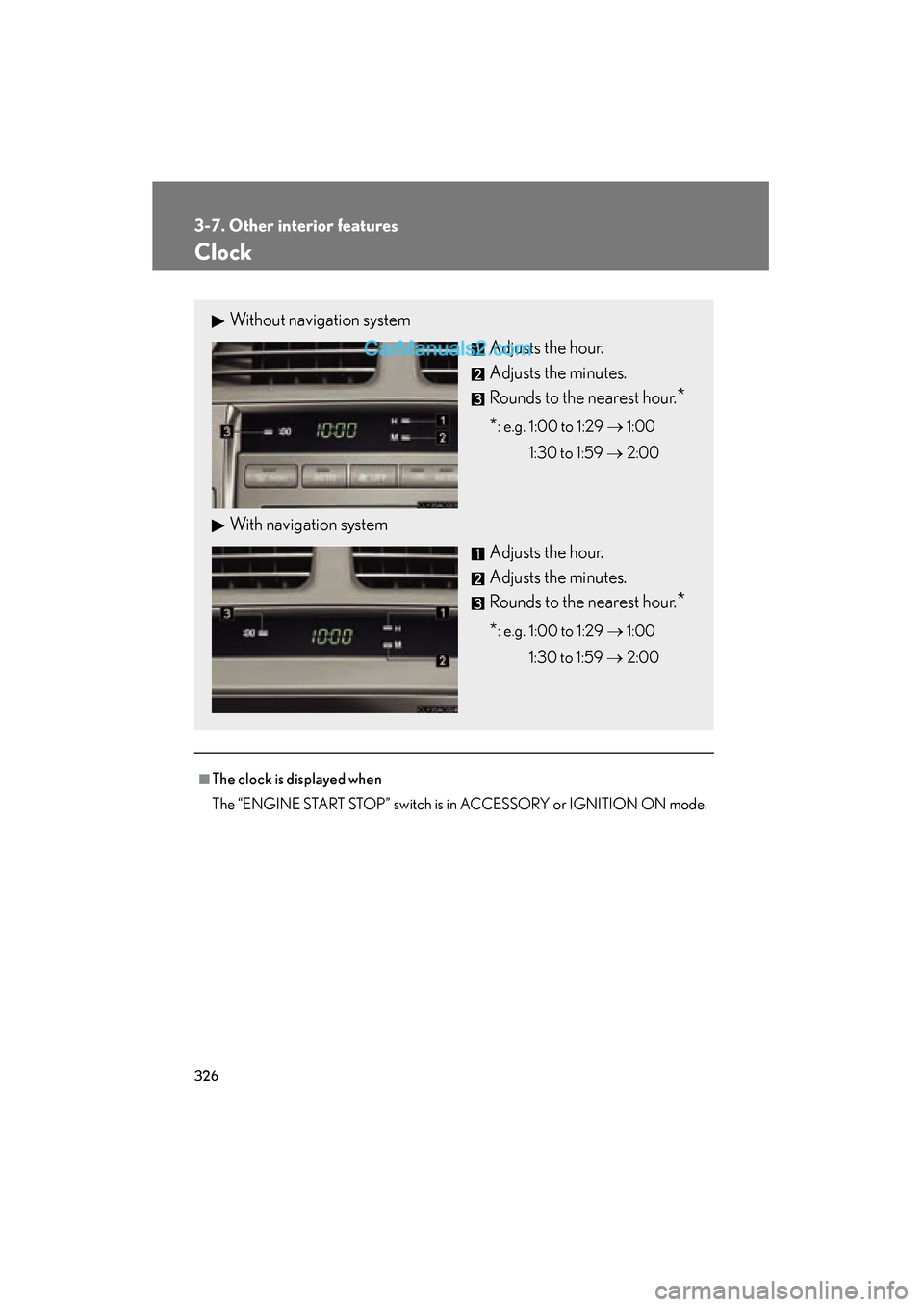
Clock
■The clock is displayed when
The “ENGINE START STOP” switch is in ACCESSORY or IGNITION ON mode.
Without navigation systemAdjusts the hour.
Adjusts the minutes.
Rounds to the nearest hour.
*
*: e.g. 1:00 to 1:29 → 1:00
1:30 to 1:59 → 2:00
With navigation system
Adjusts the hour.
Adjusts the minutes.
Rounds to the nearest hour.
*
*: e.g. 1:00 to 1:29 → 1:00
1:30 to 1:59 → 2:00
Page 436 of 563
434
ES350_U
5-1. Essential information
Emergency flashers
NOTICE
■To prevent battery discharge
Do not leave the emergency flashers on longer than necessary when the engine is
not running.
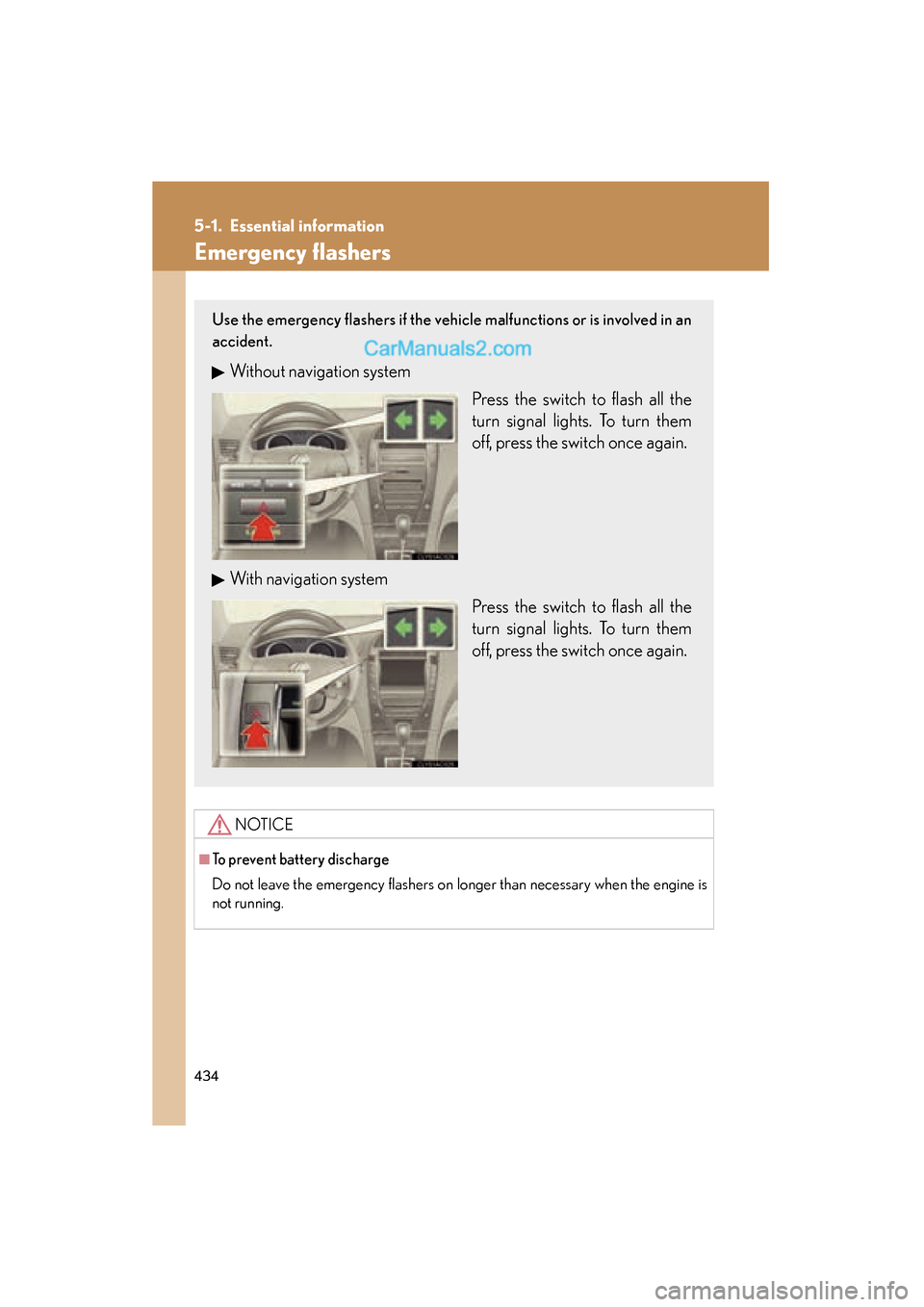
Use the emergency flashers if the vehicle malfunctions or is involved in an
accident.
Without navigation systemPress the switch to flash all the
turn signal lights. To turn them
off, press the switch once again.
With navigation system Press the switch to flash all the
turn signal lights. To turn them
off, press the switch once again.
Page 477 of 563
5
When trouble arises
475
5-2. Steps to take in an emergency
ES350_U
CAUTION
■When the compact spare tire attached
The vehicle speed may not be correctly detected, and the following systems may
not operate correctly:
●ABS & Brake assist
●VSC
●TRAC
●Navigation system (if equipped)
NOTICE
■Do not drive the vehicle with a flat tire.
Do not continue driving with a flat tire.
Driving even a short distance with a flat tire can damage the tire and the wheel
beyond repair.
■When replacing the tires
When removing or fitting the wheels, tires or the tire pressure warning valve and
transmitter, contact your Lexus dealer as the tire pressure warning valve and trans-
mitter may be damaged if not handled correctly.
■To avoid damage to the tire pressure warning valves and transmitters
When a tire is repaired with liquid sealants, the tire pressure warning valve and
transmitter may not operate properly. If a liquid sealant is used, contact your Lexus
dealer or other qualified service shop as soon as possible. Make sure to replace the
tire pressure warning valve and transmitter when replacing the tire. (→P. 395)
■Be careful when driving over bumps with the compact spare tire installed on the
vehicle.
The vehicle becomes lower when driving with the compact spare tire compared to
when driving with standard tires. Be careful when driving over uneven road sur-
faces.
■Driving with tire chains and the compact spare tire
Do not fit tire chains to the compact spare tire.
Tire chains may damage the vehicle body and adversely affect driving performance.
Page 519 of 563
517
6
Vehicle specifications
ES350_U
6-2. Customization
Customizable features
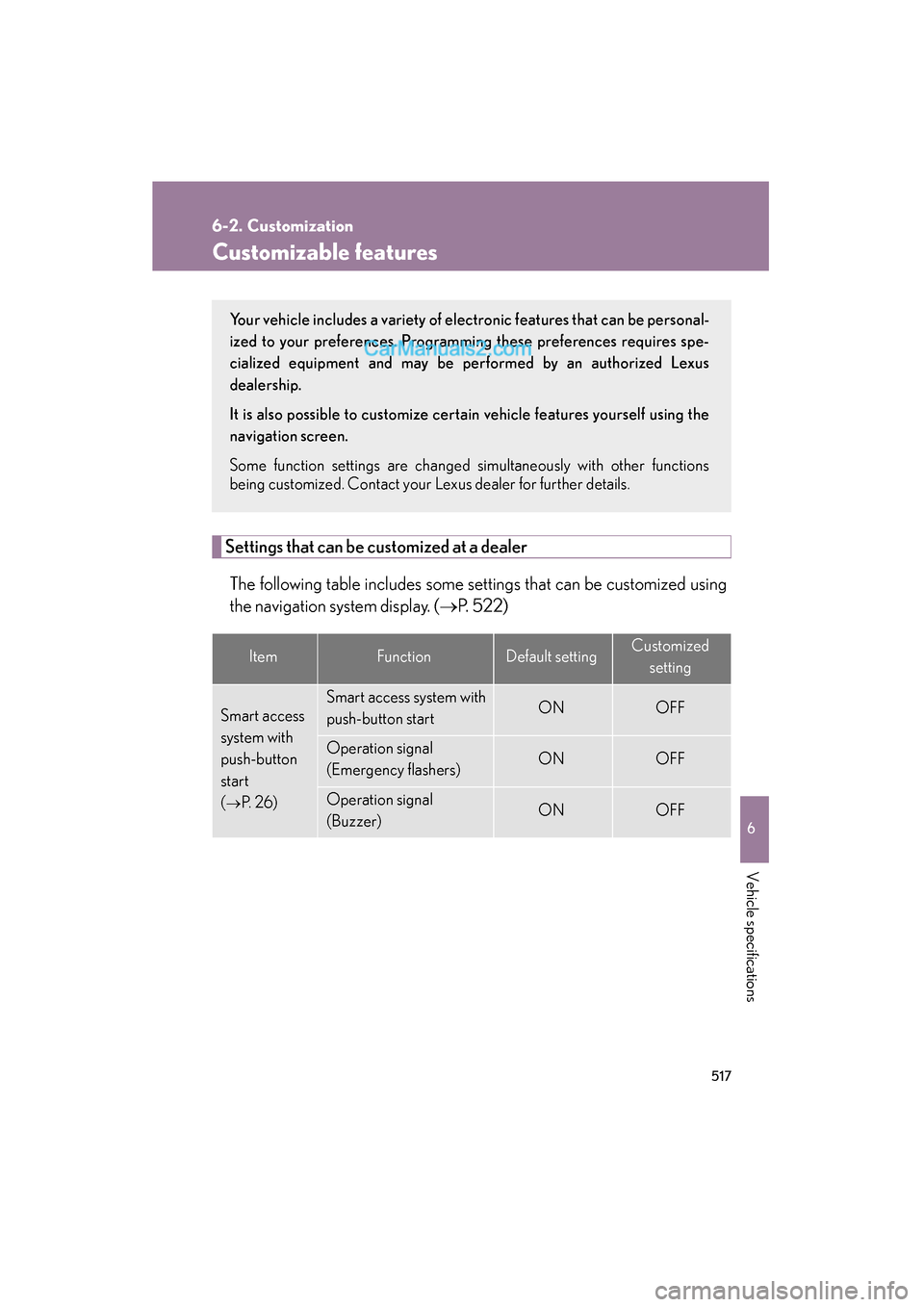
Settings that can be customized at a dealerThe following table includes some settings that can be customized using
the navigation system display. ( →P. 5 2 2 )
ItemFunctionDefault settingCustomized
setting
Smart access
system with
push-button
start
(
→P. 2 6 )
Smart access system with
push-button startONOFF
Operation signal
(Emergency flashers)ONOFF
Operation signal
(Buzzer)ONOFF
Your vehicle includes a variety of electr onic features that can be personal-
ized to your preferences. Programming these preferences requires spe-
cialized equipment and may be performed by an authorized Lexus
dealership.
It is also possible to customize cert ain vehicle features yourself using the
navigation screen.
Some function settings are changed simultaneously with other functions
being customized. Contact your Lexus dealer for further details.
Page 524 of 563
522
6-2. Customization
ES350_U
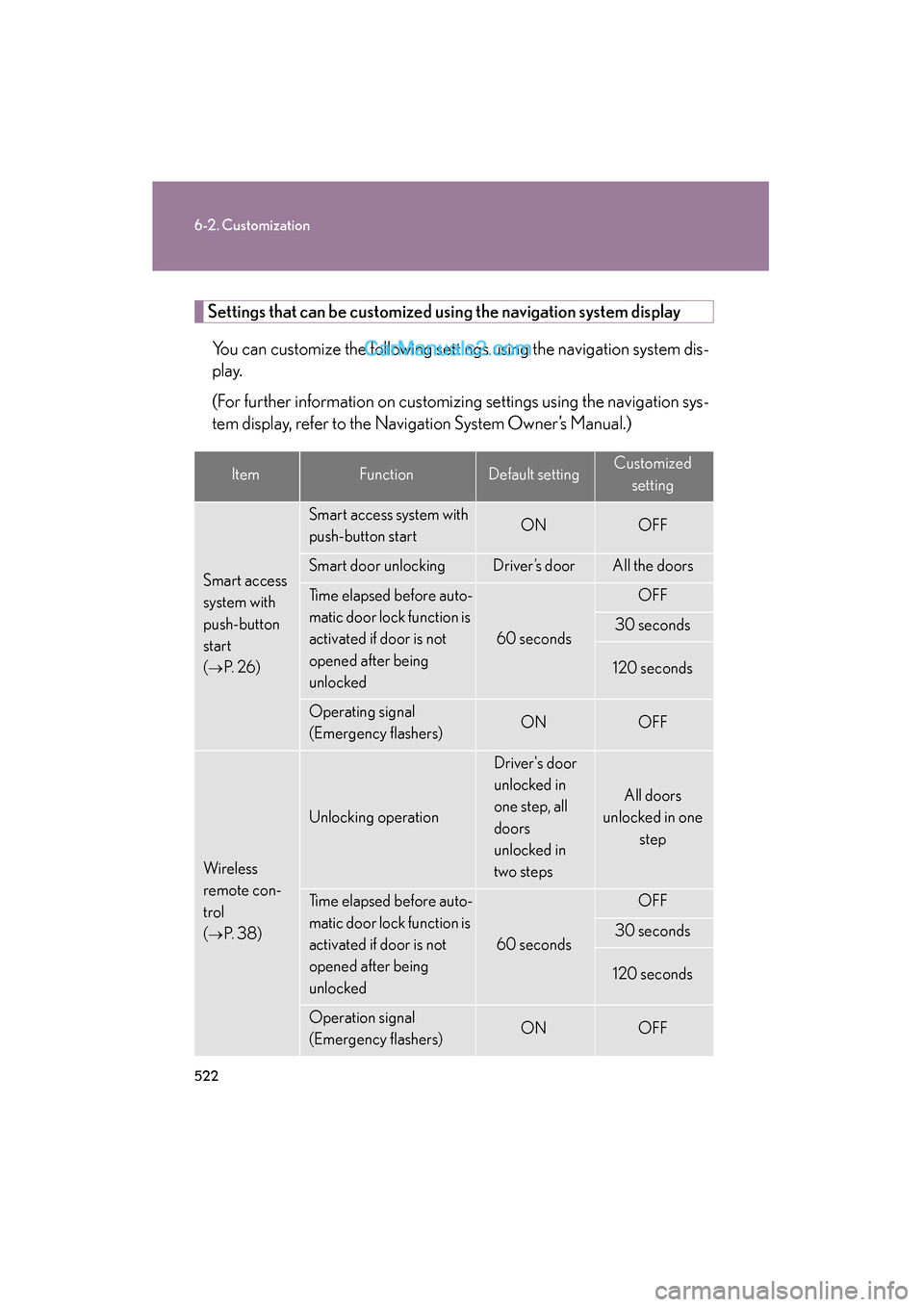
Settings that can be customized using the navigation system displayYou can customize the following settings using the navigation system dis-
play.
(For further information on customizing settings using the navigation sys-
tem display, refer to the Navigation System Owner’s Manual.)
ItemFunctionDefault settingCustomized setting
Smart access
system with
push-button
start
(
→P. 2 6 )
Smart access system with
push-button startONOFF
Smart door unlocking Driver’s doorAll the doors
Time elapsed before auto-
matic door lock function is
activated if door is not
opened after being
unlocked
60 seconds
OFF
30 seconds
120 seconds
Operating signal
(Emergency flashers)ONOFF
Wireless
remote con-
trol
(
→P. 3 8 )
Unlocking operation
Driver's door
unlocked in
one step, all
doors
unlocked in
two steps
All doors
unlocked in one
step
Time elapsed before auto-
matic door lock function is
activated if door is not
opened after being
unlocked
60 seconds
OFF
30 seconds
120 seconds
Operation signal
(Emergency flashers)ONOFF
Page 543 of 563
Index
541
ES350_U
Abbreviation list .................... 542
Alphabetical index ................. 544
What to do if... ....................... 558
For details of equipment related to the navigation system,
such as the audio system and the air conditioning systems,
refer to the “Navigation System Owner's Manual”.