key Lexus ES350 2011 s Workshop Manual
[x] Cancel search | Manufacturer: LEXUS, Model Year: 2011, Model line: ES350, Model: Lexus ES350 2011Pages: 563, PDF Size: 6.72 MB
Page 435 of 563
When trouble arises5
433
ES350_U
5-1. Essential informationEmergency flashers............... 434
If your vehicle needs to be towed ...................................... 435
If you think something is wrong ....................................... 441
Fuel pump shut off system.... 442
Event data recorder .............. 443 5-2. Steps to take in an
emergency
If a warning light turns on or a warning buzzer
sounds... ................................. 445
If a warning message is displayed................................ 455
If you have a flat tire................ 467
If the engine will not start ..... 476
If the shift lever cannot be shifted from P ....................... 478
If you lose your keys ............... 479
If the electronic key does not operate properly.......... 480
If the vehicle battery is discharged ............................ 483
If your vehicle overheats ..... 486
If the vehicle becomes stuck........................................ 489
If your vehicle has to be stopped in an
emergency ............................ 490
Page 466 of 563
464
5-2. Steps to take in an emergency
ES350_U
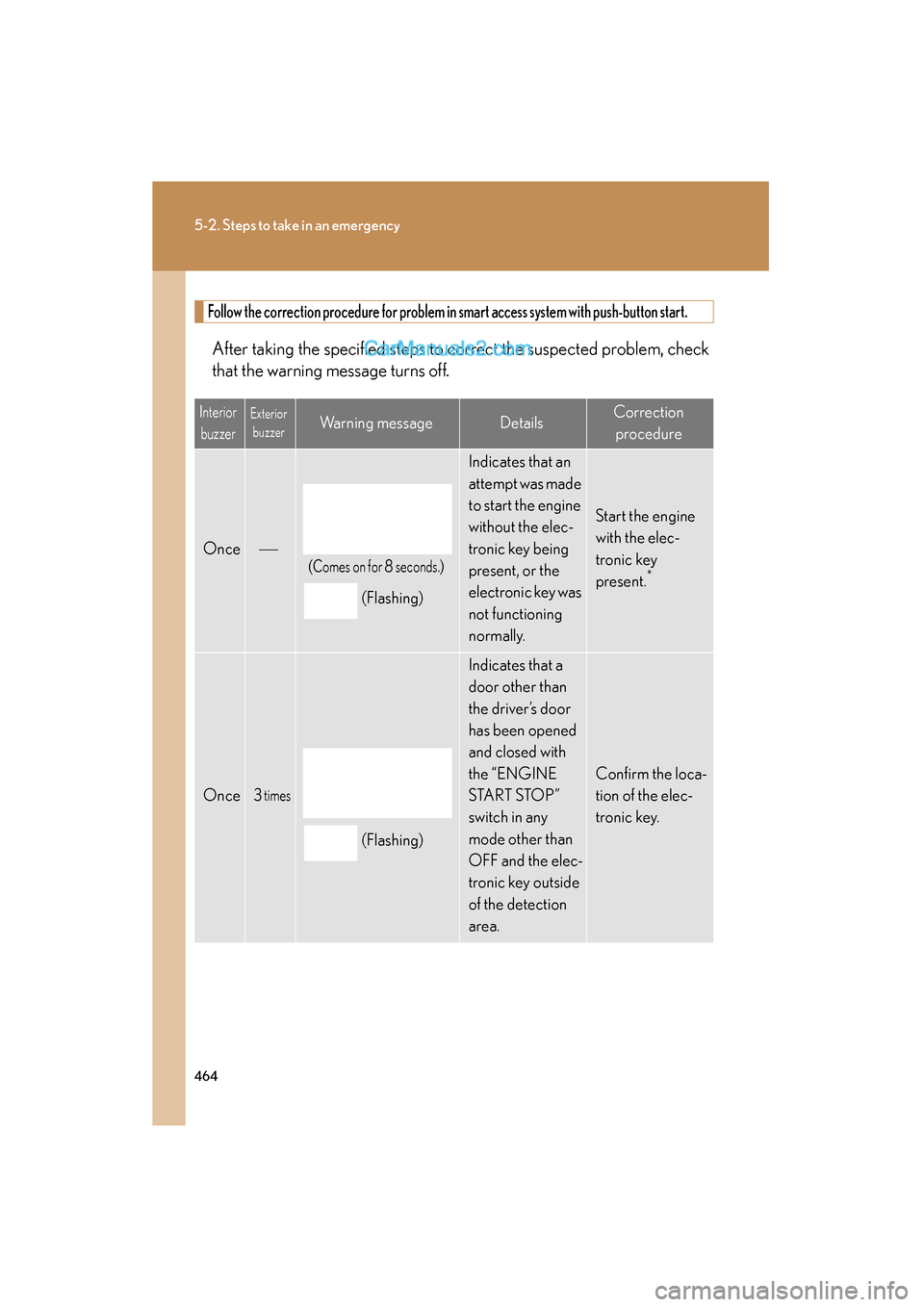
Follow the correction procedure for problem in smart access system with push-button start.
After taking the specified steps to correct the suspected problem, check
that the warning message turns off.
InteriorbuzzerExterior buzzerWarning messageDetailsCorrection
procedure
Once
(Comes on for 8 seconds.)
(Flashing)
Indicates that an
attempt was made
to start the engine
without the elec-
tronic key being
present, or the
electronic key was
not functioning
n o r m a l l y.
Start the engine
with the elec-
tronic key
present.
*
Once3 times
(Flashing)
Indicates that a
door other than
the driver’s door
has been opened
and closed with
the “ENGINE
S TA R T S TO P ”
switch in any
mode other than
OFF and the elec-
tronic key outside
of the detection
area.
Confirm the loca-
tion of the elec-
tronic key.
Page 467 of 563
5
When trouble arises
465
5-2. Steps to take in an emergency
ES350_U
InteriorbuzzerExterior buzzerWarning messageDetailsCorrection
procedure
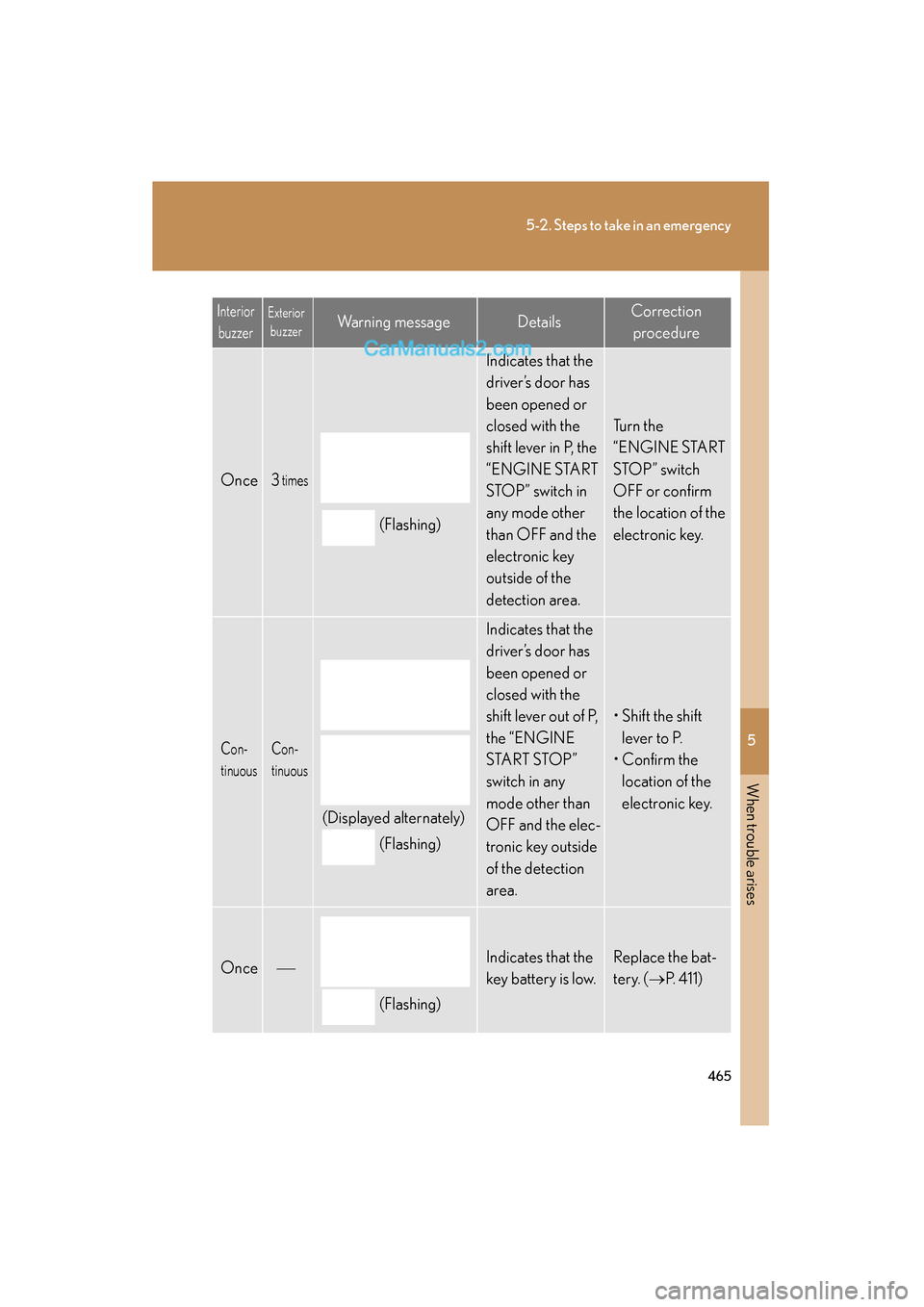
Once3 times
(Flashing)
Indicates that the
driver’s door has
been opened or
closed with the
shift lever in P, the
“ENGINE START
STOP” switch in
any mode other
than OFF and the
electronic key
outside of the
detection area.
Tu r n t h e
“ENGINE START
STO P ” s w i t c h
OFF or confirm
the location of the
electronic key.
Con-
tinuousCon-
tinuous
(Displayed alternately)
(Flashing)
Indicates that the
driver’s door has
been opened or
closed with the
shift lever out of P,
the “ENGINE
START STOP”
switch in any
mode other than
OFF and the elec-
tronic key outside
of the detection
area.
• Shift the shift lever to P.
• Confirm the
location of the
electronic key.
Once
(Flashing)
Indicates that the
key battery is low.Replace the bat-
tery. ( →P. 411)
Page 468 of 563
466
5-2. Steps to take in an emergency
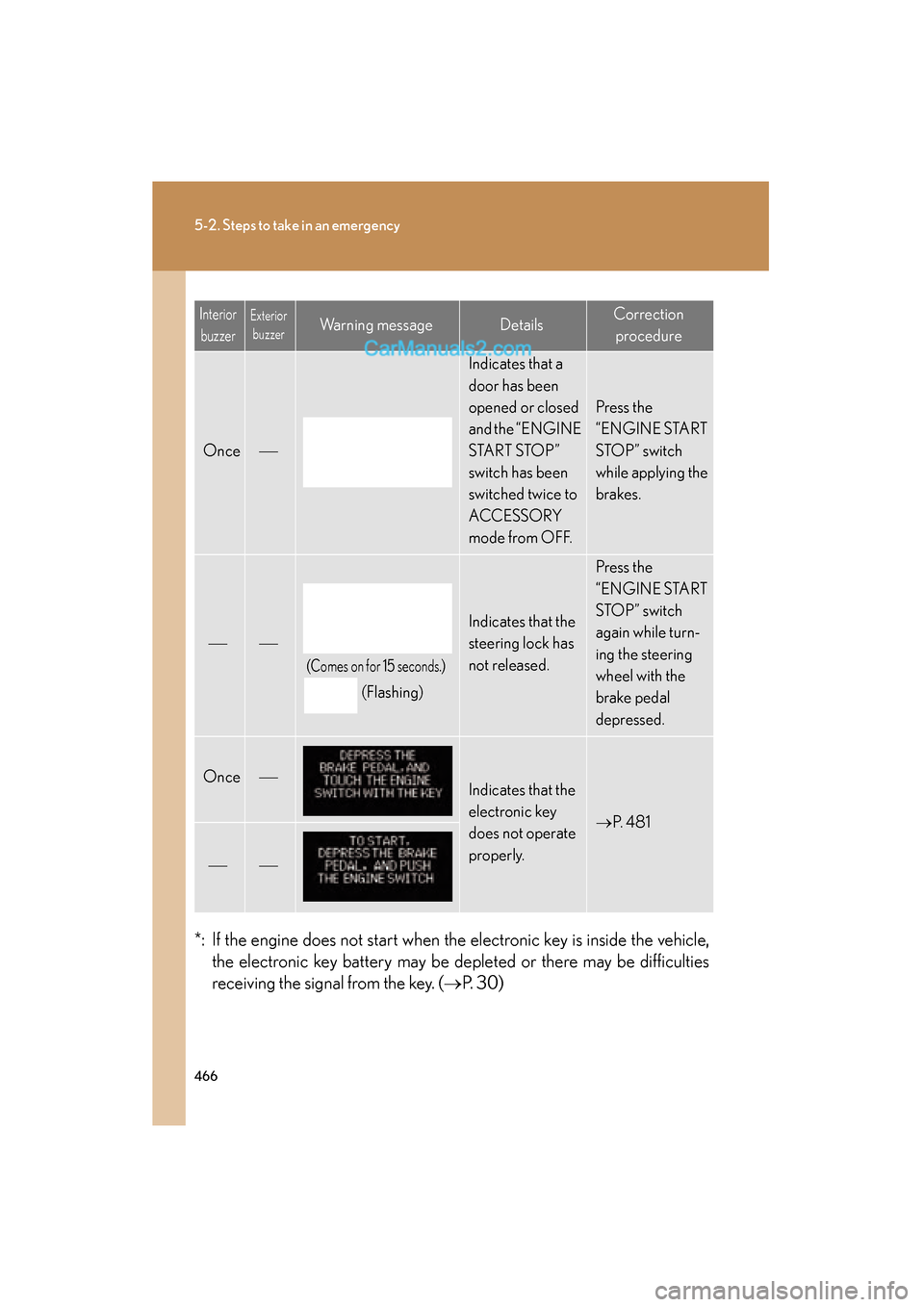
ES350_U*: If the engine does not start when the electronic key is inside the vehicle,
the electronic key battery may be de pleted or there may be difficulties
receiving the signal from the key. ( →P. 30)
Interior
buzzerExterior buzzerWarning messageDetailsCorrection
procedure
Once
Indicates that a
door has been
opened or closed
and the “ENGINE
S TA R T S TO P ”
switch has been
switched twice to
ACCESSORY
mode from OFF.
Press the
“ENGINE START
STOP” switch
while applying the
brakes.
(Comes on for 15 seconds.)
(Flashing)
Indicates that the
steering lock has
not released.
Press the
“ENGINE START
STOP” switch
again while turn-
ing the steering
wheel with the
brake pedal
depressed.
OnceIndicates that the
electronic key
does not operate
properly.
→ P. 4 8 1
Page 481 of 563
5
When trouble arises
479
5-2. Steps to take in an emergency
ES350_U
If you lose your keys
New genuine Lexus keys can be made by your Lexus dealer using the other
key and the key number stamped on your key number plate.
Page 482 of 563
480
5-2. Steps to take in an emergency
ES350_U
If the electronic key does not operate properly
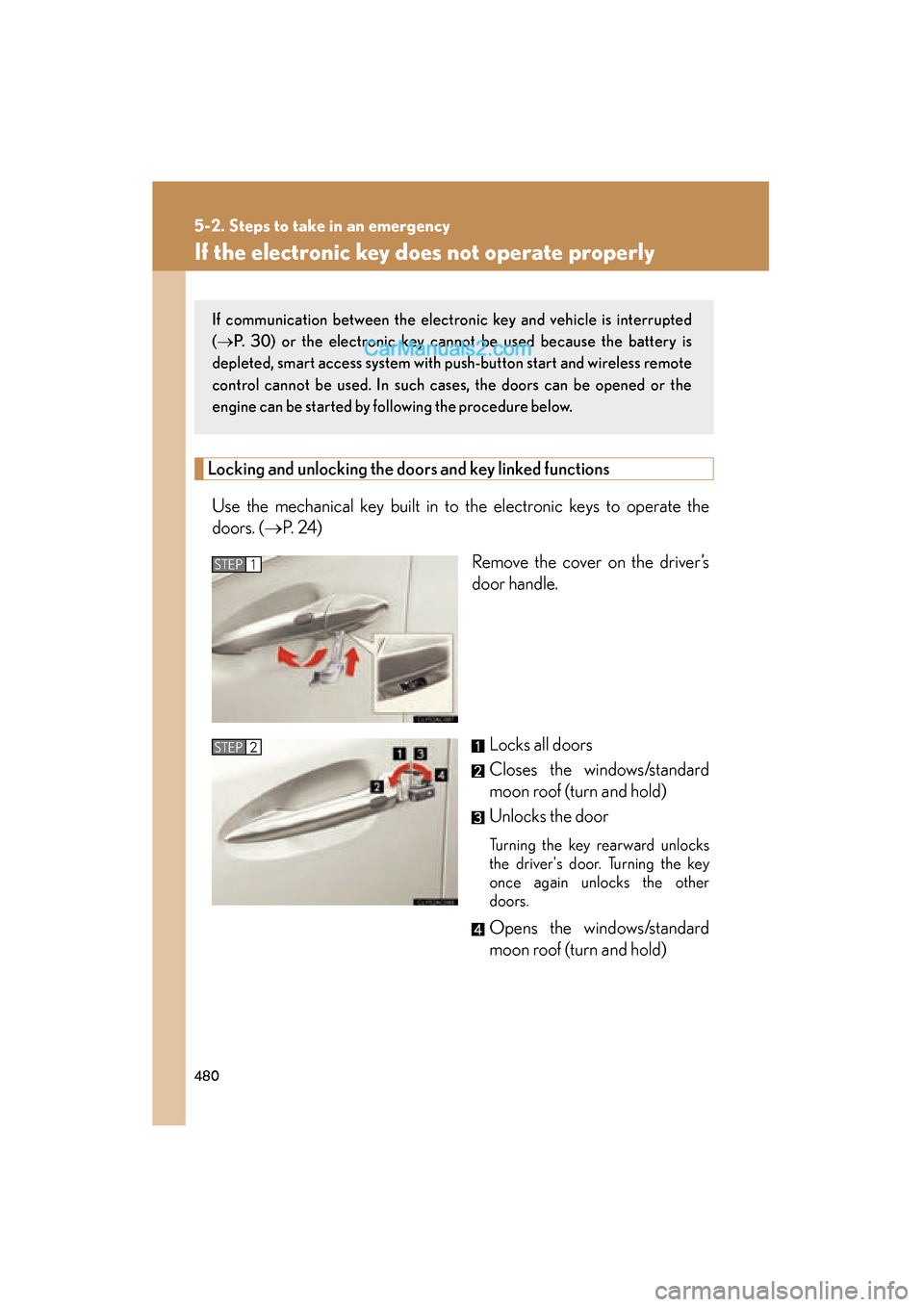
Locking and unlocking the doors and key linked functions
Use the mechanical key built in to the electronic keys to operate the
doors. (→ P. 2 4 )
Remove the cover on the driver’s
door handle.
Locks all doors
Closes the windows/standard
moon roof (turn and hold)
Unlocks the door
Turning the key rearward unlocks
the driver's door. Turning the key
once again unlocks the other
doors.
Opens the windows/standard
moon roof (turn and hold)
If communication between the electronic key and vehicle is interrupted
(→ P. 30) or the electronic key cannot be used because the battery is
depleted, smart access system with push-button start and wireless remote
control cannot be used. In such cases, the doors can be opened or the
engine can be started by following the procedure below.
STEP1
STEP2
Page 483 of 563
5
When trouble arises
481
5-2. Steps to take in an emergency
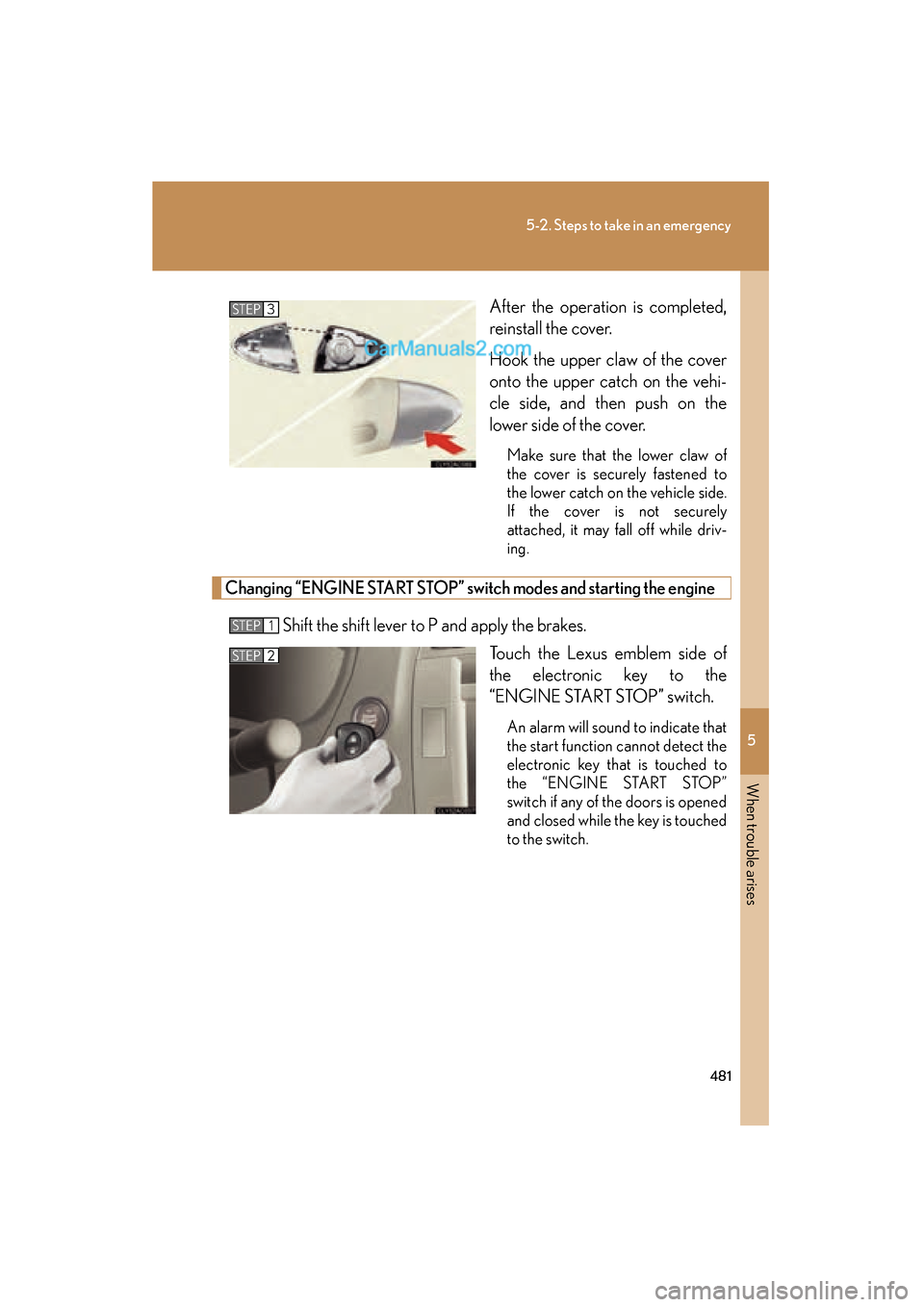
ES350_UAfter the operation is completed,
reinstall the cover.
Hook the upper claw of the cover
onto the upper catch on the vehi-
cle side, and then push on the
lower side of the cover.
Make sure that the lower claw of
the cover is securely fastened to
the lower catch on the vehicle side.
If the cover is not securely
attached, it may fall off while driv-
ing.
Changing “ENGINE START STOP” switch modes and starting the engine
Shift the shift lever to P and apply the brakes.
Touch the Lexus emblem side of
the electronic key to the
“ENGINE START STOP” switch.
An alarm will sound to indicate that
the start function cannot detect the
electronic key that is touched to
the “ENGINE START STOP”
switch if any of the doors is opened
and closed while the key is touched
to the switch.
STEP3
STEP1
STEP2
Page 484 of 563
482
5-2. Steps to take in an emergency
ES350_UTo change “ENGINE START ST
OP” switch modes: Within 10
seconds of the buzzer sounding, release the brake pedal and
press the “ENGINE START STOP” switch. Modes can be
changed each time the switch is pressed. (→ P. 1 2 6 )
To start the engine: Press the “ENGINE START STOP” switch
within 10 seconds after the buzzer sounds, keeping the brake
pedal depressed.
In the event that the “ENGINE START STOP” switch still cannot be oper-
ated, contact your Lexus dealer.
■Stopping the engine
Shift the shift lever to P and press the “ENGINE START STOP” switch as you nor-
mally do when stopping the engine.
■Replacing the key battery
As the above procedure is the temporary measure, it is recommend that the elec-
tronic key battery be replaced immediately when the battery depletes. ( →P. 411)
STEP3
Page 521 of 563
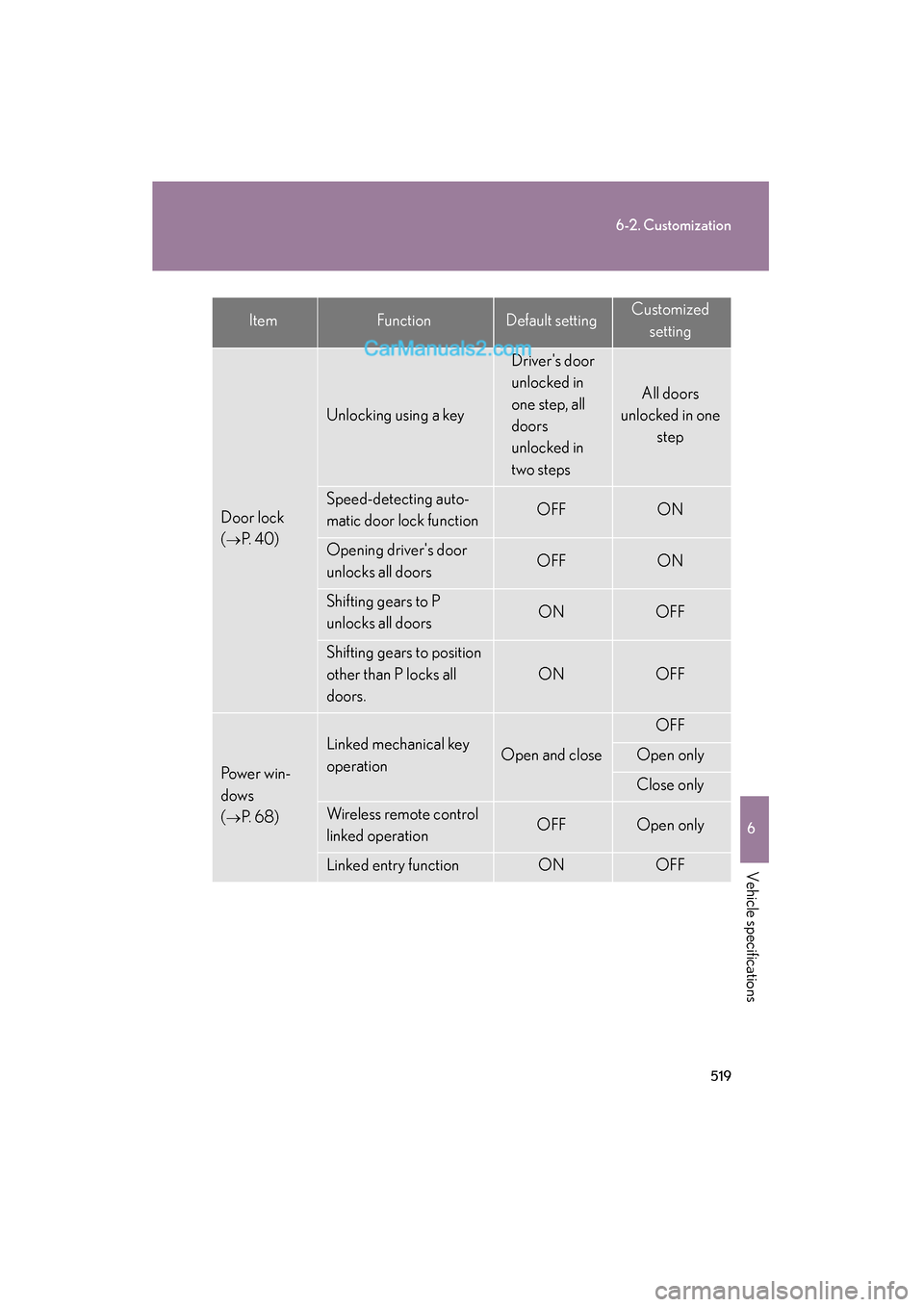
519
6-2. Customization
6
Vehicle specifications
ES350_U
Door lock
(
→P. 4 0 )
Unlocking using a key
Driver's door
unlocked in
one step, all
doors
unlocked in
two steps
All doors
unlocked in one
step
Speed-detecting auto-
matic door lock functionOFFON
Opening driver's door
unlocks all doorsOFFON
Shifting gears to P
unlocks all doorsONOFF
Shifting gears to position
other than P locks all
doors.
ONOFF
Power win-
dows
(
→P. 6 8 )
Linked mechanical key
operationOpen and close
OFF
Open only
Close only
Wireless remote control
linked operationOFFOpen only
Linked entry functionONOFF
ItemFunctionDefault settingCustomizedsetting
Page 522 of 563
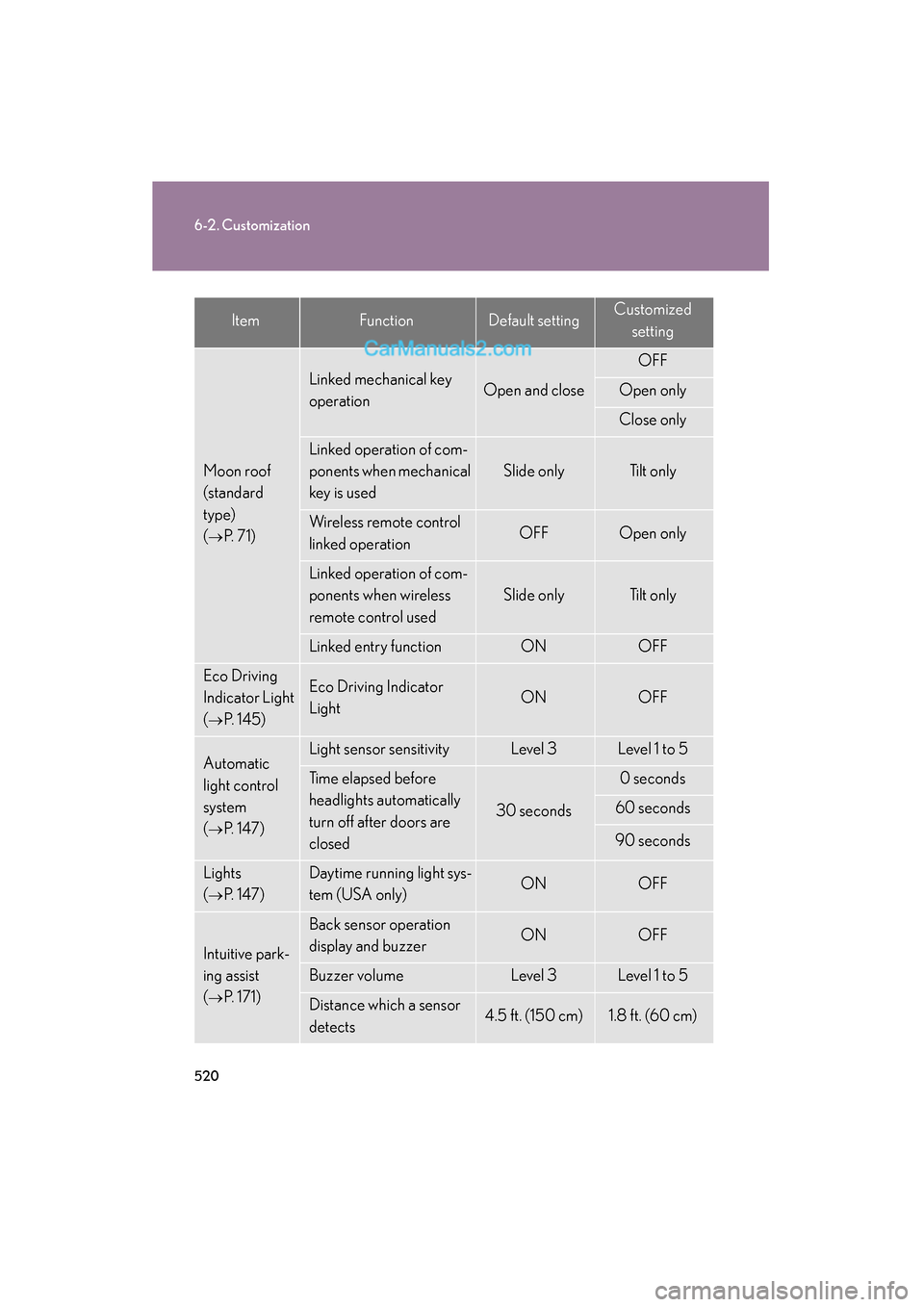
520
6-2. Customization
ES350_U
Moon roof
(standard
type)
(
→P. 71)
Linked mechanical key
operationOpen and close
OFF
Open only
Close only
Linked operation of com-
ponents when mechanical
key is used
Slide onlyTilt only
Wireless remote control
linked operationOFFOpen only
Linked operation of com-
ponents when wireless
remote control used
Slide onlyTilt only
Linked entry functionONOFF
Eco Driving
Indicator Light
(
→P. 1 4 5 )
Eco Driving Indicator
LightONOFF
Automatic
light control
system
(
→P. 147)
Light sensor sensitivityLevel 3Level 1 to 5
Time elapsed before
headlights automatically
turn off after doors are
closed
30 seconds
0 seconds
60 seconds
90 seconds
Lights
(
→P. 147)
Daytime running light sys-
tem (USA only)ONOFF
Intuitive park-
ing assist
(
→P. 171)
Back sensor operation
display and buzzerONOFF
Buzzer volumeLevel 3Level 1 to 5
Distance which a sensor
detects4.5 ft. (150 cm)1.8 ft. (60 cm)
ItemFunctionDefault settingCustomizedsetting