navigation Lexus ES350 2011 Owner's Manuals
[x] Cancel search | Manufacturer: LEXUS, Model Year: 2011, Model line: ES350, Model: Lexus ES350 2011Pages: 563, PDF Size: 6.72 MB
Page 17 of 563
ES350_U
15
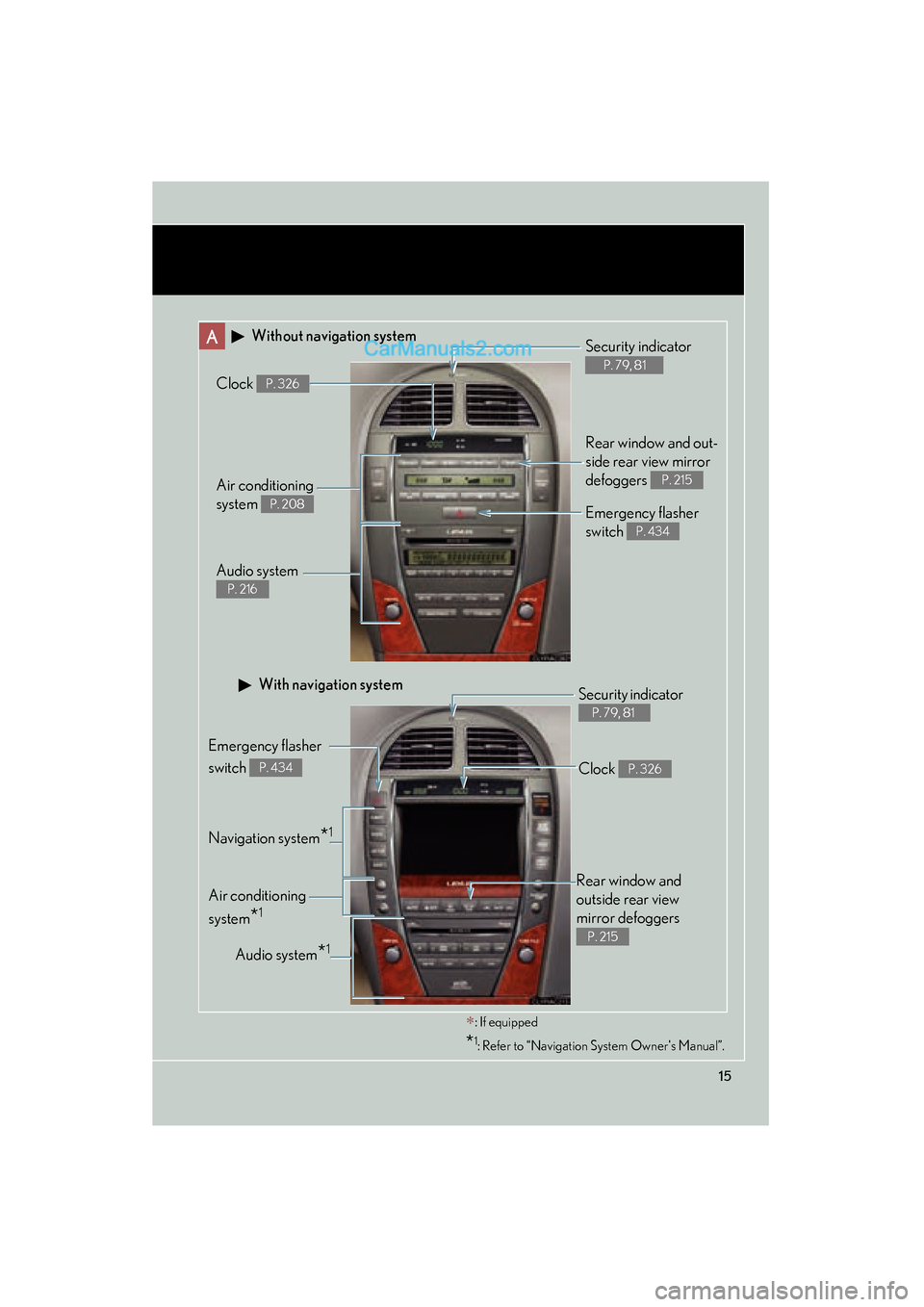
A Without navigation system
Navigation system*1
Clock P. 326
Audio system
P. 216
Air conditioning
system
P. 208
Rear window and out-
side rear view mirror
defoggers
P. 215
Security indicator
P. 79, 81
Emergency flasher
switch
P. 434
Audio system*1
Security indicator
P. 79, 81
Emergency flasher
switch
P. 434
Air conditioning
system
*1
With navigation system
∗: If equipped
*1: Refer to “Navigation System Owner's Manual”.
Rear window and
outside rear view
mirror defoggers
P. 215
Clock P. 326
Page 19 of 563
ES350_U
17
C
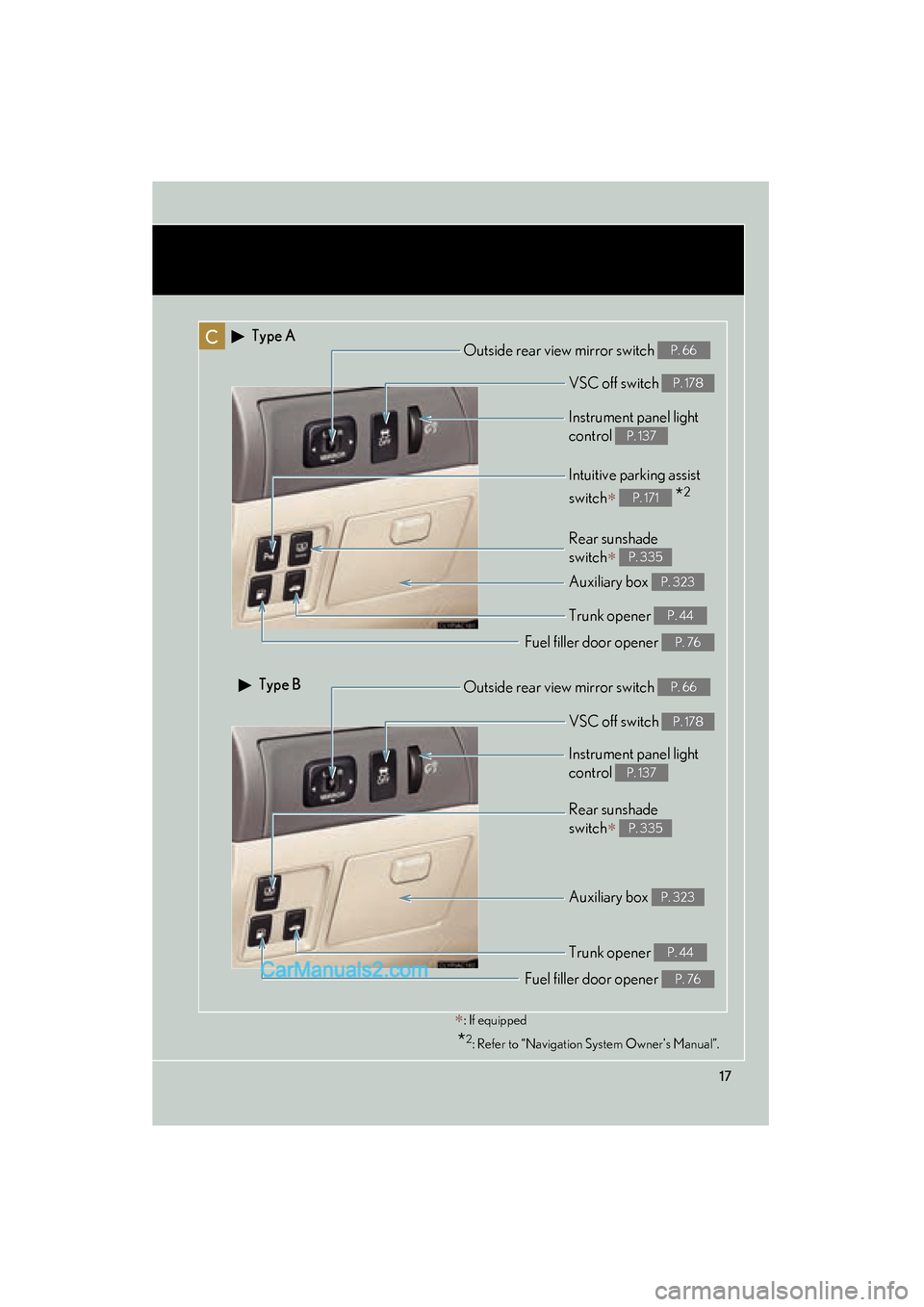
Rear sunshade
switch
∗ P. 335
Intuitive parking assist
switch
∗ *2P. 171
Instrument panel light
control
P. 137
∗: If equipped
*2: Refer to “Navigation System Owner's Manual”.
Outside rear view mirror switch P. 66
Auxiliary box P. 323
Type A
Type B
Trunk opener P. 44
Fuel filler door opener P. 76
Rear sunshade
switch
∗ P. 335
Instrument panel light
control
P. 137
Outside rear view mirror switch P. 66
Auxiliary box P. 323
Trunk opener P. 44
Fuel filler door opener P. 76
VSC off switch P. 178
VSC off switch P. 178
Page 44 of 563
42
1-2. Opening, closing and locking the doors and trunk
ES350_U■
Setting and canceling the functions (vehicles without a navigation
system only)
To switch between setting and canceling, follow the procedure below:
Close all the doors and switch the “ENGINE START STOP”
switch to IGNITION ON mode. (Perform the step 2 within 10
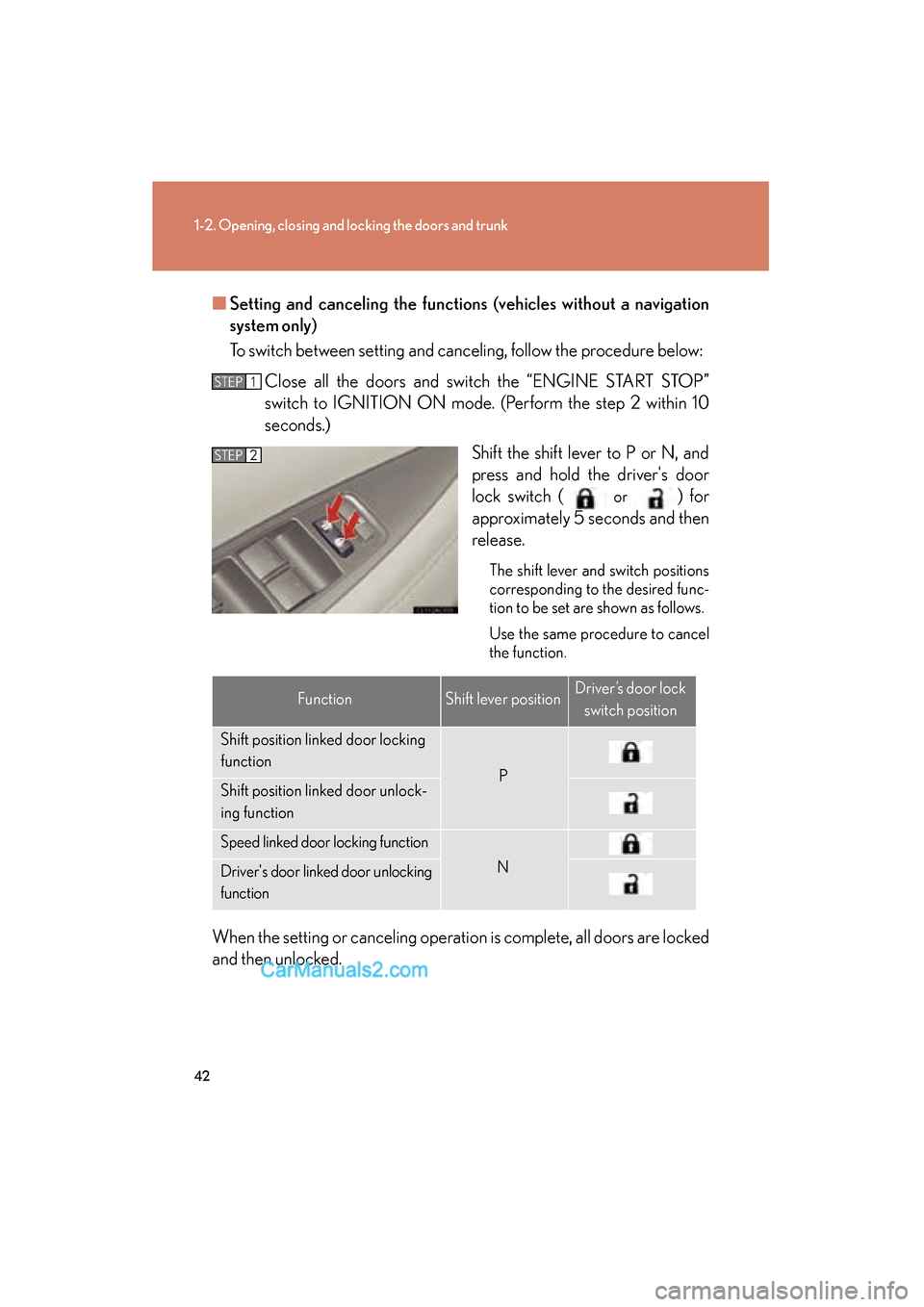
seconds.) Shift the shift lever to P or N, and
press and hold the driver's door
lock switch (
or ) for
approximately 5 seconds and then
release.
The shift lever and switch positions
corresponding to the desired func-
tion to be set are shown as follows.
Use the same procedure to cancel
the function.
When the setting or canceling operation is complete, all doors are locked
and then unlocked.
STEP1
STEP2
FunctionShift lever positionDriver’s door lock
switch position
Shift position linked door locking
function
PShift position linked door unlock-
ing function
Speed linked door locking function
NDriver's door linked door unlocking
function
Page 99 of 563
97
1
1-7. Safety information
Before driving
ES350_U
Front passenger occupant classification system
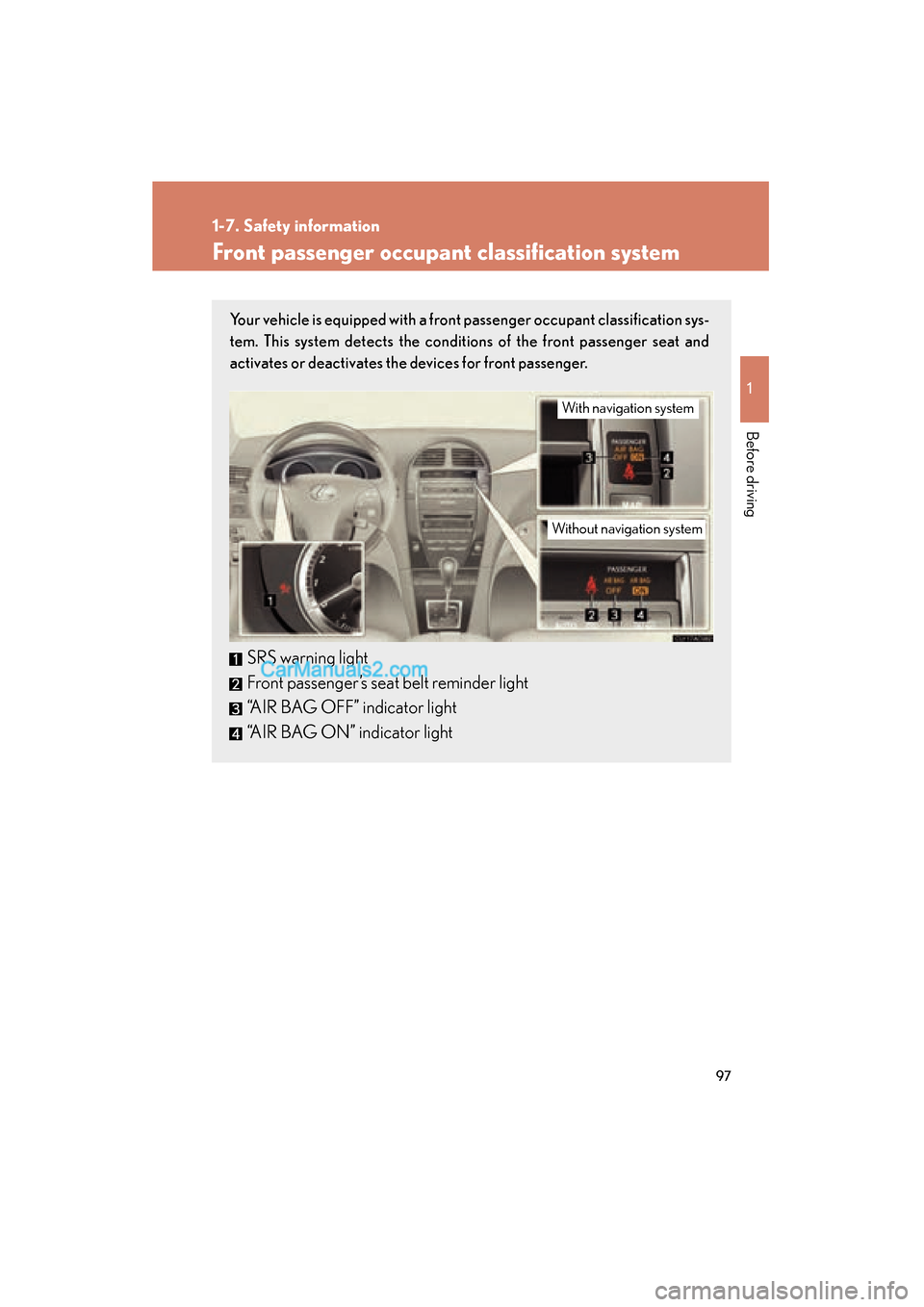
Your vehicle is equipped with a front passenger occupant classification sys-
tem. This system detects the conditions of the front passenger seat and
activates or deactivates the devices for front passenger.
SRS warning light
Front passenger’s seat belt reminder light
“AIR BAG OFF” indicator light
“AIR BAG ON” indicator light
With navigation system
Without navigation system
Page 141 of 563
139
2-2. Instrument cluster
2
When driving
ES350_U
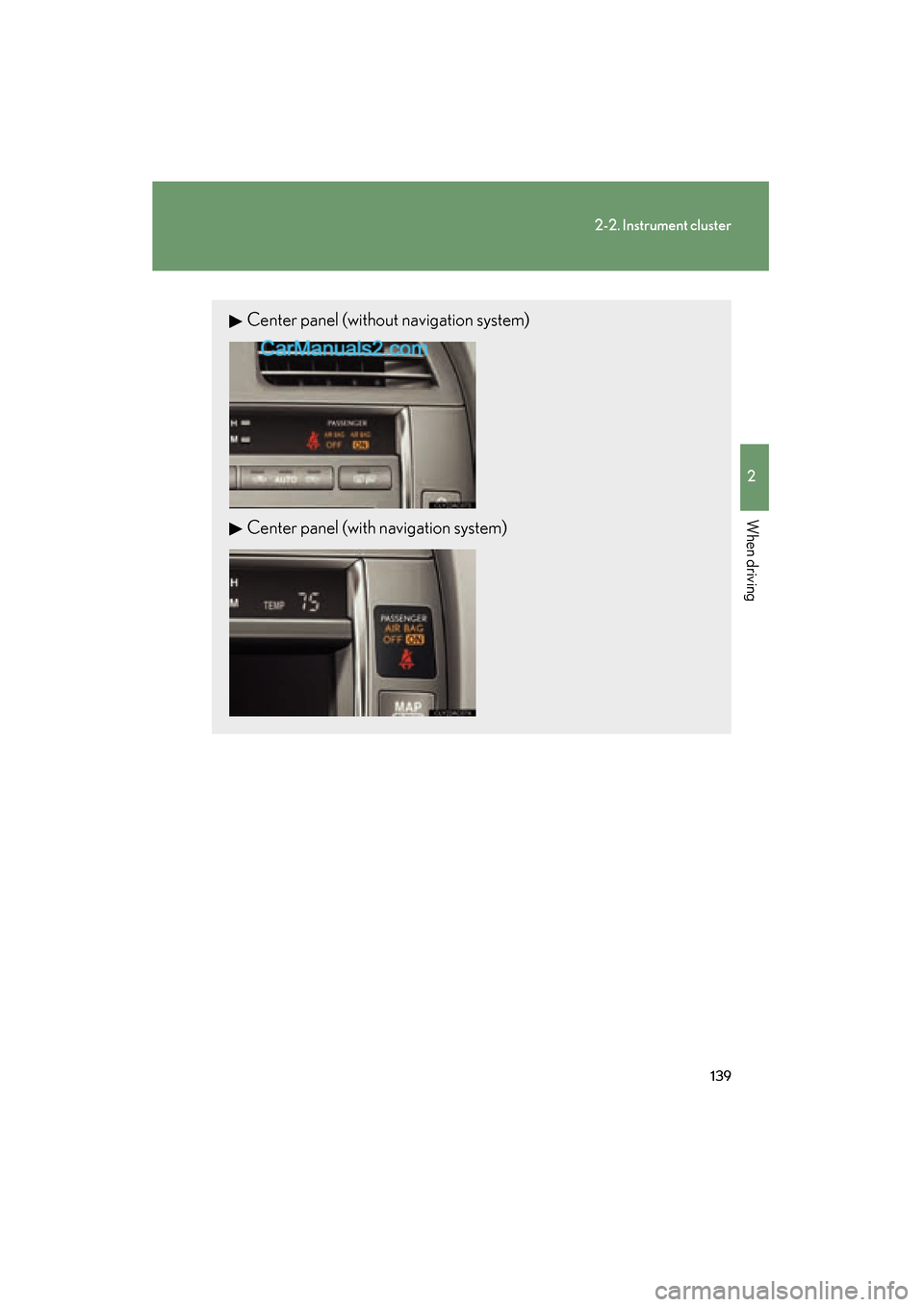
Center panel (without navigation system)
Center panel (with navigation system)
Page 142 of 563
140
2-2. Instrument cluster
ES350_U
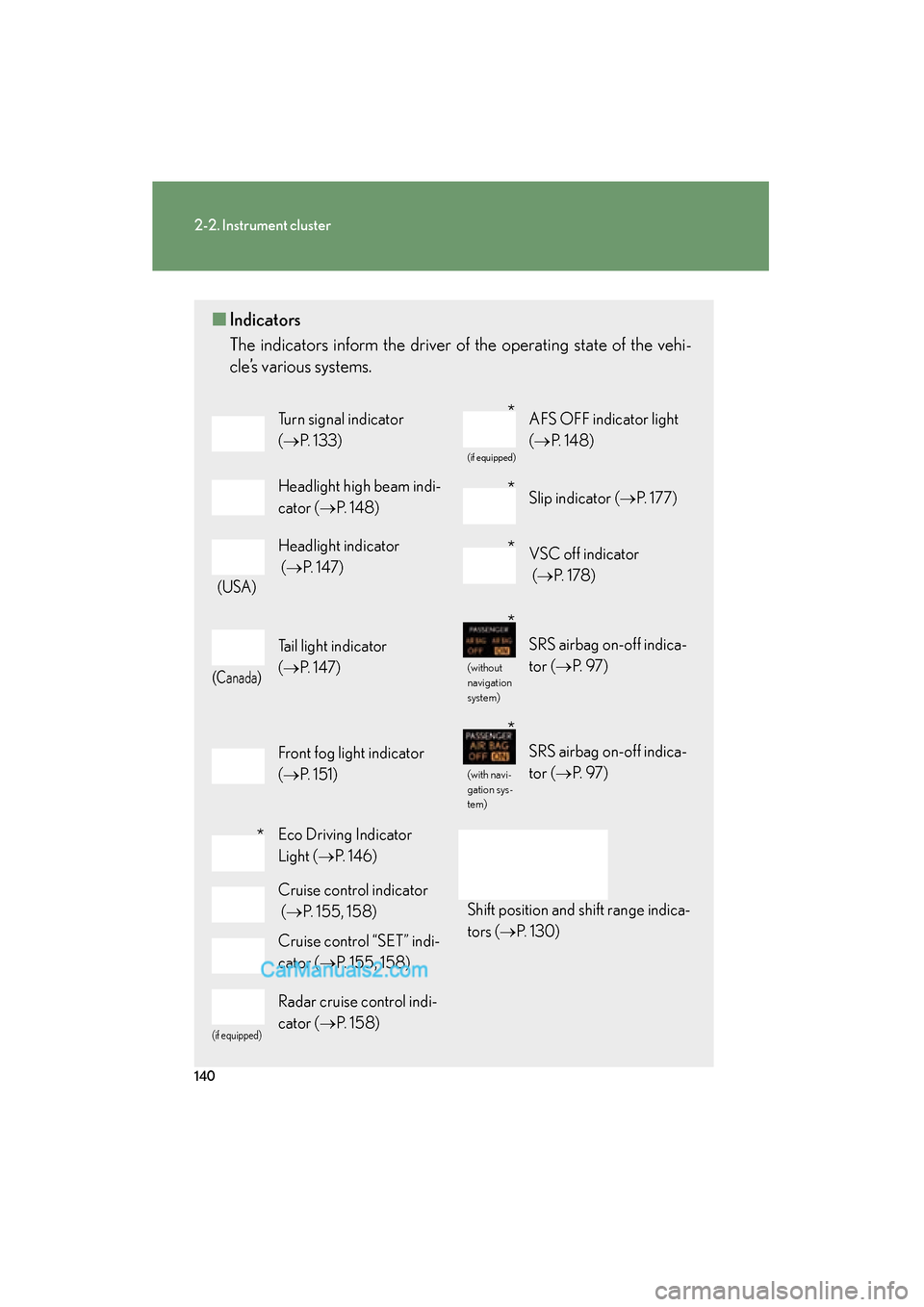
■Indicators
The indicators inform the driver of the operating state of the vehi-
cle’s various systems.
Turn signal indicator
(→ P. 1 3 3 )
(if equipped)
AFS OFF indicator light
(→ P. 1 4 8 )
Headlight high beam indi-
cator ( →P. 1 4 8 )Slip indicator ( →P. 177)
(USA)
Headlight indicator
(→ P. 147)VSC off indicator
(→ P. 1 7 8 )
(Canada)
Tail light indicator
(→ P. 147)
(without
navigation
system)
SRS airbag on-off indica-
tor (→ P. 9 7 )
Front fog light indicator
(→ P. 1 5 1 )
(with navi-
gation sys-
tem)
SRS airbag on-off indica-
tor (→ P. 9 7 )
Eco Driving Indicator
Light (→P. 1 4 6 )
Shift position and shift range indica-
tors ( →P. 1 3 0 )
Cruise control indicator
(→ P. 155, 158)
Cruise control “SET” indi-
cator ( →P. 155, 158)
(if equipped)
Radar cruise control indi-
cator ( →P. 1 5 8 )
*
*
*
*
*
*
Page 143 of 563

141
2-2. Instrument cluster
2
When driving
ES350_U
CAUTION
■If a safety system warning light does not come on
Should a safety system light such as the ABS and SRS airbag warning lights not
come on when you start the engine, this could mean that these systems are not
available to help protect you in an accident, which could result in death or serious
injury. Have the vehicle inspected by your Lexus dealer immediately if this occurs.
■Warning lights
Warning lights inform the driver of malfunctions or suspected prob-
lem in any of the vehicle’s systems. ( →P. 4 4 5 )
*: These lights turn on when the “ENGINE START STOP” switch is turned
to IGNITION ON mode to indicate that a system check is being per-
formed. They will turn off after the engine is started, or after a few sec-
onds. There may be a malfunction in a system if a light does not come on,
or if the lights do not turn off. Have the vehicle inspected by your Lexus
dealer.
(USA)(Canada)(USA)(Canada)
(USA)(Canada)(if equipped)(without
navigation system)(with naviga-
tion system)
******
*****
Page 173 of 563
171
2-4. Using other driving systems
2
When driving
ES350_U
Intuitive parking assist∗
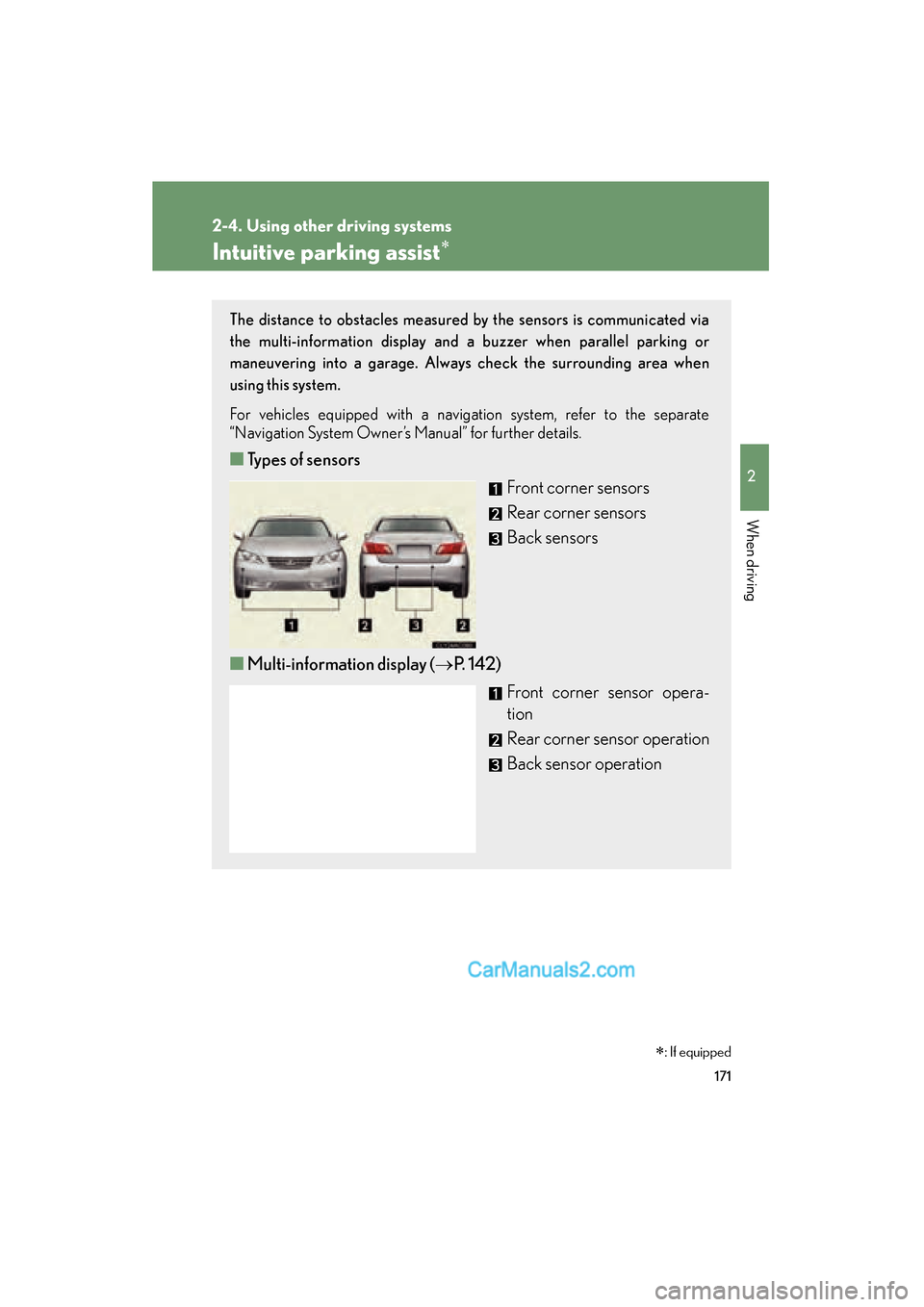
The distance to obstacles measured by the sensors is communicated via
the multi-information display and a buzzer when parallel parking or
maneuvering into a garage. Always check the surrounding area when
using this system.
For vehicles equipped with a navigation system, refer to the separate
“Navigation System Owner’s Manual” for further details.
■Types of sensors
Front corner sensors
Rear corner sensors
Back sensors
■ Multi-information display ( →P. 142)
Front corner sensor opera-
tion
Rear corner sensor operation
Back sensor operation
∗: If equipped
Page 210 of 563
208
ES350_U
3-1. Using the air conditioning system and defogger
Automatic air conditioning system
Using the automatic modePress .The air conditioning system will begin to operate. Air outlets
and fan speed are automatically adjusted according to the
temperature setting.
Press to switch to automatic mode. Automatically switches between outside air and recirculated
air modes.
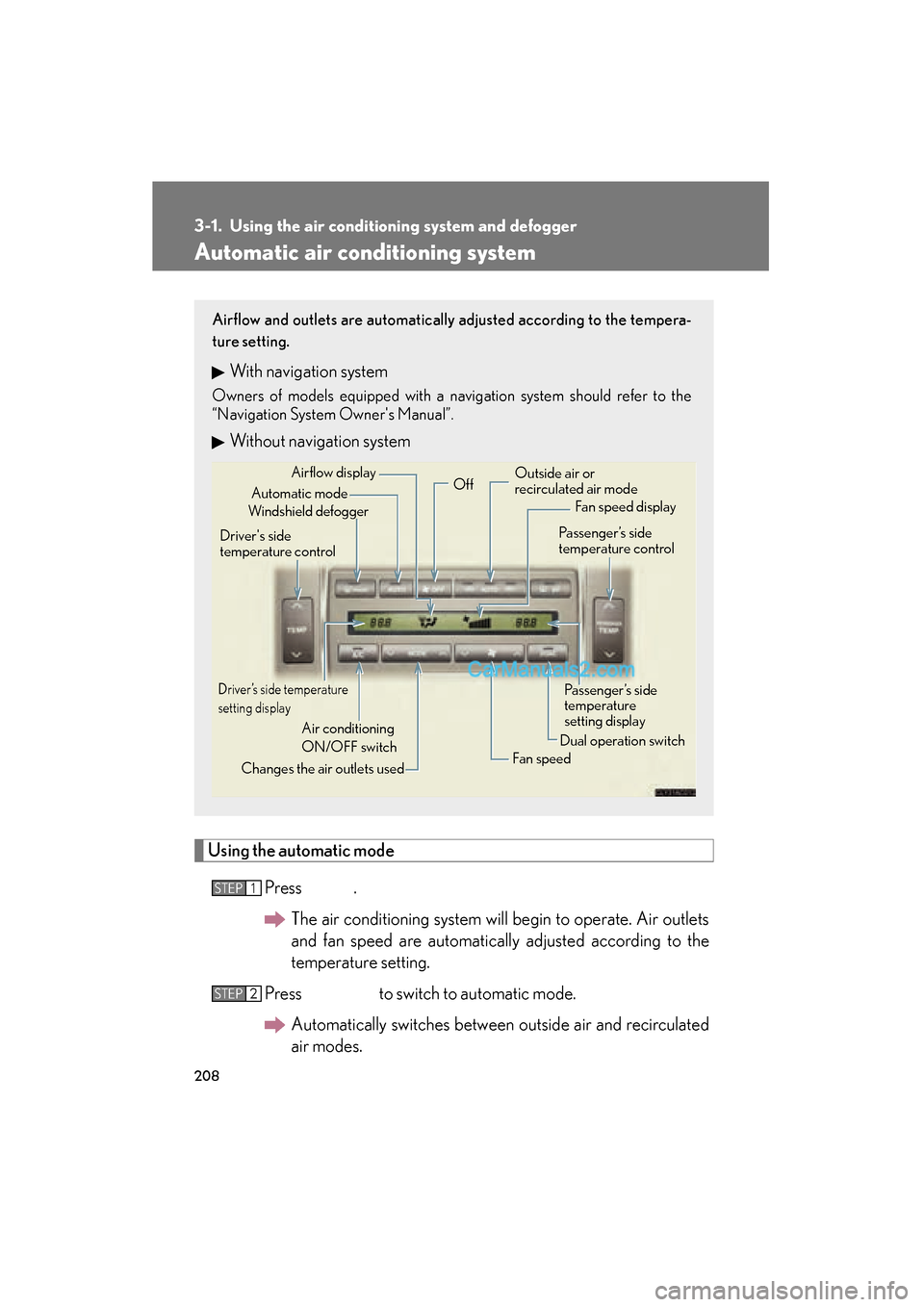
Airflow and outlets are automatically adjusted according to the tempera-
ture setting.
With navigation system
Owners of models equipped with a navigation system should refer to the
“Navigation System Owner's Manual”.
Without navigation system
Automatic mode
Driver’s side temperature
setting display
Changes the air outlets used Off
Fan speed
Airflow display
Fan speed display
Passenger’s side
temperature
setting display
Driver's side
temperature control
Air conditioning
ON/OFF switch Outside air or
recirculated air mode
Windshield defogger Passenger’s side
temperature control
Dual operation switch
STEP1
STEP2
Page 217 of 563
215
3-1. Using the air conditioning system and defogger
3
Interior features
ES350_U
Rear window and outside rear view mirror defoggers
CAUTION
■When the outside rear view mirror defoggers are on
Do not touch the outside surface of the rear view mirror, as it can become very hot
and burn you.
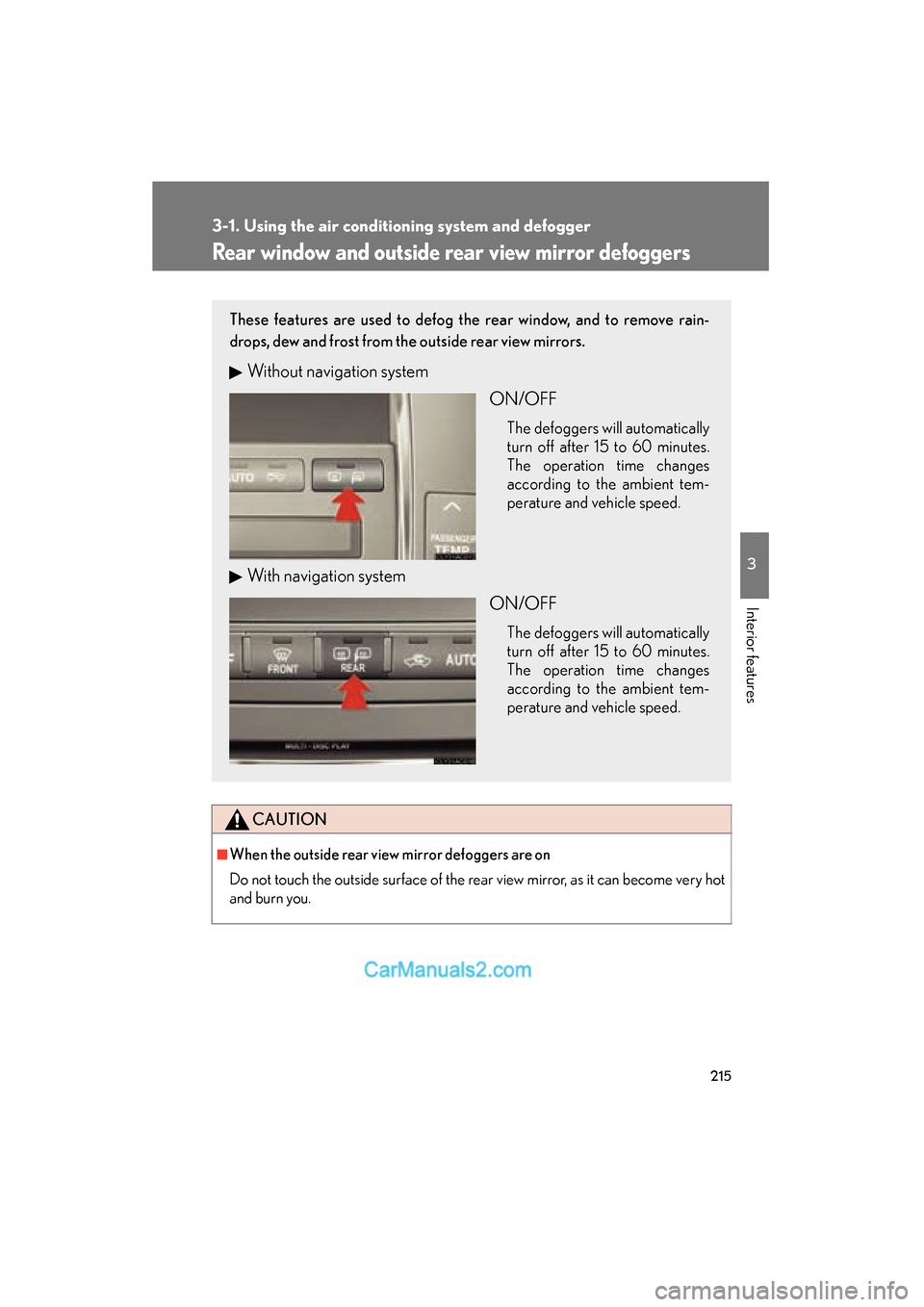
These features are used to defog the rear window, and to remove rain-
drops, dew and frost from the outside rear view mirrors.
Without navigation system ON/OFF
The defoggers will automatically
turn off after 15 to 60 minutes.
The operation time changes
according to the ambient tem-
perature and vehicle speed.
With navigation systemON/OFF
The defoggers will automatically
turn off after 15 to 60 minutes.
The operation time changes
according to the ambient tem-
perature and vehicle speed.