lock Lexus ES350 2012 Owner's Manual
[x] Cancel search | Manufacturer: LEXUS, Model Year: 2012, Model line: ES350, Model: Lexus ES350 2012Pages: 554, PDF Size: 6.43 MB
Page 473 of 554
472
5-2. Steps to take in an emergency
ES350_U
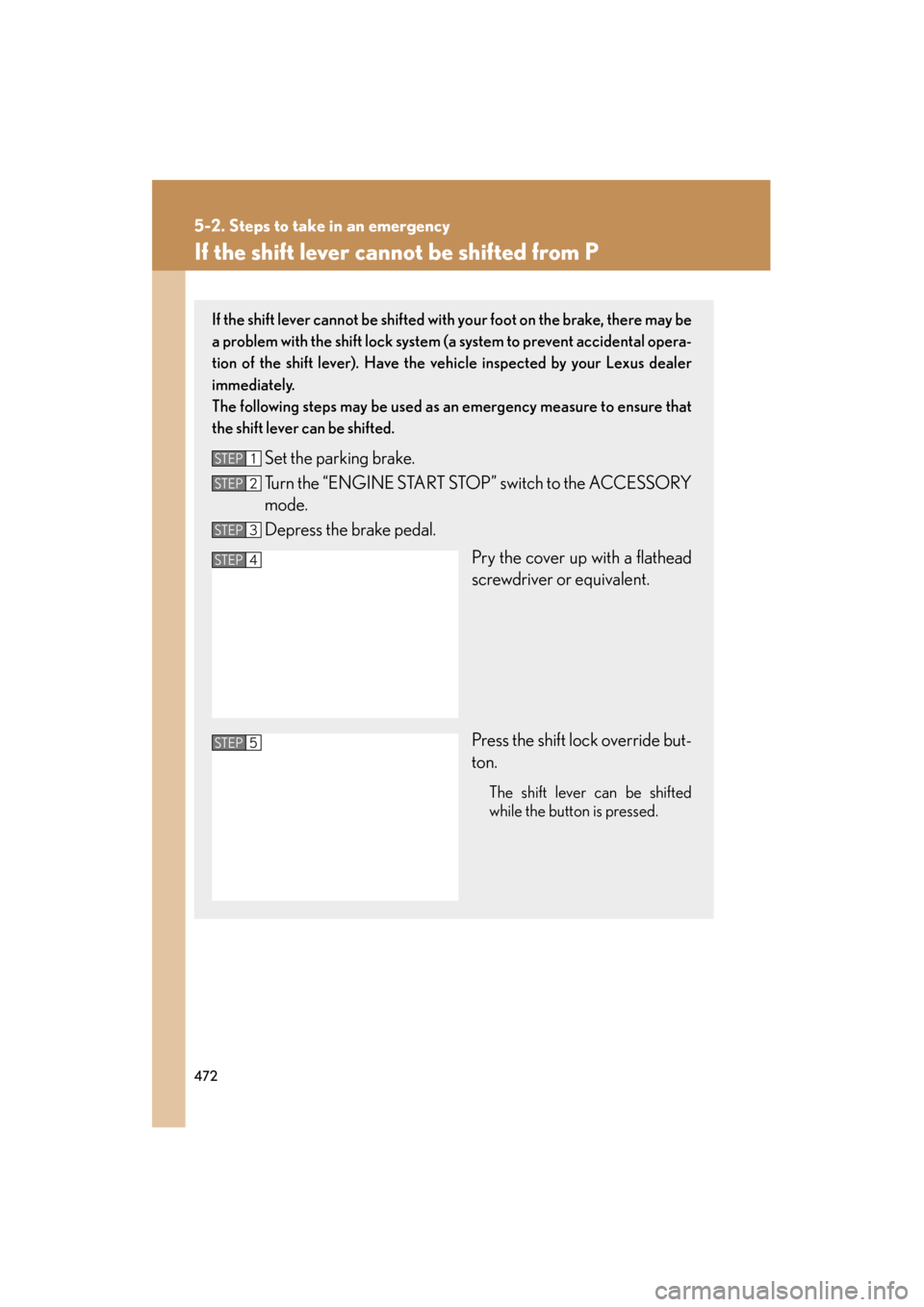
If the shift lever cannot be shifted from P
If the shift lever cannot be shifted with your foot on the brake, there may be
a problem with the shift lock system (a system to prevent accidental opera-
tion of the shift lever). Have the vehicle inspected by your Lexus dealer
immediately.
The following steps may be used as an emergency measure to ensure that
the shift lever can be shifted.
Set the parking brake.
Turn the “ENGINE START STOP” switch to the ACCESSORY
mode.
Depress the brake pedal.
Pry the cover up with a flathead
screwdriver or equivalent.
Press the shift lock override but-
ton.
The shift lever can be shifted
while the button is pressed.
STEP1
STEP2
STEP3
STEP4
STEP5
Page 475 of 554
474
5-2. Steps to take in an emergency
ES350_U
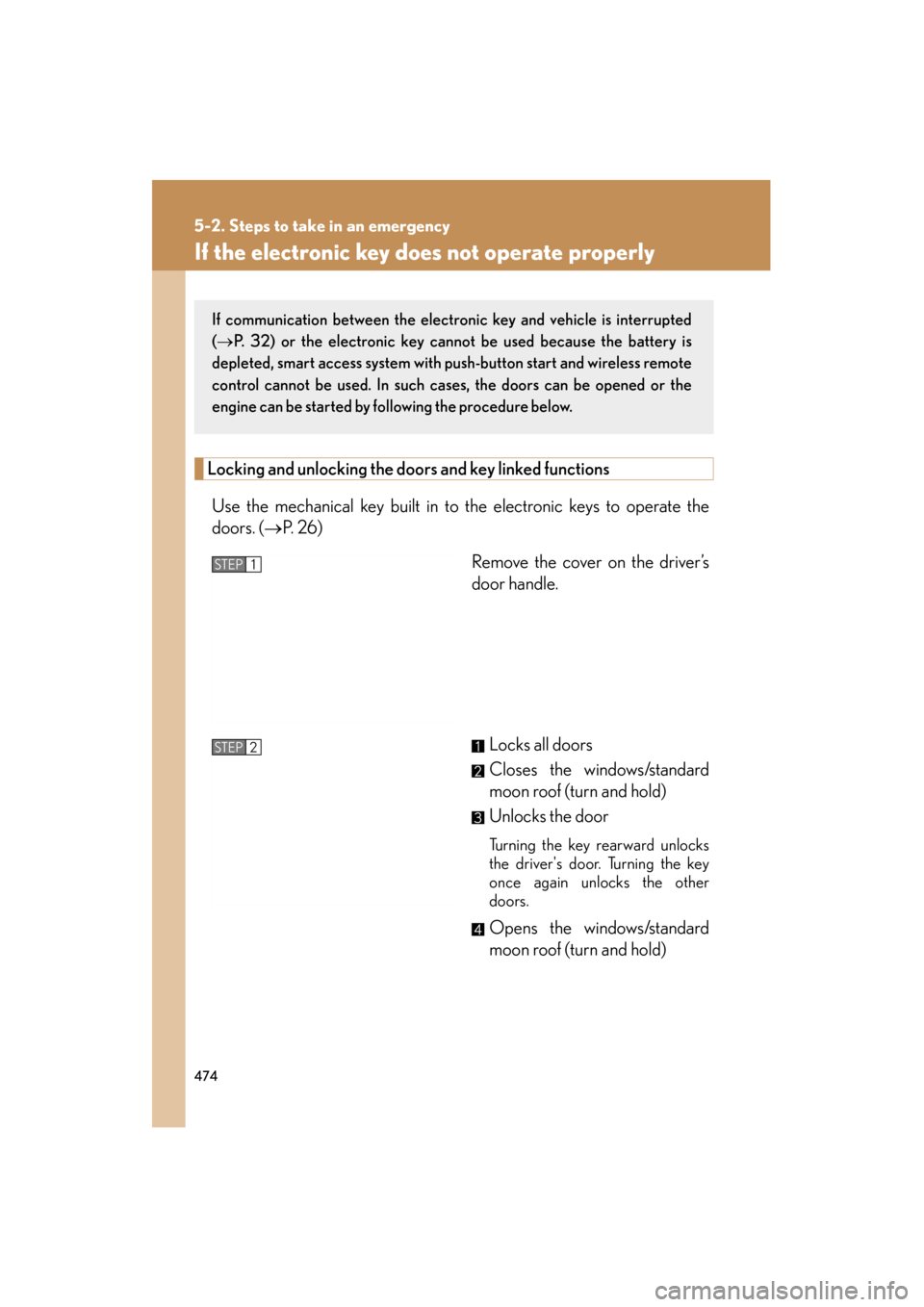
If the electronic key does not operate properly
Locking and unlocking the doors and key linked functions
Use the mechanical key built in to the electronic keys to operate the
doors. (→ P. 2 6 )
Remove the cover on the driver’s
door handle.
Locks all doors
Closes the windows/standard
moon roof (turn and hold)
Unlocks the door
Tu r n i n g t h e k e y r e a r w a r d u n l o c k s
the driver's door. Turning the key
once again unlocks the other
doors.
Opens the windows/standard
moon roof (turn and hold)
If communication between the electronic key and vehicle is interrupted
(→ P. 32) or the electronic key cann ot be used because the battery is
depleted, smart access system with push-button start and wireless remote
control cannot be used. In such cases, the doors can be opened or the
engine can be started by following the procedure below.
STEP1
STEP2
Page 488 of 554
487
6-1. Specifications
6
Vehicle specifications
ES350_U
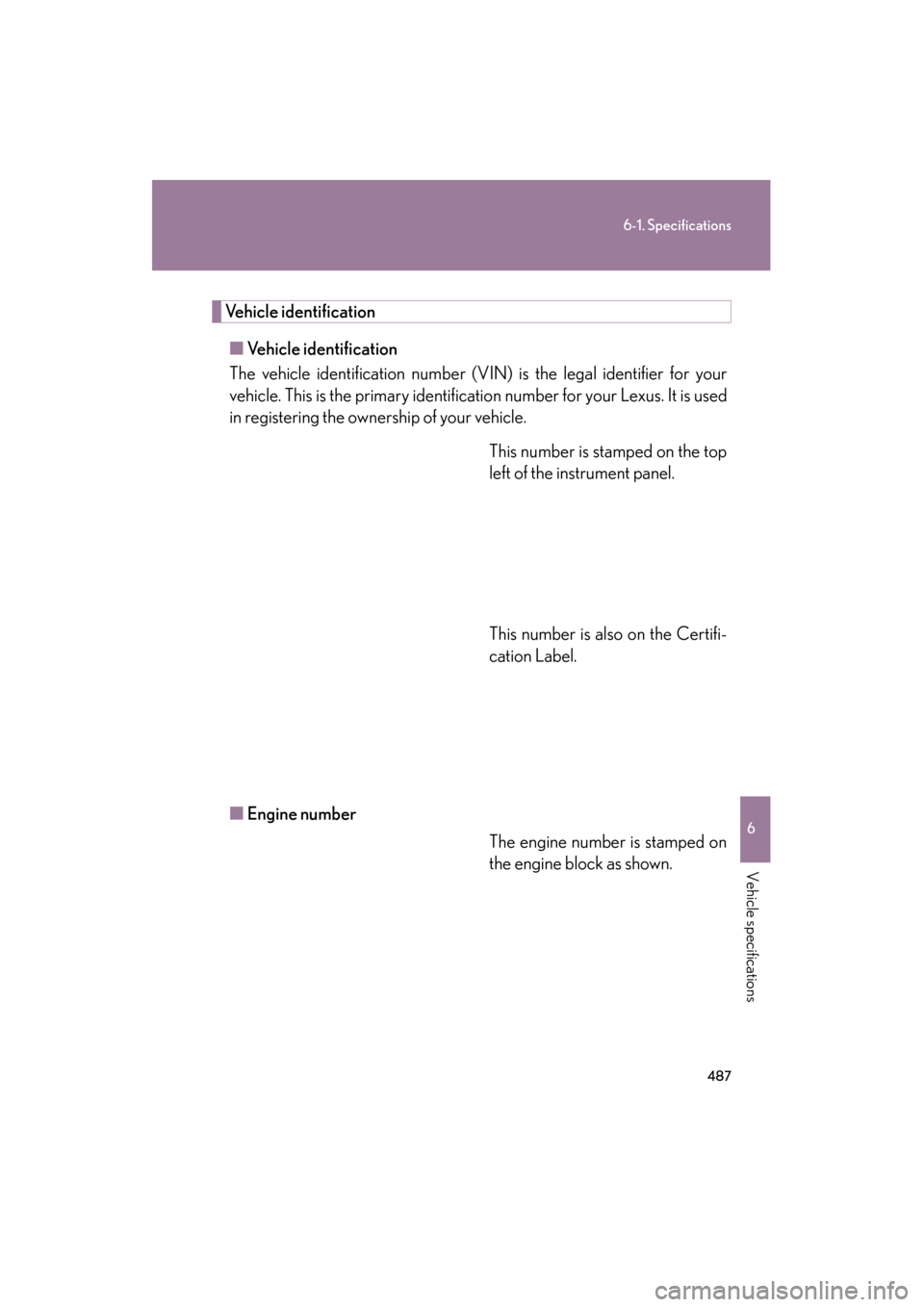
Vehicle identification■ Vehicle identification
The vehicle identification number (V IN) is the legal identifier for your
vehicle. This is the primary identification number for your Lexus. It is used
in registering the ownership of your vehicle.
This number is stamped on the top
left of the instrument panel.
This number is also on the Certifi-
cation Label.
■ Engine number
The engine number is stamped on
the engine block as shown.
Page 493 of 554
492
6-1. Specifications
ES350_U
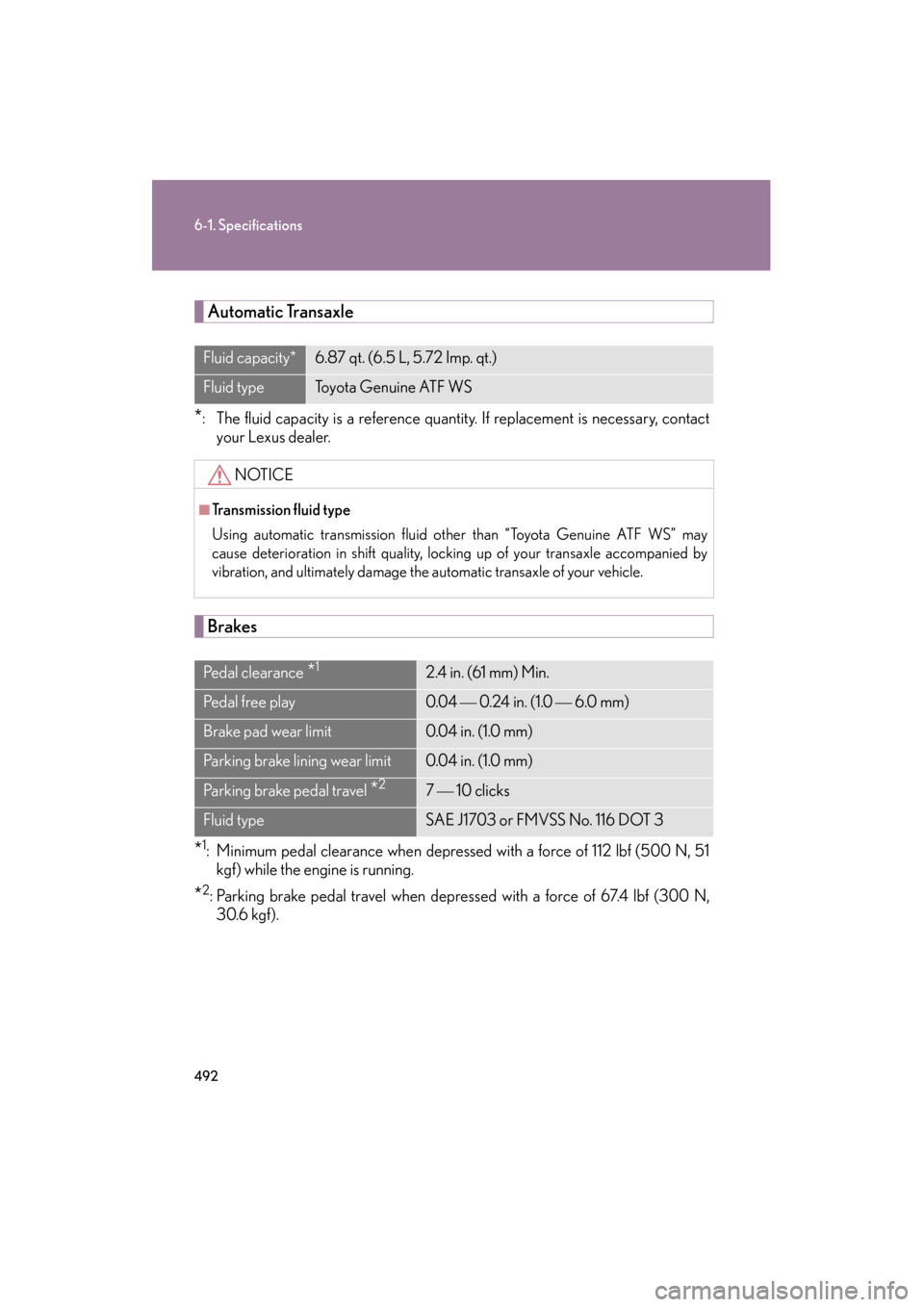
Automatic Transaxle
*: The fluid capacity is a reference quantity. If replacement is necessary, contact
your Lexus dealer.
Brakes
*1: Minimum pedal clearance when depressed with a force of 112 lbf (500 N, 51kgf) while the engine is running.
*2: Parking brake pedal travel when depressed with a force of 67.4 lbf (300 N,30.6 kgf).
Fluid capacity*6.87 qt. (6.5 L, 5.72 Imp. qt.)
Fluid typeTo y o t a G e n u i n e AT F W S
NOTICE
■Transmission fluid type
Using automatic transmission fluid other than “Toyota Genuine ATF WS” may
cause deterioration in shift quality, locking up of your transaxle accompanied by
vibration, and ultimately damage the automatic transaxle of your vehicle.
Pe d a l c l e a r a n c e *12.4 in. (61 mm) Min.
Pedal free play0.04 0.24 in. (1.0 6.0 mm)
Brake pad wear limit0.04 in. (1.0 mm)
Parking brake lining wear limit0.04 in. (1.0 mm)
Parking brake pedal travel *27 10 clicks
Fluid typeSAE J1703 or FMVSS No. 116 DOT 3
Page 513 of 554
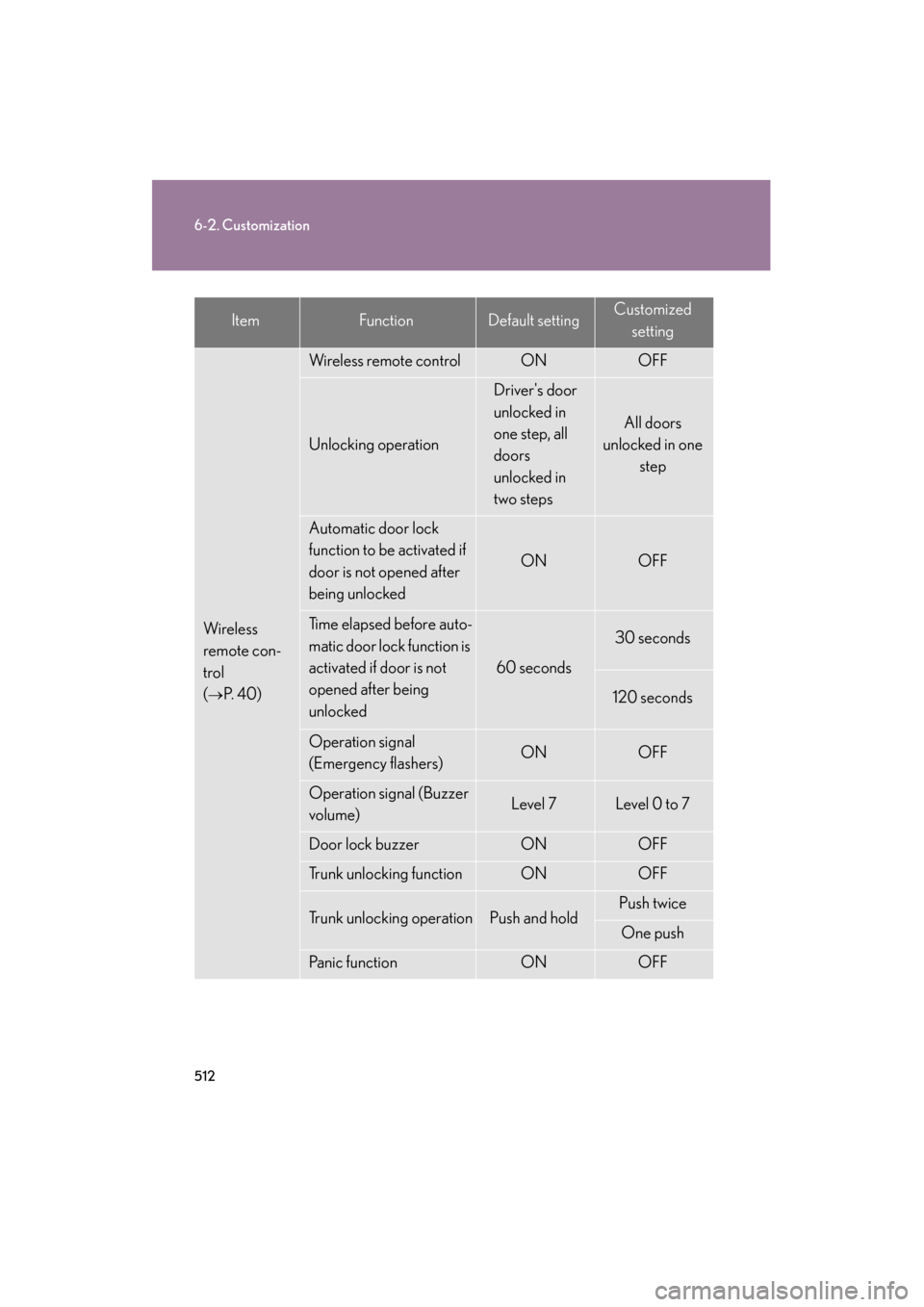
512
6-2. Customization
ES350_U
Wi re le ss
remote con-
trol
(
→P. 4 0 )
Wireless remote controlONOFF
Unlocking operation
Driver's door
unlocked in
one step, all
doors
unlocked in
two steps
All doors
unlocked in one step
Automatic door lock
function to be activated if
door is not opened after
being unlocked
ONOFF
Time elapsed before auto-
matic door lock function is
activated if door is not
opened after being
unlocked
60 seconds
30 seconds
120 seconds
Operation signal
(Emergency flashers)ONOFF
Operation signal (Buzzer
volume)Level 7Level 0 to 7
Door lock buzzerONOFF
Trunk unlocking functionONOFF
Trunk unlocking operationPush and holdPush twice
One push
Panic functionONOFF
ItemFunctionDefault settingCustomized
setting
Page 514 of 554
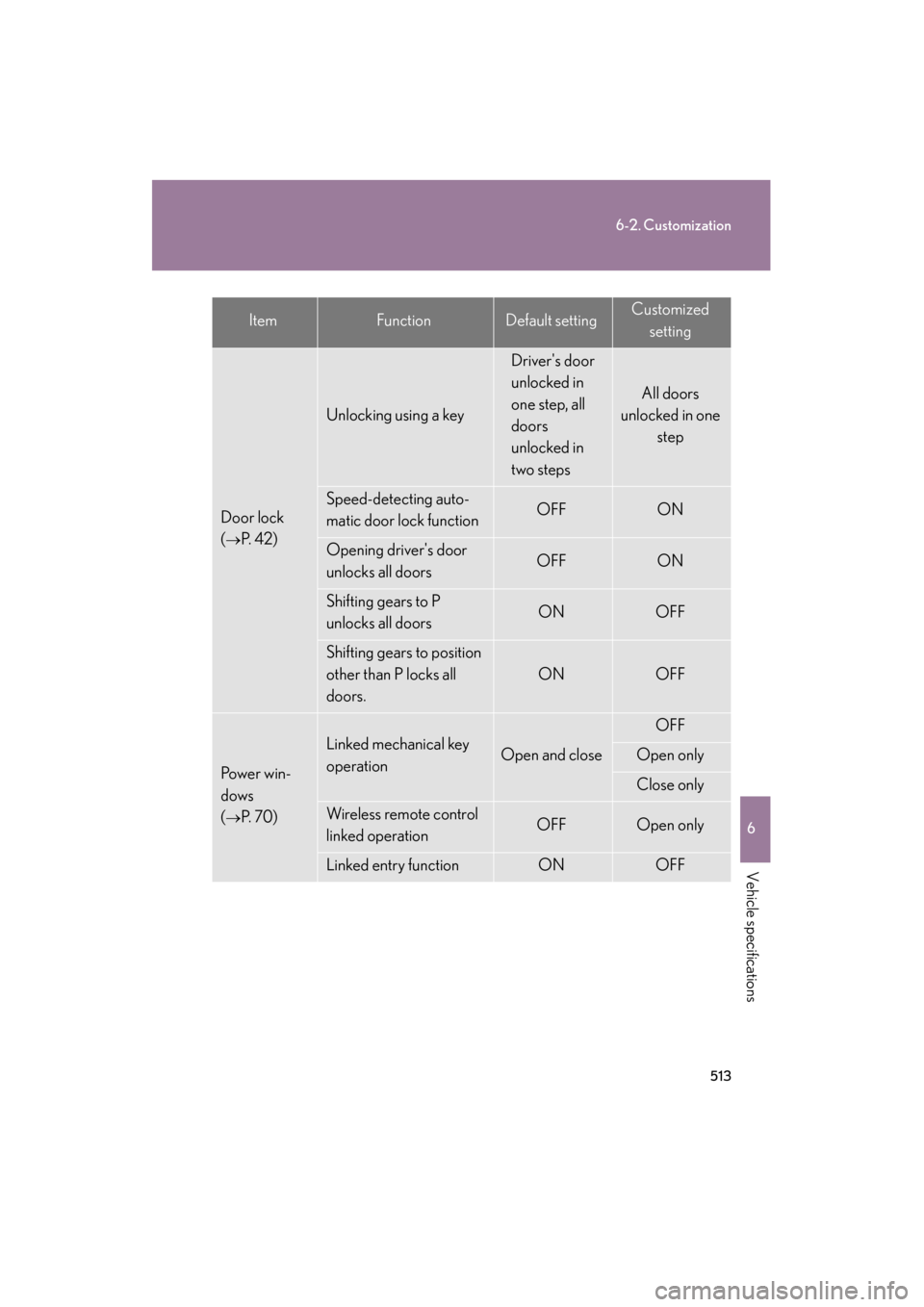
513
6-2. Customization
6
Vehicle specifications
ES350_U
Door lock
(
→P. 4 2 )
Unlocking using a key
Driver's door
unlocked in
one step, all
doors
unlocked in
two steps
All doors
unlocked in one
step
Speed-detecting auto-
matic door lock functionOFFON
Opening driver's door
unlocks all doorsOFFON
Shifting gears to P
unlocks all doorsONOFF
Shifting gears to position
other than P locks all
doors.
ONOFF
Po w e r w i n -
dows
(
→P. 7 0 )
Linked mechanical key
operationOpen and close
OFF
Open only
Close only
Wireless remote control
linked operationOFFOpen only
Linked entry functionONOFF
ItemFunctionDefault settingCustomizedsetting
Page 516 of 554

515
6-2. Customization
6
Vehicle specifications
ES350_U
Multi-information display (→P. 144)
Illumination
(
→P. 3 1 2 )
Time elapsed before lights
turn off15 seconds
OFF
7. 5 s e c o n d s
30 seconds
Operation when the
doors are unlockedONOFF
Operation after the
“ENGINE START STOP”
switch turned OFF
ONOFF
Front foot well lightingONOFF
Outer foot lightONOFF
Seat belt
reminder
(
→P. 4 4 1 )
Vehicle speed linked seat
belt reminder buzzerONOFF
CountryAv a i l a b l e l a n g u a g e s
CanadaEnglish and French
ItemFunctionDefault settingCustomized
setting
Page 517 of 554

516
6-2. Customization
ES350_U
Settings that can be customized using the navigation system display
You can customize the following settings using the navigation system dis-
play.
(For further information on customizing settings using the navigation sys-
tem display, refer to the Navigation System Owner’s Manual.)
ItemFunctionDefault settingCustomized setting
Smart access
system with
push-button
start
(
→P. 2 8 )
Smart access system with
push-button startONOFF
Smart door unlocking Driver’s doorAll the doors
Time elapsed before auto-
matic door lock function is
activated if door is not
opened after being
unlocked
60 seconds
OFF
30 seconds
120 seconds
Operating signal
(Emergency flashers)ONOFF
Wi re le ss
remote con-
trol
(
→P. 4 0 )
Unlocking operation
Driver's door
unlocked in
one step, all
doors
unlocked in
two steps
All doors
unlocked in one
step
Time elapsed before auto-
matic door lock function is
activated if door is not
opened after being
unlocked
60 seconds
OFF
30 seconds
120 seconds
Operation signal
(Emergency flashers)ONOFF
Page 518 of 554

517
6-2. Customization
6
Vehicle specifications
ES350_U
Door lock
(
→P. 4 2 )
Unlocking using a key
Driver's door
unlocked in
one step, all
doors
unlocked in
two steps
All doors
unlocked in one
step
Speed-detecting auto-
matic door lock functionOFFON
Opening driver's door
unlocks all doorsOFFON
Shifting gears to P
unlocks all doorsONOFF
Shifting gears to position
other than P locks all
doors.
ONOFF
Automatic
light control
system
(
→P. 1 4 9 )
Light sensor sensitivityLevel 3Level 1 to 5
Time elapsed before
headlights automatically
turn off after doors are
closed
30 seconds
0 seconds
60 seconds
90 seconds
Lights
(
→P. 1 4 9 )
Daytime running light sys-
tem (USA only)ONOFF
ItemFunctionDefault settingCustomizedsetting
Page 537 of 554

536
ES350_U
Abbreviation list
Abbreviation/Acronym list
ABBREVIATIONSMEANING
A/CAir Conditioning
ABSAnti-lock Brake System
AFSAdaptive Front lighting System
AI-SHIFTArtificial Intelligence Shift
ALRAutomatic Locking Retractor
CRSChild Restraint System
DISPDisplay
ECUElectronic Control Unit
EDREvent data recorder
ELREmergency Locking Retractor
GAWRGross Axle Weight Ratings
GVWRGross Vehicle Weight Rating
I/MEmission inspection and maintenance
LATCHLower Anchors and Tethers for Children
LEDLight Emitting Diode
MMTMethylcyclopentadienyl Manganese Tricarbonyl
MTBEMethyl Tertiary Butyl Ether
OBDOn Board Diagnostics
PCSPre-Collision System
SRSSupplemental Restraint System
TINTire Identification Number
TPMSTire Pressure Warning System
TRACTr a c t i o n C o n t r o l