audio Lexus ES350 2013 Quick Guide
[x] Cancel search | Manufacturer: LEXUS, Model Year: 2013, Model line: ES350, Model: Lexus ES350 2013Pages: 112, PDF Size: 4.51 MB
Page 85 of 112
84
ES350_QG_OM33A11U_(U)
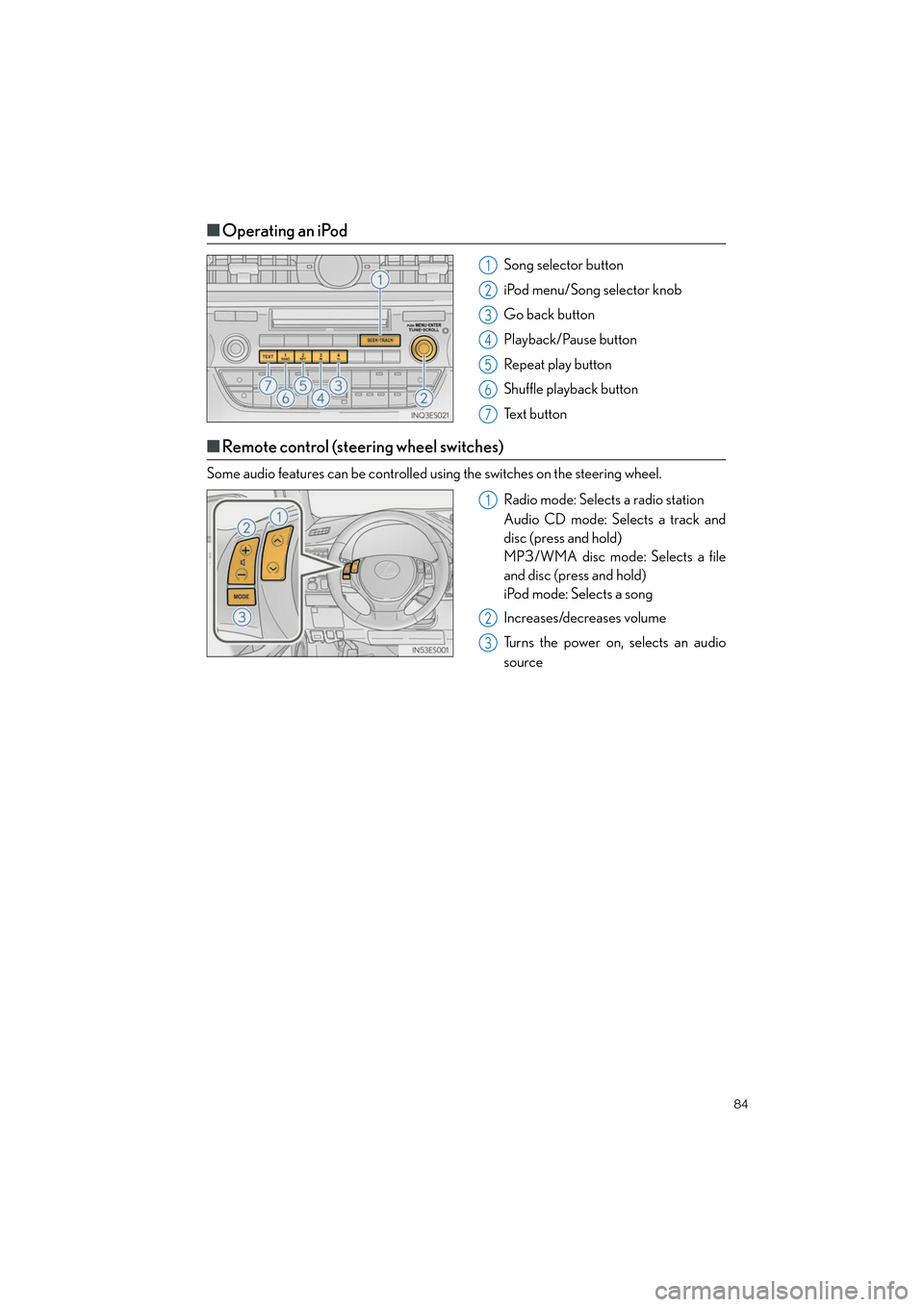
■Operating an iPod
Song selector button
iPod menu/Song selector knob
Go back button
Playback/Pause button
Repeat play button
Shuffle playback button
Text button
■Remote control (steering wheel switches)
Some audio features can be controlled using the switches on the steering wheel.
Radio mode: Selects a radio station
Audio CD mode: Selects a track and
disc (press and hold)
MP3/WMA disc mode: Selects a file
and disc (press and hold)
iPod mode: Selects a song
Increases/decreases volume
Turns the power on, selects an audio
source
1
2
3
4
5
6
7
1
2
3
Page 86 of 112
85
ES350_QG_OM33A11U_(U)
Air Conditioning System (without
navigation system or Lexus Display Audio)
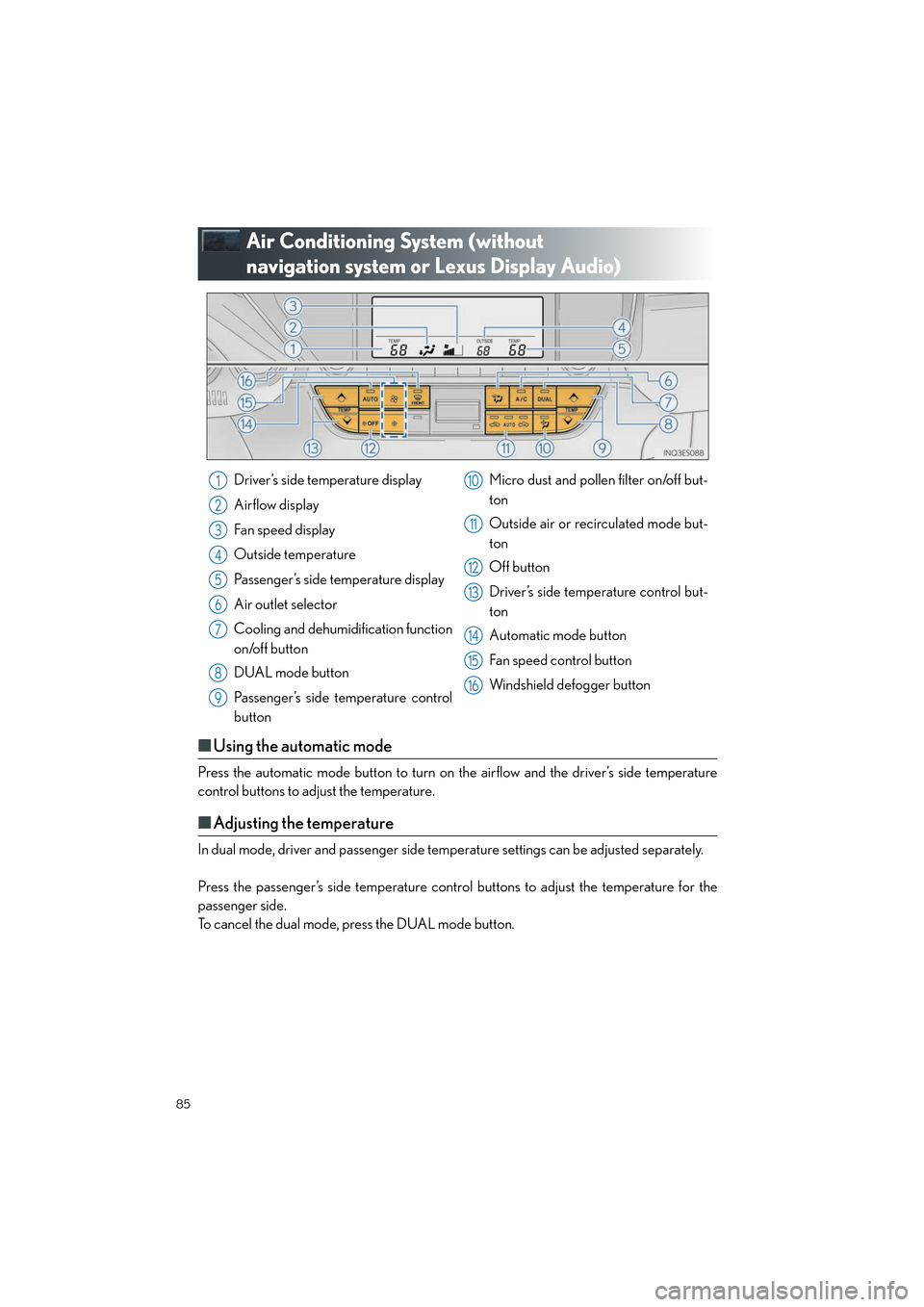
■Using the automatic mode
Press the automatic mode button to turn on the airflow and the driver’s side temperature
control buttons to adjust the temperature.
■Adjusting the temperature
In dual mode, driver and passenger side temperature settings can be adjusted separately.
Press the passenger’s side temperature contro l buttons to adjust the temperature for the
passenger side.
To cancel the dual mode, press the DUAL mode button.
Driver’s side temperature display
Airflow display
Fan speed display
Outside temperature
Passenger’s side temperature display
Air outlet selector
Cooling and dehumidification function
on/off button
DUAL mode button
Passenger’s side temperature control
button Micro dust and pollen filter on/off but-
ton
Outside air or recirculated mode but-
ton
Off button
Driver’s side temperature control but-
ton
Automatic mode button
Fan speed control button
Windshield defogger button1
2
3
4
5
6
7
8
9
10
11
12
13
14
15
16
Page 87 of 112
86
ES350_QG_OM33A11U_(U)
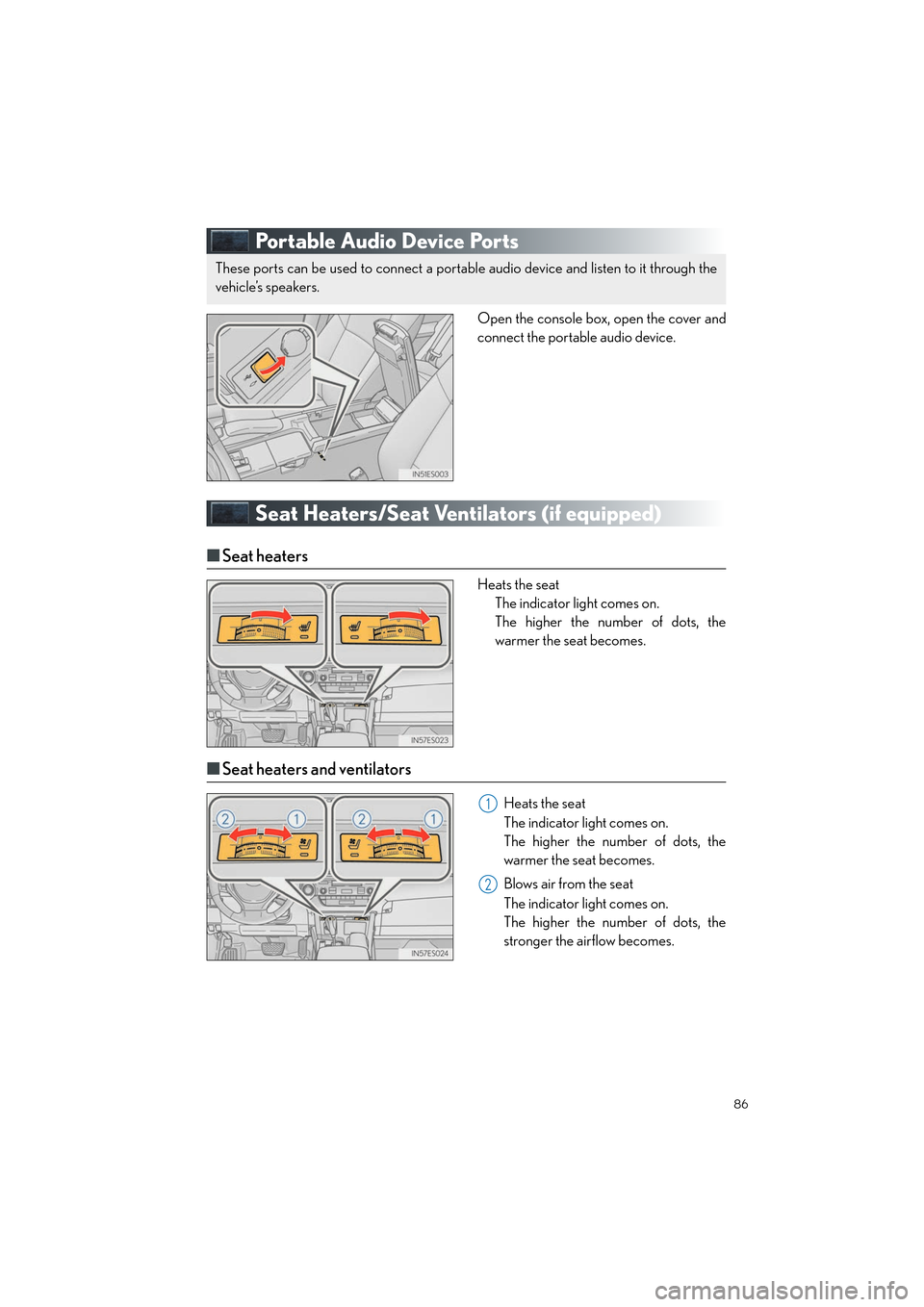
Portable Audio Device Ports
Open the console box, open the cover and
connect the portable audio device.
Seat Heaters/Seat Ventilators (if equipped)
■Seat heaters
Heats the seat
The indicator light comes on.
The higher the number of dots, the
warmer the seat becomes.
■Seat heaters and ventilators
Heats the seat
The indicator light comes on.
The higher the number of dots, the
warmer the seat becomes.
Blows air from the seat
The indicator light comes on.
The higher the number of dots, the
stronger the airflow becomes.
These ports can be used to connect a portable audio device and listen to it through the
vehicle’s speakers.
1
2
Page 95 of 112
94
ES350_QG_OM33A11U_(U)
●eDestination
With the eDestination feature, you can go online, via the Lexus.com owner’s Web site, to
select and organize destinations of your choice and then wirelessly send them to your
vehicle’s navigation system.
You can store up to 200 locations online to access and update at any time.
Your locations can be organized into up to 20 personalized folders.
You must first go online at www.lexus.com/drivers/
to view the Owners site where you
will need to register and log in. After this, you can create your personalized folders con-
taining the locations you wish to send to your vehicle. (See Lexus Enform with Safety
Connect Guide for more information.)
● Lexus Insider
Lexus Insider is an optional service that can send audio messages, or articles, to partici-
pating owners’ vehicles via the navigation system. Potential Lexus Insider subjects might
include, for example, Lexus vehicle technology tips, updates on regional Lexus events, or
audio excerpts from Lexus Magazine articles. Up to 20 articles can be stored at a time.
You may opt out of receiving Lexus Insider messages at any time.
■Subscription
After you have signed the Telematics Subscription Service Agreement and are enrolled,
you can begin receiving services . A variety of subscription terms is available for purchase.
Contact your Lexus dealer, call 1-800-25-LEXUS (1-800-255-3987), or select the “Des-
tination Assist” in your vehicle for further subscription details.
■ Function achieved by using DCM
■
Services
Of the functions included with Lexus Enform with Safety Connect, Safety Connect can be
achieved by using DCM.
● Safety Connect ( →P.9 1 )