power steering Lexus ES350 2015 Owner's Guide
[x] Cancel search | Manufacturer: LEXUS, Model Year: 2015, Model line: ES350, Model: Lexus ES350 2015Pages: 784, PDF Size: 11.04 MB
Page 216 of 784
216
ES350_300h_OM_OM33B99U_(U)
4-2. Driving procedures
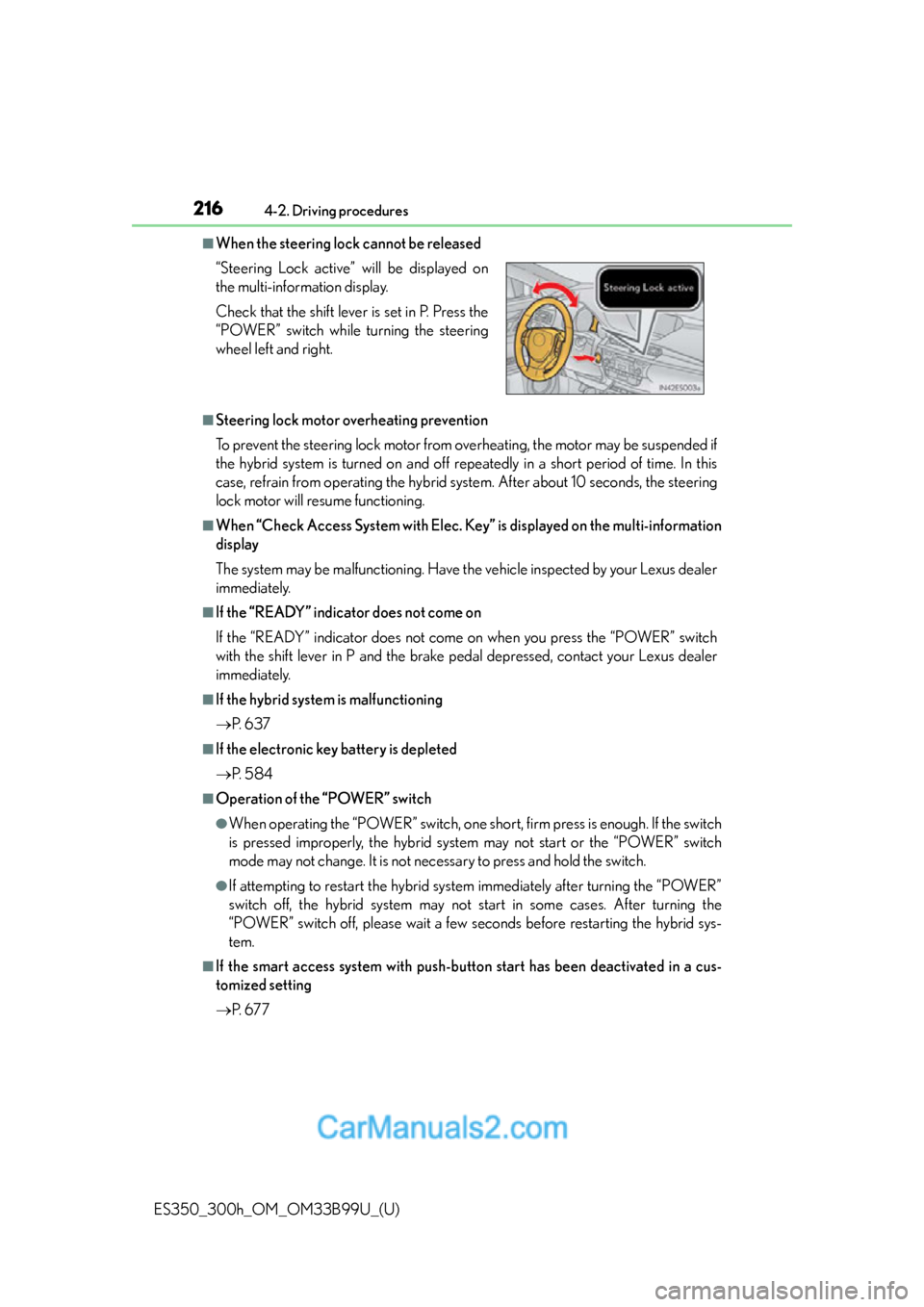
■When the steering lock cannot be released
■Steering lock motor overheating prevention
To prevent the steering lock motor from overheating, the motor may be suspended if
the hybrid system is turned on and off repeatedly in a short period of time. In this
case, refrain from operating the hybrid sy stem. After about 10 seconds, the steering
lock motor will resume functioning.
■When “Check Access System with Elec. Key” is displayed on the multi-information
display
The system may be malfunctio ning. Have the vehicle inspected by your Lexus dealer
immediately.
■If the “READY” indicator does not come on
If the “READY” indicator does not come on when you press the “POWER” switch
with the shift lever in P and the brake pedal depressed, contact your Lexus dealer
immediately.
■If the hybrid system is malfunctioning
P. 6 3 7
■If the electronic key battery is depleted
P. 5 8 4
■Operation of the “POWER” switch
●When operating the “POWER” switch, one shor t, firm press is enough. If the switch
is pressed improperly, the hybrid system may not start or the “POWER” switch
mode may not change. It is not necessary to press and hold the switch.
●If attempting to restart the hybrid syst em immediately after turning the “POWER”
switch off, the hybrid system may not start in some cases. After turning the
“POWER” switch off, please wait a few se conds before restarting the hybrid sys-
tem.
■If the smart access system with push-but ton start has been deactivated in a cus-
tomized setting
P. 6 7 7
“Steering Lock active” will be displayed on
the multi-information display.
Check that the shift lever is set in P. Press the
“POWER” switch while
turning the steering
wheel left and right.
Page 217 of 784
ES350_300h_OM_OM33B99U_(U)
2174-2. Driving procedures
4
Driving
■Odometer and trip meter display
When the “POWER” switch is turned off, the odometer or trip meter display will
extinguish after approximately 30 seconds.
CAUTION
■When starting the hybrid system
Always start the hybrid system while sitting in the driver’s seat. Do not depress the
accelerator pedal while starting the hybrid system under any circumstances.
Doing so may cause an accident resulting in death or serious injury.
■Caution while driving
If hybrid system failure occurs while the vehicle is moving, do not lock or open the
doors until the vehicle reaches a safe and complete stop. Activation of the steering
lock in this circumstance may lead to an accident, resulting in death or serious
injury.
■Stopping the hybrid system in an emergency
If you want to stop the hybrid system in an emergency while driving the vehicle,
press and hold the “POWER” switch for more than 2 seconds, or press it briefly 3
times or more in succession. ( P. 615)
However, do not touch the “POWER” switch while driving except in an emer-
gency. Turning the hybrid system off while driving will not cause loss of steering or
braking control, however, power assist to the steering will be lost. This will make it
more difficult to steer smoothly, so you should pull over and stop the vehicle as
soon as it is safe to do so.
Page 295 of 784
ES350_300h_OM_OM33B99U_(U)
2954-5. Using the driving support systems
4
Driving
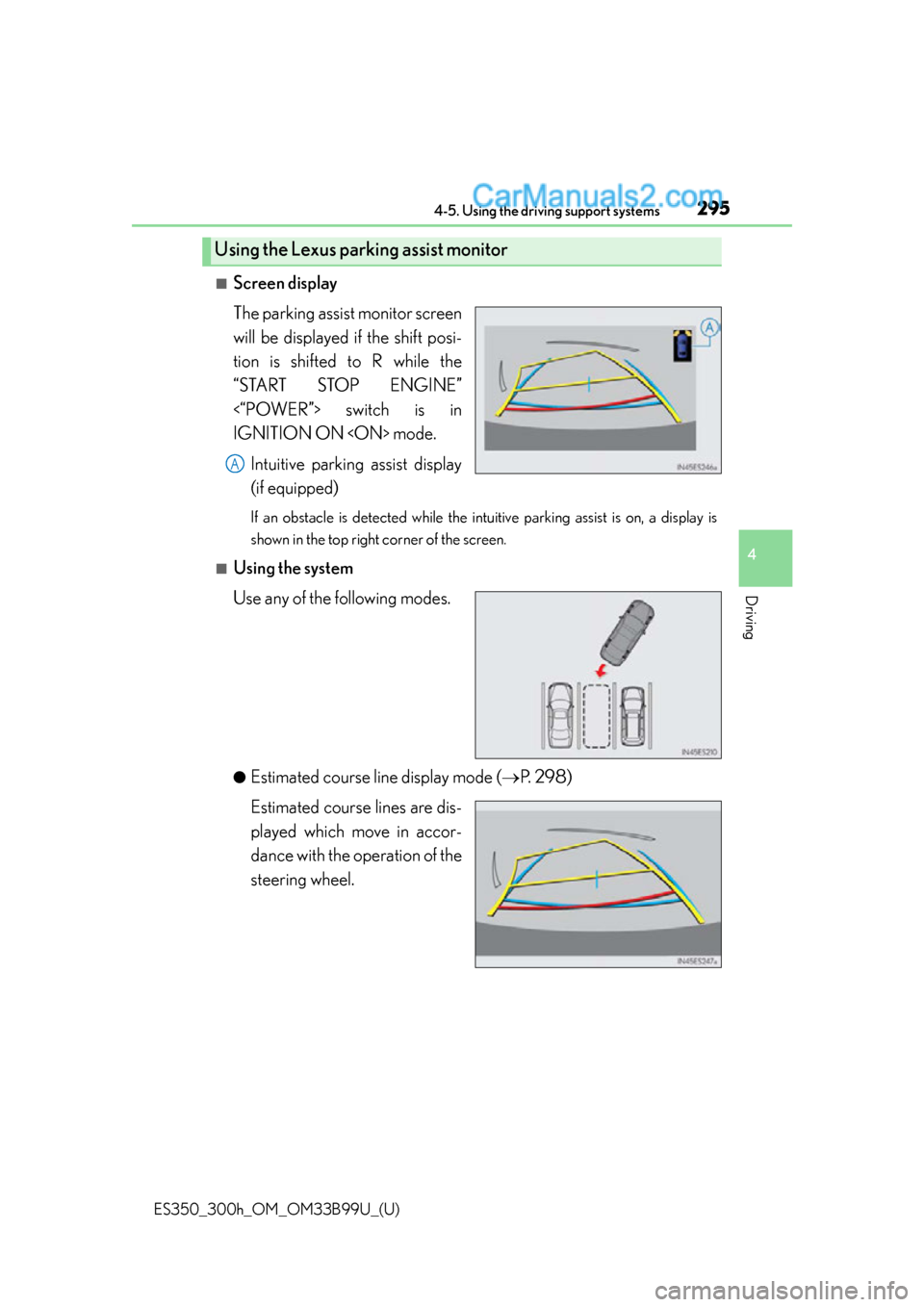
■Screen display
The parking assist monitor screen
will be displayed if the shift posi-
tion is shifted to R while the
“START STOP ENGINE”
<“POWER”> switch is in
IGNITION ON
(if equipped)
If an obstacle is detected while the intuitive parking assist is on, a display is
shown in the top right corner of the screen.
■Using the system
Use any of the following modes.
●Estimated course line display mode ( P. 2 9 8 )
Estimated course lines are dis-
played which move in accor-
dance with the operation of the
steering wheel.
Using the Lexus parking assist monitor
A
Page 308 of 784

308
ES350_300h_OM_OM33B99U_(U)
4-5. Using the driving support systems
The guide lines are very far out of alignment
The camera position is out of alignment.Have the vehicle inspected by your
Lexus dealer.
• The vehicle is tilted (there is a heavy
load on the vehicle, tire pressure is
low due to a tire puncture, etc.)
• The vehicle is used on an incline.If this happens due to these causes, it
does not indicate a malfunction.
Back up while visually checking the
vehicle’s surroundings.
The estimated course lines move even though the steering wheel is straight
There is a malfunction in the signals
being output by the steering sensor.Have the vehicle inspected by your
Lexus dealer.
Guide lines are not displayed
The trunk is open.
Close the trunk.
If this does not resolve the symptom,
have the vehicle inspected by your
Lexus dealer.
The estimated course lines are not displayed
• 12-volt battery power is low.
• The steering sensor has been rein-
stalled.
• There is a malfunction in the signals being output by the steering sensor.Stop the vehicle, and turn the steering
wheel as far as it will go to the left and
right.
If this does not resolve the symptom,
have the vehicle inspected by your
Lexus dealer.
Likely causeSolution
Page 313 of 784
313
ES350_300h_OM_OM33B99U_(U)
4-5. Using the driving support systems
4
Driving
Driving assist systems
◆ABS (Anti-lock Brake System)
Helps to prevent wheel lock when the brakes are applied suddenly, or if
the brakes are applied while dri ving on a slippery road surface
◆Brake assist
Generates an increased level of br aking force after the brake pedal is
depressed when the system detects a panic stop situation
◆VSC (Vehicle Stability Control)
Helps the driver to control skidding when swerving suddenly or turning
on slippery road surfaces
◆Enhanced VSC (Enhanced Vehicle Stability Control)
Provides cooperative control of the ABS, TRAC, VSC and EPS.
Helps to maintain directional stability when swerving on slippery road
surfaces by controllin g steering performance.
◆TRAC (Traction Control)
Helps to maintain drive power and prevent the drive wheels from spin-
ning when starting the vehicle or accelerating on slippery roads
◆Hill-start assist control (hybrid vehicles)
P. 319
To help enhance driving safety an d performance, the following systems
operate automatically in response to various driving situations. Be
aware, however, that these systems are supplementary and should not
be relied upon too heavily when operating the vehicle.
Page 314 of 784
314
ES350_300h_OM_OM33B99U_(U)
4-5. Using the driving support systems
◆EPS (Electric Power Steering)
Employs an electric motor to reduce the amount of effort needed to
turn the steering wheel
◆PCS (Pre-Collision System) (if equipped)
P. 321
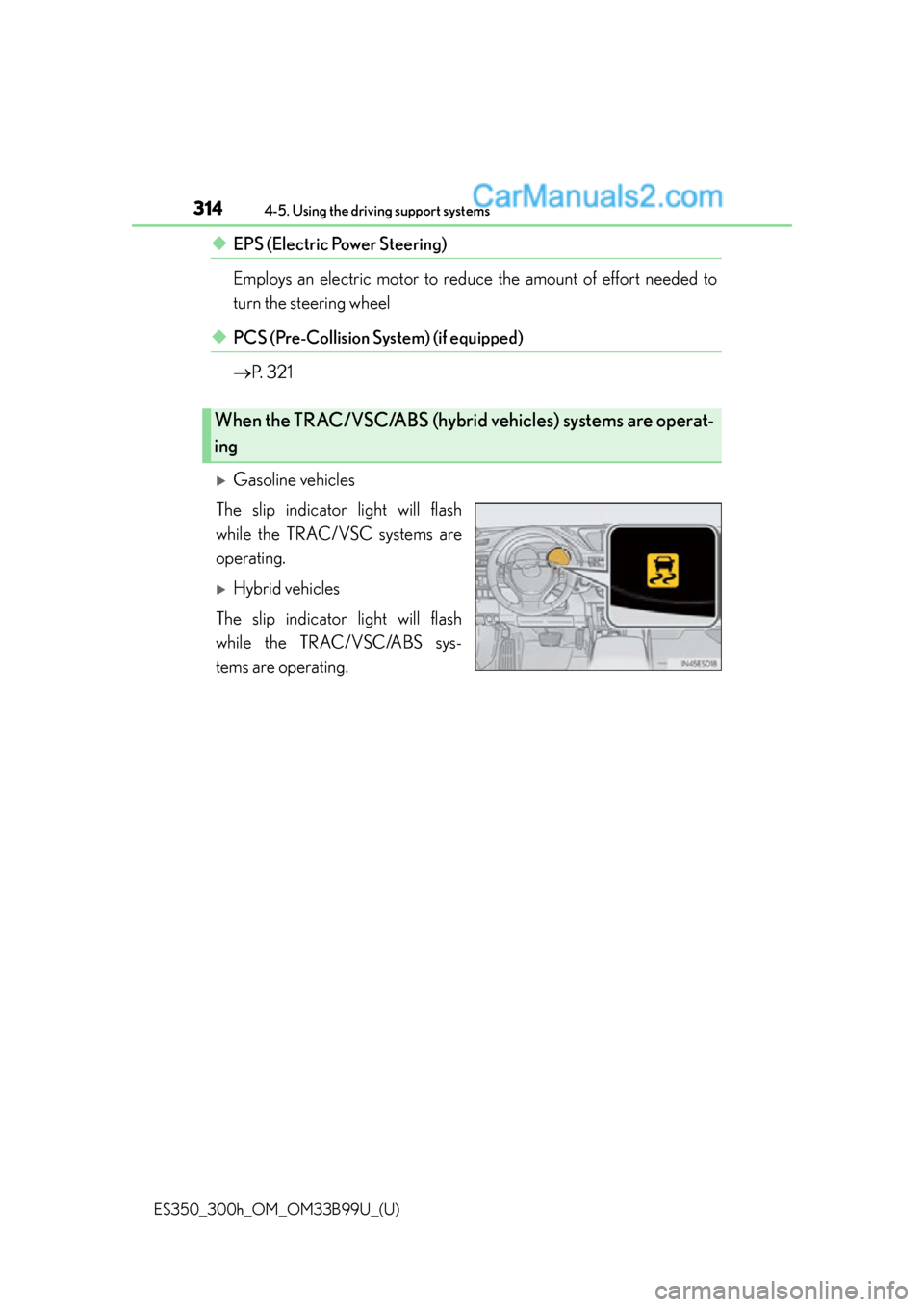
Gasoline vehicles
The slip indicator light will flash
while the TRAC/VSC systems are
operating.
Hybrid vehicles
The slip indicator light will flash
while the TRAC/VSC/ABS sys-
tems are operating.
When the TRAC/VSC/ABS (hybrid vehicles) systems are operat-
ing
Page 316 of 784
316
ES350_300h_OM_OM33B99U_(U)
4-5. Using the driving support systems
■When the message is displayed on the multi-information display showing that
TRAC has been disabled even if the VSC OFF switch has not been pressed
TRAC and hill-start assist control (hybri d vehicles) cannot be operated. Contact
your Lexus dealer.
■When the 12-volt battery is disconnected
The steering wheel may move from its straight forward position, but this will be cor-
rected automatically when driving.
■Sounds and vibrations caused by the ABS, brake assist, VSC and TRAC systems
●A sound may be heard from the engine compartment when the brake pedal is
depressed repeatedly, when the engine
vehicle begins to move. This sound does not indicate that a malfunction has
occurred in any of these systems.
●Any of the following conditions may occur when the above systems are operating.
None of these indicates that a malfunction has occurred.
• Vibrations may be felt through the vehicle body and steering.
• A motor sound may be heard after the vehicle comes to a stop.
• The brake pedal may pulsate slightly after the ABS is activated (gasoline vehi- cles).
• The brake pedal may move down slightly after the ABS is activated (gasoline
vehicles).
■EPS operation sound
When the steering wheel is operated, a motor sound (whirring sound) may be heard.
This does not indicate a malfunction.
■Automatic reactivation of TRAC and VSC systems
After turing the TRAC and VSC systems off, the systems will be automatically re-
enabled in the following situations:
●When the “START STOP ENGINE” <“POWER”> switch is turned off
●If only the TRAC system is turned off, the TRAC will turn on when vehicle speed
increases.
If both the TRAC and VSC systems are turned off, automatic re-enabling will not
occur when vehicle speed increases.
Page 317 of 784
ES350_300h_OM_OM33B99U_(U)
3174-5. Using the driving support systems
4
Driving
■Reduced effectiveness of the EPS system
The effectiveness of the EPS system is reduced to prevent the system from overheat-
ing when there is frequent steering input over an extended period of time. The steer-
ing wheel may feel heavy as a result. Should this occur, refrain from excessive
steering input or stop the vehicle and turn the engine
tiveness will improve after a short while.
CAUTION
■The ABS does not operate effectively when
●The limits of tire gripping performance have been exceeded (such as excessively
worn tires on a snow covered road).
●The vehicle hydroplanes while driving at high speed on wet or slick roads.
■Stopping distance when the ABS is operating may exceed that of normal condi-
tions
The ABS is not designed to shorten the ve hicle’s stopping distance. Always main-
tain a safe distance from the vehicle in front of you, especially in the following situa-
tions:
●When driving on dirt, gravel or snow-covered roads
●When driving with tire chains
●When driving over bumps in the road
●When driving over roads with potholes or uneven surfaces
■TRAC may not operate effectively when
Directional control and power may not be achievable while driving on slippery
road surfaces, even if the TRAC system is operating.
Drive the vehicle carefully in conditions where stability and power may be lost.
■When the VSC is activated
The slip indicator light flashes. Always drive carefully. Reckless driving may cause
an accident. Exercise particular care when the indicator light flashes.
■When the TRAC/VSC systems are turned off
Be especially careful and drive at a spee d appropriate to the road conditions. As
these are the systems help ensure vehicle st ability and driving force, do not turn the
TRAC/VSC systems off unless necessary.
Page 357 of 784
357
ES350_300h_OM_OM33B99U_(U)
5-1. Basic Operations
5
Lexus Display Audio system
Steering wheel audio switches
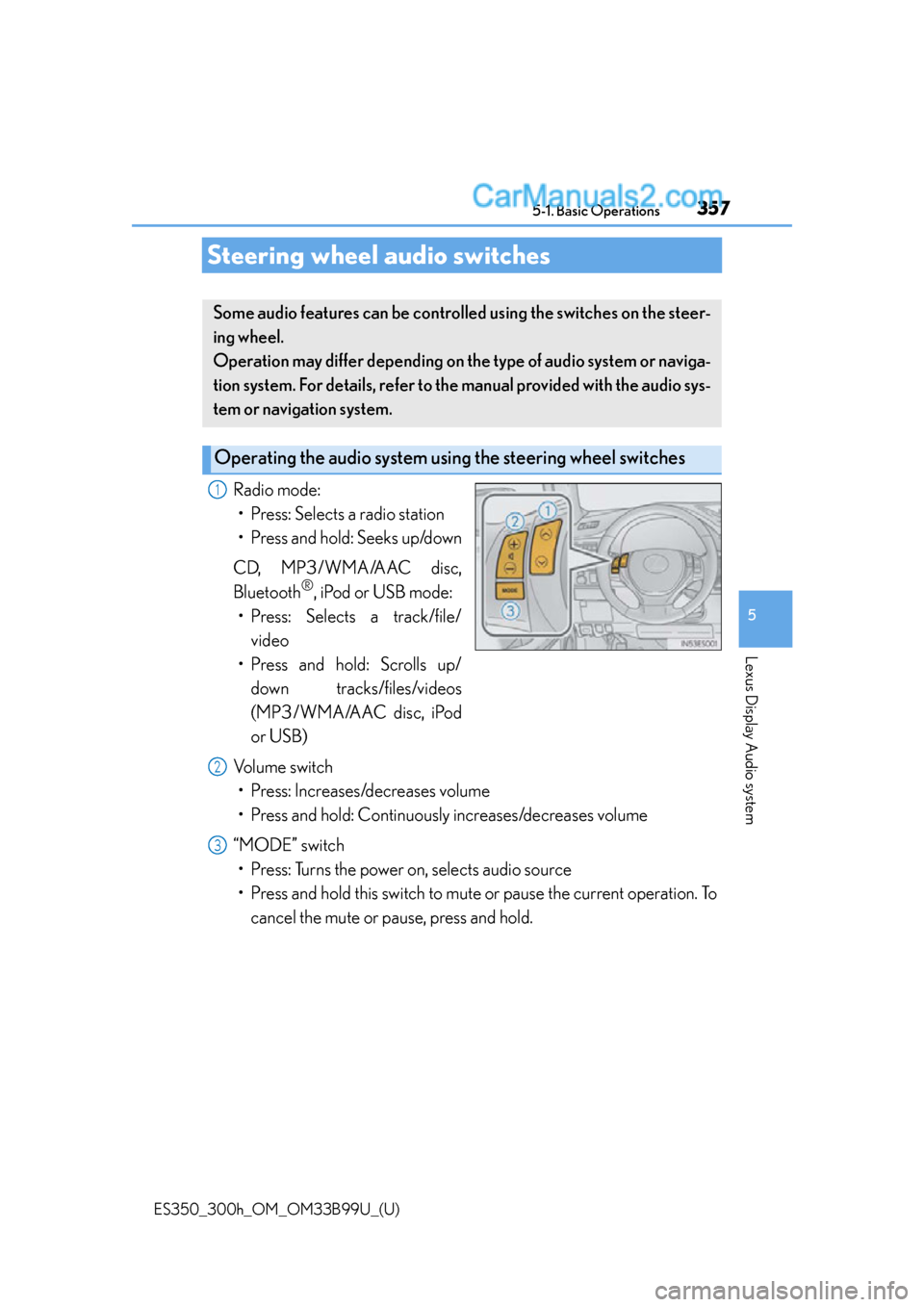
Radio mode:• Press: Selects a radio station
• Press and hold: Seeks up/down
CD, MP3/WMA/AAC disc,
Bluetooth
®, iPod or USB mode:
• Press: Selects a track/file/ video
• Press and hold: Scrolls up/
down tracks/files/videos
(MP3/WMA/AAC disc, iPod
or USB)
Volume switch • Press: Increases/decreases volume
• Press and hold: Continuously increases/decreases volume
“MODE” switch • Press: Turns the power on, selects audio source
• Press and hold this switch to mute or pause the current operation. To
cancel the mute or pause, press and hold.
Some audio features can be controlled using the switches on the steer-
ing wheel.
Operation may differ depending on the type of audio system or naviga-
tion system. For details, refer to the manual provided with the audio sys-
tem or navigation system.
Operating the audio system usin g the steering wheel switches
1
2
3
Page 463 of 784
463
ES350_300h_OM_OM33B99U_(U)
6Interior features
6-1. Using the air conditioning system and defogger
Automatic air conditioning system ..........................................464
Heated steering wheel/ seat heaters/seat
ventilators ................................... 477
6-2. Using the interior lights Interior lights list.......................... 479• Interior light ........................... 480
• Personal lights....................... 480 6-3. Using the storage features
List of storage features ............ 482• Glove box ...............................484
• Console box...........................485
• Cup holders ...........................486
• Auxiliary box .......................... 487
Trunk features ............................. 488
6-4. Other interior features Sun visors and vanity mirrors ................... 490
Clock................................................ 491
Power outlets ............................... 492
Armrest .......................................... 494
Rear sunshade/ rear door sunshades .............. 495
Trunk storage extension .......... 498
Coat hooks ................................... 499
Assist grips................................... 500
Garage door opener................. 501
Compass ...................................... 508
LEXUS Enform Safety Connect ....................................... 513