lock Lexus ES350 2017 Owner's Manuals
[x] Cancel search | Manufacturer: LEXUS, Model Year: 2017, Model line: ES350, Model: Lexus ES350 2017Pages: 584, PDF Size: 13.96 MB
Page 501 of 584
4998-2. Steps to take in an emergency
ES350_OM_OM33C68U_(U)
8
When trouble arises
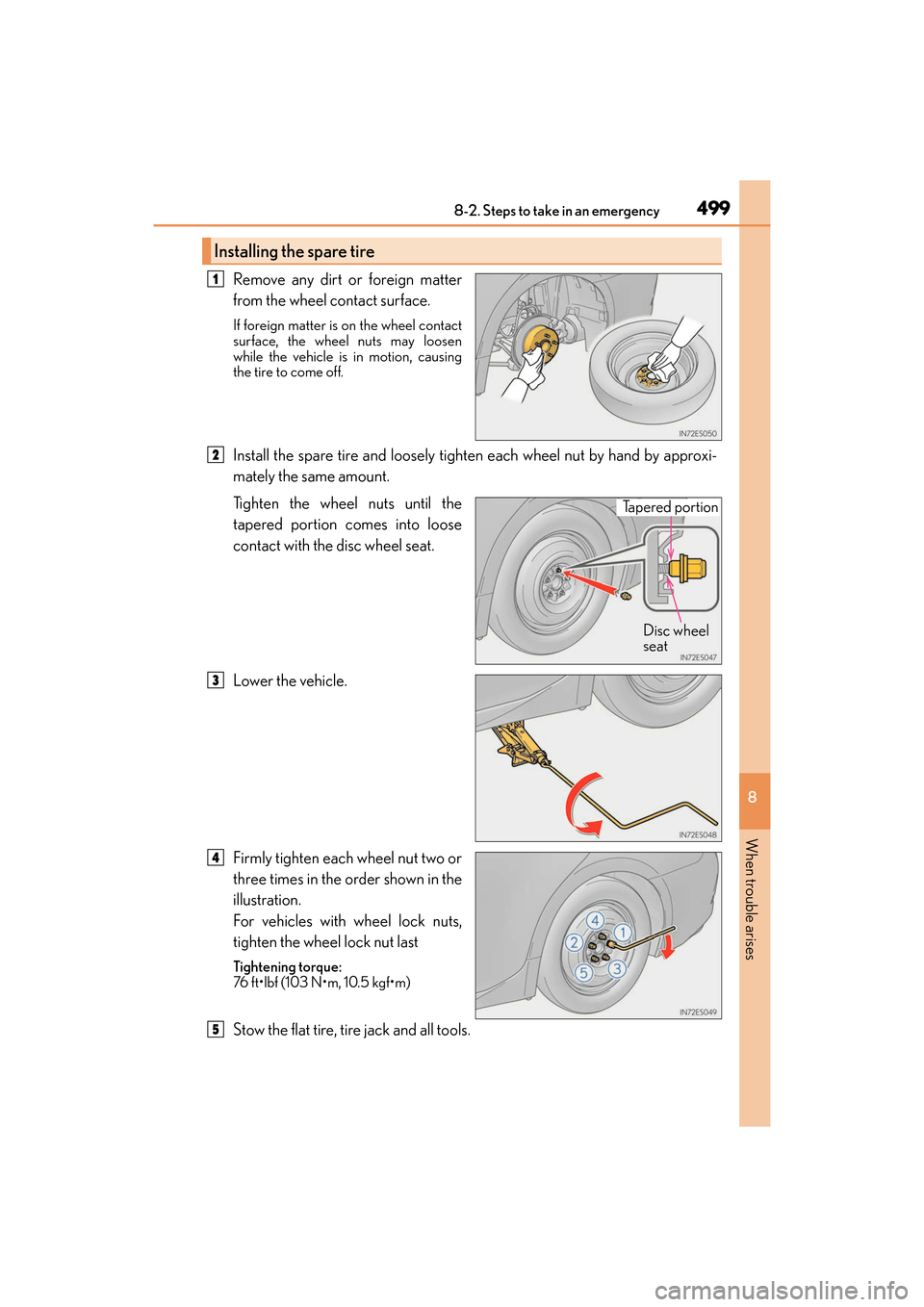
Remove any dirt or foreign matter
from the wheel contact surface.
If foreign matter is on the wheel contact
surface, the wheel nuts may loosen
while the vehicle is in motion, causing
the tire to come off.
Install the spare tire and loosely tighten each wheel nut by hand by approxi-
mately the same amount.
Tighten the wheel nuts until the
tapered portion comes into loose
contact with the disc wheel seat.
Lower the vehicle.
Firmly tighten each wheel nut two or
three times in the order shown in the
illustration.
For vehicles with wheel lock nuts,
tighten the wheel lock nut last
Tightening torque:
76 ft•lbf (103 N•m, 10.5 kgf•m)
Stow the flat tire, tire jack and all tools.
Installing the spare tire
1
2
Tapered portion Disc wheel
seat
3
4
5
Page 504 of 584
502
ES350_OM_OM33C68U_(U)8-2. Steps to take in an emergency
If the engine will not start
One of the following may be the cause of the problem:
●There may not be sufficient fuel in the vehicle’s tank.
Refuel the vehicle.
●The engine may be flooded.
Try to restart the engine again following correct starting procedures.
(
→ P. 1 5 4 )
●There may be a malfunction in the engine immobilizer system. ( →P. 6 5 )
One of the following may be the cause of the problem:
●The battery may be discharged. ( →P. 5 0 6 )
●The battery terminal connections may be loose or corroded.
The engine starting system may be malfunctioning due to an electrical problem
such as electronic key battery depletion or a blown fuse. However, an interim
measure is available to start the engine. ( →P. 5 0 3 )
One of the following may be the cause of the problem:
●One or both of the battery terminals may be disconnected.
●The battery may be discharged. ( →P. 5 0 6 )
●There may be a malfunction in the steering lock system.
Contact your Lexus dealer if the problem cannot be repaired, or if repair procedures
are unknown.
If the engine will not start even though correct starting procedures are being
followed ( →P. 154), consider each of the following points:
The engine will not start even though the starter motor operates nor-
mally.
The starter motor turns over slowly , the interior lights and headlights
are dim, or the horn does not so und or sounds at a low volume.
The starter motor does not turn over
The starter motor does not turn over , the interior lights and headlights
do not turn on, or the horn does not sound.
Page 506 of 584
504
ES350_OM_OM33C68U_(U)8-2. Steps to take in an emergency
If the electronic key does not operate properly
■Doors
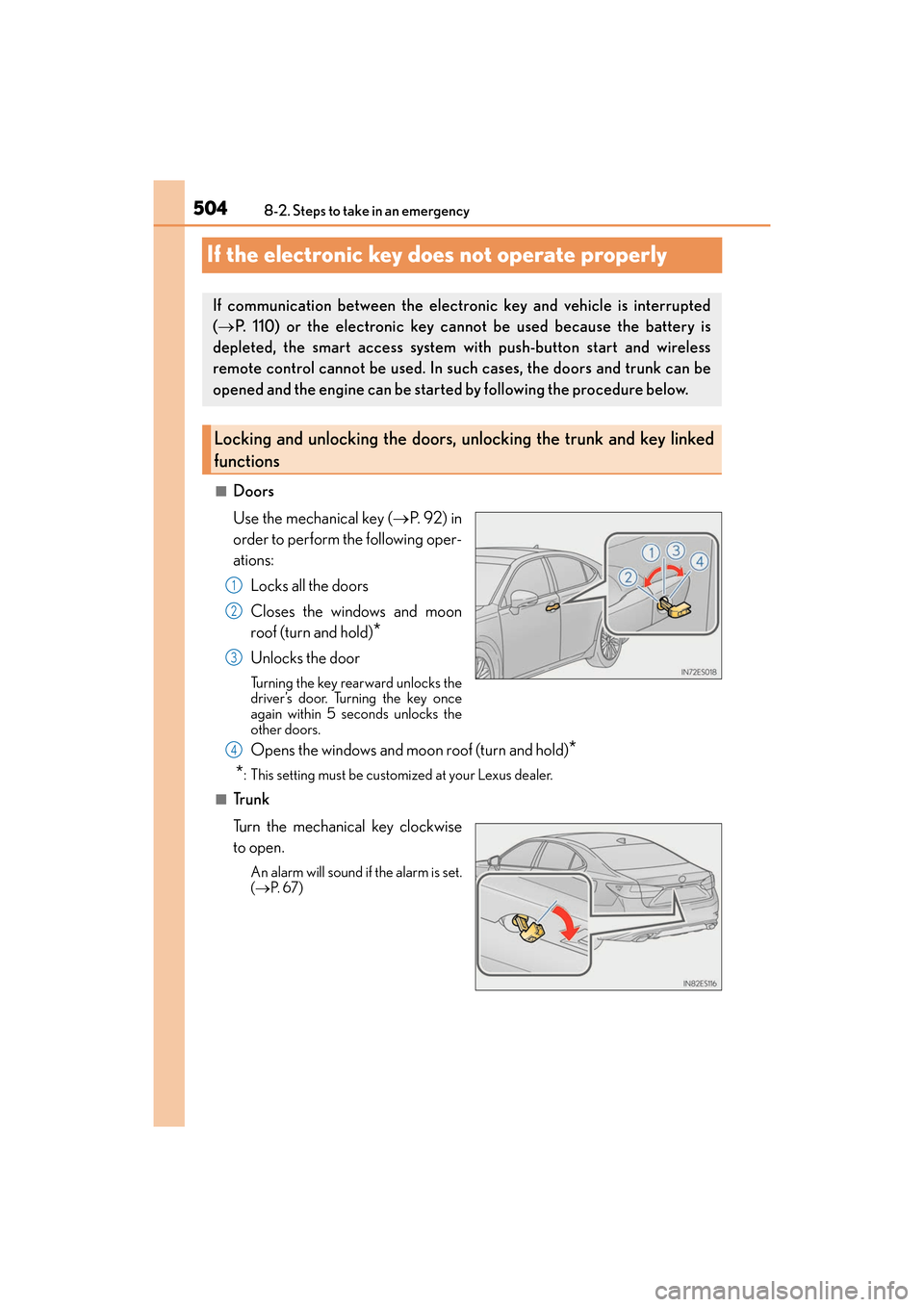
Use the mechanical key (
→P. 9 2 ) i n
order to perform the following oper-
ations:
Locks all the doors
Closes the windows and moon
roof (turn and hold)
*
Unlocks the door
Turning the key rearward unlocks the
driver’s door. Turning the key once
again within 5 seconds unlocks the
other doors.
Opens the windows and moon roof (turn and hold)*
*
: This setting must be customized at your Lexus dealer.
■Tr u n k
Turn the mechanical key clockwise
to open.
An alarm will sound if the alarm is set.
( → P. 6 7 )
If communication between the electronic key and vehicle is interrupted
(→ P. 110) or the electronic key cann ot be used because the battery is
depleted, the smart access system with push-button start and wireless
remote control cannot be used. In such cases, the doors and trunk can be
opened and the engine can be started by following the procedure below.
Locking and unlocking the doors, unlocking the trunk and key linked
functions
1
2
3
4
Page 508 of 584
506
ES350_OM_OM33C68U_(U)8-2. Steps to take in an emergency
If the battery is discharged
If you have a set of jumper (or booster) cables and a second vehicle with a 12-volt
battery, you can jump start your vehicle by following the steps below.
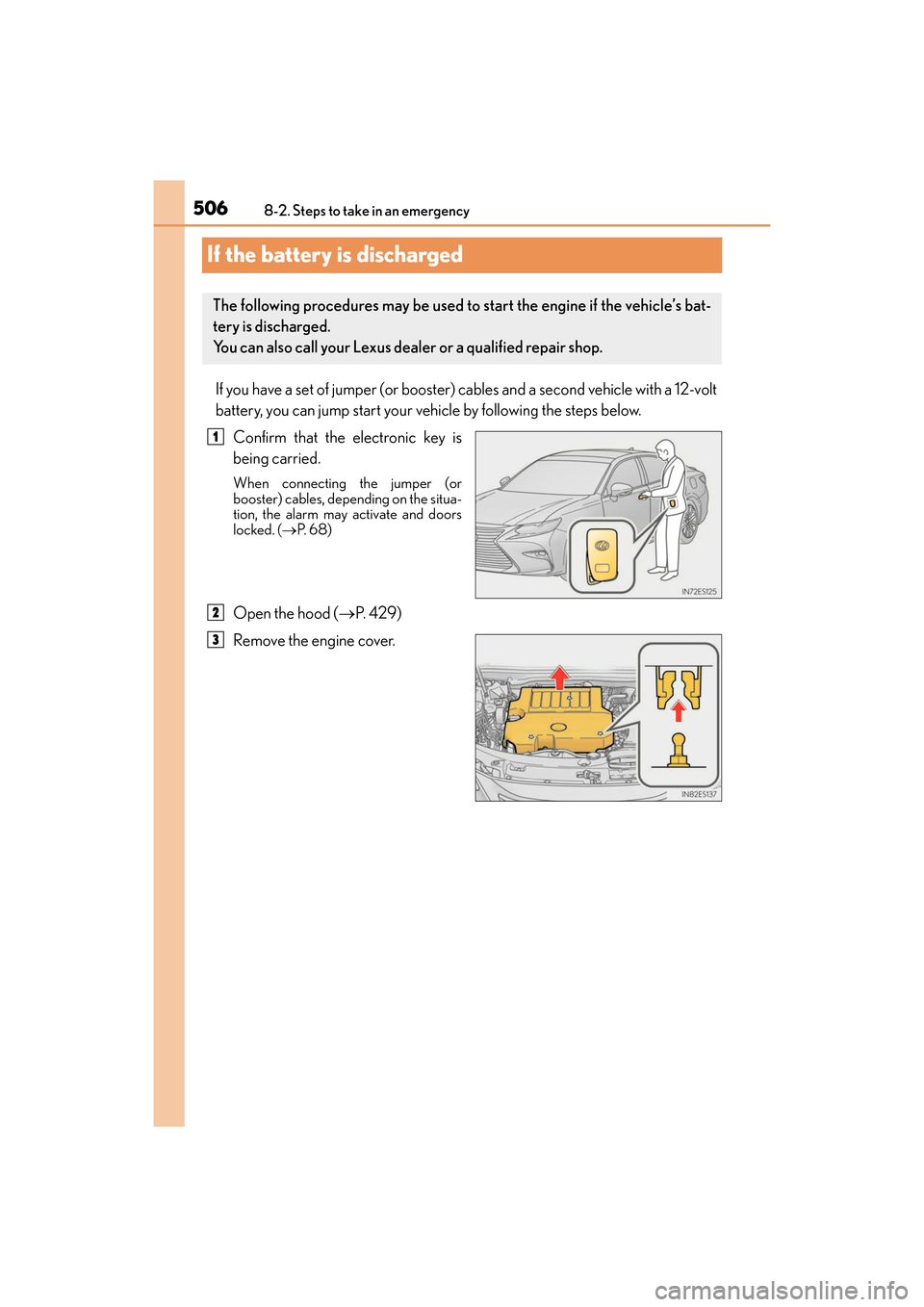
Confirm that the electronic key is
being carried.
When connecting the jumper (or
booster) cables, depending on the situa-
tion, the alarm may activate and doors
locked. ( →P. 6 8 )
Open the hood ( →P. 4 2 9 )
Remove the engine cover.
The following procedures may be used to start the engine if the vehicle’s bat-
tery is discharged.
You can also call your Lexus dealer or a qualified repair shop.
1
2
3
Page 510 of 584
5088-2. Steps to take in an emergency
ES350_OM_OM33C68U_(U)
■Starting the engine when the battery is discharged
The engine cannot be started by push-starting.
■To prevent battery discharge
●Turn off the headlights and the audio system while the engine is stopped.
●Turn off any unnecessary electrical components when the vehicle is running at a low
speed for an extended period, such as in heavy traffic.
■Charging the battery
The electricity stored in the battery will discharge gradually even when the vehicle is not
in use, due to natural discharge and the draining effects of certain electrical appliances. If
the vehicle is left for a long time, the battery may discharge, and the engine may be
unable to start. (The battery recharges automatically during driving.)
■When recharging or replacing the battery
●In some cases, it may not be possible to unlock the doors using the smart access system
with push-button start when the battery is discharged. Use the wireless remote control
or the mechanical key to lock or unlock the doors.
●The engine may not start on the first attempt after the battery has recharged but will
start normally after the second attempt. This is not a malfunction.
●The engine switch mode is memorized by the vehicle. When the battery is recon-
nected, the system will return to the mode it was in before the battery was discharged.
Before disconnecting the battery, turn the engine switch off.
If you are unsure what mode the engine switch was in before the battery discharged, be
especially careful when reconnecting the battery.
Page 519 of 584
ES350_OM_OM33C68U_(U)
5179-1. Specifications
9
Vehicle specifications
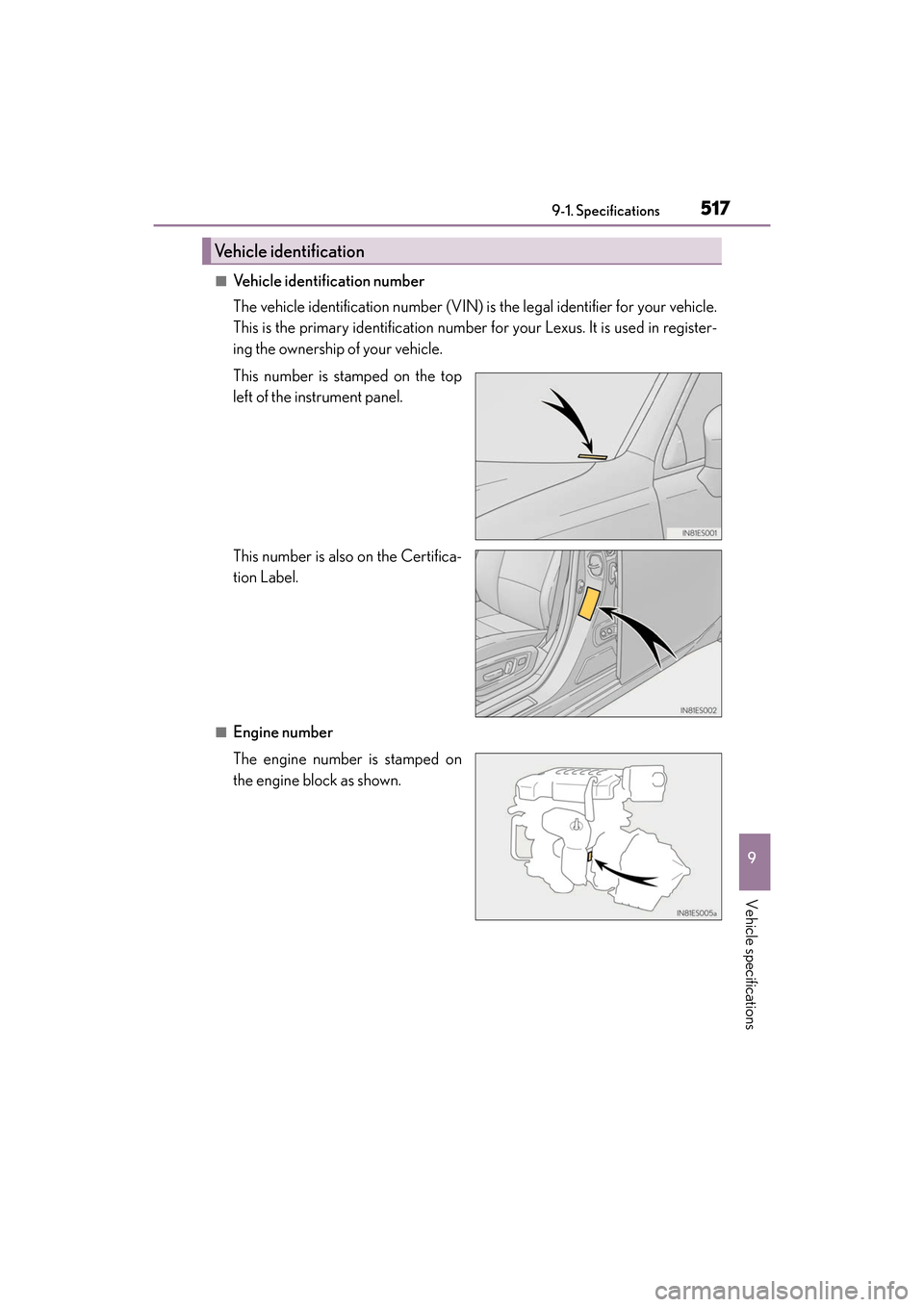
■Vehicle identification number
The vehicle identification number (VIN) is the legal identifier for your vehicle.
This is the primary identification number for your Lexus. It is used in register-
ing the ownership of your vehicle.
This number is stamped on the top
left of the instrument panel.
This number is also on the Certifica-
tion Label.
■Engine number
The engine number is stamped on
the engine block as shown.
Vehicle identification
Page 523 of 584
ES350_OM_OM33C68U_(U)
5219-1. Specifications
9
Vehicle specifications
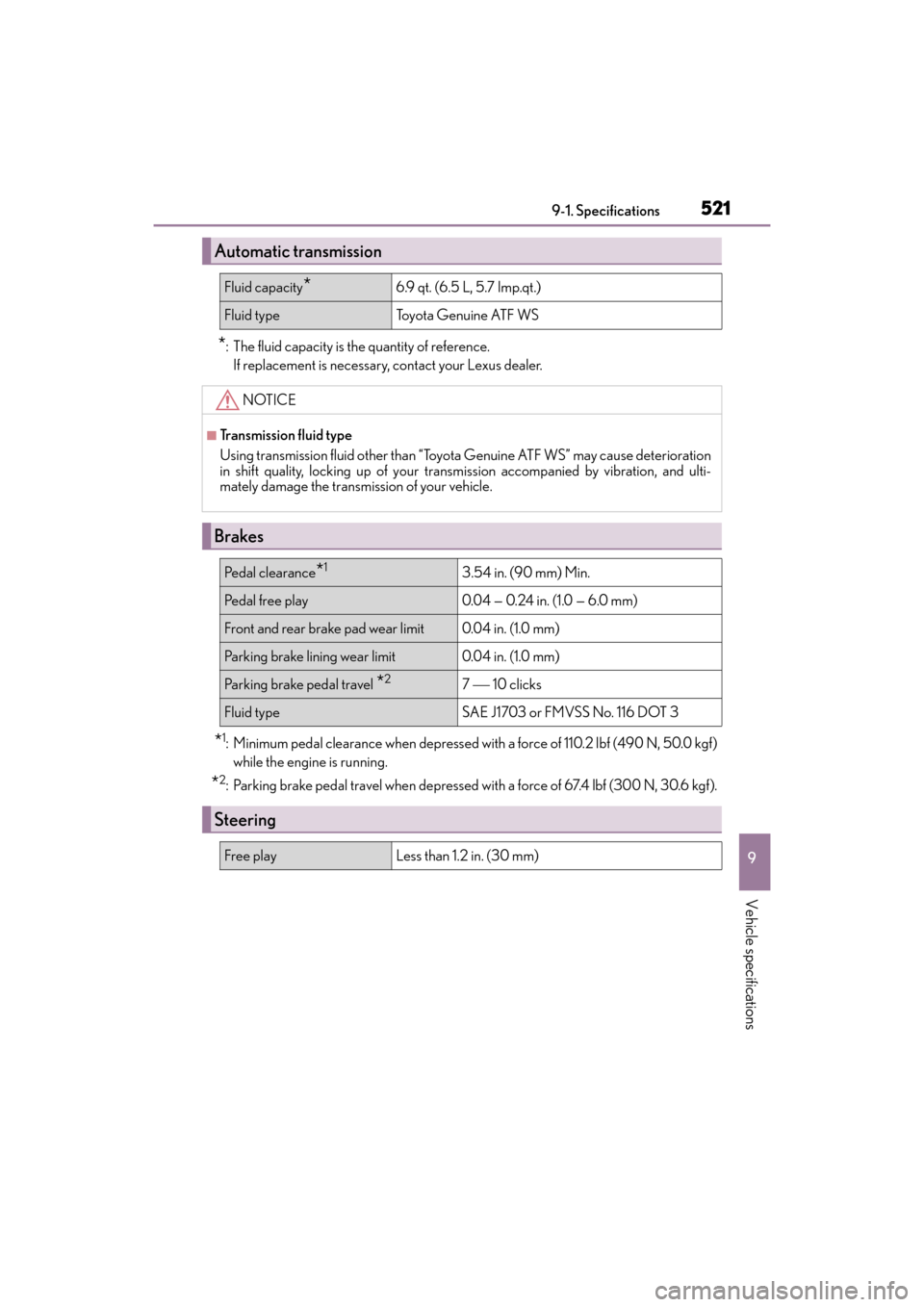
*: The fluid capacity is the quantity of reference.If replacement is necessary, contact your Lexus dealer.
*1: Minimum pedal clearance when depressed with a force of 110.2 lbf (490 N, 50.0 kgf)while the engine is running.
*2: Parking brake pedal travel when depressed with a force of 67.4 lbf (300 N, 30.6 kgf).
Automatic transmission
Fluid capacity*6.9 qt. (6.5 L, 5.7 Imp.qt.)
Fluid typeTo y o t a G e n u i n e AT F W S
NOTICE
■Transmission fluid type
Using transmission fluid other than “Toyota Genuine ATF WS” may cause deterioration
in shift quality, locking up of your transmission accompanied by vibration, and ulti-
mately damage the transmission of your vehicle.
Brakes
Pe d a l c l e a r a n c e*13.54 in. (90 mm) Min.
Pedal free play0.04 — 0.24 in. (1.0 — 6.0 m m)
Front and rear brake pad wear limit0.04 in. (1.0 mm )
Parking brake lining wear limit0.04 in. (1.0 mm )
Parking brake pedal travel *27 10 clicks
Fluid typeSAE J1703 or FMVSS No. 116 DOT 3
Steering
Free playLess than 1.2 in. (30 mm)
Page 543 of 584
ES350_OM_OM33C68U_(U)
5419-2. Customization
9
Vehicle specifications
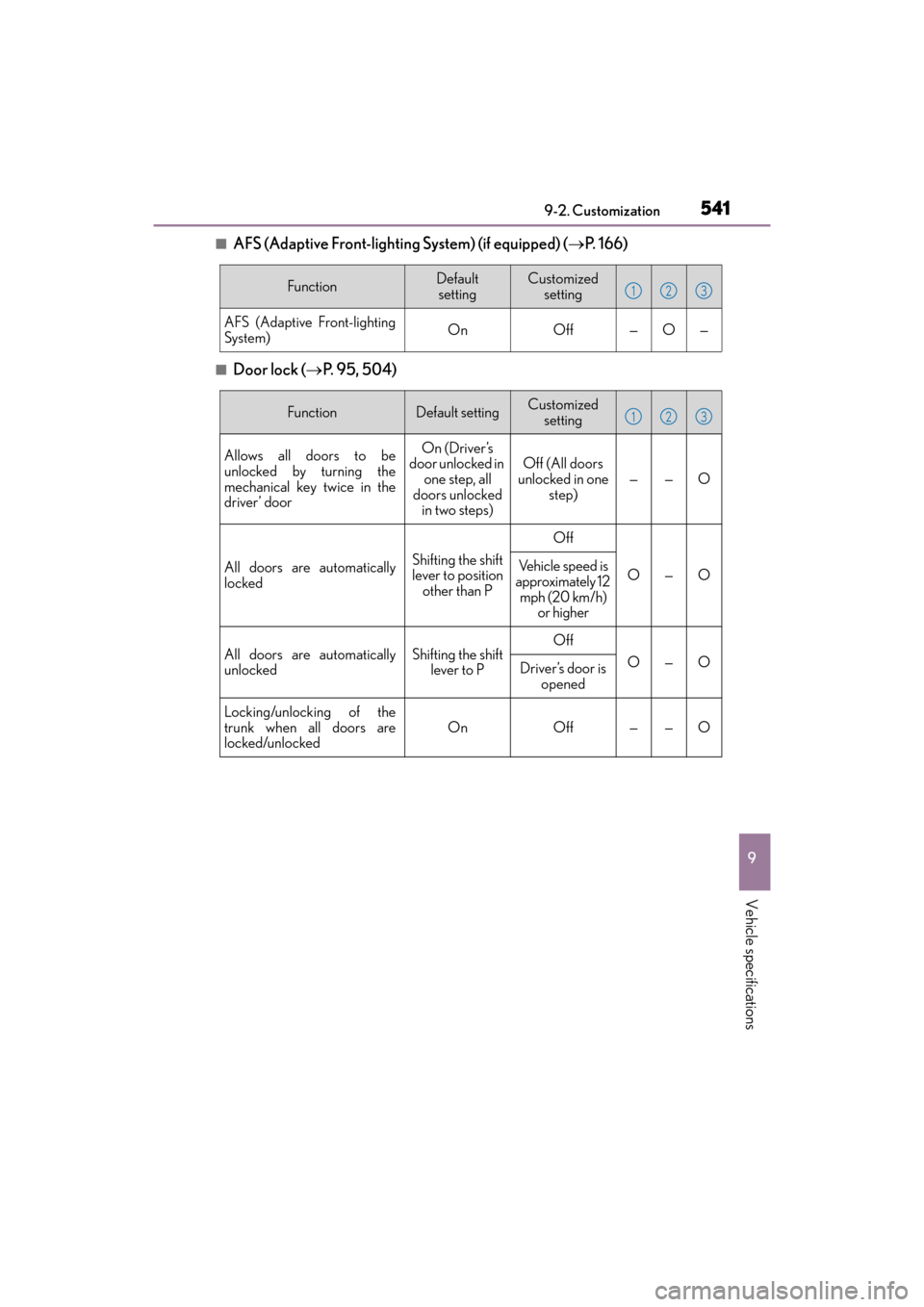
■AFS (Adaptive Front-lighting System) (if equipped) (→P. 1 6 6 )
■Door lock ( →P. 9 5 , 5 0 4 )
FunctionDefault
settingCustomized setting
AFS (Adaptive Front-lighting
System)OnOff—O—
123
FunctionDefault settingCustomized setting
Allows all doors to be
unlocked by turning the
mechanical key twice in the
driver’ doorOn (Driver’s
door unlocked in one step, all
doors unlocked in two steps)Off (All doors
unlocked in one
step)——O
All doors are automatically
lockedShifting the shift
lever to position other than P
Off
O—OVehicle speed is
approximately 12
mph (20 km/h) or higher
All doors are automatically
unlockedShifting the shift lever to POff
O—ODriver’s door is opened
Locking/unlocking of the
trunk when all doors are
locked/unlocked
OnOff——O
123
Page 544 of 584
542
ES350_OM_OM33C68U_(U)9-2. Customization
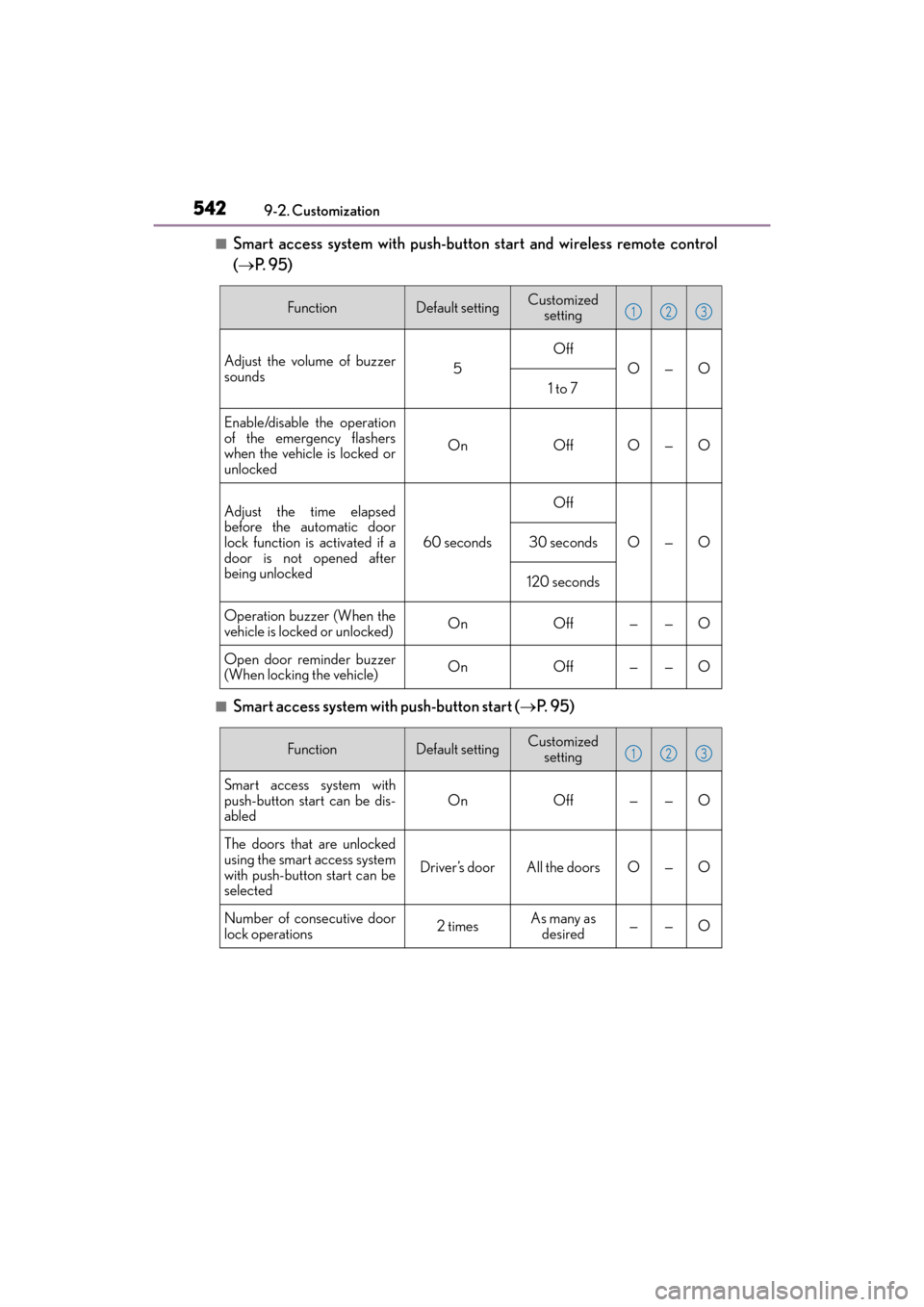
■Smart access system with push-button start and wireless remote control
(→
P. 9 5 )
■Smart access system with push-button start ( →P. 9 5 )
FunctionDefault settingCustomized
setting
Adjust the volume of buzzer
sounds5
Off
O—O
1 to 7
Enable/disable the operation
of the emergency flashers
when the vehicle is locked or
unlocked
OnOffO—O
Adjust the time elapsed
before the automatic door
lock function is activated if a
door is not opened after
being unlocked
60 seconds
Off
O—O30 seconds
120 seconds
Operation buzzer (When the
vehicle is locked or unlocked)OnOff——O
Open door reminder buzzer
(When locking the vehicle)OnOff——O
123
FunctionDefault settingCustomized
setting
Smart access system with
push-button start can be dis-
abledOnOff——O
The doors that are unlocked
using the smart access system
with push-button start can be
selected
Driver’s doorAll the doorsO—O
Number of consecutive door
lock operations2 timesAs many as desired——O
123
Page 545 of 584
ES350_OM_OM33C68U_(U)
5439-2. Customization
9
Vehicle specifications
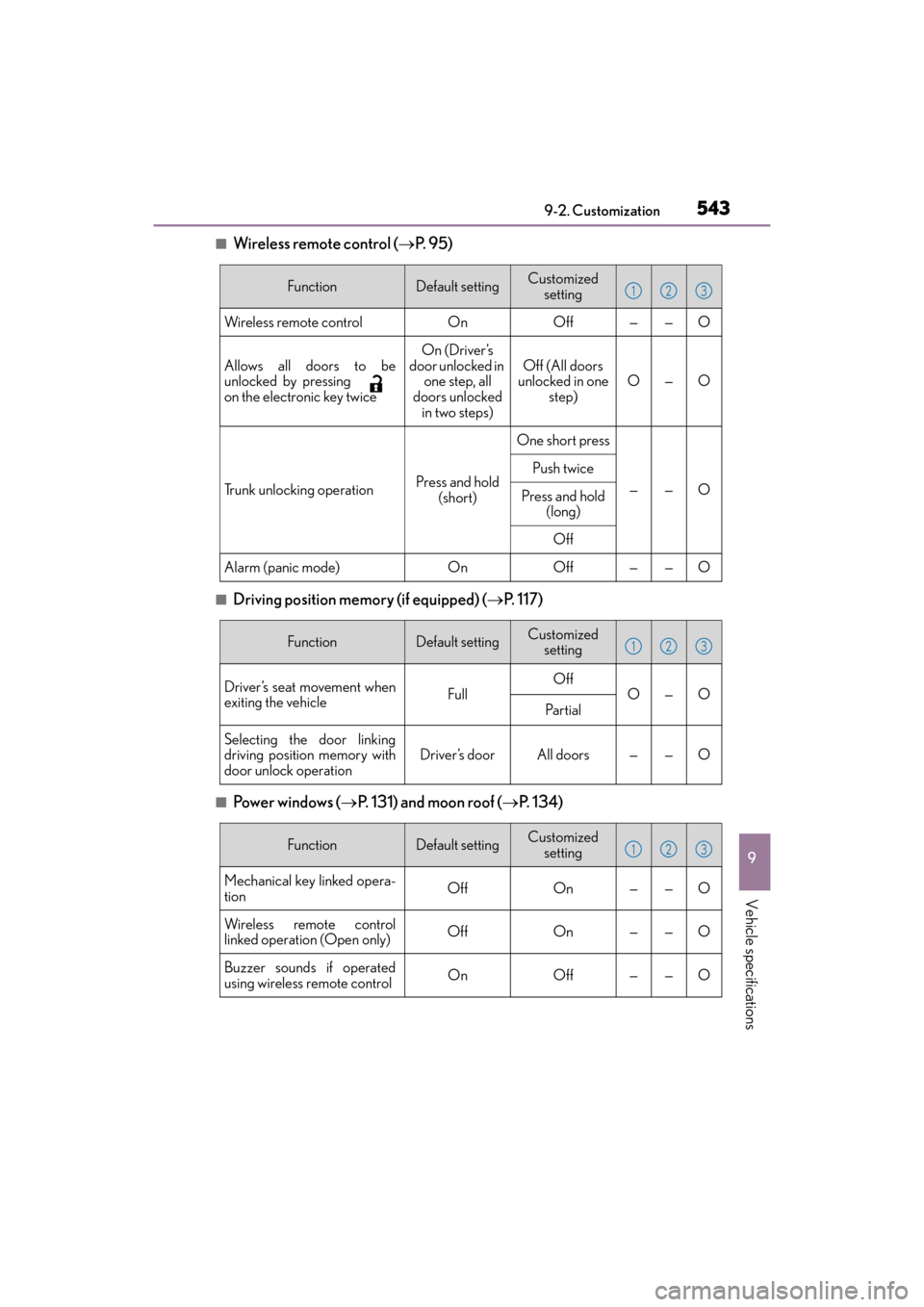
■Wireless remote control (→P. 9 5 )
■Driving position memory (if equipped) ( →P. 1 1 7 )
■Po w e r w i n d o w s ( →P. 131) and moon roof ( →P. 1 3 4 )
FunctionDefault settingCustomized
setting
Wireless remote controlOnOff——O
Allows all doors to be
unlocked by pressing
on the electronic key twiceOn (Driver’s
door unlocked in one step, all
doors unlocked in two steps)Off (All doors
unlocked in one
step)O—O
Trunk unlocking operationPress and hold (short)
One short press
——O
Push twice
Press and hold (long)
Off
Alarm (panic mode)OnOff——O
123
FunctionDefault settingCustomized setting
Driver’s seat movement when
exiting the vehicleFullOffO—OPa r t i a l
Selecting the door linking
driving position memory with
door unlock operationDriver’s doorAll doors——O
123
FunctionDefault settingCustomized setting
Mechanical key linked opera-
tionOffOn——O
Wireless remote control
linked operation (Open only)OffOn——O
Buzzer sounds if operated
using wireless remote controlOnOff——O
123