audio system Lexus ES350 2017 s User Guide
[x] Cancel search | Manufacturer: LEXUS, Model Year: 2017, Model line: ES350, Model: Lexus ES350 2017Pages: 584, PDF Size: 13.96 MB
Page 96 of 584
94
ES350_OM_OM33C68U_(U)3-1. Key information
■Replacing the battery
→
P. 4 5 7
■Confirmation of the registered key number
The number of keys already registered to the vehicle can be confirmed. Ask your Lexus
dealer for details.
■If a wrong key is used
The key cylinder rotates freely to isolate inside mechanism.
NOTICE
■To prevent key damage
●Do not drop the keys, subject them to strong shocks or bend them.
●Do not expose the keys to high temperatures for long periods of time.
●Do not get the keys wet or wash them in an ultrasonic washer etc.
●Do not attach metallic or magnetic materials to the keys or place the keys close to
such materials.
●Do not disassemble the keys.
●Do not attach a sticker or anything else to the surface of the electronic key.
●Do not place the keys near objects that produce magnetic fields, such as TVs, audio
systems and induction cookers, or medical electrical equipment, such as low-fre-
quency therapy equipment.
■Carrying the electronic key on your person
Carry the electronic key 3.9 in. (10 cm) or more away from electric appliances that are
turned on. Radio waves emitted from electric appliances within 3.9 in. (10 cm) of the
electronic key may interfere with the key, causing the key to not function properly.
■In case of a smart access system with push-button start malfunction or other key-
related problems
Take your vehicle with all the electronic keys provided with your vehicle to your Lexus
dealer.
■When an electronic key is lost
If the electronic key remains lost, the risk of vehicle theft increases significantly. Visit
your Lexus dealer immediately with all remaining electronic keys that was provided
with your vehicle.
Page 112 of 584
110
ES350_OM_OM33C68U_(U)3-2. Opening, closing and locking the doors and trunk
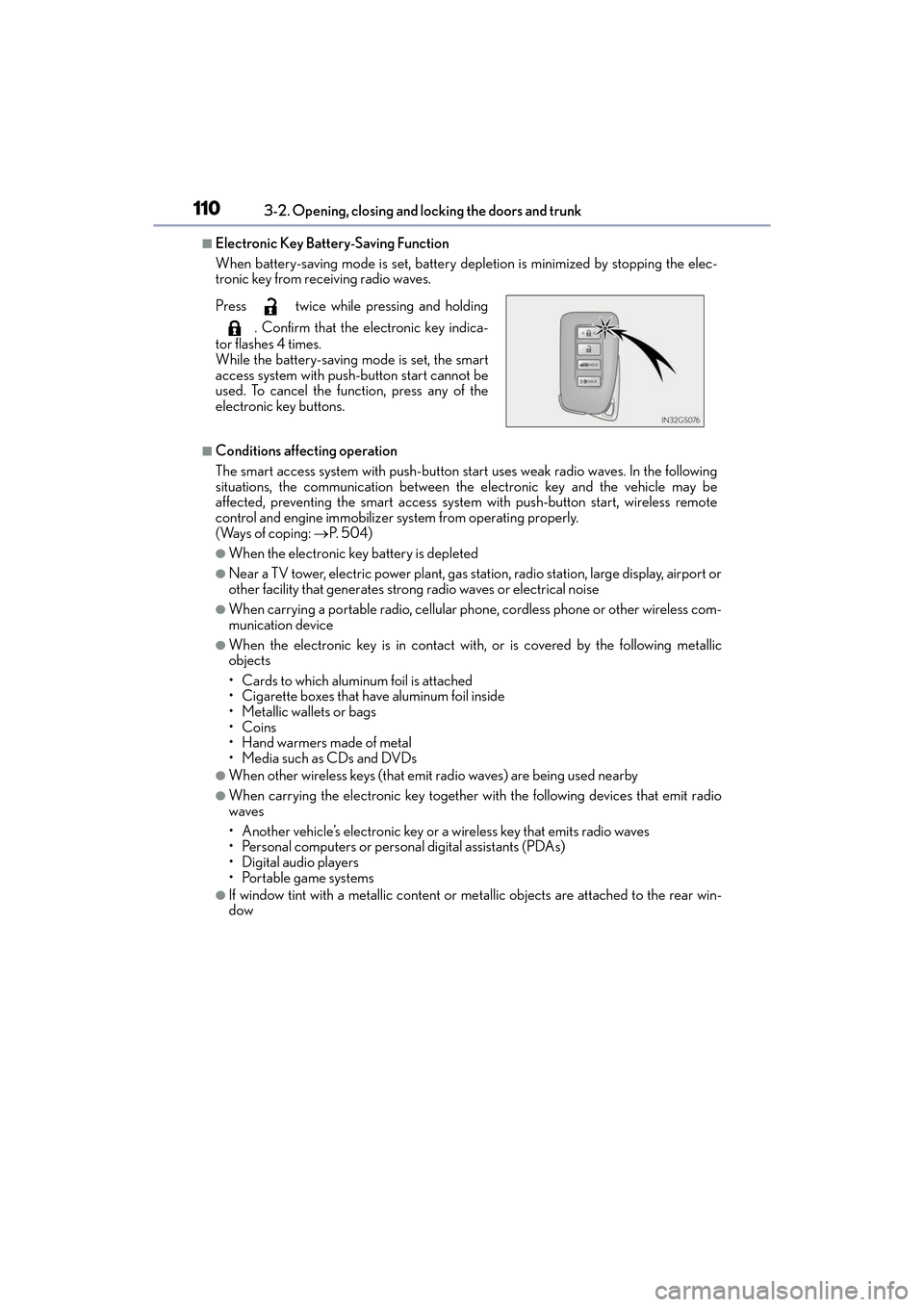
■Electronic Key Battery-Saving Function
When battery-saving mode is set, battery depletion is minimized by stopping the elec-
tronic key from receiving radio waves.
■Conditions affecting operation
The smart access system with push-button start uses weak radio waves. In the following
situations, the communication between the electronic key and the vehicle may be
affected, preventing the smart access system with push-button start, wireless remote
control and engine immobilizer system from operating properly.
(Ways of coping:
→P. 5 0 4 )
●When the electronic key battery is depleted
●Near a TV tower, electric power plant, gas station, radio station, large display, airport or
other facility that generates strong radio waves or electrical noise
●When carrying a portable radio, cellular phone, cordless phone or other wireless com-
munication device
●When the electronic key is in contact with , or is covered by the following metallic
objects
• Cards to which aluminum foil is attached
• Cigarette boxes that have aluminum foil inside
• Metallic wallets or bags
•Coins
•Hand warmers made of metal
• Media such as CDs and DVDs
●When other wireless keys (that emit radio waves) are being used nearby
●When carrying the electronic key together with the following devices that emit radio
waves
• Another vehicle’s electronic key or a wireless key that emits radio waves
• Personal computers or personal digital assistants (PDAs)
• Digital audio players
• Portable game systems
●If window tint with a metallic content or me tallic objects are attached to the rear win-
dow
Press twice while pressing and holding
. Confirm that the electronic key indica-
tor flashes 4 times.
While the battery-saving mode is set, the smart
access system with push-button start cannot be
used. To cancel the function, press any of the
electronic key buttons.
Page 152 of 584
150
ES350_OM_OM33C68U_(U)4-1. Before driving
WA R N I N G
■Things that must not be carried in the trunk
The following things may cause a fire if loaded in the trunk:
●Receptacles containing gasoline
●Aerosol cans
■Storage precautions
Observe the following precautions.
Failure to do so may prevent the pedals from being depressed properly, may block the
driver’s vision, or may result in items hitting
the driver or passengers, possibly causing
an accident.
●Stow cargo and luggage in the trunk whenever possible.
●Do not place cargo or luggage in or on the following locations.
• At the feet of the driver
• On the front passenger or rear seats (when stacking items)
• On the package tray
• On the instrument panel
• On the dashboard
• In front of the navigation system screen or Lexus Display Audio system screen
●Secure all items in the occupant compartment.
■Capacity and distribution
●Do not exceed the maximum axle weight rating or the total vehicle weight rating.
●Even if the total load of occupant’s weight and the cargo load is less than the total load
capacity, do not apply the load unevenly. Improper loading may cause deterioration
of steering or braking control which may cause death or serious injury.
Page 157 of 584
ES350_OM_OM33C68U_(U)
1554-2. Driving procedures
4
Driving
Stop the vehicle.
Set the parking brake (→P. 164), and shift the shift lever to P.
Press the engine switch.
Release the brake pedal and check that “POWER ON” on the multi-informa-
tion display is off.
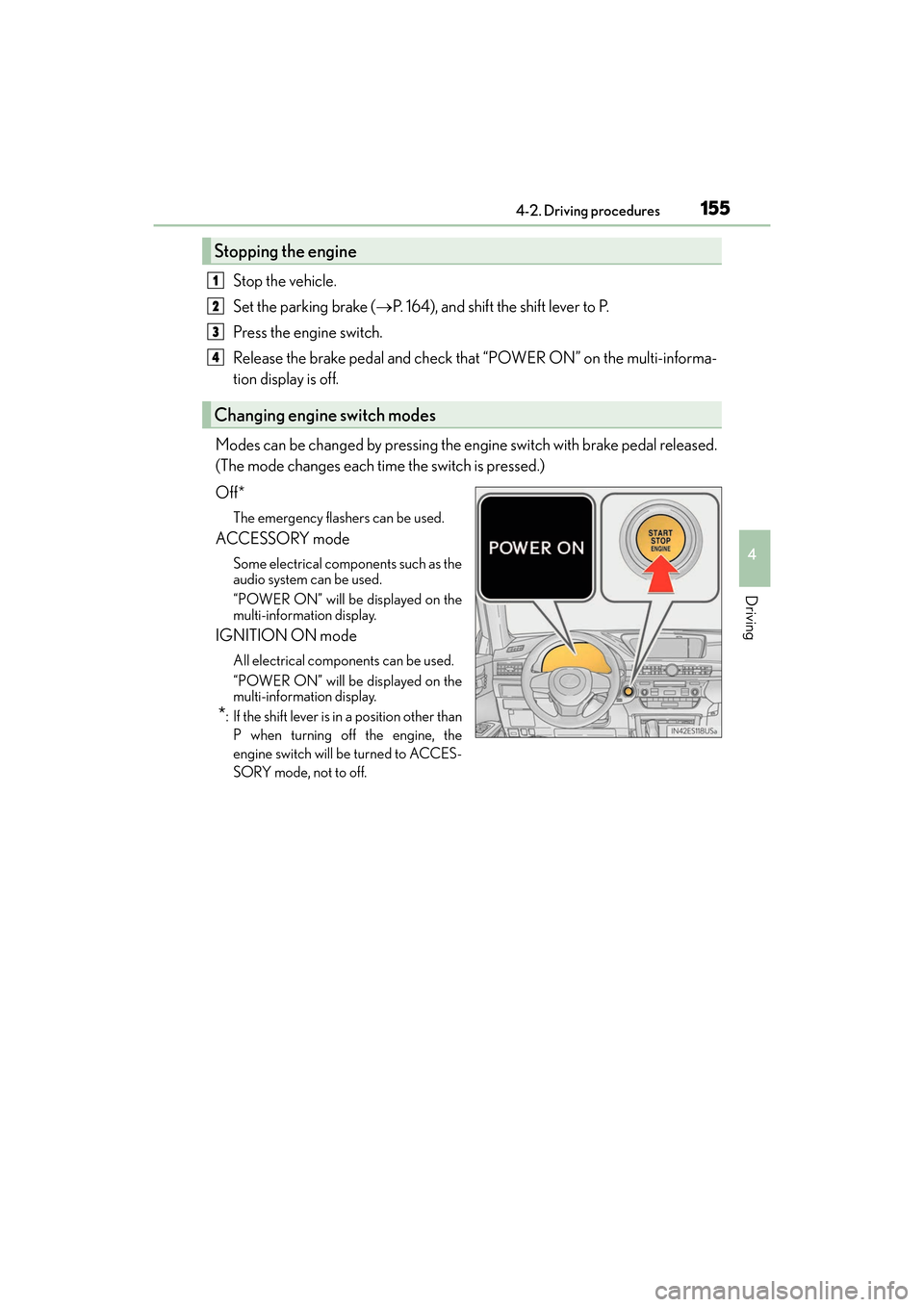
Modes can be changed by pressing the engine switch with brake pedal released.
(The mode changes each time the switch is pressed.)
Off*
The emergency flashers can be used.
ACCESSORY mode
Some electrical components such as the
audio system can be used.
“POWER ON” will be displayed on the
multi-information display.
IGNITION ON mode
All electrical components can be used.
“POWER ON” will be displayed on the
multi-information display.
*: If the shift lever is in a position other than P when turning off the engine, the
engine switch will be turned to ACCES-
SORY mode, not to off.
Stopping the engine
Changing engine switch modes
1
2
3
4
Page 206 of 584
204
ES350_OM_OM33C68U_(U)4-5. Using the driving support systems
■Operation conditions of each function
●Lane departure alert function
This function operates when all of
the following conditions are met.
• LDA is turned on.
• Vehicle speed is approximately 32 mph (50 km/h) or more.
• System recognizes white (yellow) lines.
• Width of traffic lane is approximately 9.8 ft. (3 m) or more.
• Turn signal lever is not operated.
• Vehicle is driven on a straight road or around a gentle curve with a radius of more
than approximately 492 ft. (150 m).
• No system malfunctions are detected. ( →P. 2 0 6 )
●Steering control function
This function operates when all of the follo wing conditions are met in addition to the
operation conditions for the lane departure alert function.
• Setting for “Steering Assist” in (Se ttings display) of the multi-information
display is set to “On”. ( →P. 8 0 )
• Vehicle is not accelerated or decelerated by a fixed amount or more.
• Steering wheel is not operated with a steering force level suitable for changing lanes.
• ABS, VSC, TRAC and PCS are not operating.
• TRAC or VSC is not turned off.
• Hands off steering wheel alert is not displayed. ( →P. 2 0 4 )
●Vehicle sway warning
This function operates when all of the following conditions are met.
• Setting for “Sway Warning” in (Settings display) of the multi-information dis- play is set to “On”. (→ P. 8 0 )
• Vehicle speed is approximately 32 mph (50 km/h) or more.
• Width of traffic lane is approximately 9.8 ft. (3 m) or more.
• No system malfunctions are detected. ( →P. 2 0 6 )
■Temporary cancellation of functions
When operation conditions are no longer met, a function may be temporarily canceled.
However, when the operation conditions are met again, operation of the function is auto-
matically restored. ( →P. 2 0 4 )
■Steering control function
Depending on the vehicle speed, lane departure situation, road conditions, etc., the
operation of the functions may not be recognized or the functions may not operate.
■Lane departure alert function
The warning buzzer may be difficult to hear due to external noise, audio playback, etc.
Also, it may be difficult to feel steering whee l vibrations due to the road conditions, etc.
■Hands off steering wheel alert
When the system determines that the driver has removed the hands from the steering
wheel while the steering control function is operating, a warning message is displayed on
the multi-information display and the buzzer sounds.
■White (yellow) lines are only on one side of road
The LDA system will not operate for the side on which white (yellow) lines could not be
recognized.
Page 225 of 584
223
ES350_OM_OM33C68U_(U)4-5. Using the driving support systems
4
Driving
Intuitive parking assist∗
∗: If equipped
The distance from your vehicle to nearby obstacles when parallel parking or
maneuvering into a garage is measured
by the sensors and communicated via
the multi-information display, navigation system screen or Lexus Display
Audio system screen and a buzzer. Always check the surrounding area when
using this system.
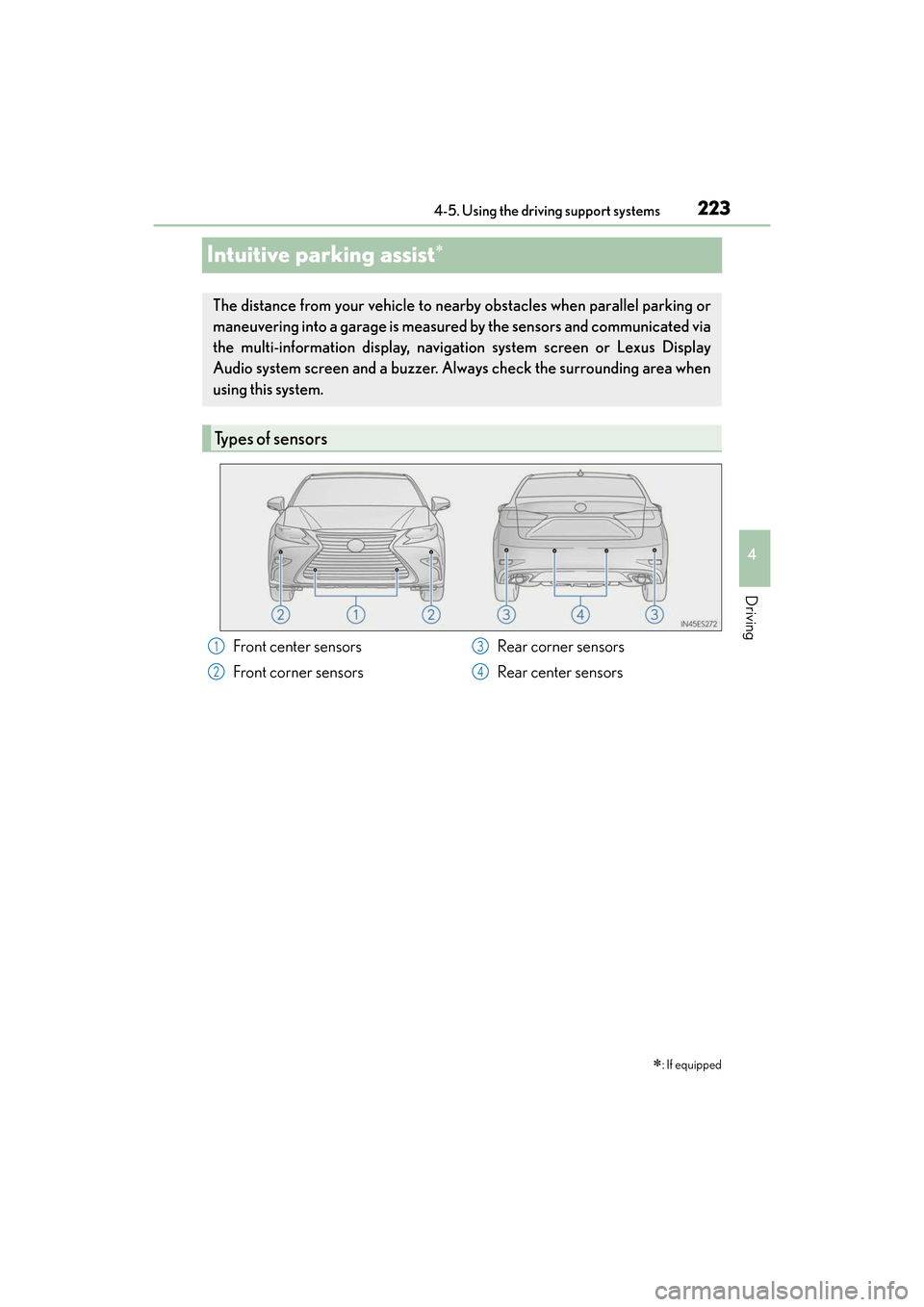
Types of sensors
Front center sensors
Front corner sensors Rear corner sensors
Rear center sensors1
2
3
4
Page 226 of 584

224
ES350_OM_OM33C68U_(U)4-5. Using the driving support systems
Turns the intuitive parking assist on/off
When on, the indicat
or light comes on
to inform the driver that the system is
operational.
When the sensors detect an obstacle, a graphic is shown on the multi-informa-
tion display and navigation system screen or Lexus Display Audio system screen
depending on the position and distance to the obstacle.
■Multi-information display
Front corner sensor detection
Front center sensor detection
Rear corner sensor detection
Rear center sensor detection
Intuitive parking assist switch
Display
1
2
3
4
Page 227 of 584
ES350_OM_OM33C68U_(U)
2254-5. Using the driving support systems
4
Driving
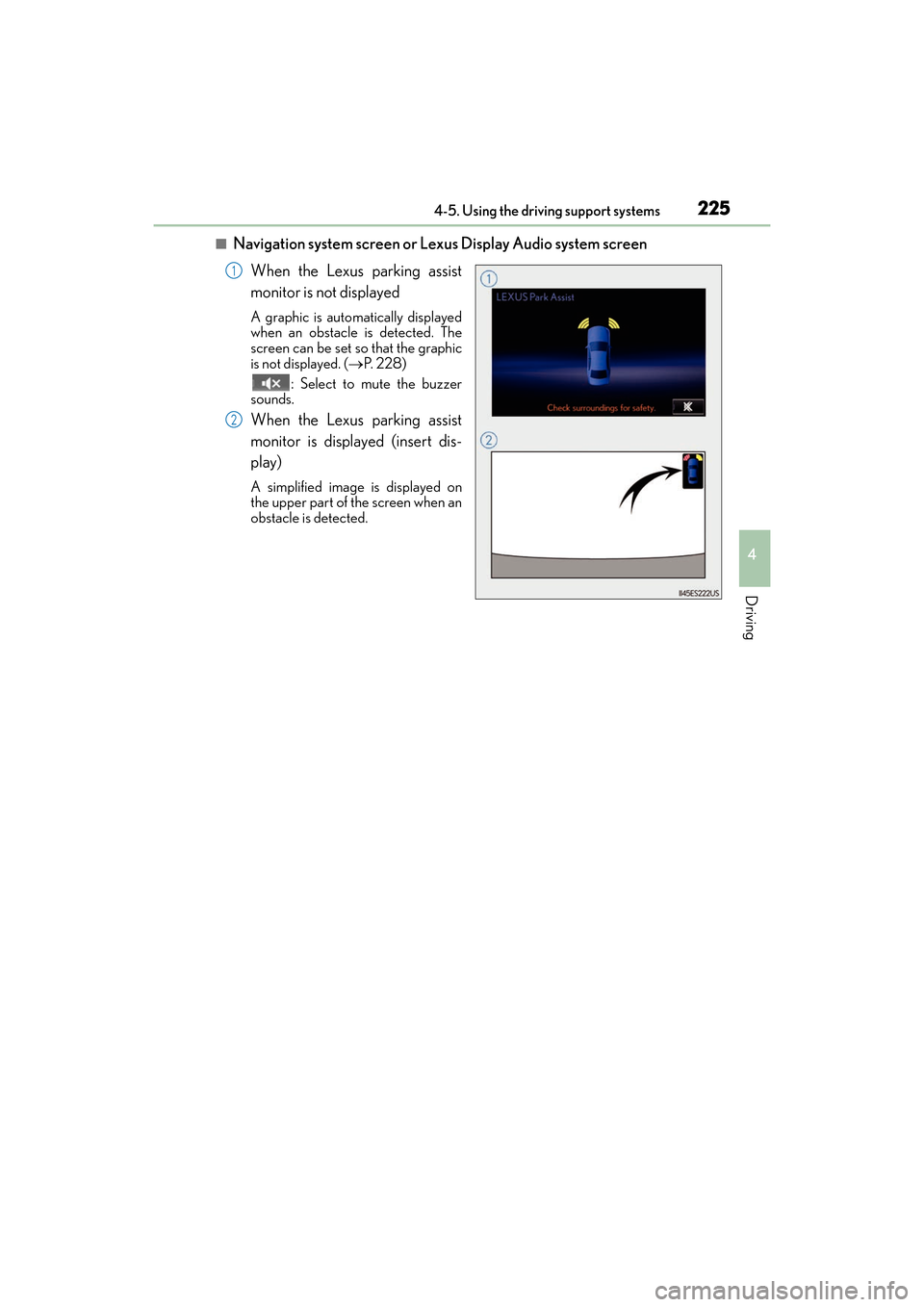
■Navigation system screen or Lexus Display Audio system screenWhen the Lexus parking assist
monitor is not displayed
A graphic is automatically displayed
when an obstacle is detected. The
screen can be set so that the graphic
is not displayed. ( →P. 2 2 8 )
: Select to mute the buzzer
sounds.
When the Lexus parking assist
monitor is displayed (insert dis-
play)
A simplified image is displayed on
the upper part of the screen when an
obstacle is detected.
1
2
Page 228 of 584

226
ES350_OM_OM33C68U_(U)4-5. Using the driving support systems
■Distance display
Sensors that detect an obstacle will illuminate continuously or blink.
*1: The images may differ from that shown in the illustrations. (→
P. 2 2 4 )
*2: Multi-information display
*3: Lexus Display Audio or navigation system screen
Sensor detection display, obstacle distance
Display*1Insert
displayApproximate distance to obstacle
Front center sensorFront and rear corner sensorRear center sensor
(continuous)(blinking slowly)
3.3 ft. (100 cm)
to
1.7 ft. (50 cm)4.9 ft. (150 cm)
to
2.0 ft. (60 cm)
(continuous)(blinking)
1.7 ft. (50 cm)
to
1.3 ft. (40 cm)2.0 ft. (60 cm)
to
1.5 ft. (45 cm)2.0 ft. (60 cm)
to
1.5 ft. (45 cm)
(continuous)(blinking rapidly)
1.3 ft. (40 cm)
to
1.0 ft. (30 cm)1.5 ft. (45 cm)
to
1.0 ft. (30 cm)1.5 ft. (45 cm)
to
1.1 ft. (35 cm)
(blinking*2 or
continuous
*3)
(continuous)
Less than
1.0 ft. (30 cm)Less than
1.0 ft. (30 cm)Less than
1.1 ft. (35 cm)
Page 230 of 584

228
ES350_OM_OM33C68U_(U)4-5. Using the driving support systems
You can change the buzzer sounds volume
and the screen operating conditions.
Press the “MENU” button on the Lexus Display Audio controller/Remote
Touch, and then select on the screen.
Select “Vehicle”, and then select “LEXUS Park Assist” on the screen.
Select the desired item.
The buzzer sounds volume can be adjusted.
On or off can be selected for intuitive parking assist display.
Both the front or rear center sensors display and tone indication can be set.
Setting up intuitive parking assist
1
2
3
XLexus Display Audio screenXNavigation system screen
1
2
3