audio Lexus ES350 2017 s Owner's Guide
[x] Cancel search | Manufacturer: LEXUS, Model Year: 2017, Model line: ES350, Model: Lexus ES350 2017Pages: 584, PDF Size: 13.96 MB
Page 277 of 584
ES350_OM_OM33C68U_(U)
2755-1. Basic Operations
5
Lexus Display Audio system
■When using the screen
●Under extremely cold conditions, the Lexus Display Audio controller may react slowly.
●If the screen is cold, the display may be dark, or the system may seem to be operating
slightly slower than normal.
●The screen may seem dark and hard to see when viewed through sunglasses. Change
your angle of viewing, adjust the display on the “Display” screen ( →P. 287) or remove
your sunglasses.
■Using cellular phones
Interference may be heard through the audio system’s speakers if a cellular phone is
being used inside or close to the vehi cle while the audio system is operating.
WA R N I N G
■Using the Lexus Display Audio controller
Be careful when touching the Lexus Display Audio controller in extreme temperatures
as it may become very hot or cold due to the temperature inside the vehicle.
■Laser product
●CAUTION
USE OF CONTROL OR ADJUSTMENT OR PERFORMANCE OF PROCE-
DURES OTHER THAN THOSE SPECIFIED HEREIN MAY RESULT IN HAZARD-
OUS RADIATION EXPOSURE.
●CAUTION
THE USE OF OPTICAL INSTRUMENTS WITH THIS PRODUCT WILL
INCREASE EYE HAZARD.
NOTICE
■To prevent Lexus Display Audio controller malfunction
●Do not allow the Lexus Display Audio controller to come into contact with food, liq-
uid, stickers or lit cigarettes as doing so may cause it to change color, emit a strange
odor or stop functioning.
●Do not subject the Lexus Display Audio controller to excessive pressure or strong
impact as the controller may bend or break off.
■To prevent battery discharge
Do not leave the audio system on longer than necessary when the engine is off.
■To avoid damaging the audio system
Take care not to spill drinks or other fluids on the audio system.
Page 278 of 584
276
ES350_OM_OM33C68U_(U)5-1. Basic Operations
Steering wheel audio switches
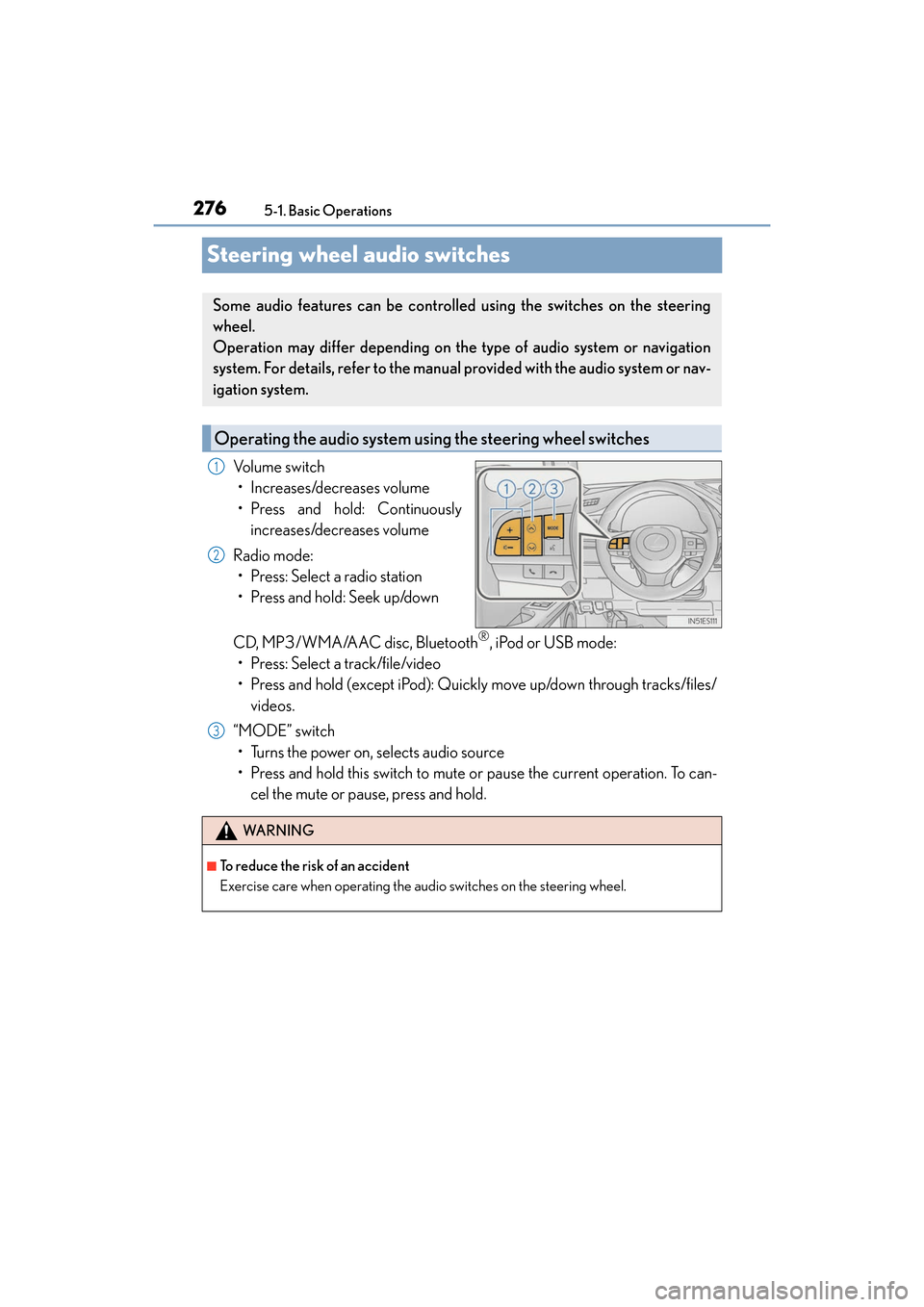
Volume switch
• Increases/decreases volume
• Press and hold: Continuously increases/decreases volume
Radio mode: • Press: Select a radio station
• Press and hold: Seek up/down
CD, MP3/WMA/AAC disc, Bluetooth
®, iPod or USB mode:
• Press: Select a track/file/video
• Press and hold (except iPod): Quickly move up/down through tracks/files/ videos.
“MODE” switch • Turns the power on, selects audio source
• Press and hold this switch to mute or pause the current operation. To can- cel the mute or pause, press and hold.
Some audio features can be controlle d using the switches on the steering
wheel.
Operation may differ depending on the type of audio system or navigation
system. For details, refer to the manual provided with the audio system or nav-
igation system.
Operating the audio system us ing the steering wheel switches
1
2
WA R N I N G
■To reduce the risk of an accident
Exercise care when operating the audio switches on the steering wheel.
3
Page 279 of 584
277
ES350_OM_OM33C68U_(U)5-1. Basic Operations
5
Lexus Display Audio system
Mobile Assistant
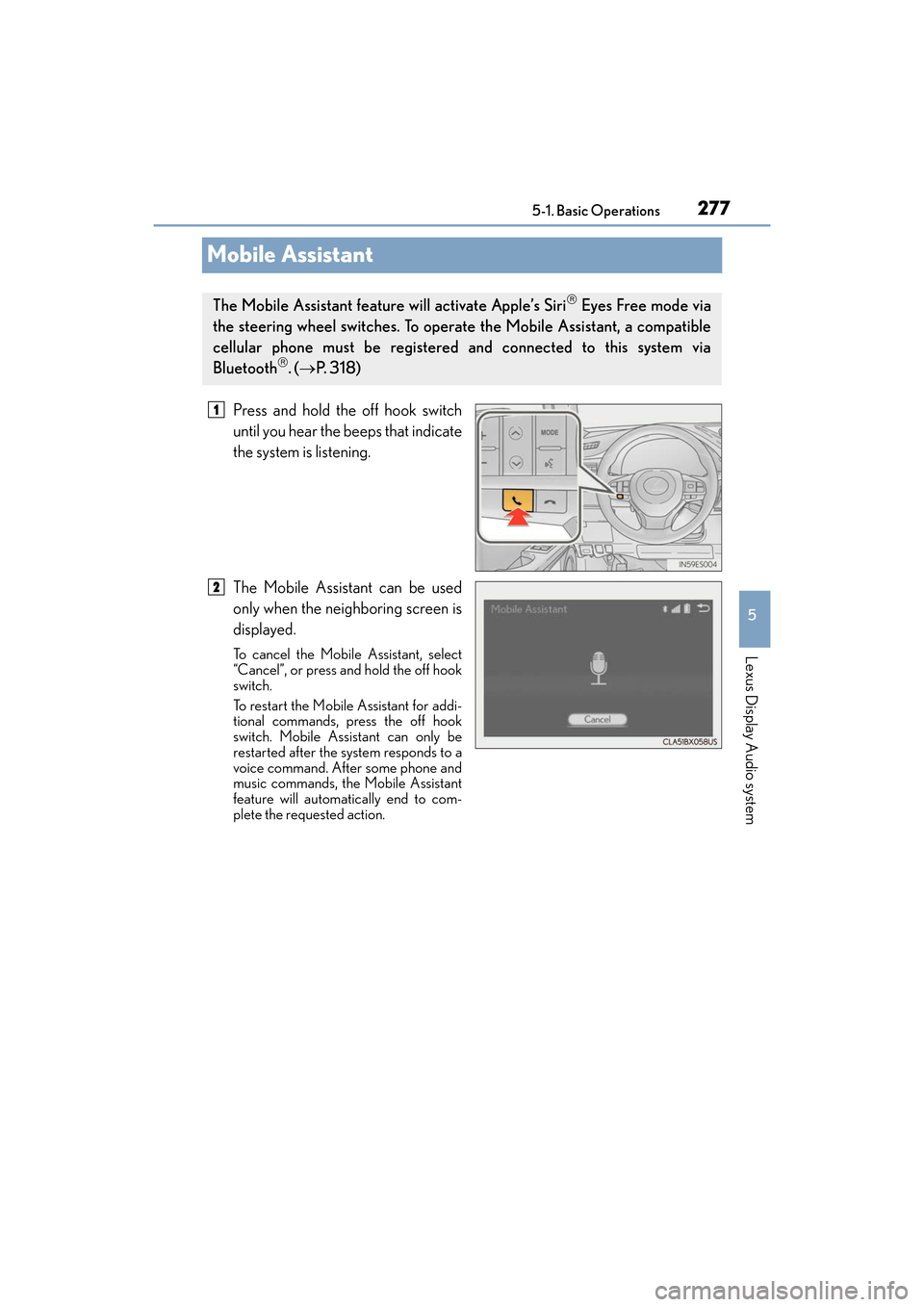
Press and hold the off hook switch
until you hear the beeps that indicate
the system is listening.
The Mobile Assistant can be used
only when the neighboring screen is
displayed.
To cancel the Mobile Assistant, select
“Cancel”, or press and hold the off hook
switch.
To restart the Mobile Assistant for addi-
tional commands, press the off hook
switch. Mobile Assistant can only be
restarted after the system responds to a
voice command. After some phone and
music commands, the Mobile Assistant
feature will automatically end to com-
plete the requested action.
The Mobile Assistant feature will activate Apple’s Siri Eyes Free mode via
the steering wheel switches. To operate the Mobile Assistant, a compatible
cellular phone must be registered and connected to this system via
Bluetooth
. ( → P. 3 1 8 )
1
2
Page 280 of 584
2785-1. Basic Operations
ES350_OM_OM33C68U_(U)
■Adjusting the volume
The volume of the Mobile Assistant can be adjusted using the
“PWR·VOL” knob or
steering wheel volume switches. The Mobile Assistant and phone call volumes are syn-
chronized.
■Microphone
It is not necessary to speak directly into the microphone when using the Mobile Assis-
tant.
●Wait for the listening beeps before using the Mobile Assistant.
●The Mobile Assistant may not recognize commands in the following situations:
• When spoken too quickly.
• When spoken at a low or high volume.
• When the roof or windows are open.
• When passengers are talking while th e Mobile Assistant is being used.
• When the air conditioning system’s fan speed is set high.
• When the air conditioning vents are turned toward the microphone.
■Mobile Assistant precautions
●The available features and functions may vary based on the iOS version installed on the
connected device.
●Some Siri features are limited in Eyes Free mode. If you attempt to use an unavailable
function, Siri will inform you that the function is not available.
●If Siri is not enabled on the ce llular phone connected via Bluetooth, an error message
will be displayed on the screen.
●While a phone call is active, the Mobile Assistant cannot be used.
●If using the navigation feature of the cellular phone, ensure the active audio source is
Bluetooth audio or iPod in order to hear turn by turn direction prompts.
Page 281 of 584
279
ES350_OM_OM33C68U_(U)5-1. Basic Operations
5
Lexus Display Audio system
USB/AUX ports
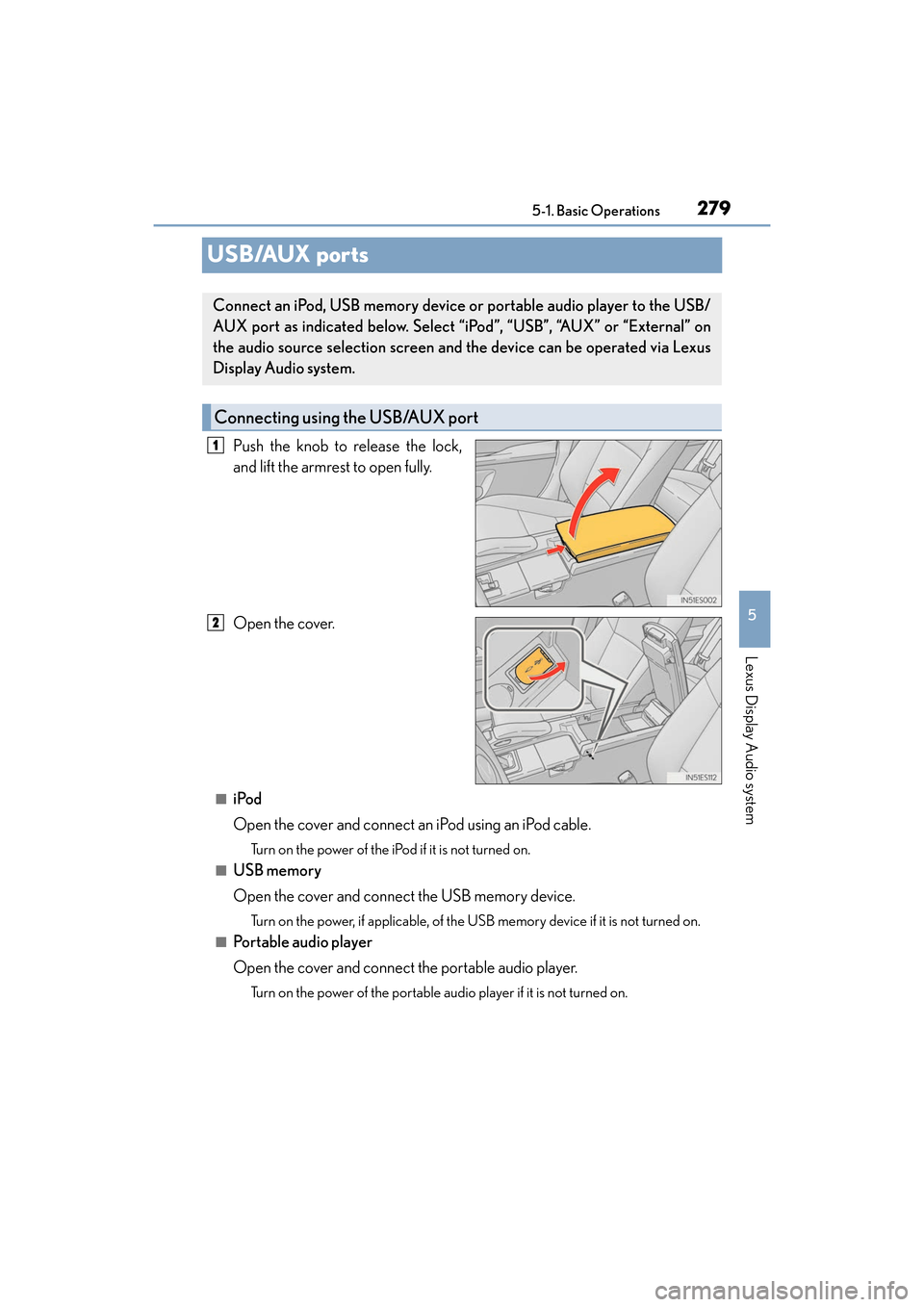
Push the knob to release the lock,
and lift the armrest to open fully.
Open the cover.
■iPod
Open the cover and connect an iPod using an iPod cable.
Turn on the power of the iPod
if it is not turned on.
■USB memory
Open the cover and connect the USB memory device.
Turn on the power, if applicable, of the US B memory device if it is not turned on.
■Portable audio player
Open the cover and connect the portable audio player.
Turn on the power of the portable audio player if it is not turned on.
Connect an iPod, USB memory device or portable audio player to the USB/
AUX port as indicated below. Select “iPod”, “USB”, “AUX” or “External” on
the audio source selection screen and the device can be operated via Lexus
Display Audio system.
Connecting using the USB/AUX port
1
2
Page 282 of 584
2805-1. Basic Operations
ES350_OM_OM33C68U_(U)
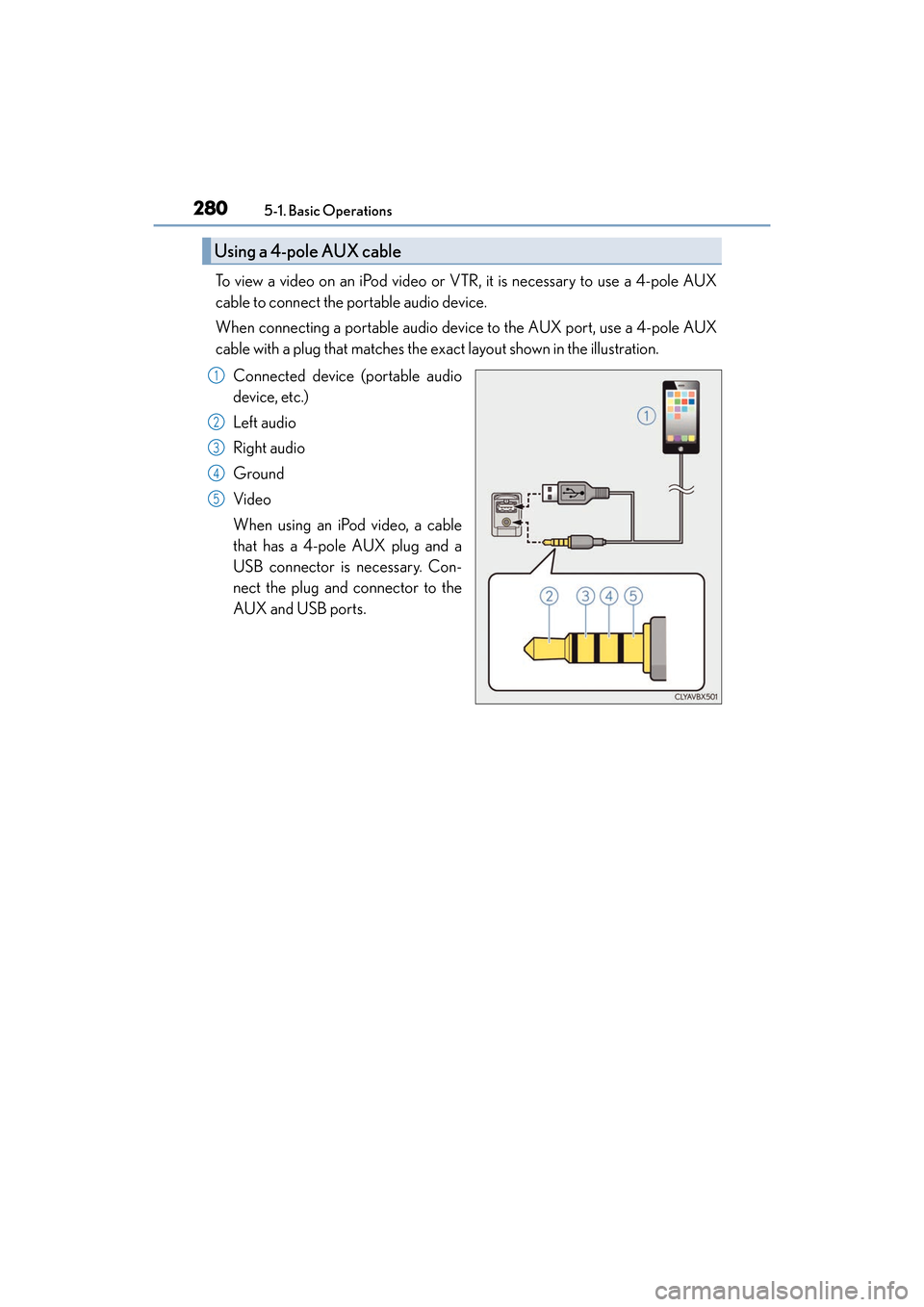
To view a video on an iPod video or VTR, it is necessary to use a 4-pole AUX
cable to connect the portable audio device.
When connecting a portable audio device to the AUX port, use a 4-pole AUX
cable with a plug that matches the ex act layout shown in the illustration.
Connected device (portable audio
device, etc.)
Left audio
Right audio
Ground
Video
When using an iPod video, a cable
that has a 4-pole AUX plug and a
USB connector is necessary. Con-
nect the plug and connector to the
AUX and USB ports.
Using a 4-pole AUX cable
1
2
3
4
5
Page 283 of 584
ES350_OM_OM33C68U_(U)
2815-1. Basic Operations
5
Lexus Display Audio system
■When using a 4-pole AUX cable
If a 4-pole AUX cable with a different layout is used, audio and/or video may not be out-
put properly.
WA R N I N G
■While driving
Do not connect a device or operate the device controls.
NOTICE
■To prevent damage to the device or its terminals
Depending on the size and shape of the device that is connected to the system, the
console box may not close fully. In this case, do not forcibly close the console box as
this may damage the device or the terminal, etc.
Page 284 of 584
282
ES350_OM_OM33C68U_(U)5-2. Setup
Setup menu
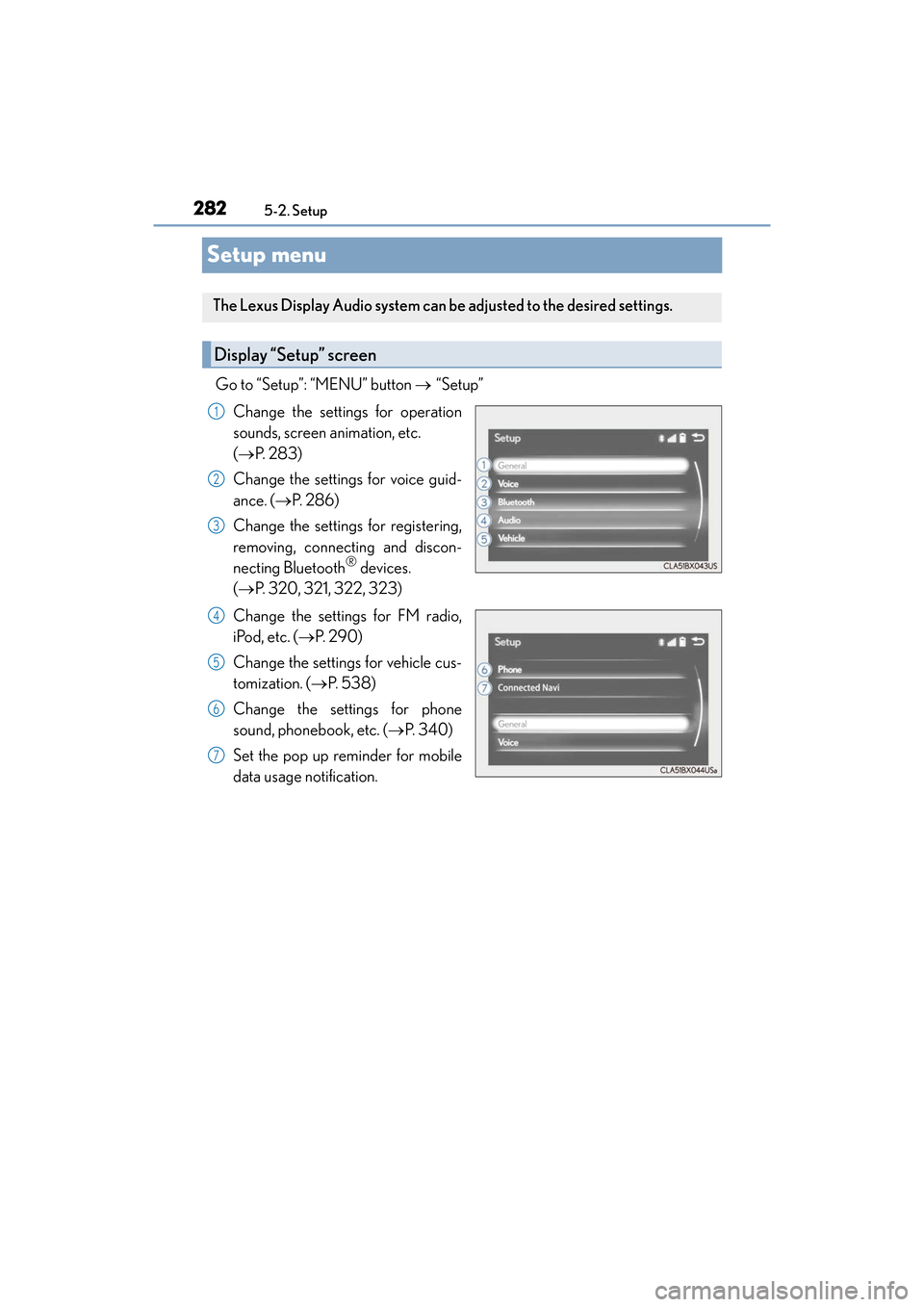
Go to “Setup”: “MENU” button
→ “Setup”
Change the settings for operation
sounds, screen animation, etc.
( → P. 2 8 3 )
Change the settings for voice guid-
ance. ( →P. 2 8 6 )
Change the settings for registering,
removing, connecting and discon-
necting Bluetooth
® devices.
( → P. 320, 321, 322, 323)
Change the settings for FM radio,
iPod, etc. ( →P. 2 9 0 )
Change the settings for vehicle cus-
tomization. ( →P. 5 3 8 )
Change the settings for phone
sound, phonebook, etc. (→ P. 3 4 0 )
Set the pop up reminder for mobile
data usage notification.
The Lexus Display Audio system can be adjusted to the desired settings.
Display “Setup” screen
1
2
3
4
5
6
7
Page 285 of 584
283
ES350_OM_OM33C68U_(U)5-2. Setup
5
Lexus Display Audio system
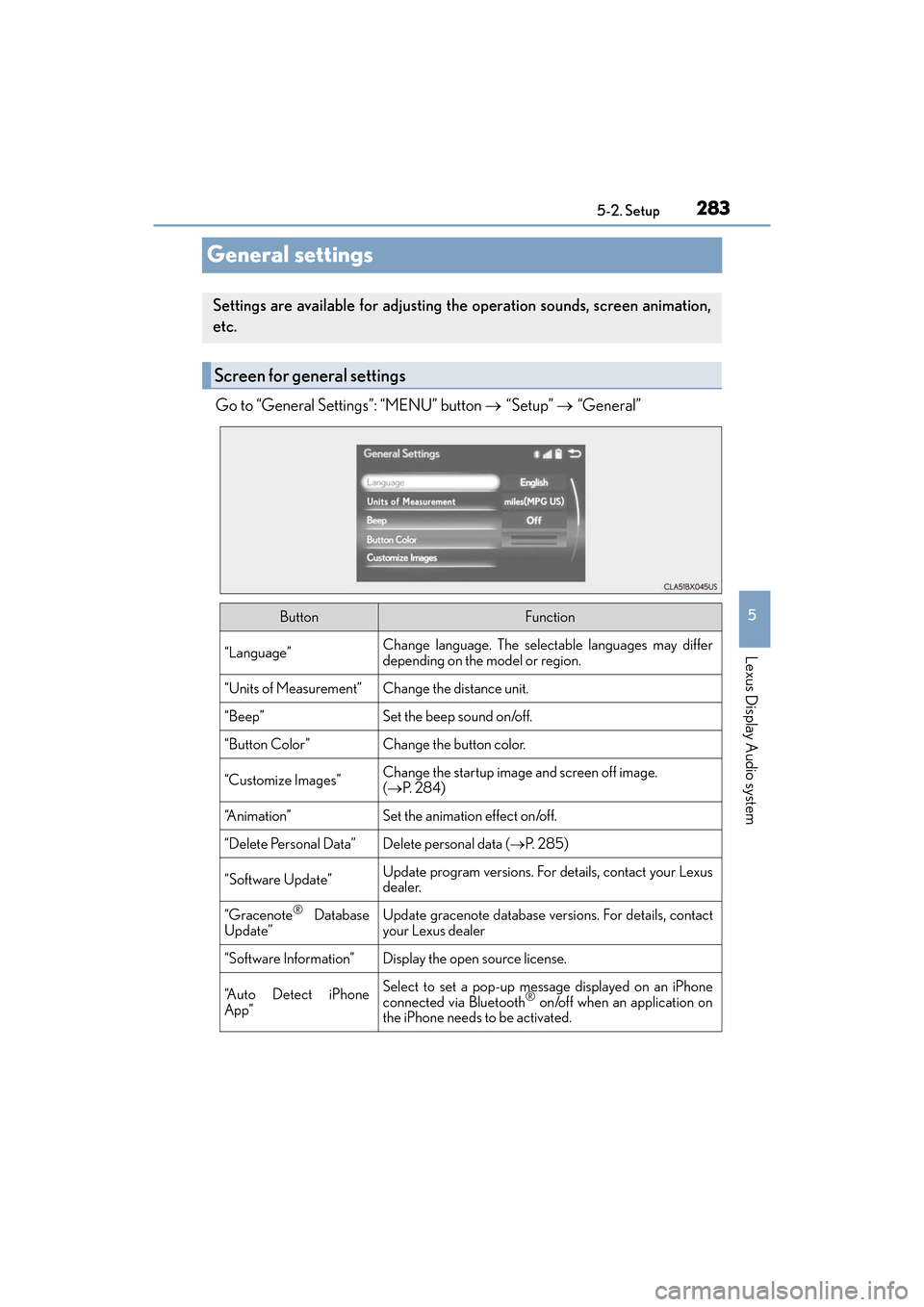
General settings
Go to “General Settings”: “MENU” button
→ “Setup” → “General”
Settings are available for adjusting the operation sounds, screen animation,
etc.
Screen for general settings
ButtonFunction
“Language”Change language. The selectable languages may differ
depending on the model or region.
“Units of Measurement”Change the distance unit.
“Beep”Set the beep sound on/off.
“Button Color”Change the button color.
“Customize Images”Change the startup image and screen off image.
(→ P. 2 8 4 )
“A n i m a t i o n ”Set the animation effect on/off.
“Delete Personal Data”Delete personal data ( →P. 2 8 5 )
“Software Update”Update program versions. For details, contact your Lexus
dealer.
“Gracenote® Database
Update”Update gracenote database versions. For details, contact
your Lexus dealer
“Software Information”Display the open source license.
“A u t o D e t e c t i P h o n e
App”Select to set a pop-up message displayed on an iPhone
connected via Bluetooth® on/off when an application on
the iPhone needs to be activated.
Page 287 of 584
ES350_OM_OM33C68U_(U)
2855-2. Setup
5
Lexus Display Audio system
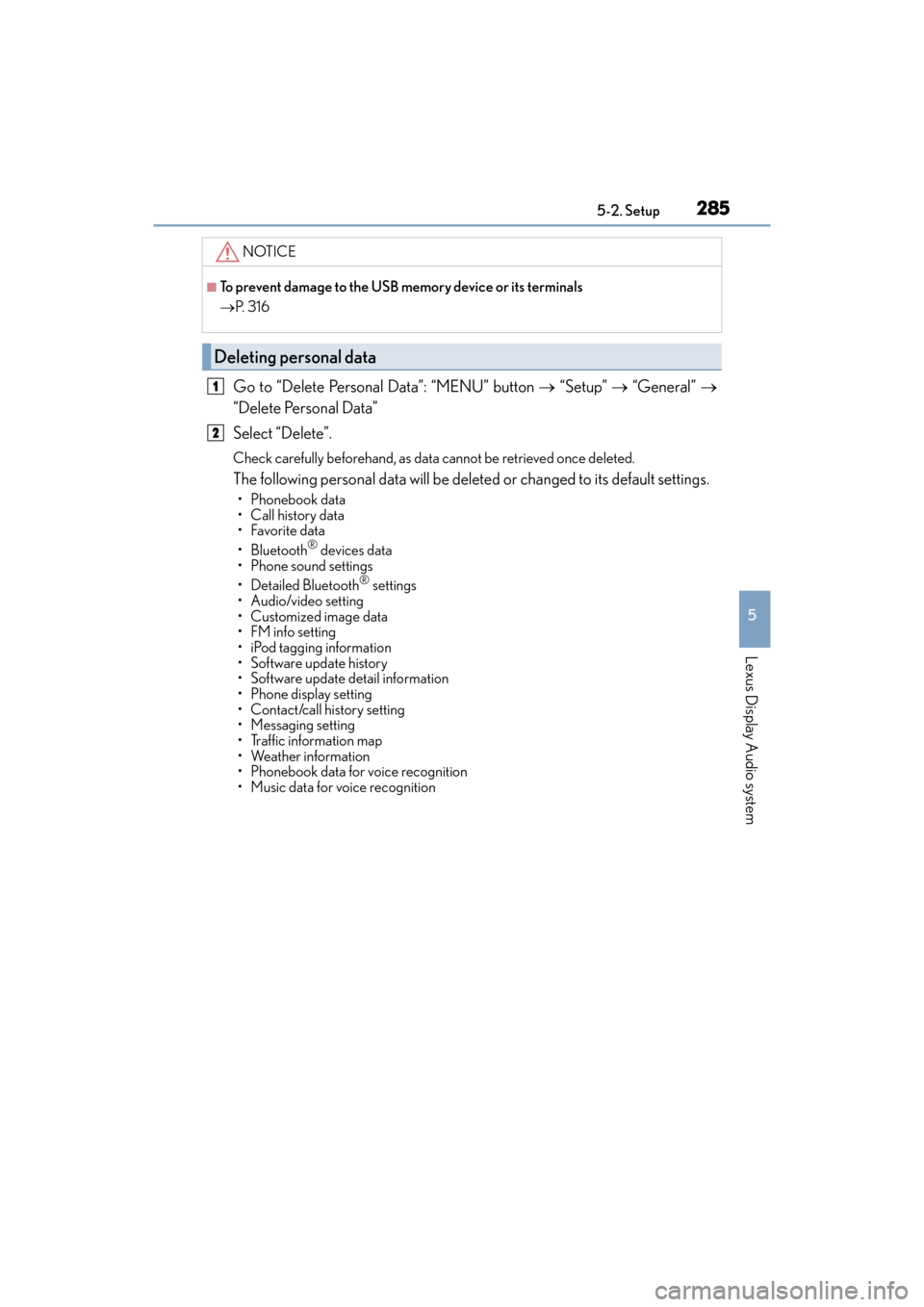
Go to “Delete Personal Data”: “MENU” button → “Setup” → “General” →
“Delete Personal Data”
Select “Delete”.
Check carefully beforehand, as data cannot be retrieved once deleted.
The following personal data will be dele ted or changed to its default settings.
• Phonebook data
• Call history data
•Favorite data
• Bluetooth
® devices data
• Phone sound settings
• Detailed Bluetooth
® settings
• Audio/video setting
• Customized image data
• FM info setting
• iPod tagging information
• Software update history
• Software update detail information
• Phone display setting
• Contact/call history setting
• Messaging setting
• Traffic information map
• Weather information
• Phonebook data for voice recognition
• Music data for voice recognition
NOTICE
■To prevent damage to the USB memory device or its terminals
→ P. 3 1 6
Deleting personal data
1
2