change Lexus ES350 2017 Quick Guide
[x] Cancel search | Manufacturer: LEXUS, Model Year: 2017, Model line: ES350, Model: Lexus ES350 2017Pages: 104, PDF Size: 3.83 MB
Page 76 of 104

75
ES350_QG_OM33C84U_(U)
Phone
Radio
CommandAction
“Redial”Places a call to the phone number of the latest outgo-
ing call
“Call Back”Places a call to the phone number of latest incoming
call
“Show Recent Calls”Displays the call history screen
“Dial
“Call
the phone book
“Mobile Assistant”Activates Apple’s Siri® Eyes Free mode
CommandAction
“Tune to
“Tune to
“Play
genre
“Tune to FM
HD
“Tune to preset
tion
“Tune to
the specified name
“Tune to channel
channel number
“Play
specified genre
“A M R a d i o ”Selects AM radio mode
“FM Radio”Selects FM radio mode
“Sirius XM”Selects satellite radio mode
Page 78 of 104

77
ES350_QG_OM33C84U_(U)
Climate
*: Only within the possible temperature range of the air conditioning system
CommandAction
“Turn Climate Control On”Turns air conditioning system on
“Turn Climate Control Off”Turns air conditioning system off
“Warmer”Increases the temperature of the air conditioning sys-
tem
“Cooler”Decreases the temperature of the air conditioning
system
“<#> degrees”Changes the set temperature of the air conditioning
system to <#> degrees
*
Commands relating to operation of the audio/visual and air conditioning systems can only
be performed when the audio and air conditioning systems are turned on. Refer to the
“OWNER’S MANUAL” and “NAVIGATION SYSTEM OWNER’S MANUAL”.
Page 82 of 104
81
ES350_QG_OM33C84U_(U)
Garage Door Opener
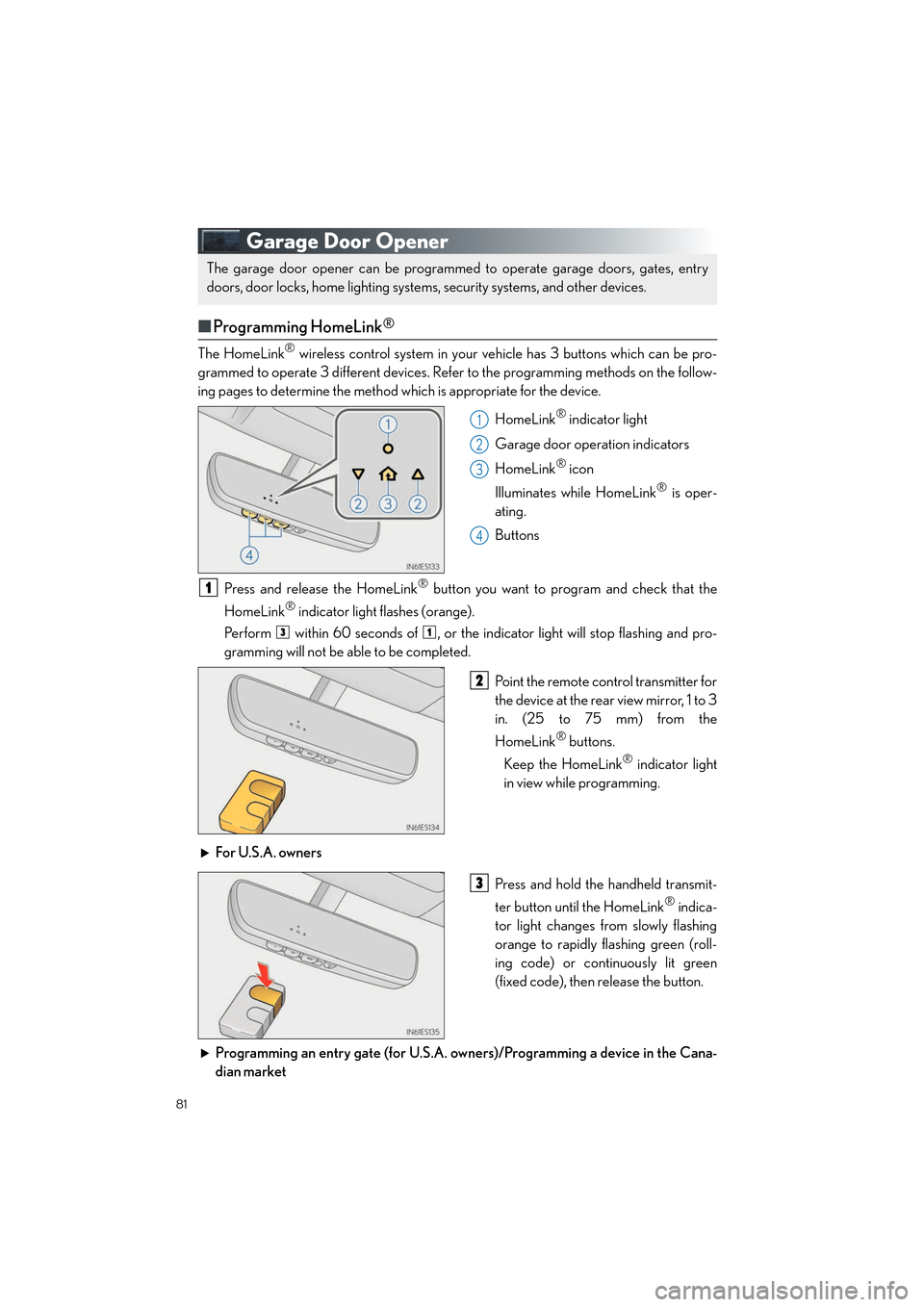
■Programming HomeLink®
The HomeLink® wireless control system in your vehicle has 3 buttons which can be pro-
grammed to operate 3 different devices. Refer to the programming methods on the follow-
ing pages to determine the method which is appropriate for the device.
HomeLink
® indicator light
Garage door operation indicators
HomeLink
® icon
Illuminates while HomeLink
® is oper-
ating.
Buttons
Press and release the HomeLink
® button you want to program and check that the
HomeLink
® indicator light flashes (orange).
Perform within 60 seconds of , or the indicator light will stop flashing and pro-
gramming will not be able to be completed.
Point the remote control transmitter for
the device at the rear view mirror, 1 to 3
in. (25 to 75 mm) from the
HomeLink
® buttons.
Keep the HomeLink
® indicator light
in view while programming.
For U.S.A. owners Press and hold the handheld transmit-
ter button until the HomeLink
® indica-
tor light changes from slowly flashing
orange to rapidly flashing green (roll-
ing code) or continuously lit green
(fixed code), then release the button.
Programming an entry gate (for U.S.A. owners)/Programming a device in the Cana-
dian market
The garage door opener can be programmed to operate garage doors, gates, entry
doors, door locks, home lighting system s, security systems, and other devices.
1
2
3
4
1
31
2
3
Page 83 of 104

82
ES350_QG_OM33C84U_(U)
Press and release the remote control transmitter button at 2 second intervals, repeat-
edly, until the HomeLink
® indicator light changes from slowly flashing (orange) to rap-
idly flashing (green) (rolling code) or continuously lit (green) (fixed code).
Test the HomeLink
® operation by pressing the newly programmed button and observ-
ing the indi cator light:
● Device with fixed code: If the indicator light is solid/continuous, programming has
been completed and your garage door or other device should operate when the
HomeLink
® button is pressed and released.
● Device with rolling code: If the indicator light flashes rapidly, your garage door
opener motor (or other device) is equipped with a rolling code. Complete the pro-
gramming process by firmly pressing and holding the programmed HomeLink
®
button for 2 seconds and then release the button.
● If the garage door or other device does not operate, proceed to “Programming a
rolling code system”.
Repeat the steps above to program another device for any of the remaining
HomeLink
® buttons.
■ Programming other devices
For U.S.A. owners:
To program an entry gate, see the OWNER’S MANUAL.
To program other devices, contact your Lexus dealer.
For Canadian owners: To program all other devices, follow the same procedure as for garage door programming.
■Operating HomeLink®
Press the appropriate HomeLink® button. The HomeLink® indicator light should turn on.
3
4
5
Page 88 of 104

87
ES350_QG_OM33C84U_(U)
■LEXUS Enform Service Connect
■
Services
Lexus Enform Service Connect uses embedded telematics hardware to collect and transmit
vehicle data that allows Lexus to provide:
● Vehicle Health Report (VHR)
Safety Recalls, Service Campaigns, Current Vehicle Alerts, Required Maintenance,
Ve h i c l e C o n d i t i o n S t a t u s
● Maintenance Notifications
● Vehicle Alert Notifications
For details about this service and how to register, refer to
http://www.lexus.com/enform/
.
The Lexus Enform Service Connect function is achieved by using a vehicle Data Communi-
cation Module (DCM).
■Subscription
→ P. 8 6
XM Satellite Radio
■Subscription
For XM Services requiring a subscription (suc h as XM Radio), the following paragraph shall
be included.
Required XM Radio monthly subscriptions sold separately after trial period. Subscription
fee is consumer only. All fees and programming subject to change. Subscriptions are
subject to the Customer Agreement available at www.siriusxm.com.
(U.S.A.) or
www.xmradio.ca
(Canada) XM service only available in the 48 contiguous United States
and 10 Canadian provinces.
For more information, program schedules, and to subscribe or extend subscription after
complimentary trial period; more information is available at:
U.S.A. Customers:
Visit www.siriusxm.com
o r c a l l 1 - 8 7 7- 4 4 7- 0 0 1 1
Canadian Customers:
Visit www.xmradio.ca
or call 1-877-438-9677
An XM Satellite Radio is a tuner designed exclusively to receive broadcasts provided
under a separate subscription.
For details, refer to the “OWNER’S MANUAL” and “NAVIGATION SYSTEM
OWNER’S MANUAL”.
Page 97 of 104

96
What to do if...
ES350_QG_OM33C84U_(U)
*1: If equipped
*2: It also comes on due to natural causes such as natural air leaks and tire inflation pressure changes caused by temperature. Adjust the tire inflation pressure to the specified level.
The light will turn off after a few minutes. In case the light does not turn off even if the tire
inflation pressure is adjusted, have the system checked by your Lexus dealer.
See the OWNER’S MANUAL
Turn signal indicatorIntuitive parking assist
indicator
*1
Headlight indicator (U.S.A.)
(Flashes)
Slip indicator light
Tail light indicator (Canada)VSC OFF indicator
Headlight high beam indicatorPCS warning light*1
Automatic High Beam
indicator
*1BSM outside rear view mirror
indicators
*1
Fog light indicator“A I R B A G O N / O F F ”
indicator
Eco Driving Indicator Light
Cruise control indicator(U.S.A.)Parking brake
indicator
Radar cruise control
indicator
*1(Canada)
Cruise control “SET” indicatorLow outside temperature
indicator
LDA indicator*1
For further information, refer to the OWNER’S MANUAL.