key Lexus ES350 2018 Owner's Mannual / LEXUS 2018 ES350 OWNER'S MANUAL QUICK GUIDE (OM06136U)
[x] Cancel search | Manufacturer: LEXUS, Model Year: 2018, Model line: ES350, Model: Lexus ES350 2018Pages: 102, PDF Size: 2.43 MB
Page 3 of 102
3
ES350_QG_OM06136U_(U)
Headlights................................................................................................................................................ 31
Head Restraints ..................................................................................................................................... 18
Intuitive Parking Assist ....................................................................................................................... 44
Keys ............................................................................................................................................................ 14
LDA (Lane Departure Alert with steering control) .............................................................. 43
Lexus Display Audio Controller (w ith Lexus Display Audio System) ............................ 61
LEXUS Enform ............................................................................................................................... ..... 85
LEXUS Enform Safety Connect ...................................................................................................83
Moon Roof ..............................................................................................................................................90
Multi-information Display .................................................................................................................28
Navigation System
*
Register home .................................................................................................................. ...............52
Destination search ............................................................................................................. ...........53
*: These features may be operated by Voice Command (See P.73)
Page 14 of 102
14
ES350_QG_OM06136U_(U)
Keys
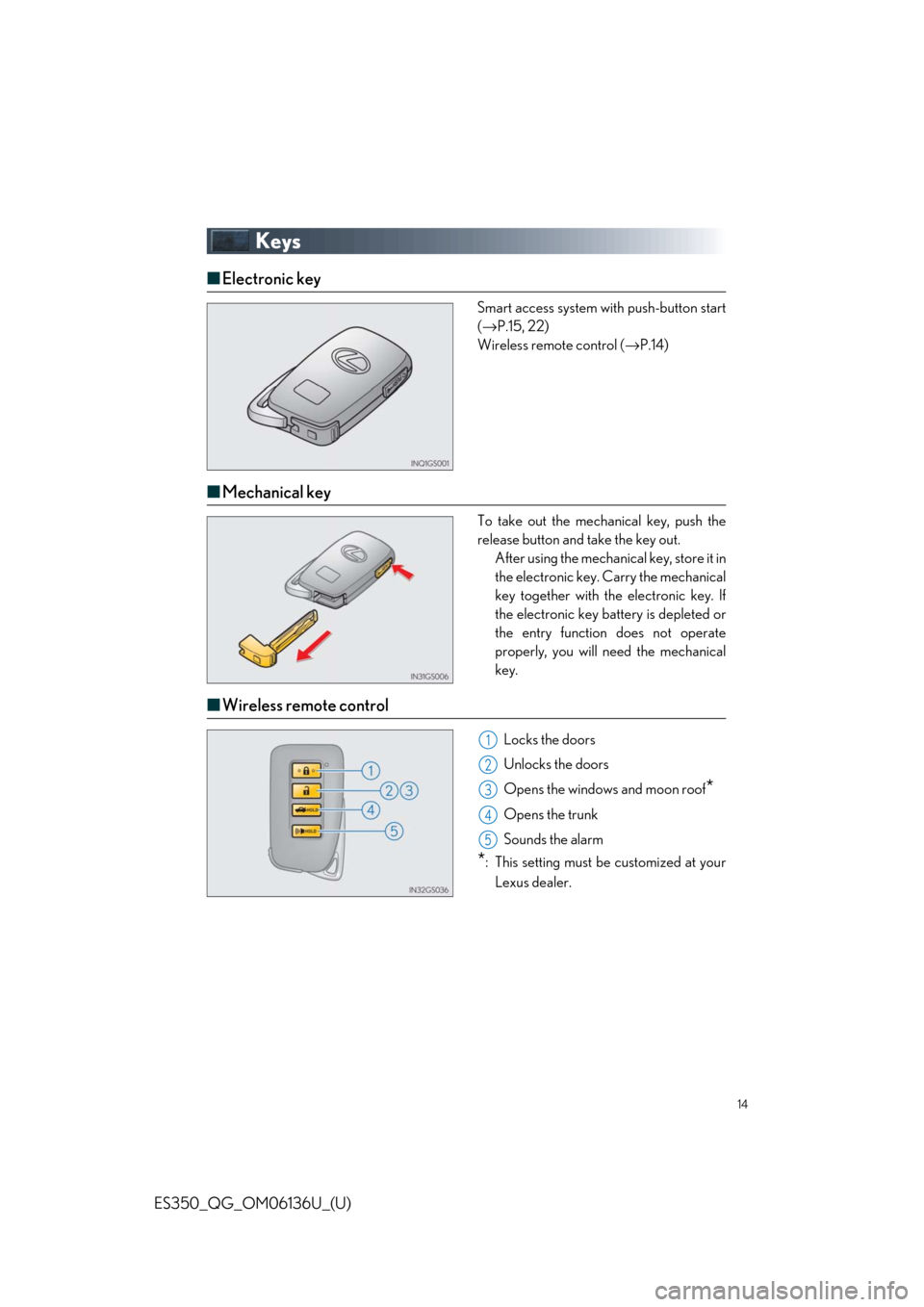
■Electronic key
Smart access system with push-button start
(→ P.15, 22)
Wireless remote control ( →P.14)
■Mechanical key
To take out the mechanical key, push the
release button and take the key out.
After using the mechani cal key, store it in
the electronic key. Carry the mechanical
key together with the electronic key. If
the electronic key battery is depleted or
the entry function does not operate
properly, you will ne ed the mechanical
key.
■ Wireless remote control
Locks the doors
Unlocks the doors
Opens the windows and moon roof
*
Opens the trunk
Sounds the alarm
*: This setting must be customized at your
Lexus dealer.
1
2
3
4
5
Page 15 of 102
15
ES350_QG_OM06136U_(U)
Smart Access System with Push-button Start
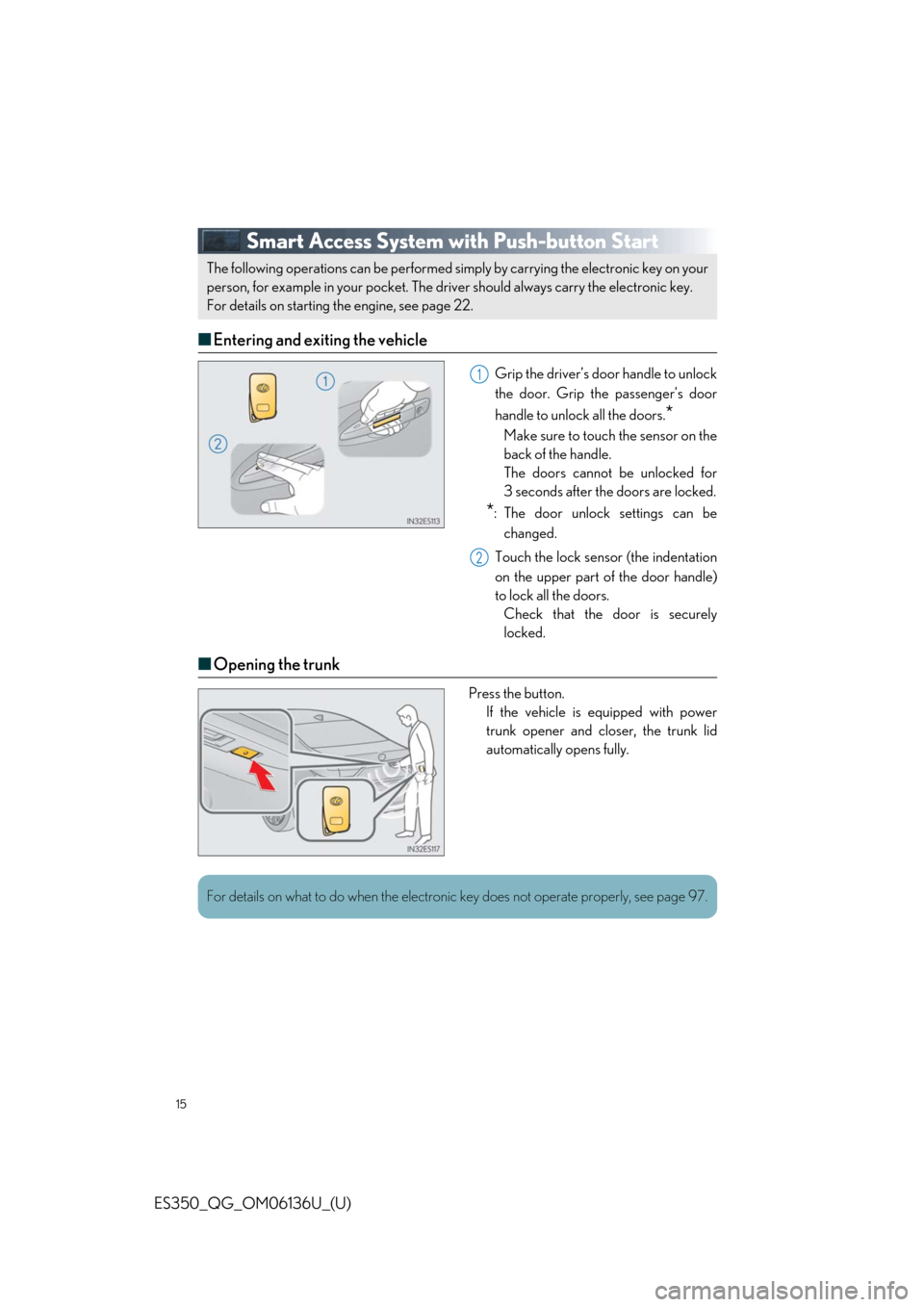
■Entering and exiting the vehicle
Grip the driver’s door handle to unlock
the door. Grip the passenger’s door
handle to unlock all the doors.
*
Make sure to touch the sensor on the
back of the handle.
The doors cannot be unlocked for
3 seconds after the doors are locked.
*: The door unlock settings can be
changed.
Touch the lock sensor (the indentation
on the upper part of the door handle)
to lock all the doors. Check that the door is securely
locked.
■ Opening the trunk
Press the button.
If the vehicle is equipped with power
trunk opener and closer, the trunk lid
automatically opens fully.
The following operations can be performed simply by carrying the electronic key on your
person, for example in your pocket. The driver should always carry the electronic key.
For details on starting the engine, see page 22.
1
2
For details on what to do when the electronic key does not operate properly, see page 97.
Page 20 of 102
20
ES350_QG_OM06136U_(U)
■Memory recall function (driver’s side only)
Each electronic key can be registered to recall your preferred driving position.
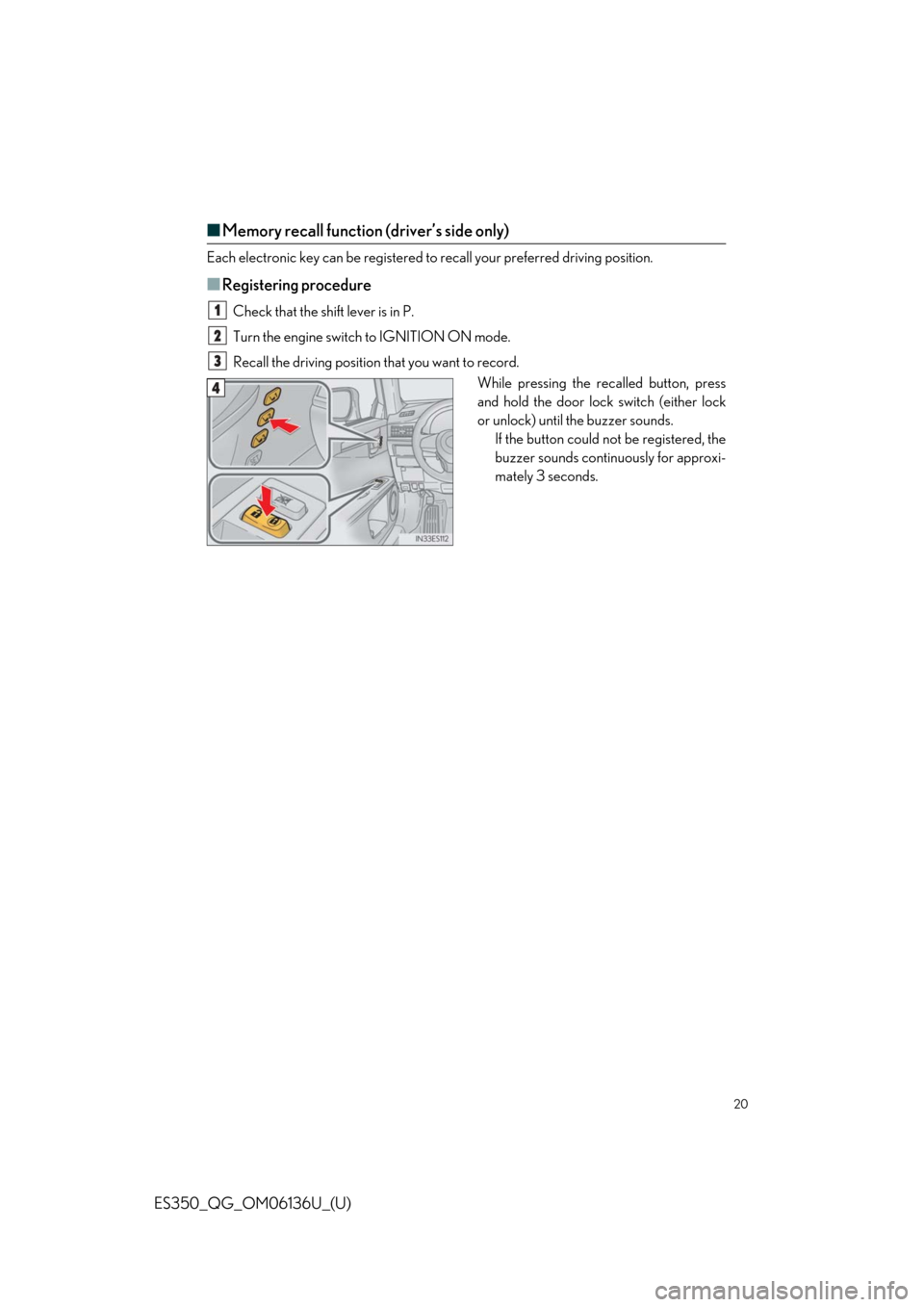
■Registering procedure
Check that the shif t lever is in P.
Turn the engine switch to IGNITION ON mode.
Recall the driving position that you want to record.
While pressing the recalled button, press
and hold the door lock switch (either lock
or unlock) until the buzzer sounds.If the button could not be registered, the
buzzer sounds continuously for approxi-
mately 3 seconds.1
2
3
4
Page 22 of 102
22
ES350_QG_OM06136U_(U)
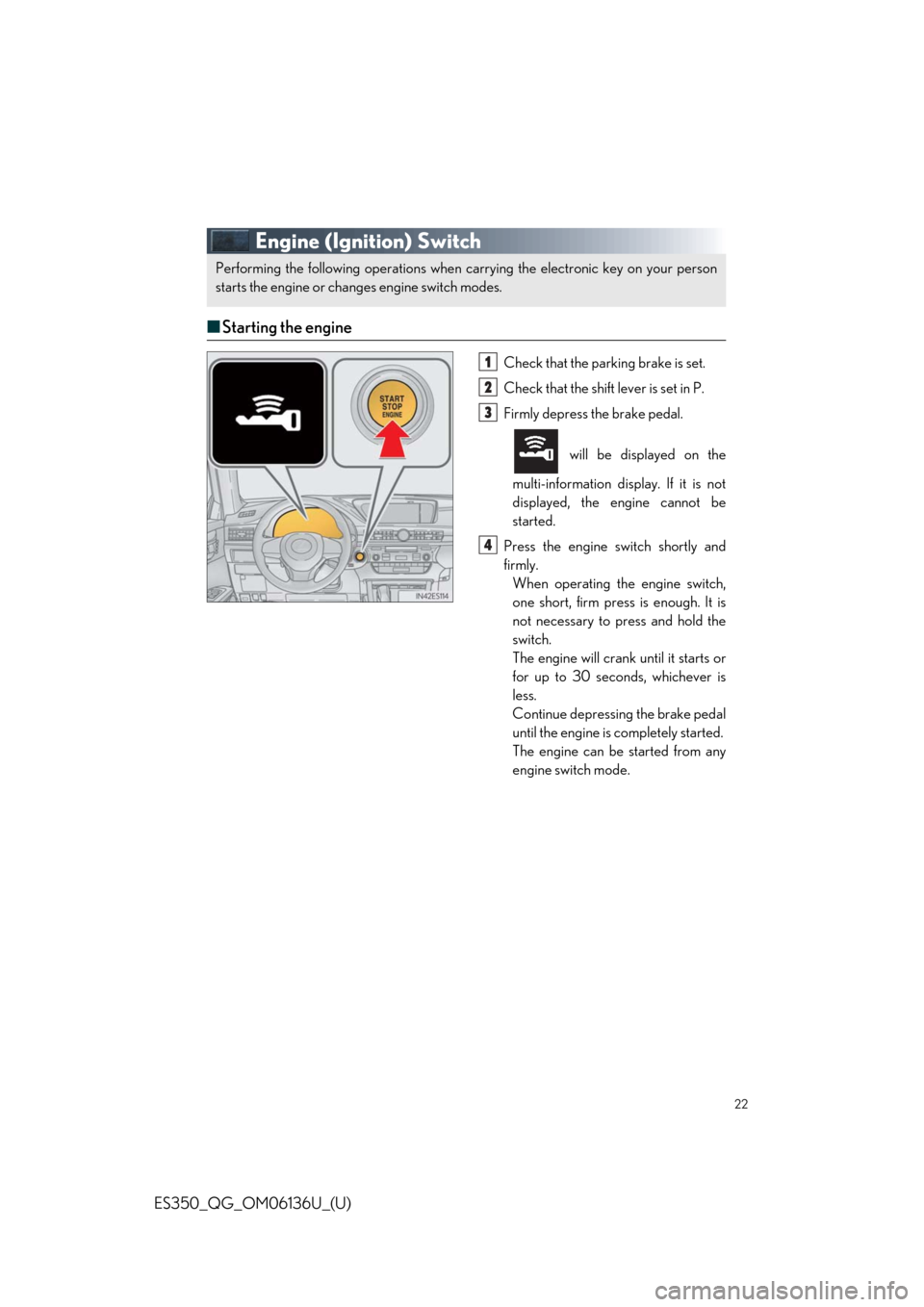
Engine (Ignition) Switch
■Starting the engine
Check that the par king brake is set.
Check that the shift lever is set in P.
Firmly depress the brake pedal.
will be displayed on the
multi-information display. If it is not
displayed, the engine cannot be
started.
Press the engine switch shortly and
firmly. When operating the engine switch,
one short, firm press is enough. It is
not necessary to press and hold the
switch.
The engine will crank until it starts or
for up to 30 seconds, whichever is
less.
Continue depressing the brake pedal
until the engine is completely started.
The engine can be started from any
engine switch mode.
Performing the following oper ations when carrying the electronic key on your person
starts the engine or changes engine switch modes.
1
2
3
4
Page 93 of 102
93
ES350_QG_OM06136U_(U)
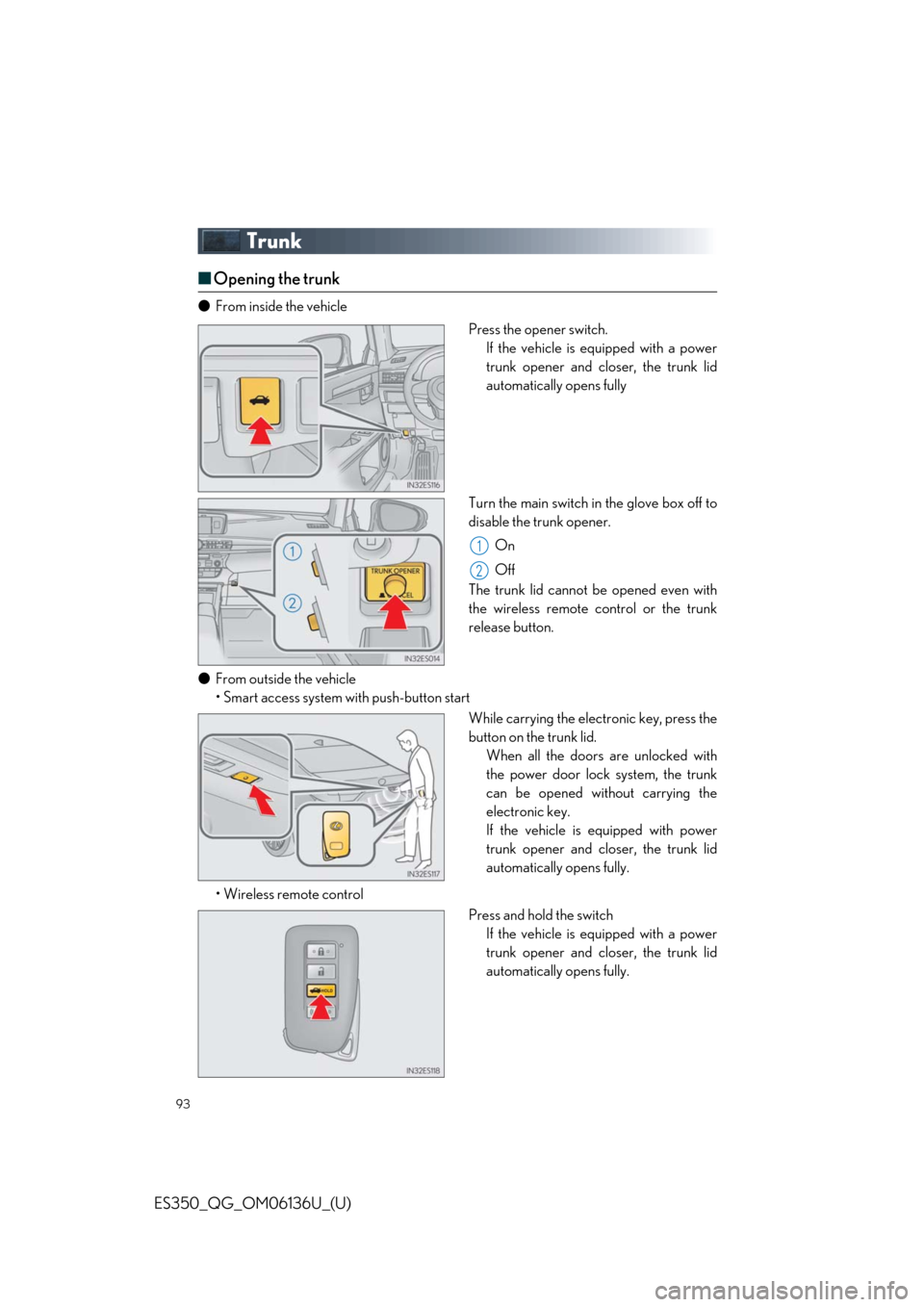
Trunk
■Opening the trunk
● From inside the vehicle
Press the opener switch.If the vehicle is equipped with a power
trunk opener and closer, the trunk lid
automatically opens fully
Turn the main switch in the glove box off to
disable the trunk opener. On
Off
The trunk lid cannot be opened even with
the wireless remote control or the trunk
release button.
● From outside the vehicle
• Smart access system wi th push-button start
While carrying the electronic key, press the
button on the trunk lid.When all the doors are unlocked with
the power door lock system, the trunk
can be opened without carrying the
electronic key.
If the vehicle is equipped with power
trunk opener and closer, the trunk lid
automatically opens fully.
• Wireless remote control Press and hold the switchIf the vehicle is equipped with a power
trunk opener and closer, the trunk lid
automatically opens fully.
1
2
Page 97 of 102
What to do if...
97
ES350_QG_OM06136U_(U)
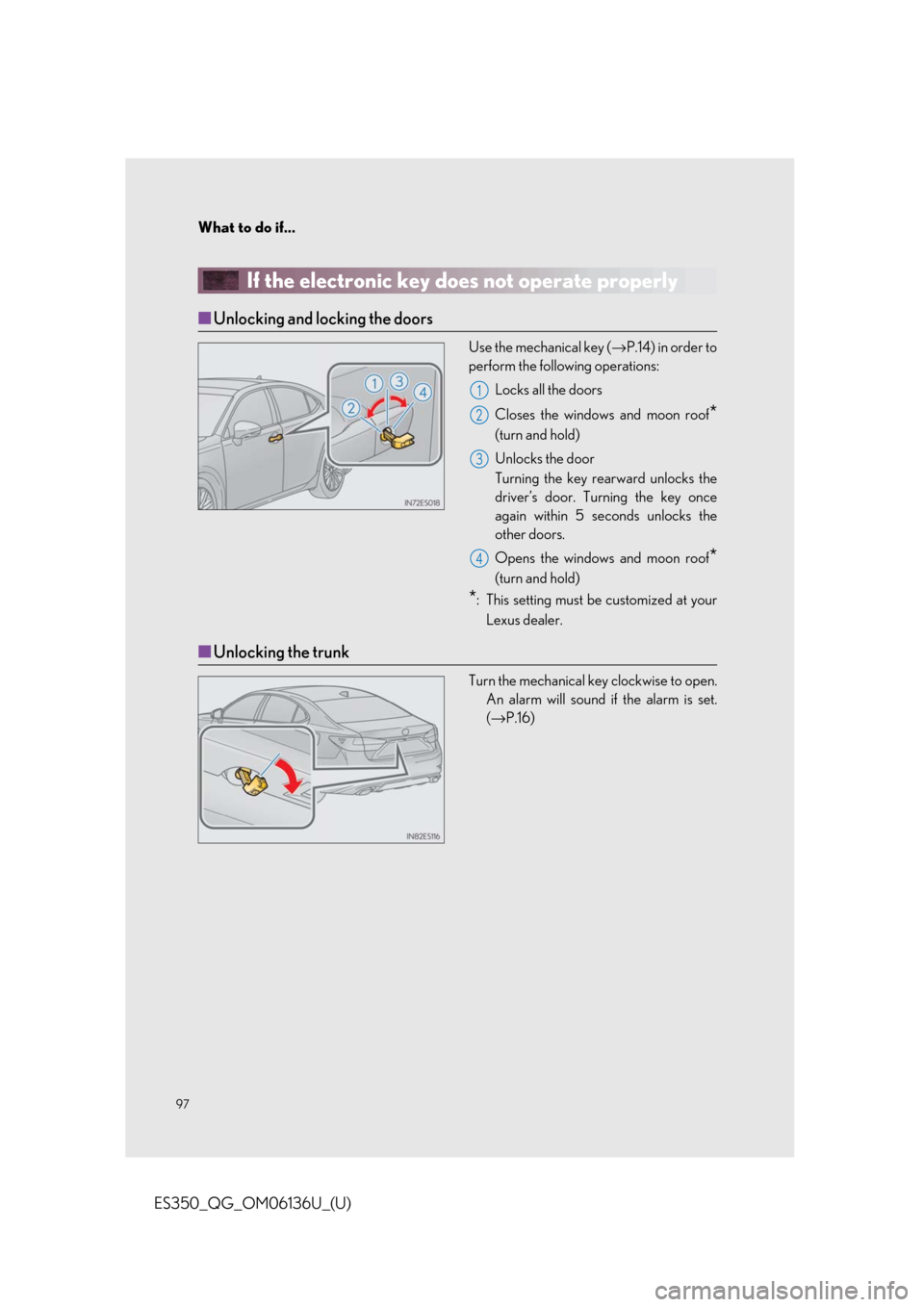
If the electronic key does not operate properly
■Unlocking and locking the doors
Use the mechanical key ( →P.14) in order to
perform the following operations:
Locks all the doors
Closes the windows and moon roof
*
(turn and hold)
Unlocks the door
Turning the key rear ward unlocks the
driver’s door. Turning the key once
again within 5 seconds unlocks the
other doors.
Opens the windows and moon roof
*
(turn and hold)
*: This setting must be customized at your
Lexus dealer.
■ Unlocking the trunk
Turn the mechanical key clockwise to open.
An alarm will sound if the alarm is set.
(→ P.16)
1
2
3
4
Page 98 of 102
98
What to do if...
ES350_QG_OM06136U_(U)
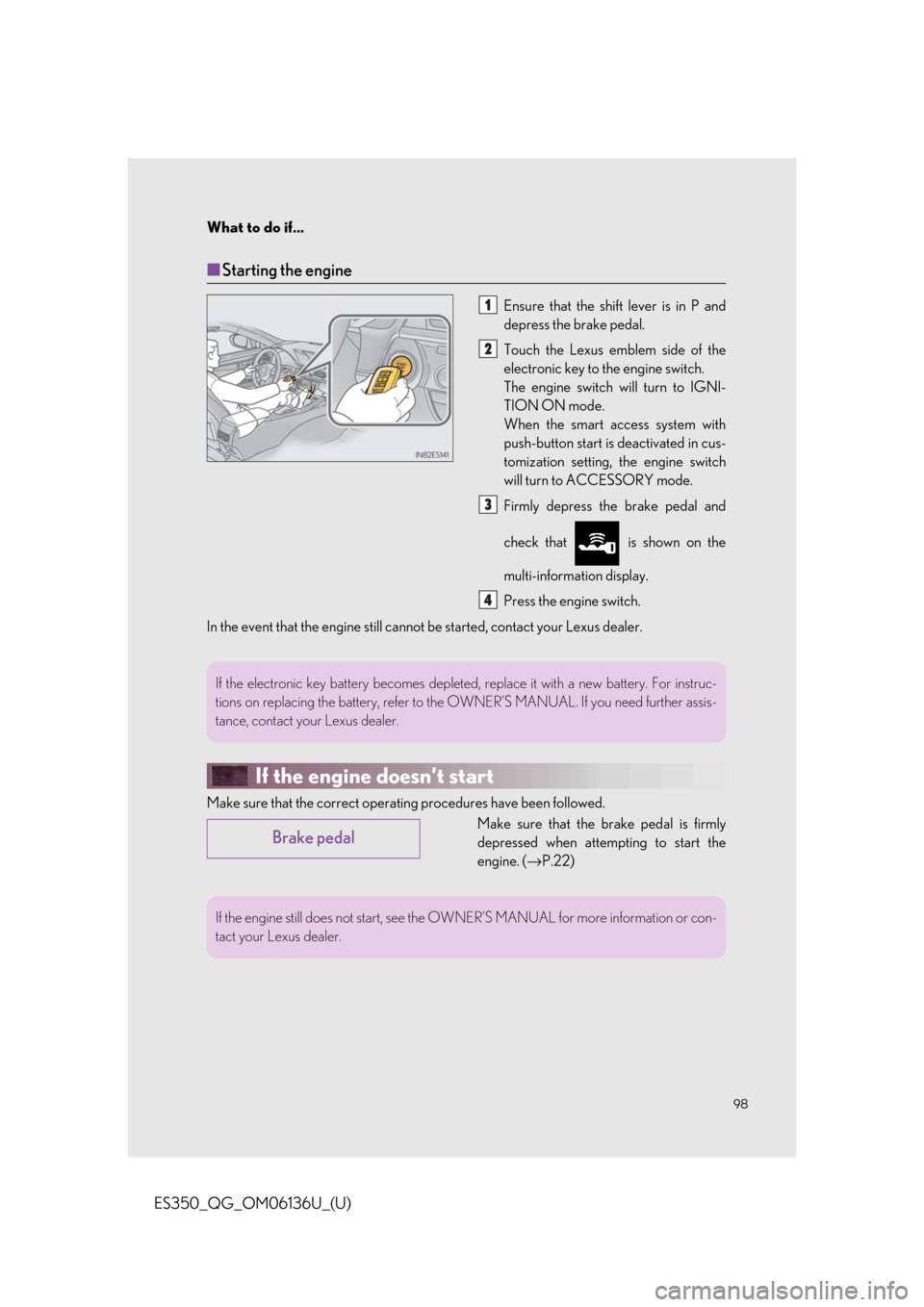
■Starting the engine
Ensure that the shift lever is in P and
depress the brake pedal.
Touch the Lexus emblem side of the
electronic key to the engine switch.
The engine switch will turn to IGNI-
TION ON mode.
When the smart a ccess system with
push-button start is deactivated in cus-
tomization setting, the engine switch
will turn to ACCESSORY mode.
Firmly depress the brake pedal and
check that is shown on the
multi-information display.
Press the engine switch.
In the event that the engine still cannot be started, contact your Lexus dealer.
If the engine doesn’t start
Make sure that the co rrect operating procedures have been followed.
Make sure that the brake pedal is firmly
depressed when attempting to start the
engine. ( →P.22)
1
2
3
4
If the electronic key battery becomes depleted, replace it with a new battery. For instruc-
tions on replacing the battery, refer to the OWNER’S MANUAL. If you need further assis-
tance, contact your Lexus dealer.
Brake pedal
If the engine still does not start, see the OWNER’S MANUAL for more information or con-
tact your Lexus dealer.