CD player Lexus ES350 2018 Owner's Manuals / LEXUS 2018 ES350 OWNER'S MANUAL (OM06134U)
[x] Cancel search | Manufacturer: LEXUS, Model Year: 2018, Model line: ES350, Model: Lexus ES350 2018Pages: 580, PDF Size: 10.39 MB
Page 4 of 580

TABLE OF CONTENTS4
ES350_OM_OM06134U_(U)
5-1. Basic OperationsLexus Display Audio system.......................................... 268
Steering wheel audio switches .......................................274
Mobile Assistant ........................ 275
USB/AUX ports .........................277
5-2. Setup Setup menu ..................................280
General settings.......................... 281
Voice settings.............................. 284
Display settings ........................... 285
5-3. Using the audio system Selecting the audio source .......................................... 286
Optimal use of the audio system.......................................... 287
Audio settings .............................288
Audio menu screen operation ......................................291
5-4. Using the radio Radio operation.......................... 294
5-5. Playing an audio CD and MP3/WMA/AAC discs
CD player operation ................300
5-6. Using an external device Listening to an iPod .................. 307
Using USB memory device ............................................. 311
Using the AUX port .................. 315 5-7. Connecting Bluetooth
®
Steps for using Bluetooth®
devices ..........................................316
Registering a Bluetooth
®
device ........................................... 318
Selecting a Bluetooth
®
device ............................................319
Connecting a Bluetooth
®
audio player .............................. 320
Connecting a Bluetooth
®
phone .............................................321
Displaying a Bluetooth
®
device details ............................ 322
Detailed Bluetooth
®
settings ........................................ 323
5-8. Bluetooth
® Audio
Listening to Bluetooth
®
Audio ........................................... 326
5-9. Bluetooth
® Phone
Using a Bluetooth
®
Phone........................................... 327
Making a call................................ 329
Receiving a call ........................... 332
Speaking on the phone ........... 333
Using a Bluetooth
®
phone message ....................... 335
Using the steering wheel switches ...................................... 337
Bluetooth
® phone
settings ........................................ 338
5Lexus Display Audio system
Page 40 of 580

401-1. For safe use
ES350_OM_OM06134U_(U)
■If the SRS airbags deploy (inflate)
●Slight abrasions, burns, bruising etc., may be sustained from SRS airbags, due to the
extremely high speed deployment (inflation) by hot gases.
●A loud noise and white powder will be emitted.
●Parts of the airbag module (steering wheel hub, airbag cover and inflator) as well as the
seats, parts of the front and rear pillars, an d roof side rails may be hot for several min-
utes. The airbag itself may also be hot.
●The windshield may crack.
●For Lexus Enform Safety Connect subscribers, if the SRS airbags deploy or in the event
of a severe rear-end collision, the system is designed to send an emergency call to the
response center, notifying them of the vehicle’s location (without needing to push the
“SOS” button) and an agent will attempt to speak with the occupants to ascertain the
level of emergency and assistance required . If the occupants are unable to communi-
cate, the agent automatically treats the call as an emergency and helps to dispatch the
necessary emergency services. ( →P. 404)
WARNING
■SRS airbag precautions
●Do not strike or apply signif icant levels of force to the area of the SRS airbag compo-
nents.
Doing so can cause the SRS airbags to malfunction.
●Do not touch any of the component part s immediately after the SRS airbags have
deployed (inflated) as they may be hot.
●If breathing becomes difficult after the SR S airbags have deployed, open a door or
window to allow fresh air in, or leave the vehicl e if it is safe to do so. Wash off any resi-
due as soon as possible to prevent skin irritation.
●If the areas where the SRS airbags are stored, such as the steering wheel pad and
front and rear pillar garnishes are damaged or cracked, have them replaced by your
Lexus dealer.
■Modification and disposal of SRS airbag system components
Do not dispose of your vehicle or perform any of the following modifications without
consulting your Lexus dealer. The SRS airb ags may malfunction or deploy (inflate)
accidentally, causing death or serious injury.
●Installation, removal, disassembly and repair of the SRS airbags
●Repairs, modifications, removal or replacement of the steering wheel, instrument
panel, dashboard, glove box, seats or seat upholstery, front, side and rear pillars or
roof side rails
●Repairs or modifications of the front fend er, front bumper, or side of the occupant
compartment
●Installation of a grille guard (bull bars, ka ngaroo bar, etc.), snow plows, winches or
roof luggage carrier
●Modifications to the vehicle’s suspension system
●Installation of electronic devices such as mobile two-way radios and CD players
●Modifications to your vehicle for a person with a physical disability
Page 110 of 580
110
ES350_OM_OM06134U_(U)3-2. Opening, closing and
locking the doors and trunk
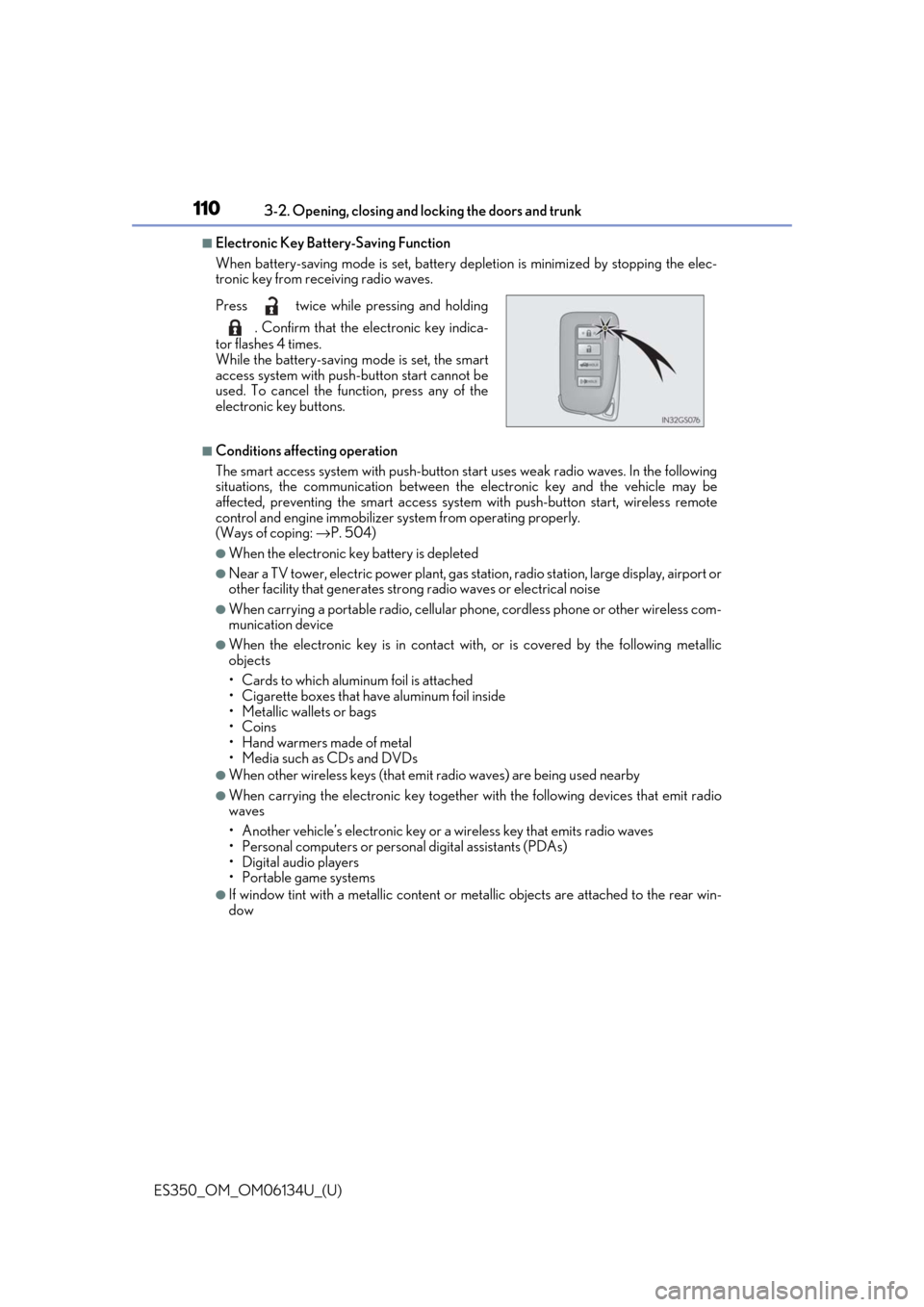
■Electronic Key Battery-Saving Function
When battery-saving mode is set, battery depletion is minimized by stopping the elec-
tronic key from receiving radio waves.
■Conditions affecting operation
The smart access system with push-button st art uses weak radio waves. In the following
situations, the communication between the electronic key and the vehicle may be
affected, preventing the smar t access system with push-but ton start, wireless remote
control and engine immobilizer system from operating properly.
(Ways of coping: →P. 504)
●When the electronic key battery is depleted
●Near a TV tower, electric power plant, gas st ation, radio station, large display, airport or
other facility that generates strong radio wave s or electrical noise
●When carrying a portable radio, cellular phone, cordless phone or other wireless com-
munication device
●When the electronic key is in contact wi th, or is covered by the following metallic
objects
• Cards to which aluminum foil is attached
• Cigarette boxes that have aluminum foil inside
• Metallic wallets or bags
•Coins
• Hand warmers made of metal
• Media such as CDs and DVDs
●When other wireless keys (that emit radio waves) are being used nearby
●When carrying the electronic key together with the following devices that emit radio
waves
• Another vehicle’s electronic key or a wireless key that emits radio waves
• Personal computers or person al digital assistants (PDAs)
• Digital audio players
• Portable game systems
●If window tint with a metallic content or me tallic objects are attached to the rear win-
dow
Press twice while pressing and holding
. Confirm that the electronic key indica-
tor flashes 4 times.
While the battery-saving mode is set, the smart
access system with push -button start cannot be
used. To cancel the function, press any of the
electronic key buttons.
Page 266 of 580

266
ES350_OM_OM06134U_(U)
5-1. Basic OperationsLexus Display Audio system .......................................... 268
Steering wheel audio switches....................................... 274
Mobile Assistant......................... 275
USB/AUX ports .........................277
5-2. Setup Setup menu ..................................280
General settings .......................... 281
Voice settings .............................. 284
Display settings ...........................285
5-3. Using the audio system Selecting the audio source .......................................... 286
Optimal use of the audio system .......................................... 287
Audio settings ............................ 288
Audio menu screen operation ..................................... 291
5-4. Using the radio Radio operation.......................... 294
5-5. Playing an audio CD and MP3/WMA/AAC discs
CD player operation ............... 300
5-6. Using an external device Listening to an iPod................... 307
Using USB memory device.............................................. 311
Using the AUX port .................. 315
Lexus Display Audio system
5
Page 267 of 580

267
ES350_OM_OM06134U_(U)
Lexus Display Audiosystem
5
5-7. Connecting Bluetooth®
Steps for using Bluetooth®
devices .......................................... 316
Registering a Bluetooth
®
device............................................ 318
Selecting a Bluetooth
®
device............................................ 319
Connecting a Bluetooth
®
audio player .............................. 320
Connecting a Bluetooth
®
phone ............................................ 321
Displaying a Bluetooth
®
device details ............................322
Detailed Bluetooth
®
settings.........................................323
5-8. Bluetooth
® Audio
Listening to Bluetooth
®
Audio............................................326
5-9. Bluetooth
® Phone
Using a Bluetooth
®
Phone ........................................... 327
Making a call ................................329
Receiving a call ...........................332
Speaking on the phone ........... 333
Using a Bluetooth
®
phone message ....................... 335
Using the steering wheel switches ....................................... 337
Bluetooth
® phone
settings........................................ 338 5-10. Phonebook
Contact settings .........................340
Messaging setting...................... 343
5-11. Bluetooth
®
What to do if... (Troubleshooting)................... 344
Bluetooth
®...................................348
5-12. Other function “Information” screen................. 354
USB photo .................................... 356
Weather information................358
Voice command system .........359
Page 277 of 580
277
ES350_OM_OM06134U_(U)5-1. Basic Operations
5
Lexus Display Audio system
USB/AUX ports
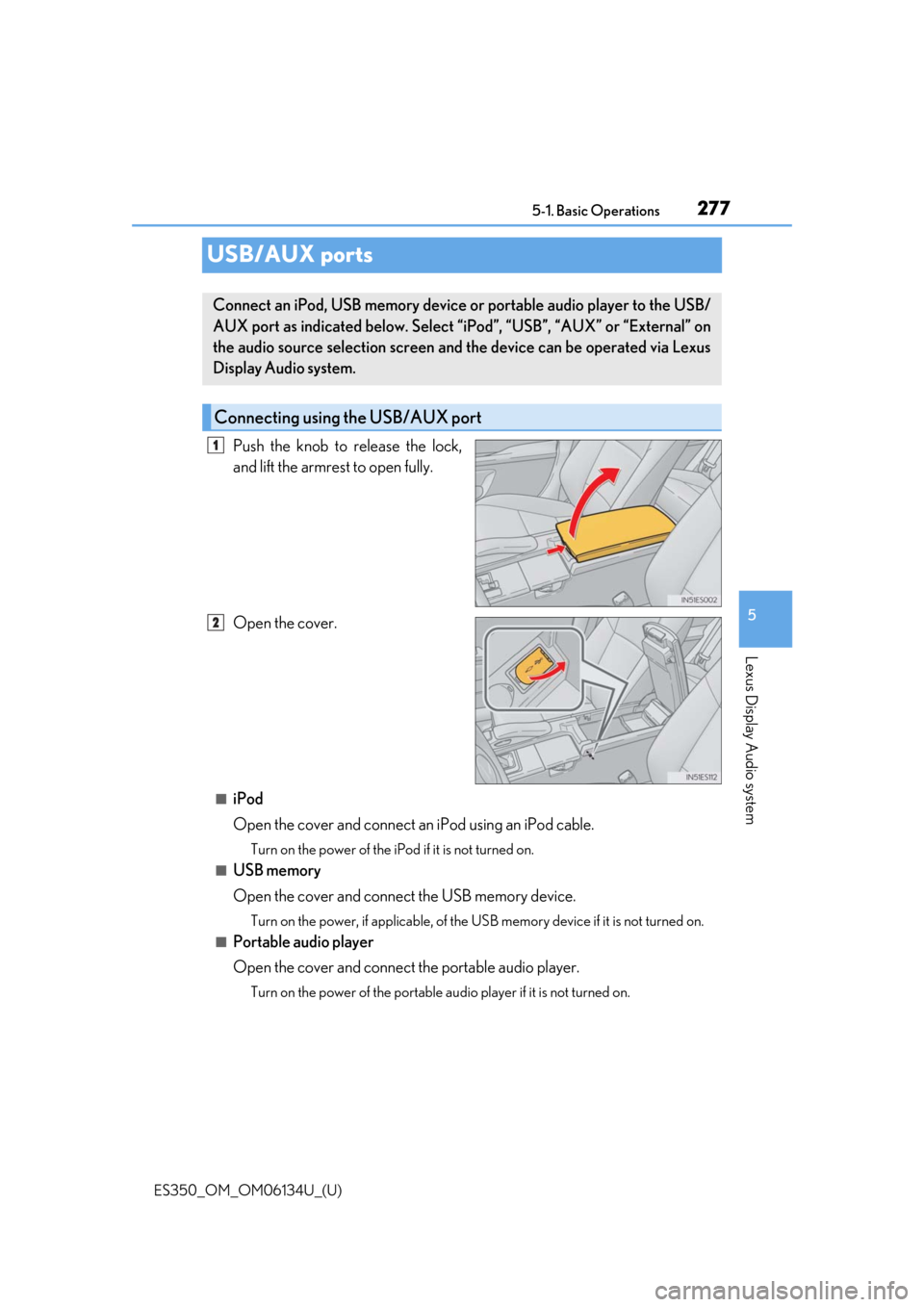
Push the knob to release the lock,
and lift the armrest to open fully.
Open the cover.
■iPod
Open the cover and connect an
iPod using an iPod cable.
Turn on the power of the iPod if it is not turned on.
■USB memory
Open the cover and connect the USB memory device.
Turn on the power, if applicable, of the US B memory device if it is not turned on.
■Portable audio player
Open the cover and connect the portable audio player.
Turn on the power of the portable audio player if it is not turned on.
Connect an iPod, USB memory device or portable audio player to the USB/
AUX port as indicated below. Select “iPod”, “USB”, “AUX” or “External” on
the audio source selection screen and the device can be operated via Lexus
Display Audio system.
Connecting using the USB/AUX port
1
2
Page 300 of 580

300
ES350_OM_OM06134U_(U)5-5. Playing an audio CD and MP3/WMA/AAC discs
CD player operation
Pressing the “MEDIA” button displays the
CD top screen from any screen of the
selected source.
■Menu screen
→ P. 291
■Selecting a track/file
Press the “ ∧” or “∨ ” button or turn the “TUNE•SCROLL” knob to select the
desired track/file number.
To fast-forward or rewind, press and hold the “ ∧” or “ ∨” button.
■Selecting the track by the list (CD)
Move the controller to the right an d then select the desired track.
■Selecting a folder (MP3/WMA/AAC disc)
Move the controller to the ri ght and then select “Folders”.
Select the desired folder. Then select a file to begin using the selected
folder.
■Selecting a file by the selected folder (MP3/WMA/AAC disc)
Move the controller to the right and then select “Files”.
Select the desired file.
Insert a disc, press the “MEDIA” butto n or select “DISC” on the “Source”
screen with a disc inserted to begin listening to a CD.
CD top screen
1
2
1
2
Page 301 of 580
ES350_OM_OM06134U_(U)
3015-5. Playing an audio CD and MP3/WMA/AAC discs
5
Lexus Display Audio system
■Error messages
If the following error messages appear on the screen, refer to the table and take the
appropriate measures. If the pr oblem is not rectified, take the vehicle to your Lexus
dealer.
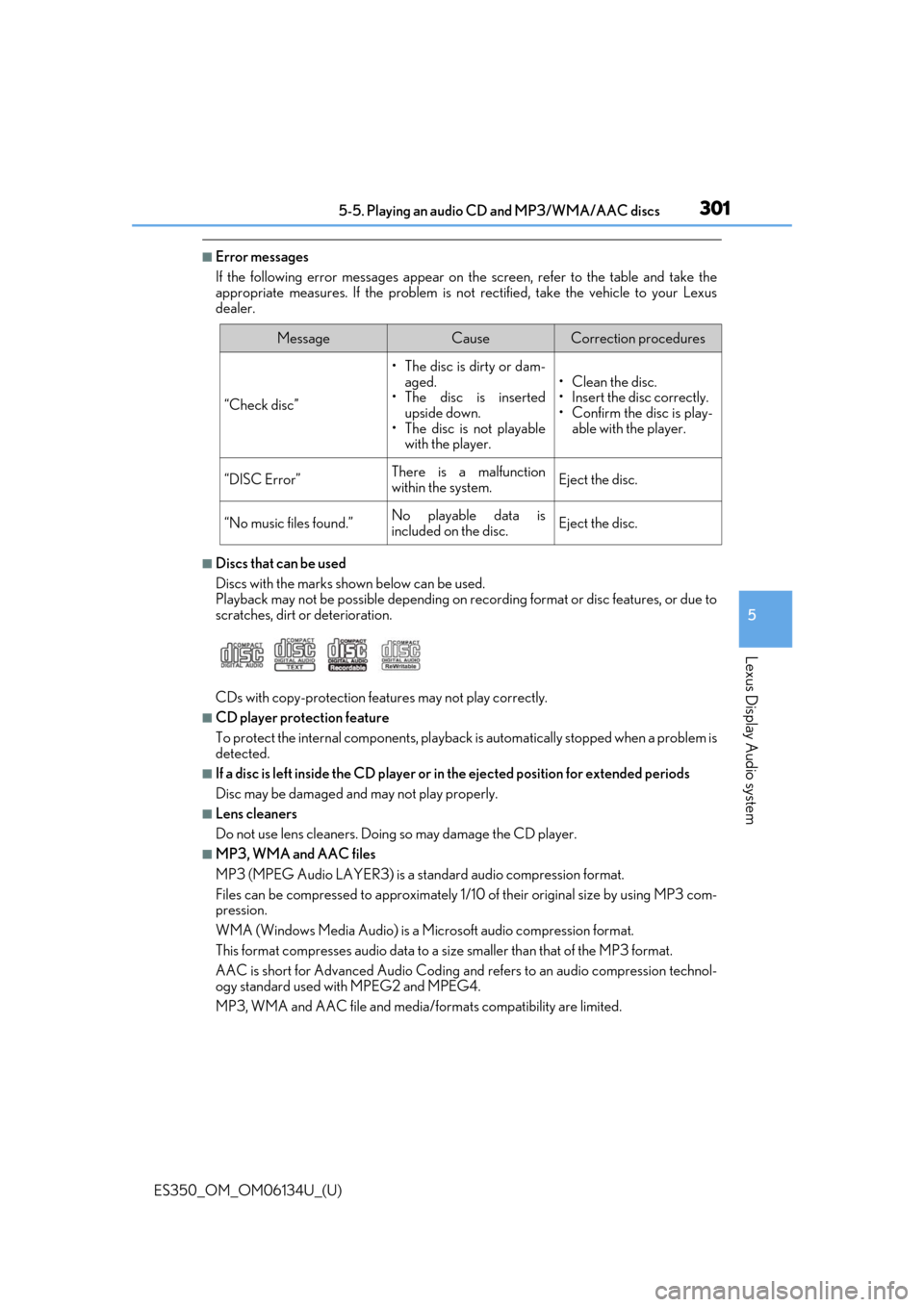
■Discs that can be used
Discs with the marks sh own below can be used.
Playback may not be possible depending on recording format or disc features, or due to
scratches, dirt or deterioration.
CDs with copy-protection feat ures may not play correctly.
■CD player protection feature
To protect the internal components, playback is automatically stopped when a problem is
detected.
■If a disc is left inside the CD player or in the ejected position for extended periods
Disc may be damaged and may not play properly.
■Lens cleaners
Do not use lens cleaners. Doing so may damage the CD player.
■MP3, WMA and AAC files
MP3 (MPEG Audio LAYER3) is a standard audio compression format.
Files can be compressed to approximately 1/10 of their original size by using MP3 com-
pression.
WMA (Windows Media Audio) is a Microsoft audio compression format.
This format compresses audio data to a si ze smaller than that of the MP3 format.
AAC is short for Advanced Audio Coding and refers to an audi o compression technol-
ogy standard used with MPEG2 and MPEG4.
MP3, WMA and AAC file and media/formats compatibility are limited.
MessageCauseCorrection procedures
“Check disc”
• The disc is dirty or dam- aged.
• The disc is inserted upside down.
•The disc is not playable with the player.
•Clean the disc.
• Insert the disc correctly.
•Confirm the disc is play-able with the player.
“DISC Error”There is a malfunction
within the system.Eject the disc.
“No music files found.”No playable data is
included on the disc.Eject the disc.
Page 306 of 580
3065-5. Playing an audio CD and MP3/WMA/AAC discs
ES350_OM_OM06134U_(U)
NOTICE
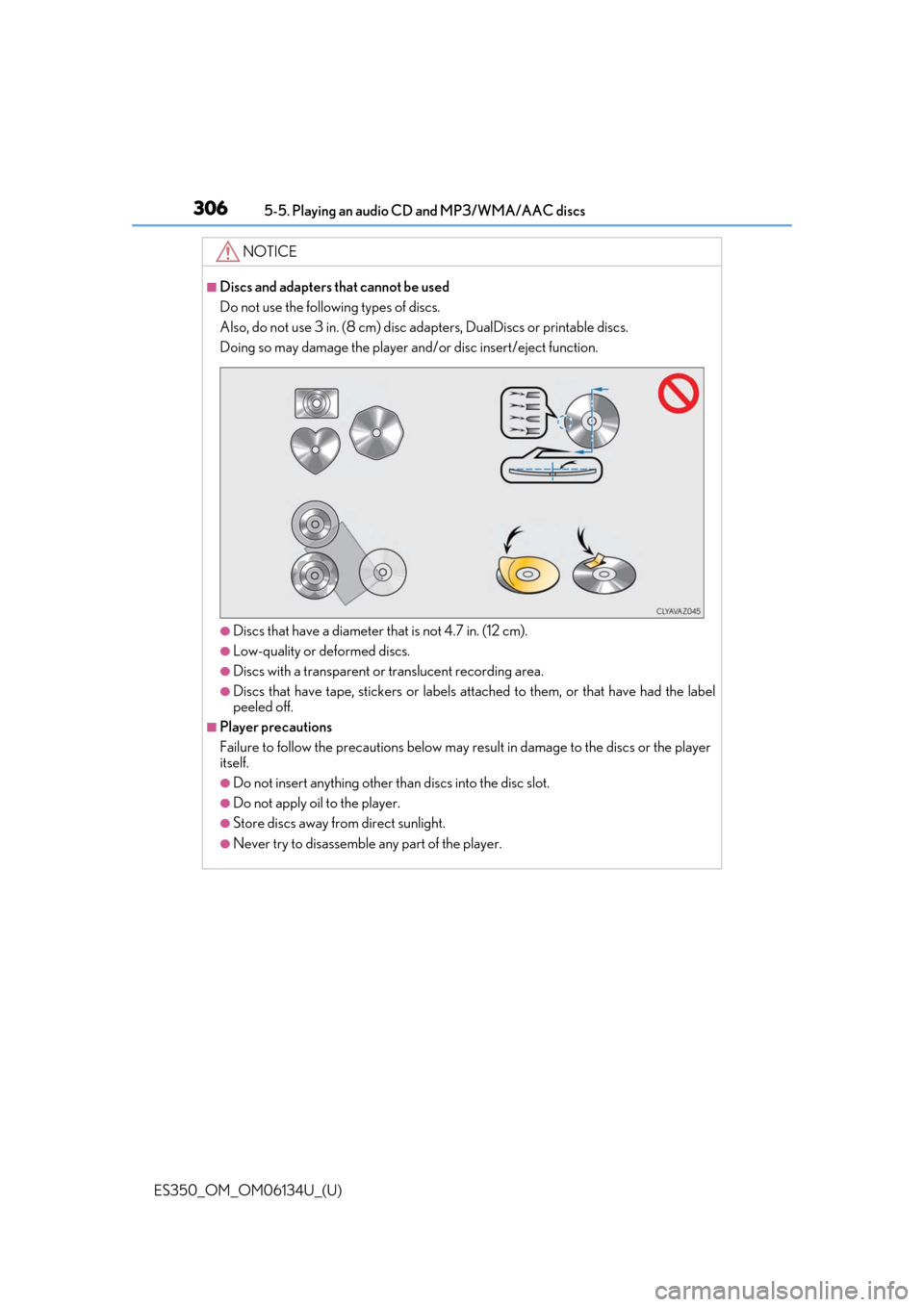
■Discs and adapters that cannot be used
Do not use the following types of discs.
Also, do not use 3 in. (8 cm) disc ad apters, DualDiscs or printable discs.
Doing so may damage the player and/or disc insert/eject function.
●Discs that have a diameter that is not 4.7 in. (12 cm).
●Low-quality or deformed discs.
●Discs with a transparent or translucent recording area.
●Discs that have tape, stickers or labels attached to them, or that have had the label
peeled off.
■Player precautions
Failure to follow the precautions below may re sult in damage to the discs or the player
itself.
●Do not insert anything other th an discs into the disc slot.
●Do not apply oil to the player.
●Store discs away from direct sunlight.
●Never try to disassemble any part of the player.
Page 315 of 580
315
ES350_OM_OM06134U_(U)5-6. Using an external device
5
Lexus Display Audio system
Using the AUX port
→
P. 277
Pressing the “MEDIA” button displays the top screen from any screen of the
selected source.
■Menu screen
→ P. 291
■Operating portable players co nnected to the audio system
Volume can be adjusted using the vehicle’s audio controls. All other adjustments must be
made on the portable player itself.
■When using a portable player connected to the power outlet
Noise may occur during playback. Use the power source of the portable player.
To use the AUX port, connect a portable player, press the “MEDIA” button or
select “AUX” or “External” on the “Source” screen.
Connecting a portable player
Top screen
NOTICE
■To prevent damage to the port able player or its terminal
●Depending on the size and shape of the port able player that is connected to the sys-
tem, the console box may not close fully. In th is case, do not forcibly close the console
box as this may damage the portable player or the terminal, etc.
●Do not leave portable player in the vehicle. The temperature inside the vehicle may
become high.
●Do not push down on or apply unnecessary pressure to the portable player while it is
connected.
●Do not insert foreign objects into the port.