navigation system Lexus ES350 2019 Owner's Mannual / LEXUS 2019 ES350 OWNER'S MANUAL QUICK GUIDE (OM06132U)
[x] Cancel search | Manufacturer: LEXUS, Model Year: 2019, Model line: ES350, Model: Lexus ES350 2019Pages: 94, PDF Size: 1.17 MB
Page 2 of 94
2
ES350_QG_OM06132U_(U)
Headlights..................................................................................................................................32
Head-up Display ...................................................................................................................... 29
Keys ........................................................................................................................... ................... 12
Lexus Climate Concierge ..................................................................................................... 61
Lexus Enform Remote ............................................................................................................ 81
Lexus Enform Safety Connect ............................................................................................ 79
Lexus Enform Service Connect ..........................................................................................82
Multi-information Display..................................................................................................... 2 6
Navigation System
*
Registering home ............................................................................................................... ........... 46
Destination search - Search by address .............................................................................. 46
Destination search - Search points of intere st by name ............................................... 48
Destination search - Search points of intere st by category ........................................ 49
Destination search - Search points of interest by phone number ............................ 49
Voice Command System .......................................................................................................... 66
Opening the fuel tank cap ....................................................................................................85
Parking Brake .................................................................................................................. .........23
Pictorial Index................................................................................................................ ..............3
Remote Touch ................................................................................................................... ....... 37
SiriusXM Satellite Radio.......... .............................................................. .................... .......... 83
Smart Access System with Push-button Start ................................................................. 13
Turn Signal Lever .............................................................................................................. .......22
USB/AUX Ports .................................................................................................................. .... 74
Voice Command System
*
Basic operation ................................................................................................................ .............. 66
Command list................................................................................................................... ................67
Windshield Wipers and Washer .........................................................................................35
*: These features may be oper ated by Voice Command (See P.66)
Page 5 of 94
5
ES350_QG_OM06132U_(U)
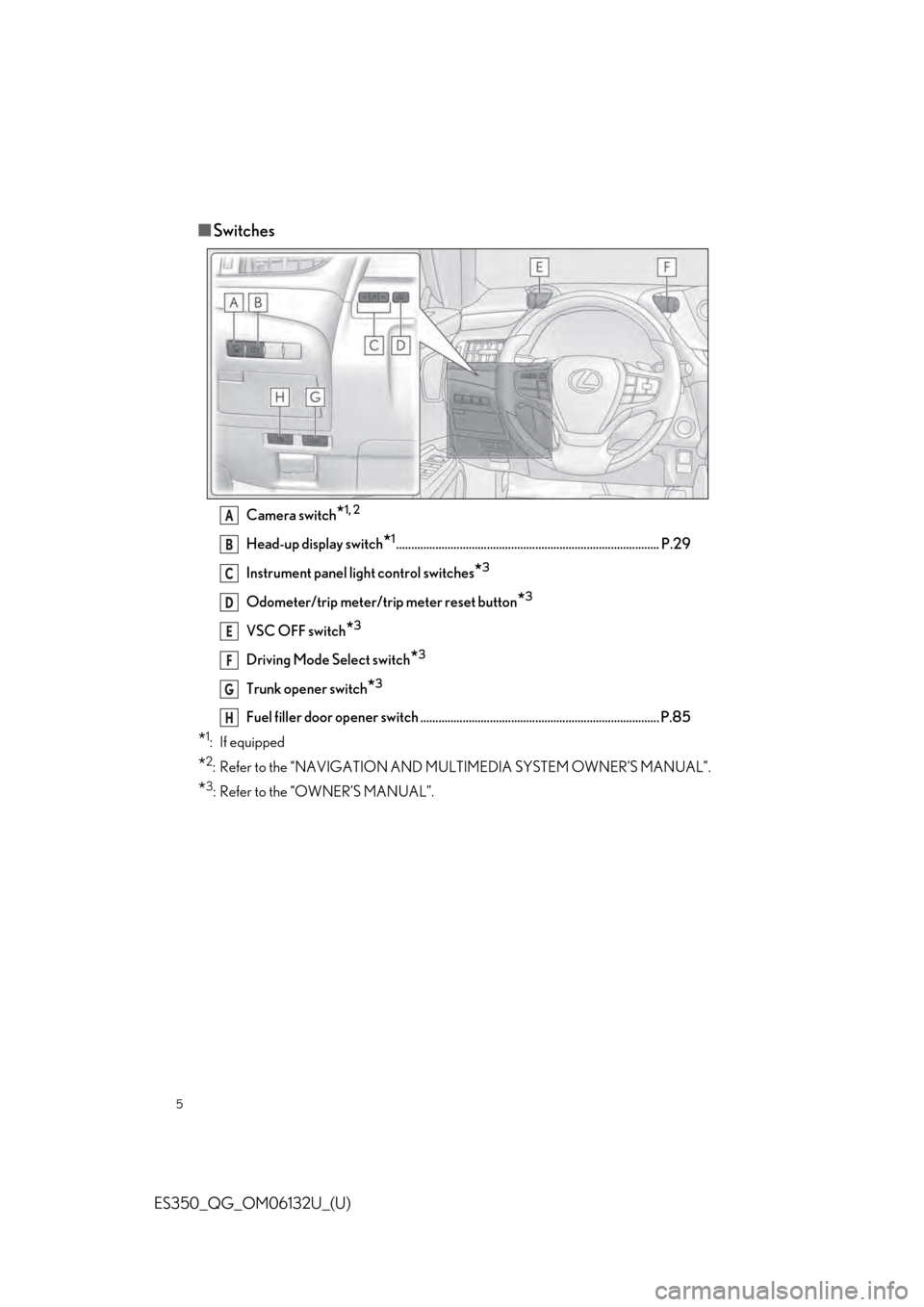
■Switches
Camera switch*1, 2
Head-up display switch*1....................................................................................... P.29
Instrument panel light control switches
*3
Odometer/trip meter/trip meter reset button*3
VSC OFF switch*3
Driving Mode Select switch*3
Trunk opener switch*3
Fuel filler door opener switch ...... ............................................. ............................ P.85
*1: If equipped
*2: Refer to the “NAVIGATION AND MU LTIMEDIA SYSTEM OWNER’S MANUAL”.
*3: Refer to the “OWNER’S MANUAL”.
A
B
C
D
E
F
G
H
Page 27 of 94
27
ES350_QG_OM06132U_(U)
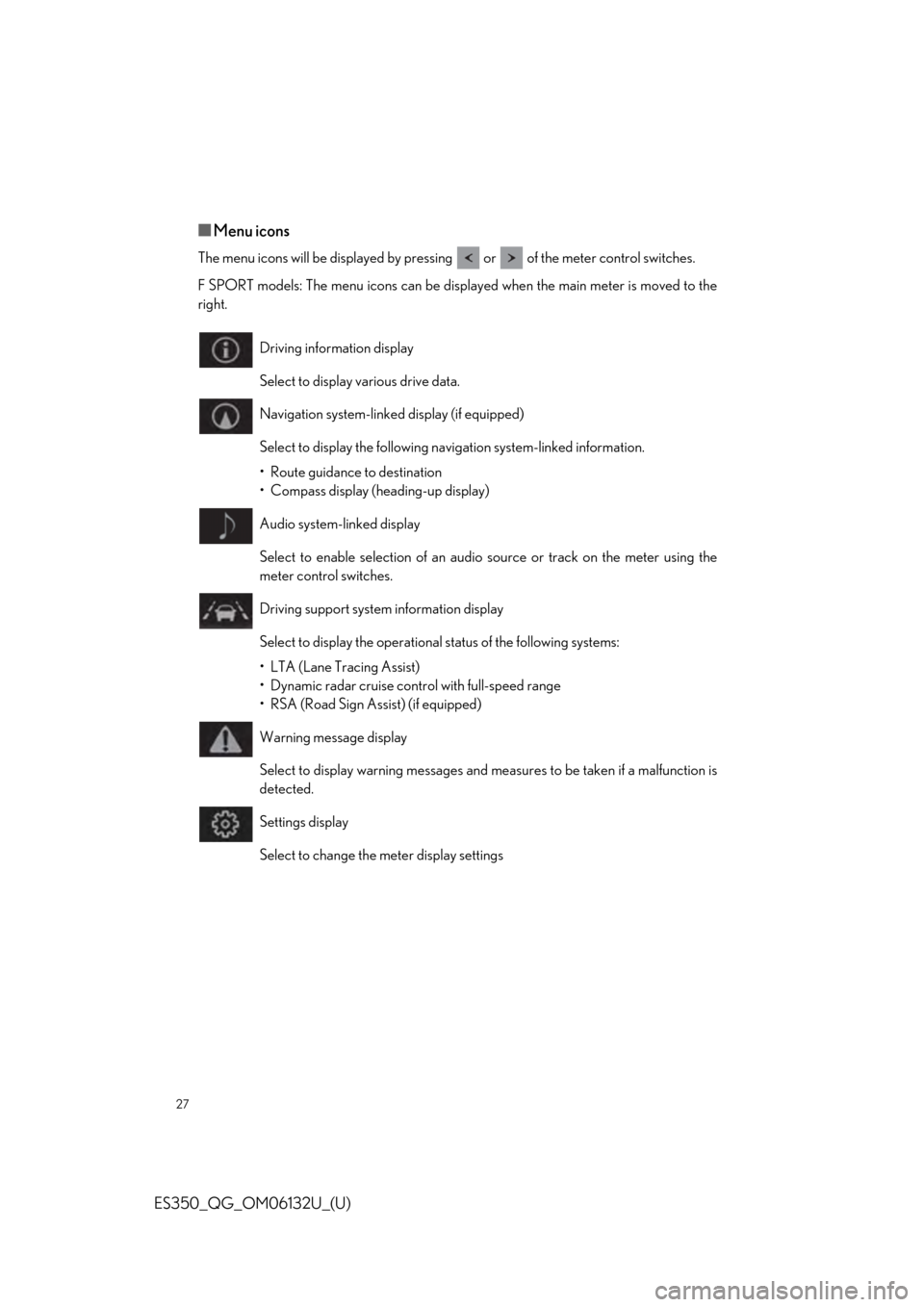
■Menu icons
The menu icons will be displayed by pressing or of the meter control switches.
F SPORT models: The menu icons can be displayed when the main meter is moved to the
right.
Driving information display
Select to display various drive data.
Navigation system-linked display (if equipped)
Select to display the following navigation system-linked information.
• Route guidance to destination
• Compass display (heading-up display)
Audio system-linked display
Select to enable selection of an audio source or track on the meter using the
meter control switches.
Driving support system information display
Select to display the operational status of the following systems:
• LTA (Lane Tracing Assist)
• Dynamic radar cruise cont rol with full-speed range
• RSA (Road Sign Assist) (if equipped)
Warning message display
Select to display warning messages and me asures to be taken if a malfunction is
detected.
Settings display
Select to change the meter display settings
Page 29 of 94
29
ES350_QG_OM06132U_(U)
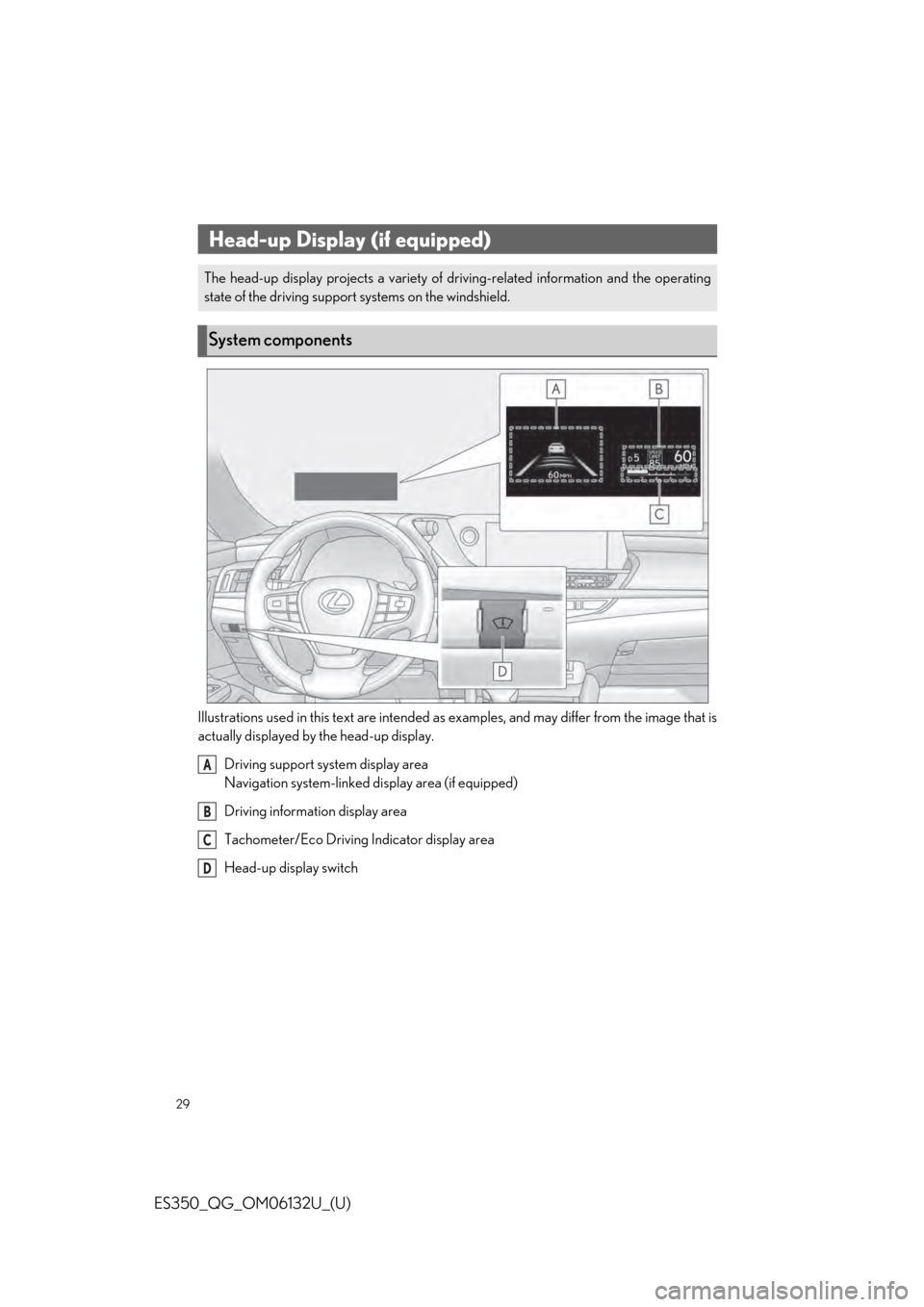
Illustrations used in this text are intended as examples, and may differ from the image that is
actually displayed by the head-up display.Driving support system display area
Navigation system-linked di splay area (if equipped)
Driving information display area
Tachometer/Eco Driving Indicator display area
Head-up display switch
Head-up Display (if equipped)
The head-up display projects a variety of dr iving-related information and the operating
state of the driving support systems on the windshield.
System components
A
B
C
D
Page 39 of 94
39
ES350_QG_OM06132U_(U)
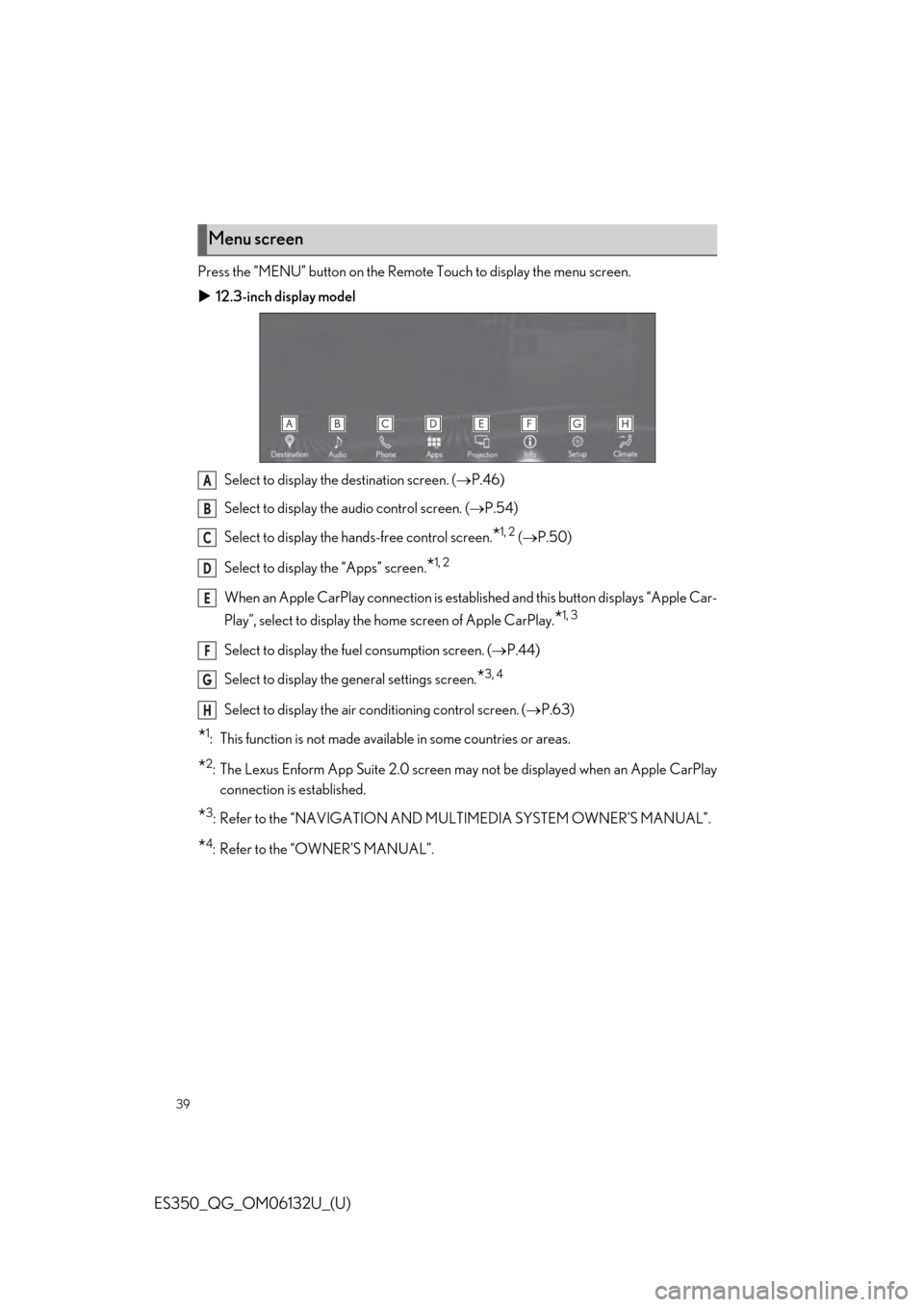
Press the “MENU” button on the Remote Touch to display the menu screen.
12.3-inch display model
Select to display the destination screen. ( P.46)
Select to display the audio control screen. ( P.54)
Select to display the ha nds-free control screen.
*1, 2 ( P.50)
Select to display the “Apps” screen.
*1, 2
When an Apple CarPlay connection is established and this button displays “Apple Car-
Play”, select to di splay the home screen of Apple CarPlay.
*1, 3
Select to display the fuel consumption screen. ( P.44)
Select to display the general settings screen.
*3, 4
Select to display the air conditioning control screen. ( P.63)
*1: This function is not made availa ble in some countries or areas.
*2:The Lexus Enform App Suite 2.0 screen may not be displayed when an Apple CarPlay
connection is established.
*3: Refer to the “NAVIGATION AND MU LTIMEDIA SYSTEM OWNER’S MANUAL”.
*4: Refer to the “OWNER’S MANUAL”.
Menu screen
A
B
C
D
E
F
G
H
Page 40 of 94
40
ES350_QG_OM06132U_(U)
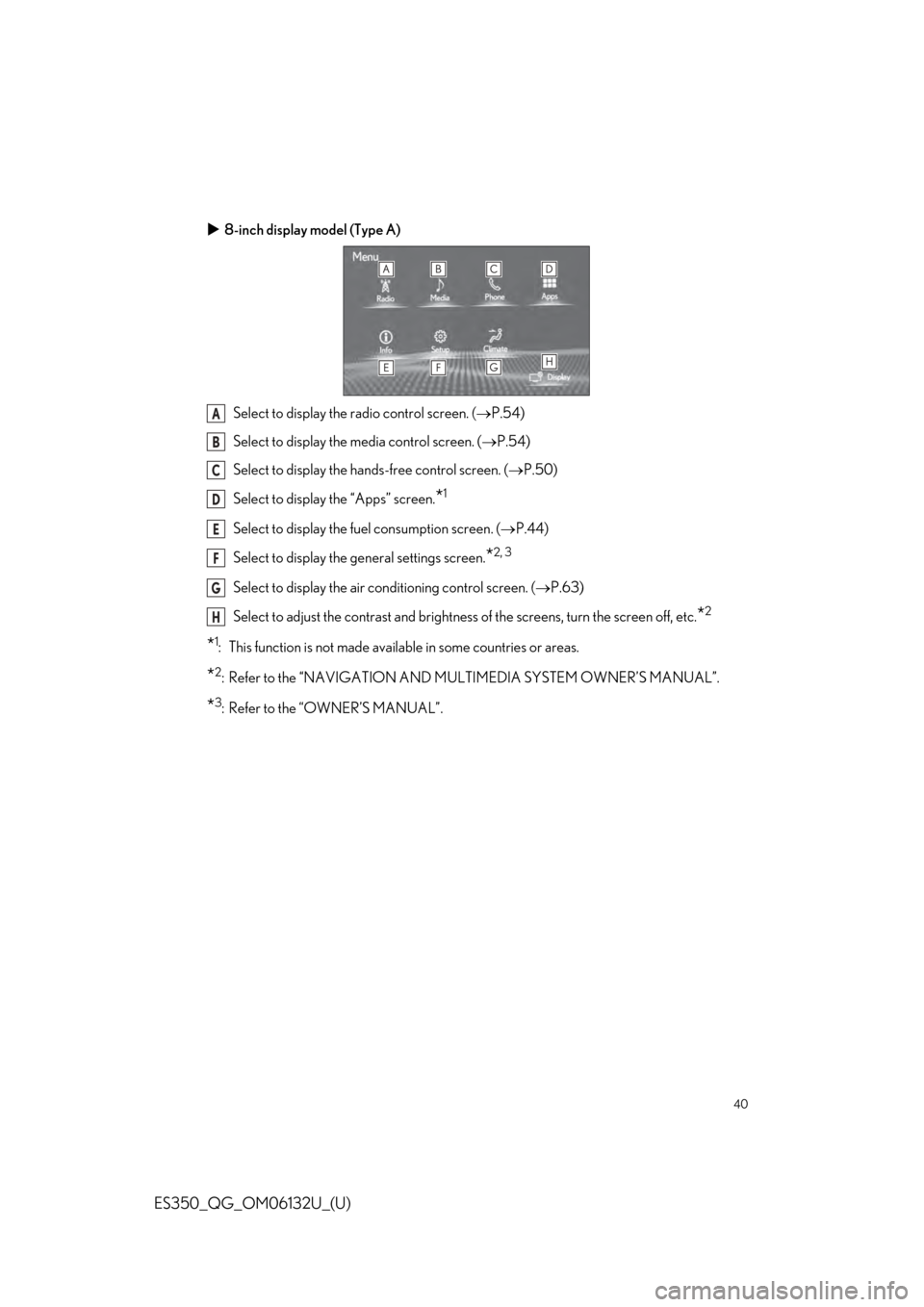
8-inch display model (Type A)
Select to display the radio control screen. ( P.54)
Select to display the media control screen. ( P.54)
Select to display the hands-free control screen. ( P.50)
Select to display the “Apps” screen.
*1
Select to display the fuel consumption screen. ( P.44)
Select to display the ge neral settings screen.
*2, 3
Select to display the air co nditioning control screen. ( P.63)
Select to adjust the contrast and brightness of the screens, turn the screen off, etc.
*2
*1: This function is not made availa ble in some countries or areas.
*2: Refer to the “NAVIGATION AND MULTIMEDIA SYSTEM OWNER’S MANUAL”.
*3: Refer to the “OWNER’S MANUAL”.
A
B
C
D
E
F
G
H
Page 41 of 94
41
ES350_QG_OM06132U_(U)
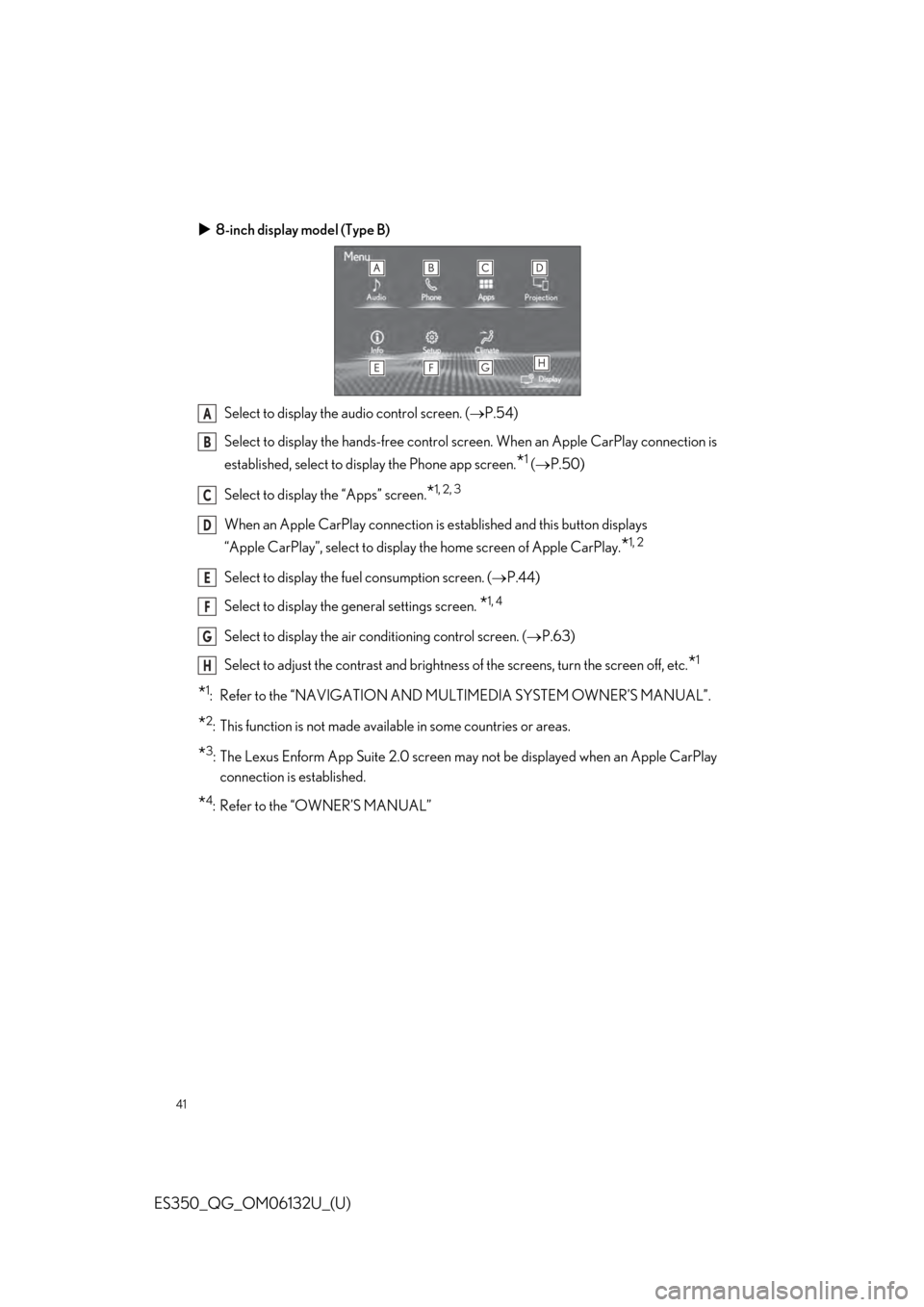
8-inch display model (Type B)
Select to display the audio control screen. ( P.54)
Select to display the hands-free control sc reen. When an Apple CarPlay connection is
established, select to display the Phone app screen.
*1 ( P.50)
Select to display the “Apps” screen.
*1, 2, 3
When an Apple CarPlay co nnection is established and this button displays
“Apple CarPlay”, select to display the home screen of Apple CarPlay.
*1, 2
Select to display the fuel consumption screen. ( P.44)
Select to display the general settings screen.
*1, 4
Select to display the air conditioning control screen. ( P.63)
Select to adjust the contrast and brightness of the screens, turn the screen off, etc.
*1
*1: Refer to the “NAVIGATION AND MU LTIMEDIA SYSTEM OWNER’S MANUAL”.
*2: This function is not made available in some countries or areas.
*3:The Lexus Enform App Suite 2.0 screen may not be displayed when an Apple CarPlay
connection is established.
*4: Refer to the “OWNER’S MANUAL”
A
B
C
D
E
F
G
H
Page 42 of 94
42
ES350_QG_OM06132U_(U)
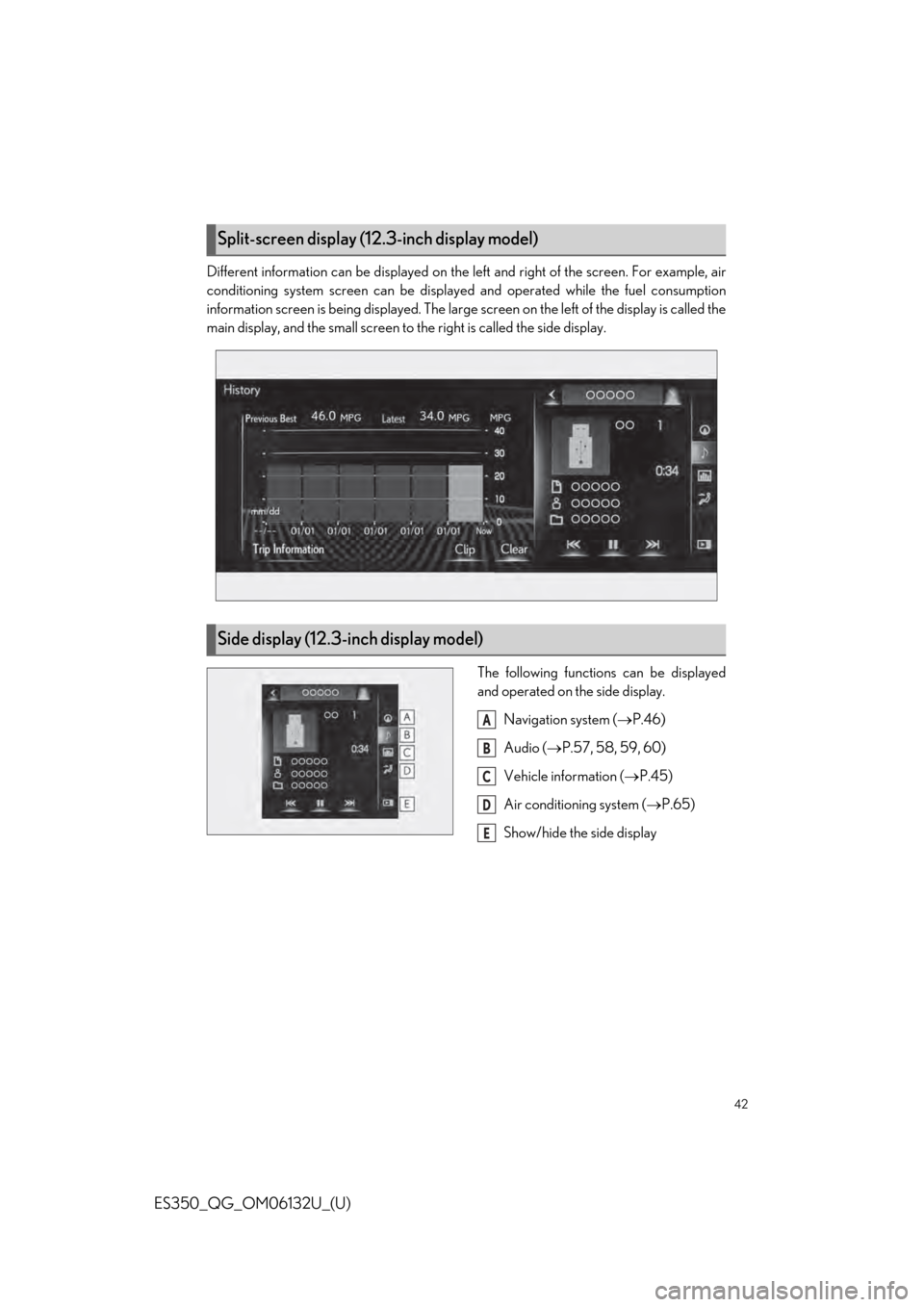
Different information can be displayed on the left and right of the screen. For example, air
conditioning system screen can be displayed and operated while the fuel consumption
information screen is being displayed. The large screen on the left of the display is called the
main display, and the small screen to the right is called the side display.
The following function s can be displayed
and operated on the side display.
Navigation system ( P.46)
Audio ( P.57, 58, 59, 60)
Vehicle information ( P.45)
Air conditioning system ( P.65)
Show/hide the side display
Split-screen display (12.3-inch display model)
Side display (12.3-inch display model)
A
B
C
D
E
Page 43 of 94
43
ES350_QG_OM06132U_(U)
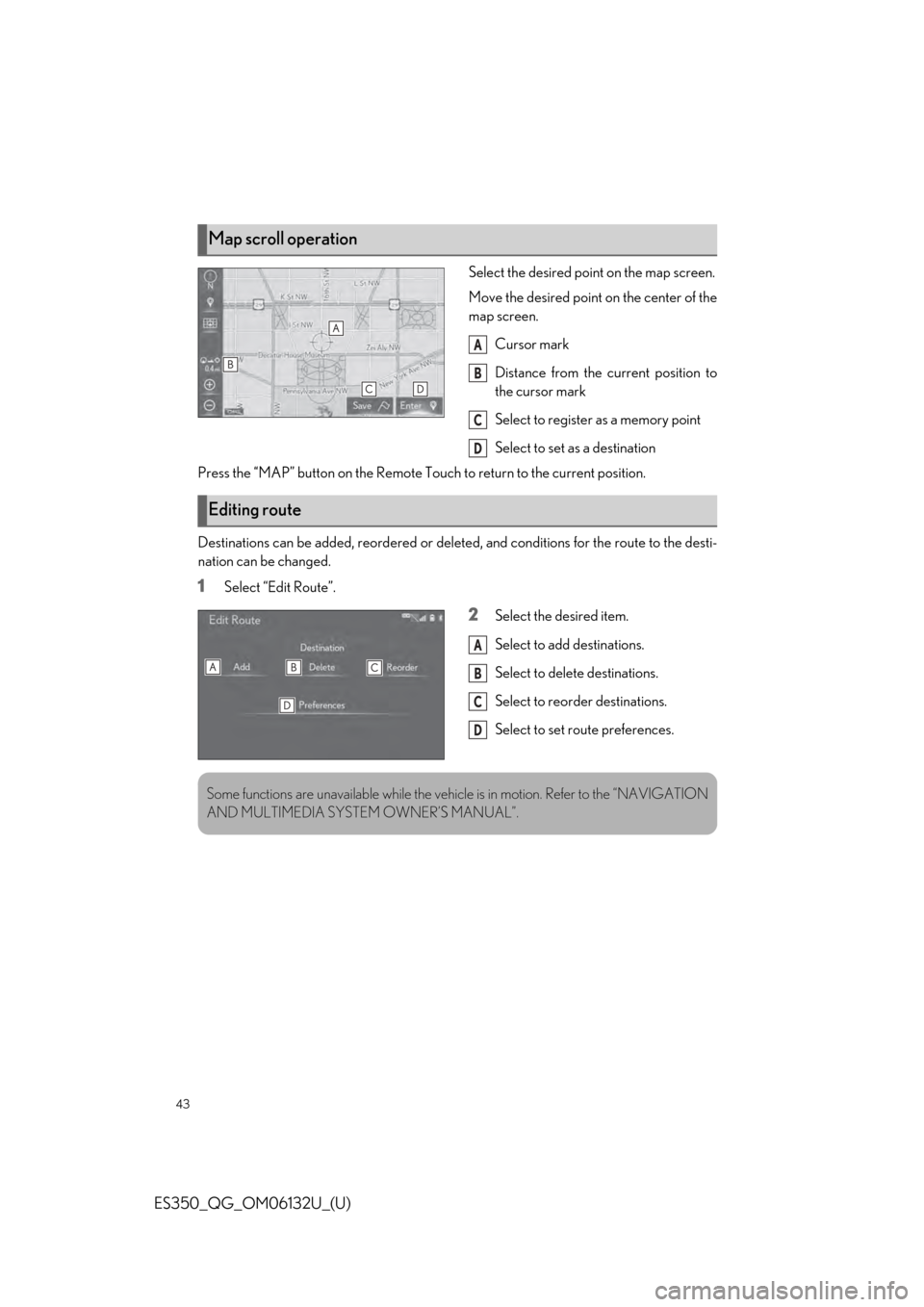
Select the desired point on the map screen.
Move the desired point on the center of the
map screen.Cursor mark
Distance from the current position to
the cursor mark
Select to register as a memory point
Select to set as a destination
Press the “MAP” button on the Remote Touch to return to the current position.
Destinations can be added, reordered or deleted, and conditions for the route to the desti-
nation can be changed.
1Select “Edit Route”.
2Select the desired item.
Select to add destinations.
Select to delete destinations.
Select to reorder destinations.
Select to set route preferences.
Map scroll operation
A
B
C
D
Editing route
A
B
C
D
Some functions are unavailable while the vehicle is in motion. Refer to the “NAVIGATION
AND MULTIMEDIA SYSTEM OWNER’S MANUAL”.
Page 46 of 94
46
ES350_QG_OM06132U_(U)
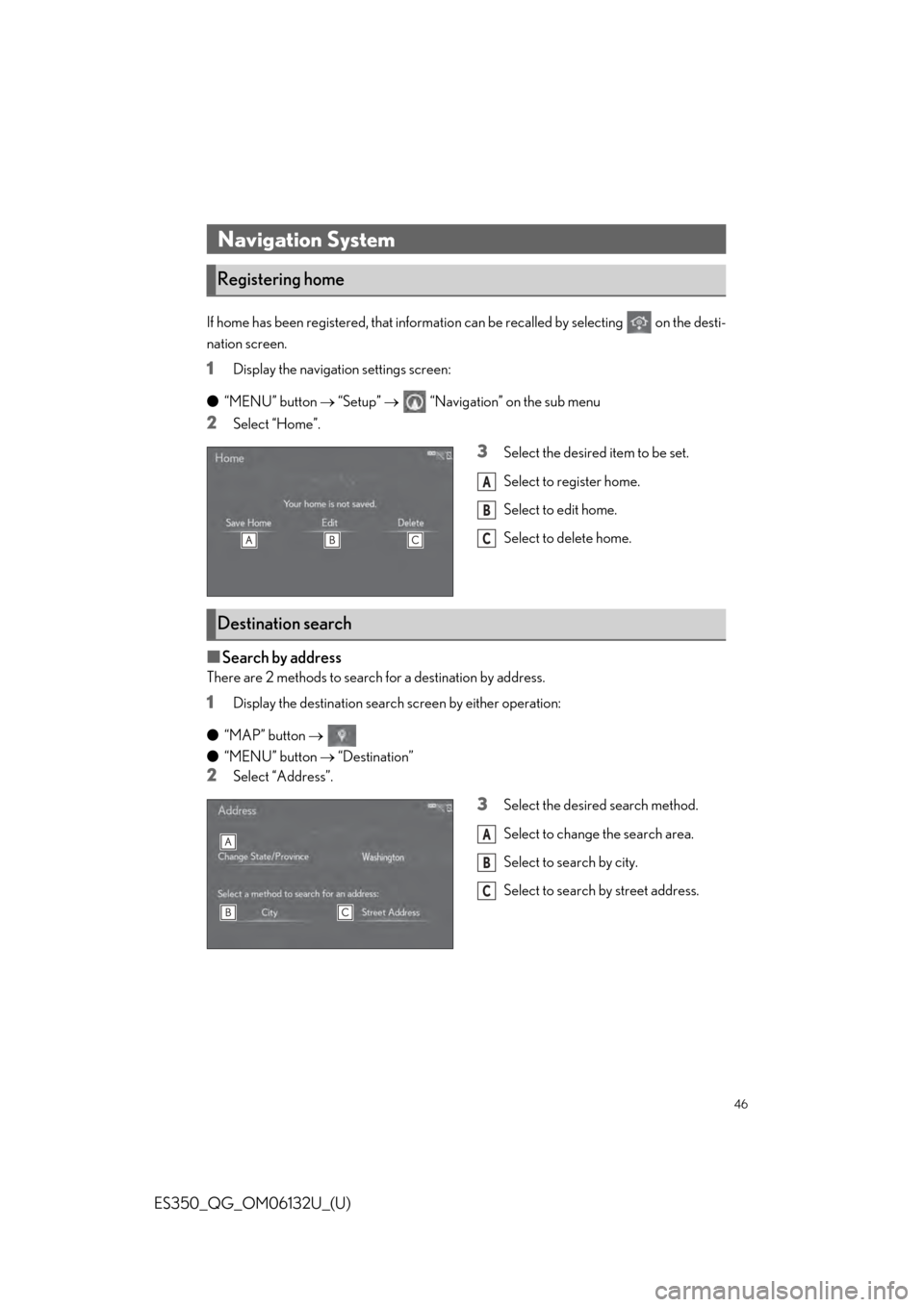
If home has been registered, that information can be recalled by selecting on the desti-
nation screen.
1Display the navigation settings screen:
● “MENU” button “Setup” “Navigation” on the sub menu
2Select “Home”.
3Select the desired item to be set.
Select to register home.
Select to edit home.
Select to delete home.
■Search by address
There are 2 methods to search for a destination by address.
1Display the destination search screen by either operation:
● “MAP” button
● “MENU” button “Destination”
2Select “Address”.
3Select the desired search method.
Select to change the search area.
Select to search by city.
Select to search by street address.
Navigation System
Registering home
A
B
C
Destination search
A
B
C