air condition Lexus ES350 2019 / LEXUS 2019 ES350 (OM06130U) User Guide
[x] Cancel search | Manufacturer: LEXUS, Model Year: 2019, Model line: ES350, Model: Lexus ES350 2019Pages: 444, PDF Size: 14.22 MB
Page 167 of 444
1674-5. Using the driving support systems
4
Driving
■If a warning message is displayed on the multi-information display
A system may be temporarily unavailable or there may be a malfunction in the system.
●In the following situations, perform the action s specified in the table. When the normal
operating conditions are detected, the me ssage will disappear and the system will
become operational.
If the message does not disappear, contact your Lexus dealer.
SituationActions
When the area around a sensor is covered
with dirt, moisture (f ogged up, covered with
condensation, ice, etc. ), or other foreign
matterTo clean the part of the windshield in front of
the front camera, use the windshield wipers
or the windshield defogger of the air condi-
tioning system ( P.252).
When the temperature around the front
camera is outside of th e operational range,
such as when the vehicle is in the sun or in an
extremely cold environment
If the front camera is hot, such as after the
vehicle had been parked in the sun, use the
air conditioning system to decrease the tem-
perature around the front camera.
If a sunshade was used when the vehicle was
parked, depending on it s type, the sunlight
reflected from the surface of the sunshade
may cause the temperature of the front cam-
era to become excessively high.
If the front camera is cold, such after the
vehicle is parked in an extremely cold envi-
ronment, use the air conditioning system to
increase the temperature around the front
camera.
The area in front of the front camera is
obstructed, such as when the hood is open
or a sticker is attached to the part of the
windshield in front of the front camera.
Close the hood, remove the sticker, etc. to
clear the obstruction.
Page 171 of 444
1714-5. Using the driving support systems
4
Driving
■Enabling/disabling the pre-colli-
sion system
The pre-collision system can be
enabled/disabled on ( P.72) of
the multi-information display.
The system is automatically enabled each
time the engine switch is turned to IGNI-
TION ON mode.
If the system is disabled, the PCS warn-
ing light will turn on and a message will
be displayed on the multi-information
display.
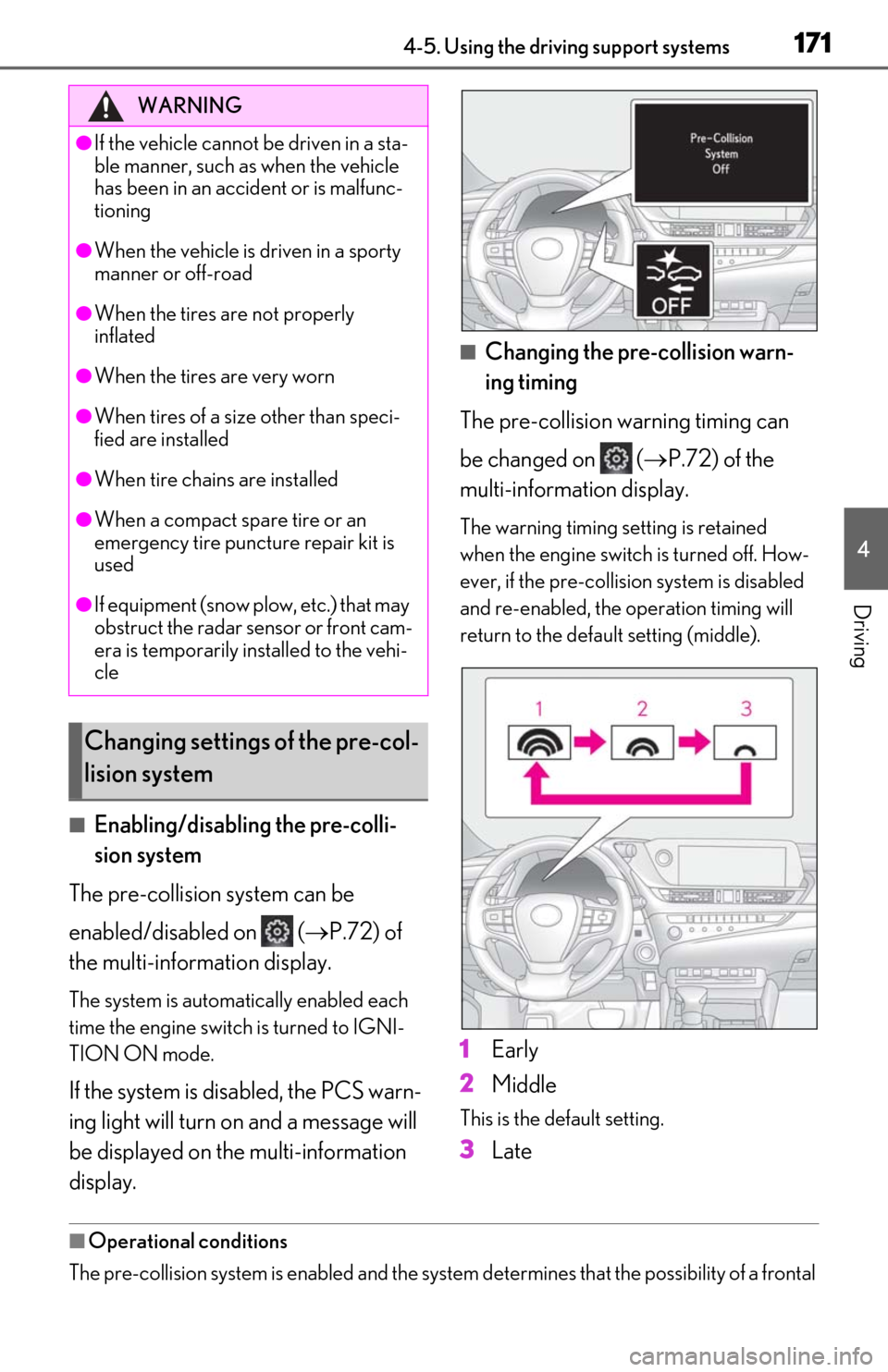
■Changing the pre-collision warn-
ing timing
The pre-collision warning timing can
be changed on ( P.72) of the
multi-information display.
The warning timing setting is retained
when the engine switch is turned off. How-
ever, if the pre-collision system is disabled
and re-enabled, the operation timing will
return to the default setting (middle).
1 Early
2 Middle
This is the default setting.
3Late
■Operational conditions
The pre-collision system is enabled and the system determines that the possibility of a frontal
WARNING
●If the vehicle cannot be driven in a sta-
ble manner, such as when the vehicle
has been in an accident or is malfunc-
tioning
●When the vehicle is driven in a sporty
manner or off-road
●When the tires are not properly
inflated
●When the tires are very worn
●When tires of a size other than speci-
fied are installed
●When tire chains are installed
●When a compact spare tire or an
emergency tire puncture repair kit is
used
●If equipment (snow plow, etc.) that may
obstruct the radar sensor or front cam-
era is temporarily installed to the vehi-
cle
Changing settings of the pre-col-
lision system
Page 177 of 444
1774-5. Using the driving support systems
4
Driving
WARNING
●When tires of a size other than speci-
fied are installed.
●Vehicle is driven in traffic lanes other
than that highways and freeways.
●During emergency towing
■Preventing LTA system malfunctions
and operations performed by mistake
●Do not modify the headlights or place
stickers, etc. on the surface of the
lights.
●Do not modify the suspension etc. If
the suspension etc. needs to be
replaced, contact your Lexus dealer.
●Do not install or place anything on the
hood or grille. Also, do not install a
grille guard (bull bars, kangaroo bar,
etc.).
●If your windshield needs repairs, con-
tact your Lexus dealer.
■Conditions in which functions may
not operate properly
In the following situations, the functions
may not operate properly and the vehicle
may depart from its lane. Drive safely by
always paying careful attention to your
surroundings and operate the steering
wheel to correct the path of the vehicle
without relying solely on the functions.
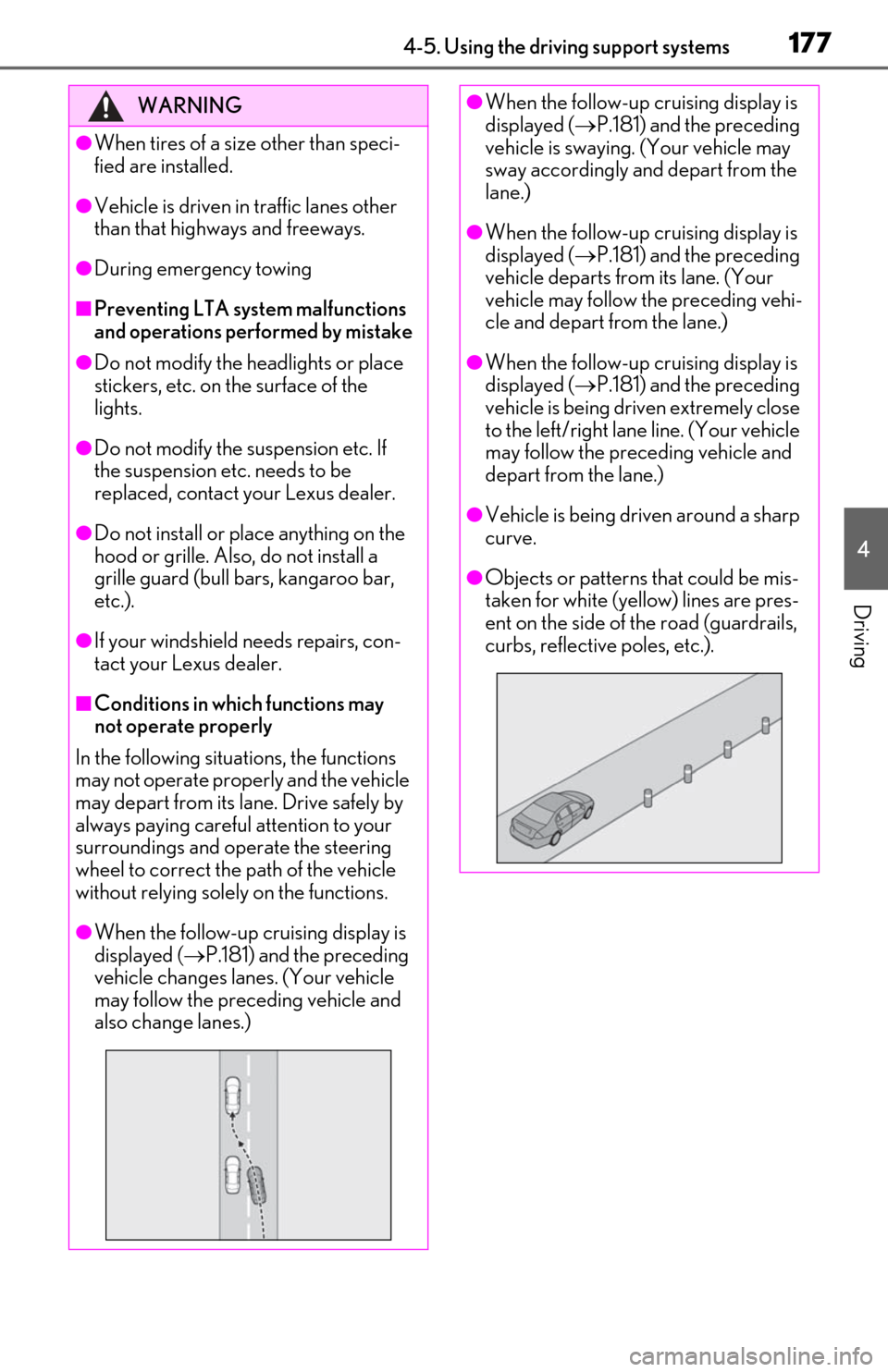
●When the follow-up cruising display is
displayed ( P.181) and the preceding
vehicle changes lanes. (Your vehicle
may follow the preceding vehicle and
also change lanes.)
●When the follow-up cruising display is
displayed ( P.181) and the preceding
vehicle is swaying. (Your vehicle may
sway accordingly and depart from the
lane.)
●When the follow-up cruising display is
displayed ( P.181) and the preceding
vehicle departs from its lane. (Your
vehicle may follow the preceding vehi-
cle and depart from the lane.)
●When the follow-up cruising display is
displayed ( P.181) and the preceding
vehicle is being driven extremely close
to the left/right lane line. (Your vehicle
may follow the preceding vehicle and
depart from the lane.)
●Vehicle is being driven around a sharp
curve.
●Objects or patterns that could be mis-
taken for white (yellow) lines are pres-
ent on the side of the road (guardrails,
curbs, reflective poles, etc.).
Page 178 of 444
1784-5. Using the driving support systems
WARNING
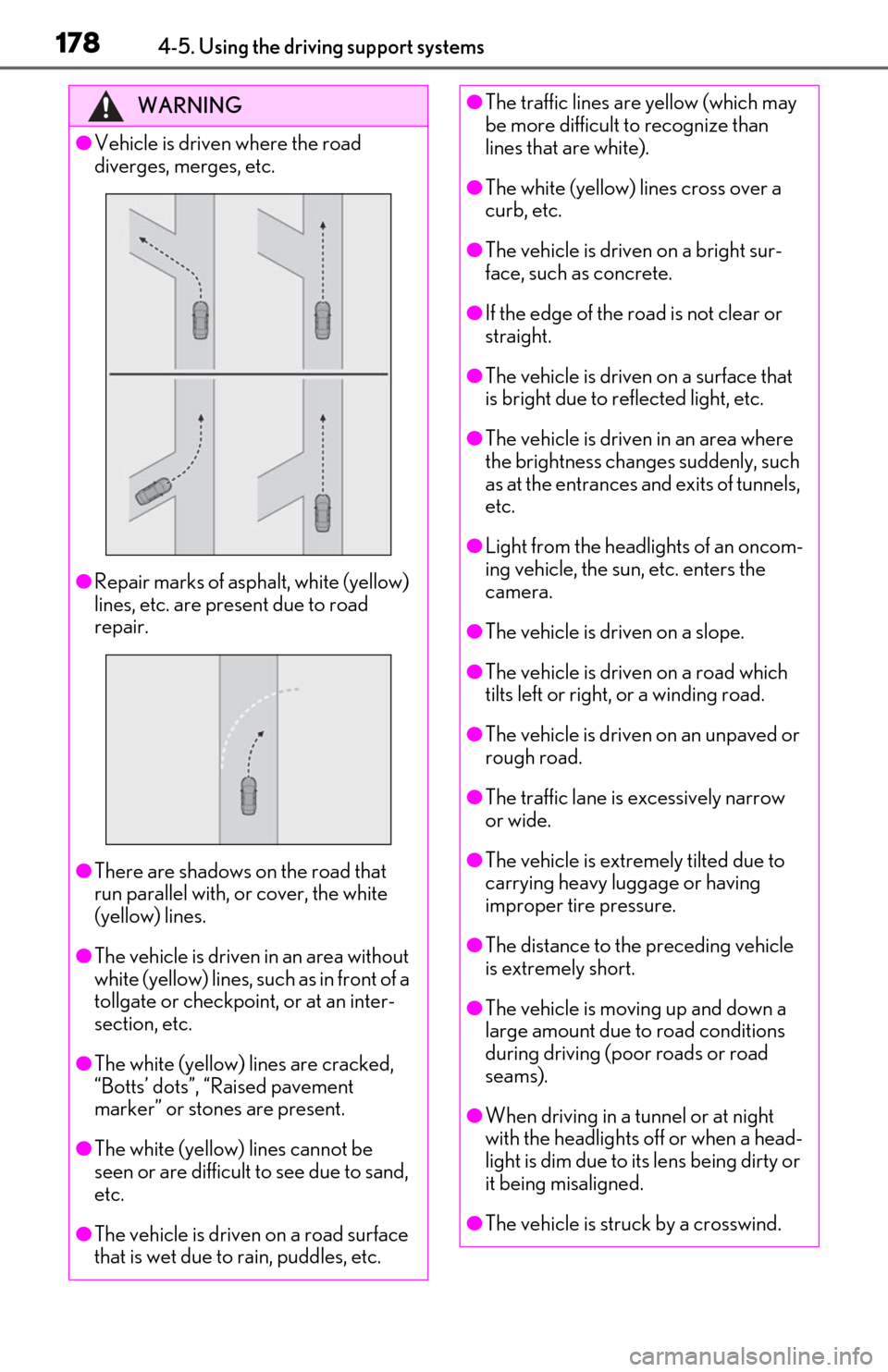
●Vehicle is driven where the road
diverges, merges, etc.
●Repair marks of asphalt, white (yellow)
lines, etc. are present due to road
repair.
●There are shadows on the road that
run parallel with, or cover, the white
(yellow) lines.
●The vehicle is driven in an area without
white (yellow) lines, su ch as in front of a
tollgate or checkpoint, or at an inter-
section, etc.
●The white (yellow) lines are cracked,
“Botts’ dots”, “Raised pavement
marker” or stones are present.
●The white (yellow) lines cannot be
seen or are difficult to see due to sand,
etc.
●The vehicle is driven on a road surface
that is wet due to rain, puddles, etc.
●The traffic lines are yellow (which may
be more difficult to recognize than
lines that are white).
●The white (yellow) lines cross over a
curb, etc.
●The vehicle is driven on a bright sur-
face, such as concrete.
●If the edge of the road is not clear or
straight.
●The vehicle is driven on a surface that
is bright due to reflected light, etc.
●The vehicle is driven in an area where
the brightness change s suddenly, such
as at the entrances and exits of tunnels,
etc.
●Light from the headlights of an oncom-
ing vehicle, the sun, etc. enters the
camera.
●The vehicle is driven on a slope.
●The vehicle is driven on a road which
tilts left or right, or a winding road.
●The vehicle is driven on an unpaved or
rough road.
●The traffic lane is excessively narrow
or wide.
●The vehicle is extremely tilted due to
carrying heavy luggage or having
improper tire pressure.
●The distance to the preceding vehicle
is extremely short.
●The vehicle is moving up and down a
large amount due to road conditions
during driving (poor roads or road
seams).
●When driving in a tunnel or at night
with the headlights off or when a head-
light is dim due to its lens being dirty or
it being misaligned.
●The vehicle is struck by a crosswind.
Page 202 of 444
2024-5. Using the driving support systems
object may increase in the following situ-
ations:
• When the sensor is misaligned due to a strong impact to the sensor or its sur-
rounding area
• When the distance between your vehicle and a guardrail, wall, etc. that enters the
detection area is short
• When driving up an d down consecutive
steep inclines, such as hills, dips in the
road, etc.
• When vehicle lanes are narrow, or when driving on the edge of a lane, and a vehi-
cle traveling in a lane other than the adja-
cent lanes enters the detection area
• When driving on roads with sharp bends,
consecutive curves, or uneven surfaces
• When the tires are slipping or spinning
• When the distance between your vehicle and a following vehicle is short
• When an accessory (such as a bicycle carrier) or towing eyel et is installed to the
rear of the vehicle
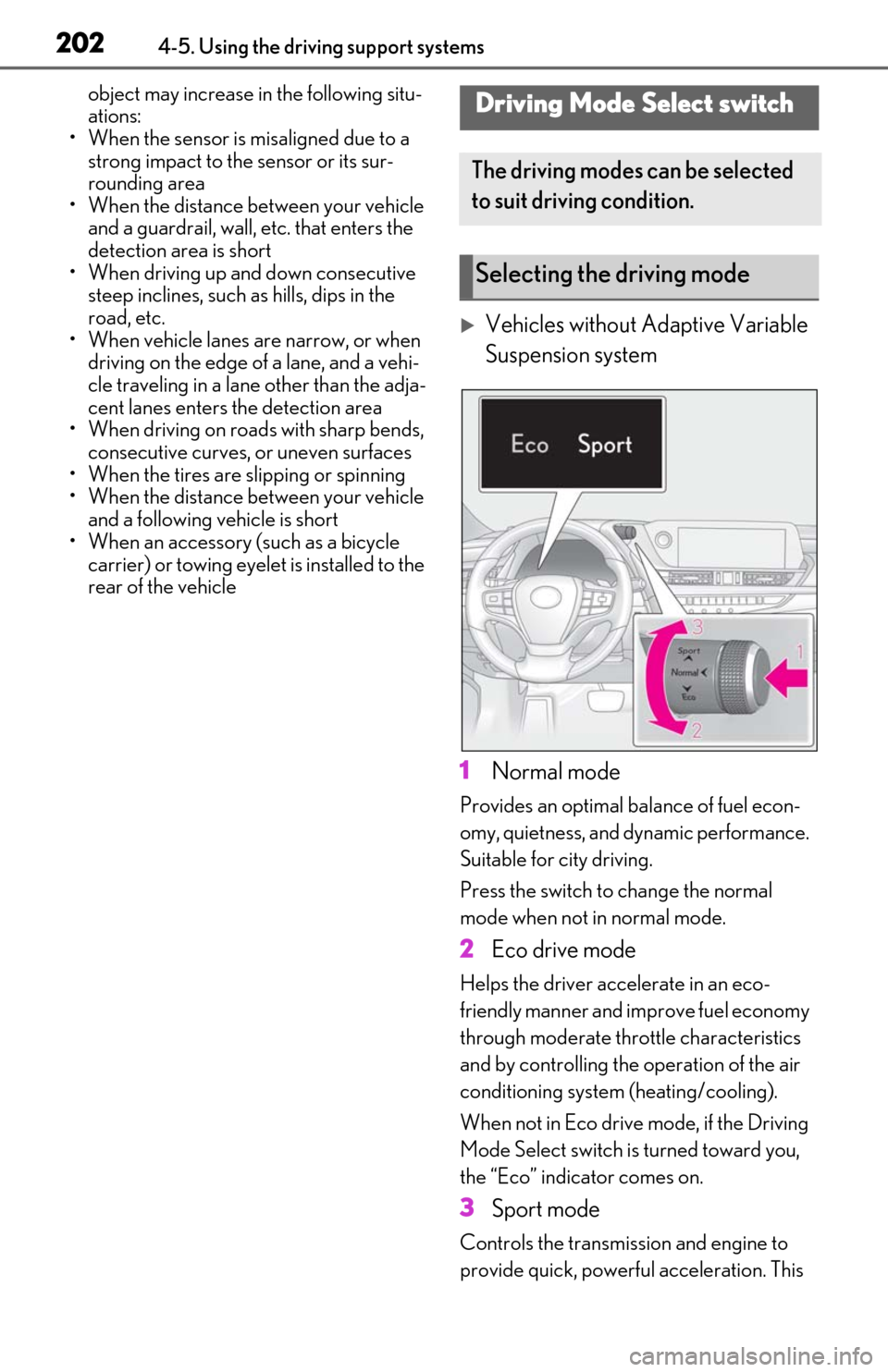
Vehicles without Adaptive Variable
Suspension system
1 Normal mode
Provides an optimal ba lance of fuel econ-
omy, quietness, and dynamic performance.
Suitable for city driving.
Press the switch to change the normal
mode when not in normal mode.
2 Eco drive mode
Helps the driver acce lerate in an eco-
friendly manner and improve fuel economy
through moderate thro ttle characteristics
and by controlling the operation of the air
conditioning system (heating/cooling).
When not in Eco drive mode, if the Driving
Mode Select switch is turned toward you,
the “Eco” indicator comes on.
3 Sport mode
Controls the transmission and engine to
provide quick, powerful acceleration. This
Driving Mode Select switch
The driving modes can be selected
to suit driving condition.
Selecting the driving mode
Page 203 of 444
2034-5. Using the driving support systems
4
Driving
mode is suitable for when agile driving
response is desired, such as when driving
on roads with many curves.
When not in SPORT mode, if the Driving
Mode Select switch is turned away from
you, the “Sport” indicator comes on.
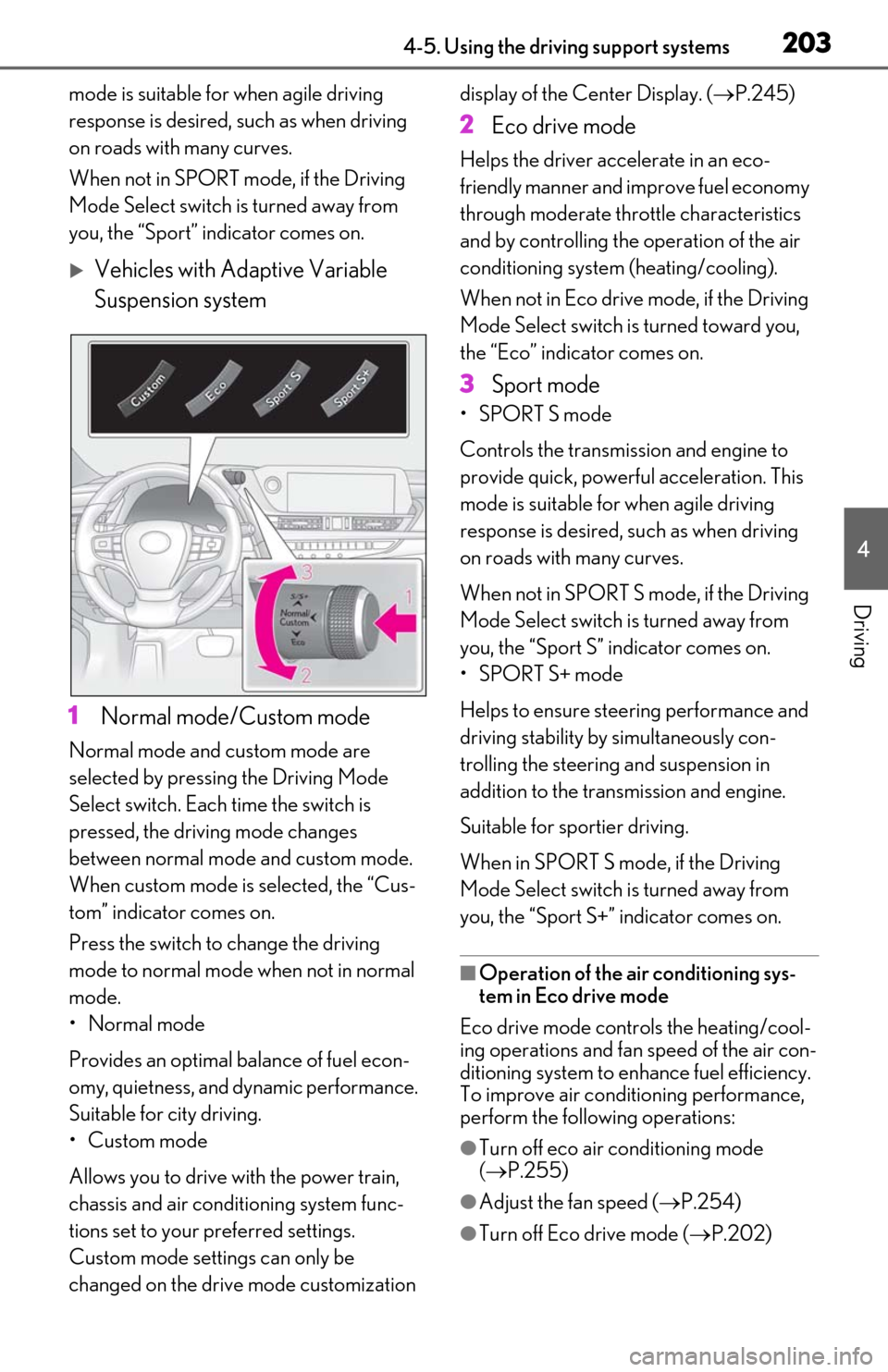
Vehicles with Adaptive Variable
Suspension system
1 Normal mode/Custom mode
Normal mode and custom mode are
selected by pressing the Driving Mode
Select switch. Each time the switch is
pressed, the driving mode changes
between normal mode and custom mode.
When custom mode is selected, the “Cus-
tom” indicator comes on.
Press the switch to change the driving
mode to normal mode when not in normal
mode.
•Normal mode
Provides an optimal ba lance of fuel econ-
omy, quietness, and dynamic performance.
Suitable for city driving.
•Custom mode
Allows you to drive with the power train,
chassis and air conditioning system func-
tions set to your preferred settings.
Custom mode settings can only be
changed on the drive mode customization display of the Center Display. (
P.245)
2 Eco drive mode
Helps the driver acce lerate in an eco-
friendly manner and improve fuel economy
through moderate thro ttle characteristics
and by controlling the operation of the air
conditioning system (heating/cooling).
When not in Eco drive mode, if the Driving
Mode Select switch is turned toward you,
the “Eco” indicator comes on.
3 Sport mode
•SPORT S mode
Controls the transmission and engine to
provide quick, powerful acceleration. This
mode is suitable for when agile driving
response is desired, such as when driving
on roads with many curves.
When not in SPORT S mode, if the Driving
Mode Select switch is turned away from
you, the “Sport S” indicator comes on.
•SPORT S+ mode
Helps to ensure steering performance and
driving stability by simultaneously con-
trolling the steering and suspension in
addition to the transmission and engine.
Suitable for sportier driving.
When in SPORT S mode, if the Driving
Mode Select switch is turned away from
you, the “Sport S+” indicator comes on.
■Operation of the air conditioning sys-
tem in Eco drive mode
Eco drive mode controls the heating/cool-
ing operations and fan speed of the air con-
ditioning system to enhance fuel efficiency.
To improve air condit ioning performance,
perform the following operations:
●Turn off eco air conditioning mode
( P.255)
●Adjust the fan speed ( P.254)
●Turn off Eco drive mode ( P.202)
Page 208 of 444

2084-5. Using the driving support systems
●A shift lever is shifted to a position other
than P.
■Setting the buzzer volume
The buzzer volume can be adjusted on the
multi-information display. ( P.205)
■If “Parking Assist Unavailable Clean
Parking Assist Sensor” is displayed on
the multi-inform ation display
A sensor may be covered with ice, snow,
dirt, etc. Remove the ice, snow, dirt, etc.,
from the sensor to return the system to nor-
mal.
Also, due to ice forming on a sensor at low
temperatures, a warning message may be
displayed or the sensor may not be able to
detect an object. Once the ice melts, the
system will return to normal.
■Sensor detectio n information
●The sensor’s detectio n areas are limited
to the areas around the vehicle’s front and
rear bumpers.
●The following situations may occur
during use.
• Depending on the shape of the object
and other factors, the detection distance
may shorten, or detection may be impos-
sible.
• There will be a short delay between object detection and display. Even at low
speeds, there is a possibility that the
object will come within the sensor’s
detection areas before the display is
shown and the warning beep sounds.
• It might be difficult to hear the buzzer due to the volume of the audio system or air
flow noise of the air conditioning system.
■Conditions under which the function
may not function correctly
Certain vehicle conditions and the sur-
rounding environment may affect the ability
of a sensor to correctly detect objects. Par-
ticular instances where this may occur are
listed below.
●There is dirt, snow or ice on a sensor.
(Cleaning the sensors will resolve this
problem.)
●A sensor is frozen. (Thawing the area will
resolve this problem.)
In especially cold weather, if a sensor is frozen the sensor display may be dis-
played abnormally, or objects, such as a
wall, may not be detected.
●A sensor is covered in any way.
●When a sensor or the area around a sen-
sor is extremely hot or cold.
●On an extremely bumpy road, on an
incline, on gravel, or on grass.
●The vicinity of the vehicle is noisy due to
vehicle horns, motorcycle engines, air
brakes of large vehicles, or other loud
noises producing ultrasonic waves.
●There is another vehicle equipped with
parking assist sensors in the vicinity.
●A sensor is coated with a sheet of spray
or heavy rain.
●If a sensor is hit by a large amount of
water, such as when driving on a flooded
road.
●If the vehicle is significantly tilted.
●The vehicle is approaching a tall or
curved curb.
●If objects draw too close to the sensor.
■Objects which may not be properly
detected
The shape of the object may prevent the
sensor from detectin g it. Pay particular
attention to the following objects:
●Wires, fences, ropes, etc.
●Cotton, snow and other materials that
absorb sound waves
●Sharply-angled objects
●Low objects
●Tall objects with upper sections project-
ing outwards in the direction of your vehi-
cle
People may not be de tected if they are
wearing certain types of clothing.
Page 217 of 444

2174-5. Using the driving support systems
4
Driving
• Pedestrians who are bending forward or squatting
• Pedestrians who are lying down
• Pedestrians who are running
• Pedestrians who suddenly enter the detection area
• People riding a bicycle, skateboard, or
other light vehicle
• Pedestrians wearing oversized clothing such as a rain coat, long skirt, etc., making
their silhouette obscure
• Pedestrians whose body is partially hid- den by an object, such as a cart or
umbrella
• Pedestrians which are obscured by dark- ness, such as at night
●In some situations, such as the following,
pedestrians may not be detected by the
rear camera detection function, prevent-
ing the function from operating properly:
• When backing up in inclement weather (rain, snow, fog, etc.)
• When the rear camera is obscured (dirt, snow, ice, etc. are attached) or scratched
• When a very bright light, such as the sun,
or the headlights of another vehicle,
shines directly into the rear camera
• When backing up in a place where the
surrounding brightness changes sud-
denly, such as at the entrance or exit of a
garage or underground parking lot
• When backing up in a dim environment such as during dusk or in an underground
parking lot
●Even though there are no pedestrians in
the detection area, some objects, such as
the following, may be detected, possibly
causing the rear camera detection func-
tion to operate.
• Three dimensional objects, such as a pole, traffic cone, fence, or parked vehi-
cle
• Moving objects, such as a car or motor- cycle
• Objects moving toward your vehicle
when backing up, such as flags or pud-
dles (or airborne matter, such as smoke,
steam, rain, or snow)
• Cobblestone or gravel roads, tram rails, road repairs, white lines, pedestrian
crossings or fallen leaves on the road
• Metal covers (gratings), such as those used for drainage ditches • Objects reflected in a puddle or on a wet
road surface
• The roadside or bumps on the road
•Shadows on the road
●In some situations, such as the following,
the rear camera detection function may
operate even though there are no pedes-
trians in the detection area.
• When backing up toward the roadside or
a bump on the road
• If the vehicle is signif icantly tilted, such as
when carrying a heavy load
• When backing up toward an incline/decline
• If the suspension has been modified or
tires of a size othe r than specified are
installed
• If the rear of the vehicle is raised or low-
ered due to the carried load
• If an electronic component, such as a backlit license plate is installed near the
rear camera
• If a bumper protector, such as an addi- tional trim strip, is installed to the rear
bumper
• If the orientation of the rear camera has been changed due to a collision or other
impact, or removal and installation
• If a towing eyelet is in stalled to the rear of
the vehicle
• When water is flowing over the rear cam-
era lens
• When the rear camera is obscured (dirt,
snow, ice, etc. are at tached) or scratched
• If there is a flashing light in the detection area, such as the emergency flashers of
another vehicle
●Situations in which the rear camera
detection function may be difficult to
notice
• The buzzer may be difficult to hear if the surrounding area is noisy, the volume of
the audio system volume is high, the air
conditioning system is being used, etc.
• If the temperature in the cabin is
extremely high or low, the Center Display
may not operate correctly.
Page 231 of 444
2314-5. Using the driving support systems
4
Driving
spaces next to your vehicle*
●Objects which are extremely close to a
radar sensor*
●Vehicles are approaching from the right
or left at the rear of the vehicle at a travel-
ing speed of less than approximately 5
mph (8 km/h)
●Vehicles are approaching from the right
or left at the rear of the vehicle at a travel-
ing speed of more than approximately 15
mph (24 km/h)
*: Depending on the conditions, detection of a vehicle and/or object may occur.
■PKSB function buzzer
RCTA function buzzer Regardless of
whether the RCTA function is enabled or
not ( P.212), if the Parking Support Brake
function is enabled and brake control is per-
formed, a buzzer will sound to notify the
driver.
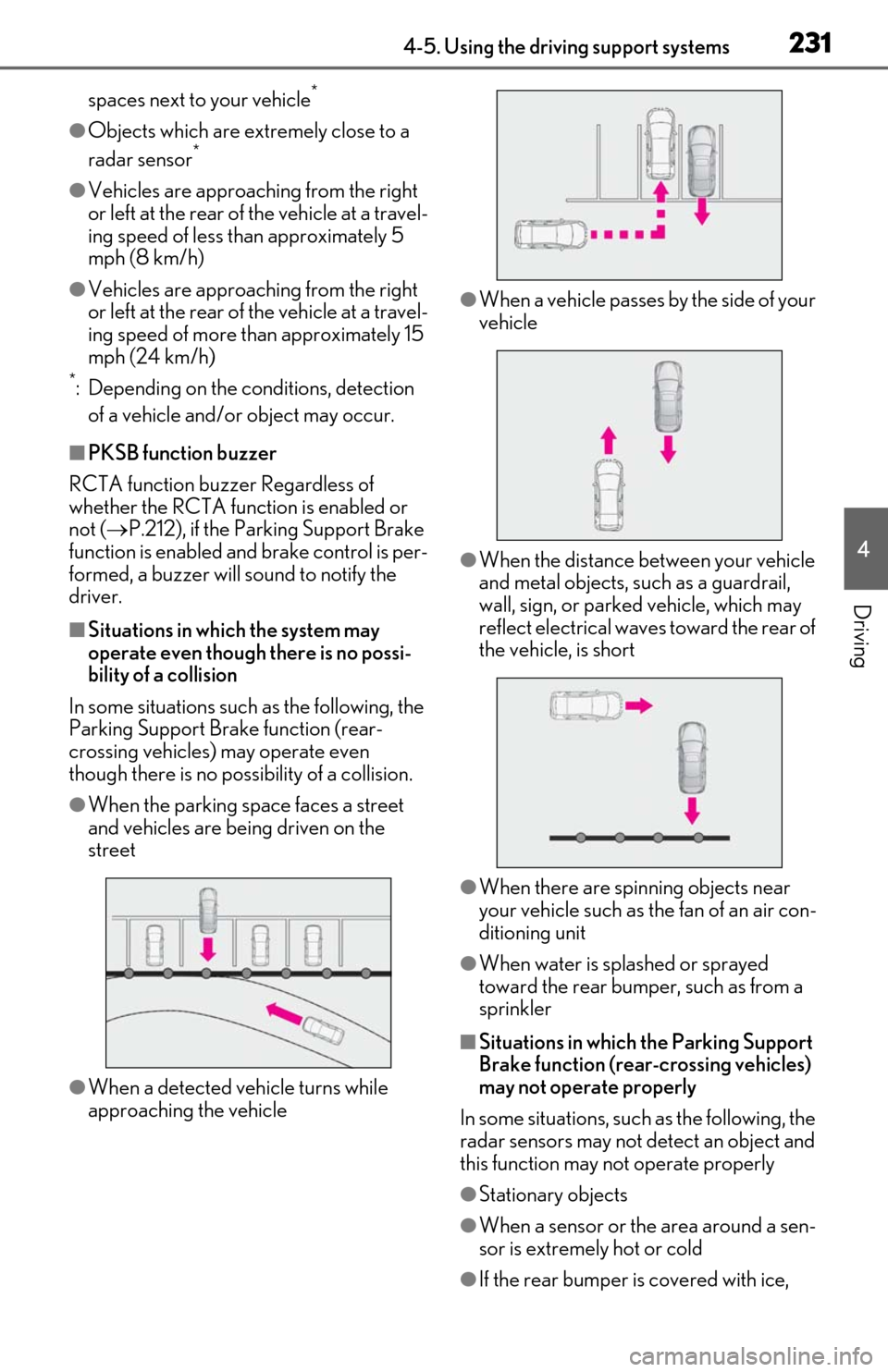
■Situations in which the system may
operate even though there is no possi-
bility of a collision
In some situations such as the following, the
Parking Support Brake function (rear-
crossing vehicles) may operate even
though there is no possibility of a collision.
●When the parking space faces a street
and vehicles are being driven on the
street
●When a detected vehicle turns while
approaching the vehicle
●When a vehicle passes by the side of your
vehicle
●When the distance between your vehicle
and metal objects, such as a guardrail,
wall, sign, or parked vehicle, which may
reflect electrical waves toward the rear of
the vehicle, is short
●When there are spinning objects near
your vehicle such as the fan of an air con-
ditioning unit
●When water is spla shed or sprayed
toward the rear bumper, such as from a
sprinkler
■Situations in which the Parking Support
Brake function (rear-crossing vehicles)
may not operate properly
In some situations, such as the following, the
radar sensors may not detect an object and
this function may not operate properly
●Stationary objects
●When a sensor or the area around a sen-
sor is extremely hot or cold
●If the rear bumper is covered with ice,
Page 236 of 444
2364-5. Using the driving support systems
■ABS (Anti-lock Brake System)
Helps to prevent wheel lock when the
brakes are applied suddenly, or if the
brakes are applied while driving on a
slippery road surface
■Brake assist
Generates an increased level of brak-
ing force after the brake pedal is
depressed when the system detects a
panic stop situation
■VSC (Vehicle Stability Control)
Helps the driver to control skidding
when swerving sudden ly or turning on
slippery road surfaces
■Enhanced VSC (Enhanced Vehi-
cle Stability Control)
Provides cooperative control of the
ABS, TRAC, VSC and EPS.
Helps to maintain directional stability
when swerving on slippery road sur-
faces by controlling steering perfor-
mance.
■Secondary Collision Brake (SCB)
When the airbag sensor detects a colli-
sion, the brakes and brake lights are
automatically controlled to reduce the
vehicle speed and that helps reduce
the possibility of further damage due to
a secondary collision
■TRAC (Traction Control)
Helps to maintain drive power and pre-
vent the drive wheels from spinning
when starting the vehicle or accelerat-
ing on slippery roads
■Active Cornering Assist (ACA)
Helps to prevent the vehicle from drift-
ing to the outer side by performing
inner wheel brake control when
attempting to acce lerate during cor-
nering
■Hill-start assist control
Helps to reduce the backward move-
ment of the vehicle when starting on an
uphill
■EPS (Electric Power Steering)
Employs an electric motor to reduce
the amount of effort needed to turn the
steering wheel
■AVS (Adaptive Variable Suspen-
sion System) (if equipped)
By independently controlling the
damping force of th e shock absorbers
for each of the 4 wheels according to
the road and driving conditions, this
system helps riding comfort with supe-
rior vehicle stability, and helps good
vehicle posture.
Also, the damping force changes
depending on the selected driving
Driving assist systems
To keep driving safety and perfor-
mance, the following systems oper-
ate automatically in response to
various driving situations. Be aware,
however, that these systems are
supplementary and should not be
relied upon too heavily when oper-
ating the vehicle.
Summary of the driving assist
systems