ECO mode Lexus ES350 2019 / LEXUS 2019 ES350 (OM06130U) Workshop Manual
[x] Cancel search | Manufacturer: LEXUS, Model Year: 2019, Model line: ES350, Model: Lexus ES350 2019Pages: 444, PDF Size: 14.22 MB
Page 237 of 444
2374-5. Using the driving support systems
4
Driving
mode. (P.202)
■When the TRAC/VSC systems are
operating
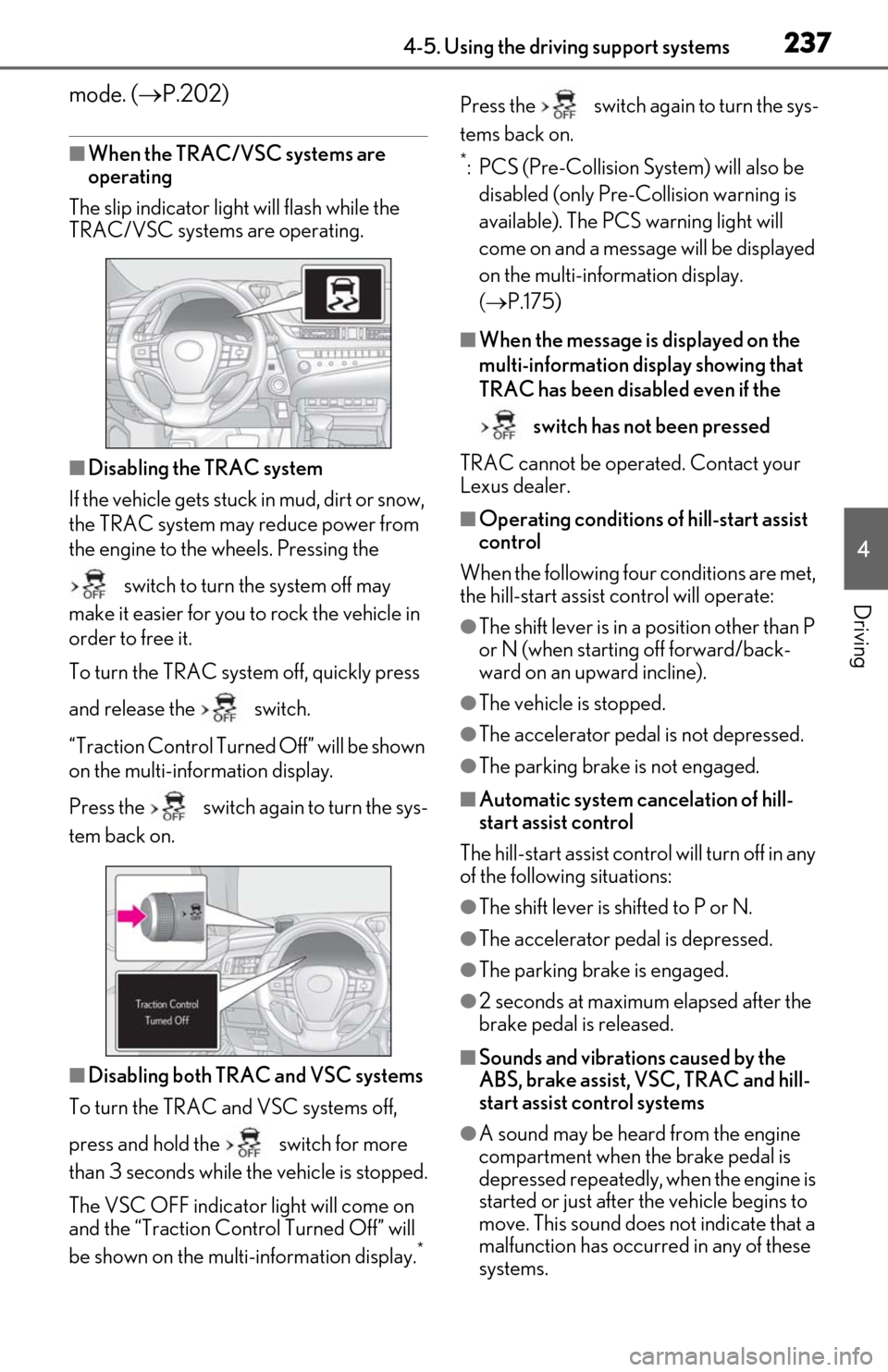
The slip indicator light will flash while the
TRAC/VSC systems are operating.
■Disabling the TRAC system
If the vehicle gets stuck in mud, dirt or snow,
the TRAC system may reduce power from
the engine to the wheels. Pressing the
switch to turn the system off may
make it easier for you to rock the vehicle in
order to free it.
To turn the TRAC system off, quickly press
and release the switch.
“Traction Control Turned Off” will be shown
on the multi-information display.
Press the switch again to turn the sys-
tem back on.
■Disabling both TRAC and VSC systems
To turn the TRAC and VSC systems off,
press and hold the switch for more
than 3 seconds while the vehicle is stopped.
The VSC OFF indicator light will come on
and the “Traction Cont rol Turned Off” will
be shown on the multi-information display.
*
Press the switch again to turn the sys-
tems back on.
*: PCS (Pre-Collision System) will also be disabled (only Pre-Collision warning is
available). The PCS warning light will
come on and a message will be displayed
on the multi-information display.
( P.175)
■When the message is displayed on the
multi-information display showing that
TRAC has been disabled even if the
switch has not been pressed
TRAC cannot be operated. Contact your
Lexus dealer.
■Operating conditions of hill-start assist
control
When the following four conditions are met,
the hill-start assist control will operate:
●The shift lever is in a position other than P
or N (when starting off forward/back-
ward on an up ward incline).
●The vehicle is stopped.
●The accelerator pedal is not depressed.
●The parking brake is not engaged.
■Automatic system cancelation of hill-
start assist control
The hill-start assist control will turn off in any
of the following situations:
●The shift lever is shifted to P or N.
●The accelerator pedal is depressed.
●The parking brake is engaged.
●2 seconds at maximum elapsed after the
brake pedal is released.
■Sounds and vibrations caused by the
ABS, brake assist, VSC, TRAC and hill-
start assist control systems
●A sound may be heard from the engine
compartment when the brake pedal is
depressed repeatedly, when the engine is
started or just after the vehicle begins to
move. This sound does not indicate that a
malfunction has occurred in any of these
systems.
Page 253 of 444
2535-3. Using the air conditioning system
5
Interior features
●Outside/recirculated air mode may auto-
matically switch regardless of the air con-
ditioning setting depending on the
temperature setting or inside tempera-
ture.
■Registering air conditioning settings to
electronic keys
●Unlocking the vehicle using an electronic
key and turning the engine switch to
IGNITION ON mode will recall that
key’s registered air conditioning settings.
●When the engine switch is turned off, the
current air conditioning settings will auto-
matically be registered to the electronic
key that was used to unlock the vehicle.
●The system may not operate correctly if
more than one electr onic key is in the
vicinity or if the smart access system with
push-button start is used to unlock the
passenger door.
●Vehicles with the driving position mem-
ory: The doors that can recall the air con-
ditioning setting
* when unlocked using
the smart access system with push-but-
ton start can be changed. For details,
contact your Lexus dealer.
*: The doors that can recall the driving posi-
tion memory are changed at the same
time.
■Operation of the air conditioning sys-
tem in Eco drive mode
In Eco drive mode, the air conditioning sys-
tem is controlled as follows to prioritize fuel
efficiency:
●Engine speed and compressor operation
controlled to restri ct heating/cooling
capacity
●Fan speed restricted when automatic
mode is selected
To improve air condit ioning performance,
perform the following operations:
●Turn off eco air conditioning mode
( P.254)
●Adjust the fan speed
●Turn off Eco drive mode ( P.202)
■When the outside temperature falls to
nearly 32°F (0°C)
The dehumidification function may not
operate even when “A/C” is selected.
■Ventilation and air conditioning odors
●To let fresh air in, set the air conditioning
system to the outside air mode.
●During use, various odors from inside and
outside the vehicle may enter into and
accumulate in the air conditioning sys-
tem. This may then cause odor to be
emitted from the vents.
●When parking, the system automatically
switches to fresh air intake mode to
encourage better air circulation through-
out the vehicle, helping to reduce odors
that occur when starting the vehicle.
■Using the voice command system
Air conditioning system can be operated
using voice commands. For details, refer to
the “NAVIGATION AND MULTIMEDIA
SYSTEM OWNER’S MANUAL”.
■Air conditioning filter
P.328
■Customization
Settings (e.g. A/C Auto switch operation)
can be changed.
(Customizable features P.400)
WARNING
■To prevent the windshield from fog-
ging up
Do not use the windshield defogger
switch during cool air operation in
extremely humid weather. The difference
between the temperature of the outside
air and that of the windshield can cause
the outer surface of the windshield to fog
up, blocking your vision.
■When the outside rear view mirror
defoggers are operating
Do not touch the outside rear view mir-
ror surfaces, as they can become very
hot and burn you.
Page 255 of 444
2555-3. Using the air conditioning system
5
Interior features
(“DUAL” mode) (P.255)
: Set eco air conditioning mode
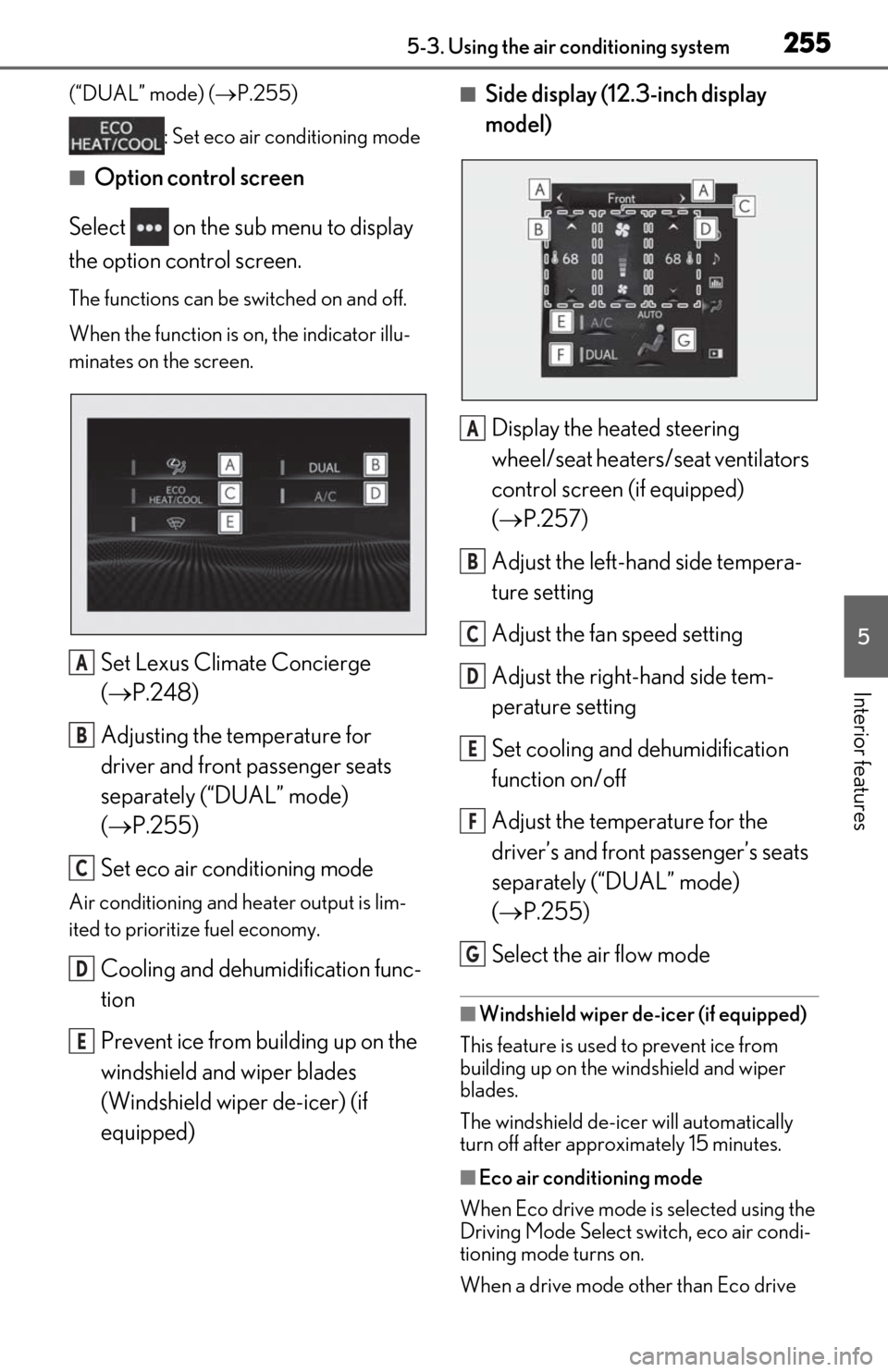
■Option control screen
Select on the sub menu to display
the option control screen.
The functions can be switched on and off.
When the function is on, the indicator illu-
minates on the screen.
Set Lexus Climate Concierge
( P.248)
Adjusting the temperature for
driver and front passenger seats
separately (“DUAL” mode)
( P.255)
Set eco air conditioning mode
Air conditioning and heater output is lim-
ited to prioritize fuel economy.
Cooling and dehumidification func-
tion
Prevent ice from building up on the
windshield and wiper blades
(Windshield wiper de-icer) (if
equipped)
■Side display (12.3-inch display
model)
Display the heated steering
wheel/seat heaters/seat ventilators
control screen (if equipped)
( P.257)
Adjust the left-hand side tempera-
ture setting
Adjust the fan speed setting
Adjust the right-hand side tem-
perature setting
Set cooling and dehumidification
function on/off
Adjust the temperature for the
driver’s and front passenger’s seats
separately (“DUAL” mode)
( P.255)
Select the air flow mode
■Windshield wiper de-icer (if equipped)
This feature is used to prevent ice from
building up on the windshield and wiper
blades.
The windshield de-icer will automatically
turn off after approximately 15 minutes.
■Eco air conditioning mode
When Eco drive mode is selected using the
Driving Mode Select switch, eco air condi-
tioning mode turns on.
When a drive mode other than Eco drive
A
B
C
D
E
A
B
C
D
E
F
G
Page 256 of 444
2565-3. Using the air conditioning system
mode is selected, eco air conditioning
mode may turn off.
1Press the automatic mode switch or
select “AUTO” on the sub function
menu. ( P.253)
2 Press the outside/recirculated air
mode switch to switch to automatic
air intake mode.
The air conditioning system automatically
switches between outside air and recircu-
lated air modes.
3Adjust the temperature setting.
4 To stop the operation, press the off
switch or select “Off” on the sub
function menu. ( P.253)
If the fan speed setting or air flow
modes are operated , the automatic
mode indicator goes off. However,
automatic mode for functions other
than that operated is maintained.
■Using automatic mode
Fan speed is adjusted automatically accord-
ing to the temperature setting and the
ambient conditions.
Therefore, the fan may stop for a while until
warm or cool air is ready to flow immedi-
ately after the automatic mode switch is
pressed or “AUTO” is selected.
Cool air may blow around the upper body
even when the heater is on due to sunlight.
■Automatic mode for air intake control
In automatic mode, the system detects
exhaust gas and other pollutants and auto-
matically switches between outside air and
recirculated air modes.
When the dehumidification function is off,
and the fan is operating, turning automatic
mode on will activate the dehumidification
function. The next time the dehumidification
function is turned off, the AUTO mode for
switching between outside air and recircu-
lated air modes is canceled.
To turn on the “DUAL” mode, perform
any of the following procedures:
Select “DUAL” on the sub function
menu. ( P.254)
Select “DUAL” on the option con-
trol screen.
Adjust the front passenger’s side
temperature setting.
The indicator on the main control screen
comes on when the “DUAL” mode is on.
■Location of air outlets
The air outlets and air volume changes
according to the selected air flow
mode.
WARNING
■To prevent burns (vehicles with wind-
shield wiper de-icer)
Do not touch the glass at lower part of
the windshield or to the side of the front
pillars when the wind shield wiper de-icer
is on.
Using automatic modeAdjusting the temperature for
driver and passenger seats sepa-
rately (“DUAL” mode)
Air outlet layout and operations
Page 259 of 444
2595-3. Using the air conditioning system
5
Interior features
recalled.
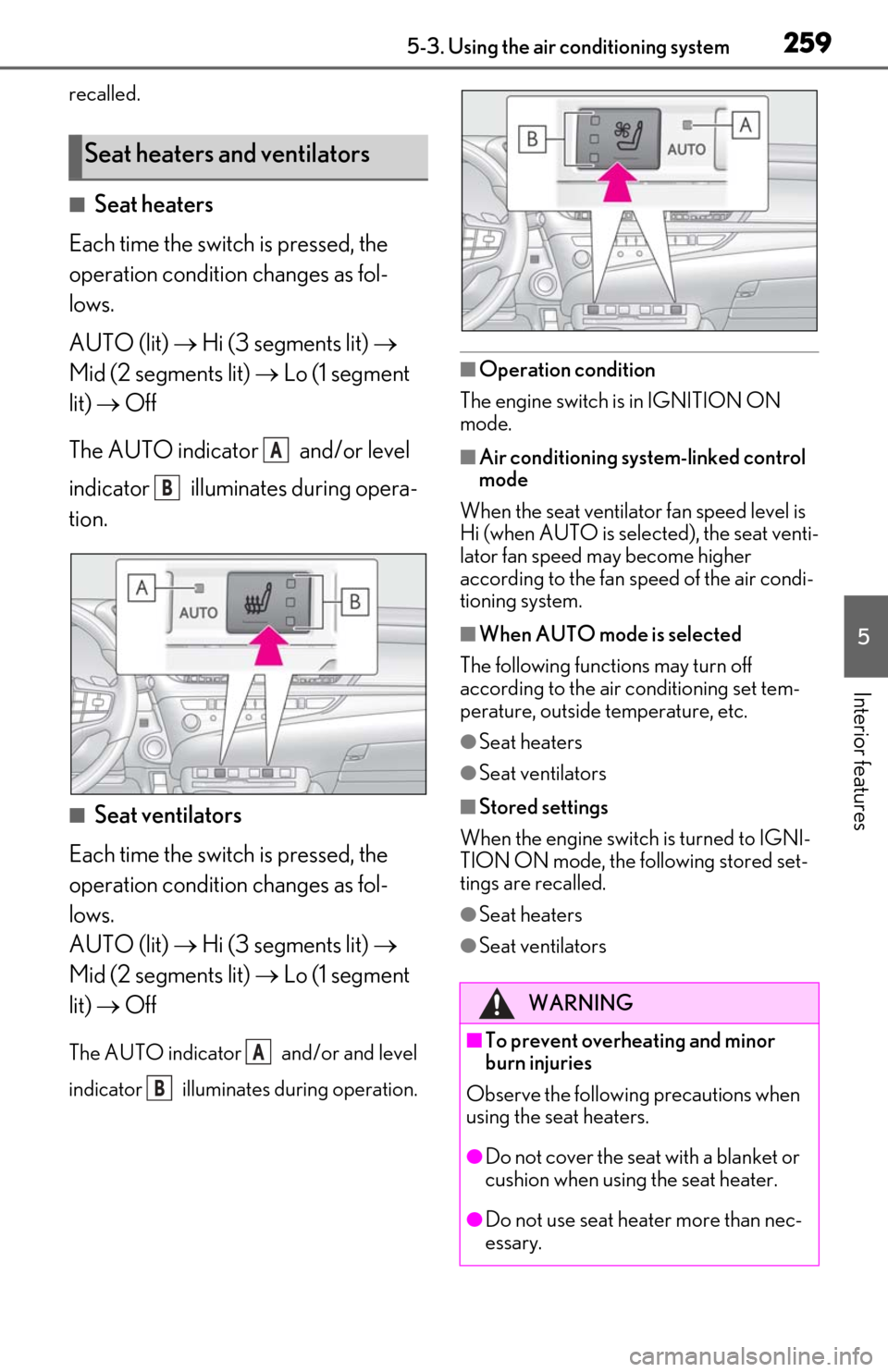
■Seat heaters
Each time the switch is pressed, the
operation condition changes as fol-
lows.
AUTO (lit) Hi (3 segments lit)
Mid (2 segments lit) Lo (1 segment
lit) Off
The AUTO indicator and/or level
indicator illuminates during opera-
tion.
■Seat ventilators
Each time the switch is pressed, the
operation condition changes as fol-
lows.
AUTO (lit) Hi (3 segments lit)
Mid (2 segments lit) Lo (1 segment
lit) Off
The AUTO indicator and/or and level
indicator illuminates during operation.
■Operation condition
The engine switch is in IGNITION ON
mode.
■Air conditioning system-linked control
mode
When the seat ventilator fan speed level is
Hi (when AUTO is sele cted), the seat venti-
lator fan speed may become higher
according to the fan speed of the air condi-
tioning system.
■When AUTO mode is selected
The following functions may turn off
according to the air conditioning set tem-
perature, outside temperature, etc.
●Seat heaters
●Seat ventilators
■Stored settings
When the engine switch is turned to IGNI-
TION ON mode, the following stored set-
tings are recalled.
●Seat heaters
●Seat ventilators
Seat heaters and ventilators
A
B
A
B
WARNING
■To prevent overheating and minor
burn injuries
Observe the following precautions when
using the seat heaters.
●Do not cover the seat with a blanket or
cushion when using the seat heater.
●Do not use seat heater more than nec-
essary.
Page 273 of 444
2735-6. Using the other interior features
5
Interior features
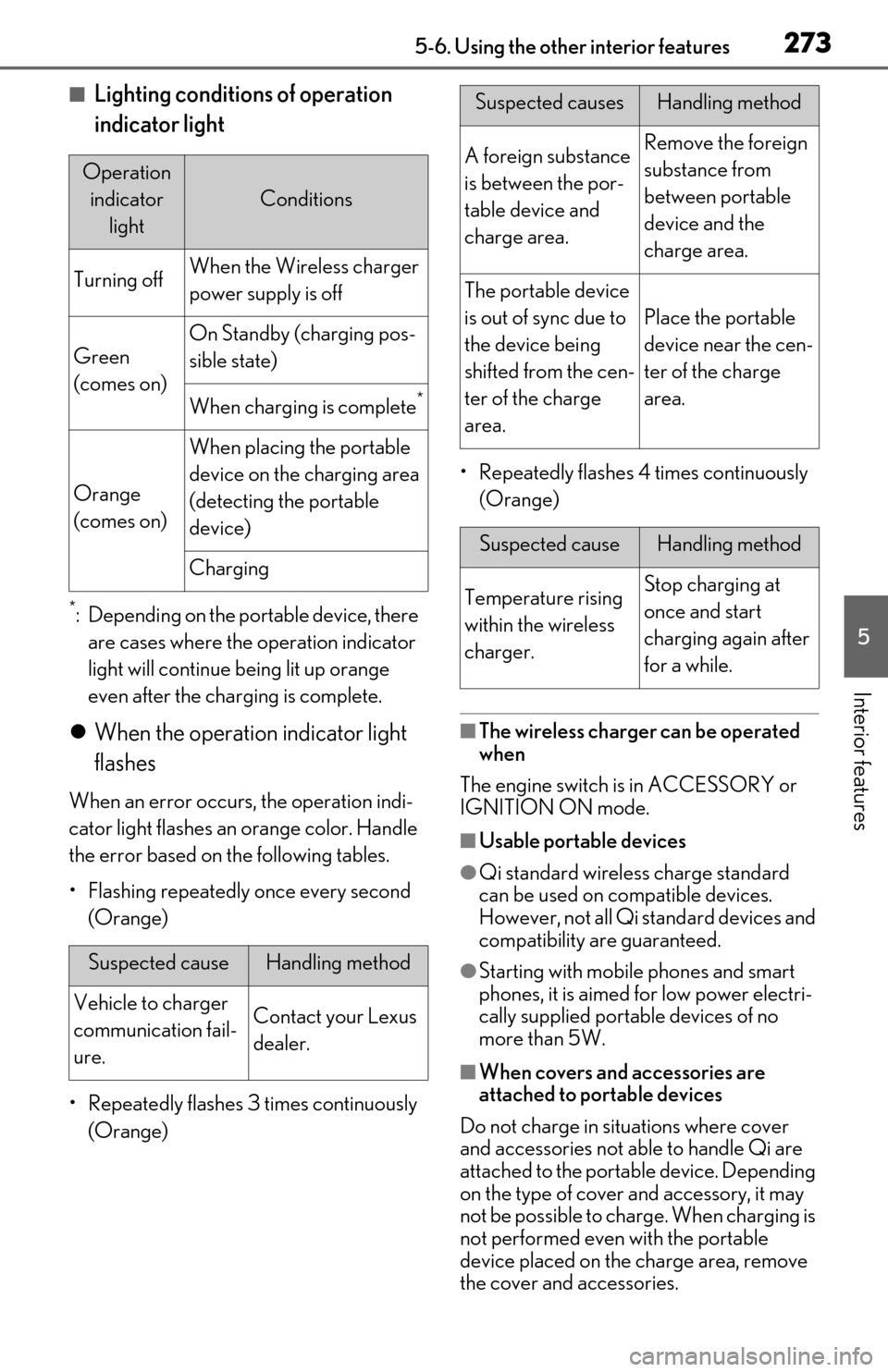
■Lighting conditions of operation
indicator light
*: Depending on the portable device, there are cases where the operation indicator
light will continue being lit up orange
even after the char ging is complete.
When the operation indicator light
flashes
When an error occurs , the operation indi-
cator light flashes an orange color. Handle
the error based on the following tables.
• Flashing repeatedly once every second (Orange)
• Repeatedly flashes 3 times continuously (Orange) • Repeatedly flashes 4 times continuously
(Orange)
■The wireless charger can be operated
when
The engine switch is in ACCESSORY or
IGNITION ON mode.
■Usable portable devices
●Qi standard wireless charge standard
can be used on compatible devices.
However, not all Qi standard devices and
compatibility ar e guaranteed.
●Starting with mobile phones and smart
phones, it is aimed for low power electri-
cally supplied portable devices of no
more than 5W.
■When covers and accessories are
attached to portable devices
Do not charge in situations where cover
and accessories not able to handle Qi are
attached to the portable device. Depending
on the type of cover and accessory, it may
not be possible to charge. When charging is
not performed even with the portable
device placed on the charge area, remove
the cover and accessories.
Operation indicator light
Conditions
Turning offWhen the Wireless charger
power supply is off
Green
(comes on)
On Standby (charging pos-
sible state)
When charging is complete*
Orange
(comes on)
When placing the portable
device on the charging area
(detecting the portable
device)
Charging
Suspected causeHandling method
Vehicle to charger
communication fail-
ure.Contact your Lexus
dealer.
Suspected causesHandling method
A foreign substance
is between the por-
table device and
charge area.Remove the foreign
substance from
between portable
device and the
charge area.
The portable device
is out of sync due to
the device being
shifted from the cen-
ter of the charge
area.
Place the portable
device near the cen-
ter of the charge
area.
Suspected causeHandling method
Temperature rising
within the wireless
charger.Stop charging at
once and start
charging again after
for a while.
Page 291 of 444
2915-6. Using the other interior features
5
Interior features
Connects drivers to response-center sup-
port. (
P.291)
Enhanced Roadside Assistance
Provides drivers various on-road assis-
tance. (
P.291)
After you have signed the Telematics
Subscription Service Agreement and
are enrolled, you can begin receiving
services.
A variety of subscription terms is avail-
able for purchase. Contact your Lexus
dealer, call the following or push the
“SOS” button in your vehicle for fur-
ther subscription details.
The United States
1-800-25-LEXUS (1-800-255-3987)
Canada
1-800-26-LEXUS (1-800-265-3987)
Puerto Rico
1-877-539-8777
■Safety Connect Serv ices Information
●Phone calls using the vehicles Blue-
tooth® technology will not be possible
during Safety Connect.
●Safety Connect is available beginning Fall
2009 on select Lexus models (in the
contiguous United States only). Contact
with the Safety Connect response center
is dependent upon the telematics device
being in operative co ndition, cellular con-
nection availability, and GPS satellite sig-
nal reception, which ca n limit the ability to
reach the response center or receive
emergency service support. Enrollment
and Telematics Subscription Service
Agreement required. A variety of sub-
scription terms is available; charges vary
by subscription term selected and loca- tion.
●Automatic Collision Notification, Emer-
gency Assistance and Stolen Vehicle
Location will function in the United
States, including Hawaii and Alaska,
Puerto Rico and in Canada, and
Enhanced Roadside Assistance will func-
tion in the United States, Puerto Rico and
in Canada.
●Automatic Collision Notification, Emer-
gency Assistance, Stolen Vehicle and
Enhanced Road Assistance will not func-
tion in the United St
ates Virgin Islands.
For vehicles first sold in the USVI, no
Safety Connect services will function in
and outside the United States Virgin
Islands.
●Safety Connect services are not subject
to section 255 of the Telecommunica-
tions Act and the device is not TTY com-
patible.
■Languages
The Safety Connect re sponse center will
offer support in mult iple languages. The
Safety Connect system will offer voice
prompts in English, Spanish, and French.
Please indicate your language of choice
when enrolling.
■When contacting the response center
You may be unable to contact the response
center if the network is busy.
When the engine switch is turned to
IGNITION ON mode, the red indica-
tor light comes on for 2 seconds then
turns off. Afterward, the green indica-
tor light comes on, indicating that the
service is active.
The following indicator light patterns
indicate specific system usage condi-
tions:
Green indicator light on = Active
Subscription
Safety Connect LED light Indi-
cators
Page 296 of 444
2966-1. Maintenance and care
6-1.Maintenance and care
Working from top to bottom, liber-
ally apply water to the vehicle body,
wheel wells and underside of the
vehicle to remove any dirt and dust.
Wash the vehicle body using a
sponge or soft cloth, such as a
chamois.
For hard-to-remove marks, use car
wash soap and rinse thoroughly with
water.
Wipe away any water.
Wax the vehicle when the water-
proof coating deteriorates.
If water does not bead on a clean surface,
apply wax when the vehicle body is cool.
■Self-restoring coat
The vehicle body has a self-restoring coat-
ing that is resistant to small surface
scratches caused in a car wash etc.
●The coating lasts for 5 to 8 years from
when the vehicle is delivered from the
plant.
●The restoration time differs depending on
the depth of the scratch and outside tem-
perature.
The restoration time may become
shorter when the coating is warmed by
applying warm water.
●Deep scratches caused by keys, coins,
etc. cannot be restored.
●Do not use wax that contain abrasives.
■Automatic car washes
●Fold the mirrors befo re washing the vehi-
cle. Start washing from the front of the
vehicle. Make sure to extend the mirrors
before driving.
●Brushes used in automatic car washes
may scratch the vehicle body and dam-
age the paint.
●Rear spoiler (if equipped) may not be
washable in some automatic car washes.
There may also be an increased risk of
damage to vehicle.
■High pressure car washes
●Do not allow the nozzles of the car wash
to come within close proximity of the win-
dows.
●Before using the car wash, check that the
fuel filler door on your vehicle is closed
properly.
■Notes for the smart access system with
push-button start
If the door handle becomes wet while the
electronic key is within the effective range,
the door may lock and unlock repeatedly. In
that case, follow the following correction
procedures to wash the vehicle:
●Place the key in a position 6 ft. (2 m) or
more separate from the vehicle while the
vehicle is being wash ed. (Take care to
ensure that the key is not stolen.)
●Set the electronic key to battery-saving
mode to disable the smart access system
with push-button start. ( P.101)
■Aluminum wheels
●Remove any dirt immediately by using a
neutral detergent.
●Wash detergent off with water immedi-
ately after use.
●To protect the paint from damage, make
sure to observe the following precau-
tions.
• Do not use acidic, alkaline or abrasive
detergent
• Do not use hard brushes
• Do not use detergent on the wheels when they are hot, such as after driving or park-
ing in hot weather
Cleaning and protecting the
vehicle exterior
Perform cleaning in a manner
appropriate to each component
and its material.
Cleaning instructions
Page 307 of 444
3076-3. Do-it-yourself maintenance
6
Maintenance and care
Tire inflation
pressure
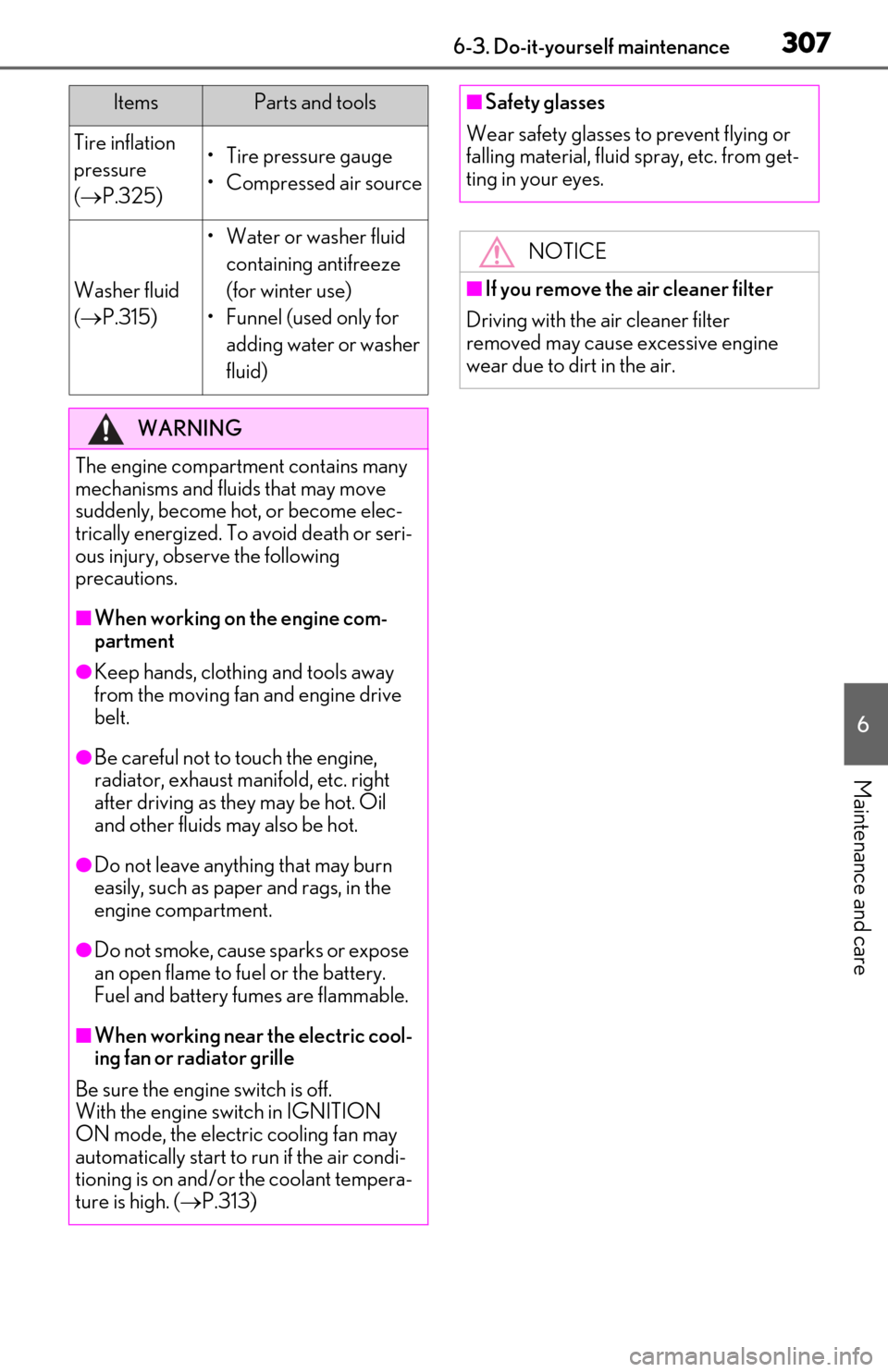
( P.325)• Tire pressure gauge
• Compressed air source
Washer fluid
( P.315)
• Water or washer fluid
containing antifreeze
(for winter use)
• Funnel (used only for adding water or washer
fluid)
WARNING
The engine compartment contains many
mechanisms and fluids that may move
suddenly, become hot, or become elec-
trically energized. To avoid death or seri-
ous injury, observe the following
precautions.
■When working on the engine com-
partment
●Keep hands, clothi ng and tools away
from the moving fan and engine drive
belt.
●Be careful not to touch the engine,
radiator, exhaust manifold, etc. right
after driving as they may be hot. Oil
and other fluids may also be hot.
●Do not leave anything that may burn
easily, such as paper and rags, in the
engine compartment.
●Do not smoke, cause sparks or expose
an open flame to fuel or the battery.
Fuel and battery fumes are flammable.
■When working near the electric cool-
ing fan or radiator grille
Be sure the engine switch is off.
With the engine switch in IGNITION
ON mode, the electric cooling fan may
automatically start to run if the air condi-
tioning is on and/or the coolant tempera-
ture is high. ( P.313)
ItemsParts and tools■Safety glasses
Wear safety glasses to prevent flying or
falling material, fluid spray, etc. from get-
ting in your eyes.
NOTICE
■If you remove the air cleaner filter
Driving with the air cleaner filter
removed may cause excessive engine
wear due to dirt in the air.
Page 314 of 444
3146-3. Do-it-yourself maintenance
■Brake fluid can absorb moisture from
the air
Excess moisture in the brake fluid can cause
a dangerous loss of braking efficiency. Use
only newly opened brake fluid.
Check the battery as follows.
■Battery exterior
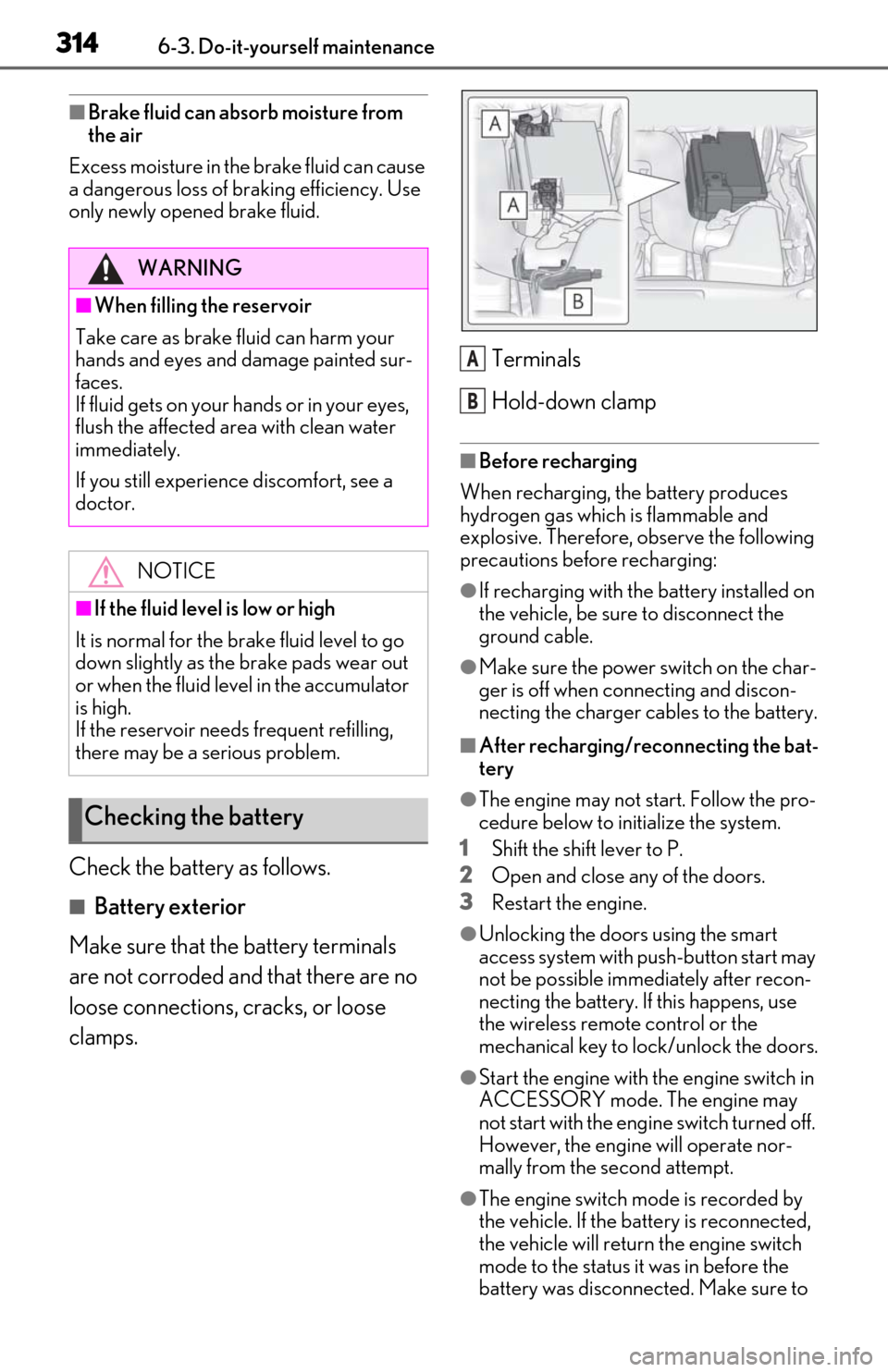
Make sure that the battery terminals
are not corroded and that there are no
loose connections, cracks, or loose
clamps. Terminals
Hold-down clamp
■Before recharging
When recharging, the battery produces
hydrogen gas which is flammable and
explosive. Therefore, observe the following
precautions before recharging:
●If recharging with the battery installed on
the vehicle, be sure to disconnect the
ground cable.
●Make sure the power switch on the char-
ger is off when connecting and discon-
necting the charger cables to the battery.
■After recharging/reconnecting the bat-
tery
●The engine may not start. Follow the pro-
cedure below to initialize the system.
1 Shift the shift lever to P.
2 Open and close any of the doors.
3 Restart the engine.
●Unlocking the doors using the smart
access system with pu sh-button start may
not be possible immediately after recon-
necting the battery. If this happens, use
the wireless remote control or the
mechanical key to lo ck/unlock the doors.
●Start the engine with the engine switch in
ACCESSORY mode. The engine may
not start with the engine switch turned off.
However, the engine will operate nor-
mally from the second attempt.
●The engine switch mode is recorded by
the vehicle. If the battery is reconnected,
the vehicle will return the engine switch
mode to the status it was in before the
battery was disconnected. Make sure to
WARNING
■When filling the reservoir
Take care as brake fluid can harm your
hands and eyes and damage painted sur-
faces.
If fluid gets on your hands or in your eyes,
flush the affected area with clean water
immediately.
If you still experience discomfort, see a
doctor.
NOTICE
■If the fluid level is low or high
It is normal for the brake fluid level to go
down slightly as the brake pads wear out
or when the fluid level in the accumulator
is high.
If the reservoir need s frequent refilling,
there may be a serious problem.
Checking the battery
A
B