Camera Lexus ES350 2019 Owner's Manual / LEXUS 2019 ES350 OWNER'S MANUAL (OM06130U)
[x] Cancel search | Manufacturer: LEXUS, Model Year: 2019, Model line: ES350, Model: Lexus ES350 2019Pages: 444, PDF Size: 14.22 MB
Page 3 of 444
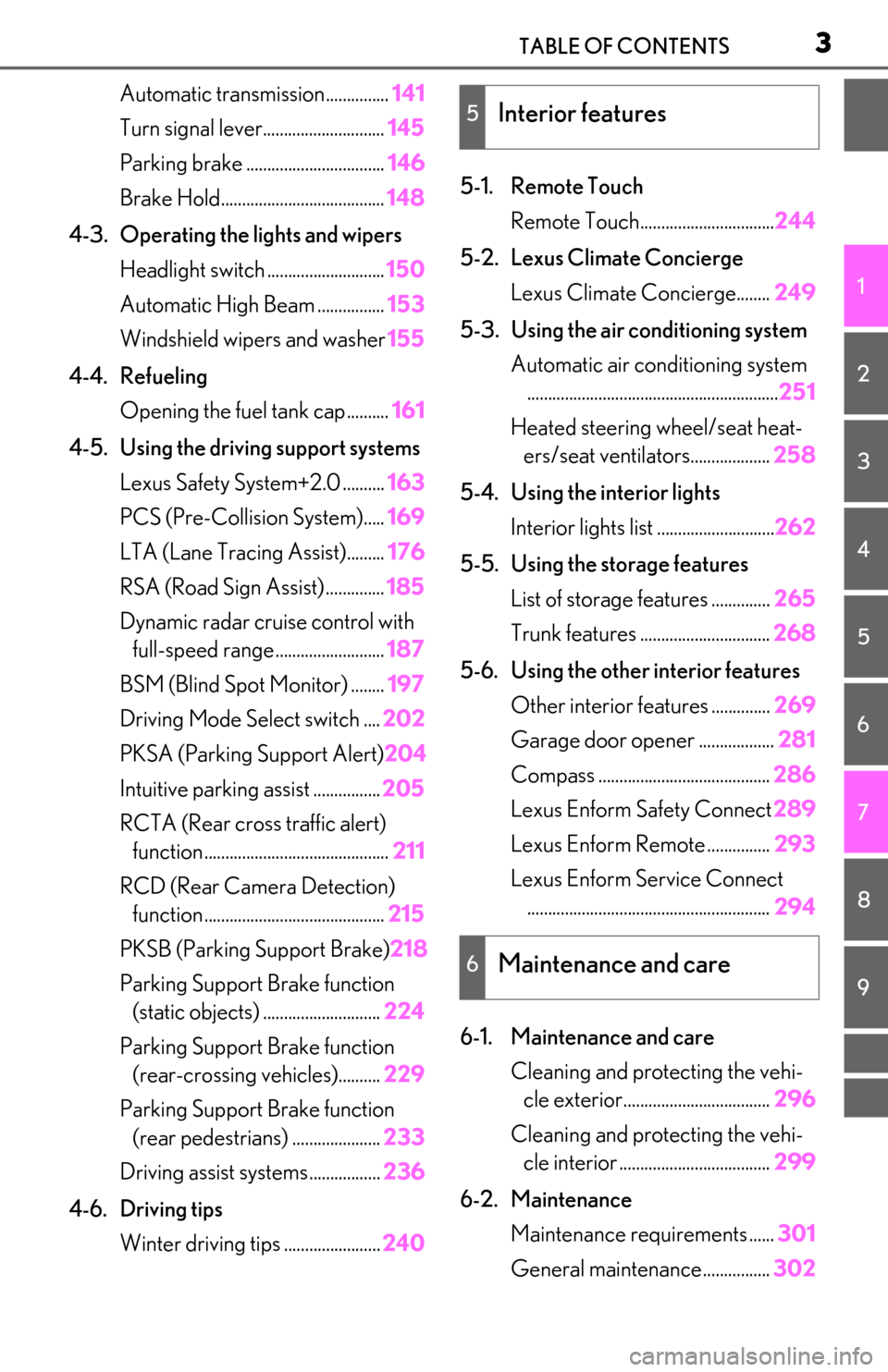
3TABLE OF CONTENTS
1
2
3
4
5
6
7
8
9
Automatic transmission...............141
Turn signal lever............................. 145
Parking brake ................................. 146
Brake Hold....................................... 148
4-3. Operating the lights and wipers Headlight switch ............................ 150
Automatic High Beam ................ 153
Windshield wipers and washer 155
4-4. Refueling Opening the fuel tank cap.......... 161
4-5. Using the driving support systems Lexus Safety System+2.0 .......... 163
PCS (Pre-Collision System)..... 169
LTA (Lane Tracing Assist)......... 176
RSA (Road Sign Assist) .............. 185
Dynamic radar crui se control with
full-speed range.......................... 187
BSM (Blind Spot Monitor) ........ 197
Driving Mode Select switch .... 202
PKSA (Parking Support Alert) 204
Intuitive parking assist ................ 205
RCTA (Rear cross traffic alert) function ............................................ 211
RCD (Rear Camera Detection) function ........................................... 215
PKSB (Parking Support Brake) 218
Parking Support Brake function (static objects) ............................ 224
Parking Support Brake function (rear-crossing vehicles).......... 229
Parking Support Brake function (rear pedestrians) ..................... 233
Driving assist systems ................. 236
4-6. Driving tips Winter driving tips ....................... 2405-1. Remote Touch
Remote Touch................................ 244
5-2. Lexus Climate Concierge Lexus Climate Concierge........ 249
5-3. Using the air conditioning system Automatic air conditioning system............................................................ 251
Heated steering wheel/seat heat- ers/seat ventilators................... 258
5-4. Using the interior lights Interior lights list ............................ 262
5-5. Using the storage features List of storage features .............. 265
Trunk features ............................... 268
5-6. Using the other interior features Other interior features .............. 269
Garage door opener .................. 281
Compass ......................................... 286
Lexus Enform Safety Connect 289
Lexus Enform Remote ............... 293
Lexus Enform Service Connect .......................................................... 294
6-1. Maintenance and care Cleaning and protecting the vehi-cle exterior................................... 296
Cleaning and protecting the vehi- cle interior ..
.................................. 299
6-2. Maintenance Maintenance re quirements ......301
General maintenance................ 302
5Interior features
6Maintenance and care
Page 7 of 444
7
The recorded data varies according to
the vehicle grade level and options
with which it is equipped.
These computers do not record con-
versations or sounds, and only record
images outside of the vehicle in certain
situations.
Engine speed / Electric motor
speed (traction motor speed)
Accelerator status
Brake status
Vehicle speed
Operation status of the driving
assist systems, such as the ABS and
pre-collision system
Images from the front camera (avail-
able only when certain safety sys-
tems are activated, which varies
depending on the vehicle specifica-
tions).
Data Transmission
Your vehicle may transmit the data
recorded in these computers to Lexus
without notification to you.
Data usage
Lexus may use the data recorded in this
computer to diagnose malfunctions, con-
duct research and development, and
improve quality.
Lexus will not disclose the recorded data to
a third party except:
• With the consent of the vehicle owner or with the consent of the lessee if the vehi-
cle is leased
• In response to an of ficial request by the
police, a court of law or a government
agency • For use by Lexus in a lawsuit
• For research purposes where the data is
not tied to a specific vehicle or vehicle
owner
Recorded image information can be
erased by your Lexus dealer
The image recording function can be dis-
abled. However, if the function is disabled,
data from when the pre-collision system
operates will not be available.
To learn more about the vehicle data col-
lected, used and shared by Lexus, please
visit
www.lexus.com/privacyvts/.
If your Lexus has Lexus Enform and if
you have subscribed to those services,
please refer to the Lexus Enform
Telematics Subscription Service
Agreement for information on data
collected and its usage.
To learn more about the vehicle data
collected, used and shared by Lexus,
please visit
www.lexus.com/privacyvts/
.
This vehicle is equipped with an event
data recorder (EDR). The main pur-
pose of an EDR is to record, in certain
crash or near crash-like situations, such
as an air bag deployment or hitting a
road obstacle, data that will assist in
understanding how a vehicle’s systems
performed. The EDR is designed to
Usage of data collected through
Lexus Enform (U.S.mainland on-
ly)
Event data recorder
Page 16 of 444
16Pictorial index
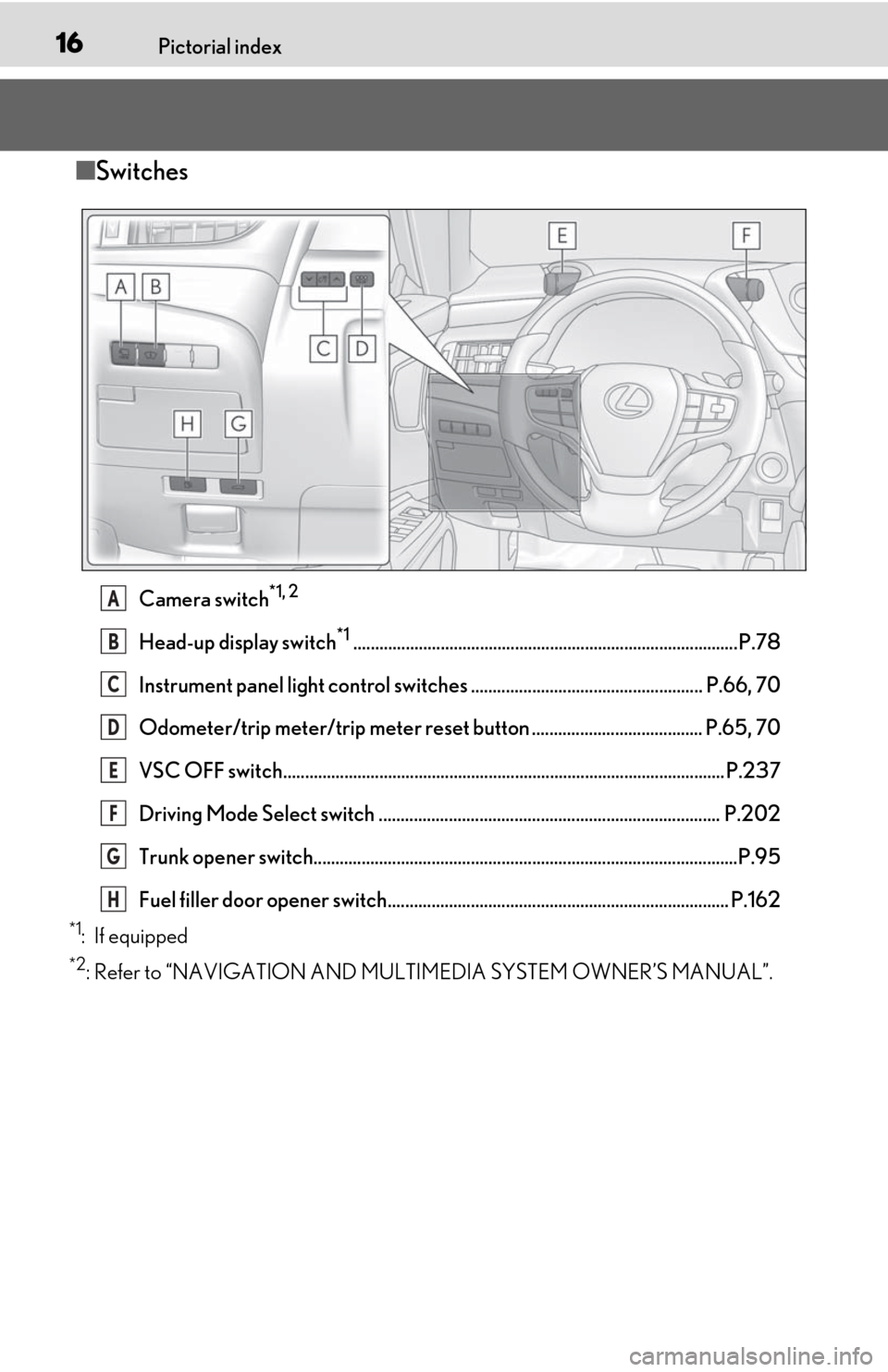
■Switches
Camera switch*1, 2
Head-up display switch*1........................................................................................P.78
Instrument panel light control switches ..................................................... P.66, 70
Odometer/trip meter/trip meter reset button ....................................... P.65, 70
VSC OFF switch..................................................................................................... P.237
Driving Mode Select switch .............................................................................. P.202
Trunk opener switch.................................................................................................P.95
Fuel filler door opener switch.............................................................................. P.162
*1: If equipped
*2: Refer to “NAVIGATION AND MULTIMEDIA SYSTEM OWNER’S MANUAL”.
A
B
C
D
E
F
G
H
Page 127 of 444
127
4
4
Driving
Driving
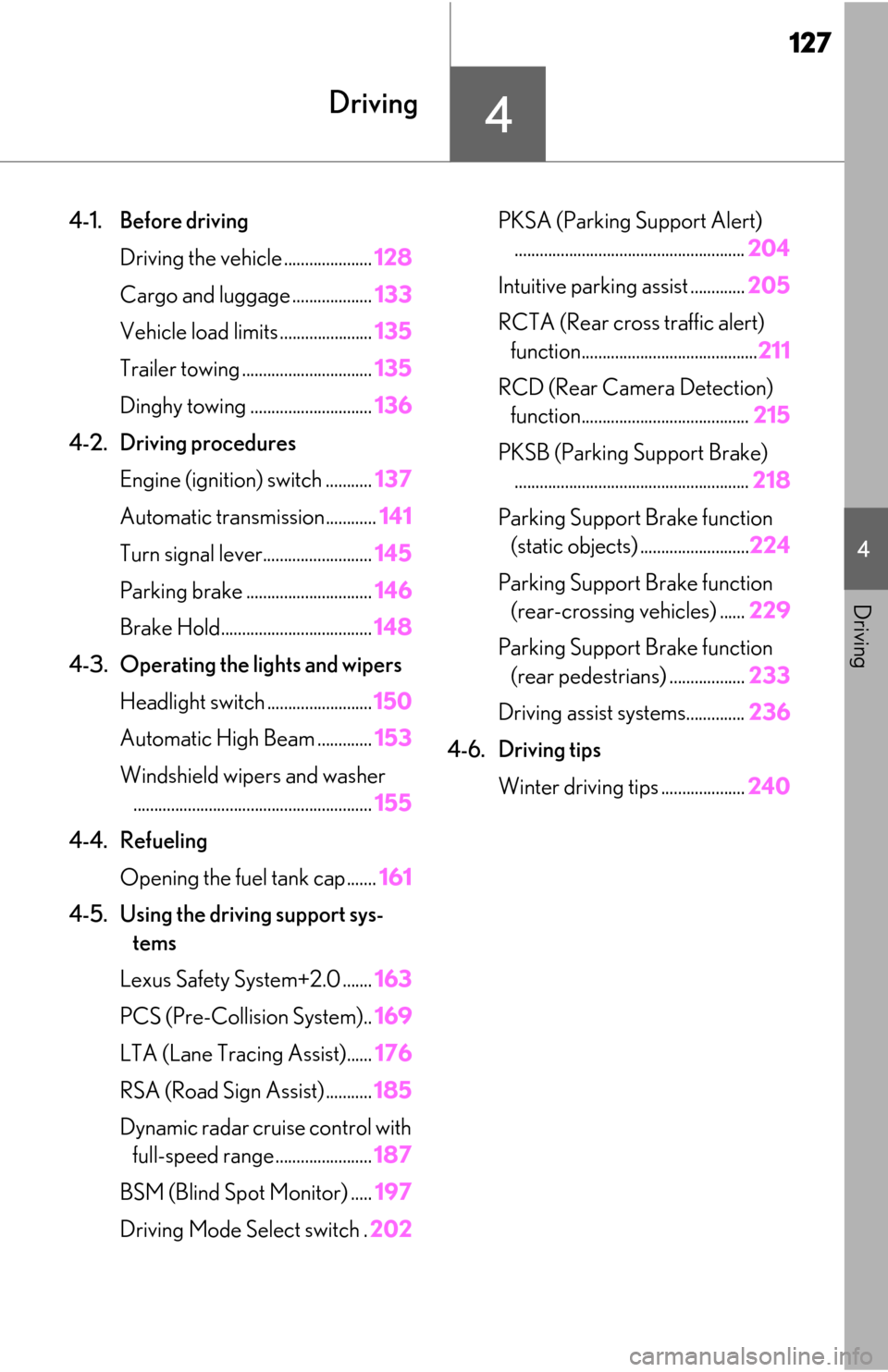
4-1. Before drivingDriving the vehicle ..................... 128
Cargo and luggage ................... 133
Vehicle load limits ...................... 135
Trailer towing ............................... 135
Dinghy towing ............................. 136
4-2. Driving procedures Engine (ignition) switch ........... 137
Automatic transmission............ 141
Turn signal lever.......................... 145
Parking brake .............................. 146
Brake Hold.................................... 148
4-3. Operating the lights and wipers Headlight switch ......................... 150
Automatic High Beam ............. 153
Windshield wipers and washer ......................................................... 155
4-4. Refueling Opening the fuel tank cap....... 161
4-5. Using the driving support sys- tems
Lexus Safety System+2.0 ....... 163
PCS (Pre-Collision System).. 169
LTA (Lane Tracing Assist)...... 176
RSA (Road Sign Assist) ........... 185
Dynamic radar cruise control with full-speed range....................... 187
BSM (Blind Spot Monitor) ..... 197
Driving Mode Select switch . 202PKSA (Parking Support Alert)
....................................................... 204
Intuitive parking assist ............. 205
RCTA (Rear cross traffic alert) function.......................................... 211
RCD (Rear Camera Detection) function........................................ 215
PKSB (Parking Support Brake) ........................................................ 218
Parking Support Brake function (static objects) .......................... 224
Parking Support Brake function (rear-crossing vehicles) ...... 229
Parking Support Brake function (rear pedestrians) .................. 233
Driving assist systems.............. 236
4-6. Driving tips Winter driving tips .................... 240
Page 153 of 444
1534-3. Operating the lights and wipers
4
Driving
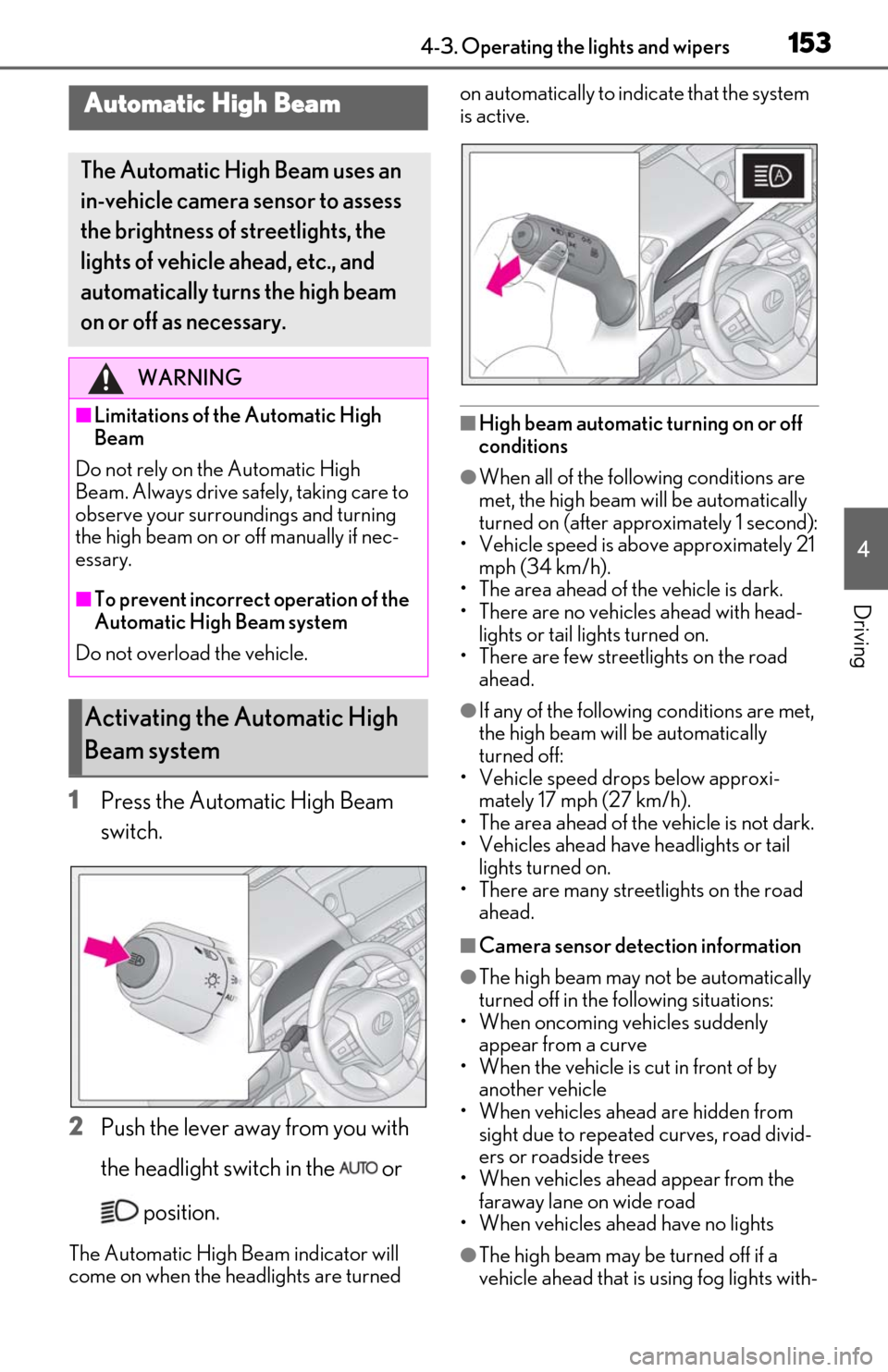
1Press the Automatic High Beam
switch.
2 Push the lever away from you with
the headlight switch in the or
position.
The Automatic High Beam indicator will
come on when the headlights are turned on automatically to indicate that the system
is active.
■High beam automatic turning on or off
conditions
●When all of the follo
wing conditions are
met, the high beam will be automatically
turned on (after approximately 1 second):
• Vehicle speed is above approximately 21
mph (34 km/h).
• The area ahead of the vehicle is dark.
• There are no vehicles ahead with head- lights or tail lights turned on.
• There are few streetlights on the road ahead.
●If any of the following conditions are met,
the high beam will be automatically
turned off:
• Vehicle speed drops below approxi- mately 17 mph (27 km/h).
• The area ahead of the vehicle is not dark.
• Vehicles ahead have headlights or tail lights turned on.
• There are many streetlights on the road ahead.
■Camera sensor dete ction information
●The high beam may not be automatically
turned off in the following situations:
• When oncoming vehicles suddenly
appear from a curve
• When the vehicle is cut in front of by another vehicle
• When vehicles ahead are hidden from sight due to repeated curves, road divid-
ers or roadside trees
• When vehicles ahead appear from the faraway lane on wide road
• When vehicles ahead have no lights
●The high beam may be turned off if a
vehicle ahead that is using fog lights with-
Automatic High Beam
The Automatic High Beam uses an
in-vehicle camera sensor to assess
the brightness of streetlights, the
lights of vehicle ahead, etc., and
automatically turn s the high beam
on or off as necessary.
WARNING
■Limitations of the Automatic High
Beam
Do not rely on the Automatic High
Beam. Always drive sa fely, taking care to
observe your surroundings and turning
the high beam on or off manually if nec-
essary.
■To prevent incorrect operation of the
Automatic High Beam system
Do not overload the vehicle.
Activating the Automatic High
Beam system
Page 154 of 444
1544-3. Operating the lights and wipers
out using the headlights is detected.
●House lights, street lights, traffic signals,
and illuminated billboards or signs may
cause the high beam to switch to the low
beams, or the low beams to remain on.
●The following factors may affect the
amount of time taken to turn the high
beam on or off:
• The brightness of headlights, fog lights, and tail lights of vehicles ahead
• The movement and direction of vehicles
ahead
• When a vehicle ahead only has opera- tional lights on one side
• When a vehicle ahead is a two-wheeled vehicle
• The condition of the road (gradient,
curve, condition of the road surface etc.)
• The number of passengers and amount of luggage
●The high beam may be turned on or off
when the driver does not expect it.
●Bicycles or similar objects may not be
detected.
●In the situations show n below, the system
may not be able to accurately detect sur-
rounding brightness levels. This may
cause the low beams to remain on or the
high beams to cause problems for pedes-
trians, vehicles ahead or other parties. In
these cases, manually switch between the
high and low beams.
• In bad weather (rain, snow, fog, sand-
storms etc.)
• The windshield is obscured by fog, mist, ice, dirt etc.
• The windshield is cracked or damaged.
• The camera sensor is deformed or dirty.
• When the temperature of the camera sensor is extremely high
• Surrounding brightness levels are equal to those of headlights, tail lights or fog
lights.
• When headlights or tail lights of vehicles ahead are turned off, dirty, changing
color, or not aimed properly
• When the vehicle is hit by water, snow, dust, etc. from a preceding vehicle
• When driving through an area of inter-
mittently changing brightness and dark-
ness.
• When frequently and repeatedly driving ascending/descending roads, or roads
with rough, bumpy or uneven surfaces
(such as stone-paved roads, gravel tracks
etc.).
• When frequently and repeatedly taking curves or driving on a winding road.
• There is a highly re flective object ahead
of the vehicle, such as a sign or a mirror.
• The back of a vehicle ahead is highly reflective, such as a container on a truck.
• The vehicle’s headlights are damaged or dirty.
• The vehicle is listing or tilting, due to a flat
tire, a trailer being towed etc.
• The high beam and low beam are repeat- edly being switched between in an
abnormal manner.
• The driver believes that the high beam may be causing problems or distress to
other drivers or pedestrians nearby.
■Temporarily lowering sensor sensitivity
The sensitivity of the sensor can be tempo-
rarily lowered.
1 Turn the engine switch off while the fol-
lowing conditions are met.
• The headlight swit ch is in or .
• The headlight switch lever is in high beam position.
• Automatic High Be am switch is on.
2 Turn the engine switch to IGNITION
ON mode.
3 Within 30 seconds after 2, repeat pull-
ing the headlight switch lever to the
original position then pushing it to the
high beam position quickly 10 times,
then leave the lever in high beam posi-
tion.
4 If the sensitivity is changed, the Auto-
matic High Beam indicator turns on and
off 3 times.
Automatic High Beam (headlights) may
turn on even the vehicle is stopped.
■Switching to low beam
Pull the lever to the original position.
Turning the high beam on/off
manually
Page 163 of 444
1634-5. Using the driving support systems
4
Driving
4-5.Using the driving support systems
■PCS (Pre-Collision System)
P.169
■LTA (Lane Tracing Assist)
P.176
■Automatic High Beam
P.153
■RSA (Road Sign Assist) (if
equipped)
P.185
■Dynamic radar cruise control with
full-speed range
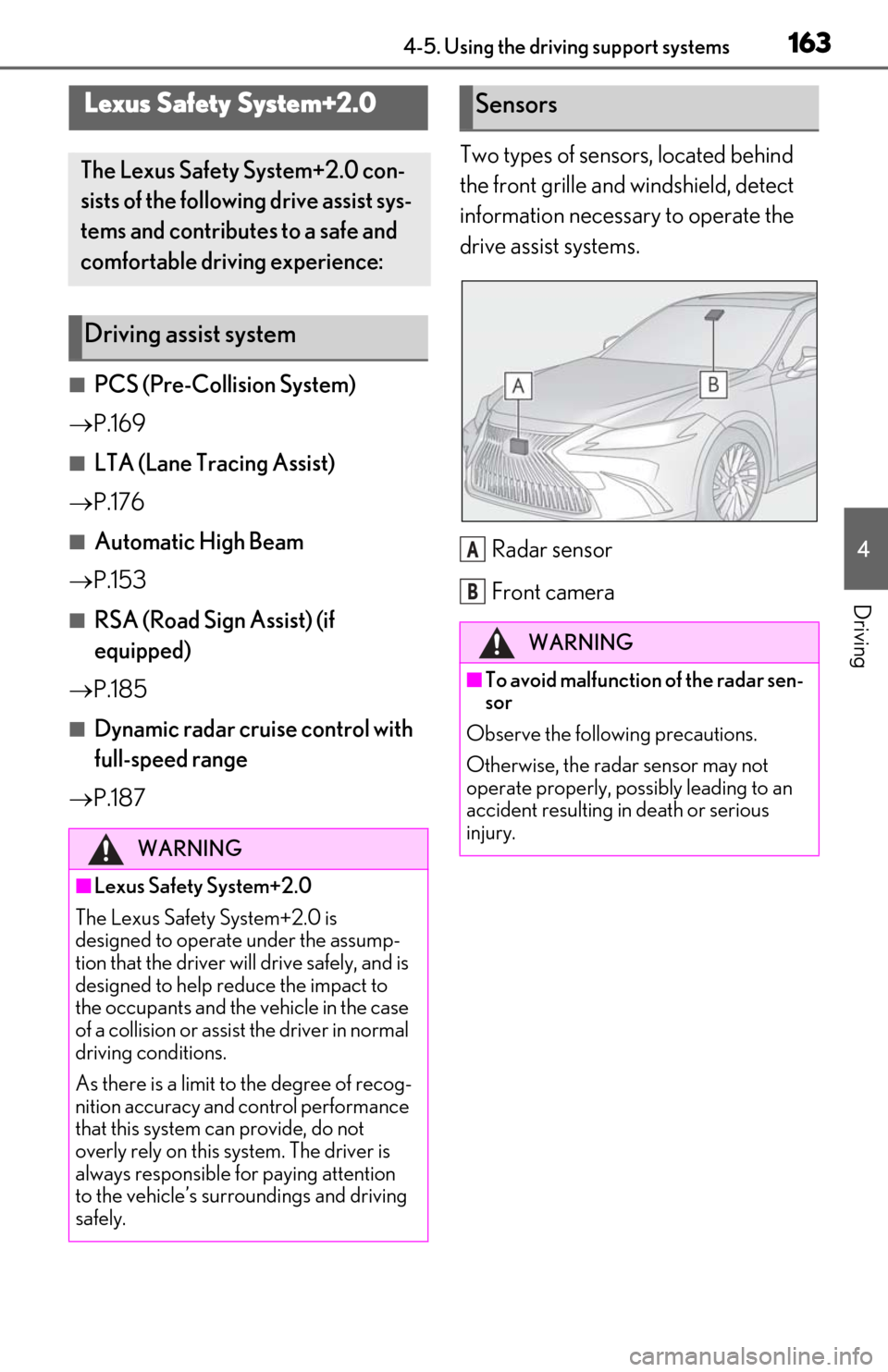
P.187 Two types of sensors, located behind
the front grille and windshield, detect
information necessary to operate the
drive assist systems.
Radar sensor
Front camera
Lexus Safety System+2.0
The Lexus Safety System+2.0 con-
sists of the following drive assist sys-
tems and contributes to a safe and
comfortable driving experience:
Driving assist system
WARNING
■Lexus Safety System+2.0
The Lexus Safety System+2.0 is
designed to operate under the assump-
tion that the driver wi ll drive safely, and is
designed to help reduce the impact to
the occupants and the vehicle in the case
of a collision or assist the driver in normal
driving conditions.
As there is a limit to the degree of recog-
nition accuracy and control performance
that this system can provide, do not
overly rely on this system. The driver is
always responsible for paying attention
to the vehicle’s surro undings and driving
safely.
Sensors
WARNING
■To avoid malfunction of the radar sen-
sor
Observe the following precautions.
Otherwise, the radar sensor may not
operate properly, possibly leading to an
accident resulting in death or serious
injury.
A
B
Page 164 of 444
1644-5. Using the driving support systems
WARNING
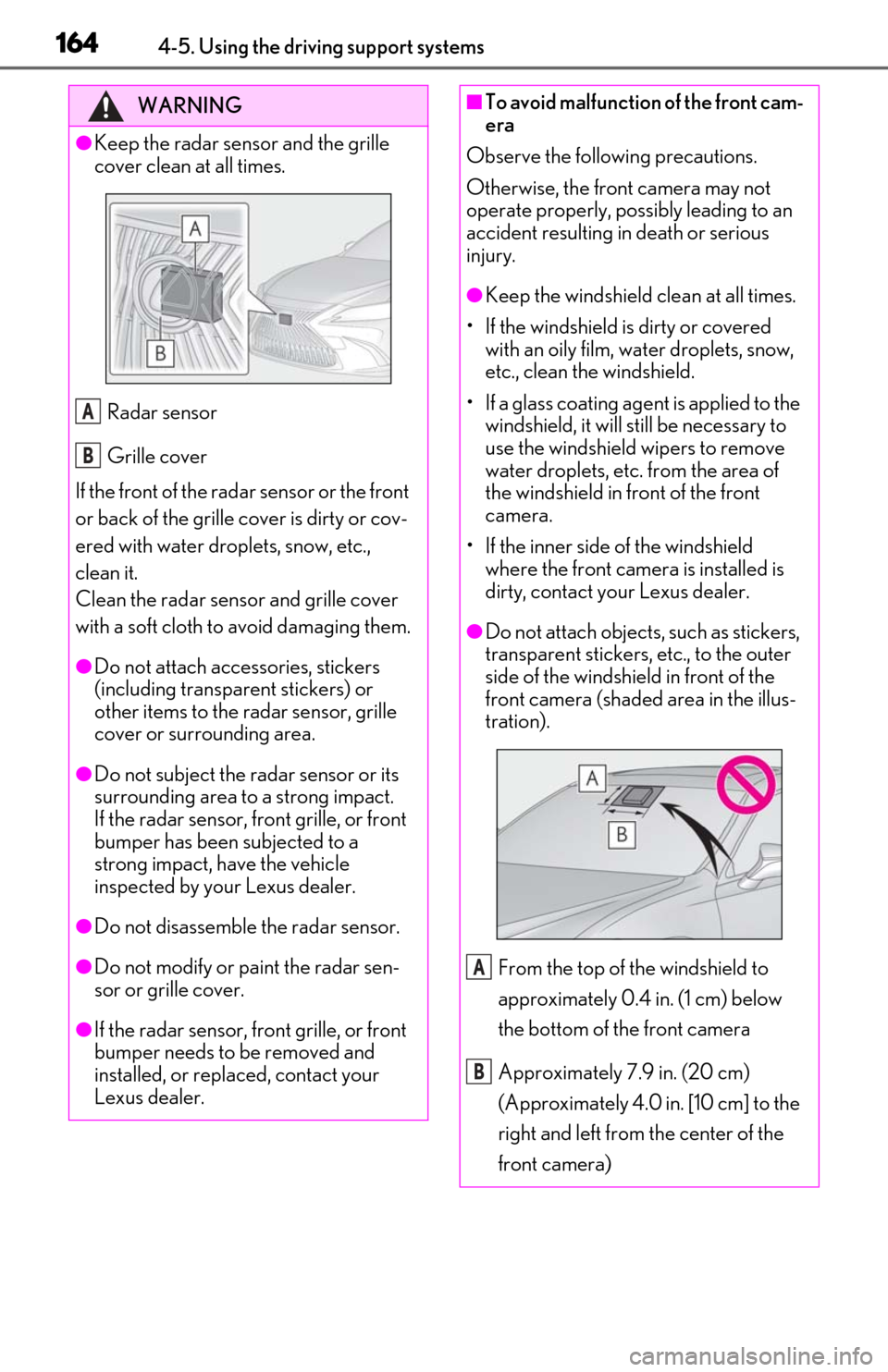
●Keep the radar sensor and the grille
cover clean at all times.Radar sensor
Grille cover
If the front of the rada r sensor or the front
or back of the grille cover is dirty or cov-
ered with water droplets, snow, etc.,
clean it.
Clean the radar sensor and grille cover
with a soft cloth to avoid damaging them.
●Do not attach accessories, stickers
(including transpar ent stickers) or
other items to the radar sensor, grille
cover or surrounding area.
●Do not subject the radar sensor or its
surrounding area to a strong impact.
If the radar sensor, front grille, or front
bumper has been subjected to a
strong impact, have the vehicle
inspected by your Lexus dealer.
●Do not disassemble the radar sensor.
●Do not modify or paint the radar sen-
sor or grille cover.
●If the radar sensor, front grille, or front
bumper needs to be removed and
installed, or replaced, contact your
Lexus dealer.
A
B
■To avoid malfunction of the front cam-
era
Observe the following precautions.
Otherwise, the front camera may not
operate properly, possibly leading to an
accident resulting in death or serious
injury.
●Keep the windshield clean at all times.
• If the windshield is dirty or covered with an oily film, water droplets, snow,
etc., clean the windshield.
• If a glass coating agent is applied to the windshield, it will still be necessary to
use the windshield wipers to remove
water droplets, etc. from the area of
the windshield in front of the front
camera.
• If the inner side of the windshield where the front camera is installed is
dirty, contact your Lexus dealer.
●Do not attach objects, such as stickers,
transparent stickers, etc., to the outer
side of the windshield in front of the
front camera (shaded area in the illus-
tration).
From the top of the windshield to
approximately 0.4 in. (1 cm) below
the bottom of the front camera
Approximately 7.9 in. (20 cm)
(Approximately 4.0 in. [10 cm] to the
right and left from the center of the
front camera)
A
B
Page 165 of 444

1654-5. Using the driving support systems
4
Driving
WARNING
●If the part of the windshield in front of
the front camera is fogged up or cov-
ered with condensation, or ice, use the
windshield defogger to remove the
fog, condensation, or ice. (P.252)
●If water droplets cannot be properly
removed from the area of the wind-
shield in front of the front camera by
the windshield wipers, replace the
wiper insert or wiper blade.
If the wiper inserts or wiper blades
need to be replaced, contact your
Lexus dealer.
●Do not attach window tint to the wind-
shield.
●Replace the windshield if it is damaged
or cracked.
If the windshield needs to be replaced,
contact your Lexus dealer.
●Do not allow liquids to contact the
front camera.
●Do not allow bright lights to shine into
the front camera.
●Do not dirty or damage the front cam-
era.
When cleaning the inside of the wind-
shield, do not allow glass cleaner to
contact the lens of the front camera.
Also, do not touch the lens.
If the lens is dirty or damaged, contact
your Lexus dealer.
●Do not subject the front camera to a
strong impact.
●Do not change the installation position
or direction of the front camera or
remove it.
●Do not disassemble the front camera.
●Do not modify any components of the
vehicle around the front camera
(inside rear view mirror, etc.) or ceiling.
●Do not attach any accessories to the
hood, front grille or front bumper that
may obstruct the front camera. Con-
tact your Lexus dealer for details.
●If a surfboard or other long object is to
be mounted on the roof, make sure
that it will not obstruct the front cam-
era.
●Do not modify the headlights or other
lights.
Page 167 of 444
1674-5. Using the driving support systems
4
Driving
■If a warning message is displayed on the multi-information display
A system may be temporarily unavailable or there may be a malfunction in the system.
●In the following situations, perform the action s specified in the table. When the normal
operating conditions are detected, the me ssage will disappear and the system will
become operational.
If the message does not disappear, contact your Lexus dealer.
SituationActions
When the area around a sensor is covered
with dirt, moisture (f ogged up, covered with
condensation, ice, etc. ), or other foreign
matterTo clean the part of the windshield in front of
the front camera, use the windshield wipers
or the windshield defogger of the air condi-
tioning system ( P.252).
When the temperature around the front
camera is outside of th e operational range,
such as when the vehicle is in the sun or in an
extremely cold environment
If the front camera is hot, such as after the
vehicle had been parked in the sun, use the
air conditioning system to decrease the tem-
perature around the front camera.
If a sunshade was used when the vehicle was
parked, depending on it s type, the sunlight
reflected from the surface of the sunshade
may cause the temperature of the front cam-
era to become excessively high.
If the front camera is cold, such after the
vehicle is parked in an extremely cold envi-
ronment, use the air conditioning system to
increase the temperature around the front
camera.
The area in front of the front camera is
obstructed, such as when the hood is open
or a sticker is attached to the part of the
windshield in front of the front camera.
Close the hood, remove the sticker, etc. to
clear the obstruction.