heater Lexus ES350 2020 Owner's Manual / LEXUS 2020 ES350 FROM OCT. 2019 PROD. OWNER'S MANUAL (OM06194U)
[x] Cancel search | Manufacturer: LEXUS, Model Year: 2020, Model line: ES350, Model: Lexus ES350 2020Pages: 450, PDF Size: 9.81 MB
Page 18 of 450
18Pictorial index
LTA (Lane Tracing Assist) switch .......................................................................P.182
Vehicle-to-vehicle distance switch ...................................................................P.198
Cruise control switches
Dynamic radar cruise control with full-speed range .......................................... P.193
Audio remote control switches
*
Talk switch*
*
: Refer to “NAVIGATION AND MULTIMEDIA SYSTEM OWNER’S MANUAL”.
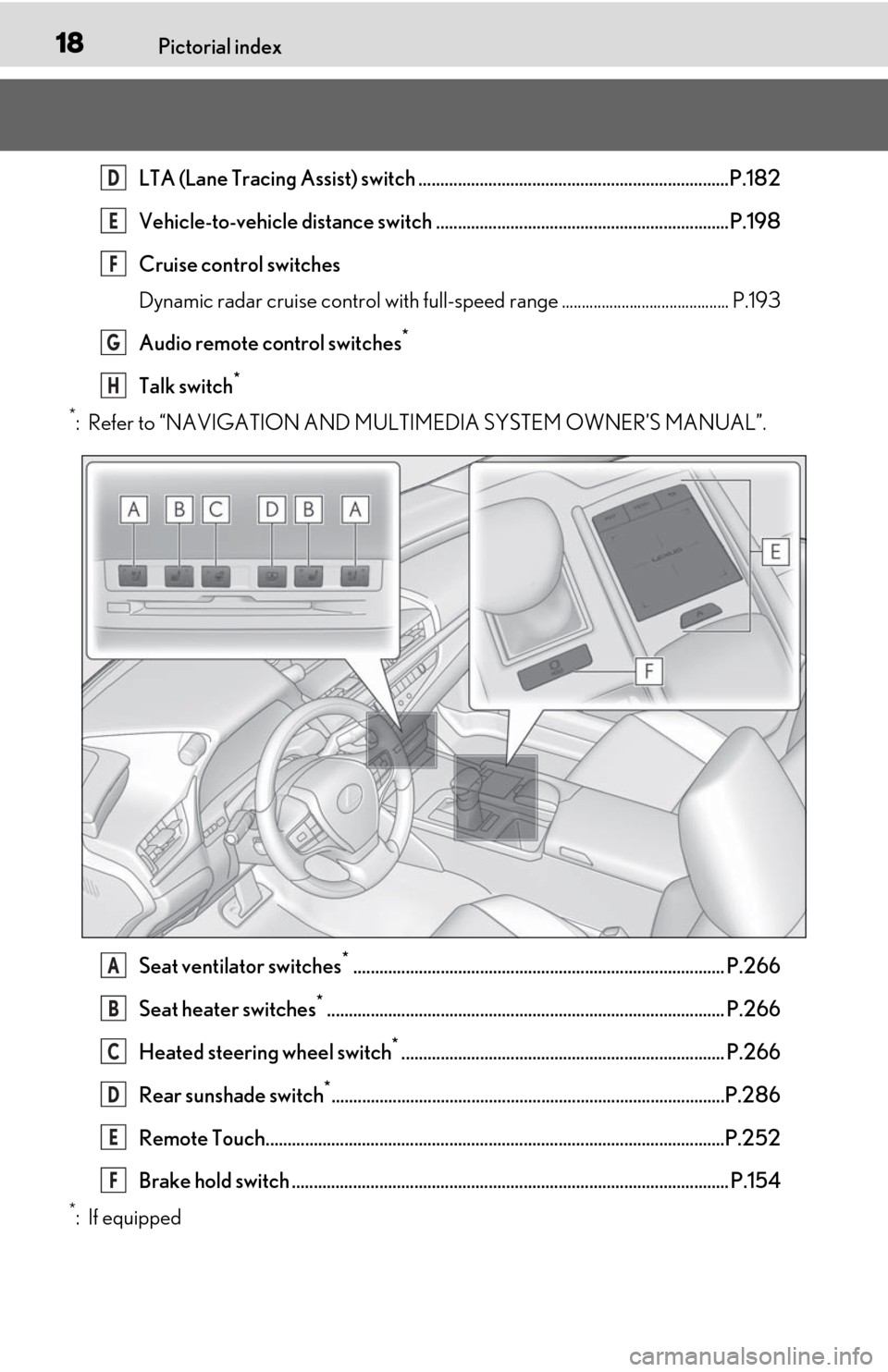
Seat ventilator switches
*..................................................................................... P.266
Seat heater switches
*........................................................................................... P.266
Heated steering wheel switch
*.......................................................................... P.266
Rear sunshade switch
*..........................................................................................P.286
Remote Touch.........................................................................................................P.252
Brake hold switch .................................................................................................... P.154
*:If equipped
D
E
F
G
H
A
B
C
D
E
F
Page 259 of 450
2575-2. Lexus Climate Concierge
5
Interior features
5-2.Lexus Climate Concierge
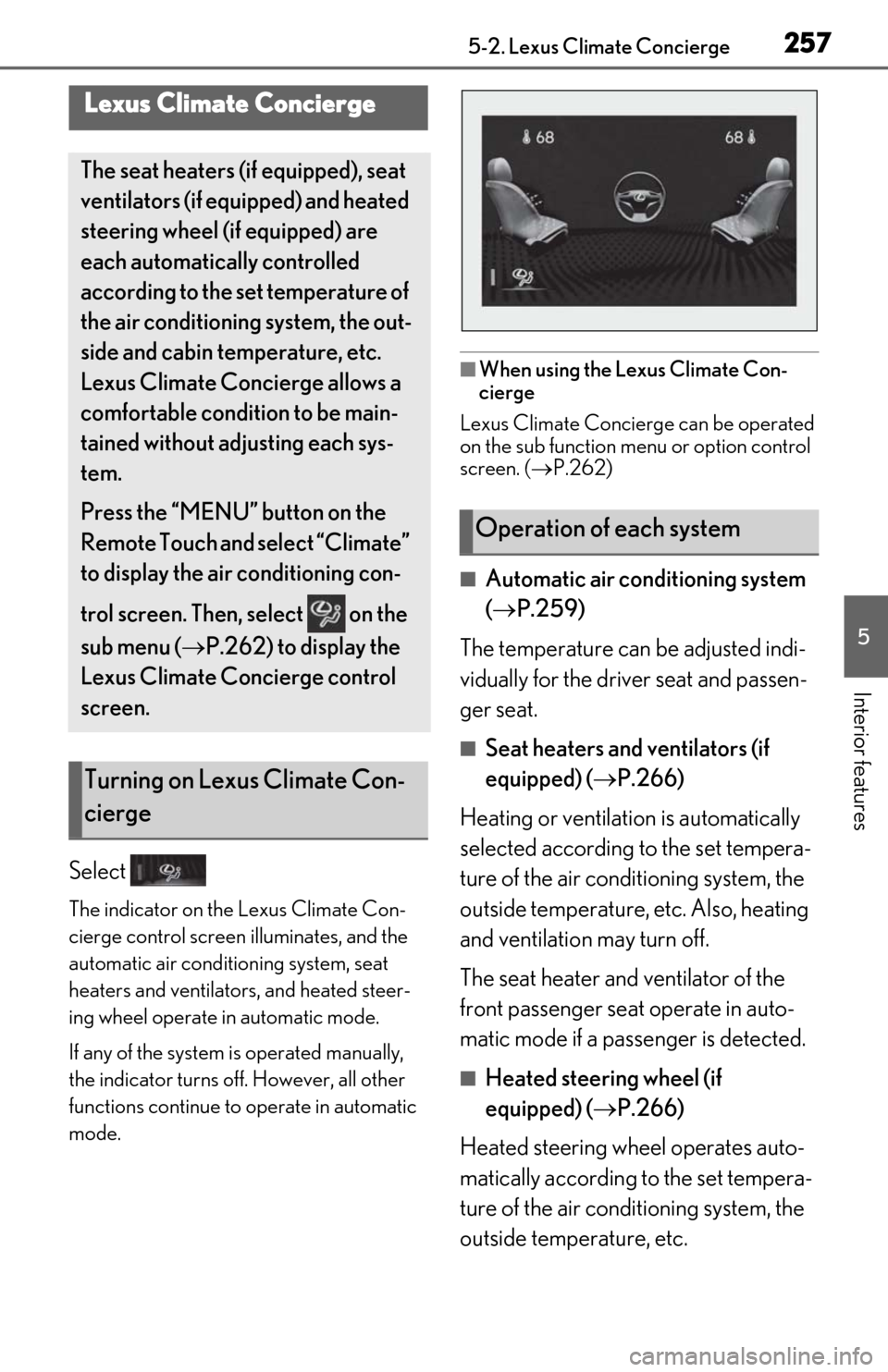
Select
The indicator on the Lexus Climate Con-
cierge control screen illuminates, and the
automatic air conditioning system, seat
heaters and ventilators, and heated steer-
ing wheel operate in automatic mode.
If any of the system is operated manually,
the indicator turns off. However, all other
functions continue to operate in automatic
mode.
■When using the Lexus Climate Con-
cierge
Lexus Climate Concierge can be operated
on the sub function menu or option control
screen. ( P.262)
■Automatic air conditioning system
( P.259)
The temperature can be adjusted indi-
vidually for the driver seat and passen-
ger seat.
■Seat heaters and ventilators (if
equipped) ( P.266)
Heating or ventilation is automatically
selected according to the set tempera-
ture of the air conditioning system, the
outside temperature, etc. Also, heating
and ventilation may turn off.
The seat heater and ventilator of the
front passenger seat operate in auto-
matic mode if a passenger is detected.
■Heated steering wheel (if
equipped) ( P.266)
Heated steering wheel operates auto-
matically according to the set tempera-
ture of the air conditioning system, the
outside temperature, etc.
Lexus Climate Concierge
The seat heaters (if equipped), seat
ventilators (if equipped) and heated
steering wheel (if equipped) are
each automatically controlled
according to the set temperature of
the air conditioning system, the out-
side and cabin temperature, etc.
Lexus Climate Concierge allows a
comfortable condition to be main-
tained without adjusting each sys-
tem.
Press the “MENU” button on the
Remote Touch and select “Climate”
to display the air conditioning con-
trol screen. Then, select on the
sub menu ( P.262) to display the
Lexus Climate Concierge control
screen.
Turning on Lexus Climate Con-
cierge
Operation of each system
Page 260 of 450

2585-2. Lexus Climate Concierge
■Seat heater/ventilator operation
When automatic mode is selected using the
seat heater/ventilator switch, passenger
detection is not performed.
Page 264 of 450
2625-3. Using the air conditioning system
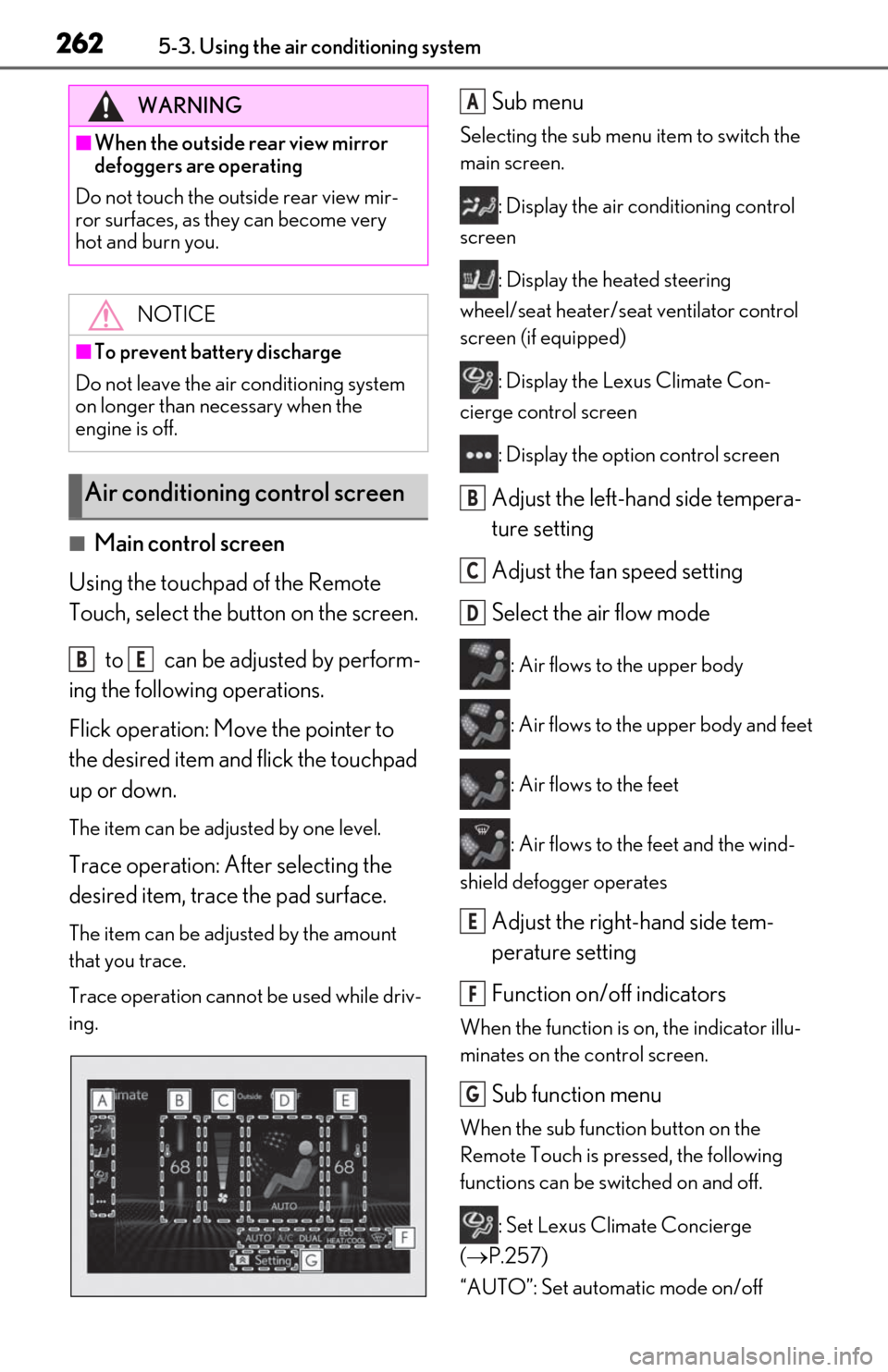
■Main control screen
Using the touchpad of the Remote
Touch, select the button on the screen.
to can be adjusted by perform-
ing the following operations.
Flick operation: Move the pointer to
the desired item and flick the touchpad
up or down.
The item can be adjusted by one level.
Trace operation: After selecting the
desired item, trace the pad surface.
The item can be adjusted by the amount
that you trace.
Trace operation cannot be used while driv-
ing.
Sub menu
Selecting the sub menu item to switch the
main screen.
: Display the air conditioning control
screen
: Display the heated steering
wheel/seat heater/sea t ventilator control
screen (if equipped)
: Display the Lexus Climate Con-
cierge control screen
: Display the option control screen
Adjust the left-hand side tempera-
ture setting
Adjust the fan speed setting
Select the air flow mode
: Air flows to the upper body
: Air flows to the upper body and feet
: Air flows to the feet
: Air flows to the feet and the wind-
shield defogger operates
Adjust the right-hand side tem-
perature setting
Function on/off indicators
When the function is on, the indicator illu-
minates on the control screen.
Sub function menu
When the sub function button on the
Remote Touch is pressed, the following
functions can be switched on and off.
: Set Lexus Climate Concierge
( P.257)
“AUTO”: Set automatic mode on/off
WARNING
■When the outside rear view mirror
defoggers are operating
Do not touch the outside rear view mir-
ror surfaces, as they can become very
hot and burn you.
NOTICE
■To prevent battery discharge
Do not leave the air conditioning system
on longer than necessary when the
engine is off.
Air conditioning control screen
BE
A
B
C
D
E
F
G
Page 265 of 450
2635-3. Using the air conditioning system
5
Interior features
( P.264)
“Off”: Turn the fan off
“A/C”: Set cooling and dehumidification
function
“DUAL”: Adjust the temperature for driver
and front passenger seats separately
(“DUAL” mode) ( P.264)
: Set eco air conditioning mode
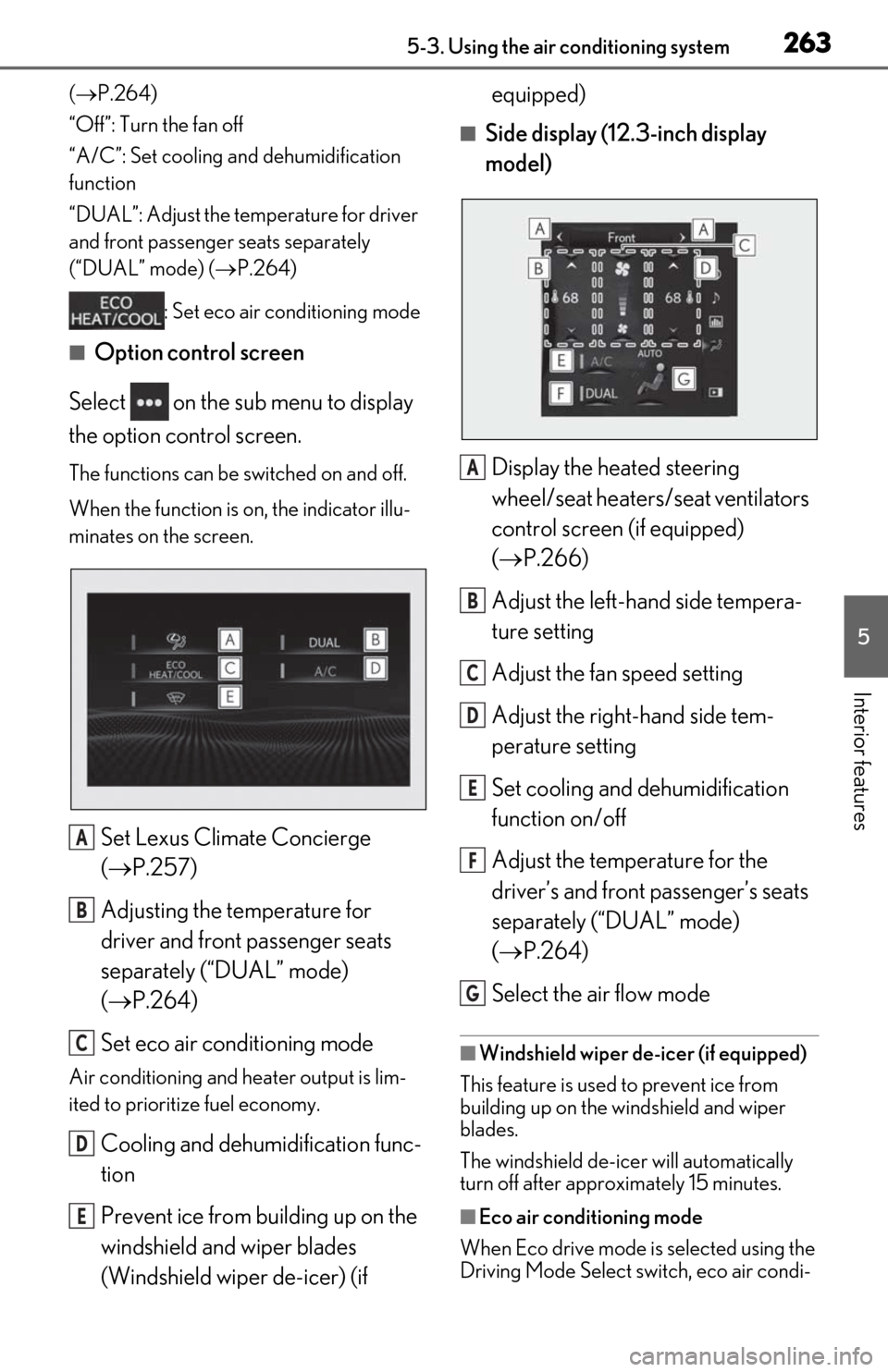
■Option control screen
Select on the sub menu to display
the option control screen.
The functions can be switched on and off.
When the function is on, the indicator illu-
minates on the screen.
Set Lexus Climate Concierge
( P.257)
Adjusting the temperature for
driver and front passenger seats
separately (“DUAL” mode)
( P.264)
Set eco air conditioning mode
Air conditioning and heater output is lim-
ited to prioritize fuel economy.
Cooling and dehumidification func-
tion
Prevent ice from building up on the
windshield and wiper blades
(Windshield wiper de-icer) (if equipped)
■Side display (12.3-inch display
model)
Display the heated steering
wheel/seat heaters/seat ventilators
control screen (if equipped)
( P.266)
Adjust the left-hand side tempera-
ture setting
Adjust the fan speed setting
Adjust the right-hand side tem-
perature setting
Set cooling and dehumidification
function on/off
Adjust the temperature for the
driver’s and front passenger’s seats
separately (“DUAL” mode)
( P.264)
Select the air flow mode
■Windshield wiper de-icer (if equipped)
This feature is used to prevent ice from
building up on the windshield and wiper
blades.
The windshield de-icer will automatically
turn off after approximately 15 minutes.
■Eco air conditioning mode
When Eco drive mode is selected using the
Driving Mode Select switch, eco air condi-
A
B
C
D
E
A
B
C
D
E
F
G
Page 266 of 450
2645-3. Using the air conditioning system
tioning mode turns on.
When a drive mode other than Eco drive
mode is selected, eco air conditioning
mode may turn off.
1Press the automatic mode switch or
select “AUTO” on the sub function
menu. (P.262)
2
Press the outside/recirculated air
mode switch to switch to automatic
air intake mode.
The air conditioning system automatically
switches between outside air and recircu-
lated air modes.
3Adjust the temperature setting.
4
To stop the operation, press the off
switch or select “Off” on the sub
function menu. ( P.262)
If the fan speed setting or air flow
modes are operated , the automatic
mode indicator goes off. However,
automatic mode for functions other
than that operated is maintained.
■Using automatic mode
Fan speed is adjusted automatically accord-
ing to the temperature setting and the
ambient conditions.
Therefore, the fan may stop for a while until
warm or cool air is ready to flow immedi-
ately after the automatic mode switch is
pressed or “AUTO” is selected. Cool air may blow around the upper body
even when the heater is on due to sunlight.
■Automatic mode for air intake control
In automatic mode, the system detects
exhaust gas and other pollutants and auto-
matically switches between outside air and
recirculated air modes.
When the dehumidification function is off,
and the fan is operating, turning automatic
mode on will activate the dehumidification
function. The next time the dehumidification
function is turned off, the AUTO mode for
switching between outside air and recircu-
lated air modes is canceled.
To turn on the “DUAL” mode, perform
any of the following procedures:
Select “DUAL” on the sub function
menu. ( P.263)
Select “DUAL” on the option con-
trol screen.
Adjust the front passenger’s side
temperature setting.
The indicator on the main control screen
comes on when the “DUAL” mode is on.
■Location of air outlets
The air outlets and air volume changes
according to the selected air flow
mode.
WARNING
■To prevent burns (vehicles with wind-
shield wiper de-icer)
Do not touch the glass at lower part of
the windshield or to the side of the front
pillars when the wind shield wiper de-icer
is on.
Using automatic mode
Adjusting the temperature for
driver and passenger seats sepa-
rately (“DUAL” mode)
Air outlet layout and operations
Page 268 of 450
2665-3. Using the air conditioning system
*: If equipped
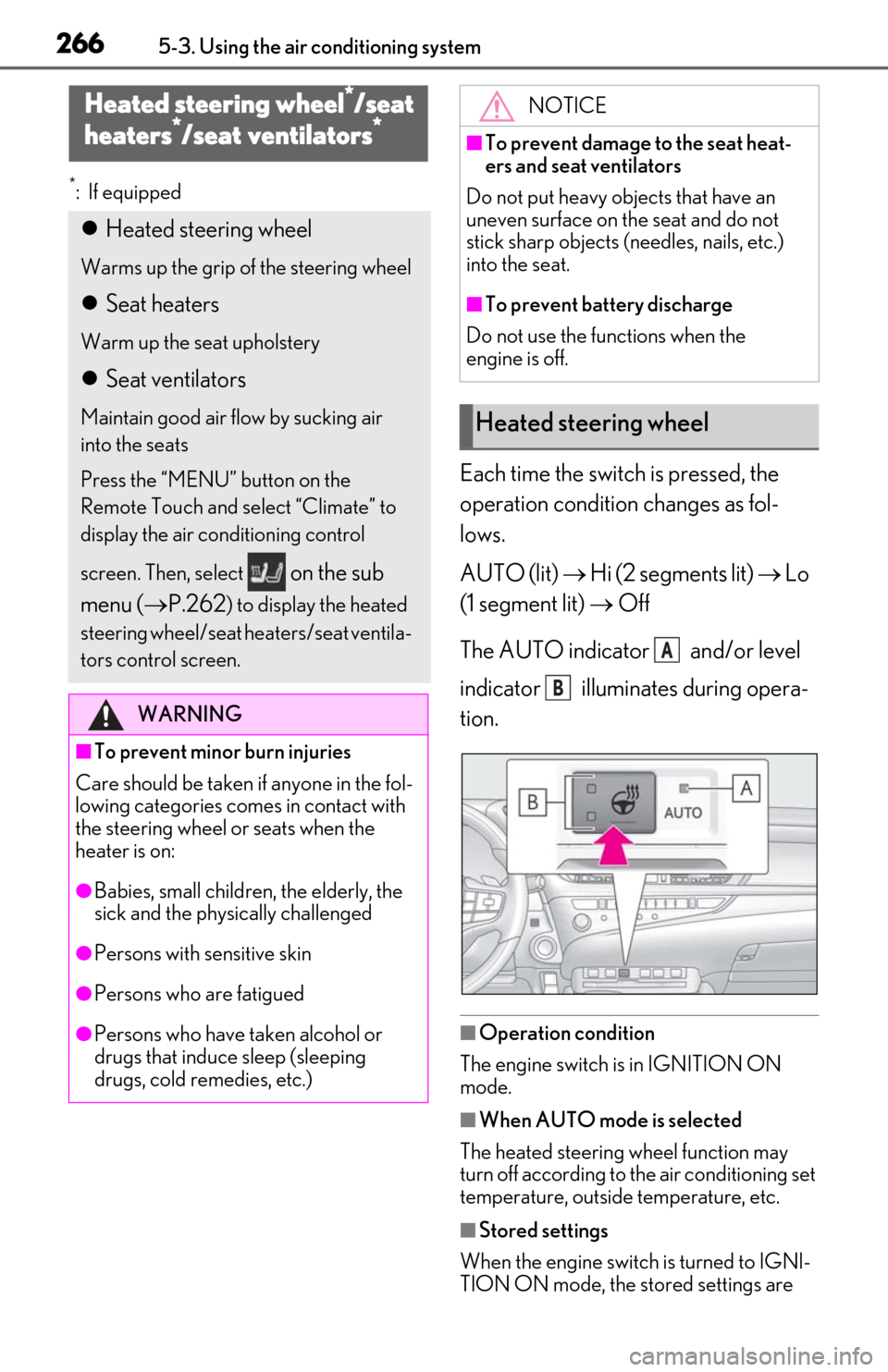
Each time the switch is pressed, the
operation condition changes as fol-
lows.
AUTO (lit) Hi (2 segments lit) Lo
(1 segment lit) Off
The AUTO indicator and/or level
indicator illuminates during opera-
tion.
■Operation condition
The engine switch is in IGNITION ON
mode.
■When AUTO mode is selected
The heated steering wheel function may
turn off according to the air conditioning set
temperature, outside temperature, etc.
■Stored settings
When the engine switch is turned to IGNI-
TION ON mode, the stored settings are
Heated steering wheel*/seat
h
eaters*/seat ventilators*
Heated steering wheel
Warms up the grip of the steering wheel
Seat heaters
Warm up the seat upholstery
Seat ventilators
Maintain good air flow by sucking air
into the seats
Press the “MENU” button on the
Remote Touch and select “Climate” to
display the air conditioning control
screen. Then, select
on the sub
menu ( P.262
) to display the heated
steering wheel/seat heaters/seat ventila-
tors control screen.
WARNING
■To prevent minor burn injuries
Care should be taken if anyone in the fol-
lowing categories comes in contact with
the steering wheel or seats when the
heater is on:
●Babies, small children, the elderly, the
sick and the phys ically challenged
●Persons with sensitive skin
●Persons who are fatigued
●Persons who have taken alcohol or
drugs that induce sleep (sleeping
drugs, cold remedies, etc.)
NOTICE
■To prevent damage to the seat heat-
ers and seat ventilators
Do not put heavy objects that have an
uneven surface on the seat and do not
stick sharp objects (n eedles, nails, etc.)
into the seat.
■To prevent battery discharge
Do not use the functions when the
engine is off.
Heated steering wheel
A
B
Page 269 of 450
2675-3. Using the air conditioning system
5
Interior features
recalled.
■Seat heaters
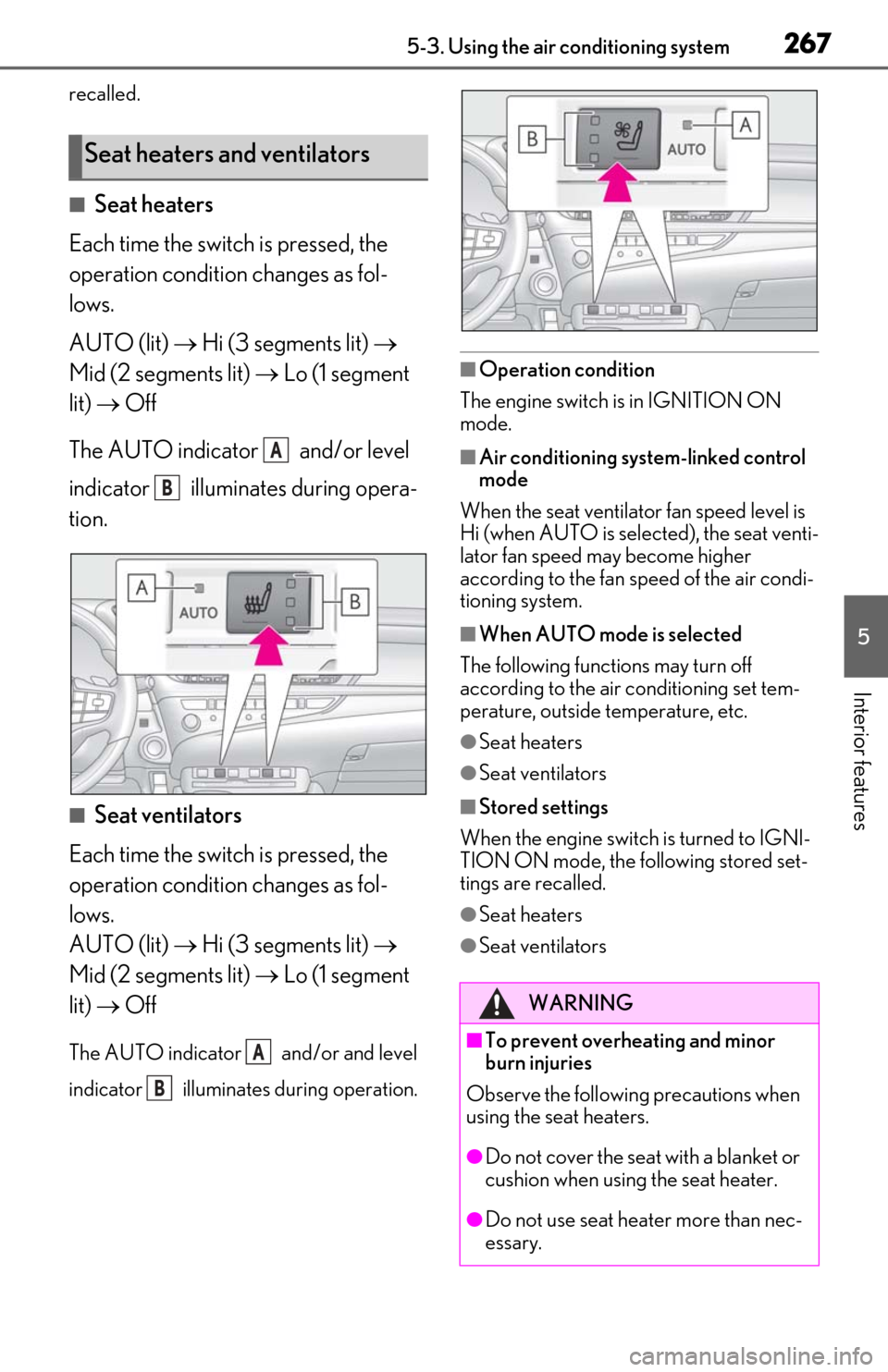
Each time the switch is pressed, the
operation condition changes as fol-
lows.
AUTO (lit) Hi (3 segments lit)
Mid (2 segments lit) Lo (1 segment
lit) Off
The AUTO indicator and/or level
indicator illuminates during opera-
tion.
■Seat ventilators
Each time the switch is pressed, the
operation condition changes as fol-
lows.
AUTO (lit) Hi (3 segments lit)
Mid (2 segments lit) Lo (1 segment
lit) Off
The AUTO indicator and/or and level
indicator illuminates during operation.
■Operation condition
The engine switch is in IGNITION ON
mode.
■Air conditioning system-linked control
mode
When the seat ventilator fan speed level is
Hi (when AUTO is sele cted), the seat venti-
lator fan speed may become higher
according to the fan speed of the air condi-
tioning system.
■When AUTO mode is selected
The following functions may turn off
according to the air conditioning set tem-
perature, outside temperature, etc.
●Seat heaters
●Seat ventilators
■Stored settings
When the engine switch is turned to IGNI-
TION ON mode, the following stored set-
tings are recalled.
●Seat heaters
●Seat ventilators
Seat heaters and ventilators
A
B
A
B
WARNING
■To prevent overheating and minor
burn injuries
Observe the following precautions when
using the seat heaters.
●Do not cover the seat with a blanket or
cushion when using the seat heater.
●Do not use seat heater more than nec-
essary.
Page 270 of 450
2685-3. Using the air conditioning system
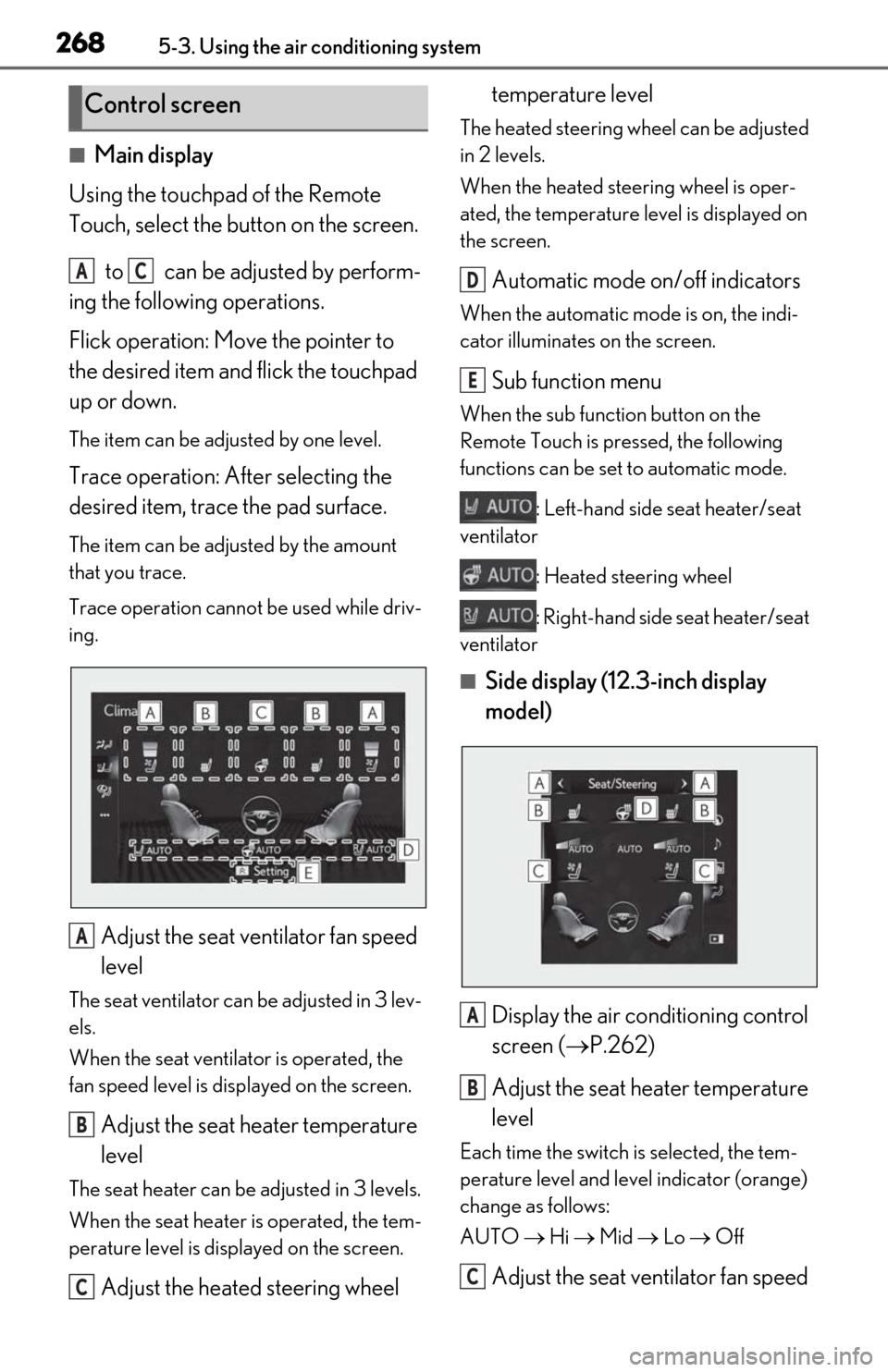
■Main display
Using the touchpad of the Remote
Touch, select the button on the screen.
to can be adjusted by perform-
ing the following operations.
Flick operation: Move the pointer to
the desired item and flick the touchpad
up or down.
The item can be adjusted by one level.
Trace operation: After selecting the
desired item, trace the pad surface.
The item can be adjusted by the amount
that you trace.
Trace operation cannot be used while driv-
ing.
Adjust the seat ventilator fan speed
level
The seat ventilator can be adjusted in 3 lev-
els.
When the seat ventilator is operated, the
fan speed level is disp layed on the screen.
Adjust the seat heater temperature
level
The seat heater can be adjusted in 3 levels.
When the seat heater is operated, the tem-
perature level is displayed on the screen.
Adjust the heated steering wheel temperature level
The heated steering wheel can be adjusted
in 2 levels.
When the heated steering wheel is oper-
ated, the temperature le
vel is displayed on
the screen.
Automatic mode on/off indicators
When the automatic mode is on, the indi-
cator illuminates on the screen.
Sub function menu
When the sub function button on the
Remote Touch is pressed, the following
functions can be set to automatic mode.
: Left-hand side seat heater/seat
ventilator
: Heated steering wheel
: Right-hand side seat heater/seat
ventilator
■Side display (12.3-inch display
model)
Display the air conditioning control
screen ( P.262)
Adjust the seat heater temperature
level
Each time the switch is selected, the tem-
perature level and level indicator (orange)
change as follows:
AUTO Hi Mid Lo Off
Adjust the seat ventilator fan speed
Control screen
AC
A
B
C
D
E
A
B
C
Page 306 of 450
3046-1. Maintenance and care
Remove dirt using a water-damp-
ened soft cloth or synthetic chamois.
Wipe the surface with a dry soft
cloth to remove any remaining
moisture.
■Cleaning the areas with satin-finish
metal accents
The metal areas use a layer of real metal for
the surface. It is necessary to clean them
regularly. If dirty area s are left uncleaned for
long periods of time, they may be difficult to
clean.
Remove dirt and dust using a vac-
uum cleaner.
Wipe off any excess dirt and dust
with a soft cloth dampened with
diluted detergent.
Use a diluted water solution of approxi-
mately 5% neutral wool detergent.
Wring out any excess water from
the cloth and thoroughly wipe off all
remaining traces of detergent.
Wipe the surface with a dry soft
cloth to remove any remaining
moisture. Allow the leather to dry in
a shaded and ventilated area.
■Caring for leather areas
Lexus recommends cleani ng the interior of
the vehicle at least twice a year to maintain
the quality of the vehicle’s interior.
Remove dirt and dust using a vac-
uum cleaner.
Wipe it off with a soft cloth damp-
ened with neutral detergent diluted
to approximately 1%.
Wring out any excess water from
the cloth and thoroughly wipe off
remaining traces of detergent and
water.
NOTICE
●Do not expose the vehicle to direct
sunlight for extended periods of time.
Park the vehicle in the shade, espe-
cially during summer.
●Do not place items made of vinyl, plas-
tic, or containing wax on the uphol-
stery, as they may stick to the leather
surface if the vehicle interior heats up
significantly.
■Water on the floor
Do not wash the vehicle floor with water.
Vehicle systems such as the audio system
may be damaged if water comes into
contact with electrical components such
as the audio system above or under the
floor of the vehicle. Water may also
cause the body to rust.
■When cleaning the inside of the wind-
shield
Do not allow glass cleaner to contact the
lens. Also, do not touch the lens.
( P.169)
■Cleaning the inside of the rear win-
dow
●Do not use glass cleaner to clean the
rear window, as this may cause dam-
age to the rear window defogger
heater wires or antenna. Use a cloth
dampened with lukewarm water to
gently wipe the window clean. Wipe
the window in strokes running parallel
to the heater wires or antenna.
●Be careful not to scratch or damage
the heater wires or antenna.
Cleaning the areas with satin-fin-
ish metal accents
Cleaning the leather areas
Cleaning the synthetic leather
areas