warning LEXUS ES350 2021 Owners Manual
[x] Cancel search | Manufacturer: LEXUS, Model Year: 2021, Model line: ES350, Model: LEXUS ES350 2021Pages: 464, PDF Size: 9.61 MB
Page 228 of 464
2284-5. Using the driving support systems
The Parking Support Brake can be
enabled/disabled on the multi-infor-
mation display. All of the Parking Sup-
port Brake functions (static objects,
rear-crossing vehicles, and rear
pedestrians) are enabled/disabled
simultaneously.
Use the meter control switches to
enable/disable the parking support
brake. ( P.78)
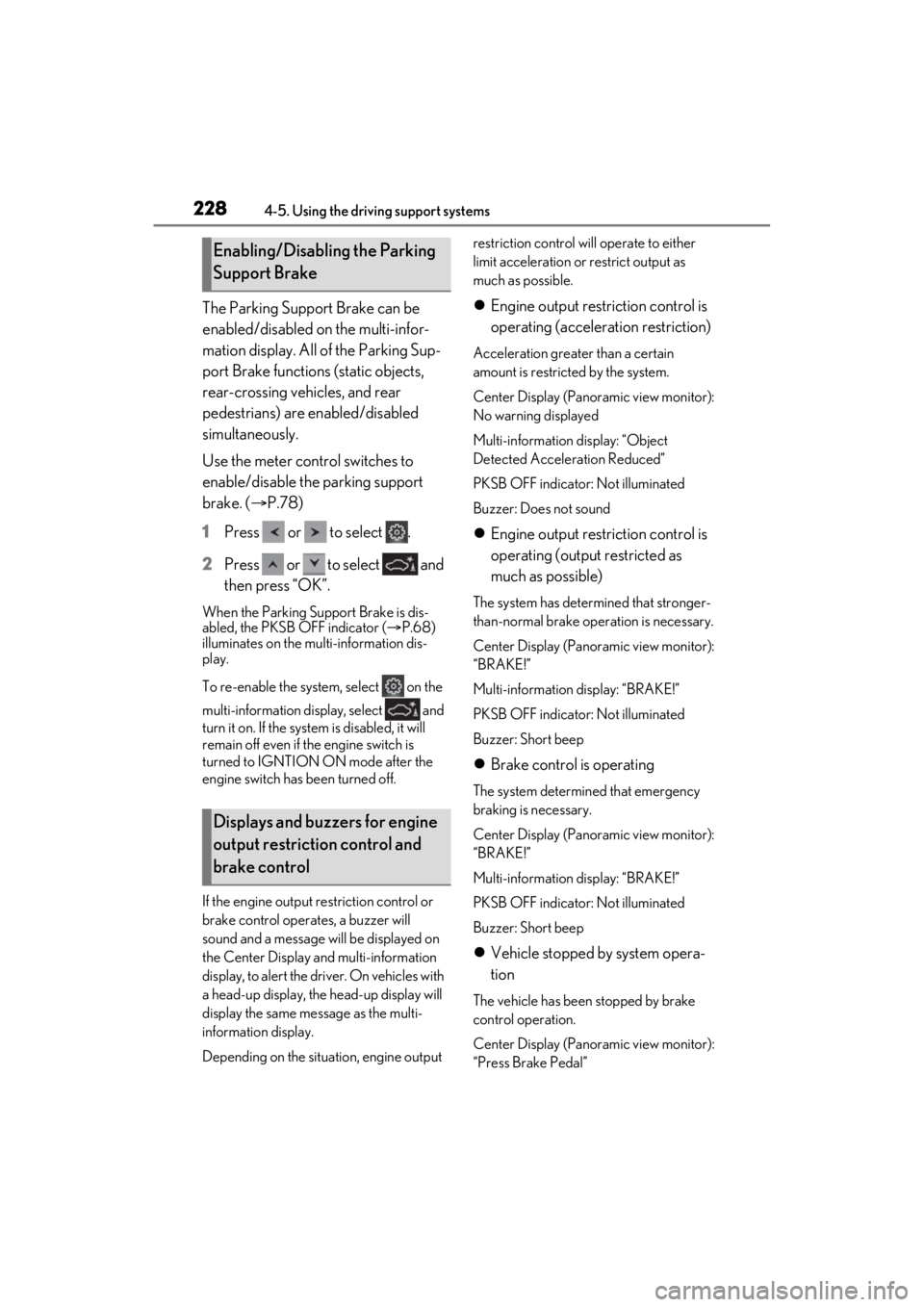
1 Press or to select .
2 Press or to select and
then press “OK”.
When the Parking Support Brake is dis-
abled, the PKSB OFF indicator ( P.68)
illuminates on the multi-information dis-
play.
To re-enable the system, select on the
multi-information display, select and
turn it on. If the system is disabled, it will
remain off even if the engine switch is
turned to IGNTION ON mode after the
engine switch has been turned off.
If the engine output restriction control or
brake control operates, a buzzer will
sound and a message will be displayed on
the Center Display and multi-information
display, to alert the driver. On vehicles with
a head-up display, the head-up display will
display the same message as the multi-
information display.
Depending on the situation, engine output restriction control will operate to either
limit acceleration or restrict output as
much as possible.
Engine output restriction control is
operating (acceleration restriction)
Acceleration greater than a certain
amount is restricted by the system.
Center Display (Panoramic view monitor):
No warning displayed
Multi-information display: “Object
Detected Acceleration Reduced”
PKSB OFF indicator: Not illuminated
Buzzer: Does not sound
Engine output restriction control is
operating (output restricted as
much as possible)
The system has determined that stronger-
than-normal brake operation is necessary.
Center Display (Panoramic view monitor):
“BRAKE!”
Multi-information display: “BRAKE!”
PKSB OFF indicator: Not illuminated
Buzzer: Short beep
Brake control is operating
The system determined that emergency
braking is necessary.
Center Display (Panoramic view monitor):
“BRAKE!”
Multi-information display: “BRAKE!”
PKSB OFF indicator: Not illuminated
Buzzer: Short beep
Vehicle stopped by system opera-
tion
The vehicle has been stopped by brake
control operation.
Center Display (Panoramic view monitor):
“Press Brake Pedal”
Enabling/Disabling the Parking
Support Brake
Displays and buzzers for engine
output restriction control and
brake control
Page 234 of 464
2344-5. Using the driving support systems
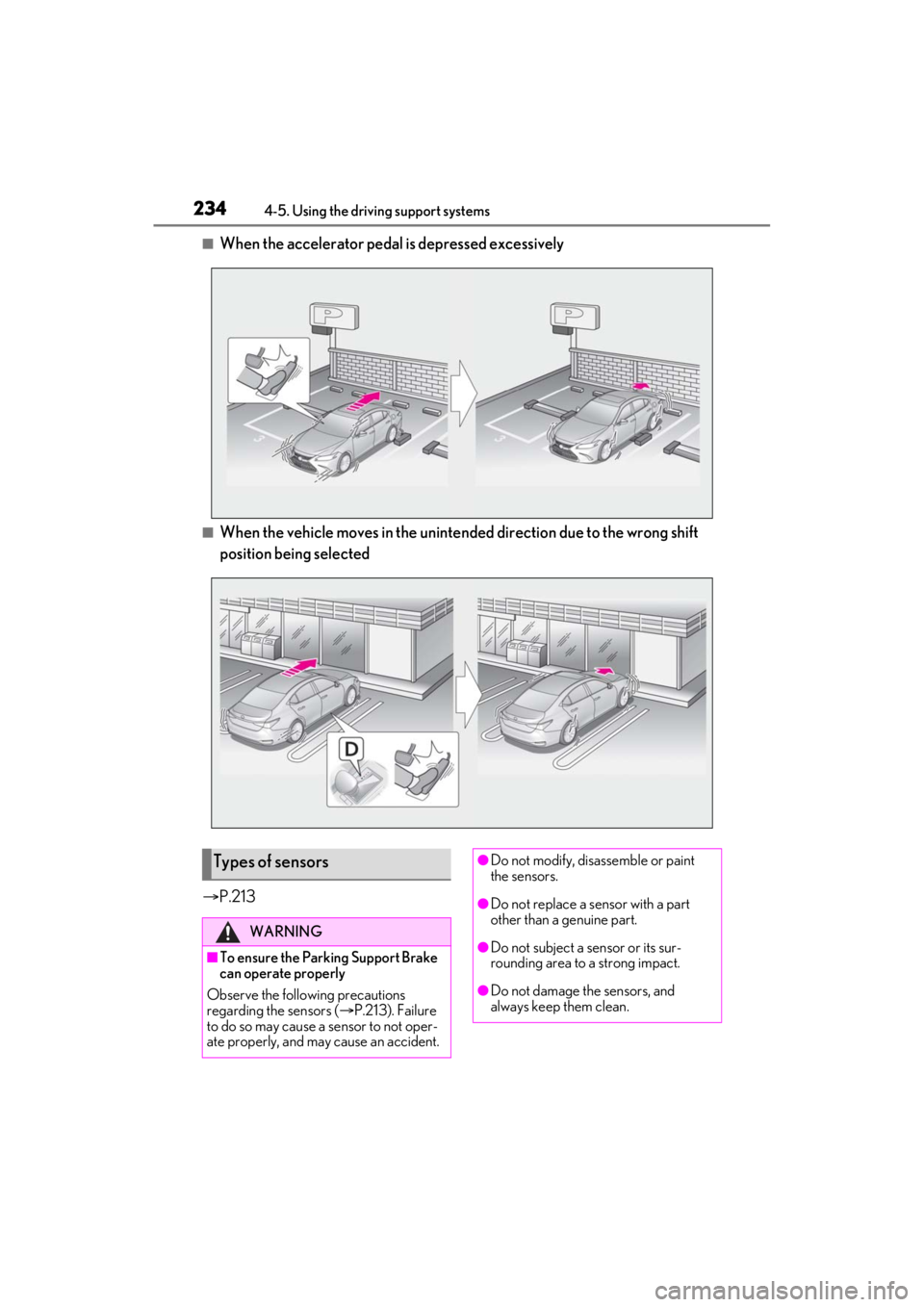
■When the accelerator pedal is depressed excessively
■When the vehicle moves in the unintend ed direction due to the wrong shift
position being selected
P.213
Types of sensors
WARNING
■To ensure the Parking Support Brake
can operate properly
Observe the following precautions
regarding the sensors ( P.213). Failure
to do so may cause a sensor to not oper-
ate properly, and may cause an accident.
●Do not modify, disassemble or paint
the sensors.
●Do not replace a sensor with a part
other than a genuine part.
●Do not subject a sensor or its sur-
rounding area to a strong impact.
●Do not damage the sensors, and
always keep them clean.
Page 235 of 464
2354-5. Using the driving support systems
4
Driving
■The Parking Support Brake function
(static object) will operate when
The function will operate when the PKSB
OFF indicator is not illuminated or flashing
( P.67, 68) and all of the following condi-
tions are met:
●Engine output restriction control
• The Parking Support Brake is enabled.
• The vehicle speed is 9 mph (15 km/h) or less.
• There is a static object in the traveling direction of the vehicle and 6 to 13 ft. (2
to 4 m) away.
• The Parking Support Brake determines that a stronger-than-normal brake oper-
ation is necessary to avoid a collision.
●Brake control
• Engine output restriction control is oper-
ating.
• The Parking Support Brake determines that an immediate brake operation is
necessary to avoid a collision.
■Re-enabling the Parking Support Brake
function (static objects)
P.231
■The Parking Support Brake function
(static objects) will stop operating when
The function will stop operating if any of the
following conditions are met:
●Engine output restriction control
• The Parking Support Brake is disabled.
• The system determines that the collision
WARNING
■Handling the suspension
Do not modify the suspension, as
changes to the height or inclination of the
vehicle may prevent the sensors from
detecting objects correctly or cause the
system to not operate or operate unnec-
essarily.
■If the Parking Support Brake function
(static objects) operates unnecessar-
ily, such as at a railroad crossing
In the event that the Parking Support
Brake function (static objects) operates
unnecessarily, such as at a railroad cross-
ing, brake control w ill be canceled after
approximately 2 seconds, allowing you
to proceed forward and leave the area,
brake control can also be canceled by
depressing the brake pedal. Depressing
the accelerator pedal after brake control
is canceled will allow you to proceed for-
ward and leave the area.
■Notes when washing the vehicle
Do not apply intensive bursts of water or
steam to the sensor area.
Doing so may result in the sensor mal-
functioning.
●When using a high pressure washer to
wash the vehicle, do not spray the sen-
sors directly, as doing so may cause a
sensor to malfunction.
●When using steam to clean the vehi-
cle, do not direct steam too close to
the sensors as doing so may cause a
sensor to malfunction.
■When to disable the Parking Support
Brake
In the following situations, disable the
Parking Support Brake as the system
may operate even though there is no
possibility of a collision.
●When inspecting the vehicle using a
chassis roller, chassis dynamo or free
roller
●When loading the vehicle onto a boat,
truck or other transport vessel
●If the suspension has been modified or
tires of a size othe r than specified are
installed
●If the front of the vehicle is raised or
lowered due to the carried load
●When equipment that may obstruct a
sensor is installed, such as a towing
eyelet, bumper protector (an addi-
tional trim strip, etc.), bicycle carrier,
or snow plow
●When using an automatic car wash
Page 236 of 464

2364-5. Using the driving support systems
has become avoidable with normal brake
operation.
• The static object is no longer 6 to 13 ft. (2
to 4 m) away from the vehicle or in the
traveling direction of the vehicle.
●Brake control
• The Parking Support Brake is disabled.
• Approximately 2 seconds have elapsed since the vehicle was stopped by brake
control.
• The brake pedal is depressed after the
vehicle is stopped by brake control.
• The static object is no longer 6 to 13 ft. (2 to 4 m) away from the vehicle or in the
traveling direction of the vehicle.
■Detection range of the Parking Support
Brake function (static objects)
The detection range of the Parking Support
Brake function (static objects) differs from
the detection range of the intuitive parking
assist. ( P.217) Therefore, even if the intui-
tive parking assist de tects an object and
provides a warning, the Parking Support
Brake function (static objects) may not start
operating.
■Objects that the Parking Support Brake
function (static obje cts) may not detect
The sensors may not be able to detect cer-
tain objects, such as the following:
●Pedestrian
●Cotton cloth, snow, and other materials
that are poor reflectors of ultrasonic
waves
●Objects which are not perpendicular to
the ground, are not perpendicular to the
traveling direction of the vehicle, are
uneven or are waving
●Low objects
●Thin objects such as wires, fences, ropes
and signposts
●Objects that are extremely close to the
bumper
●Sharply-angled objects
●Tall objects with upper sections project-
ing outwards in the direction of your vehi-
cle
■Situations in which the Parking Support
Brake function (static objects) may not
operate
When the shift lever is in N.
■Intuitive parking assist buzzer
Regardless of whether the intuitive parking
assist system is enabled or not (P.214), if
the Parking Support Brake function (static
objects) is enabled ( P.228), the front or
rear sensors detect an object and brake
control is performed, the intuitive parking
assist buzzer will sound to notify the driver
of the approximate distance to the object.
■Situations in which the Parking Support
Brake function (static objects) may
operate even if there is no possibility of a
collision
In some situations, such as the following, the
Parking Support Brake function (static
objects) may operate even though there is
no possibility of a collision.
●Vehicle surroundings
• When driving on a narrow road
• When driving on a gravel road or in an area with tall grass
• When driving toward a banner, flag, low- hanging branch or boom barrier (such as
those used at railroad crossings, toll
gates and parking lots)
• When driving on a narrow path sur-
rounded by a structure, such as in a tun-
nel or on an iron bridge
Page 239 of 464
2394-5. Using the driving support systems
4
Driving
*:If equipped
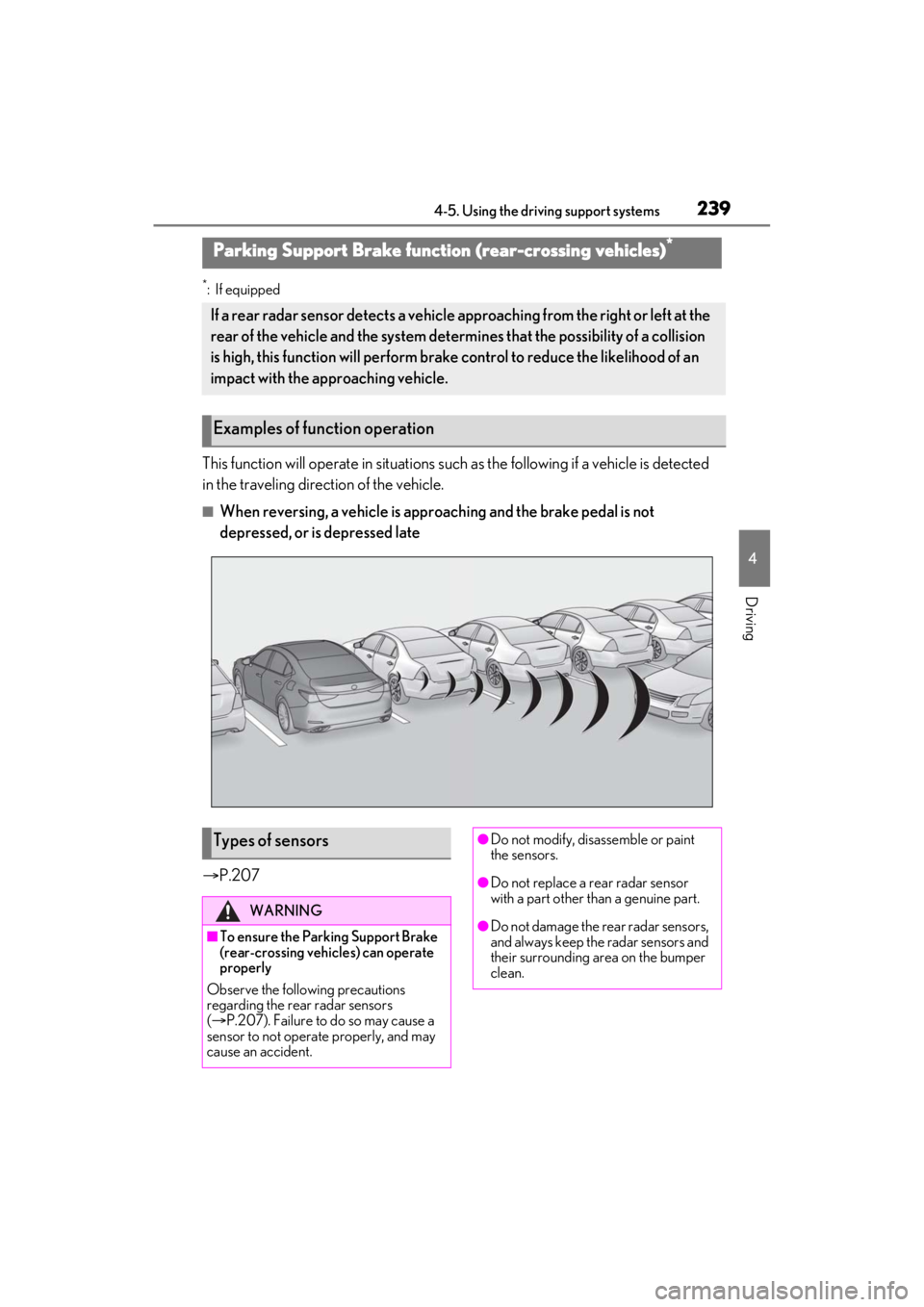
This function will operate in situations such as the following if a vehicle is detected
in the traveling direction of the vehicle.
■When reversing, a vehicle is appr oaching and the brake pedal is not
depressed, or is depressed late
P.207
Parking Support Brake function (rear-crossing vehicles)*
If a rear radar sensor detects a vehicle a pproaching from the right or left at the
rear of the vehicle and the system determ ines that the possibility of a collision
is high, this function will perform brak e control to reduce the likelihood of an
impact with the approaching vehicle.
Examples of function operation
Types of sensors
WARNING
■To ensure the Parking Support Brake
(rear-crossing vehicles) can operate
properly
Observe the following precautions
regarding the rear radar sensors
( P.207). Failure to do so may cause a
sensor to not operate properly, and may
cause an accident.
●Do not modify, disassemble or paint
the sensors.
●Do not replace a rear radar sensor
with a part other than a genuine part.
●Do not damage the rear radar sensors,
and always keep the radar sensors and
their surrounding area on the bumper
clean.
Page 240 of 464

2404-5. Using the driving support systems
■The Parking Support Brake function
(rear-crossing vehicles) will operate
when
The function will oper ate when the PKSB
OFF indicator is not illuminated or flashing
( P.67, 68) and all of the following condi-
tions are met:
●Engine output restriction control
• The Parking Support Brake is enabled.
• The vehicle speed is 9 mph (15 km/h) or
less.
• Vehicles are approaching from the right
or left at the rear of the vehicle at a travel-
ing speed of more than approximately 5
mph (8 km/h)
• The shift lever is in R.
• The Parking Support Brake determines that a stronger than normal brake opera-
tion is necessary to avoid a collision with
an approaching vehicle.
●Brake control
• Engine output restriction control is oper- ating.
• The Parking Support Brake determines that an emergency brake operation is
necessary to avoid a collision with an
approaching vehicle.
■The Parking Support Brake function
(rear-crossing vehicles) will stop oper-
ating when
The function will stop operating if any of the
following conditions are met:
●Engine output restriction control
• The Parking Support Brake is disabled.
• The collision becomes avoidable with
normal brake operation.
• A vehicle is no longer approaching from
the right or left at the rear of the vehicle.
●Brake control • The Parking Support Brake is disabled.
• Approximately 2 seconds have elapsed
since the vehicle was stopped by brake
control.
• The brake pedal is depressed after the vehicle is stopped by brake control.
• A vehicle is no longer approaching from the right or left at the rear of the vehicle.
■Re-enabling the Parking Support Brake
function (rear-crossing vehicles)
P.231
■Detection area of the Parking Support
Brake function (rear-crossing vehicles)
The detection area of the Parking Support
Brake function (rear-crossing vehicles) dif-
fers from the detection area of the RCTA
function ( P.222). Therefore, even if the
RCTA function detects a vehicle and pro-
vides an alert, the Parking Support Brake
function (rear-crossing vehicles) may not
start operating.
■Conditions under which the Parking
Support Brake function (rear-crossing
vehicles) will not detect a vehicle
The Parking Support Brake function (rear-
crossing vehicles) is not designed to detect
the following types of vehicles and/or
objects:
●Vehicles approaching from directly
behind
●Vehicles backing up in a parking space
next to your vehicle
●Vehicles that the sensors cannot detect
due to obstructions
●Vehicles which suddenly accelerate or
decelerate near your vehicle
●Guardrails, walls, signs, parked vehicles
and similar stationary objects*
●Small motorcycles, bicycles, pedestrians,
WARNING
●If the area around a rear radar sensor
is subjected to an impact, the system
may not operate properly due to a
sensor malfunction. Have the vehicle
inspected by your Lexus dealer.
●Observe the rear radar sensor han-
dling precautions. ( P.207)
Page 244 of 464

2444-5. Using the driving support systems
■Parking Support Brake function (rear
pedestrians) will operate when
The function will oper ate when the PKSB
OFF indicator is not illuminated or flashing
( P.67, 68) and all of the following condi-
tions are met:
●Engine output restriction control
• The Parking Support Brake is enabled.
• The vehicle speed is 9 mph (15 km/h) or less.
• The shift lever is in R.
• The rear camera sensor detects a pedes- trian behind the vehicle while backing up
and the system determines that the possi-
bility of colliding with the detected
pedestrian is high.
●Brake control • Engine output restriction control is oper-
ating.
• The Parking Support Brake determines
that an emergency brake operation is
necessary to avoid a collision with a
pedestrian.
■The Parking Support Brake function
(rear pedestrians) will stop operating
when
The function will stop operating if any of the
following conditions are met:
●Engine output restriction control
• The Parking Support Brake is disabled.
• The collision becomes avoidable with normal brake operation.
• The pedestrian is no longer detected behind your vehicle.
●Brake control
• The Parking Support Brake is disabled.
• Approximately 2 seconds have elapsed
since the vehicle was stopped by brake
control.
• The brake pedal is depressed after the vehicle is stopped by brake control.
• The pedestrian is no longer detected
behind your vehicle.
■Re-enabling the Parking Support Brake
function (rear pedestrians)
P.231
■Detection area of the Parking Support
Brake function (rear pedestrians)
The detection area of the Parking Support
Brake function (rear pedestrians) differs
from the detection area of the RCD func-
tion ( P.225). Therefore, even if the RCD
function detects a pedestrian and provides
an alert, the Parking Support Brake func-
tion (rear pedestrians) may not start operat-
ing.
■Situations in which the system may not
operate properly
●Some pedestrians, such as the following,
may not be detected by the Parking Sup-
port Brake function (rear pedestrians),
preventing the function from operating
properly:
• Pedestrians who are bending forward or
squatting
• Pedestrians who are lying down
• Pedestrians who are running
WARNING
■If the Parking Support Brake function
(rear pedestrians) operates unneces-
sarily
Depress the brake pedal immediately
after the Parking Support Brake function
(rear pedestrians) operates. (Operation
of the function is canceled by depressing
the brake pedal.)
■In order to correctly use the Parking
Support Brake function (rear pedes-
trians)
Do not rely solely upon the system.
Depending on the road conditions, vehi-
cle conditions, and weather conditions,
etc., the system may not operate. The
detection capability of the rear camera is
limited. Always driv e while confirming
the safety of the surroundings of the vehi-
cle.
Also, if the PKSB OFF indicator is flash-
ing or the message indicating that the
system is unavailable is displayed over
the camera image, the system cannot be
used. However, even if the indicator is
not flashing or the message is not dis-
played, do not rely solely upon the sys-
tem and make sure to always drive while
directly confirming the safety of your sur-
roundings.
Page 247 of 464

2474-5. Using the driving support systems
4
Driving
steering wheel
■AVS (Adaptive Variable Suspen-
sion System) (if equipped)
By independently controlling the
damping force of the shock absorbers
for each of the 4 wheels according to
the road and driving conditions, this
system helps riding comfort with supe-
rior vehicle stabilit y, and helps good
vehicle posture.
Also, the damping force changes
depending on the selected driving
mode. ( P.210)
■When the TRAC/VSC systems are
operating
The slip indicator light will flash while the
TRAC/VSC systems are operating.
■Disabling the TRAC system
If the vehicle gets stuck in mud, dirt or snow,
the TRAC system may reduce power from
the engine to the wheels. Pressing the
switch to turn the system off may
make it easier for you to rock the vehicle in
order to free it.
To turn the TRAC system off, quickly press
and release the switch.
“Traction Control Turned Off” will be
shown on the multi-information display.
Press the switch again to turn the
system back on.
■Turning off both TRAC and VSC sys-
tems
To turn the TRAC and VSC systems off,
press and hold the switch for more
than 3 seconds while the vehicle is stopped.
The VSC OFF indicator light will come on
and the “Traction Control Turned Off” will
be shown on the multi-information display.
*
Press the switch again to turn the
system back on.
*: PCS (Pre-Collision System) will also be disabled (only Pre-Collision warning is
available). The PCS warning light will
come on and a message will be displayed
on the multi-information display.
( P.183)
■When the message is displayed on the
multi-information display showing that
TRAC has been disabled even if the
switch has not been pressed
TRAC is temporary deactivated. If the
information continues to show, contact your
Lexus dealer.
■Operating conditions of hill-start assist
control
When the following four conditions are met,
the hill-start assist control will operate:
●The shift lever is in a position other than P
or N (when starting off forward/back-
ward on an up ward incline).
●The vehicle is stopped.
●The accelerator pedal is not depressed.
●The parking brake is not engaged.
Page 249 of 464
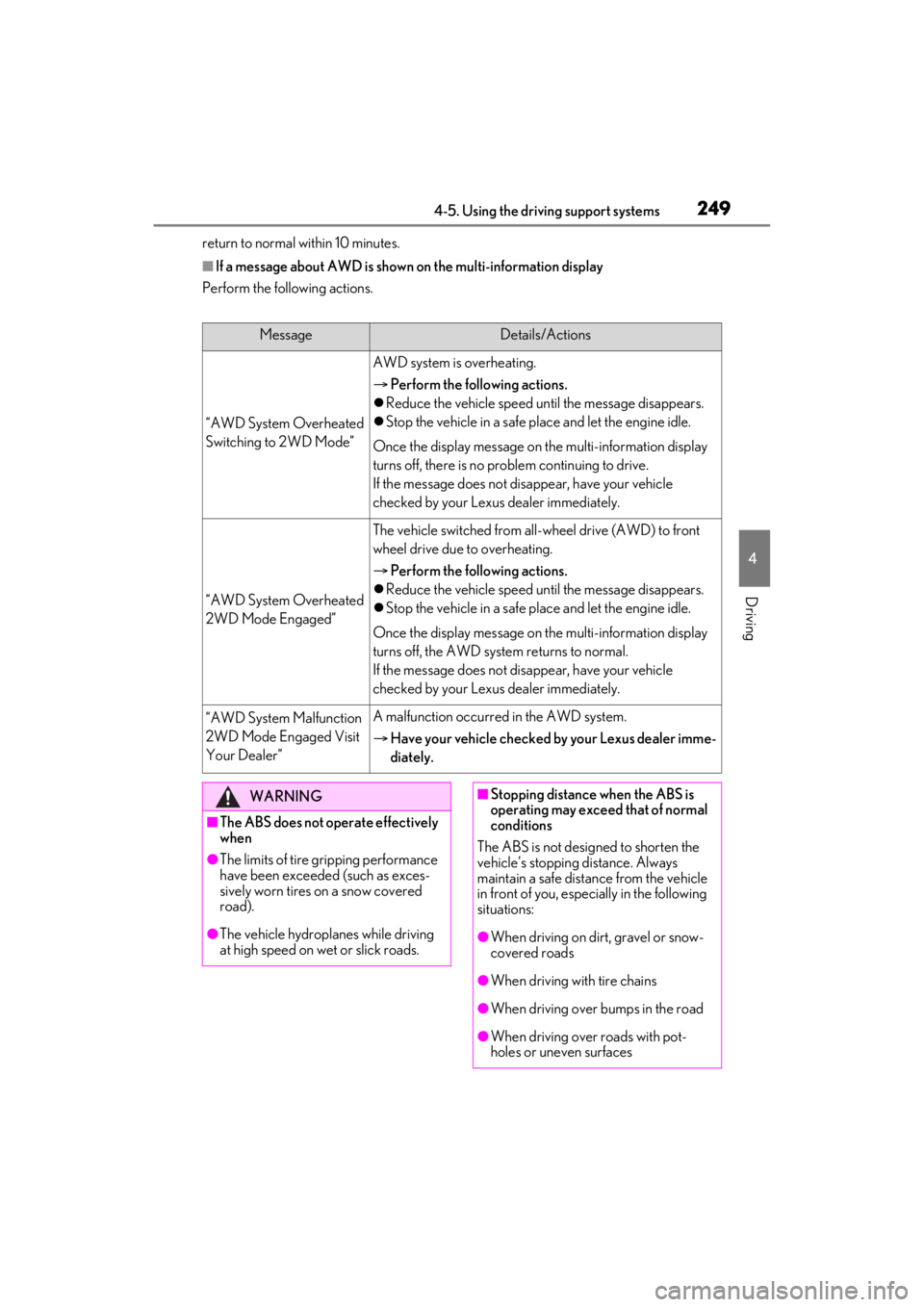
2494-5. Using the driving support systems
4
Driving
return to normal within 10 minutes.
■If a message about AWD is shown on the multi-information display
Perform the following actions.
MessageDetails/Actions
“AWD System Overheated
Switching to 2WD Mode”
AWD system is overheating.
Perform the following actions.
Reduce the vehicle speed until the message disappears.
Stop the vehicle in a safe pl ace and let the engine idle.
Once the display message on the multi-information display
turns off, there is no problem continuing to drive.
If the message does not disappear, have your vehicle
checked by your Lexus dealer immediately.
“AWD System Overheated
2WD Mode Engaged”
The vehicle switched from all-wheel drive (AWD) to front
wheel drive due to overheating.
Perform the following actions.
Reduce the vehicle speed until the message disappears.
Stop the vehicle in a safe pl ace and let the engine idle.
Once the display message on the multi-information display
turns off, the AWD system returns to normal.
If the message does not disappear, have your vehicle
checked by your Lexus dealer immediately.
“AWD System Malfunction
2WD Mode Engaged Visit
Your Dealer”A malfunction occurred in the AWD system.
Have your vehicle checked by your Lexus dealer imme-
diately.
WARNING
■The ABS does not operate effectively
when
●The limits of tire gripping performance
have been exceeded (such as exces-
sively worn tires on a snow covered
road).
●The vehicle hydroplanes while driving
at high speed on wet or slick roads.
■Stopping distance when the ABS is
operating may exceed that of normal
conditions
The ABS is not designed to shorten the
vehicle’s stopping distance. Always
maintain a safe distance from the vehicle
in front of you, especially in the following
situations:
●When driving on dirt, gravel or snow-
covered roads
●When driving with tire chains
●When driving over bumps in the road
●When driving over roads with pot-
holes or uneven surfaces
Page 250 of 464

2504-5. Using the driving support systems
WARNING
■TRAC/VSC may not operate effec-
tively when
Directional control and power may not
be achievable while driving on slippery
road surfaces, even if the TRAC/VSC
system is operating.
Drive the vehicle carefully in conditions
where stability and power may be lost.
■Active Cornering Assist does not
operate effectively when
●Do not overly rely on Active Corner-
ing Assist. Active Cornering Assist
may not operate effectively when
accelerating down slopes or driving on
slippery road surfaces.
●When Active Cornering Assist fre-
quently operates, Active Cornering
Assist may temporarily stop operating
to ensure proper operation of the
brakes, TRAC and VSC.
■Hill- start assist control does not
operate effectively when
●Do not overly rely on hill-start assist
control. Hill-start assist control may
not operate effectively on steep
inclines and roads covered with ice.
●Unlike the parking brake, hill-start
assist control is not intended to hold
the vehicle stationary for an extended
period of time. Do not attempt to use
hill-start assist control to hold the vehi-
cle on an incline, as doing so may lead
to an accident.
■When the TRAC/VSC is activated
The slip indicator light flashes. Always
drive carefully. Re ckless driving may
cause an accident. Exercise particular
care when the indicator light flashes.
■When the TRAC/VSC systems are
turned off
Be especially careful and drive at a
speed appropriate to the road condi-
tions. As these are the systems to help
ensure vehicle stability and driving force,
do not turn the TRAC/VSC systems off
unless necessary.
■Secondary Collision Brake
Do not rely solely upon the Secondary
Collision Brake. This system is designed
to help reduce the possibility of further
damage due to a secondary collision,
however, that effect changes according
to various conditions. Overly relying on
the system may result in death or serious
injury.
■Replacing tires
Make sure that all ti res are of the speci-
fied size, brand, tread pattern and total
load capacity. In addition, make sure that
the tires are inflated to the recom-
mended tire inflation pressure level.
The ABS, TRAC and VSC systems will
not function correctly if different tires are
installed on the vehicle.
Contact your Lexus dealer for further
information when replacing tires or
wheels.
■Handling of tires and the suspension
Using tires with any kind of problem or
modifying the suspensi on will affect the
driving assist systems, and may cause a
system to malfunction.