change time LEXUS ES350 2021 User Guide
[x] Cancel search | Manufacturer: LEXUS, Model Year: 2021, Model line: ES350, Model: LEXUS ES350 2021Pages: 464, PDF Size: 9.61 MB
Page 117 of 464
1173-3. Adjusting the seats
3
Before driving
●If the a door other than the driver’s door
is unlocked with the smart access system
with push-button start, the driving posi-
tion cannot be recalled. In this case, press
the driving position button which has
been set.
■Customization
The unlock door settings of the memory
recall function can be changed.
(Customizable features: P.419)
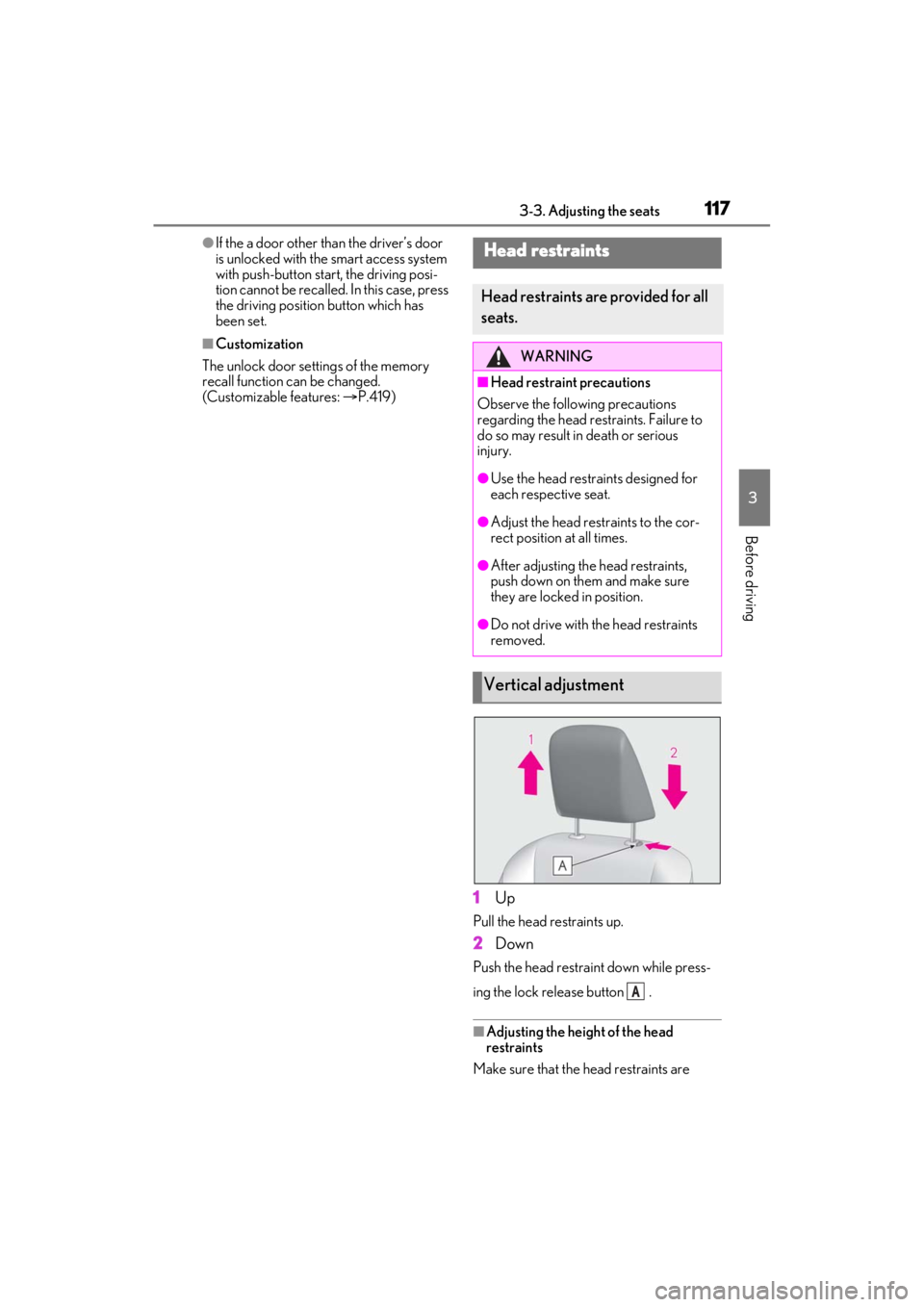
1Up
Pull the head restraints up.
2Down
Push the head restra int down while press-
ing the lock release button .
■Adjusting the heig ht of the head
restraints
Make sure that the head restraints are
Head restraints
Head restraints are provided for all
seats.
WARNING
■Head restraint precautions
Observe the following precautions
regarding the head re straints. Failure to
do so may result in death or serious
injury.
●Use the head restraints designed for
each respective seat.
●Adjust the head restraints to the cor-
rect position at all times.
●After adjusting the head restraints,
push down on them and make sure
they are locked in position.
●Do not drive with the head restraints
removed.
Vertical adjustment
A
Page 123 of 464
1233-4. Adjusting the steering wheel and mirrors
3
Before driving
■Using automatic mode in cold weather
(power type)
When automatic mode is used in cold
weather, the door mirror could freeze up
and automatic stowing and return may not
be possible. In this case, remove any ice and
snow from the door mirror, then either
operate the mirror using manual mode or
move the mirror by hand.
■Customization
The automatic mirror fo lding and extending
operation can be changed.
(Customizable features: P.419)
When the mirror select switch is in the
“L” or “R” position, the outside rear
view mirrors will automatically angle
downwards when the vehicle is revers-
ing in order to give a better view of the
ground.
To disable this function, move the mir-
ror select switch to the neutral position
(between “L” or “R”).
■Adjusting the mirror angle when
the vehicle is reversing
With the shift lever in R, adjust the mir-
ror angle at a desired position. The
adjusted angle will be memorized and
the mirror will automatically tilt to the
memorized angle whenever the shift
lever is shifted to R from next time.
The memorized downward tilt position of
the mirror is linked to the normal position
(angle adjusted with th e shift lever in other
than R). Therefore, if the normal position is
changed after adjustment, the tilt position
will also change.
When the normal position is changed,
readjust the angle in reversing.
WARNING
■When a mirror is moving
To avoid personal injury and mirror mal-
function, be careful not to get your hand
caught by the moving mirror.
Linked mirror function when
reversing (vehicles with driving
position memory)
Page 127 of 464

1273-5. Opening and closing the windows and moon roof
3
Before driving
*: Lightly press either way of the moon roof
switch to stop the moon roof partway.
■The moon roof can be operated when
The engine switch is in IGNITION ON
mode.
■Operating the moon roof after turning
the engine off
The moon roof can be operated for approx-
imately 45 seconds after the engine switch
is turned to ACCESSORY mode or turned
off. It cannot, however, be operated once
either front door is opened.
■Jam protection function
If an object is detected between the moon
roof and the frame while the moon roof is
closing or tilting down, travel is stopped and
the moon roof opens slightly.
■Sunshade
The sunshade can be opened and closed
manually. However, the sunshade will open
automatically when the moon roof is
opened.
■Door lock linked moon roof operation
●The moon roof can be opened and
closed using the mechanical key.*
( P.387)
●The moon roof can be opened using the
wireless remote control.* ( P.95)
*: These settings must be customized at
your Lexus dealer.
■When the moon roof does not close nor-
mally
Perform the following procedure:
1 Stop the vehicle.
2 Press and hold the “CLOSE” switch.
*
The moon roof will close, reopen and pause
for approximately 10 se conds. Then it will
close again and stop at the completely
closed position.
3 Check to make sure that the moon roof
is completely closed and then release
the switch.
*: If the switch is released at the incorrect
time, the procedure will have to be per- formed again from the beginning.
If the moon roof does not fully close even
after performing the above procedure cor-
rectly, have the vehicle inspected by your
Lexus dealer.
■If the moon roof does not move normally
If the moon roof does not open or close
normally or the automatic opening function
does not operate, perform the following ini-
tialization procedure.
1 Stop the vehicle.
2 Press and hold the “DOWN” switch.
*
The moon roof will stop at the tilt-up posi-
tion. After that, it will open, close, tilt up, tilt
down, and stop at the fully closed position.
3 Confirm that the moon roof has com-
pletely stopped and release the switch.
*:If you release the sw itch while the moon
roof is moving, perform the procedure
again from the beginning.
If, after performing the above procedures
correctly, the moon roof still does not open
or close normally or the automatic opening
function does not operate, have the vehicle
inspected by your Lexus dealer.
■Moon roof open warning buzzer
A buzzer sounds and a message is shown
on the multi-informat ion display when the
engine switch is turned off and the driver’s
door is opened with the moon roof open.
■Customization
Settings (e.g. linked door lock operation)
can be changed. (Customizable fea-
tures: P.419)
WARNING
Observe the following precautions.
Failure to do so may cause death or seri-
ous injury.
■Opening the moon roof
●Do not allow any passengers to put
their hands or heads outside the vehi-
cle while it is moving.
Page 145 of 464

1454-2. Driving procedures
4
Driving
■If the battery is discharged
The engine cannot be started using the
smart access system with push-button start.
Refer to P.389 to restart the engine.
■Electronic key battery depletion
P.92
■Conditions affe cting operation
P.108
■Notes for the entry function
P.108
■Steering lock function
●After turning the engine switch off and
opening and closing the doors, the steer-
ing wheel will be lock ed due to the steer-
ing lock function. Operating the engine
switch again automatically cancels the
steering lock.
●When the steering lock cannot be
released, “Push Engine Switch while
Turning Steering Whee l in Either Direc-
tion” will be displayed on the multi-infor-
mation display.
Check that the shift leve r is set in P. Press
the engine switch shor tly and firmly while
turning the steering wheel left and right.
●To prevent the steering lock motor from
overheating, operation of the motor may
be suspended if the engine is turned on
and off repeatedly in a short period of
time. In this case, refrain from operating
the engine switch. After about 10 sec-
onds, the steering lock motor will resume
functioning.
■If there is a malfun ction in the smart
access system with push-button start
If “Access System with Elec. Key Malfunc-
tion See Owner’s Manual” is displayed on
the multi-information display, the system
may be malfunctioning. Have the vehicle inspected by your Lexus dealer immedi-
ately.
■Electronic key battery
P.341
■Operation of the engine switch
●If the switch is no t pressed shortly and
firmly, the engine switch mode may not
change or the engine may not start.
●If attempting to restart the engine imme-
diately after turning th e engine switch off,
the engine may not start in some cases.
After turning the engine switch off, please
wait a few seconds be fore restarting the
engine.
■Customization
If the smart access system with push-button
start has been deactivated in a customized
setting, refer to P.419.
WARNING
■When starting the engine
Always start the engine while sitting in
the driver’s seat. Do not depress the
accelerator pedal while starting the
engine under any circumstances.
Doing so may cause an accident result-
ing in death or serious injury.
■Caution while driving
If engine failure occurs while the vehicle
is moving, do not lock or open the doors
until the vehicle reaches a safe and com-
plete stop. Activation of the steering lock
in this circumstance may lead to an acci-
dent, resulting in death or serious injury.
NOTICE
■When starting the engine
●Do not race a cold engine.
●If the engine becomes difficult to start
or stalls frequently, have your vehicle
checked by your Lexus dealer imme-
diately.
Page 147 of 464

1474-2. Driving procedures
4
Driving
Modes can be changed by pressing
the engine switch with the brake pedal
released. (The mode changes each
time the switch is pressed.)1
Off
*
The emergency flashers can be used.
2ACCESSORY mode
Some electrical components such as the
audio system can be used.
“ACCESSORY” will be displayed on the
meter.
3IGNITION ON mode
All electrical components can be used.
“IGNITION ON” will be displayed on the
meter.
*: If the shift lever is in a position other than
P when turning off the engine, the engine
switch will be turned to ACCESSORY
mode, not to off.
■Auto power off function
If the vehicle is left in ACCESSORY mode
for more than 20 minutes or IGNITION
ON mode (the engine is not running) for
more than an hour with the shift lever in P,
the engine switch will automatically turn off.
However, this function cannot entirely pre-
vent the battery discharge. Do not leave the
vehicle with the engine switch in ACCES-
WARNING
●When restarting the engine after an
emergency shutdown, shift the shift
lever to N and press the engine switch
shortly and firmly.
■When parking
Exhaust gases include harmful carbon
monoxide (CO), which is colorless and
odorless. Observe the following precau-
tions.
Failure to do so may cause exhaust gases
to enter the vehicle and may lead to an
accident caused by light-headedness, or
may lead to death or a serious health
hazard.
●If the vehicle is in a poorly ventilated
area or a closed area, such as a
garage, stop the engine.
●Do not leave the vehicle with the
engine running for a long time. If such
a situation cannot be avoided, park the
vehicle in an open space and ensure
that exhaust fumes do not enter the
vehicle interior.
●Do not leave the engine running in an
area with snow build-up, or where it is
snowing. If snowbanks build up around
the vehicle while the engine is running,
exhaust gases may collect and enter
the vehicle.
Changing engine switch modes
Page 153 of 464

1534-2. Driving procedures
4
Driving
■If the S indicator does not come on or
the D indicator is displayed even after
shifting the shift lever to S
This may indicate a malfunction in the auto-
matic transmission system. Have the vehicle
inspected by your Lexus dealer immedi-
ately. (In this situation, the transmission will
operate in the same manner as when the
shift lever is in D.)
1 Right turn
2 Lane change to the right (move the
lever partway and release it)
The right hand signals will flash 3 times.
3Lane change to the left (move the
lever partway and release it)
The left hand signals will flash 3 times.
4Left turn
■Turn signals can be operated when
The engine switch is in IGNITION ON
mode.
■If the indicator flashes faster than usual
Check that a light bulb in the front or rear
turn signal lights has not burned out.
■If the turn signals stop flashing before a
lane change has been performed
Operate the lever again.
Turn signal lever
Operating instructions
Page 159 of 464
1594-3. Operating the lights and wipers
4
Driving
■Automatic light off system
●When the headlights come on: The head-
lights and tail lights turn off 30 seconds
after the driver’s door is opened and
closed if the engine switch is turned to
ACCESSORY mode or turned off. (The
lights turn off immediately if on
the key is pressed after all the doors are
locked.)
●When only the tail lights come on: The tail
lights turn off automatically if the engine
switch is turned to ACCESSORY mode
or turned off and the driver’s door is
opened.
For the U.S.A.: To turn the lights on again,
turn the engine swit ch to IGNITION ON
mode, or turn the light switch off once and
then back to or .
For Canada: To turn the lights on again, turn
the engine switch to IGNITION ON mode,
or turn the light switch to position once
and then back to or .
■Light reminder buzzer
A buzzer sounds when the engine switch is
turned off or turned to ACCESSORY
mode and the driver’s door is opened while
the lights are turned on.
■Automatic headlight leveling system (if
equipped)
The level of the headlights is automatically
adjusted according to the number of pas-
sengers and the loading condition of the
vehicle to ensure that the headlights do not
interfere with other road users.
■Windshield wiper linked headlight illu-
mination
When driving during daytime with the
headlight switch turned to , if the wind-
shield wipers are used, the headlights will
turn on automatically after several seconds
to help enhance the visibility of your vehicle.
■Battery-saving function
In order to prevent the battery of the vehi-
cle from discharging, if the headlights
and/or tail lights are on when the engine
switch is turned off the battery saving func-
tion will operate and automatically turn off
all the lights after approximately 20 min-
utes.
When the engine switch is turned to IGNI-
TION ON mode, the battery-saving func-
tion will be disabled.
When any of the following are performed,
the battery-saving function is canceled
once and then reactivated. All the lights will
turn off automatically 20 minutes after the
battery-saving function has been reacti-
vated:
●When the headlight switch is operated
●When a door is opened or closed
■Welcome light illumination control
The parking lights, tail lights and license
plate lights automatically turn on at night
when the doors are unlocked using the
entry function or wireless remote control if
the light switch is in the position.
■Customization
Settings (e.g. light sensor sensitivity) can be
changed.
(Customizable features: P.419)
NOTICE
■To prevent battery discharge
Do not leave the lights on longer than
necessary when the engine is not run-
ning.
Page 162 of 464

1624-3. Operating the lights and wipers
●House lights, street lights, traffic signals,
and illuminated billboards or signs may
cause the high beam to switch to the low
beams, or the low beams to remain on.
●The following factors may affect the
amount of time taken to turn the high
beam on or off:
• The brightness of headlights, fog lights,
and tail lights of vehicles ahead
• The movement and direction of vehicles ahead
• When a vehicle ahead only has opera- tional lights on one side
• When a vehicle ahead is a two-wheeled
vehicle
• The condition of the road (gradient, curve, condition of the road surface etc.)
• The number of passengers and amount of luggage
●The high beam may be turned on or off
when the driver does not expect it.
●Bicycles or similar objects may not be
detected.
●In the situations show n below, the system
may not be able to accurately detect sur-
rounding brightness levels. This may
cause the low beams to remain on or the
high beams to cause problems for pedes-
trians, vehicles ahead or other parties. In
these cases, manually switch between the
high and low beams.
• In bad weather (rain, snow, fog, sand-
storms etc.)
• The windshield is obscured by fog, mist, ice, dirt etc.
• The windshield is cracked or damaged.
• The camera sensor is deformed or dirty.
• When the temperature of the camera sensor is extremely high
• Surrounding brightness levels are equal to those of headlights, tail lights or fog
lights.
• When headlights or tail lights of vehicles ahead are turned off, dirty, changing
color, or not aimed properly
• When the vehicle is hit by water, snow, dust, etc. from a preceding vehicle
• When driving through an area of inter-
mittently changing brightness and dark-
ness.
• When frequently and repeatedly driving
ascending/descending roads, or roads with rough, bumpy or uneven surfaces
(such as stone-paved roads, gravel tracks
etc.).
• When frequently and repeatedly taking curves or driving on a winding road.
• There is a highly re flective object ahead
of the vehicle, such as a sign or a mirror.
• The back of a vehicle ahead is highly reflective, such as a container on a truck.
• The vehicle’s headlights are damaged or dirty.
• The vehicle is listing or tilting, due to a flat
tire, a trailer being towed etc.
• The high beam and low beam are repeat- edly being switched between in an
abnormal manner.
• The driver believes that the high beam may be causing problems or distress to
other drivers or pedestrians nearby.
■Temporarily lowering sensor sensitivity
The sensitivity of the sensor can be tempo-
rarily lowered.
1 Turn the engine switch off while the fol-
lowing conditions are met.
• The headlight swit ch is in or .
• The headlight switch lever is in low beam
position.
• Automatic High Be am switch is on.
2 Turn the engine switch to IGNITION
ON mode.
3 Within 60 seconds after 2, repeat pull-
ing the headlight switch lever to the
original position then pushing it to the
high beam position quickly 10 times,
then leave the lever in high beam posi-
tion.
4 If the sensitivity is changed, the Auto-
matic High Beam indicator turns on and
off 3 times.
Automatic High Beam (headlights) may
turn on even the vehicle is stopped.
■Switching to high beam
Push the lever away from you.
Turning the high beam on/off
manually
Page 176 of 464
1764-5. Using the driving support systems
●In the following situations, if the situation has changed (or the vehicle has been driven for
some time) and the normal operating conditions are detected, the message will disap-
pear and the system will become operational.
If the message does not disappear, contact your Lexus dealer.
• When the temperature around the radar sensor is outside of the operational range, such
as when the vehicle is in the sun or in an extremely cold environment
• When the front camera cannot detect objects in front of the vehicle, such as when driving
in the dark, snow, or fog, or when brig ht lights are shining into the front camera
When the temperature around the front
camera is outside of th e operational range,
such as when the vehicle is in the sun or in an
extremely cold environment
If the front camera is hot, such as after the
vehicle had been parked in the sun, use the
air conditioning system to decrease the tem-
perature around the front camera.
If a sunshade was used when the vehicle was
parked, depending on its type, the sunlight
reflected from the surface of the sunshade
may cause the temperature of the front cam-
era to become excessively high.
If the front camera is cold, such after the
vehicle is parked in an extremely cold envi-
ronment, use the air conditioning system to
increase the temperature around the front
camera.
The area in front of the front camera is
obstructed, such as when the hood is open
or a sticker is attached to the part of the
windshield in front of the front camera.
Close the hood, remove the sticker, etc. to
clear the obstruction.
SituationActions
Page 179 of 464
1794-5. Using the driving support systems
4
Driving
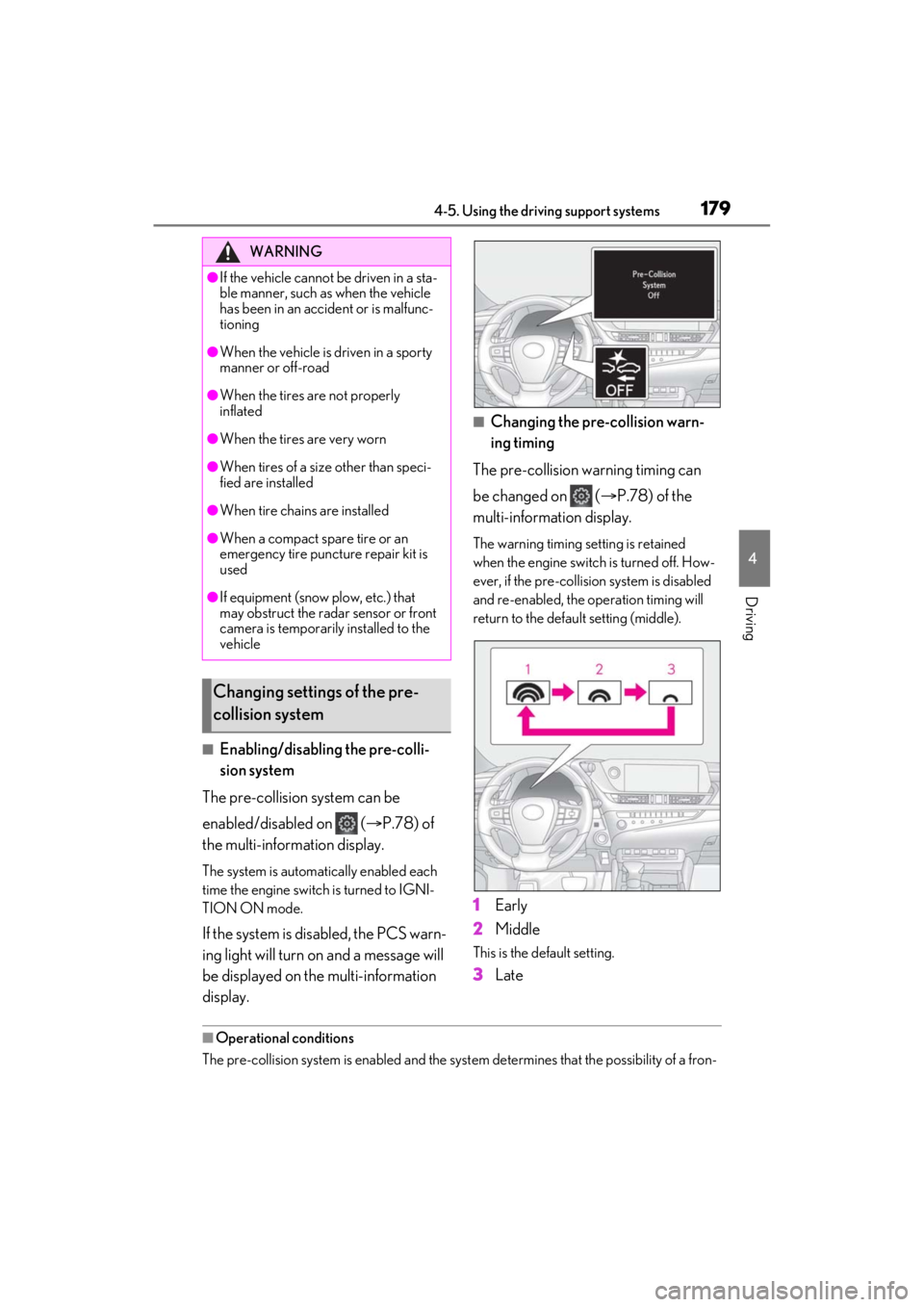
■Enabling/disabling the pre-colli-
sion system
The pre-collision system can be
enabled/disabled on ( P.78) of
the multi-information display.
The system is automatically enabled each
time the engine switch is turned to IGNI-
TION ON mode.
If the system is disabled, the PCS warn-
ing light will turn on and a message will
be displayed on the multi-information
display.
■Changing the pre-collision warn-
ing timing
The pre-collision warning timing can
be changed on ( P.78) of the
multi-information display.
The warning timing setting is retained
when the engine switch is turned off. How-
ever, if the pre-collision system is disabled
and re-enabled, the operation timing will
return to the default setting (middle).
1 Early
2 Middle
This is the default setting.
3Late
■Operational conditions
The pre-collision system is enabled and the syst em determines that the possibility of a fron-
WARNING
●If the vehicle cannot be driven in a sta-
ble manner, such as when the vehicle
has been in an accident or is malfunc-
tioning
●When the vehicle is driven in a sporty
manner or off-road
●When the tires are not properly
inflated
●When the tires are very worn
●When tires of a size other than speci-
fied are installed
●When tire chains are installed
●When a compact spare tire or an
emergency tire puncture repair kit is
used
●If equipment (snow plow, etc.) that
may obstruct the radar sensor or front
camera is temporarily installed to the
vehicle
Changing settings of the pre-
collision system