warning LEXUS ES350 2021 Owners Manual
[x] Cancel search | Manufacturer: LEXUS, Model Year: 2021, Model line: ES350, Model: LEXUS ES350 2021Pages: 464, PDF Size: 9.61 MB
Page 388 of 464
3887-2. Steps to take in an emergency
open.
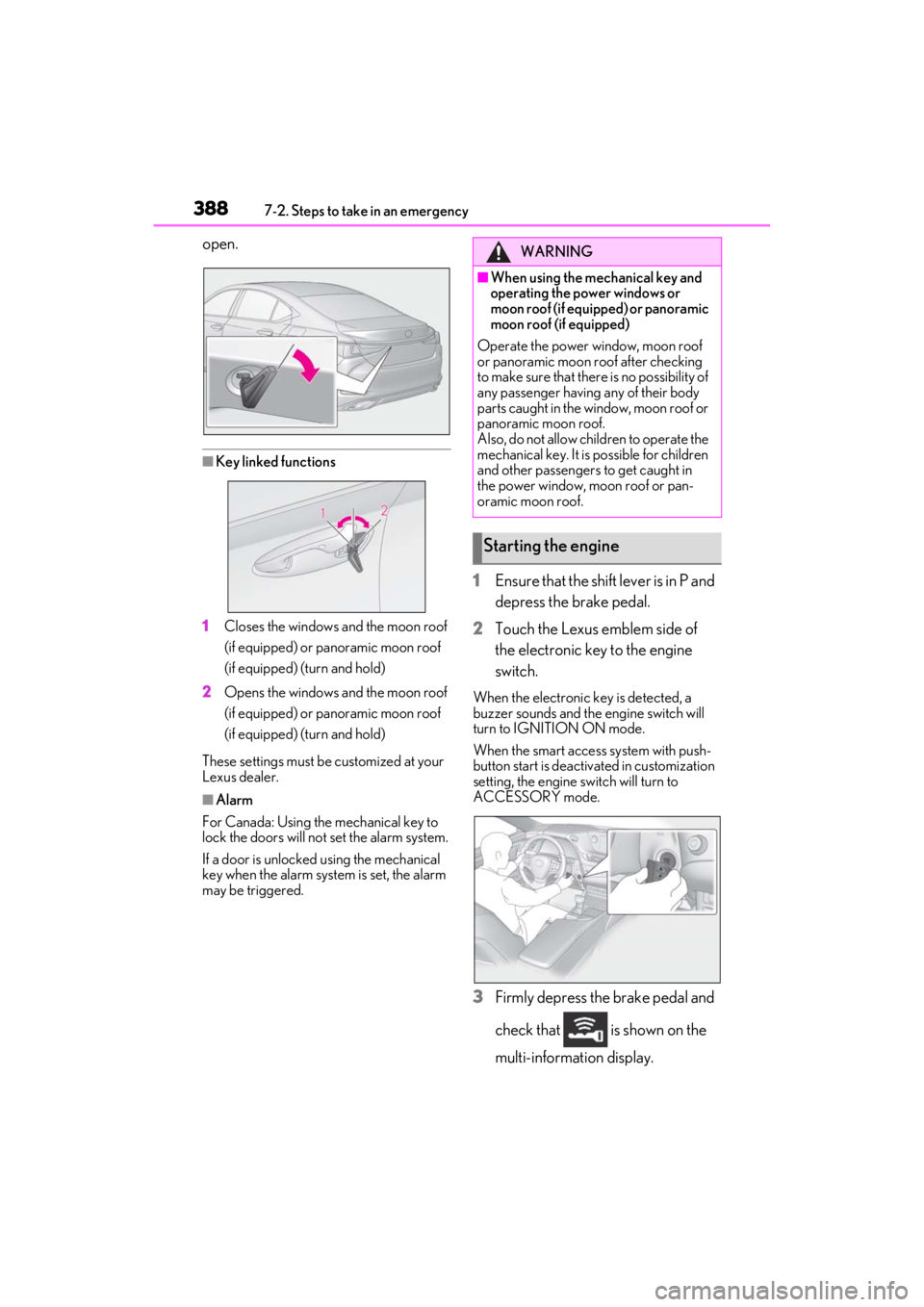
■Key linked functions
1 Closes the windows and the moon roof
(if equipped) or panoramic moon roof
(if equipped) (turn and hold)
2 Opens the windows and the moon roof
(if equipped) or panoramic moon roof
(if equipped) (turn and hold)
These settings must be customized at your
Lexus dealer.
■Alarm
For Canada: Using the mechanical key to
lock the doors will not set the alarm system.
If a door is unlocked using the mechanical
key when the alarm system is set, the alarm
may be triggered.
1 Ensure that the shift lever is in P and
depress the brake pedal.
2 Touch the Lexus emblem side of
the electronic key to the engine
switch.
When the electronic key is detected, a
buzzer sounds and the engine switch will
turn to IGNITION ON mode.
When the smart access system with push-
button start is deactivated in customization
setting, the engine switch will turn to
ACCESSORY mode.
3Firmly depress the brake pedal and
check that is shown on the
multi-information display.
WARNING
■When using the mechanical key and
operating the power windows or
moon roof (if equipped) or panoramic
moon roof (if equipped)
Operate the power window, moon roof
or panoramic moon roof after checking
to make sure that there is no possibility of
any passenger having any of their body
parts caught in the window, moon roof or
panoramic moon roof.
Also, do not allow children to operate the
mechanical key. It is possible for children
and other passengers to get caught in
the power window, moon roof or pan-
oramic moon roof.
Starting the engine
Page 392 of 464
3927-2. Steps to take in an emergency
• If the 20 hour rate capacity is low, even if the time period where the vehicle is not
used is a short time, the battery may dis-
charge and engine may not be able to
start.
For details, consult your Lexus dealer.
WARNING
■When removing the battery termi-
nals
Always remove the negative (-) terminal
first. If the positive (+) terminal contacts
any metal in the surrounding area when
the positive (+) terminal is removed, a
spark may occur, leading to a fire in addi-
tion to electrical shocks and death or
serious injury.
■Avoiding battery fires or explosions
Observe the following precautions to
prevent accidentally igniting the flamma-
ble gas that may be emitted from the bat-
tery:
●Make sure each jumper cable is con-
nected to the correct terminal and that
it is not unintentiona lly in contact with
any other than the intended terminal.
●Do not allow the other end of the
jumper cable connected to the “+” ter-
minal to come into contact with any
other parts or metal surfaces in the
area, such as brackets or unpainted
metal.
●Do not allow the + and - clamps of the
jumper cables to come into contact
with each other.
●Do not smoke, use matches, cigarette
lighters or allow open flame near the
battery.
■Battery precautions
The battery contains poisonous and cor-
rosive acidic electrolyte, while related
parts contain lead and lead compounds.
Observe the following precautions when
handling the battery:
●When working with the battery, always
wear safety glasses and take care not
to allow any battery fluids (acid) to
come into contact with skin, clothing
or the vehicle body.
●Do not lean over the battery.
●In the event that battery fluid comes
into contact with the skin or eyes,
immediately wash the affected area
with water and seek medical attention.
Place a wet sponge or cloth over the
affected area until medical attention
can be received.
●Always wash your hands after han-
dling the battery support, terminals,
and other battery-related parts.
●Do not allow children near the battery.
■When replacing the battery
When the vent plug and indicator are
close to the hold down clamp, the battery
fluid (sulfuric acid) may leak.
NOTICE
■When handling jumper cables
When connecting the jumper cables,
ensure that they do not become entan-
gled in the cooling fan or engine drive
belt.
Page 394 of 464

3947-2. Steps to take in an emergency
A25A-FKS engineReservoir
“F” line
“L” line
Coolant inlet cap
5 Add coolant if necessary.
2GR-FKS engine
Water can be used in an emergency if
coolant is unavailable.
A25A-FKS engine
Water can be used in an emergency if
coolant is unavailable.
6Start the engine and turn the air
conditioning system on to check
that the radiator cooling fan oper-
ates and to check for coolant leaks
from the radiator or hoses.
The fan operates when the air conditioning
system is turned on immediately after a
cold start. Confirm that the fan is operating
by checking the fan sound and air flow. If it
is difficult to check these, turn the air con-
ditioning system on and off repeatedly.
(The fan may not oper ate in freezing tem-
peratures.)
7 If the fan is not operating:
Stop the engine immediately and
contact your Lexus dealer.
If the fan is operating:
Have the vehicle inspected at the
nearest Lexus dealer.
A
B
C
D
WARNING
■When inspecting under the hood of
your vehicle
Observe the following precautions.
Failure to do so may result in serious
injury such as burns.
●If steam is seen coming from under the
hood, do not open the hood until the
steam has subsided. The engine com-
partment may be very hot.
●Keep hands and clothing (especially a
tie, a scarf or a muffler) away from the
fan and belts. Failure to do so may
cause the hands or clothing to be
caught, resulting in serious injury.
●While the engine and radiator are hot,
do not loosen or remove the coolant
inlet cap or coolant reservoir cap.
High temperature steam or coolant
could spray out.
Page 396 of 464

3967-2. Steps to take in an emergency
WARNING
■When attempting to free a stuck vehi-
cle
If you choose to push the vehicle back
and forth to free it, make sure the sur-
rounding area is clear to avoid striking
other vehicles, objects or people. The
vehicle may also lunge forward or lunge
back suddenly as it becomes free. Use
extreme caution.
■When shifting the shift lever
Be careful not to shif t the shift lever with
the accelerator pedal depressed.
This may lead to unexpected rapid accel-
eration of the vehicle that may cause an
accident resulting in death or serious
injury.
NOTICE
■To avoid damaging the transmission
and other components
●Avoid spinning the front wheels and
depressing the accelerator pedal
more than necessary.
●If the vehicle remains stuck even after
these procedures are performed, the
vehicle may require towing to be
freed.
Page 404 of 464
4048-1. Specifications
Your Lexus vehicle is filled with “Toyota Genuine Differential Gear Oil” at the factory. Use
Lexus approved “Toyota Genuine Differential Gear Oil” or an equivalent of matching
quality to satisfy the above specification. Please contact your Lexus dealer for further
details.
Your Lexus vehicle is filled with “Toyota Genuine Differential Gear Oil” at the factory. Use
Lexus approved “Toyota Genuine Differential Gear Oil” or an equivalent of matching
quality to satisfy the above specification. Please contact your Lexus dealer for further
details.
*1: Minimum pedal clearance when depressed with a force of 67.4 lbf (300 N, 30.6 kgf)
while the engine is running.
When performing the brake pedal inspection, also be sure to check that the brake sys-
tem warning light is not illuminated when th e engine is running. (If the brake system
warning light is illuminated, refer to P.361.)
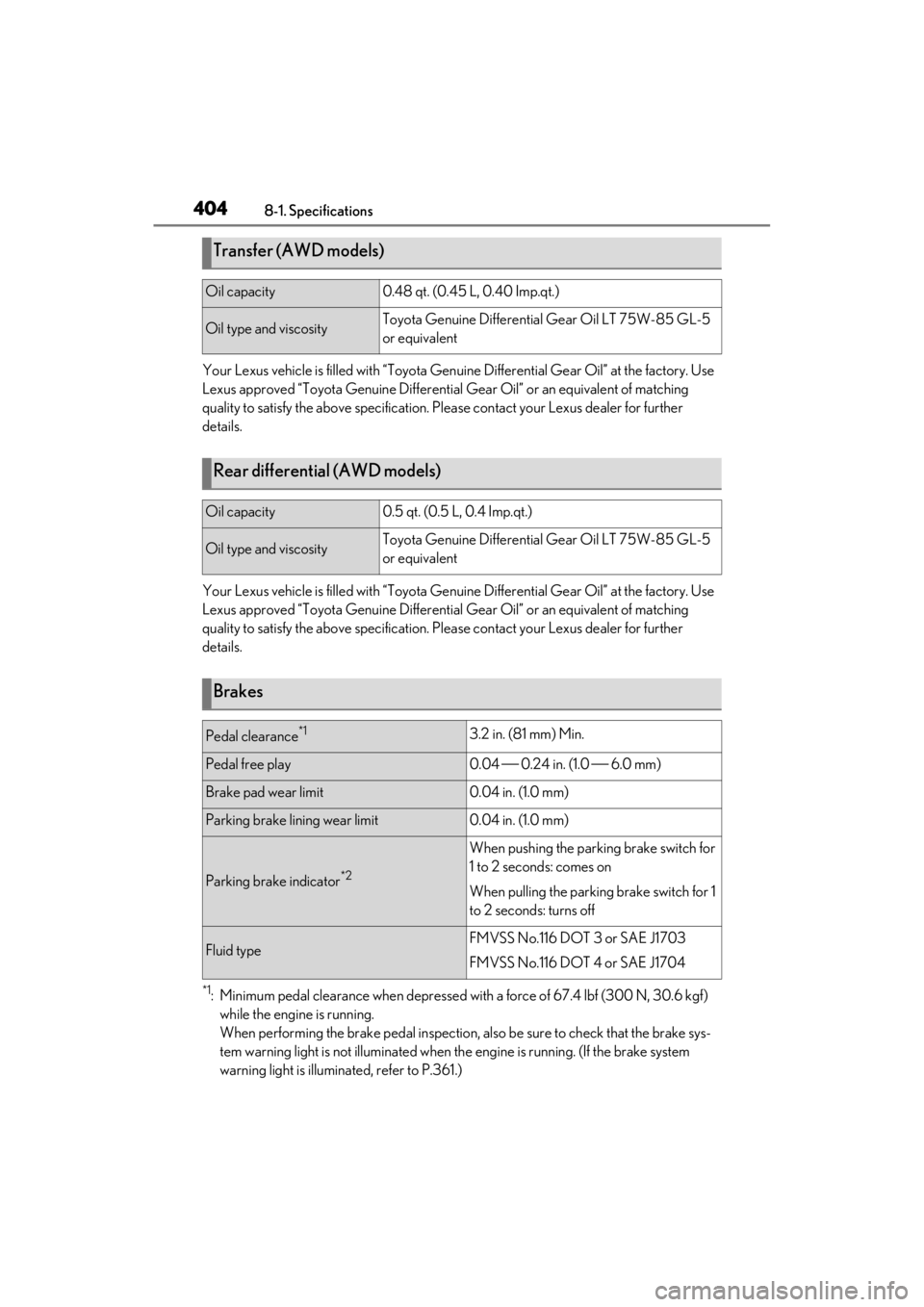
Transfer (AWD models)
Oil capacity0.48 qt. (0.45 L, 0.40 Imp.qt.)
Oil type and viscosityToyota Genuine Differential Gear Oil LT 75W-85 GL-5
or equivalent
Rear differential (AWD models)
Oil capacity0.5 qt. (0.5 L, 0.4 Imp.qt.)
Oil type and viscosityToyota Genuine Differential Gear Oil LT 75W-85 GL-5
or equivalent
Brakes
Pedal clearance*13.2 in. (81 mm) Min.
Pedal free play0.04 0.24 in. (1.0 6.0 mm)
Brake pad wear limit0.04 in. (1.0 mm)
Parking brake lining wear limit0.04 in. (1.0 mm)
Parking brake indicator*2
When pushing the parking brake switch for
1 to 2 seconds: comes on
When pulling the parking brake switch for 1
to 2 seconds: turns off
Fluid typeFMVSS No.116 DOT 3 or SAE J1703
FMVSS No.116 DOT 4 or SAE J1704
Page 405 of 464
4058-1. Specifications
8
Vehicle specifications
*2: Make sure to confirm that the brake system warning light (yellow) does not illuminate. (If
the brake system warning light illuminates, refer to P.365.)
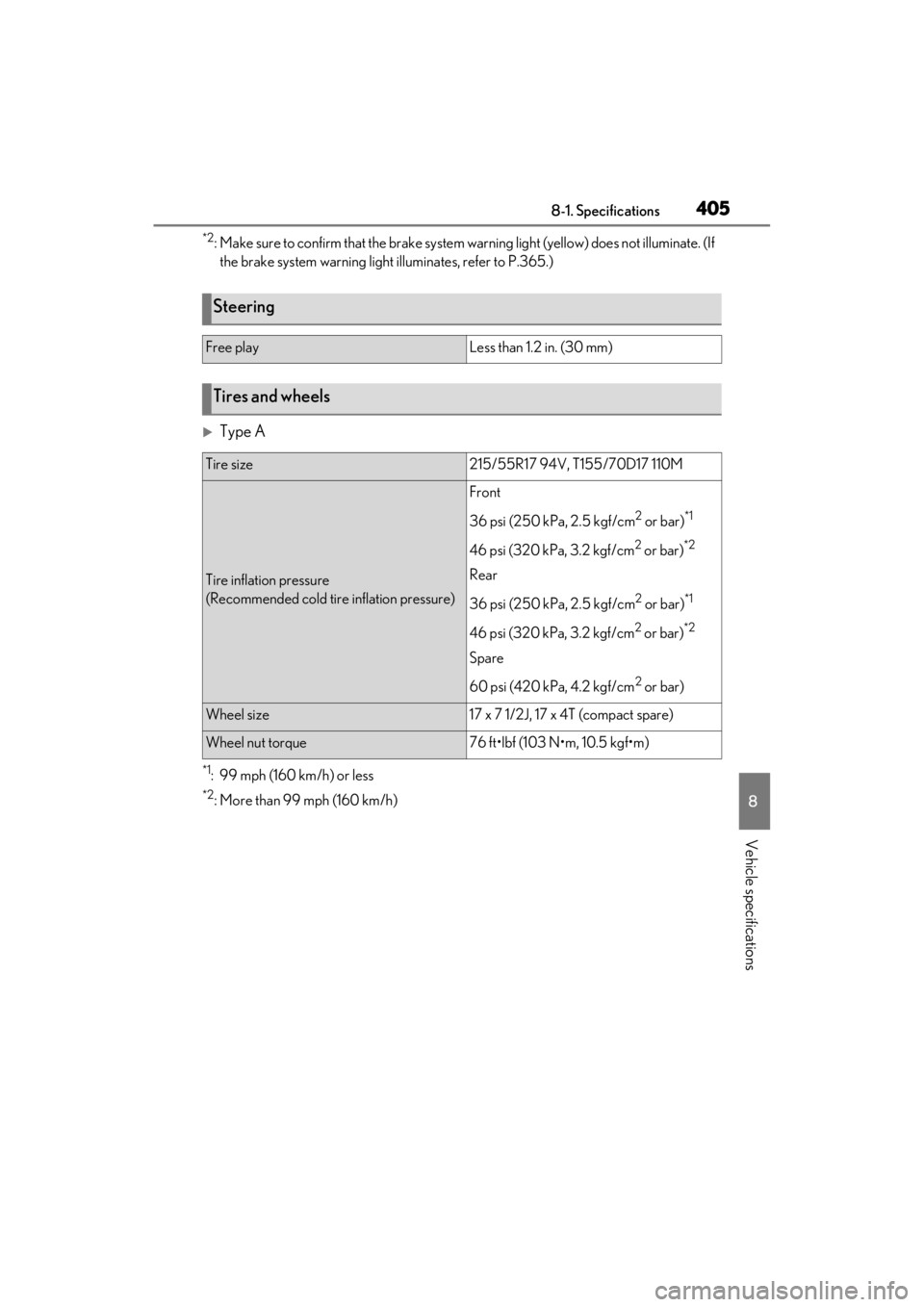
Type A
*1: 99 mph (160 km/h) or less
*2: More than 99 mph (160 km/h)
Steering
Free playLess than 1.2 in. (30 mm)
Tires and wheels
Tire size215/55R17 94V, T155/70D17 110M
Tire inflation pressure
(Recommended cold tire inflation pressure)
Front
36 psi (250 kPa, 2.5 kgf/cm
2 or bar)*1
46 psi (320 kPa, 3.2 kgf/cm2 or bar)*2
Rear
36 psi (250 kPa, 2.5 kgf/cm
2 or bar)*1
46 psi (320 kPa, 3.2 kgf/cm2 or bar)*2
Spare
60 psi (420 kPa, 4.2 kgf/cm
2 or bar)
Wheel size17 x 7 1/2J, 17 x 4T (compact spare)
Wheel nut torque76 ft•lbf (103 N•m, 10.5 kgf•m)
Page 414 of 464
4148-1. Specifications
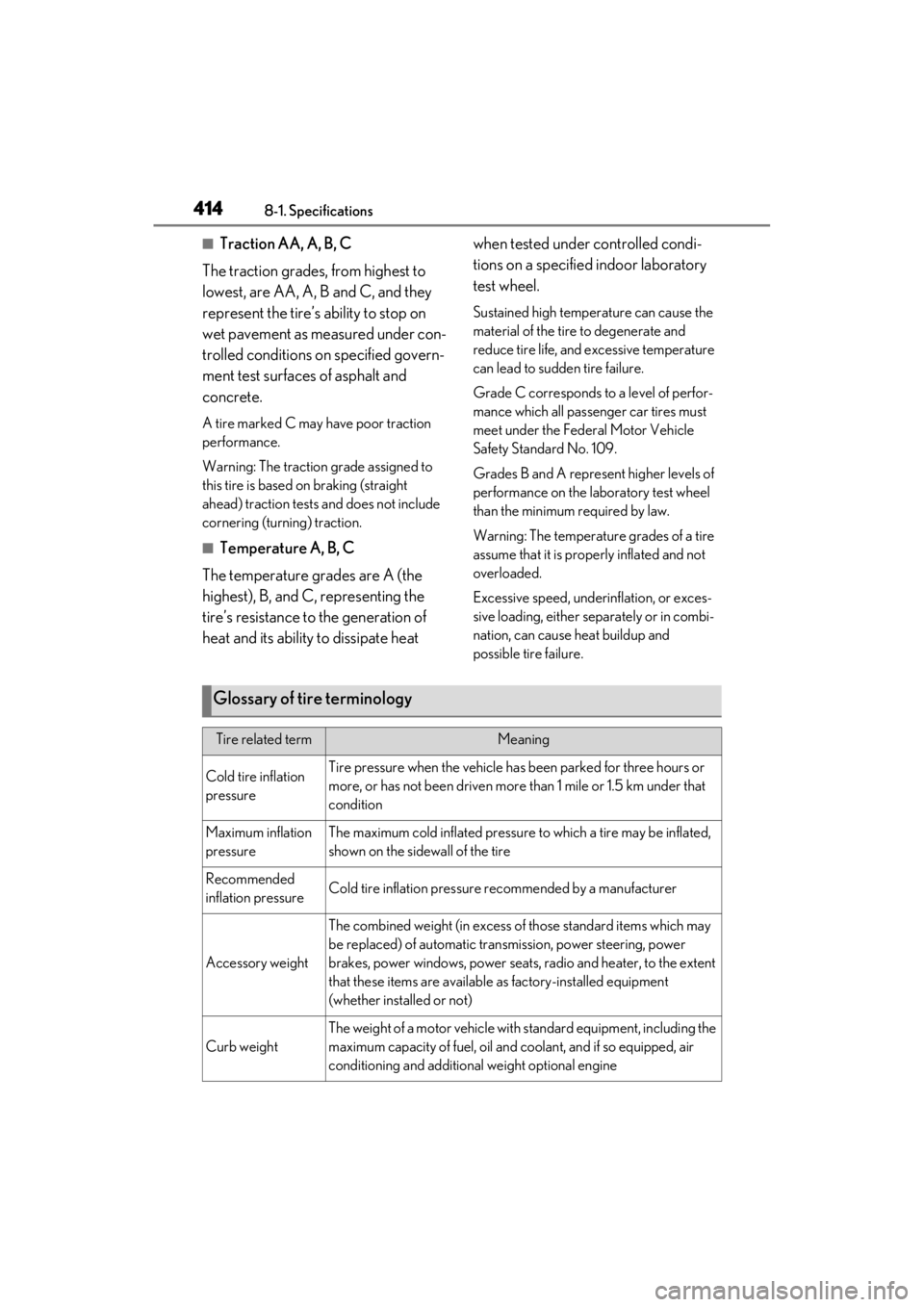
■Traction AA, A, B, C
The traction grades, from highest to
lowest, are AA, A, B and C, and they
represent the tire’s ability to stop on
wet pavement as measured under con-
trolled conditions on specified govern-
ment test surfaces of asphalt and
concrete.
A tire marked C may have poor traction
performance.
Warning: The traction grade assigned to
this tire is based on braking (straight
ahead) traction tests and does not include
cornering (turning) traction.
■Temperature A, B, C
The temperature grades are A (the
highest), B, and C, representing the
tire’s resistance to the generation of
heat and its ability to dissipate heat when tested under controlled condi-
tions on a specified indoor laboratory
test wheel.
Sustained high temperature can cause the
material of the tire to degenerate and
reduce tire life, and excessive temperature
can lead to sudd
en tire failure.
Grade C corresponds to a level of perfor-
mance which all passenger car tires must
meet under the Fede ral Motor Vehicle
Safety Standard No. 109.
Grades B and A represent higher levels of
performance on the laboratory test wheel
than the minimum required by law.
Warning: The temperature grades of a tire
assume that it is properly inflated and not
overloaded.
Excessive speed, unde rinflation, or exces-
sive loading, either separately or in combi-
nation, can cause heat buildup and
possible tire failure.
Glossary of tire terminology
Tire related termMeaning
Cold tire inflation
pressureTire pressure when the vehicle has been parked for three hours or
more, or has not been driven more than 1 mile or 1.5 km under that
condition
Maximum inflation
pressureThe maximum cold inflated pressure to which a tire may be inflated,
shown on the sidewall of the tire
Recommended
inflation pressureCold tire inflation pressure recommended by a manufacturer
Accessory weight
The combined weight (in excess of those standard items which may
be replaced) of automatic tran smission, power steering, power
brakes, power windows, power seats, radio and heater, to the extent
that these items are available as factory-installed equipment
(whether installed or not)
Curb weight
The weight of a motor vehicle with standard equipment, including the
maximum capacity of fuel, oil and coolant, and if so equipped, air
conditioning and additional weight optional engine
Page 419 of 464
4198-2. Customization
8
Vehicle specifications
8-2.Customization
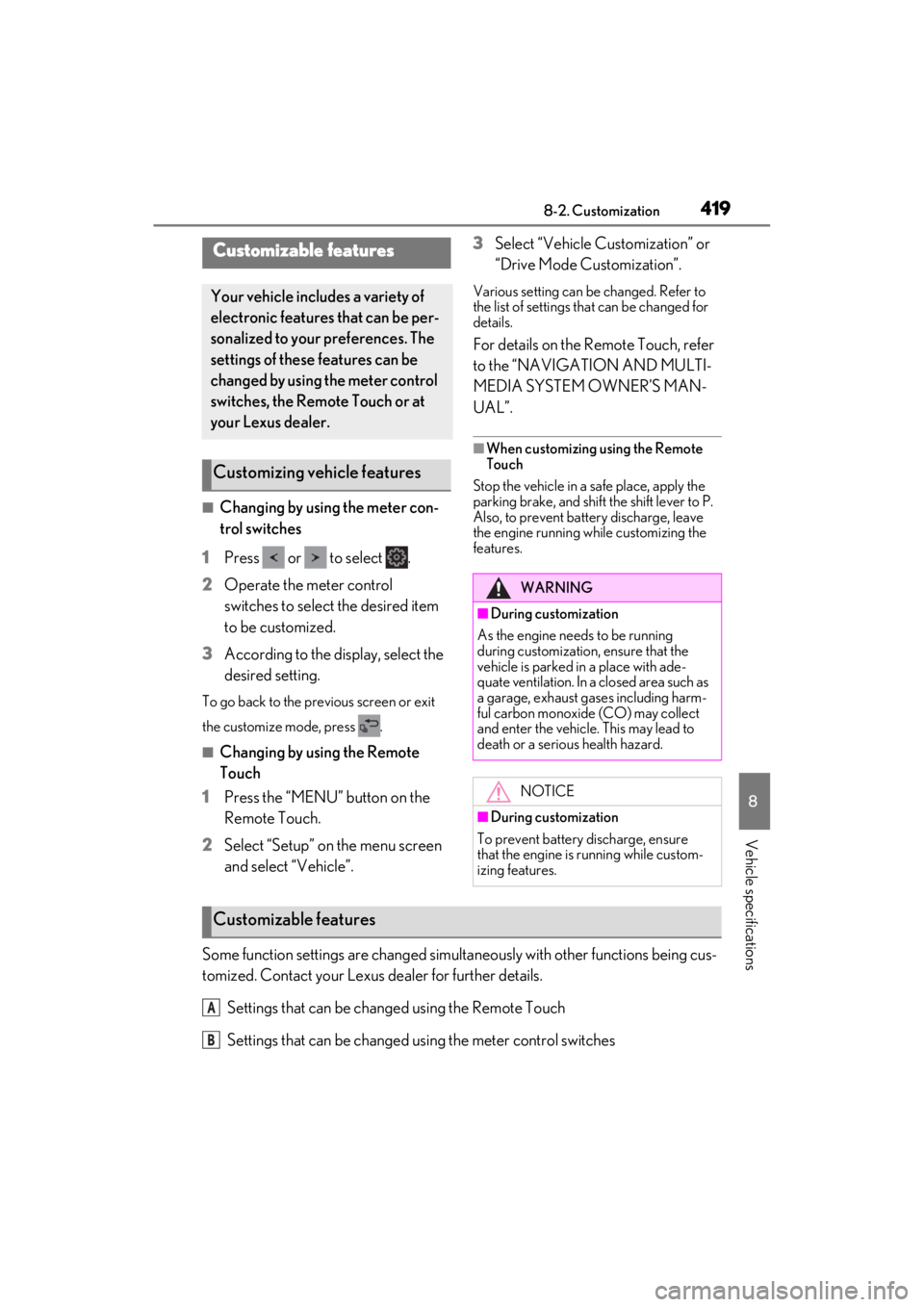
■Changing by using the meter con-
trol switches
1 Press or to select .
2 Operate the meter control
switches to select the desired item
to be customized.
3 According to the display, select the
desired setting.
To go back to the previous screen or exit
the customize mode, press .
■Changing by using the Remote
Touch
1 Press the “MENU” button on the
Remote Touch.
2 Select “Setup” on the menu screen
and select “Vehicle”. 3
Select “Vehicle Cu stomization” or
“Drive Mode Customization”.
Various setting can be changed. Refer to
the list of settings th at can be changed for
details.
For details on the Remote Touch, refer
to the “NAVIGATION AND MULTI-
MEDIA SYSTEM OWNER’S MAN-
UAL”.
■When customizing using the Remote
Touch
Stop the vehicle in a safe place, apply the
parking brake, and shift the shift lever to P.
Also, to prevent battery discharge, leave
the engine running while customizing the
features.
Some function settings are changed simultaneously with other functions being cus-
tomized. Contact your Lexus dealer for further details.
Settings that can be changed using the Remote Touch
Settings that can be changed using the meter control switches
Customizable features
Your vehicle includes a variety of
electronic features that can be per-
sonalized to your preferences. The
settings of these features can be
changed by using the meter control
switches, the Remote Touch or at
your Lexus dealer.
Customizing vehicle features
WARNING
■During customization
As the engine needs to be running
during customization, ensure that the
vehicle is parked in a place with ade-
quate ventilation. In a closed area such as
a garage, exhaust gases including harm-
ful carbon monoxide (CO) may collect
and enter the vehicle. This may lead to
death or a serious health hazard.
NOTICE
■During customization
To prevent battery discharge, ensure
that the engine is running while custom-
izing features.
Customizable features
A
B
Page 422 of 464
4228-2. Customization
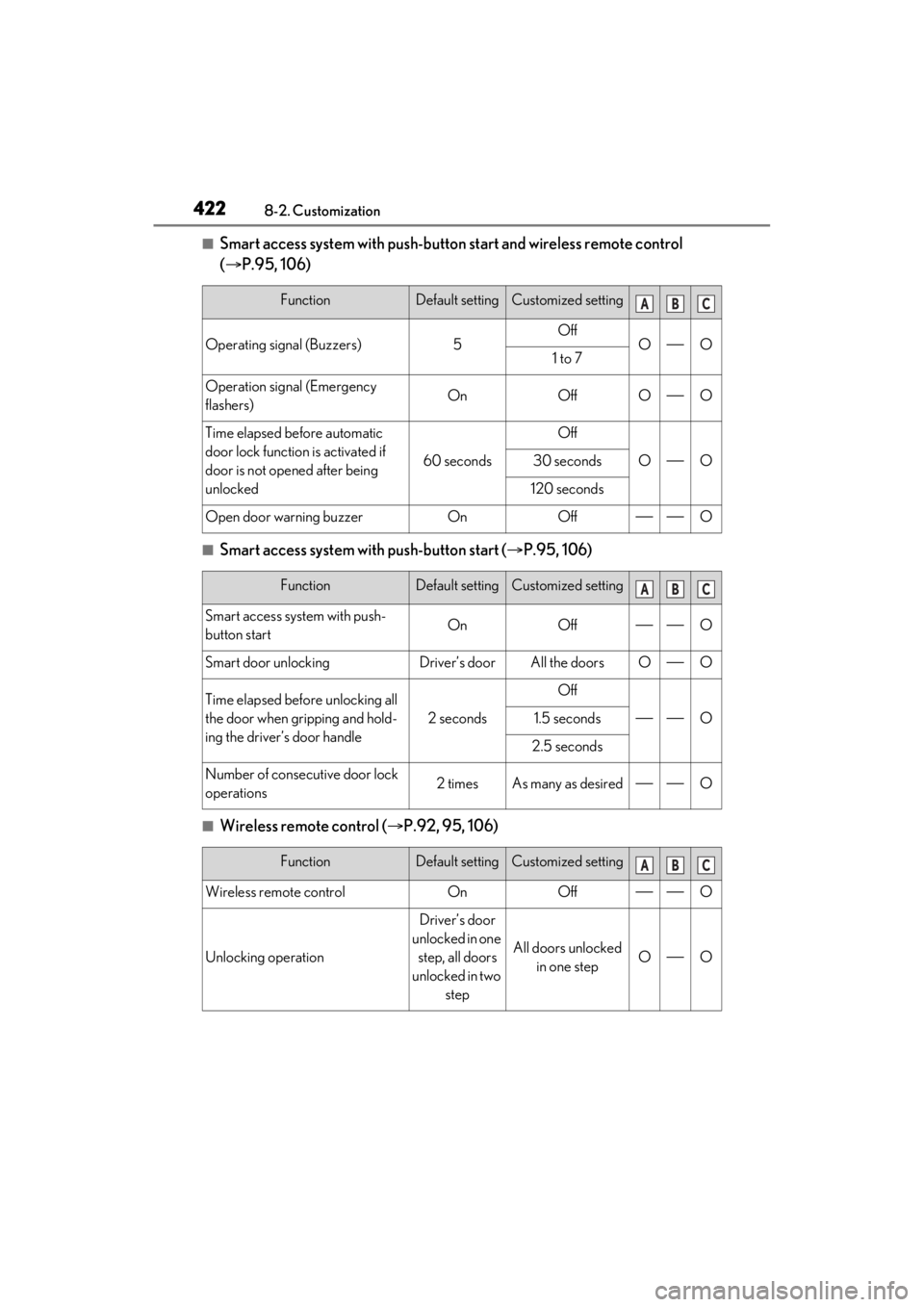
■Smart access system with push-button start and wireless remote control
( P.95, 106)
■Smart access system with push-button start ( P.95, 106)
■Wireless remote control ( P.92, 95, 106)
FunctionDefault settingCustomized setting
Operating signal (Buzzers)5OffOO1 to 7
Operation signal (Emergency
flashers)OnOffOO
Time elapsed before automatic
door lock function is activated if
door is not open ed after being
unlocked
60 seconds
Off
OO30 seconds
120 seconds
Open door warning buzzerOnOffO
FunctionDefault settingCustomized setting
Smart access system with push-
button startOnOffO
Smart door unlockingDriver’s doorAll the doorsOO
Time elapsed before unlocking all
the door when gripping and hold-
ing the driver’s door handle
2 seconds
Off
O1.5 seconds
2.5 seconds
Number of consecutive door lock
operations2 timesAs many as desiredO
FunctionDefault settingCustomized setting
Wireless remote controlOnOffO
Unlocking operation
Driver’s door
unlocked in one step, all doors
unlocked in two step
All doors unlocked in one stepOO
ABC
ABC
ABC
Page 425 of 464
4258-2. Customization
8
Vehicle specifications
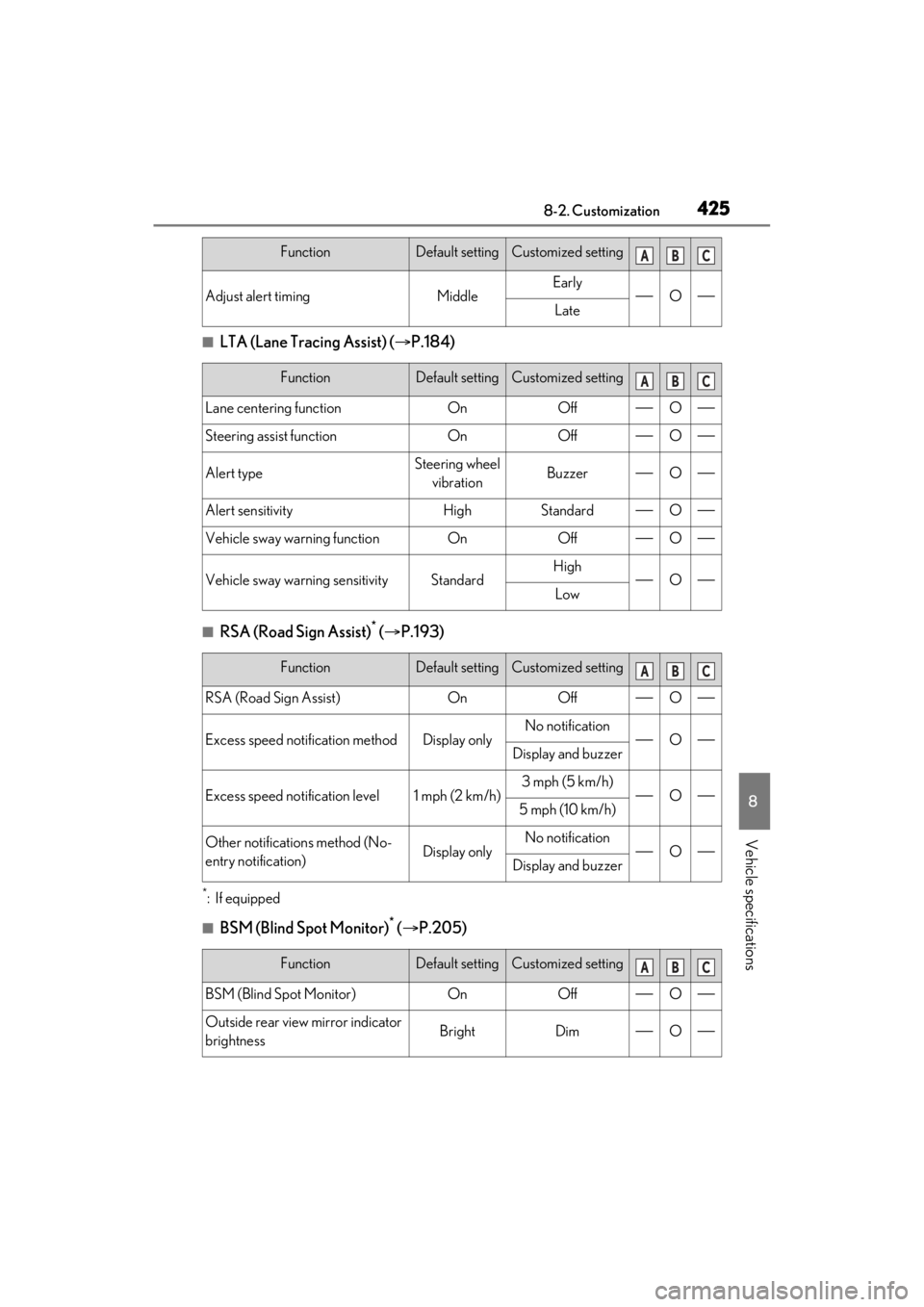
■LTA (Lane Tracing Assist) (P.184)
■RSA (Road Sign Assist)* ( P.193)
*:If equipped
■BSM (Blind Spot Monitor)* ( P.205)
Adjust alert timingMiddleEarlyOLate
FunctionDefault settingCustomized setting
Lane centering functionOnOffO
Steering assist functionOnOffO
Alert typeSteering wheel
vibrationBuzzerO
Alert sensitivityHighStandardO
Vehicle sway warning functionOnOffO
Vehicle sway warning sensitivityStandardHighOLow
FunctionDefault settingCustomized setting
RSA (Road Sign Assist)OnOffO
Excess speed noti fication methodDisplay onlyNo notificationODisplay and buzzer
Excess speed notification level1 mph (2 km/h)3 mph (5 km/h)O5 mph (10 km/h)
Other notifications method (No-
entry notification)Display onlyNo notificationODisplay and buzzer
FunctionDefault settingCustomized setting
BSM (Blind Spot Monitor)OnOffO
Outside rear view mirror indicator
brightnessBrightDimO
FunctionDefault settingCustomized settingABC
ABC
ABC
ABC