mirror LEXUS ES350 2021 Owner's Manual
[x] Cancel search | Manufacturer: LEXUS, Model Year: 2021, Model line: ES350, Model: LEXUS ES350 2021Pages: 464, PDF Size: 9.61 MB
Page 208 of 464
2084-5. Using the driving support systems
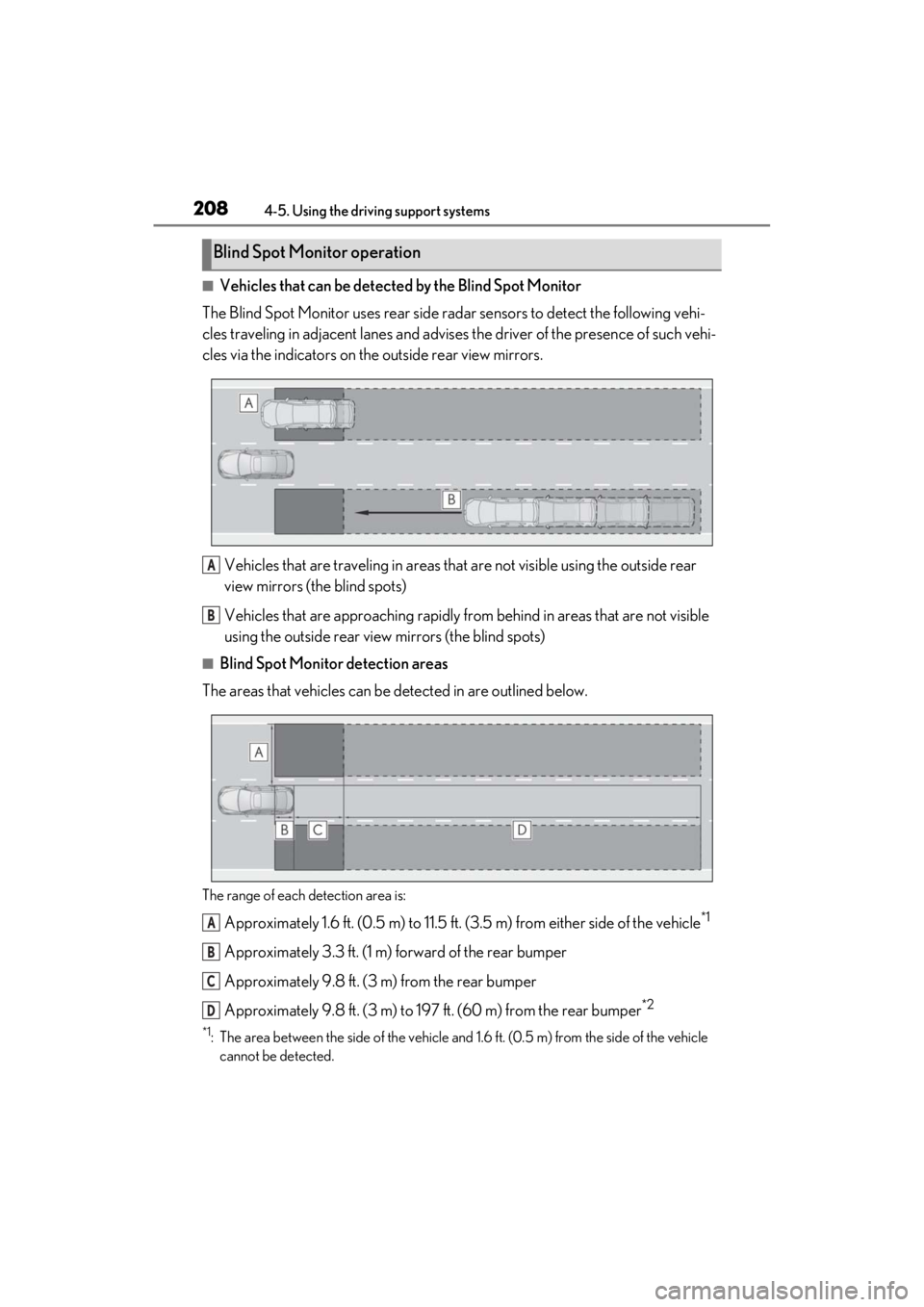
■Vehicles that can be detected by the Blind Spot Monitor
The Blind Spot Monitor uses rear side radar sensors to detect the following vehi-
cles traveling in adjacent lanes and advises the driver of the presence of such vehi-
cles via the indicators on th e outside rear view mirrors.
Vehicles that are traveling in areas that are not visible using the outside rear
view mirrors (the blind spots)
Vehicles that are approaching rapidly from behind in areas that are not visible
using the outside rear view mirrors (the blind spots)
■Blind Spot Monitor detection areas
The areas that vehicles can be detected in are outlined below.
The range of each detection area is:
Approximately 1.6 ft. (0.5 m) to 11.5 ft. (3.5 m) from either side of the vehicle*1
Approximately 3.3 ft. (1 m) forward of the rear bumper
Approximately 9.8 ft. (3 m) from the rear bumper
Approximately 9.8 ft. (3 m) to 19 7 ft. (60 m) from the rear bumper
*2
*1: The area between the side of the vehicle and 1.6 ft. (0.5 m) from the side of the vehicle
cannot be detected.
Blind Spot Monitor operation
A
B
A
B
C
D
Page 209 of 464

2094-5. Using the driving support systems
4
Driving
*2: The greater the difference in speed between your vehicle and the detected vehicle is, the farther away the vehicle will be detected, causing the outside rear view mirror indi-
cator to illuminate or flash.
■The Blind Spot Monitor is operational
when
The Blind Spot Monitor is operational when
all of the following conditions are met:
●The Blind Spot Monitor is on.
●The shift lever is in a position other than R.
●The vehicle speed is greater than
approximately 10 mph (16 km/h).
■The Blind Spot Monitor will detect a
vehicle when
The Blind Spot Monitor will detect a vehicle
present in the detection area in the follow-
ing situations:
●A vehicle in an adj acent lane overtakes
your vehicle.
●You overtake a vehicle in adjacent lane
slowly.
●Another vehicle enters the detection
area when it changes lanes.
■Conditions under wh ich the Blind Spot
Monitor will not detect a vehicle
The Blind Spot Monitor is not designed to
detect the following types of vehicles
and/or objects:
●Small motorcycles, bicycles, pedestrians,
etc.*
●Vehicles traveling in the opposite direc-
tion
●Guardrails, walls, signs, parked vehicles
and similar stationary objects*
●Following vehicles th at are in the same
lane*
●Vehicles traveling 2 lanes away from
your vehicle*
●Vehicles which are being overtaken rap-
idly by your vehicle.*
*
: Depending on the conditions, detection of a vehicle and/or object may occur.
■Conditions under which the Blind Spot
Monitor may not function correctly
●The Blind Spot Monitor may not detect
vehicles correctly in the following situa-
tions:
• When the sensor is misaligned due to a
strong impact to the sensor or its sur-
rounding area
• When mud, snow, ice, a sticker, etc. is
covering the sensor or surrounding area
on the rear bumper
• When driving on a road surface that is
wet with standing water during bad
weather, such as heavy rain, snow, or fog
• When multiple vehicles are approaching
with only a small gap between each vehi-
cle
• When the distance between your vehicle
and a following vehicle is short
• When there is a significant difference in speed between your vehicle and the
vehicle that enters the detection area
• When the difference in speed between your vehicle and another vehicle is
changing
• When a vehicle enters a detection area traveling at about the same speed as your
vehicle
• As your vehicle starts from a stop, a vehi- cle remains in the detection area
• When driving up and down consecutive steep inclines, such as hills, dips in the
road, etc.
• When driving on roads with sharp bends, consecutive curves, or uneven surfaces
• When vehicle lanes are wide, or when
driving on the edge of a lane, and the
vehicle in an adjacent lane is far away
from your vehicle
• When an accessory (such as a bicycle carrier) or towing eyelet is installed to the
rear of the vehicle
• When there is a significant difference in
height between your vehicle and the
vehicle that enters the detection area
• Immediately after the Blind Spot Monitor
is turned on
●Instances of the Blind Spot Monitor
unnecessarily detecting a vehicle and/or
Page 220 of 464
2204-5. Using the driving support systems
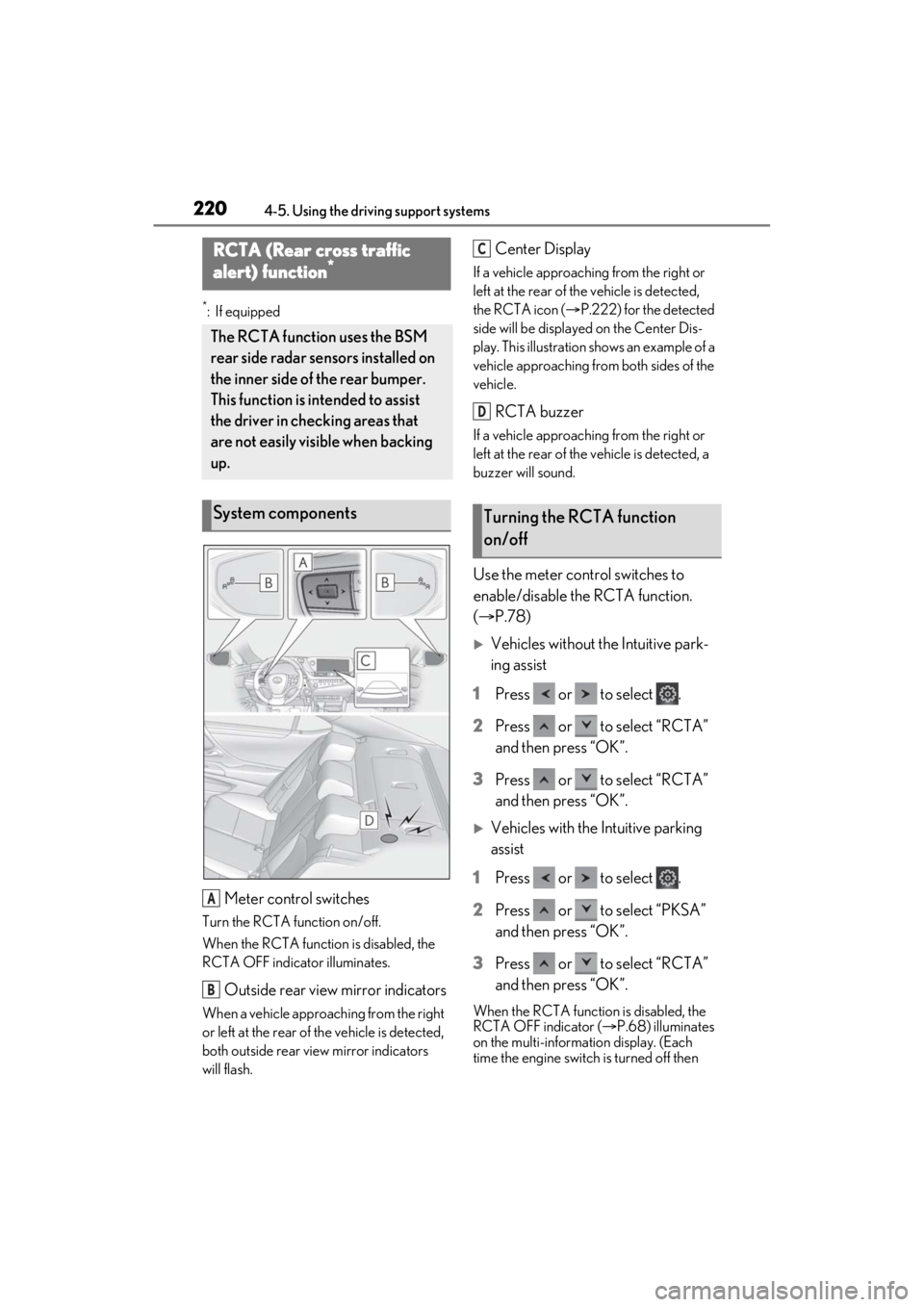
*:If equipped
Meter control switches
Turn the RCTA function on/off.
When the RCTA function is disabled, the
RCTA OFF indicator illuminates.
Outside rear view mirror indicators
When a vehicle approaching from the right
or left at the rear of the vehicle is detected,
both outside rear view mirror indicators
will flash.
Center Display
If a vehicle approaching from the right or
left at the rear of the vehicle is detected,
the RCTA icon ( P.222) for the detected
side will be displayed on the Center Dis-
play. This illustration shows an example of a
vehicle approaching from both sides of the
vehicle.
RCTA buzzer
If a vehicle approaching from the right or
left at the rear of th e vehicle is detected, a
buzzer will sound.
Use the meter control switches to
enable/disable the RCTA function.
( P.78)
Vehicles without the Intuitive park-
ing assist
1 Press or to select .
2 Press or to select “RCTA”
and then press “OK”.
3 Press or to select “RCTA”
and then press “OK”.
Vehicles with the Intuitive parking
assist
1 Press or to select .
2 Press or to select “PKSA”
and then press “OK”.
3 Press or to select “RCTA”
and then press “OK”.
When the RCTA function is disabled, the
RCTA OFF indicator ( P.68) illuminates
on the multi-informat ion display. (Each
time the engine switch is turned off then
RCTA (Rear cross traffic
alert) function*
The RCTA function uses the BSM
rear side radar sensors installed on
the inner side of the rear bumper.
This function is intended to assist
the driver in checking areas that
are not easily visible when backing
up.
System components
A
B
Turning the RCTA function
on/off
C
D
Page 221 of 464
2214-5. Using the driving support systems
4
Driving
changed to IGNITION ON mode, the
RCTA function will be enabled automati-
cally.)■Outside rear view mirror indicator visi-
bility
In strong sunlight, the outside rear view mir-
ror indicator may be difficult to see.
■Hearing the RCTA buzzer
The RCTA buzzer may be difficult to hear
over loud noises, such as if the audio system
volume is high.
■When “Rear Cross Traffic Alert
Unavailable” is shown on the multi-
information display
Ice, snow, mud, etc., may be attached to the
rear bumper around the sensors.
( P.207) Remove the ice, snow, mud, etc.,
attached to the rear bumper around the
sensors to return the function to normal.
Additionally, the sensors may not operate
normally when driving in extremely hot or
cold environments.
■Rear side radar sensors
P.207
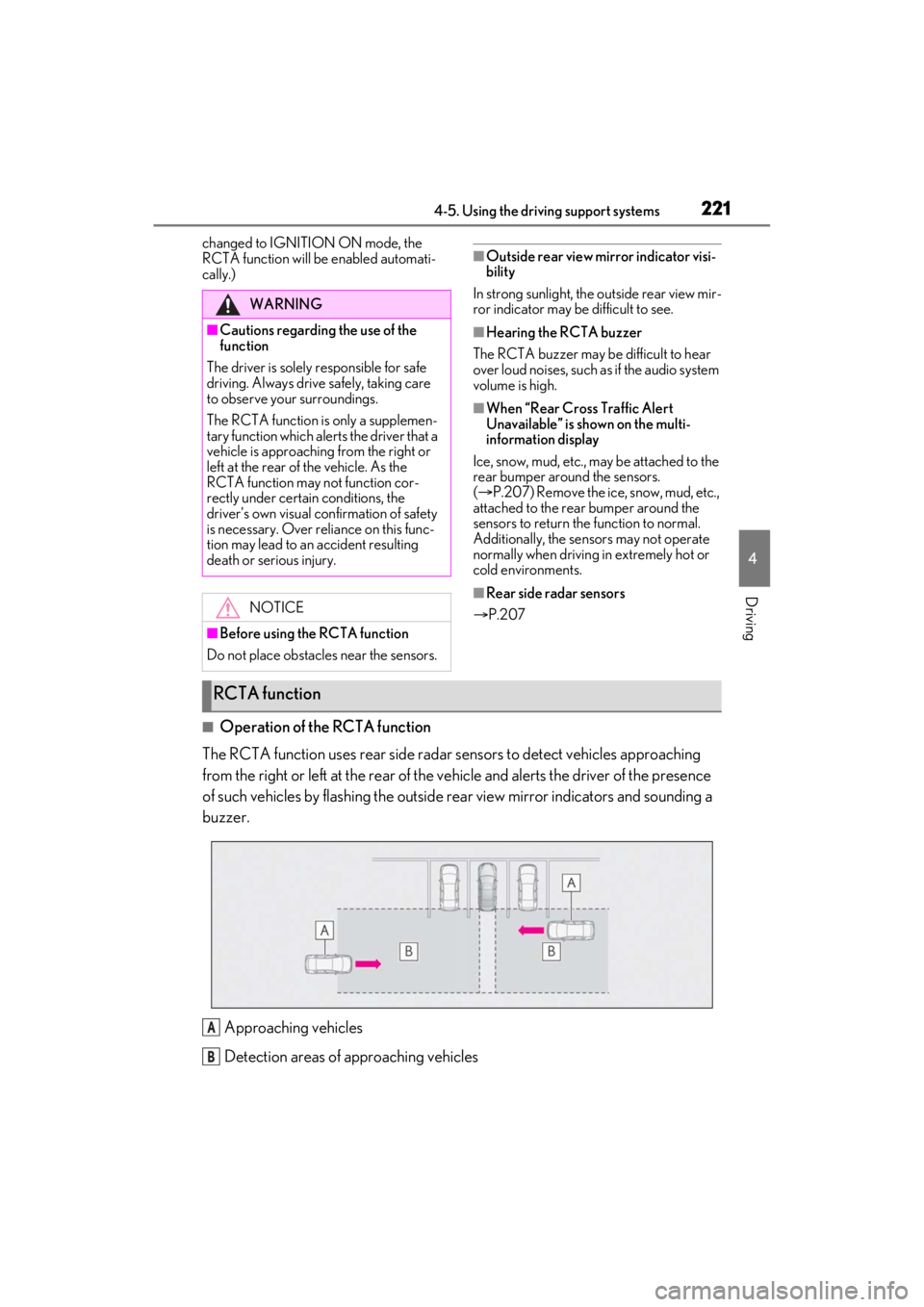
■Operation of the RCTA function
The RCTA function uses rear side radar sensors to detect vehicles approaching
from the right or left at the rear of the vehicle and alerts the driver of the presence
of such vehicles by flashing the outside rear view mirror indi cators and sounding a
buzzer.
Approaching vehicles
Detection areas of approaching vehicles
WARNING
■Cautions regarding the use of the
function
The driver is solely responsible for safe
driving. Always driv e safely, taking care
to observe your surroundings.
The RCTA function is only a supplemen-
tary function which alerts the driver that a
vehicle is approaching from the right or
left at the rear of the vehicle. As the
RCTA function may not function cor-
rectly under certain conditions, the
driver’s own visual confirmation of safety
is necessary. Over reli ance on this func-
tion may lead to an accident resulting
death or serious injury.
NOTICE
■Before using the RCTA function
Do not place obstacles near the sensors.
RCTA function
A
B
Page 263 of 464
2635-3. Using the air conditioning system
5
Interior features
5-3.Using the air conditioning system
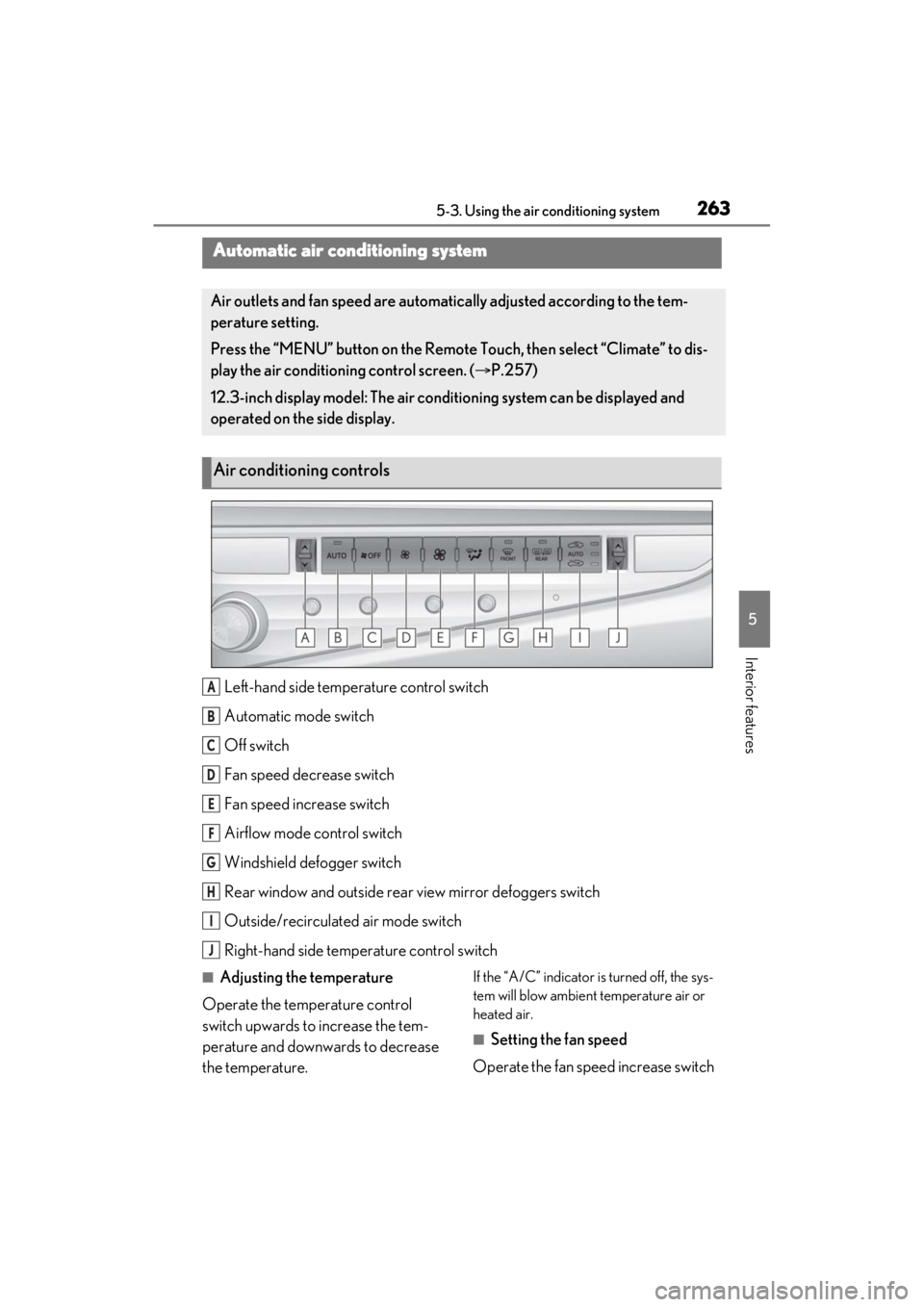
Left-hand side temperature control switch
Automatic mode switch
Off switch
Fan speed decrease switch
Fan speed increase switch
Airflow mode control switch
Windshield defogger switch
Rear window and outside rear view mirror defoggers switch
Outside/recirculated air mode switch
Right-hand side temp erature control switch
■Adjusting the temperature
Operate the temperature control
switch upwards to increase the tem-
perature and downwards to decrease
the temperature.If the “A/C” indicator is turned off, the sys-
tem will blow ambient temperature air or
heated air.
■Setting the fan speed
Operate the fan speed increase switch
Automatic air conditioning system
Air outlets and fan speed are automati cally adjusted according to the tem-
perature setting.
Press the “MENU” button on the Remote Touch, then select “Climate” to dis-
play the air conditioning control screen. ( P.257)
12.3-inch display model: The air condit ioning system can be displayed and
operated on the side display.
Air conditioning controls
A
B
C
D
E
F
G
H
I
J
Page 264 of 464
2645-3. Using the air conditioning system
to increase the fan speed and the fan
speed decrease switch to decrease the
fan speed.
Press the off switch to turn the fan off.
■Changing the air flow mode
Press the airflow mode control switch.
The mode changes as follows each
time the switch is pressed. ( P.266)
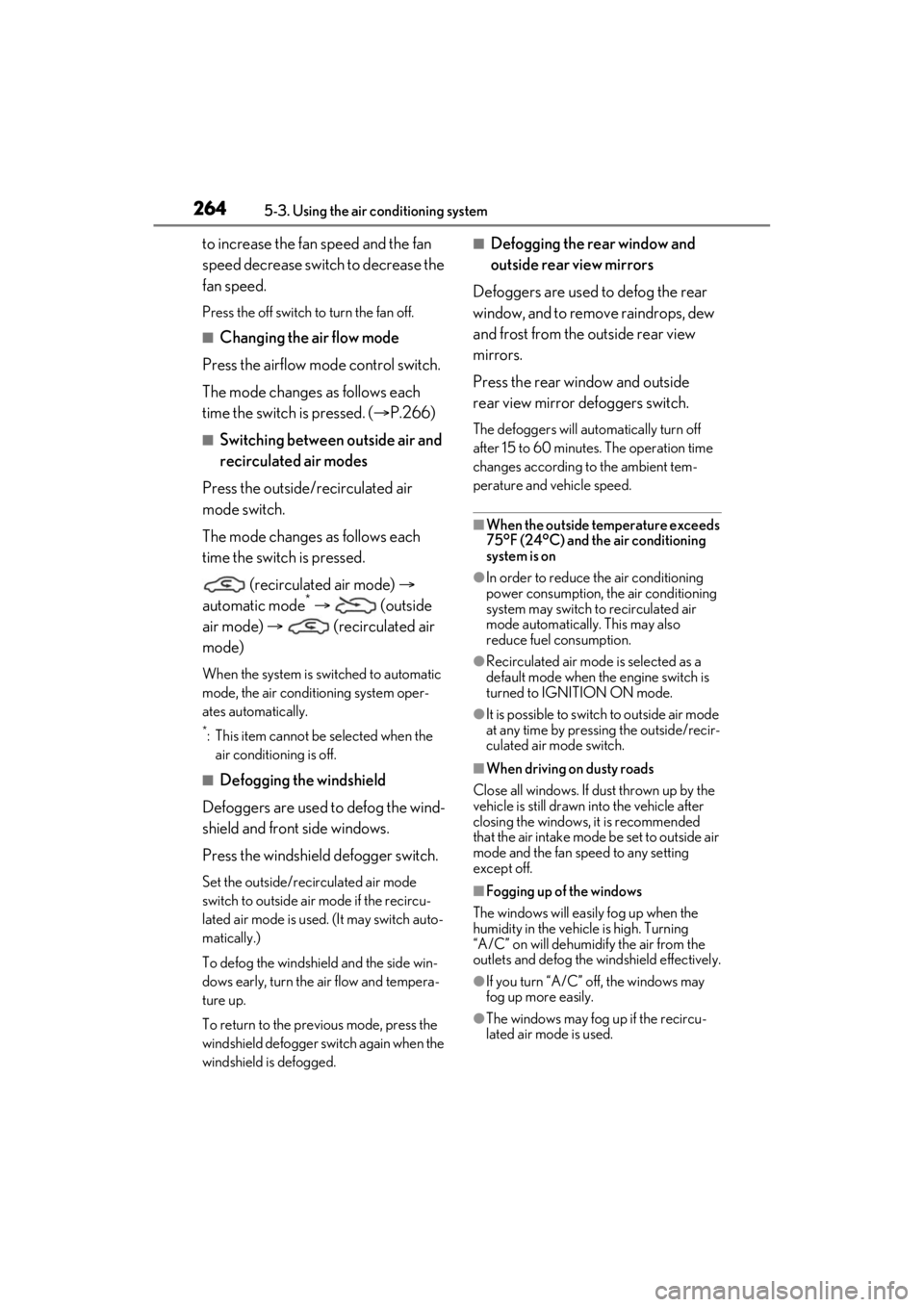
■Switching between outside air and
recirculated air modes
Press the outside/recirculated air
mode switch.
The mode changes as follows each
time the switch is pressed. (recirculated air mode)
automatic mode
* (outside
air mode) (recirculated air
mode)
When the system is switched to automatic
mode, the air conditioning system oper-
ates automatically.
*: This item cannot be selected when the air conditioning is off.
■Defogging the windshield
Defoggers are used to defog the wind-
shield and front side windows.
Press the windshield defogger switch.
Set the outside/reci rculated air mode
switch to outside air mode if the recircu-
lated air mode is used. (It may switch auto-
matically.)
To defog the windshield and the side win-
dows early, turn the air flow and tempera-
ture up.
To return to the previous mode, press the
windshield defogger switch again when the
windshield is defogged.
■Defogging the rear window and
outside rear view mirrors
Defoggers are used to defog the rear
window, and to remove raindrops, dew
and frost from the outside rear view
mirrors.
Press the rear wi ndow and outside
rear view mirror defoggers switch.
The defoggers will automatically turn off
after 15 to 60 minutes. The operation time
changes according to the ambient tem-
perature and vehicle speed.
■When the outside temperature exceeds
75°F (24°C) and the air conditioning
system is on
●In order to reduce the air conditioning
power consumption, the air conditioning
system may switch to recirculated air
mode automatically. This may also
reduce fuel consumption.
●Recirculated air mode is selected as a
default mode when the engine switch is
turned to IGNITION ON mode.
●It is possible to switch to outside air mode
at any time by pressing the outside/recir-
culated air mode switch.
■When driving on dusty roads
Close all windows. If dust thrown up by the
vehicle is still drawn into the vehicle after
closing the windows, it is recommended
that the air intake mode be set to outside air
mode and the fan speed to any setting
except off.
■Fogging up of the windows
The windows will easily fog up when the
humidity in the vehicle is high. Turning
“A/C” on will dehumidify the air from the
outlets and defog the windshield effectively.
●If you turn “A/C” off, the windows may
fog up more easily.
●The windows may fog up if the recircu-
lated air mode is used.
Page 266 of 464
2665-3. Using the air conditioning system
●The meaning of each symbol on the label
are as follows:
■Customization
Settings (e.g. A/C Auto switch operation)
can be changed.
(Customizable features P.419)
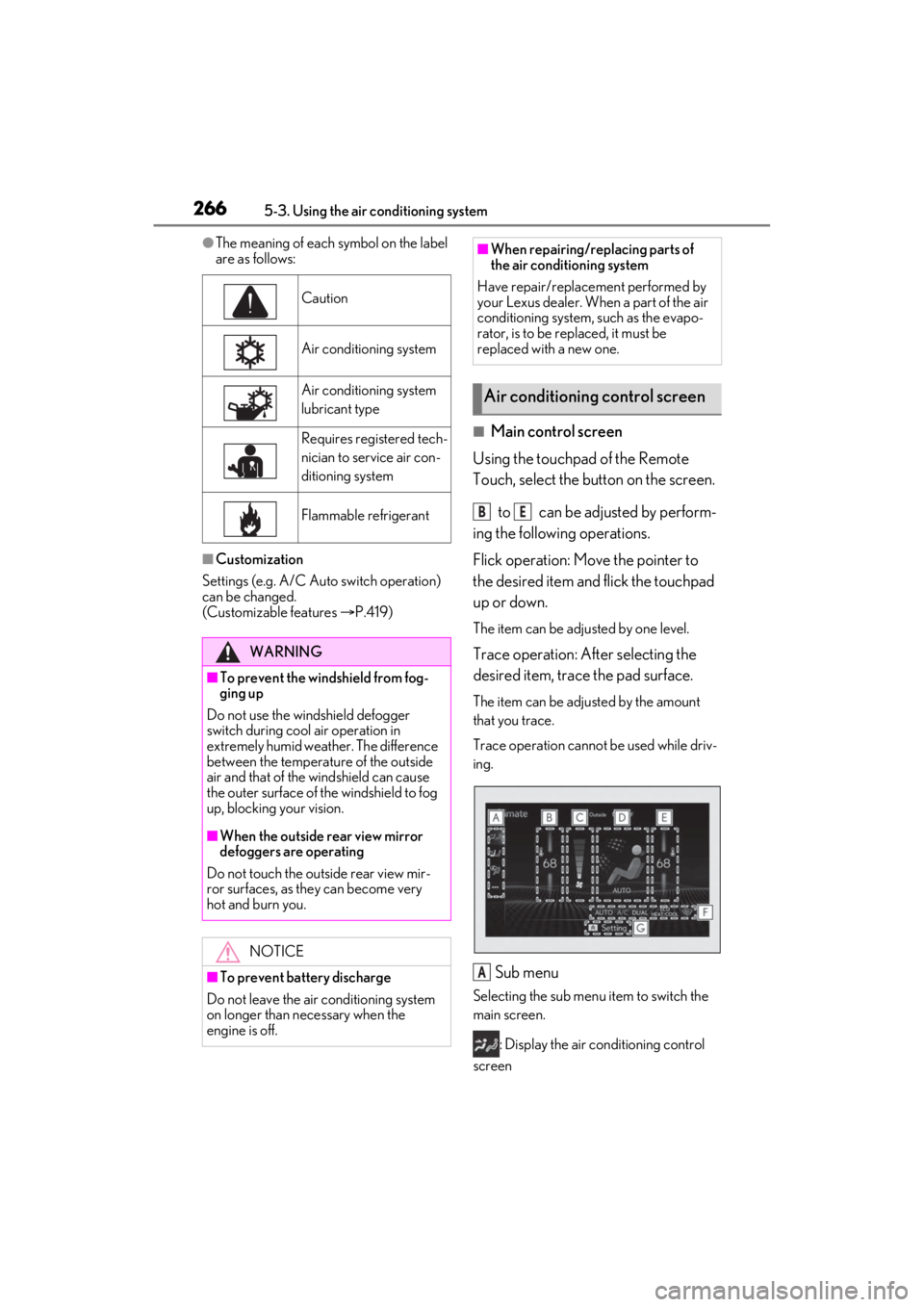
■Main control screen
Using the touchpad of the Remote
Touch, select the button on the screen.
to can be adjusted by perform-
ing the following operations.
Flick operation: Move the pointer to
the desired item and flick the touchpad
up or down.
The item can be adjusted by one level.
Trace operation: After selecting the
desired item, trace the pad surface.
The item can be adjusted by the amount
that you trace.
Trace operation cannot be used while driv-
ing.
Sub menu
Selecting the sub menu item to switch the
main screen.
: Display the air conditioning control
screen
Caution
Air conditioning system
Air conditioning system
lubricant type
Requires registered tech-
nician to service air con-
ditioning system
Flammable refrigerant
WARNING
■To prevent the windshield from fog-
ging up
Do not use the windshield defogger
switch during cool air operation in
extremely humid weather. The difference
between the temperature of the outside
air and that of the windshield can cause
the outer surface of the windshield to fog
up, blocking your vision.
■When the outside rear view mirror
defoggers are operating
Do not touch the outside rear view mir-
ror surfaces, as they can become very
hot and burn you.
NOTICE
■To prevent battery discharge
Do not leave the air conditioning system
on longer than necessary when the
engine is off.
■When repairing/replacing parts of
the air conditioning system
Have repair/replace ment performed by
your Lexus dealer. When a part of the air
conditioning system, such as the evapo-
rator, is to be re placed, it must be
replaced with a new one.
Air conditioning control screen
BE
A
Page 281 of 464
2815-6. Using the other interior features
5
Interior features
5-6.Using the other interior features
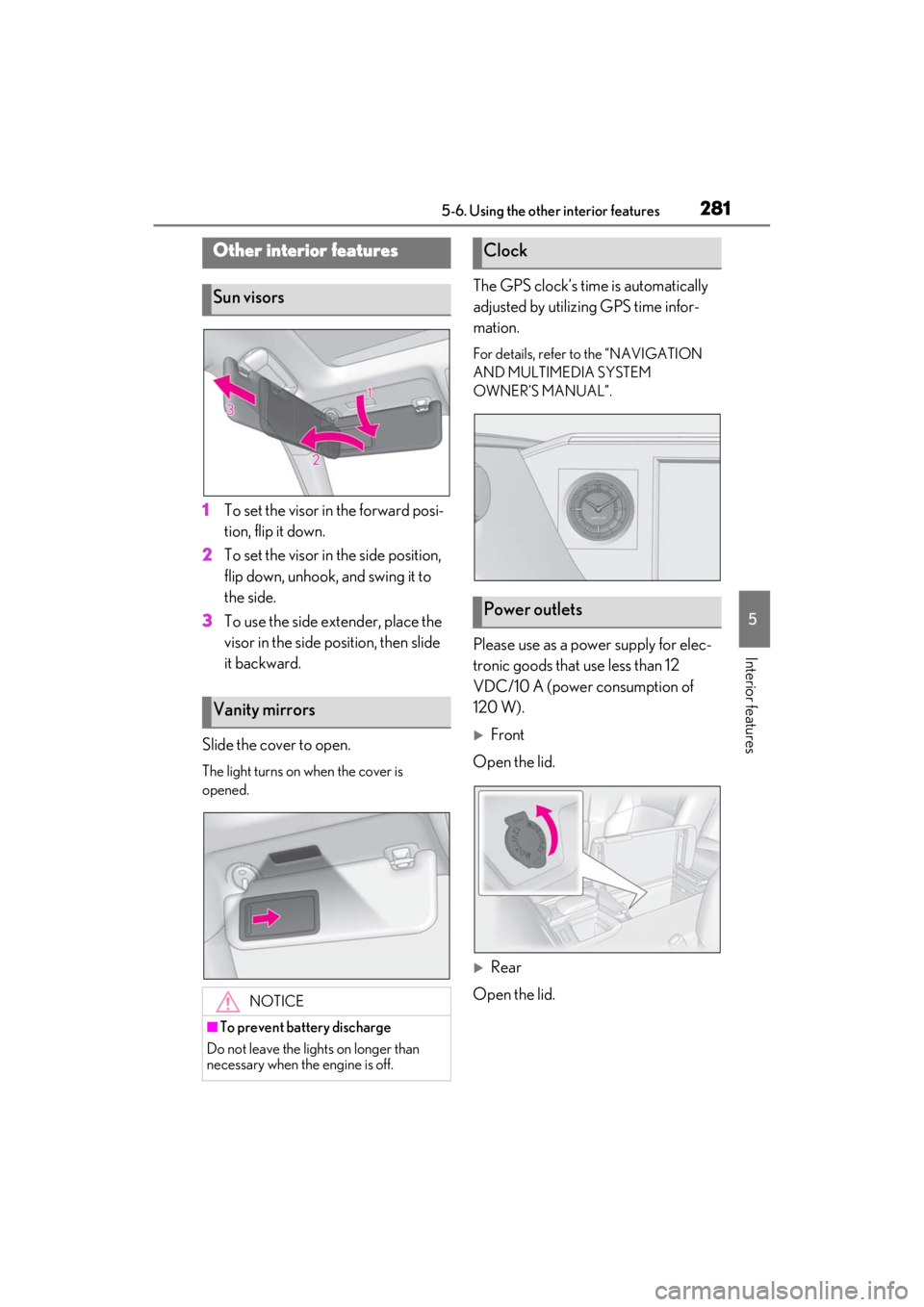
1To set the visor in the forward posi-
tion, flip it down.
2 To set the visor in the side position,
flip down, unhook, and swing it to
the side.
3 To use the side extender, place the
visor in the side position, then slide
it backward.
Slide the cover to open.
The light turns on when the cover is
opened.
The GPS clock’s time is automatically
adjusted by utilizing GPS time infor-
mation.
For details, refer to the “NAVIGATION
AND MULTIMEDIA SYSTEM
OWNER’S MANUAL”.
Please use as a power supply for elec-
tronic goods that use less than 12
VDC/10 A (power consumption of
120 W).
Front
Open the lid.
Rear
Open the lid.
Other interior features
Sun visors
Vanity mirrors
NOTICE
■To prevent battery discharge
Do not leave the lights on longer than
necessary when the engine is off.
Clock
Power outlets
Page 295 of 464
2955-6. Using the other interior features
5
Interior features
tion. If this is the case, you may need
a stepladder or other sturdy, safe
device to reach the “Learn” or
“Smart” button on the garage door
opener motor.
■Programming HomeLink®
Steps 1 through 3 must be performed
within 60 seconds, otherwise the indi-
cator light will stop flashing and pro-
gramming will not be able to be
completed.
1 Press and release the HomeLink
®
button you want to program and
check that the HomeLink
® indica-
tor light flashes (orange).
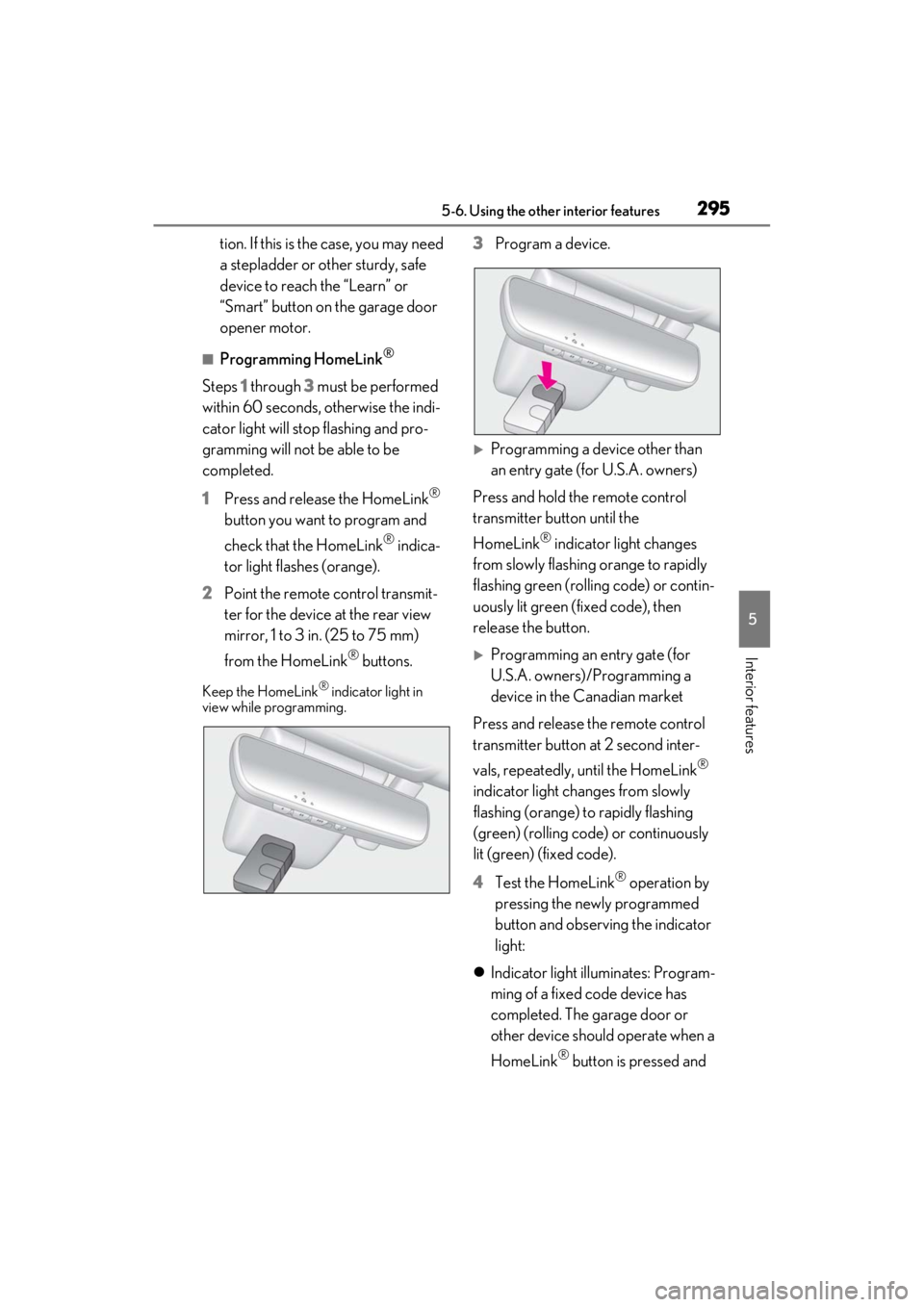
2 Point the remote control transmit-
ter for the device at the rear view
mirror, 1 to 3 in. (25 to 75 mm)
from the HomeLink
® buttons.
Keep the HomeLink® indicator light in
view while programming.
3 Program a device.
Programming a device other than
an entry gate (for U.S.A. owners)
Press and hold the remote control
transmitter button until the
HomeLink
® indicator light changes
from slowly flashing orange to rapidly
flashing green (rolling code) or contin-
uously lit green (fixed code), then
release the button.
Programming an entry gate (for
U.S.A. owners)/Programming a
device in the Canadian market
Press and release the remote control
transmitter button at 2 second inter-
vals, repeatedly, until the HomeLink
®
indicator light changes from slowly
flashing (orange) to rapidly flashing
(green) (rolling code) or continuously
lit (green) (fixed code).
4 Test the HomeLink
® operation by
pressing the newly programmed
button and observing the indicator
light:
Indicator light illuminates: Program-
ming of a fixed code device has
completed. The garage door or
other device should operate when a
HomeLink
® button is pressed and
Page 299 of 464
2995-6. Using the other interior features
5
Interior features
*:If equipped
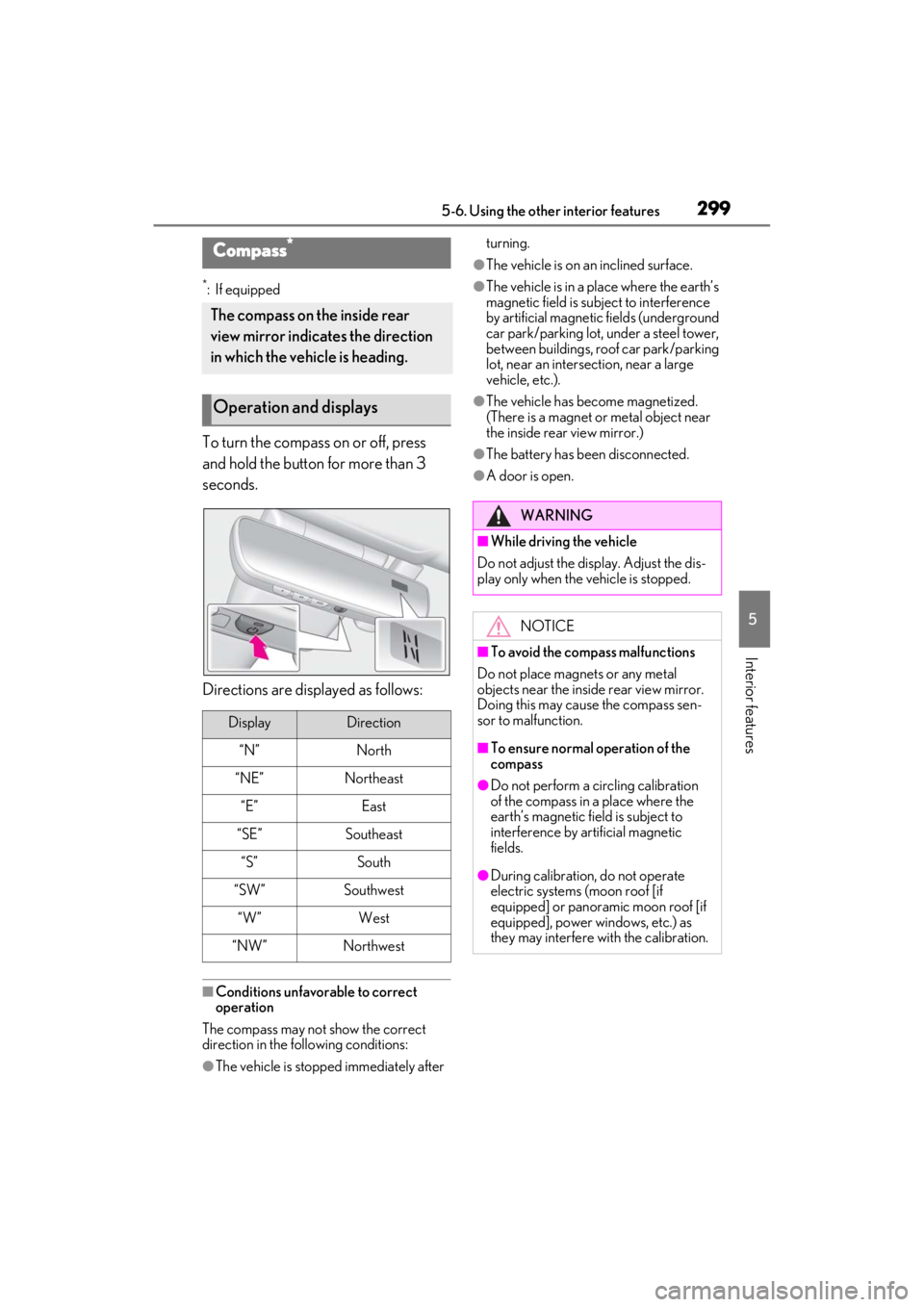
To turn the compass on or off, press
and hold the button for more than 3
seconds.
Directions are displayed as follows:
■Conditions unfavorable to correct
operation
The compass may not show the correct
direction in the following conditions:
●The vehicle is stopped immediately after turning.
●The vehicle is on an inclined surface.
●The vehicle is in a place where the earth’s
magnetic field is subject to interference
by artificial magnetic fields (underground
car park/parking lot, under a steel tower,
between buildings, roof car park/parking
lot, near an intersection, near a large
vehicle, etc.).
●The vehicle has become magnetized.
(There is a magnet or
metal object near
the inside rear view mirror.)
●The battery has been disconnected.
●A door is open.
Compass*
The compass on the inside rear
view mirror indicates the direction
in which the vehicle is heading.
Operation and displays
DisplayDirection
“N”North
“NE”Northeast
“E”East
“SE”Southeast
“S”South
“SW”Southwest
“W”West
“NW”Northwest
WARNING
■While driving the vehicle
Do not adjust the display. Adjust the dis-
play only when the vehicle is stopped.
NOTICE
■To avoid the compass malfunctions
Do not place magnets or any metal
objects near the inside rear view mirror.
Doing this may cause the compass sen-
sor to malfunction.
■To ensure normal operation of the
compass
●Do not perform a circling calibration
of the compass in a place where the
earth’s magnetic field is subject to
interference by artificial magnetic
fields.
●During calibration, do not operate
electric systems (moon roof [if
equipped] or panoramic moon roof [if
equipped], power windows, etc.) as
they may interfere with the calibration.