wheel LEXUS ES350 2021 Owner's Manual
[x] Cancel search | Manufacturer: LEXUS, Model Year: 2021, Model line: ES350, Model: LEXUS ES350 2021Pages: 464, PDF Size: 9.61 MB
Page 134 of 464

1344-1. Before driving
4-1.Before driving
■Starting the engine
P.144
■Driving
1 With the brake pedal depressed,
shift the shift lever to D. ( P.150)
2 If the parking brake is in manual
mode, release the parking brake.
(P.154)
3 Gradually release the brake pedal
and gently depress the accelerator
pedal to accelerate the vehicle.
■Stopping
1 With the shift lever in D, depress
the brake pedal.
2 If necessary, set the parking brake.
If the vehicle is to be stopped for an
extended period of time, shift the shift lever
to P or N. ( P.150)
■Parking the vehicle
1 With the shift lever in D, depress
the brake pedal.
2 Set the parking brake ( P.154),
and shift the shift lever to P
( P.150).
3 Press the engine switch to stop the
engine.
4 Lock the door, making sure that
you have the electronic key on your
person.
If parking on a hill, block the wheels as
needed.
■Starting off on a steep uphill
1 Make sure that the parking brake is
set with the brake pedal depressed,
and then shift the shift lever to D.
2 Release the brake pedal and gently
depress the accelerator pedal.
3 Release the parking brake.
■When starting off on a uphill
The hill-start assist control will activate.
( P.246)
■Driving in the rain
●Drive carefully when it is raining, because
visibility will be reduced, the windows
may become fogged-up, and the road
will be slippery.
●Drive carefully when it starts to rain,
because the road surface will be espe-
cially slippery.
●Refrain from high speeds when driving on
an expressway in the rain, because there
may be a layer of wa ter between the tires
and the road surface, preventing the
steering and brakes from operating
properly.
■Engine speed while driving
In the following conditions, the engine
speed may become high while driving. This
is due to automatic up-shifting control or
down-shifting implementation to meet driv-
ing conditions. It does not indicate sudden
acceleration.
●The vehicle is judged to be driving uphill
or downhill
●When the accelerato r pedal is released
●When the brake pedal is firmly or quickly
depressed
■Restraining the engine output (Brake
Override System)
●When the accelerator and brake pedals
are depressed at the same time, the
engine output may be restrained.
Driving the vehicle
The following procedures should be
observed to ensure safe driving:
Driving procedure
Page 136 of 464
1364-1. Before driving
WARNING
●Use engine braking (downshift) to
maintain a safe speed when driving
down a steep hill.
Using the brakes continuously may
cause the brakes to overheat and lose
effectiveness. (P.149)
●Do not adjust the positions of the
steering wheel, the seat, or the inside
or outside rear view mirrors while driv-
ing.
Doing so may result in a loss of vehicle
control.
●Always check that all passengers’
arms, heads or other parts of their
body are not outside the vehicle.
●AWD models: Do not drive the vehicle
off-road. This is not an AWD vehicle
designed for off-road driving. Proceed
with all due caution if it becomes
unavoidable to drive off-road.
●Do not drive across a river or through
other bodies of water. This may cause
electric/electronic components to
short circuit, damage the engine or
cause other serious damage to the
vehicle.
●Do not drive in excess of the speed
limit. Even if the legal speed limit per-
mits it, do not drive over 85 mph (140
km/h) unless your vehicle has high-
speed capability tires. Driving over 85
mph (140 km/h) may result in tire fail-
ure, loss of control and possible injury.
Be sure to consult a tire dealer to
determine whether the tires on your
vehicle are high-speed capability tires
or not before driving at such speeds.
■When driving on slippery road sur-
faces
●Sudden braking, acceleration and
steering may cause tire slippage and
reduce your ability to control the vehi-
cle.
●Sudden acceleration, engine braking
due to shifting, or changes in engine
speed could cause the vehicle to skid,
resulting in an accident.
●After driving through a puddle, lightly
depress the brake pedal to make sure
that the brakes are functioning prop-
erly. Wet brake pads may prevent the
brakes from functioning properly. If
the brakes on only one side are wet
and not functioning properly, steering
control may be affected.
■When shifting the shift lever
●Do not let the vehicle roll backward
while the shift lever is in a driving posi-
tion or roll forward while the shift lever
is in R.
Doing so may cause the engine to stall
or lead to poor brake and steering
performance, resulting in an accident
or damage to the vehicle.
●Do not shift the shif t lever to P while
the vehicle is moving.
Doing so can damage the transmission
and may result in a loss of vehicle con-
trol.
●Do not shift the shift lever to R while
the vehicle is moving forward.
Doing so can damage the transmission
and may result in a loss of vehicle con-
trol.
●Do not shift the shift lever to a driving
position while the vehicle is moving
backward.
Doing so can damage the transmission
and may result in a loss of vehicle con-
trol.
●Shifting the shift lever to N while the
vehicle is moving will disengage the
engine from the transmission. Engine
braking is not available when N is
selected.
Page 138 of 464
1384-1. Before driving
WARNING
■When taking a nap in the vehicle
Always turn the engine off. Otherwise, if
you accidentally move the shift lever or
depress the accelerator pedal, this could
cause an accident or fire due to engine
overheating. Additionally, if the vehicle is
parked in a poorly ventilated area,
exhaust gases may collect and enter the
vehicle, leading to death or a serious
health hazard.
■When braking
●When the brakes are wet, drive more
cautiously.
Braking distance increases when the
brakes are wet, and this may cause
one side of the vehicle to brake differ-
ently than the other side. Also, the
parking brake may not securely hold
the vehicle.
●If the brake booster device does not
operate, do not follow other vehicles
closely and avoid hills or sharp turns
that require braking.
In this case, braking is still possible, but
the brake pedal should be depressed
more firmly than usual. Also, the brak-
ing distance will increase. Have your
brakes fixed immediately.
●Do not pump the brake pedal if the
engine stalls.
Each push on the brake pedal uses up
the reserve for the power-assisted
brakes.
●The brake system consists of 2 or
more individual hydraulic systems; if
one of the systems fails, the other(s)
will still operate. In this case, the brake
pedal should be depressed more
firmly than usual and the braking dis-
tance will increase. Have your brakes
fixed immediately.
■If the vehicle becomes stuck (AWD
models)
Do not spin the wheels excessively when
any of the tires is up in the air, or the vehi-
cle is stuck in sand, mud, etc. This may
damage the driveline components or
propel the vehicle forward or backward,
causing an accident.
NOTICE
■When driving the vehicle
●Do not depress the accelerator and
brake pedals at th e same time while
driving, as this may restrain the engine
output.
●Do not use the accelerator pedal or
depress the accelerator and brake
pedals at the same time to hold the
vehicle on a hill.
■Avoiding damage to vehicle parts
●Do not turn the steering wheel fully in
either direction and hold it there for an
extended period of time.
Doing so may damage the power
steering motor.
●When driving over bumps in the road,
drive as slowly as possible to avoid
damaging the wheels, underside of the
vehicle, etc.
■If you get a flat tire while driving
A flat or damaged tire may cause the fol-
lowing situations. Hold the steering
wheel firmly and gradually depress the
brake pedal to slow down the vehicle.
●It may be difficult to control your vehi-
cle.
●The vehicle will make abnormal
sounds or vibrations.
●The vehicle will lean abnormally.
Information on what to do in case of a flat
tire ( P.375)
Page 142 of 464
1424-1. Before driving
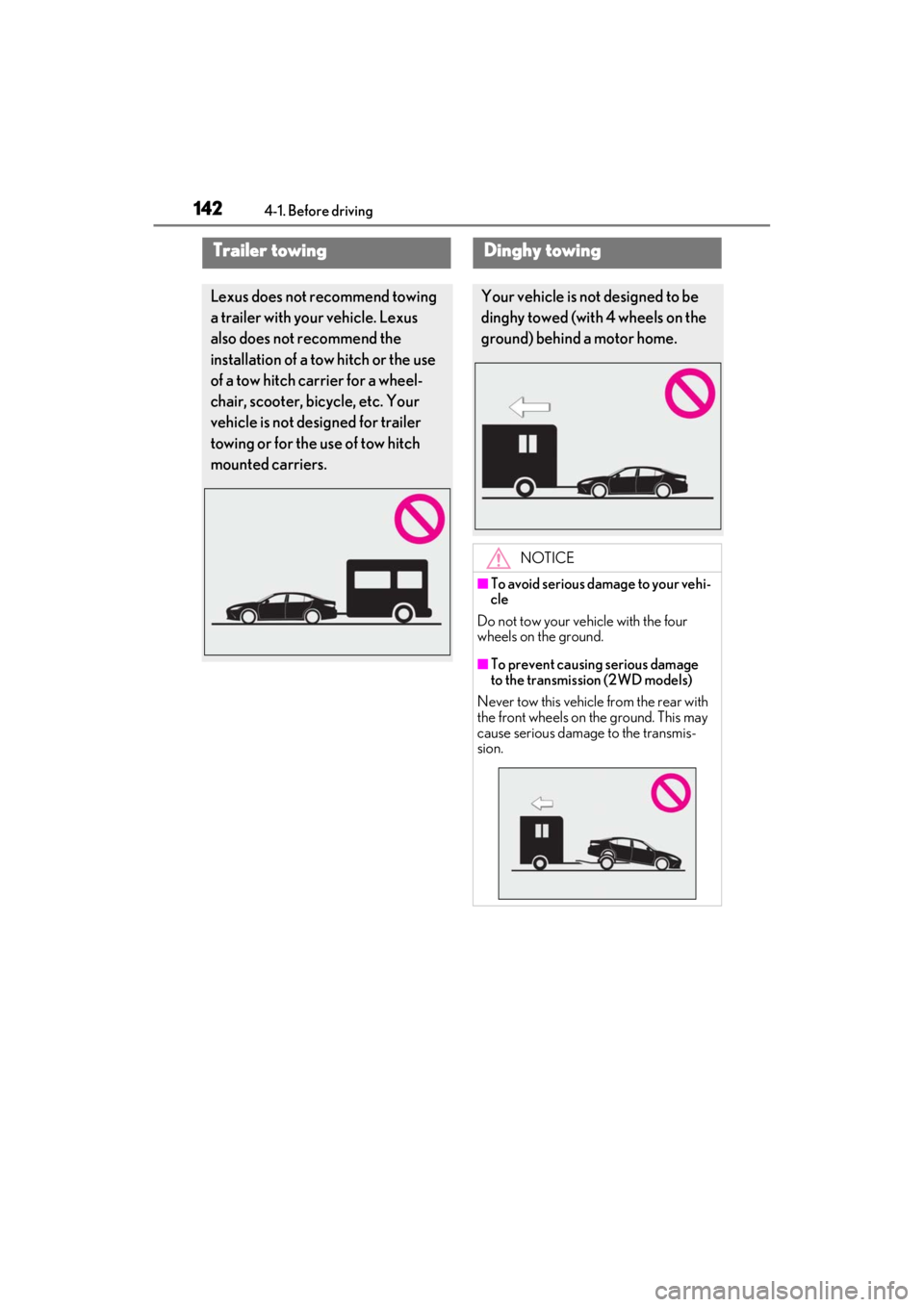
Trailer towing
Lexus does not recommend towing
a trailer with your vehicle. Lexus
also does not recommend the
installation of a tow hitch or the use
of a tow hitch carrier for a wheel-
chair, scooter, bicycle, etc. Your
vehicle is not designed for trailer
towing or for the use of tow hitch
mounted carriers.
Dinghy towing
Your vehicle is not designed to be
dinghy towed (with 4 wheels on the
ground) behind a motor home.
NOTICE
■To avoid serious damage to your vehi-
cle
Do not tow your vehicle with the four
wheels on the ground.
■To prevent causing serious damage
to the transmissi on (2WD models)
Never tow this vehicle from the rear with
the front wheels on the ground. This may
cause serious damage to the transmis-
sion.
Page 143 of 464
1434-1. Before driving
4
Driving
NOTICE
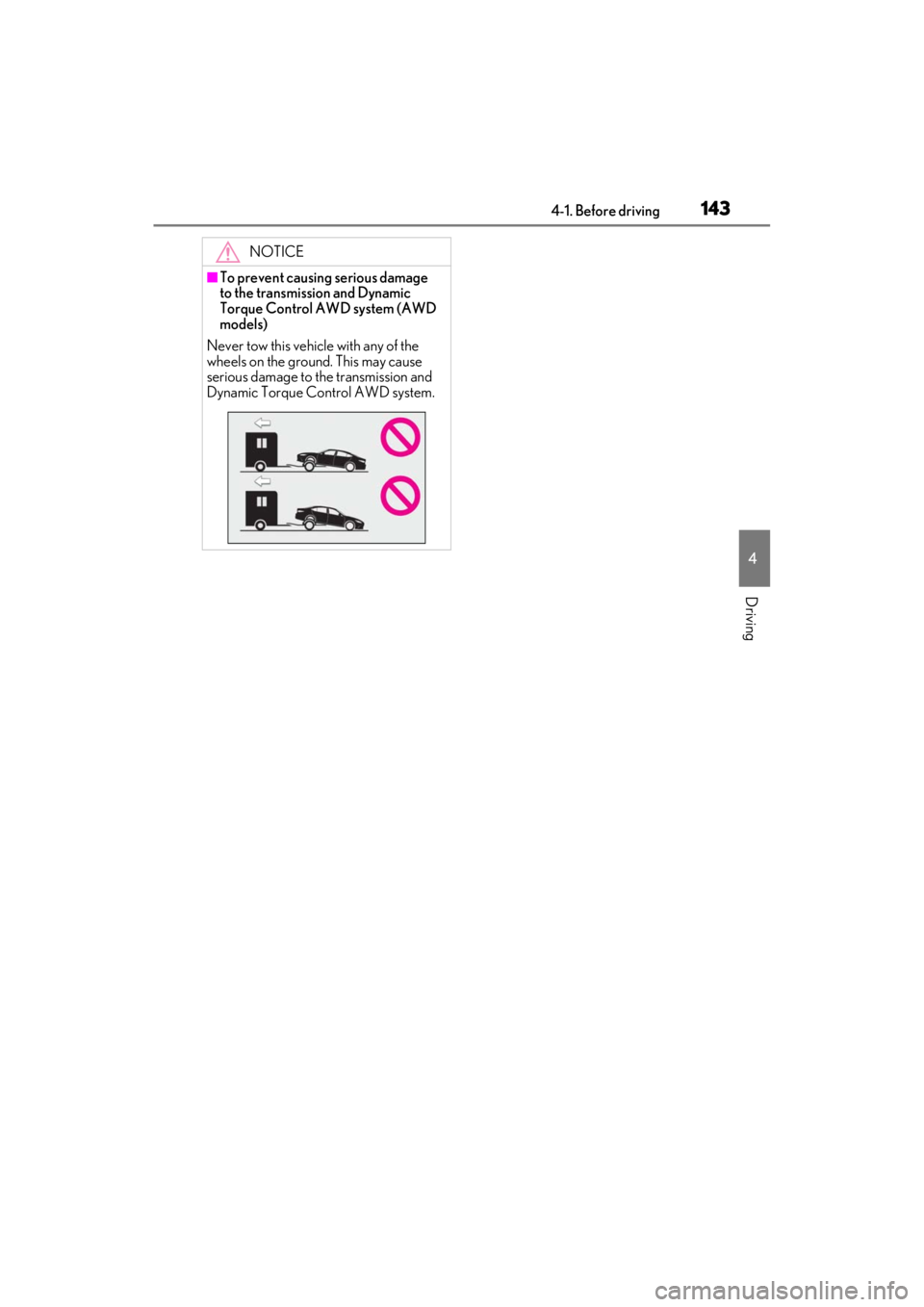
■To prevent causing serious damage
to the transmission and Dynamic
Torque Control AWD system (AWD
models)
Never tow this vehicle with any of the
wheels on the ground. This may cause
serious damage to the transmission and
Dynamic Torque Control AWD system.
Page 145 of 464

1454-2. Driving procedures
4
Driving
■If the battery is discharged
The engine cannot be started using the
smart access system with push-button start.
Refer to P.389 to restart the engine.
■Electronic key battery depletion
P.92
■Conditions affe cting operation
P.108
■Notes for the entry function
P.108
■Steering lock function
●After turning the engine switch off and
opening and closing the doors, the steer-
ing wheel will be lock ed due to the steer-
ing lock function. Operating the engine
switch again automatically cancels the
steering lock.
●When the steering lock cannot be
released, “Push Engine Switch while
Turning Steering Whee l in Either Direc-
tion” will be displayed on the multi-infor-
mation display.
Check that the shift leve r is set in P. Press
the engine switch shor tly and firmly while
turning the steering wheel left and right.
●To prevent the steering lock motor from
overheating, operation of the motor may
be suspended if the engine is turned on
and off repeatedly in a short period of
time. In this case, refrain from operating
the engine switch. After about 10 sec-
onds, the steering lock motor will resume
functioning.
■If there is a malfun ction in the smart
access system with push-button start
If “Access System with Elec. Key Malfunc-
tion See Owner’s Manual” is displayed on
the multi-information display, the system
may be malfunctioning. Have the vehicle inspected by your Lexus dealer immedi-
ately.
■Electronic key battery
P.341
■Operation of the engine switch
●If the switch is no t pressed shortly and
firmly, the engine switch mode may not
change or the engine may not start.
●If attempting to restart the engine imme-
diately after turning th e engine switch off,
the engine may not start in some cases.
After turning the engine switch off, please
wait a few seconds be fore restarting the
engine.
■Customization
If the smart access system with push-button
start has been deactivated in a customized
setting, refer to P.419.
WARNING
■When starting the engine
Always start the engine while sitting in
the driver’s seat. Do not depress the
accelerator pedal while starting the
engine under any circumstances.
Doing so may cause an accident result-
ing in death or serious injury.
■Caution while driving
If engine failure occurs while the vehicle
is moving, do not lock or open the doors
until the vehicle reaches a safe and com-
plete stop. Activation of the steering lock
in this circumstance may lead to an acci-
dent, resulting in death or serious injury.
NOTICE
■When starting the engine
●Do not race a cold engine.
●If the engine becomes difficult to start
or stalls frequently, have your vehicle
checked by your Lexus dealer imme-
diately.
Page 160 of 464
1604-3. Operating the lights and wipers
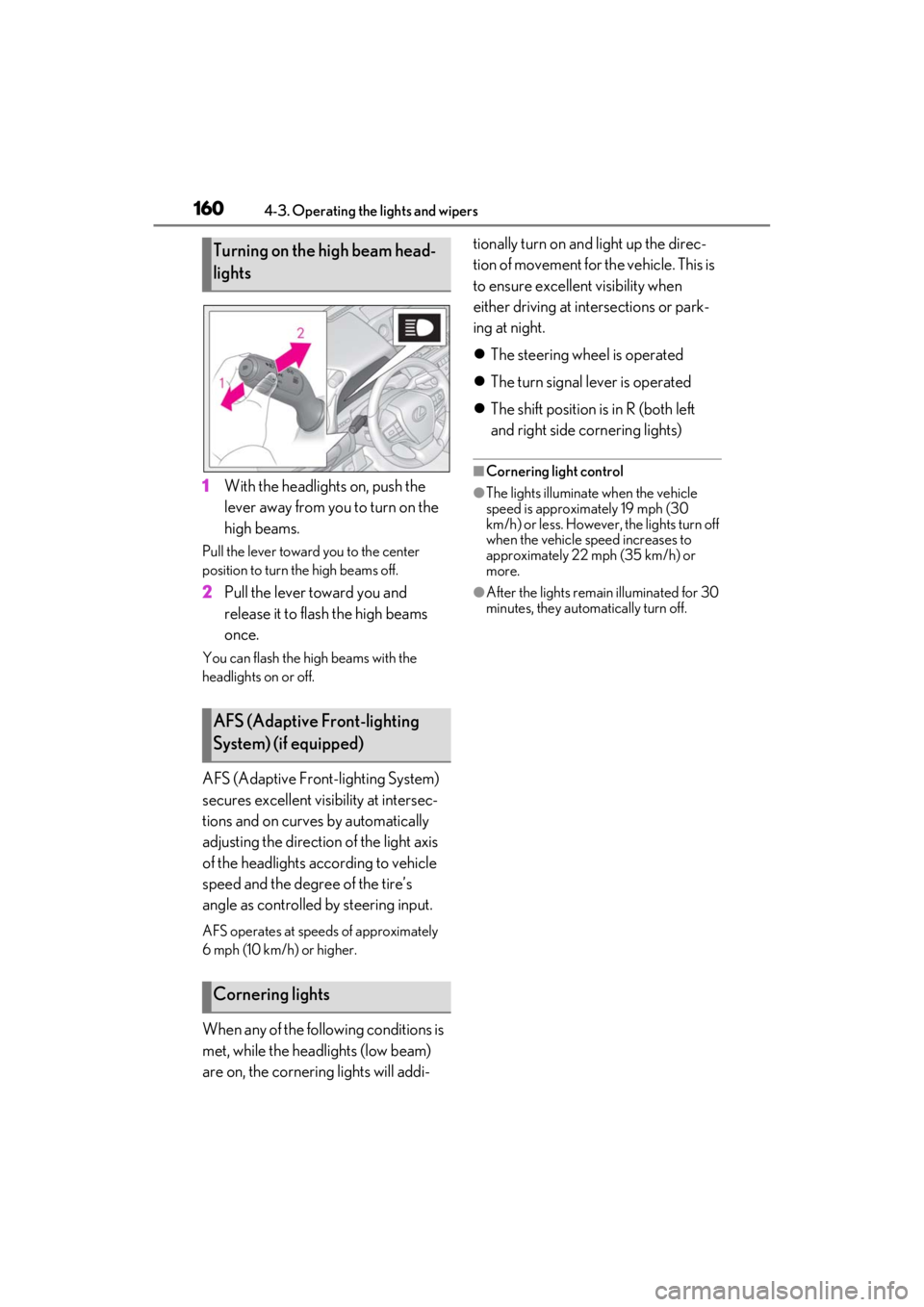
1With the headlights on, push the
lever away from you to turn on the
high beams.
Pull the lever toward you to the center
position to turn the high beams off.
2Pull the lever toward you and
release it to flash the high beams
once.
You can flash the high beams with the
headlights on or off.
AFS (Adaptive Front-lighting System)
secures excellent visibility at intersec-
tions and on curves by automatically
adjusting the direction of the light axis
of the headlights according to vehicle
speed and the degree of the tire’s
angle as controlled by steering input.
AFS operates at speed s of approximately
6 mph (10 km/h) or higher.
When any of the following conditions is
met, while the headlights (low beam)
are on, the cornering lights will addi- tionally turn on and light up the direc-
tion of movement for the vehicle. This is
to ensure excellent visibility when
either driving at intersections or park-
ing at night.
The steering wheel is operated
The turn signal lever is operated
The shift position is in R (both left
and right side cornering lights)
■Cornering light control
●The lights illuminate when the vehicle
speed is approximately 19 mph (30
km/h) or less. However, the lights turn off
when the vehicle speed increases to
approximately 22 mph (35 km/h) or
more.
●After the lights remain illuminated for 30
minutes, they automatically turn off.
Turning on the high beam head-
lights
AFS (Adaptive Front-lighting
System) (if equipped)
Cornering lights
Page 162 of 464

1624-3. Operating the lights and wipers
●House lights, street lights, traffic signals,
and illuminated billboards or signs may
cause the high beam to switch to the low
beams, or the low beams to remain on.
●The following factors may affect the
amount of time taken to turn the high
beam on or off:
• The brightness of headlights, fog lights,
and tail lights of vehicles ahead
• The movement and direction of vehicles ahead
• When a vehicle ahead only has opera- tional lights on one side
• When a vehicle ahead is a two-wheeled
vehicle
• The condition of the road (gradient, curve, condition of the road surface etc.)
• The number of passengers and amount of luggage
●The high beam may be turned on or off
when the driver does not expect it.
●Bicycles or similar objects may not be
detected.
●In the situations show n below, the system
may not be able to accurately detect sur-
rounding brightness levels. This may
cause the low beams to remain on or the
high beams to cause problems for pedes-
trians, vehicles ahead or other parties. In
these cases, manually switch between the
high and low beams.
• In bad weather (rain, snow, fog, sand-
storms etc.)
• The windshield is obscured by fog, mist, ice, dirt etc.
• The windshield is cracked or damaged.
• The camera sensor is deformed or dirty.
• When the temperature of the camera sensor is extremely high
• Surrounding brightness levels are equal to those of headlights, tail lights or fog
lights.
• When headlights or tail lights of vehicles ahead are turned off, dirty, changing
color, or not aimed properly
• When the vehicle is hit by water, snow, dust, etc. from a preceding vehicle
• When driving through an area of inter-
mittently changing brightness and dark-
ness.
• When frequently and repeatedly driving
ascending/descending roads, or roads with rough, bumpy or uneven surfaces
(such as stone-paved roads, gravel tracks
etc.).
• When frequently and repeatedly taking curves or driving on a winding road.
• There is a highly re flective object ahead
of the vehicle, such as a sign or a mirror.
• The back of a vehicle ahead is highly reflective, such as a container on a truck.
• The vehicle’s headlights are damaged or dirty.
• The vehicle is listing or tilting, due to a flat
tire, a trailer being towed etc.
• The high beam and low beam are repeat- edly being switched between in an
abnormal manner.
• The driver believes that the high beam may be causing problems or distress to
other drivers or pedestrians nearby.
■Temporarily lowering sensor sensitivity
The sensitivity of the sensor can be tempo-
rarily lowered.
1 Turn the engine switch off while the fol-
lowing conditions are met.
• The headlight swit ch is in or .
• The headlight switch lever is in low beam
position.
• Automatic High Be am switch is on.
2 Turn the engine switch to IGNITION
ON mode.
3 Within 60 seconds after 2, repeat pull-
ing the headlight switch lever to the
original position then pushing it to the
high beam position quickly 10 times,
then leave the lever in high beam posi-
tion.
4 If the sensitivity is changed, the Auto-
matic High Beam indicator turns on and
off 3 times.
Automatic High Beam (headlights) may
turn on even the vehicle is stopped.
■Switching to high beam
Push the lever away from you.
Turning the high beam on/off
manually
Page 178 of 464
1784-5. Using the driving support systems
WARNING
■Limitations of the pre-collision sys-
tem
●The driver is solely responsible for safe
driving. Always drive safely, taking
care to observe your surroundings.
Do not use the pre-collision system
instead of normal braking operations
under any circumstances. This system
will not prevent collisions or lessen col-
lision damage or injury in every situa-
tion. Do not overly rely on this system.
Failure to do so may lead to an acci-
dent, resulting in death or serious
injury.
●Although this system is designed to
help avoid a collision or help reduce
the impact of the coll ision, its effective-
ness may change according to various
conditions, therefore the system may
not always be able to achieve the same
level of performance.
Read the following conditions care-
fully. Do not overly rely on this system
and always drive carefully.
• Conditions under which the system may operate even if there is no possi-
bility of a collision: P.181
• Conditions under which the system may not operate properly: P.182
●Do not attempt to test the operation of
the pre-collision system yourself.
Depending on the objects used for
testing (dummies, cardboard objects
imitating detectable objects, etc.), the
system may not operate properly, pos-
sibly leading to an accident.
■Pre-collision braking
●When the pre-collision braking func-
tion is operating, a large amount of
braking force will be applied.
●If the vehicle is stopped by the opera-
tion of the pre-collision braking func-
tion, the pre-collision braking function
operation will be canceled after
approximately 2 seconds.
Depress the brake pedal as necessary.
●The pre-collision braking function may
not operate if certain operations are
performed by the driver. If the acceler-
ator pedal is being depressed strongly
or the steering wheel is being turned,
the system may determine that the
driver is taking evasive action and pos-
sibly prevent the pre-collision braking
function from operating.
●In some situations, while the pre-colli-
sion braking function is operating,
operation of the function may be can-
celed if the accelerator pedal is
depressed strongly or the steering
wheel is turned and the system deter-
mines that the driver is taking evasive
action.
●If the brake pedal is being depressed,
the system may determine that the
driver is taking evasive action and pos-
sibly delay the operat ion timing of the
pre-collision braking function.
■When to disable the pre-collision sys-
tem
In the following situations, disable the
system, as it may not operate properly,
possibly leading to an accident resulting
in death or serious injury:
●When the vehicle is being towed
●When your vehicle is towing another
vehicle
●When transporting the vehicle via
truck, boat, train or similar means of
transportation
●When the vehicle is raised on a lift with
the engine running and the tires are
allowed to rotate freely
●When inspecting the vehicle using a
drum tester such as a chassis dyna-
mometer or speedometer tester, or
when using an on vehicle wheel bal-
ancer
●When a strong impact is applied to the
front bumper or front grille, due to an
accident or other reasons
Page 181 of 464
1814-5. Using the driving support systems
4
Driving
■Cancelation of the pre-collision braking
If either of the following occur while the
pre-collision braking function is operating,
it will be canceled:
●The accelerator pedal is depressed
strongly.
●The steering wheel is turned sharply or
abruptly.
■Conditions under which the system may
operate even if there is no possibility of a
collision
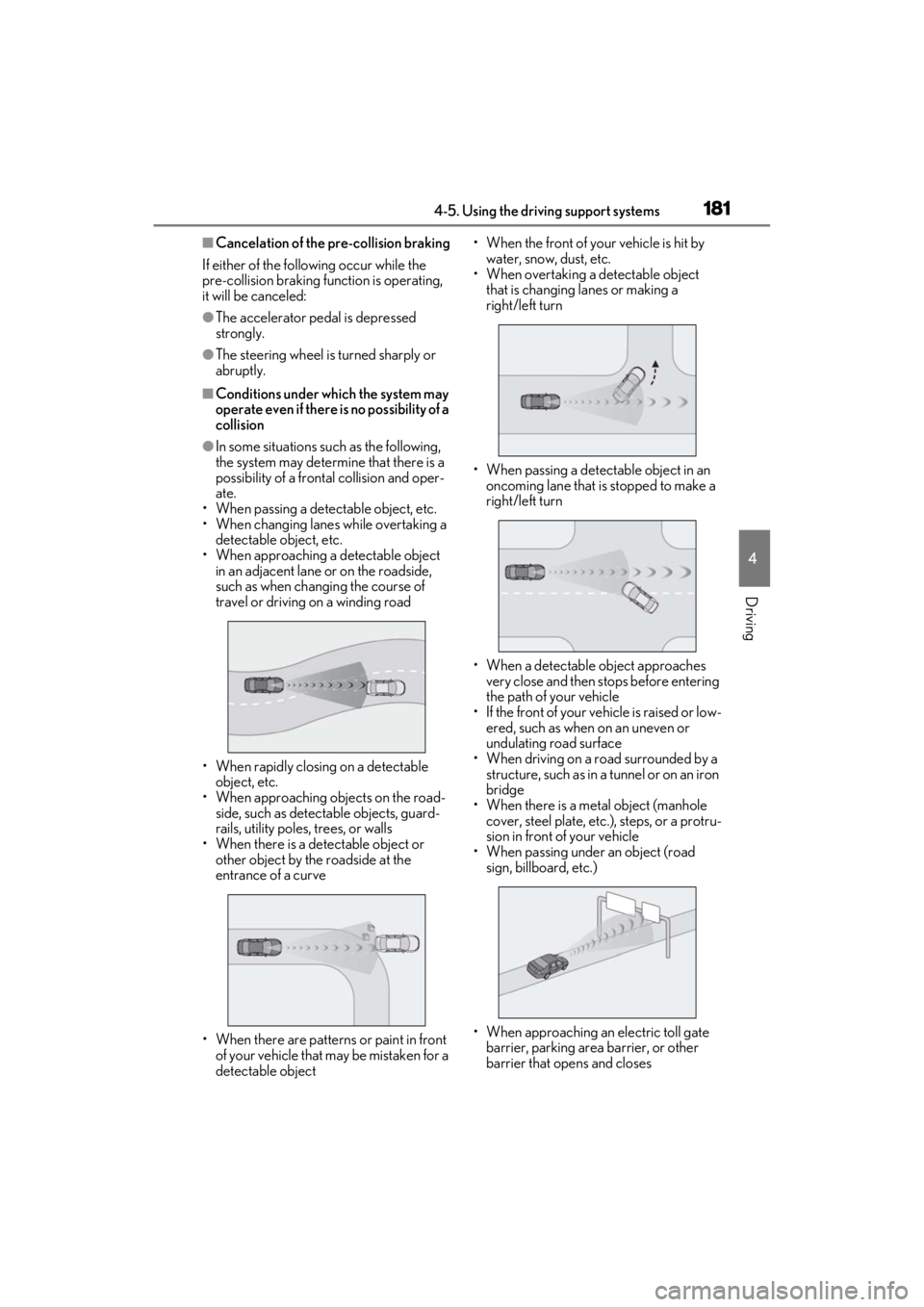
●In some situations such as the following,
the system may determine that there is a
possibility of a frontal collision and oper-
ate.
• When passing a detectable object, etc.
• When changing lane s while overtaking a
detectable object, etc.
• When approaching a detectable object in an adjacent lane or on the roadside,
such as when changing the course of
travel or driving on a winding road
• When rapidly closing on a detectable object, etc.
• When approaching objects on the road- side, such as detectable objects, guard-
rails, utility poles, trees, or walls
• When there is a detectable object or other object by the roadside at the
entrance of a curve
• When there are patterns or paint in front of your vehicle that may be mistaken for a
detectable object • When the front of your vehicle is hit by
water, snow, dust, etc.
• When overtaking a de tectable object
that is changing lanes or making a
right/left turn
• When passing a detectable object in an oncoming lane that is stopped to make a
right/left turn
• When a detectable object approaches very close and then stops before entering
the path of your vehicle
• If the front of your vehicle is raised or low- ered, such as when on an uneven or
undulating road surface
• When driving on a road surrounded by a structure, such as in a tunnel or on an iron
bridge
• When there is a metal object (manhole cover, steel plate, etc.), steps, or a protru-
sion in front of your vehicle
• When passing under an object (road sign, billboard, etc.)
• When approaching an electric toll gate barrier, parking area barrier, or other
barrier that opens and closes