battery LEXUS ES350 2021 Owners Manual
[x] Cancel search | Manufacturer: LEXUS, Model Year: 2021, Model line: ES350, Model: LEXUS ES350 2021Pages: 464, PDF Size: 9.61 MB
Page 1 of 464

ES350_250_OM_OM06207U_(U)
1
2
3
4
5
6
7
8
9
Pictorial indexSearch by illustration
For safety and
securityMake sure to read through them
(Main topics: Child seat, theft deterrent system)
Vehicle status
information and
indicatorsReading driving-related information
(Main topics: Meters, multi-information display)
Before drivingOpening and closing the doors and windows,
adjustment before driving
(Main topics: Keys, doors, seats, power windows)
DrivingOperations and advice which are necessary for driving
(Main topics: Starting engine, refueling)
Interior featuresUsage of the interior features
(Main topics: Air conditioner, storage features)
Maintenance and
careCaring for your vehicle and maintenance procedures
(Main topics: Interior and exterior, light bulbs)
When trouble
arisesWhat to do in case of malfunction and emergency
(Main topics: Battery discharge, flat tire)
Vehicle
specificationsVehicle specifications, customizable features
(Main topics: Fuel, oil, tire inflation pressure)
For ownersReporting safety defects for U.S. owners, and seat belt,
SRS airbag and headlight aim instructions for Canadian
owners
IndexSearch by symptom
Search alphabetically
Page 4 of 464
4TABLE OF CONTENTS
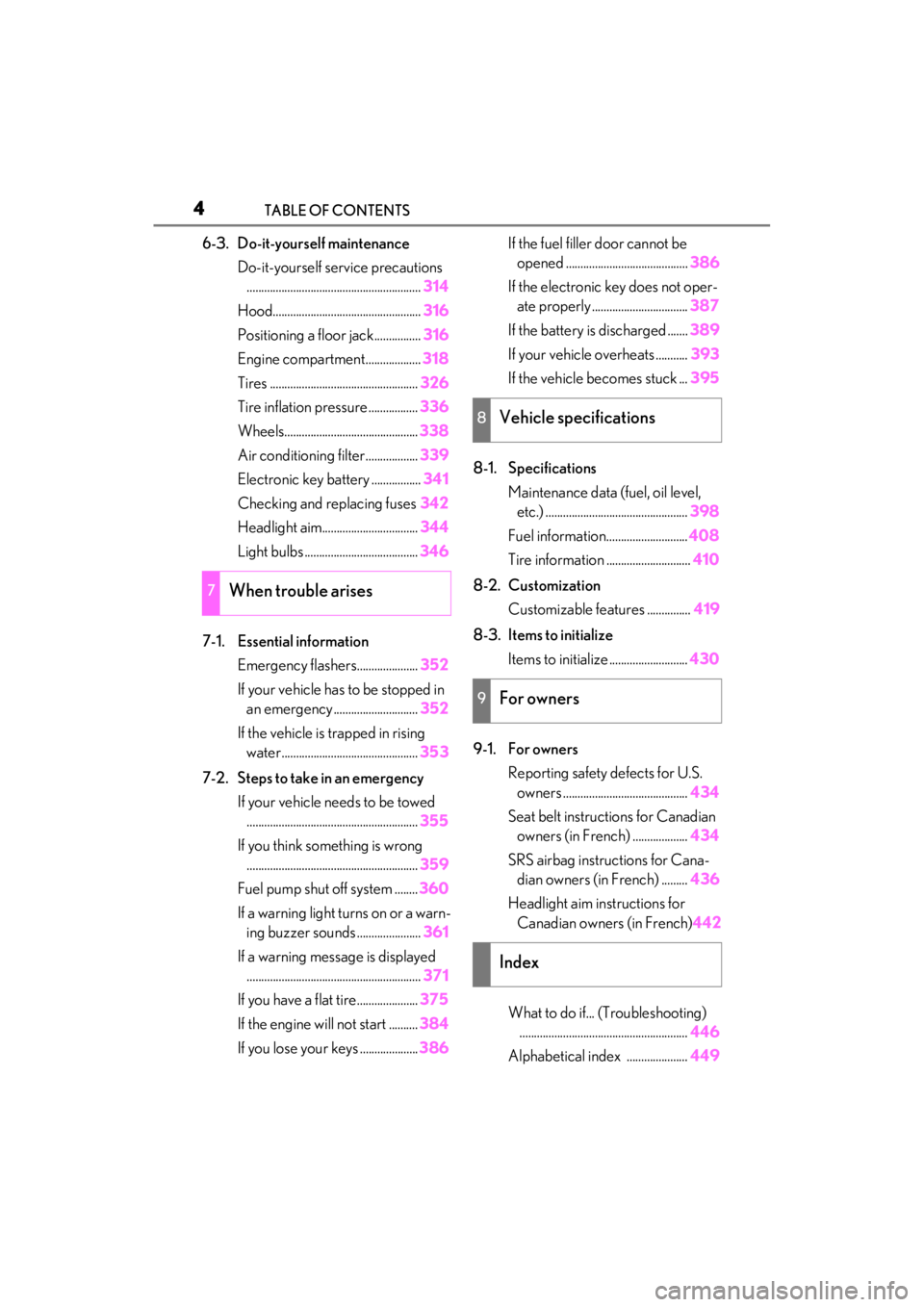
6-3. Do-it-yourself maintenanceDo-it-yourself service precautions............................................................ 314
Hood................................................... 316
Positioning a floor jack................ 316
Engine compartment................... 318
Tires ................................................... 326
Tire inflation pressure ................. 336
Wheels.............................................. 338
Air conditioning filter..................339
Electronic key battery ................. 341
Checking and replacing fuses 342
Headlight aim................................. 344
Light bulbs ....................................... 346
7-1. Essential information Emergency flashers..................... 352
If your vehicle has to be stopped in an emergency ............................. 352
If the vehicle is trapped in rising water............................................... 353
7-2. Steps to take in an emergency If your vehicle needs to be towed........................................................... 355
If you think something is wrong ........................................................... 359
Fuel pump shut off system ........ 360
If a warning light turns on or a warn- ing buzzer sounds ...................... 361
If a warning message is displayed ............................................................ 371
If you have a flat tire..................... 375
If the engine wi ll not start .......... 384
If you lose your keys .................... 386If the fuel filler door cannot be
opened .......................................... 386
If the electronic key does not oper- ate properly ................................. 387
If the battery is discharged ....... 389
If your vehicle overheats ........... 393
If the vehicle becomes stuck ... 395
8-1. Specifications Maintenance data (fuel, oil level, etc.) ................................................. 398
Fuel information............................ 408
Tire information ............................. 410
8-2. Customization Customizable features ............... 419
8-3. Items to initialize Items to initialize ........................... 430
9-1. For owners Reporting safety defects for U.S. owners ........................................... 434
Seat belt instructions for Canadian owners (in French) ................... 434
SRS airbag instructions for Cana- dian owners (in French) ......... 436
Headlight aim instructions for Canadian owners (in French) 442
What to do if... (Troubleshooting) .......................................................... 446
Alphabetical index ..................... 44
9
7When trouble arises
8Vehicle specifications
9For owners
Index
Page 64 of 464
641-4. Theft deterrent system
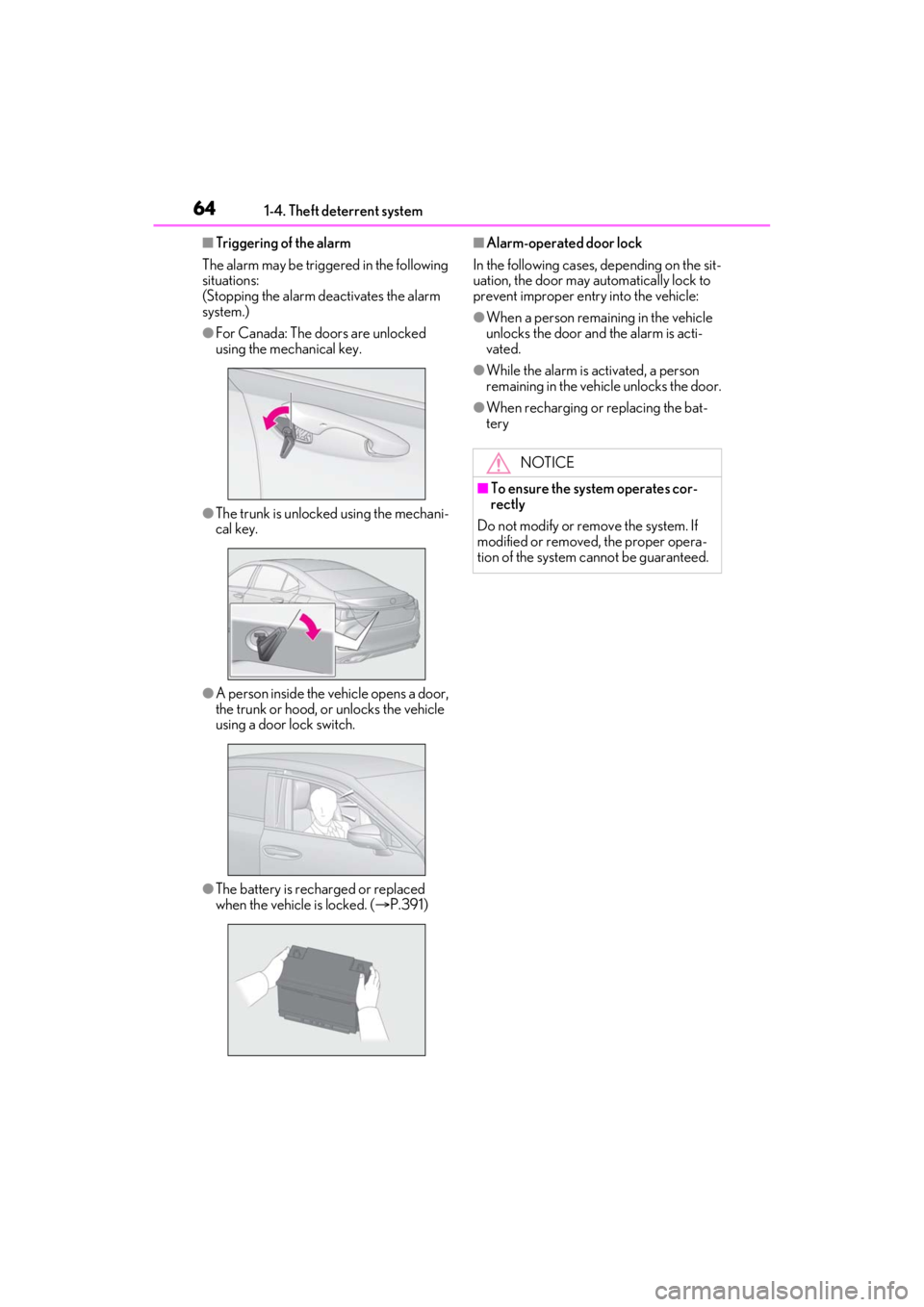
■Triggering of the alarm
The alarm may be trigge red in the following
situations:
(Stopping the alarm deactivates the alarm
system.)
●For Canada: The doors are unlocked
using the mechanical key.
●The trunk is unlocked using the mechani-
cal key.
●A person inside the vehicle opens a door,
the trunk or hood, or unlocks the vehicle
using a door lock switch.
●The battery is rech arged or replaced
when the vehicle is locked. ( P.391)
■Alarm-operated door lock
In the following cases, depending on the sit-
uation, the door may automatically lock to
prevent improper entry into the vehicle:
●When a person remaining in the vehicle
unlocks the door and the alarm is acti-
vated.
●While the alarm is activated, a person
remaining in the vehicle unlocks the door.
●When recharging or replacing the bat-
tery
NOTICE
■To ensure the system operates cor-
rectly
Do not modify or remove the system. If
modified or removed, the proper opera-
tion of the system cannot be guaranteed.
Page 83 of 464
832-1. Instrument cluster
2
Vehicle status information and indicators
Displays suggestions to the driver in
the following situations. To select a
response to a displayed suggestion,
use the meter control switches.
■Suggestion to turn off the head-
lights
If the headlights are left on for a certain
amount of time with the headlight
switch in after the engine switch
has been turned off, a suggestion mes-
sage will be displayed asking if you
wish to turn the headlights off.
To turn the headlights off, select “Yes”.
If a front door is op ened after the engine
switch is turned off, this suggestion mes-
sage will not be displayed.
■Customization
Some functions can be customized.
( P.419)
WARNING
■Cautions during setting up the dis-
play
As the engine needs to be running
during setting up the display, ensure that
the vehicle is parked in a place with ade-
quate ventilation. In a closed area such as
a garage, exhaust gases including harm-
ful carbon monoxide (CO) may collect
and enter the vehicle. This may lead to
death or a serious health hazard.
NOTICE
■During setting up the display
To prevent battery discharge, ensure
that the engine is running while setting up
the display features.
Suggestion function
Page 86 of 464
862-1. Instrument cluster
items:
• Route guidance to destination/street
name
• Driving support system display
*
• Compass (heading-up display)
• Audio system operation status
*: Make sure to enable this display when using the driving support systems
Display angle
Select to adjust the angle of the head-up
display.
■Enabling/disabling of the head-up dis-
play
If the head-up display is disabled, it will
remain disabled when the engine switch is
turned off then back to IGNITION ON
mode.
■Display brightness
The brightness of the head-up display can
be adjusted on of the multi-information
display. Also, it is automatically adjusted
according to the ambient brightness.
■Head-up display automatic position
adjustment
If the display position is recorded into mem-
ory, the head-up display will be automati-
cally adjusted to the desired position.
( P.114)
■When the battery is disconnected
The customize settings of the head-up dis-
play will be reset.
Displays the operational status of the
following systems:
LTA (Lane Tracing Assist)
( P.184)
Dynamic radar cruise control with
full-speed range ( P.195)
Details of content displayed on the head-
up display may differ from that displayed
on the multi-inform ation display. For
details, refer to the explanation of each sys-
tem.
Pop-up displays for the following sys-
tems will be displayed when necessary.
WARNING
■Caution for changing settings of the
head-up display
As the engine needs to be running while
changing the settings of the head-up dis-
play, ensure that the vehicle is parked in a
place with adequate ventilation. In a
closed area such as a garage, exhaust
gases including harmful carbon monox-
ide (CO) may collect and enter the vehi-
cle. This may lead to death or a serious
health hazard.
NOTICE
■When changing the settings of the
head-up display
To prevent battery discharge, ensure
that the engine is running while the
changing the settings of the head-up dis-
play.
Driving support system display
area
Pop-up display
Page 92 of 464
923-1. Key information
3-1.Key information
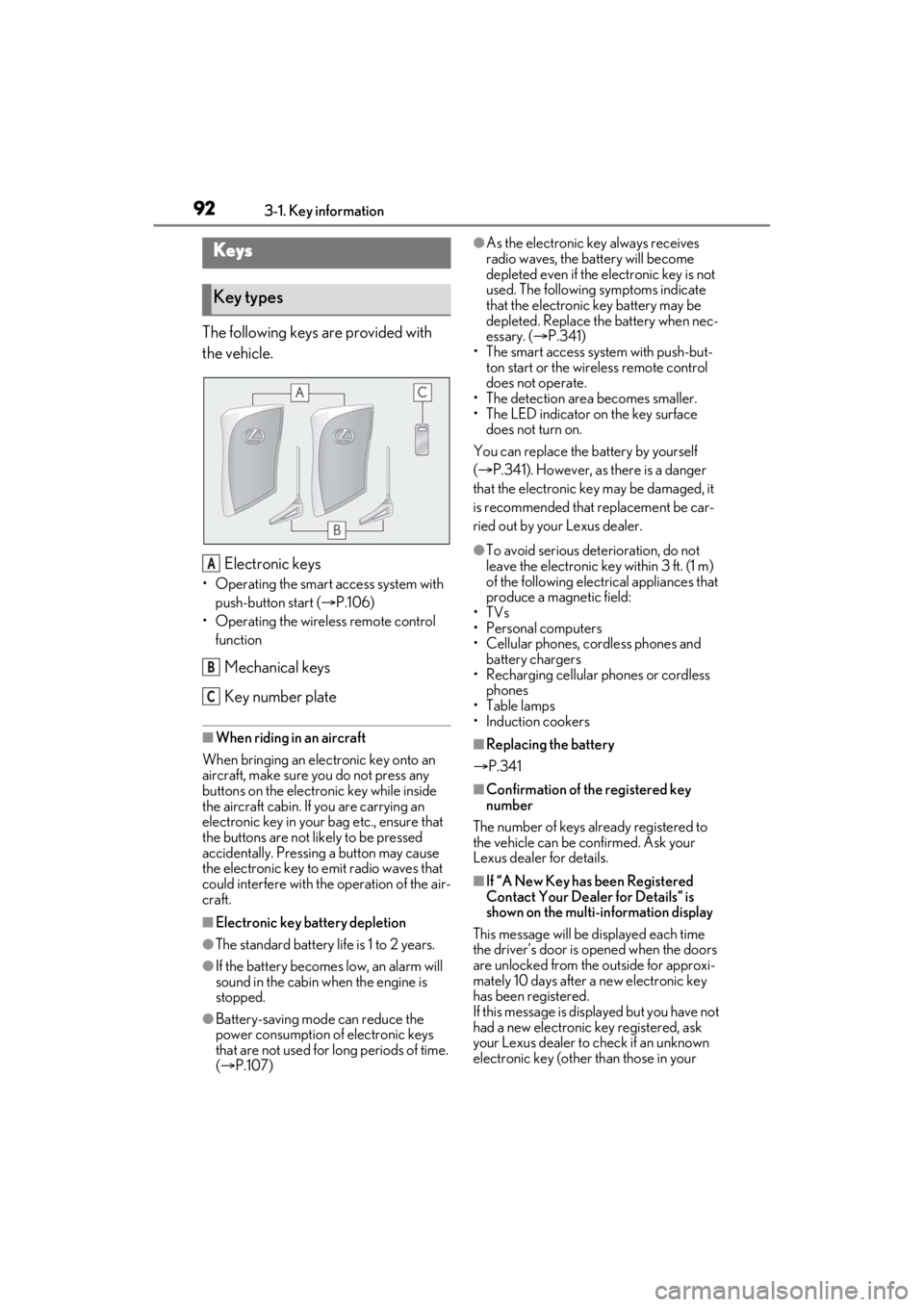
The following keys are provided with
the vehicle.
Electronic keys
• Operating the smart access system with push-button start ( P.106)
• Operating the wireless remote control function
Mechanical keys
Key number plate
■When riding in an aircraft
When bringing an elec tronic key onto an
aircraft, make sure you do not press any
buttons on the electronic key while inside
the aircraft cabin. If you are carrying an
electronic key in your bag etc., ensure that
the buttons are not likely to be pressed
accidentally. Pressing a button may cause
the electronic key to emit radio waves that
could interfere with the operation of the air-
craft.
■Electronic key battery depletion
●The standard battery life is 1 to 2 years.
●If the battery becomes low, an alarm will
sound in the cabin when the engine is
stopped.
●Battery-saving mode can reduce the
power consumption of electronic keys
that are not used for long periods of time.
( P.107)
●As the electronic key always receives
radio waves, the battery will become
depleted even if the electronic key is not
used. The following symptoms indicate
that the electronic key battery may be
depleted. Replace the battery when nec-
essary. ( P.341)
• The smart access system with push-but- ton start or the wireless remote control
does not operate.
• The detection area becomes smaller.
• The LED indicator on the key surface does not turn on.
You can replace the battery by yourself
( P.341). However, as there is a danger
that the electronic key may be damaged, it
is recommended that replacement be car-
ried out by your Lexus dealer.
●To avoid serious dete rioration, do not
leave the electronic key within 3 ft. (1 m)
of the following electrical appliances that
produce a magnetic field:
•TVs
• Personal computers
• Cellular phones, cordless phones and battery chargers
• Recharging cellular phones or cordless
phones
•Table lamps
• Induction cookers
■Replacing the battery
P.341
■Confirmation of the registered key
number
The number of keys already registered to
the vehicle can be confirmed. Ask your
Lexus dealer for details.
■If “A New Key has been Registered
Contact Your Dealer for Details” is
shown on the multi-information display
This message will be displayed each time
the driver’s door is opened when the doors
are unlocked from the outside for approxi-
mately 10 days after a new electronic key
has been registered.
If this message is disp layed but you have not
had a new electronic key registered, ask
your Lexus dealer to check if an unknown
electronic key (other than those in your
Keys
Key types
A
B
C
Page 94 of 464
943-1. Key information
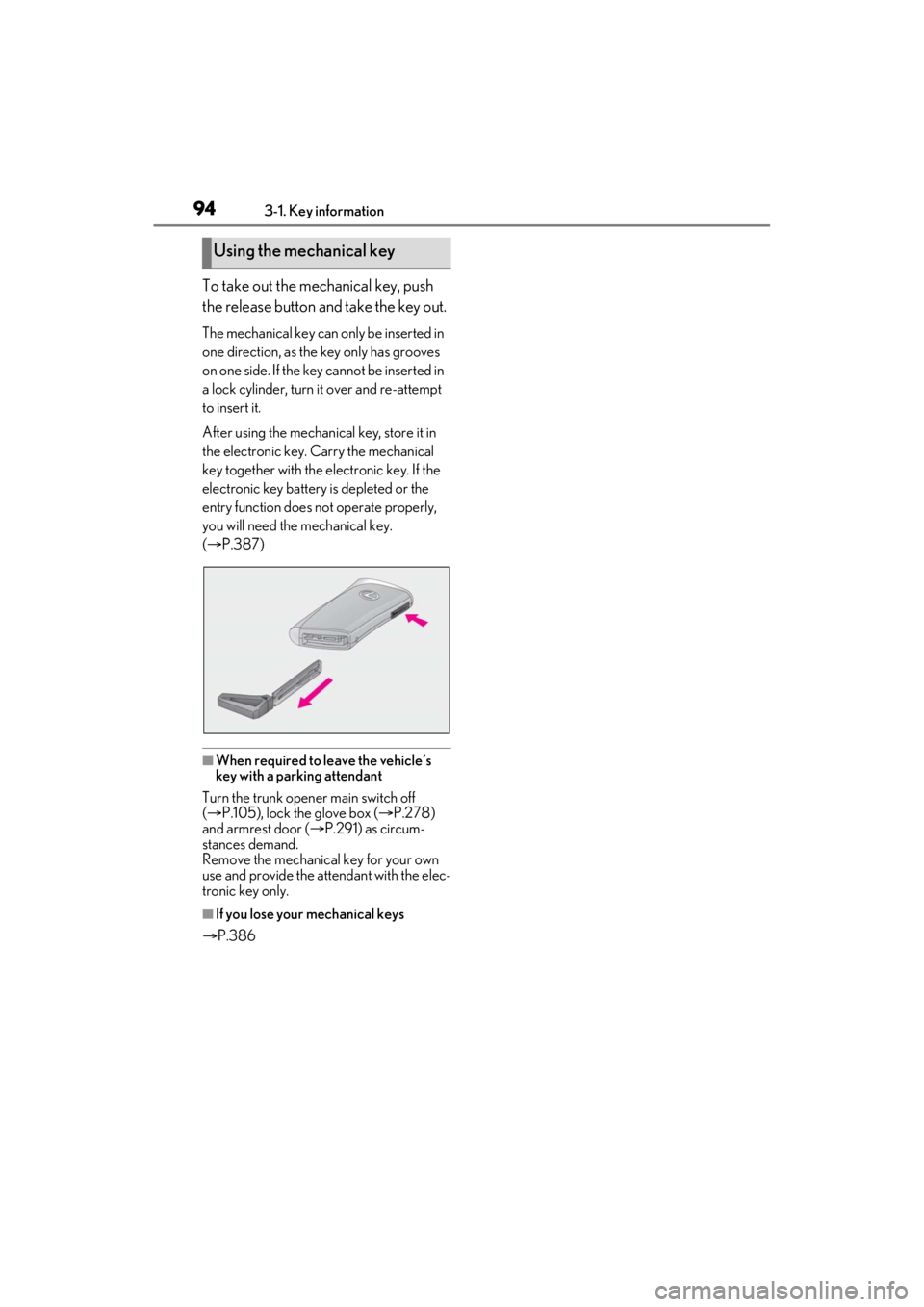
To take out the mechanical key, push
the release button and take the key out.
The mechanical key can only be inserted in
one direction, as the key only has grooves
on one side. If the key cannot be inserted in
a lock cylinder, turn it over and re-attempt
to insert it.
After using the mechanical key, store it in
the electronic key. Carry the mechanical
key together with the electronic key. If the
electronic key battery is depleted or the
entry function does not operate properly,
you will need the mechanical key.
( P.387)
■When required to leave the vehicle’s
key with a parking attendant
Turn the trunk opener main switch off
( P.105), lock the glove box ( P.278)
and armrest door ( P.291) as circum-
stances demand.
Remove the mechanical key for your own
use and provide the attendant with the elec-
tronic key only.
■If you lose your mechanical keys
P.386
Using the mechanical key
Page 96 of 464
963-2. Opening, closing and locking the doors and trunk
To prevent unintended triggering of the
alarm, unlock the doors using the wireless
remote control and open and close a door
once after the settings have been changed.
(If a door is not opened within 60 seconds
after is pressed, the doors will be
locked again and the alarm will automati-
cally be set.)
In a case that the alarm is triggered, imme-
diately stop the alarm. (P.63)
■Impact detection door lock release sys-
tem
In the event that the vehicle is subject to a
strong impact, all the doors are unlocked.
Depending on the force of the impact or the
type of accident, however, the system may
not operate.
■Operation signals
A buzzer sounds and the emergency flash-
ers flash to indicate that the doors have
been locked/unlocked. (Locked: once;
Unlocked: twice)
Windows and moon roof (if equipped) or
panoramic moon roof (if equipped): A
buzzer sounds to indicate that the windows
and moon roof or panoramic moon roof are
opening.
■Security feature
If a door is not opened within approximately
60 seconds after the vehicle is unlocked,
the security feature automatically locks the
vehicle again. (However, depending on the
location of the electronic key, the key may
be detected as being in the vehicle. In this
case, vehicle may be unlocked.)
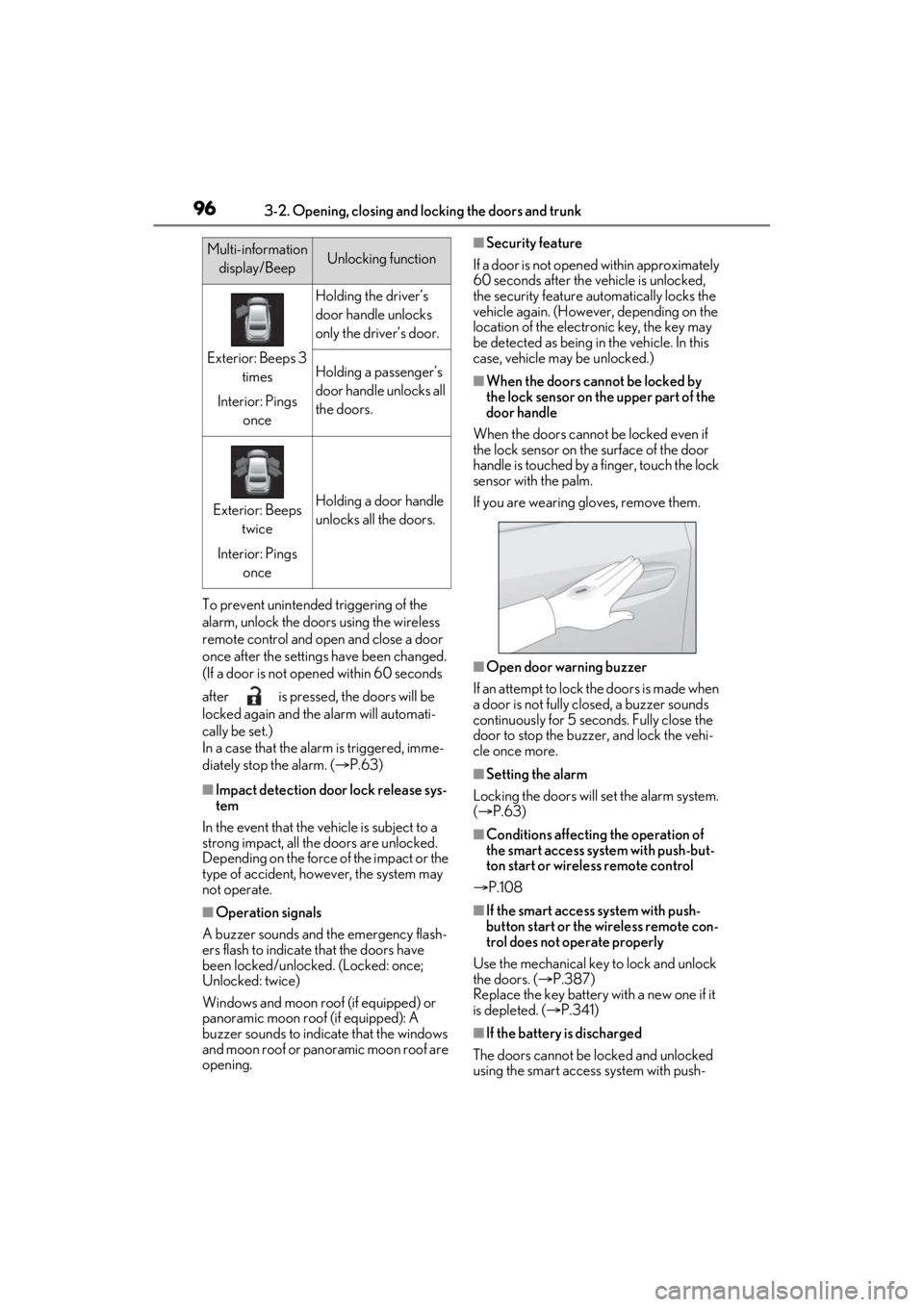
■When the doors cannot be locked by
the lock sensor on the upper part of the
door handle
When the doors cannot be locked even if
the lock sensor on the surface of the door
handle is touched by a finger, touch the lock
sensor with the palm.
If you are wearing gloves, remove them.
■Open door warning buzzer
If an attempt to lock the doors is made when
a door is not fully closed, a buzzer sounds
continuously for 5 seconds. Fully close the
door to stop the buzzer, and lock the vehi-
cle once more.
■Setting the alarm
Locking the doors will set the alarm system.
( P.63)
■Conditions affecting the operation of
the smart access system with push-but-
ton start or wireless remote control
P.108
■If the smart access system with push-
button start or the wireless remote con-
trol does not operate properly
Use the mechanical key to lock and unlock
the doors. ( P.387)
Replace the key battery with a new one if it
is depleted. ( P.341)
■If the battery is discharged
The doors cannot be locked and unlocked
using the smart access system with push-
Multi-information display/BeepUnlocking function
Exterior: Beeps 3 times
Interior: Pings once
Holding the driver’s
door handle unlocks
only the driver’s door.
Holding a passenger’s
door handle unlocks all
the doors.
Exterior: Beeps twice
Interior: Pings onceHolding a door handle
unlocks all the doors.
Page 100 of 464

1003-2. Opening, closing and locking the doors and trunk
WARNING
●Vehicles without power trunk lid:
When closing the trunk lid, make sure
to press it lightly on its outer surface. If
the trunk grip is used to fully close the
trunk lid, it may result in hands or arms
being caught.
●Do not attach any accessories other
than genuine Lexus parts to the trunk
lid. Such additional weight on the trunk
lid may cause the lid to suddenly shut
again after it is opened.
■Trunk easy closer (vehicles with
power trunk lid)
In the event that the trun k lid is left slightly
open, the trunk easy closer will automati-
cally close it to the fully closed position. It
takes several seconds before the trunk
easy closer begins to operate. Be careful
not to catch fingers or anything else in
the trunk lid, as this may cause bone frac-
tures or other serious injuries.
■Power trunk lid (if equipped)
Observe the following precautions when
operating the power trunk lid.
Failure to do so may cause serious injury.
●Check the safety of the surrounding
area to make sure there are no obsta-
cles or anything that could cause any
of your belongings to get caught.
●If anyone is in the vicinity, make sure
they are safe and let them know that
the trunk is about to open or close.
●If the trunk closer switch is pressed
while the trunk lid is opening during
automatic operation, the trunk lid
stops opening. Take extra care when
on an incline, as the trunk lid may open
or close suddenly.
●On an incline, the trunk lid may sud-
denly shut after it opens automatically.
Make sure the trunk lid is fully open
and secure before using the trunk.
●In the following situations, the power
trunk lid may detect an abnormality
and automatic operation may be
stopped. In this case, the trunk lid has
to be operated manually. Take extra
care in this situat ion, as the stopped
trunk lid may suddenly shut, causing an
accident.
• When the trunk lid contacts an obsta- cle
• When the battery voltage suddenly drops, such as when the engine switch
is turned to IGNITION ON mode or
the engine is started during automatic
operation
●Do not attach any accessories other
than genuine Lexus parts to the trunk
lid. The power trunk lid may not oper-
ate, causing itself to malfunction, or the
trunk lid may suddenly shut again after
it is opened.
■Hands Free Power Trunk Lid (vehi-
cles with power trunk lid)
Observe the following precautions.
Failure to do so may cause serious injury.
●Exhaust gases cause the exhaust pipes
to become quite hot. When operating
the Hands Free Power Trunk Lid, be
careful not to touch the exhaust pipe.
●Do not operate the Hands Free Power
Trunk Lid if there is little space under
the rear bumper.
■Jam protection function (vehicles
with power trunk lid)
Observe the following precautions.
Failure to do so may cause serious injury.
Page 104 of 464

1043-2. Opening, closing and locking the doors and trunk
■Using the mechanical key
The trunk can be also opened using the
mechanical key. ( P.387) If the trunk is
unlocked using the mechanical key, the
power trunk lid and trunk easy closer will
not be operational. To return them to an
operational state, fully close the trunk lid by
hand.
■If the smart access system with push-
button start or the wireless remote con-
trol does not operate properly
Use the mechanical key to unlock the trunk.
( P.387)
Replace the key battery with a new one if it
is depleted. ( P.341)
■Hands Free Power Trunk Lid operating
conditions (vehicle s with power trunk
lid)
●When the Hands Free Power Trunk Lid
(kick sensor) operation setting is turned
on and the engine sw itch is turned off
●When an electronic key is carried within
the operation range
■Situations in which the Hands Free
Power Trunk Lid may not operate prop-
erly (vehicles with power trunk lid)
In the following situations, the Hands Free
Power Trunk Lid may not operate properly:
●When a foot remain s under the rear
bumper
●If the rear bumper is strongly hit with a
foot or is touched for a while
If the rear bumper has been touched for a
while, wait for a short time before
attempting to operate the Hands Free
Power Trunk Lid again.
●When operated while a person is too
close to the rear bumper
●When an external radio wave source
interferes with the communication between the electronic key and the vehi-
cle (
P.108)
●When the vehicle is parked near an elec-
trical noise source which affects the sen-
sitivity of the Hands Free Power Trunk
Lid, such as a pay parking spot, gas sta-
tion, electrically heated road, or fluores-
cent light
●When the vehicle is near a TV tower,
electric power plant, radio station, large
display, airport or ot her facility that gen-
erates strong radio waves or electrical
noise
●When a large amount of water is applied
to the rear bumper, such as when the
vehicle is being washed or in heavy rain
●When mud, snow, ice, etc. is attached to
the rear bumper
●When the vehicle has been parked for a
while near objects that may move and
contact the rear bumper, such as plants
●When an accessory is installed to the rear
bumper
If an accessory has been installed, turn
the Hands Free Power Trunk Lid (kick
sensor) operation setting off.
■Preventing unintentional operation of
the Hands Free Power Trunk Lid (vehi-
cles with power trunk lid)
When an electronic key is in the operation
range, the Hands Free Power Trunk Lid
may operate unintentionally, so be careful
in the following situations.
●When a large amount of water is applied
to the rear bumper, such as when the
vehicle is being washed or in heavy rain
●When dirt is wiped off the rear bumper
●When a small animal or small object, such
as a ball, moves under the rear bumper
●When an object is moved from under the
rear bumper
●If someone is swinging their legs while sit-
ting on the rear bumper
●If the legs or another part of someone’s
body contacts the rear bumper while
passing by the vehicle
●When the vehicle is parked near an elec-
trical noise source which affects the sen-