lock LEXUS ES350 2022 Owners Manual
[x] Cancel search | Manufacturer: LEXUS, Model Year: 2022, Model line: ES350, Model: LEXUS ES350 2022Pages: 468, PDF Size: 26.96 MB
Page 380 of 468
3787-2. Steps to take in an emergency
1Ensure that the shift lever is in P and
depress the brake pedal.
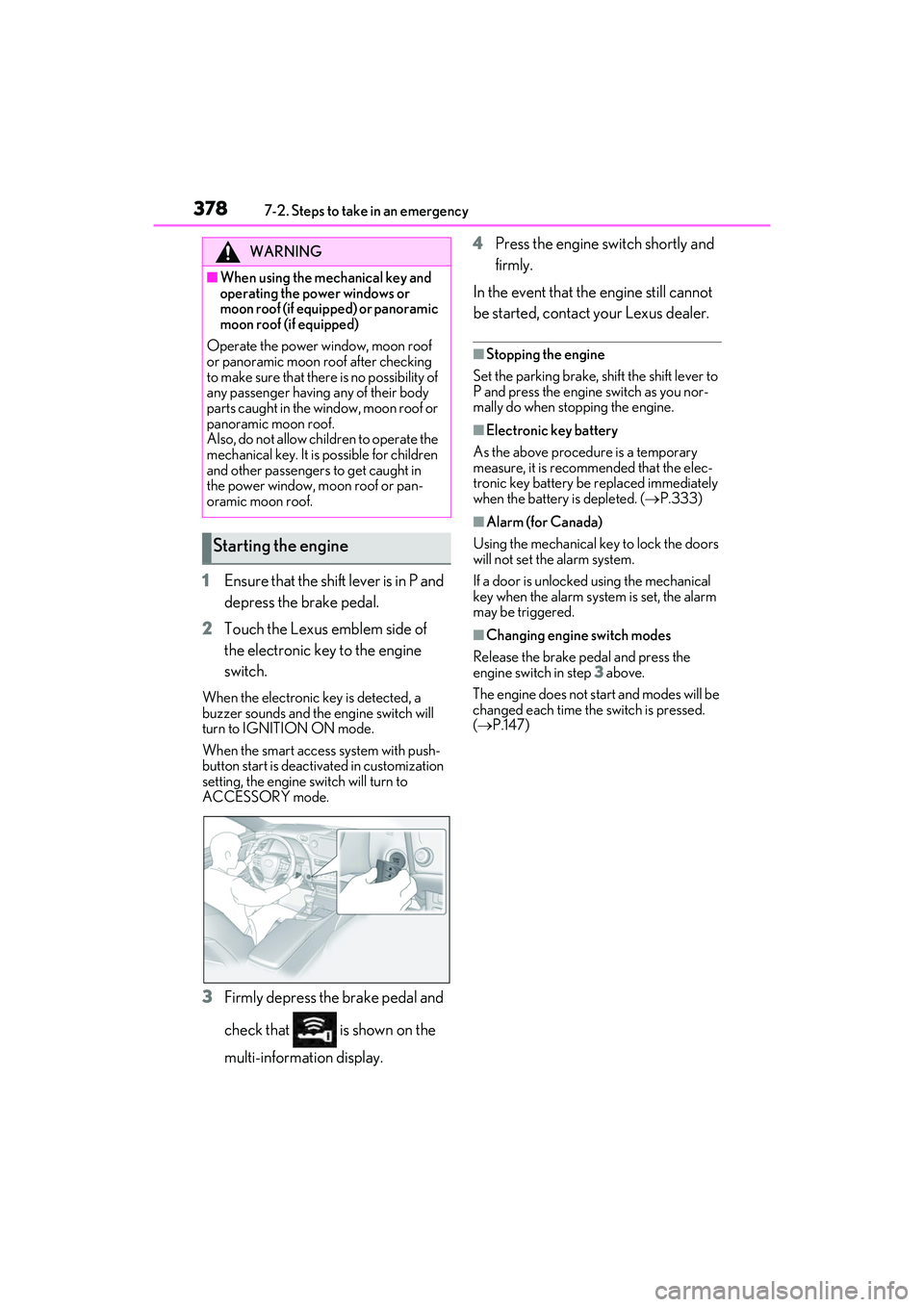
2 Touch the Lexus emblem side of
the electronic key to the engine
switch.
When the electronic key is detected, a
buzzer sounds and the engine switch will
turn to IGNITION ON mode.
When the smart access system with push-
button start is deactivated in customization
setting, the engine switch will turn to
ACCESSORY mode.
3Firmly depress the brake pedal and
check that is shown on the
multi-information display. 4
Press the engine switch shortly and
firmly.
In the event that the engine still cannot
be started, contact your Lexus dealer.
■Stopping the engine
Set the parking brake, shift the shift lever to
P and press the engine switch as you nor-
mally do when stopping the engine.
■Electronic key battery
As the above procedure is a temporary
measure, it is recommended that the elec-
tronic key battery be replaced immediately
when the battery is depleted. ( P.333)
■Alarm (for Canada)
Using the mechanical key to lock the doors
will not set the alarm system.
If a door is unlocked using the mechanical
key when the alarm system is set, the alarm
may be triggered.
■Changing engine switch modes
Release the brake pedal and press the
engine switch in step 3 above.
The engine does not start and modes will be
changed each time the switch is pressed.
( P.147)
WARNING
■When using the mechanical key and
operating the power windows or
moon roof (if equipped) or panoramic
moon roof (if equipped)
Operate the power window, moon roof
or panoramic moon roof after checking
to make sure that there is no possibility of
any passenger having any of their body
parts caught in the window, moon roof or
panoramic moon roof.
Also, do not allow children to operate the
mechanical key. It is possible for children
and other passengers to get caught in
the power window, moon roof or pan-
oramic moon roof.
Starting the engine
Page 381 of 468
3797-2. Steps to take in an emergency
7
When trouble arises
If you have a set of jumper (or booster)
cables and a second vehicle with a 12-
volt battery, you can jump start your
vehicle using the following procedure.1
Confirm that the electronic key is
being carried.
When connecting the jumper (or booster)
cables, depending on the situation, the
alarm may activate and doors locked.
( P.61)
2 Open the hood. ( P.310)
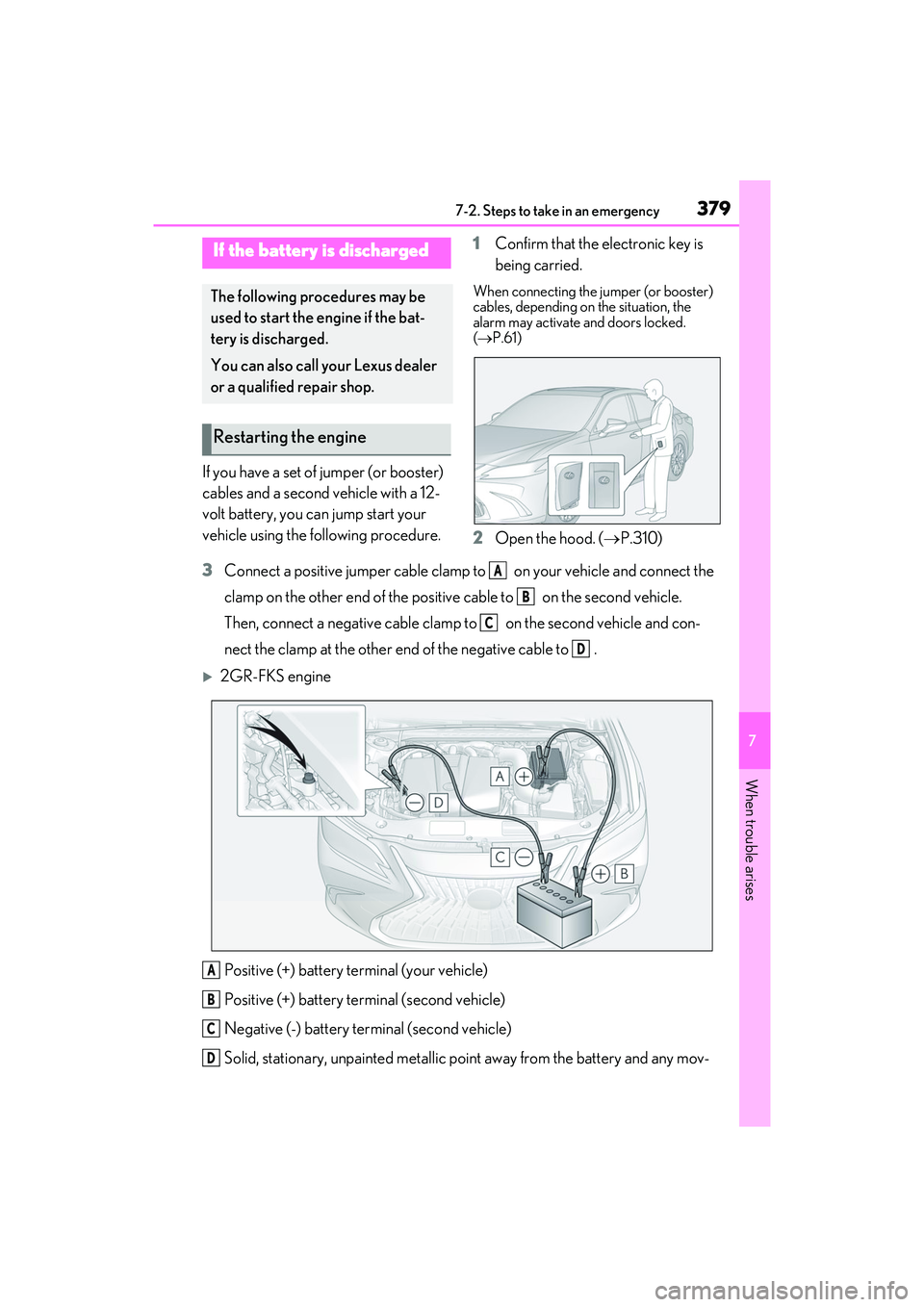
3 Connect a positive jumper cable clamp to on your vehicle and connect the
clamp on the other end of the positive cable to on the second vehicle.
Then, connect a negative cable clamp to on the second vehicle and con-
nect the clamp at the other end of the negative cable to .
2GR-FKS engine
Positive (+) battery terminal (your vehicle)
Positive (+) battery terminal (second vehicle)
Negative (-) battery terminal (second vehicle)
Solid, stationary, unpainted metallic point away from the battery and any mov-
If the battery is discharged
The following procedures may be
used to start the engine if the bat-
tery is discharged.
You can also call your Lexus dealer
or a qualified repair shop.
Restarting the engine
A
B
C
D
A
B
C
D
Page 383 of 468
3817-2. Steps to take in an emergency
7
When trouble arises
When the battery is depleted, have the
vehicle inspected at your Lexus dealer.
●Some systems may require initialization.
( P.419)
■When removing the battery terminals
When the battery terminals are removed,
the information stored in the ECU is
cleared. Before removing the battery termi-
nals, contact your Lexus dealer.
■Charging the battery
The electricity stored in the battery will dis-
charge gradually even when the vehicle is
not in use, due to natural discharge and the
draining effects of certain electrical appli-
ances. If the vehicle is left for a long time,
the battery may discharge, and the engine
may be unable to start. (The battery
recharges automatically during driving.)
■When recharging or replacing the bat-
tery
●In some cases, it may not be possible to
unlock the doors using the smart access
system with push-button start when the
battery is discharged. Use the wireless
remote control or the mechanical key to
lock or unlock the doors.
●The engine may not start on the first
attempt after the battery has recharged
but will start normally after the second
attempt. This is not a malfunction.
●The engine switch mode is memorized by
the vehicle. When the battery is recon-
nected, the system will return to the
mode it was in before the battery was dis-
charged. Before disconnecting the bat-
tery, turn the engine switch off.
If you are unsure what mode the engine
switch was in before the battery dis-
charged, be especially careful when
reconnecting the battery.
■When replacing the battery
●Use a battery that conforms to European
regulations.
●Use a battery that the case size is same as
the previous one (LN3), 20 hour rate
capacity (20HR) is equivalent (70Ah) or
greater, and performance rating (CCA)
is equivalent (592A) or greater.
• If the sizes differ, the battery cannot be properly secured.
• If the 20 hour rate capacity is low, even if the time period where the vehicle is not
used is a short time, the battery may dis-
charge and engine may not be able to
start.
●For details, consult your Lexus dealer.
WARNING
■When removing the battery termi-
nals
Always remove the negative (-) terminal
first. If the positive (+) terminal contacts
any metal in the surrounding area when
the positive (+) terminal is removed, a
spark may occur, leading to a fire in addi-
tion to electrical shocks and death or
serious injury.
■Avoiding battery fires or explosions
Observe the following precautions to
prevent accidentally igniting the flamma-
ble gas that may be emitted from the bat-
tery:
●Make sure each jumper cable is con-
nected to the correct terminal and that
it is not unintentionally in contact with
any other than the intended terminal.
●Do not allow the other end of the
jumper cable connected to the “+” ter-
minal to come into contact with any
other parts or metal surfaces in the
area, such as brackets or unpainted
metal.
●Do not allow the + and - clamps of the
jumper cables to come into contact
with each other.
●Do not smoke, use matches, cigarette
lighters or allow open flame near the
battery.
■Battery precautions
The battery contains poisonous and cor-
rosive acidic electrolyte, while related
parts contain lead and lead compounds.
Observe the following precautions when
handling the battery:
Page 411 of 468
4098-2. Customization
8
Vehicle specifications
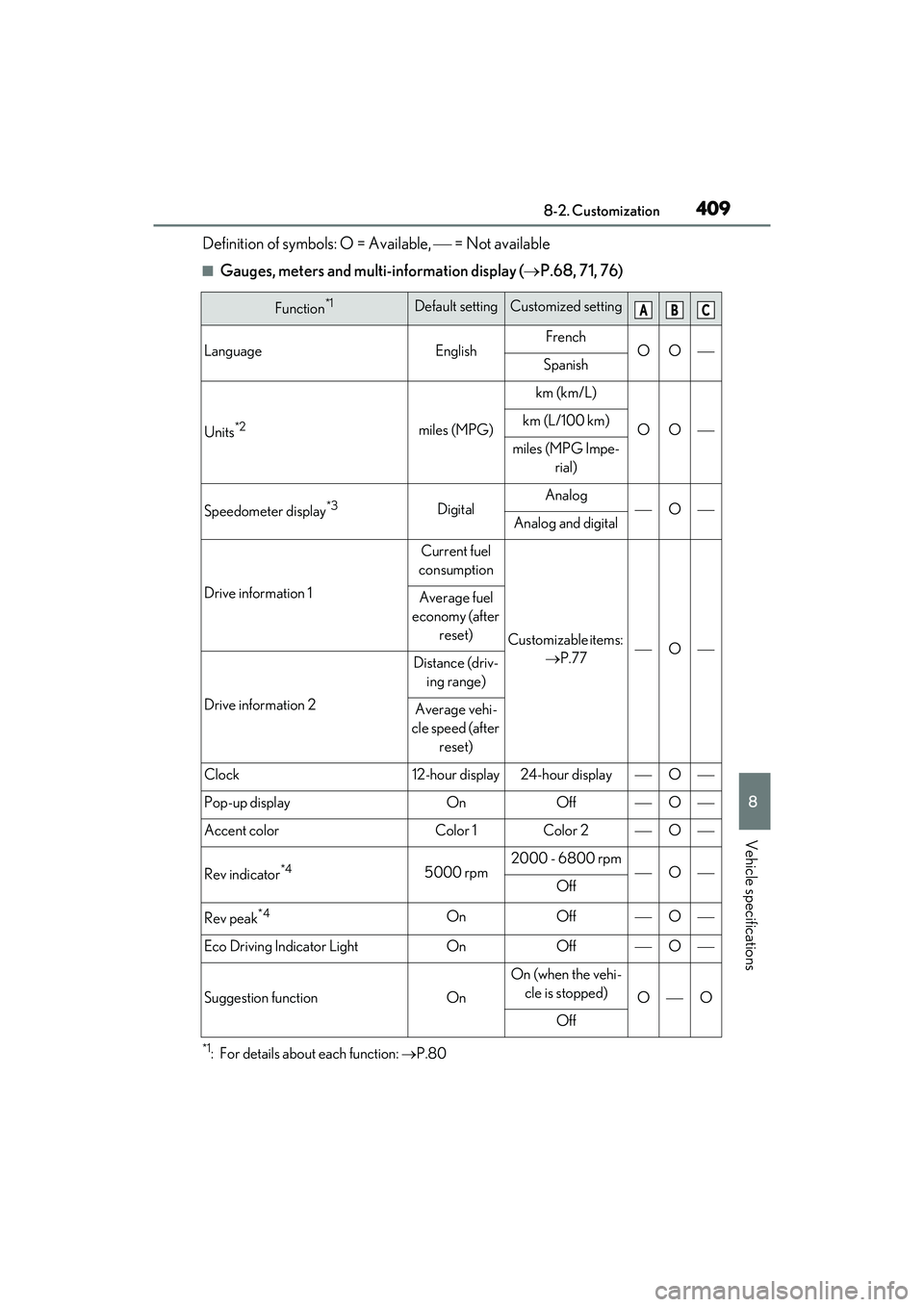
Definition of symbols: O = Available, = Not available
■Gauges, meters and multi-information display ( P.68, 71, 76)
*1: For details about each function: P.80
Function*1Default settingCustomized setting
LanguageEnglishFrenchOOSpanish
Units*2miles (MPG)
km (km/L)
OOkm (L/100 km)
miles (MPG Impe-
rial)
Speedometer display*3DigitalAnalogOAnalog and digital
Drive information 1
Current fuel
consumption
Customizable items: P.77O
Average fuel
economy (after reset)
Drive information 2
Distance (driv-ing range)
Average vehi-
cle speed (after reset)
Clock12-hour display24-hour displayO
Pop-up displayOnOffO
Accent colorColor 1Color 2O
Rev indicator*45000 rpm2000 - 6800 rpmOOff
Rev peak*4OnOffO
Eco Driving Indicator LightOnOffO
Suggestion functionOn
On (when the vehi-cle is stopped)
OO
Off
ABC
Page 412 of 468
4108-2. Customization
*2: The default setting varies according to country.
*3:Except F SPORT models
*4:F SPORT models
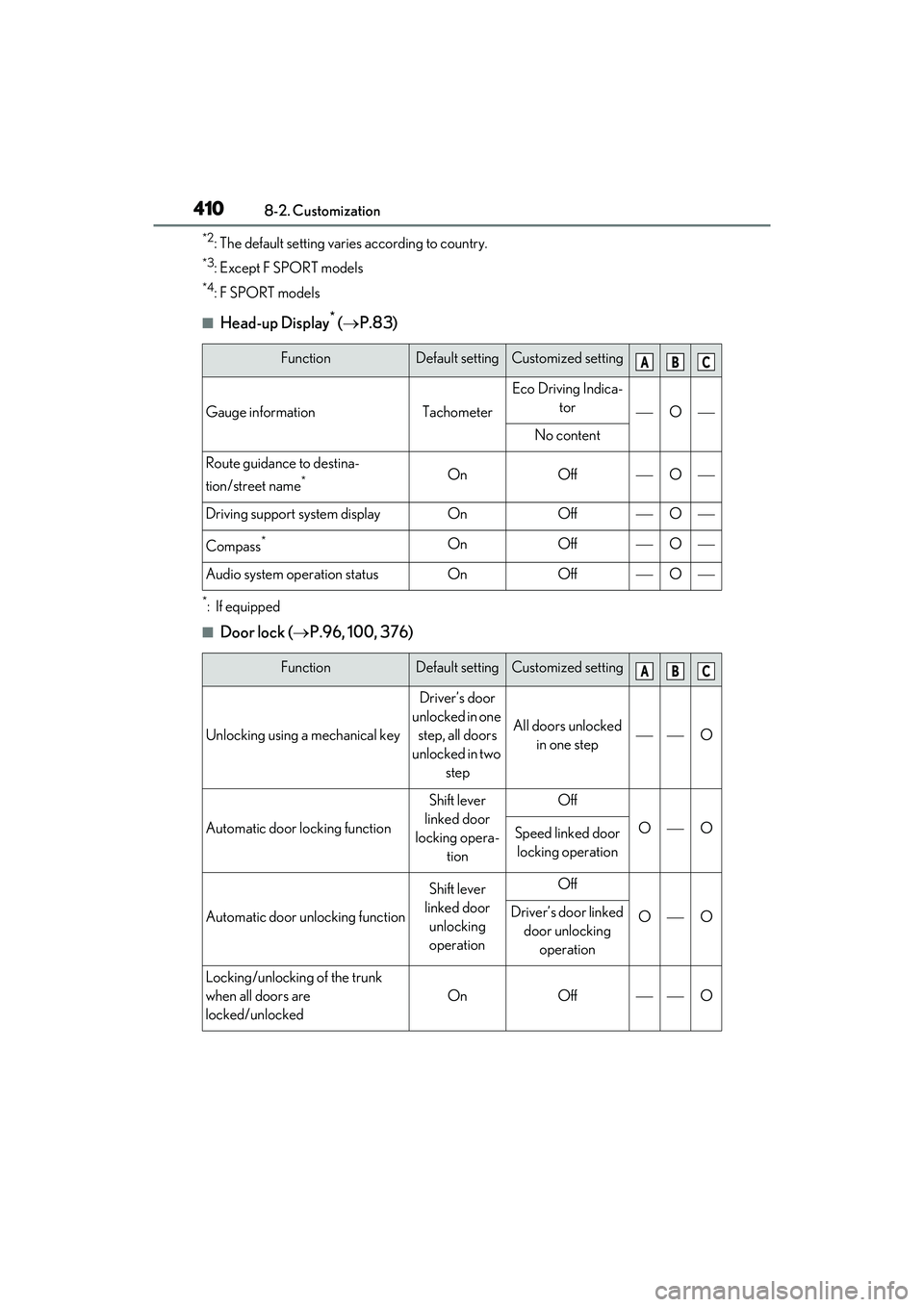
■Head-up Display* ( P.83)
*: If equipped
■Door lock ( P.96, 100, 376)
FunctionDefault settingCustomized setting
Gauge informationTachometer
Eco Driving Indica-
tor
O
No content
Route guidance to destina-
tion/street name
*OnOffO
Driving support system displayOnOffO
Compass*OnOffO
Audio system operation statusOnOffO
FunctionDefault settingCustomized setting
Unlocking using a mechanical key
Driver’s door
unlocked in one step, all doors
unlocked in two step
All doors unlocked in one stepO
Automatic door locking function
Shift lever
linked door
locking opera- tionOff
OOSpeed linked door locking operation
Automatic door unlocking function
Shift lever
linked door unlocking
operationOff
OODriver’s door linked door unlocking operation
Locking/unlocking of the trunk
when all doors are
locked/unlocked
OnOffO
ABC
ABC
Page 413 of 468
4118-2. Customization
8
Vehicle specifications
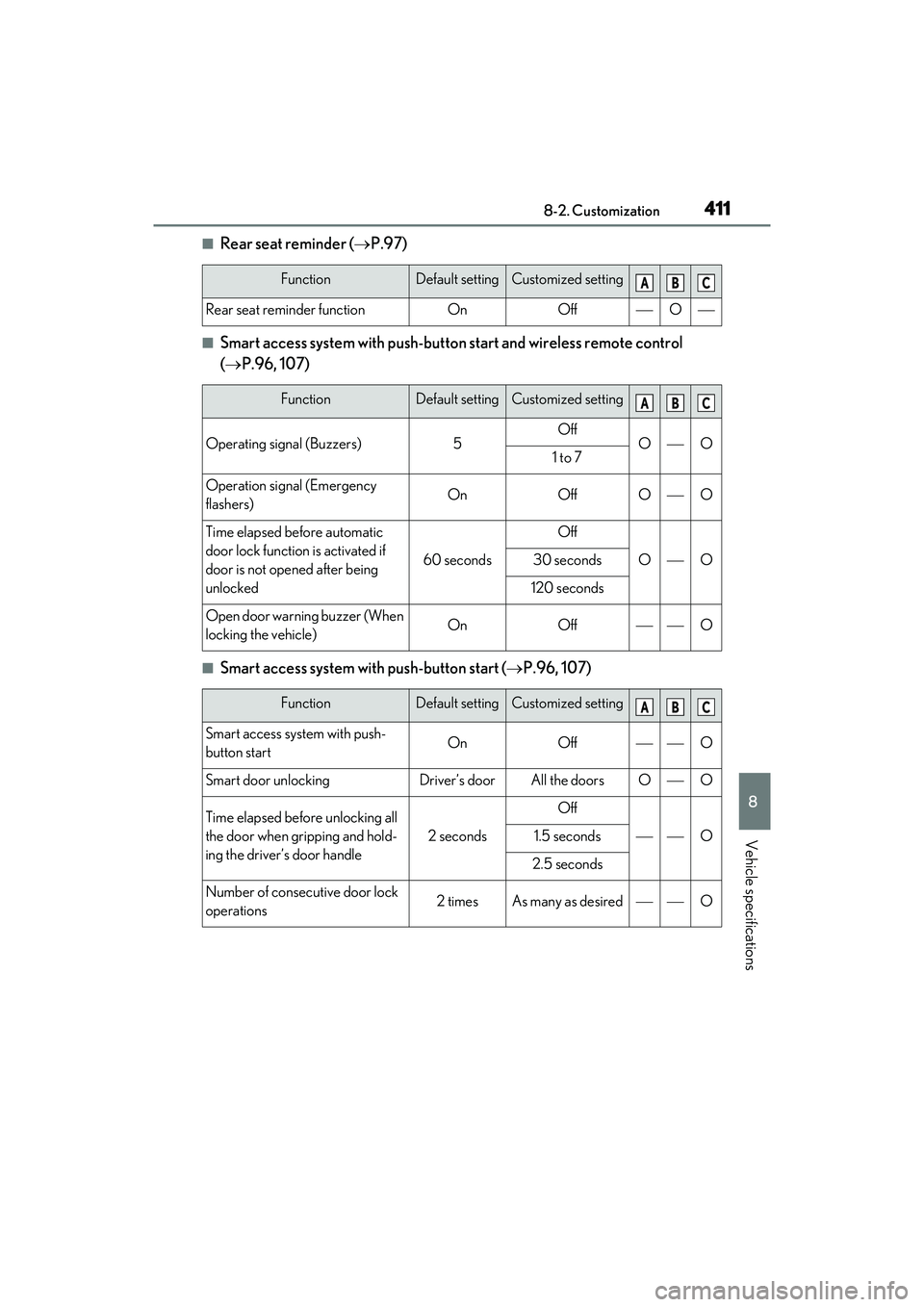
■Rear seat reminder (P.97)
■Smart access system with push-button start and wireless remote control
( P.96, 107)
■Smart access system with push-button start ( P.96, 107)
FunctionDefault settingCustomized setting
Rear seat reminder functionOnOffO
FunctionDefault settingCustomized setting
Operating signal (Buzzers)5OffOO1 to 7
Operation signal (Emergency
flashers)OnOffOO
Time elapsed before automatic
door lock function is activated if
door is not opened after being
unlocked
60 seconds
Off
OO30 seconds
120 seconds
Open door warning buzzer (When
locking the vehicle)OnOffO
FunctionDefault settingCustomized setting
Smart access system with push-
button startOnOffO
Smart door unlockingDriver’s doorAll the doorsOO
Time elapsed before unlocking all
the door when gripping and hold-
ing the driver’s door handle
2 seconds
Off
O1.5 seconds
2.5 seconds
Number of consecutive door lock
operations2 timesAs many as desiredO
ABC
ABC
ABC
Page 414 of 468
4128-2. Customization
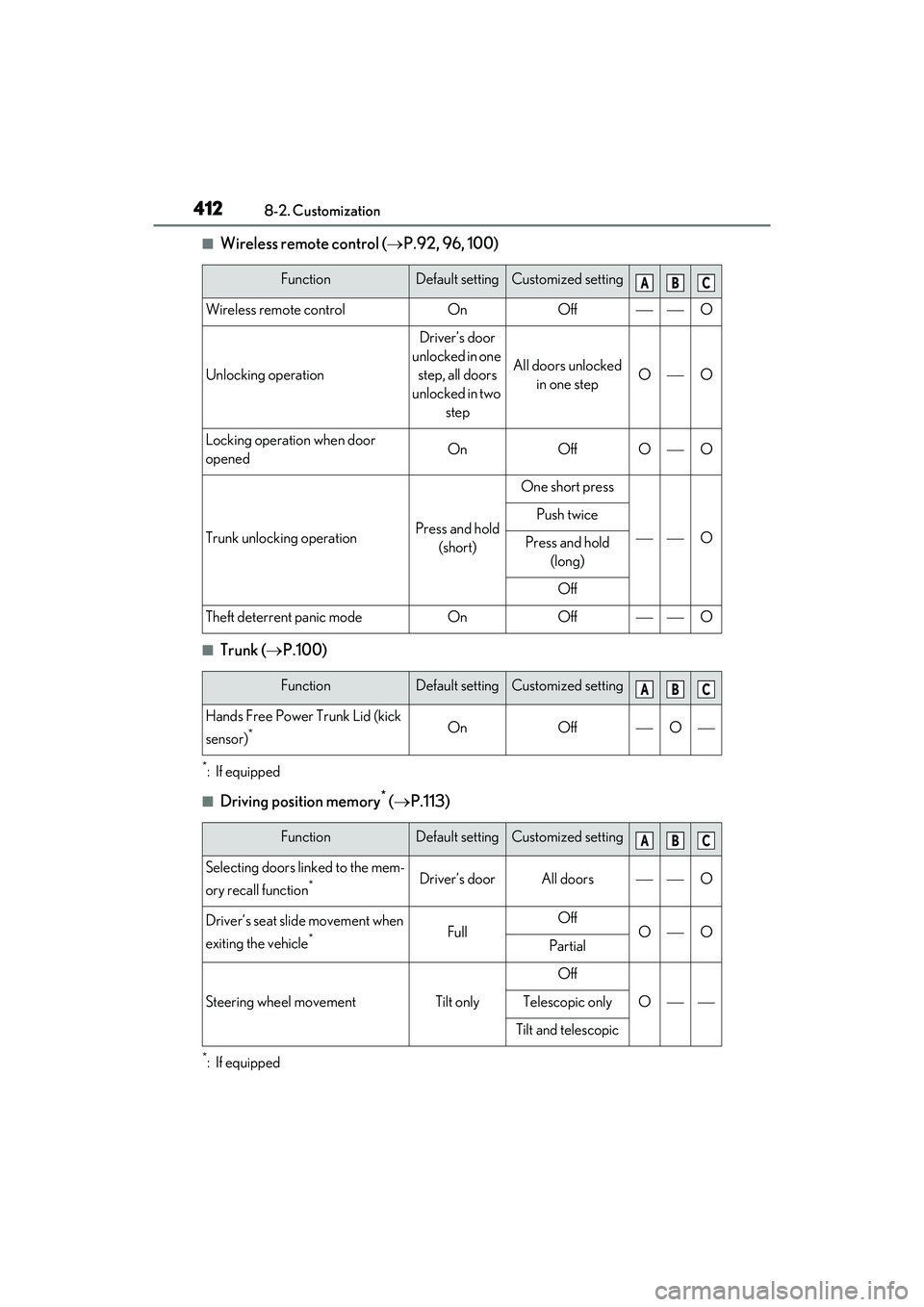
■Wireless remote control (P.92, 96, 100)
■Trunk ( P.100)
*: If equipped
■Driving position memory* ( P.113)
*: If equipped
FunctionDefault settingCustomized setting
Wireless remote controlOnOffO
Unlocking operation
Driver’s door
unlocked in one step, all doors
unlocked in two step
All doors unlocked in one stepOO
Locking operation when door
openedOnOffOO
Trunk unlocking operationPress and hold (short)
One short press
O
Push twice
Press and hold (long)
Off
Theft deterrent panic modeOnOffO
FunctionDefault settingCustomized setting
Hands Free Power Trunk Lid (kick
sensor)
*OnOffO
FunctionDefault settingCustomized setting
Selecting doors linked to the mem-
ory recall function
*Driver’s doorAll doorsO
Driver’s seat slide movement when
exiting the vehicle
*FullOffOOPartial
Steering wheel movementTilt only
Off
OTelescopic only
Tilt and telescopic
ABC
ABC
ABC
Page 415 of 468
4138-2. Customization
8
Vehicle specifications
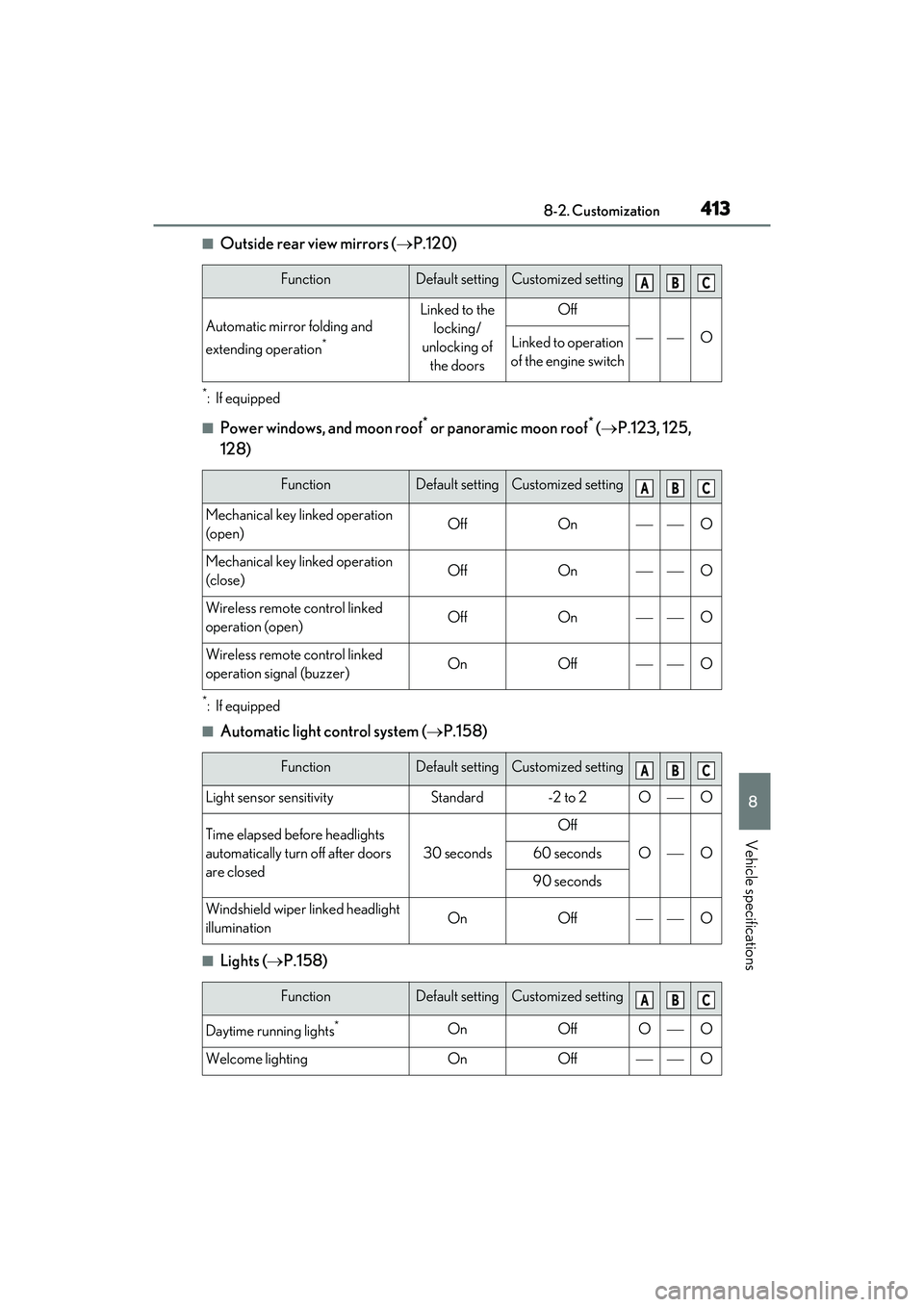
■Outside rear view mirrors (P.120)
*: If equipped
■Power windows, and moon roof* or panoramic moon roof* ( P.123, 125,
128)
*: If equipped
■Automatic light control system ( P.158)
■Lights ( P.158)
FunctionDefault settingCustomized setting
Automatic mirror folding and
extending operation
*
Linked to the
locking/
unlocking of the doorsOff
OLinked to operation
of the engine switch
FunctionDefault settingCustomized setting
Mechanical key linked operation
(open)OffOnO
Mechanical key linked operation
(close)OffOnO
Wireless remote control linked
operation (open)OffOnO
Wireless remote control linked
operation signal (buzzer)OnOffO
FunctionDefault settingCustomized setting
Light sensor sensitivityStandard-2 to 2OO
Time elapsed before headlights
automatically turn off after doors
are closed
30 seconds
Off
OO60 seconds
90 seconds
Windshield wiper linked headlight
illuminationOnOffO
FunctionDefault settingCustomized setting
Daytime running lights*OnOffOO
Welcome lightingOnOffO
ABC
ABC
ABC
ABC
Page 419 of 468
4178-2. Customization
8
Vehicle specifications
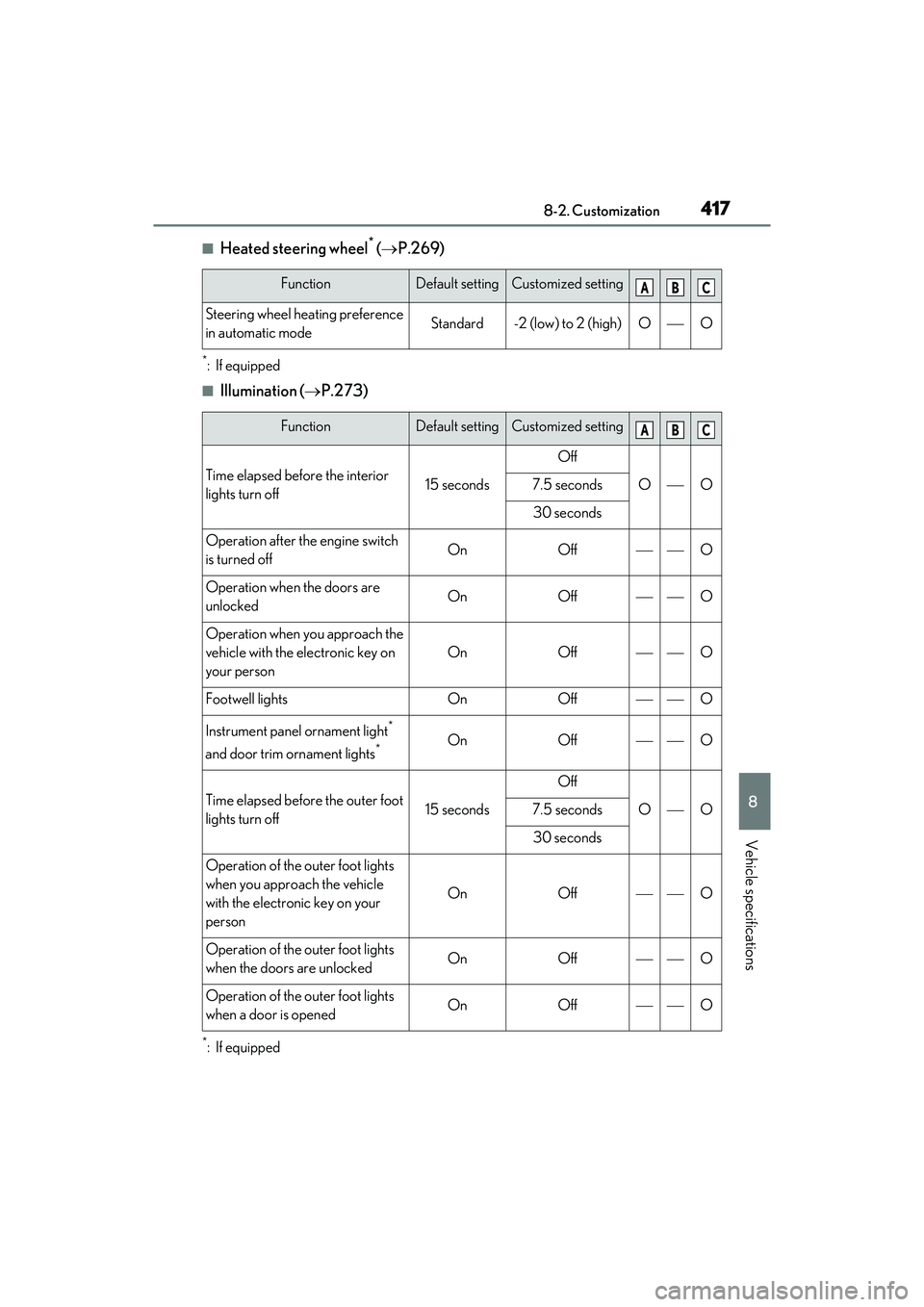
■Heated steering wheel* ( P.269)
*: If equipped
■Illumination ( P.273)
*: If equipped
FunctionDefault settingCustomized setting
Steering wheel heating preference
in automatic modeStandard-2 (low) to 2 (high)OO
FunctionDefault settingCustomized setting
Time elapsed before the interior
lights turn off15 seconds
Off
OO7.5 seconds
30 seconds
Operation after the engine switch
is turned offOnOffO
Operation when the doors are
unlockedOnOffO
Operation when you approach the
vehicle with the electronic key on
your person
OnOffO
Footwell lightsOnOffO
Instrument panel ornament light*
and door trim ornament lights
*OnOffO
Time elapsed before the outer foot
lights turn off15 seconds
Off
OO7.5 seconds
30 seconds
Operation of the outer foot lights
when you approach the vehicle
with the electronic key on your
person
OnOffO
Operation of the outer foot lights
when the doors are unlockedOnOffO
Operation of the outer foot lights
when a door is openedOnOffO
ABC
ABC
Page 420 of 468
4188-2. Customization
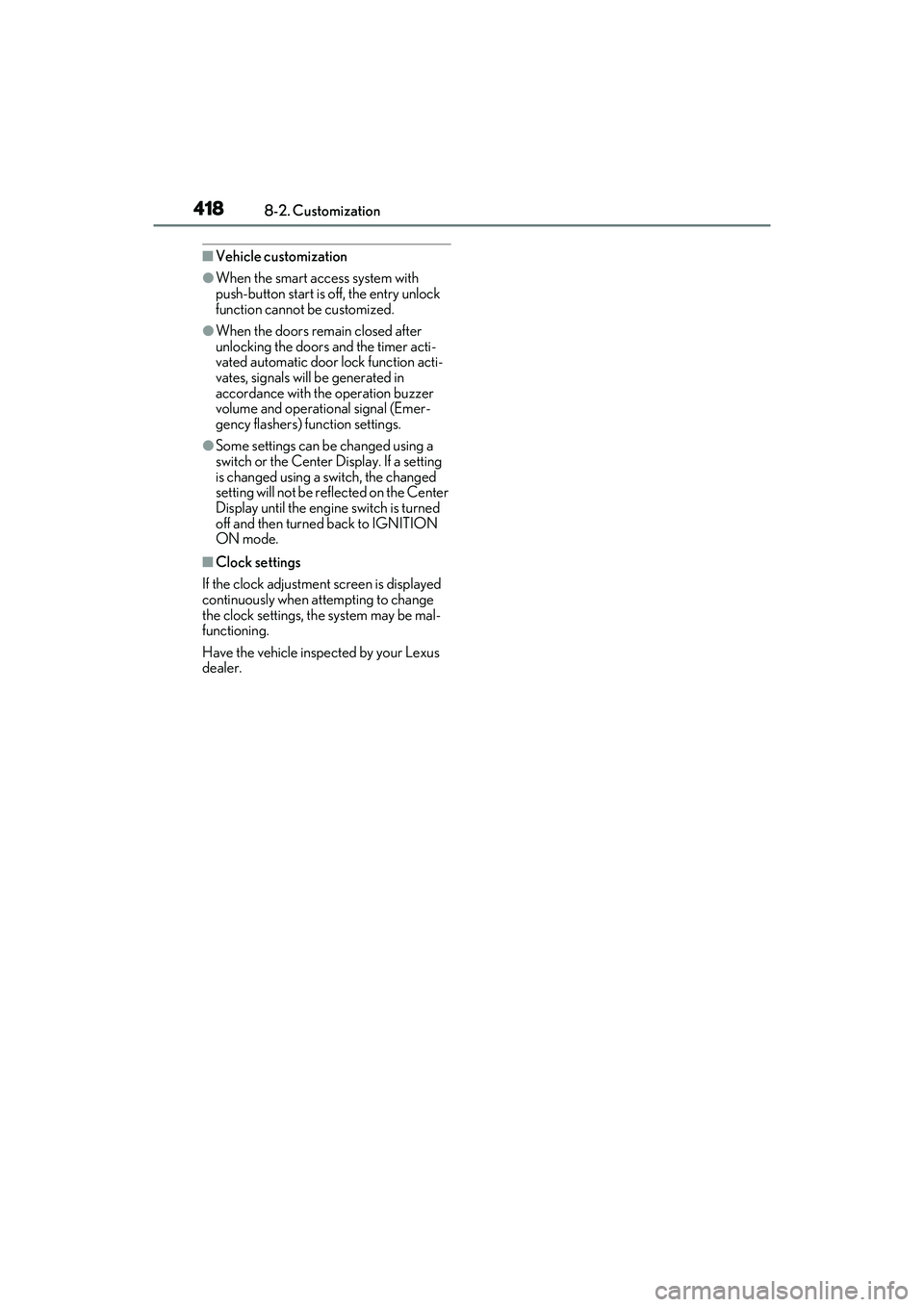
■Vehicle customization
●When the smart access system with
push-button start is off, the entry unlock
function cannot be customized.
●When the doors remain closed after
unlocking the doors and the timer acti-
vated automatic door lock function acti-
vates, signals will be generated in
accordance with the operation buzzer
volume and operational signal (Emer-
gency flashers) function settings.
●Some settings can be changed using a
switch or the Center Display. If a setting
is changed using a switch, the changed
setting will not be reflected on the Center
Display until the engine switch is turned
off and then turned back to IGNITION
ON mode.
■Clock settings
If the clock adjustment screen is displayed
continuously when attempting to change
the clock settings, the system may be mal-
functioning.
Have the vehicle inspected by your Lexus
dealer.