check LEXUS ES350 2022 User Guide
[x] Cancel search | Manufacturer: LEXUS, Model Year: 2022, Model line: ES350, Model: LEXUS ES350 2022Pages: 468, PDF Size: 26.96 MB
Page 68 of 468
662-1. Instrument cluster
*1: These lights come on when the engine switch is turned to IGNITION ON
mode to indicate that a system check is
being performed. They will turn off after
the engine is started, or after a few sec-
onds. There may be a malfunction in a
system if the lights do not come on, or
turn off. Have the vehicle inspected by
your Lexus dealer.
*2: This light illuminates on the multi-infor-mation display.
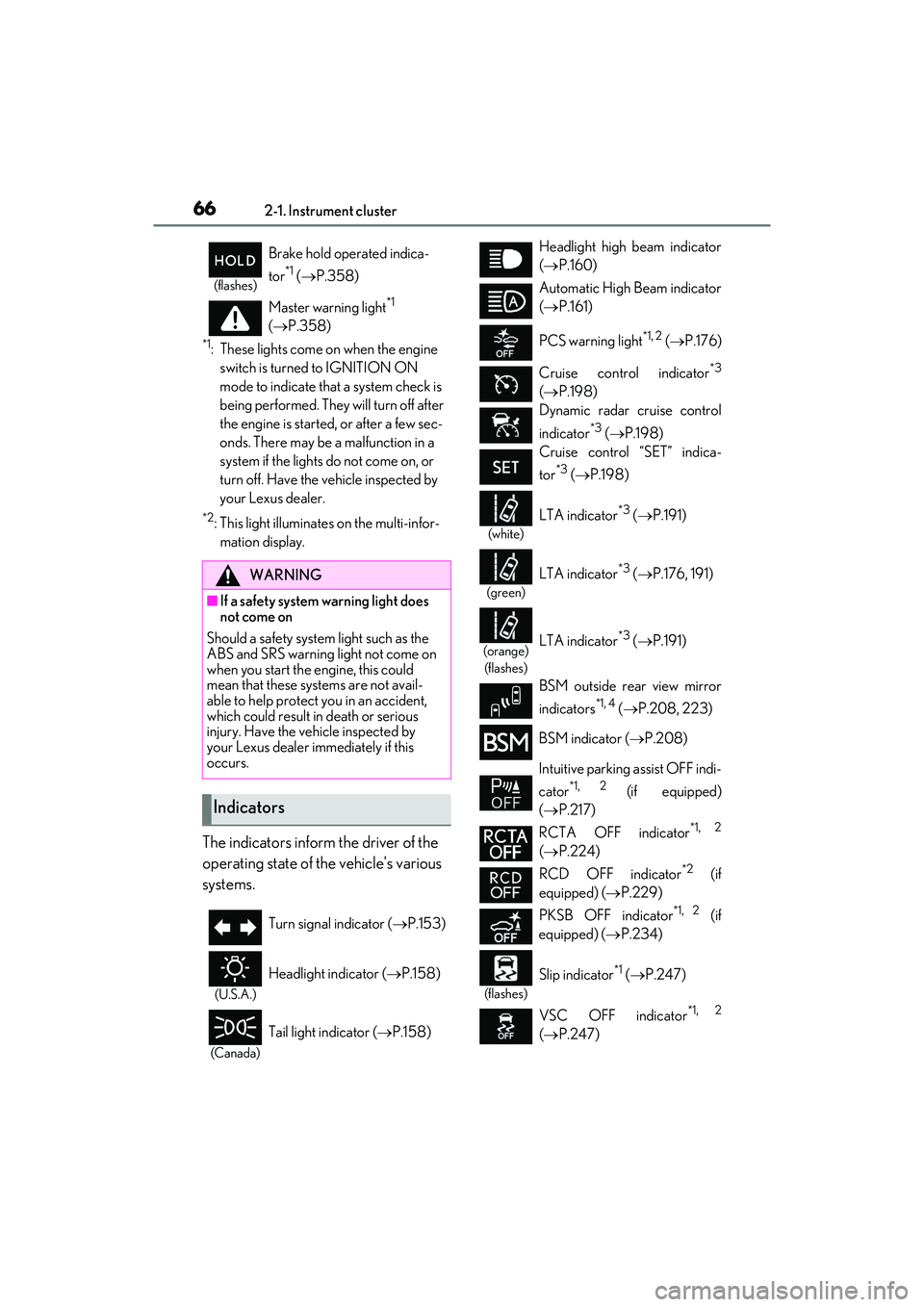
The indicators inform the driver of the
operating state of the vehicle’s various
systems.
(flashes)
Brake hold operated indica-
tor
*1 ( P.358)
Master warning light
*1
( P.358)
WARNING
■If a safety system warning light does
not come on
Should a safety system light such as the
ABS and SRS warning light not come on
when you start the engine, this could
mean that these systems are not avail-
able to help protect you in an accident,
which could result in death or serious
injury. Have the vehicle inspected by
your Lexus dealer immediately if this
occurs.
Indicators
Turn signal indicator ( P.153)
(U.S.A.)
Headlight indicator ( P.158)
(Canada)
Tail light indicator ( P.158)
Headlight high beam indicator
( P.160)
Automatic High Beam indicator
( P.161)
PCS warning light
*1, 2 ( P.176)
Cruise control indicator
*3
( P.198)
Dynamic radar cruise control
indicator
*3 ( P.198)
Cruise control “SET” indica-
tor
*3 ( P.198)
(white)
LTA indicator*3 ( P.191)
(green)
LTA indicator*3 ( P.176, 191)
(orange)
(flashes)LTA indicator*3 ( P.191)
BSM outside rear view mirror
indicators
*1, 4 ( P.208, 223)
BSM indicator ( P.208)
Intuitive parking assist OFF indi-
cator
*1, 2 (if equipped)
( P.217)
RCTA OFF indicator
*1, 2
( P.224)
RCD OFF indicator
*2 (if
equipped) ( P.229)
PKSB OFF indicator
*1, 2 (if
equipped) ( P.234)
(flashes)
Slip indicator*1 ( P.247)
VSC OFF indicator
*1, 2
( P.247)
Page 69 of 468
672-1. Instrument cluster
2
Vehicle status information and indicators
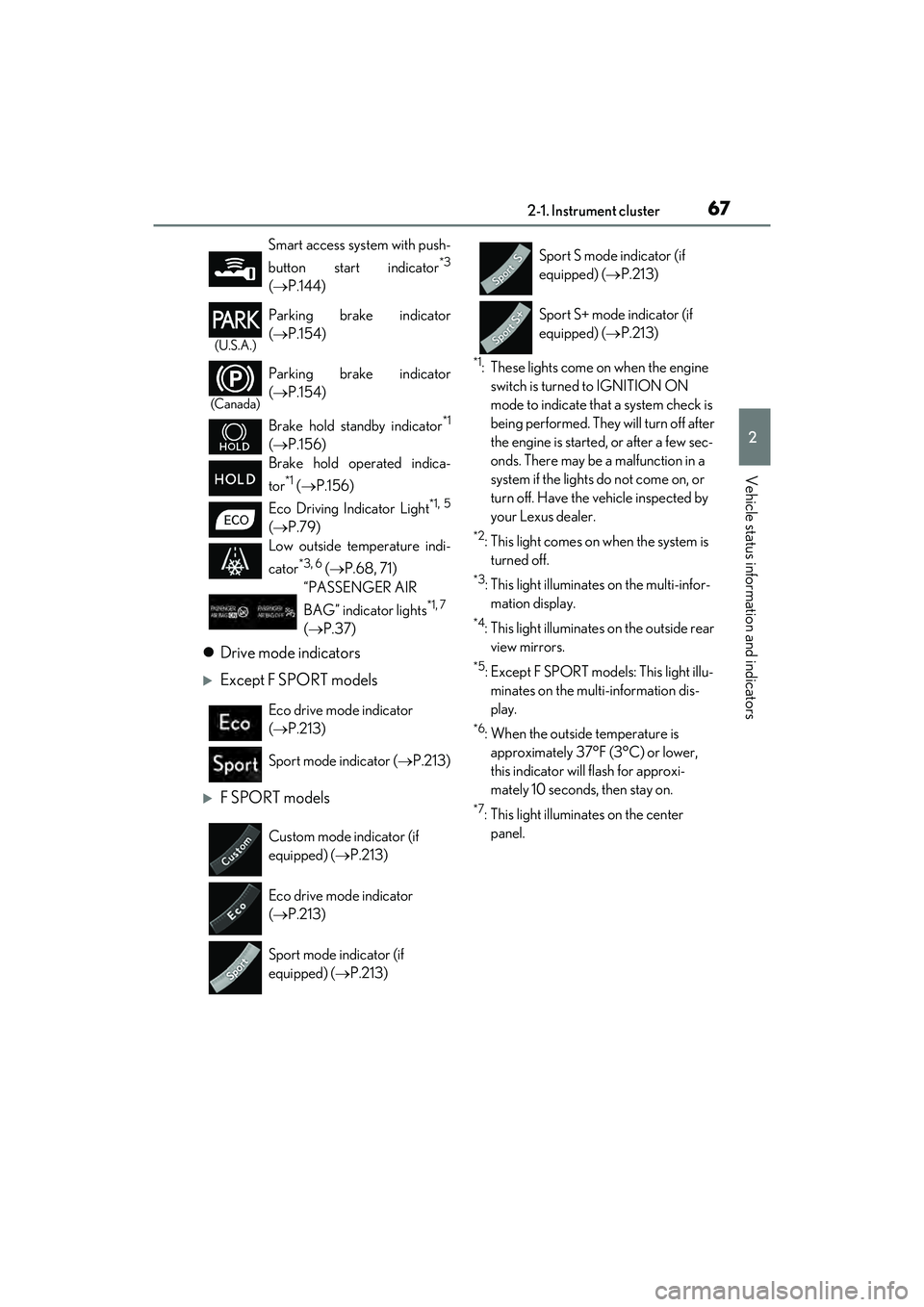
Drive mode indicators
Except F SPORT models
F SPORT models
*1: These lights come on when the engine
switch is turned to IGNITION ON
mode to indicate that a system check is
being performed. They will turn off after
the engine is started, or after a few sec-
onds. There may be a malfunction in a
system if the lights do not come on, or
turn off. Have the vehicle inspected by
your Lexus dealer.
*2: This light comes on when the system is turned off.
*3: This light illuminates on the multi-infor-mation display.
*4: This light illuminates on the outside rear view mirrors.
*5: Except F SPORT models: This light illu-minates on the multi-information dis-
play.
*6: When the outside temperature is approximately 37°F (3°C) or lower,
this indicator will flash for approxi-
mately 10 seconds, then stay on.
*7: This light illuminates on the center panel.
Smart access system with push-
button start indicator
*3
(
P.144)
(U.S.A.)
Parking brake indicator
( P.154)
(Canada)
Parking brake indicator
( P.154)
Brake hold standby indicator
*1
( P.156)
Brake hold operated indica-
tor
*1 ( P.156)
Eco Driving Indicator Light
*1, 5
( P.79)
Low outside temperature indi-
cator
*3, 6 ( P.68, 71)
“PASSENGER AIR
BAG” indicator lights
*1, 7
( P.37)
Eco drive mode indicator
( P.213)
Sport mode indicator ( P.213)
Custom mode indicator (if
equipped) ( P.213)
Eco drive mode indicator
( P.213)
Sport mode indicator (if
equipped) ( P.213)
Sport S mode indicator (if
equipped) ( P.213)
Sport S+ mode indicator (if
equipped) ( P.213)
Page 72 of 468
702-1. Instrument cluster
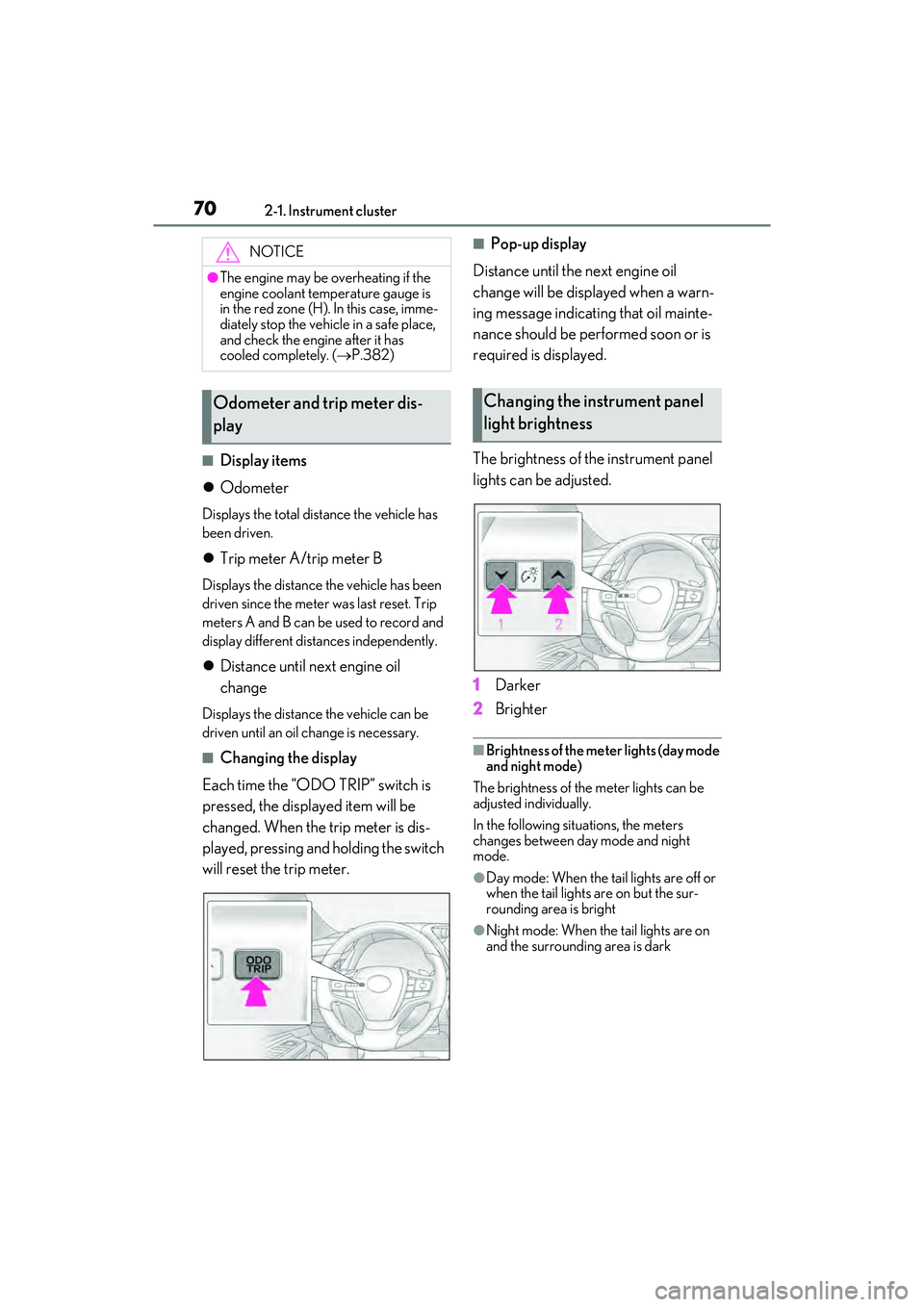
■Display items
Odometer
Displays the total distance the vehicle has
been driven.
Trip meter A/trip meter B
Displays the distance the vehicle has been
driven since the meter was last reset. Trip
meters A and B can be used to record and
display different distances independently.
Distance until next engine oil
change
Displays the distance the vehicle can be
driven until an oil change is necessary.
■Changing the display
Each time the “ODO TRIP” switch is
pressed, the displayed item will be
changed. When the trip meter is dis-
played, pressing and holding the switch
will reset the trip meter.
■Pop-up display
Distance until the next engine oil
change will be displayed when a warn-
ing message indicating that oil mainte-
nance should be performed soon or is
required is displayed.
The brightness of the instrument panel
lights can be adjusted.
1 Darker
2 Brighter
■Brightness of the meter lights (day mode
and night mode)
The brightness of the meter lights can be
adjusted individually.
In the following situations, the meters
changes between day mode and night
mode.
●Day mode: When the tail lights are off or
when the tail lights are on but the sur-
rounding area is bright
●Night mode: When the tail lights are on
and the surrounding area is dark
NOTICE
●The engine may be overheating if the
engine coolant temperature gauge is
in the red zone (H). In this case, imme-
diately stop the vehicle in a safe place,
and check the engine after it has
cooled completely. ( P.382)
Odometer and trip meter dis-
playChanging the instrument panel
light brightness
Page 76 of 468
742-1. Instrument cluster
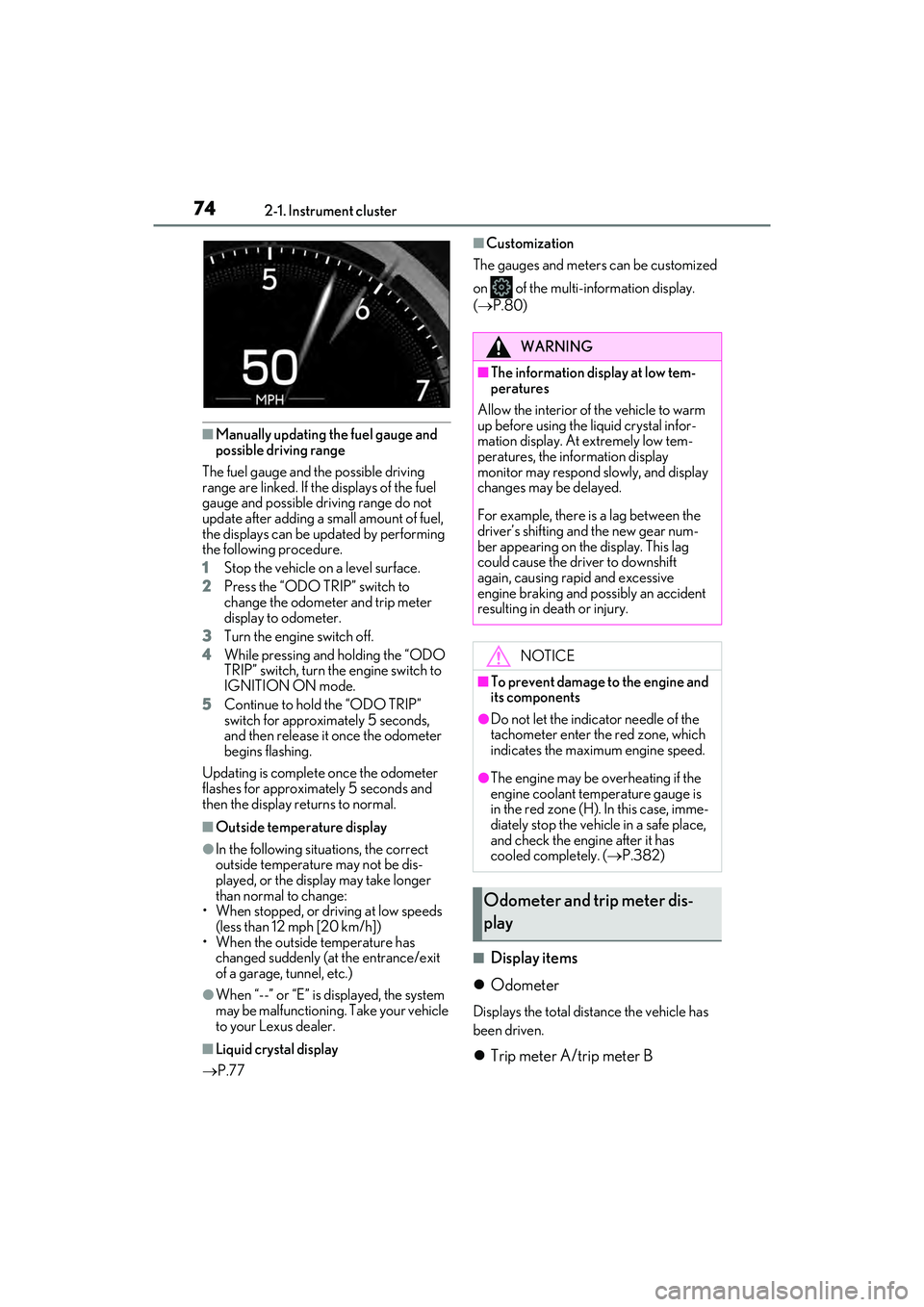
■Manually updating the fuel gauge and
possible driving range
The fuel gauge and the possible driving
range are linked. If the displays of the fuel
gauge and possible driving range do not
update after adding a small amount of fuel,
the displays can be updated by performing
the following procedure.
1 Stop the vehicle on a level surface.
2 Press the “ODO TRIP” switch to
change the odometer and trip meter
display to odometer.
3 Turn the engine switch off.
4 While pressing and holding the “ODO
TRIP” switch, turn the engine switch to
IGNITION ON mode.
5 Continue to hold the “ODO TRIP”
switch for approximately 5 seconds,
and then release it once the odometer
begins flashing.
Updating is complete once the odometer
flashes for approximately 5 seconds and
then the display returns to normal.
■Outside temperature display
●In the following situations, the correct
outside temperature may not be dis-
played, or the display may take longer
than normal to change:
• When stopped, or driving at low speeds (less than 12 mph [20 km/h])
• When the outside temperature has changed suddenly (at the entrance/exit
of a garage, tunnel, etc.)
●When “--” or “E” is displayed, the system
may be malfunctioning. Take your vehicle
to your Lexus dealer.
■Liquid crystal display
P.77
■Customization
The gauges and meters can be customized
on of the multi-information display.
( P.80)
■Display items
Odometer
Displays the total distance the vehicle has
been driven.
Trip meter A/trip meter B
WARNING
■The information display at low tem-
peratures
Allow the interior of the vehicle to warm
up before using the liquid crystal infor-
mation display. At extremely low tem-
peratures, the information display
monitor may respond slowly, and display
changes may be delayed.
For example, there is a lag between the
driver’s shifting and the new gear num-
ber appearing on the display. This lag
could cause the driver to downshift
again, causing rapid and excessive
engine braking and possibly an accident
resulting in death or injury.
NOTICE
■To prevent damage to the engine and
its components
●Do not let the indicator needle of the
tachometer enter the red zone, which
indicates the maximum engine speed.
●The engine may be overheating if the
engine coolant temperature gauge is
in the red zone (H). In this case, imme-
diately stop the vehicle in a safe place,
and check the engine after it has
cooled completely. ( P.382)
Odometer and trip meter dis-
play
Page 86 of 468
842-1. Instrument cluster
Tachometer/Eco Driving Indicator display area (P.86)
Head-up display switch
■Head-up display will operate when
The engine switch is in IGNITION ON
mode.
■When using the head-up display
The head-up display may seem dark or hard
to see when viewed through sunglasses,
especially polarized sunglasses. Adjust the
brightness of the he ad-up display or
remove your sunglasses.
■Street name display
Only street names which are included in the
map data will be displayed.
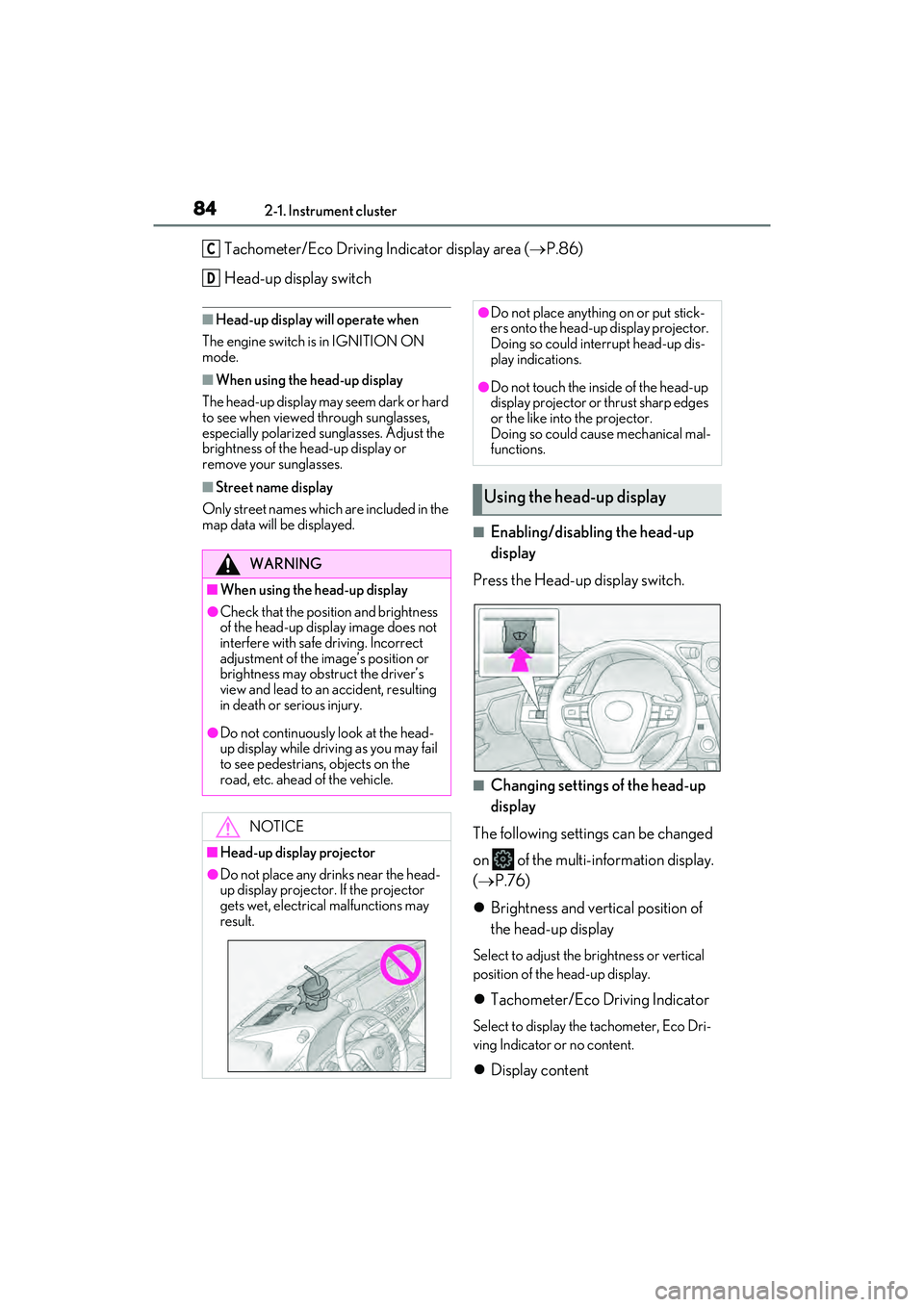
■Enabling/disabling the head-up
display
Press the Head-up display switch.
■Changing settings of the head-up
display
The following settings can be changed
on of the multi-information display.
( P.76)
Brightness and vertical position of
the head-up display
Select to adjust the brightness or vertical
position of the head-up display.
Tachometer/Eco Driving Indicator
Select to display the tachometer, Eco Dri-
ving Indicator or no content.
Display content
C
D
WARNING
■When using the head-up display
●Check that the position and brightness
of the head-up display image does not
interfere with safe driving. Incorrect
adjustment of the image’s position or
brightness may obstruct the driver’s
view and lead to an accident, resulting
in death or serious injury.
●Do not continuously look at the head-
up display while driving as you may fail
to see pedestrians, objects on the
road, etc. ahead of the vehicle.
NOTICE
■Head-up display projector
●Do not place any drinks near the head-
up display projector. If the projector
gets wet, electrical malfunctions may
result.
●Do not place anything on or put stick-
ers onto the head-up display projector.
Doing so could interrupt head-up dis-
play indications.
●Do not touch the inside of the head-up
display projector or thrust sharp edges
or the like into the projector.
Doing so could cause mechanical mal-
functions.
Using the head-up display
Page 95 of 468

933-1. Key information
3
Before driving
power consumption of electronic keys
that are not used for long periods of time.
( P.109)
●As the electronic key always receives
radio waves, the battery will become
depleted even if the electronic key is not
used. The following symptoms indicate
that the electronic key battery may be
depleted. Replace the battery when nec-
essary. ( P.333)
• The smart access system with push-but-
ton start or the wireless remote control
does not operate.
• The detection area becomes smaller.
• The LED indicator on the key surface does not turn on.
You can replace the battery by yourself
( P.333). However, as there is a danger
that the electronic key may be damaged, it
is recommended that replacement be car-
ried out by your Lexus dealer.
●To avoid serious deterioration, do not
leave the electronic key within 3 ft. (1 m)
of the following electrical appliances that
produce a magnetic field:
•TVs
• Personal computers
• Cellular phones, cordless phones and battery chargers
• Recharging cellular phones or cordless phones
• Table lamps
• Induction cookers
■Replacing the battery
P.333
■Confirmation of the registered key
number
The number of keys already registered to
the vehicle can be confirmed. Ask your
Lexus dealer for details.
■If “A New Key has been Registered
Contact Your Dealer for Details” is
shown on the multi-information display
This message will be displayed each time
the driver’s door is opened when the doors
are unlocked from the outside for approxi-
mately 10 days after a new electronic key
has been registered.
If this message is displayed but you have not had a new electronic key registered, ask
your Lexus dealer to check if an unknown
electronic key (other than those in your
possession) has been registered.
NOTICE
■To prevent key damage
●Do not drop the keys, subject them to
strong shocks or bend them.
●Do not expose the keys to high tem-
peratures for long periods of time.
●Do not get the keys wet or wash them
in an ultrasonic washer etc.
●Do not attach metallic or magnetic
materials to the keys or place the keys
close to such materials.
●Do not disassemble the keys.
●Do not attach a sticker or anything else
to the surface of the electronic key.
●Do not place the keys near objects that
produce magnetic fields, such as TVs,
audio systems and induction cookers.
●Do not place the keys near medical
electrical equipment such as low-fre-
quency therapy equipment or micro-
wave therapy equipment, and do not
receive medical attention with the keys
on your person.
■Carrying the electronic key on your
person
Carry the electronic key 3.9 in. (10 cm)
or more away from electric appliances
that are turned on. Radio waves emitted
from electric appliances within 3.9 in. (10
cm) of the electronic key may interfere
with the key, causing the key to not func-
tion properly.
■In case of a smart access system with
push-button start malfunction or
other key-related problems
P.376
■When an electronic key is lost
P.375
Page 96 of 468

943-1. Key information
The electronic keys are equipped with
the following wireless remote control:Locks the doors (
P.96)
Unlocks the doors ( P.96)
Opens the windows and moon
roof
*1, 2 or panoramic moon roof*1,
2
( P.96)
Opens the trunk ( P.103)
Sounds the alarm ( P.94)
*1: If equipped
*2: This setting must be customized at your
Lexus dealer.
■Theft deterrent panic mode
When is pressed for longer than
about one second, an alarm will sound
intermittently and the vehicle lights will flash
to deter any person from trying to break
into or damage your vehicle.
To stop the alarm, press any button on the
electronic key.
To take out the mechanical key, push
NOTICE
■Handling the card key (if equipped)
●Do not apply excess force when
inserting the mechanical key into the
card key. Doing so may damage the
card key.
●If the battery or card key terminals get
wet, the battery may corrode and the
card key may stop working.
If the key is dropped into water, or if
drinking water, etc. is spilled on the
key, immediately remove the battery
cover and wipe the battery and termi-
nals. (To remove th e battery cover,
lightly grasp and pull it .) If the battery is
corroded, have your Lexus dealer
replace the battery.
●Do not crush the battery cover or use
a screwdriver to re move the battery
cover. Forcibly re moving the battery
cover may bend or damage the key.
●If the battery cover is frequently
removed, the battery cover may
become loose.
●When installing the battery, make sure
to check the direction of the battery.
Installing the battery in the wrong
direction may cause the battery to
deplete rapidly.
●The surface of the card key may be
damaged, or its coating may peel off in
the following situations:
• The card key is carried together with hard objects, such as coins and keys.
• The card key is scraped with a sharp object, such as the tip of a mechanical
pencil.
• The surface of the card key is wiped with thinner or benzene.
Wireless remote controlUsing the mechanical key
A
B
C
D
E
Page 98 of 468

963-2. Opening, closing and locking the doors and trunk
3-2.Op ening, clo sing and locking the do ors and trunk
■Smart access system with push-
button start
Carry the electronic key to enable this
function.
1 Grip the driver’s door handle to
unlock the door. Holding the
driver’s door handle for approxi-
mately 2 seconds unlocks all the
doors. Grip the passenger’s door
handle to unlock all the doors.
*
Make sure to touch the sensor on the back
of the handle.
The doors cannot be unlocked for 3 sec-
onds after the doors are locked.
*: The door unlock settings can be
changed.
2 Touch the lock sensor (the indenta-
tion on the upper part of the door
handle) to lock all the doors.
Check that the door is securely locked.
■Wireless remote control
1 Locks all the doors
Check that the door is securely locked.
2Unlocks all the doors
Pressing the button unlocks the driver’s
door. Pressing the button again within 5
seconds unlocks the other doors.
Press and hold to open the windows and
moon roof (if equipped) or panoramic
moon roof (if equipped).
*
*
: This setting must be customized at your Lexus dealer.
■Switching the door unlock function
It is possible to set which doors the entry
function unlocks using the wireless remote
control.
1 Turn the engine switch off.
2 When the indicator light on the key sur-
face is not on, press and hold ,
or for approximately 5
seconds while pressing and holding
.
The setting changes each time an operation
is performed, as shown below. (When
changing the setting continuously, release
the buttons, wait for at least 5 seconds, and
repeat step 2.)
Doors
Unlocking and locking the doors
from the outside
Page 100 of 468

983-2. Opening, closing and locking the doors and trunk
gage, etc. in the rear seat, when the
engine switch is turned off after any of the
following conditions are met, a buzzer
will sound and a message will be dis-
played on the multi-information display
for approximately 6 seconds.
• The engine is started within 10 minutes after opening and closing a rear door.
• A rear door has been opened and closed after the engine was started.
However, if a rear door is opened and then
closed within approximately 2 seconds, the
rear seat reminder function may not oper-
ate.
●The rear seat reminder function deter-
mines that luggage, etc. has been placed
in a rear seat based on opening and clos-
ing of a rear door. Therefore, depending
on the situation, the rear seat reminder
function may not operate and you may
still forget luggage, etc. in the rear seat,
or it may operate unnecessarily.
●The rear seat reminder function can be
enabled/disabled. ( P.408)
■Customization
Settings (e.g. unlocking function using a
key) can be changed.
(Customizable features: P.408)
■Door lock switches (to
lock/unlock)
1 Locks all the doors
2 Unlocks all the doors
■Inside lock buttons (to lock)
Push down the inside lock button to
lock the door.
WARNING
■To prevent an accident
Observe the following precautions while
driving the vehicle.
Failure to do so may result in a door
opening and an occupant being thrown
out of the vehicle, resulting in death or
serious injury.
●Ensure that all doors are properly
closed and locked.
●Do not pull the inside handle of the
doors while driving.
Be especially careful for the front
doors, as the doors may be opened
even if the inside lock buttons are in
locked position.
●Set the rear door child-protector locks
when children are seated in the rear
seats.
■When opening or closing a door
Check the surroundings of the vehicle
such as whether the vehicle is on an
incline, whether there is enough space
for a door to open and whether a strong
wind is blowing. When opening or clos-
ing the door, hold the door handle tightly
to prepare for any unpredictable move-
ment.
Unlocking and locking the doors
from the inside
Page 103 of 468
1013-2. Opening, closing and locking the doors and trunk
3
Before driving
WARNING
●Remove any heavy loads, such as
snow and ice, from the trunk lid before
opening it. Failure to do so may cause
the trunk lid to suddenly shut again
after it is opened.
●When opening or closing the trunk lid,
thoroughly check to make sure the
surrounding area is safe.
●If anyone is in the vicinity, make sure
they are safe and let them know that
the trunk is about to open or close.
●Use caution when opening or closing
the trunk lid in windy weather as it may
move abruptly in strong wind.
●Vehicles without power trunk lid: The
trunk lid may suddenly shut if it is not
opened fully. It is more difficult to open
or close the trunk lid on an incline than
on a level surface, so beware of the
trunk lid unexpect edly opening or
closing by itself. Make sure that the
trunk lid is fully open and secure
before using the trunk.
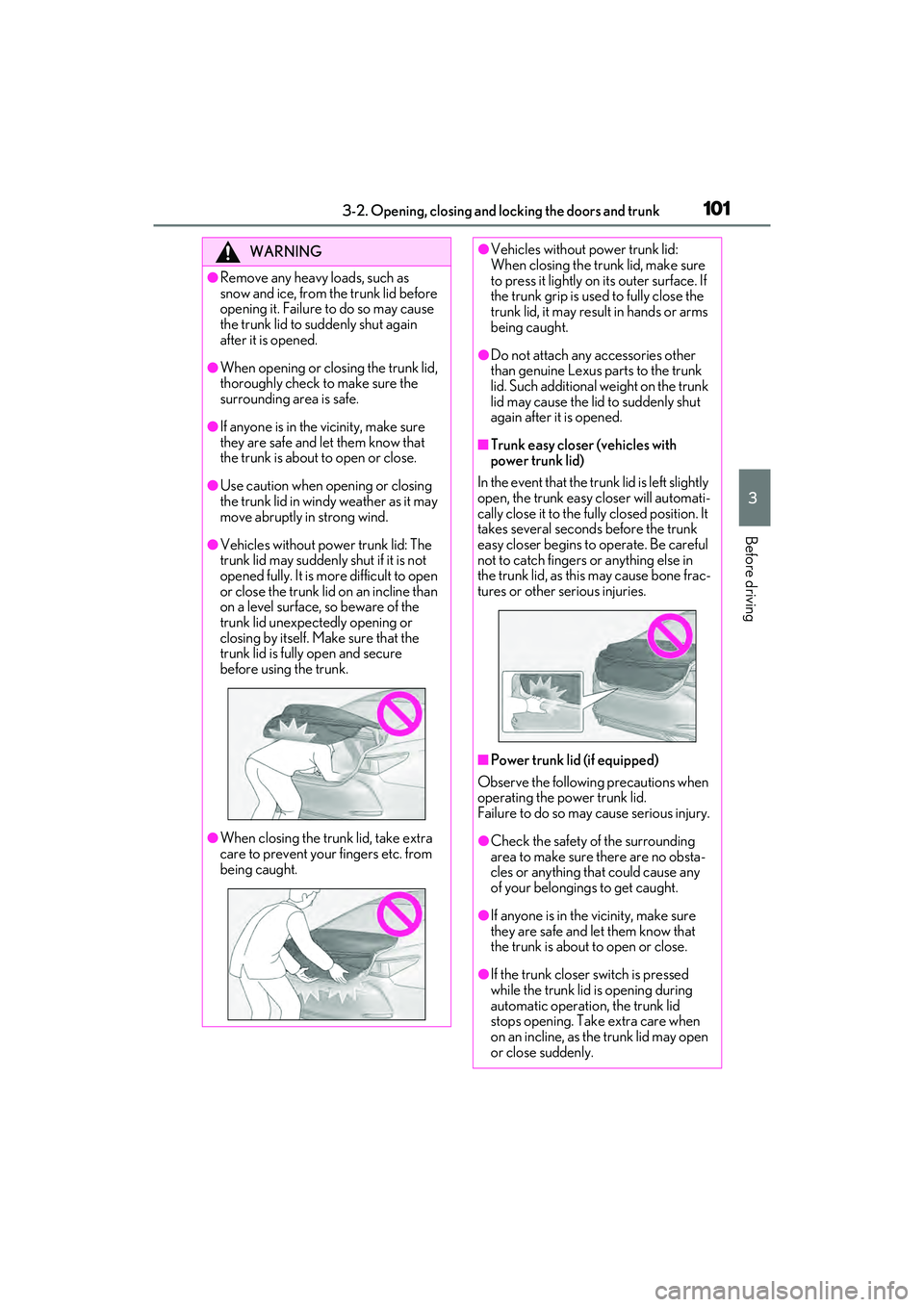
●When closing the trunk lid, take extra
care to prevent your fingers etc. from
being caught.
●Vehicles without power trunk lid:
When closing the trunk lid, make sure
to press it lightly on its outer surface. If
the trunk grip is used to fully close the
trunk lid, it may result in hands or arms
being caught.
●Do not attach any accessories other
than genuine Lexus parts to the trunk
lid. Such additional weight on the trunk
lid may cause the lid to suddenly shut
again after it is opened.
■Trunk easy closer (vehicles with
power trunk lid)
In the event that the trunk lid is left slightly
open, the trunk easy closer will automati-
cally close it to the fully closed position. It
takes several second s before the trunk
easy closer begins to operate. Be careful
not to catch fingers or anything else in
the trunk lid, as this may cause bone frac-
tures or other serious injuries.
■Power trunk lid (if equipped)
Observe the following precautions when
operating the power trunk lid.
Failure to do so may cause serious injury.
●Check the safety of the surrounding
area to make sure there are no obsta-
cles or anything that could cause any
of your belongings to get caught.
●If anyone is in the vicinity, make sure
they are safe and let them know that
the trunk is about to open or close.
●If the trunk closer switch is pressed
while the trunk lid is opening during
automatic operation, the trunk lid
stops opening. Take extra care when
on an incline, as the trunk lid may open
or close suddenly.