engine LEXUS ES350 2022 User Guide
[x] Cancel search | Manufacturer: LEXUS, Model Year: 2022, Model line: ES350, Model: LEXUS ES350 2022Pages: 468, PDF Size: 26.96 MB
Page 44 of 468
421-1. For safe use
Exhaust gas precautions
Harmful substance to the human
body is included in exhaust gases if
inhaled.
WARNING
Exhaust gases include harmful carbon
monoxide (CO), which is colorless and
odorless. Observe the following precau-
tions.
Failure to do so may cause exhaust gases
enter the vehicle and may lead to an
accident caused by light-headedness, or
may lead to death or a serious health
hazard.
■Important points while driving
●Keep the trunk lid closed.
●If you smell exhaust gases in the vehi-
cle even when the trunk lid is closed,
open the windows and have the vehi-
cle inspected at your Lexus dealer as
soon as possible.
■When parking
●If the vehicle is in a poorly ventilated
area or a closed area, such as a
garage, stop the engine.
●Do not leave the vehicle with the
engine running for a long time.
If such a situation cannot be avoided,
park the vehicle in an open space and
ensure that exhaust fumes do not enter
the vehicle interior.
●Do not leave the engine running in an
area with snow build-up, or where it is
snowing. If snowbanks build up around
the vehicle while the engine is running,
exhaust gases may collect and enter
the vehicle.
■Exhaust pipe
The exhaust system needs to be checked
periodically. If there is a hole or crack
caused by corrosion, damage to a joint
or abnormal exhaust noise, be sure to
have the vehicle inspected and repaired
by your Lexus dealer.
Page 58 of 468
561-3. Lexus Enform
Subscription Service Agreement and
are enrolled, you can begin receiving
services.
A variety of subscription terms is avail-
able for purchase. Contact your Lexus
dealer, call the following or push the
“SOS” button in your vehicle for fur-
ther subscription details.
The United States
1-800-25-LEXUS (1-800-255-3987)
Canada
1-800-26-LEXUS (1-800-265-3987)
Puerto Rico
1-877-539-8777
■Safety Connect Services Information
●Phone calls using the vehicles
Bluetooth® technology will not be possi-
ble during Safety Connect.
●Safety Connect is available beginning
Fall 2009 on select Lexus models (in the
contiguous United States only). Contact
with the Safety Connect response center
is dependent upon the telematics device
being in operative condition, cellular con-
nection availability, and GPS satellite sig-
nal reception, which can limit the ability to
reach the response center or receive
emergency service support. Enrollment
and Telematics Subscription Service
Agreement required. A variety of sub-
scription terms is available; charges vary
by subscription term selected and loca-
tion.
●Automatic Collision Notification, Emer-
gency Assistance and Stolen Vehicle
Location will function in the United
States, including Hawaii and Alaska,
Puerto Rico and in Canada, and
Enhanced Roadside Assistance will func-
tion in the United States, Puerto Rico and
in Canada.
●Automatic Collision Notification, Emer-
gency Assistance, Stolen Vehicle and Enhanced Road Assistance will not func-
tion in the United States Virgin Islands.
For vehicles first sold in the USVI, no
Safety Connect services will function in
and outside the United States Virgin
Islands.
●Safety Connect services are not subject
to section 255 of the Telecommunica-
tions Act and the device is not TTY com-
patible.
■Languages
The Safety Connect response center will
offer support in multiple languages. The
Safety Connect system will offer voice
prompts in English, Spanish, and French.
Please indicate your language of choice
when enrolling.
■When contacting the response center
You may be unable to contact the response
center if the network is busy.
When the engine switch is turned to
IGNITION ON mode, the red indica-
tor light comes on for 2 seconds then
turns off. Afterward, the green indica-
tor light comes on, indicating that the
service is active.
The following indicator light patterns
indicate specific system usage condi-
tions:
Green indicator light on = Active
service
Green indicator light flashing =
Safety Connect call in process
Red indicator light (except at vehi-
cle start-up) = System malfunction
(contact your Lexus dealer)
No indicator light (off) = Safety
Connect service not active
Safety Connect LED light Indi-
cators
Page 60 of 468
581-3. Lexus Enform
In August 1996, the Federal Commu-
nications Commission (FCC) adopted
RF exposure guidelines with safety lev-
els for mobile wireless phones. Those
guidelines are consistent with the
safety standards previously set by the
following U.S. and international stan-
dards bodies.
ANSI (American National Stan-
dards Institute) C95.1 [1992]
NCRP (National Council on Radia-
tion Protection and Measurement)
Report 86 [1986]
ICNIRP (International Commission
on Non-Ionizing Radiation Protec-
tion) [1996]
Those standards were based on com-
prehensive and periodic evaluations of
the relevant scientific literature. Over
120 scientists, engineers, and physi-
cians from universities, and govern-
ment health agencies and industries
reviewed the available body of
research to develop the ANSI Stan-
dard (C95.1).
The design of Safety Connect com-
plies with the FCC guidelines in addi-
tion to those standards.
Page 61 of 468

591-4. Theft deterrent system
1
For safety and security
1-4.Theft deterrent system
The indicator light flashes after the
engine switch has been turned off to
indicate that the system is operating.
The indicator light stops flashing after
the engine switch has been turned to
ACCESSORY or IGNITION ON
mode to indicate that the system has
been canceled.
■System maintenance
The vehicle has a maintenance-free type
engine immobilizer system.
■Conditions that may cause the system to
malfunction
●If the grip portion of the key is in contact with a metallic object
●If the key is in close proximity to or touch-
ing a key registered to the security sys-
tem (key with a built-in transponder chip)
of another vehicleEngine immobilizer system
The vehicle’s keys have built-in
transponder chips that prevent the
engine from starting if a key has not
been previously registered in the
vehicle’s on-board computer.
Never leave the keys inside the
vehicle when you leave the vehicle.
This system is designed to help pre-
vent vehicle theft but does not guar-
antee absolute security against all
vehicle thefts.
Operating the system
NOTICE
■To ensure the system operates cor-
rectly
Do not modify or remove the system. If
modified or removed, the proper opera-
tion of the system cannot be guaranteed.
Page 62 of 468

601-4. Theft deterrent system
■Items to check before locking the
vehicle
To prevent unexpected triggering of
the alarm and vehicle theft, make sure
of the following:
Nobody is in the vehicle.
The windows and moon roof (if
equipped) or panoramic moon roof
(if equipped) are closed before the
alarm is set.
No valuables or other personal
items are left in the vehicle.
■Setting
Close the doors, trunk and hood, and
lock all the doors using the entry func-
tion or wireless remote control. The
system will be set automatically after
30 seconds.
Except for Canada, the alarm can also
be set using the mechanical key.
The indicator light changes from being on
to flashing when the system is set.
■Canceling or stopping
Do one of the following to deactivate
or stop the alarm:
Except for Canada: Unlock the
doors using the entry function, wire-
less remote control or mechanical
key.
For Canada: Unlock the doors using
the entry function or wireless
remote control.
Turn the engine switch to ACCES-
SORY or IGNITION ON mode, or
start the engine. (The alarm will be
deactivated or stopped after a few
seconds.)
■System maintenance
The vehicle has a maintenance-free type
alarm system.
Alarm
The alarm uses light and sound to
give an alert when an intrusion is
detected.
The alarm is triggered in the follow-
ing situations when the alarm is set:
A locked door is unlocked or
opened in any way other than
using the entry function, wireless
remote control or mechanical
key
*. (The doors will lock again
automatically.)
A locked trunk is unlocked or
opened in any way other than
using the entry function or wire-
less remote control.
The hood is opened.
*:Except for Canada
Setting/canceling/stopping the
alarm system
Page 67 of 468
652-1. Instrument cluster
2
Vehicle status information and indicators
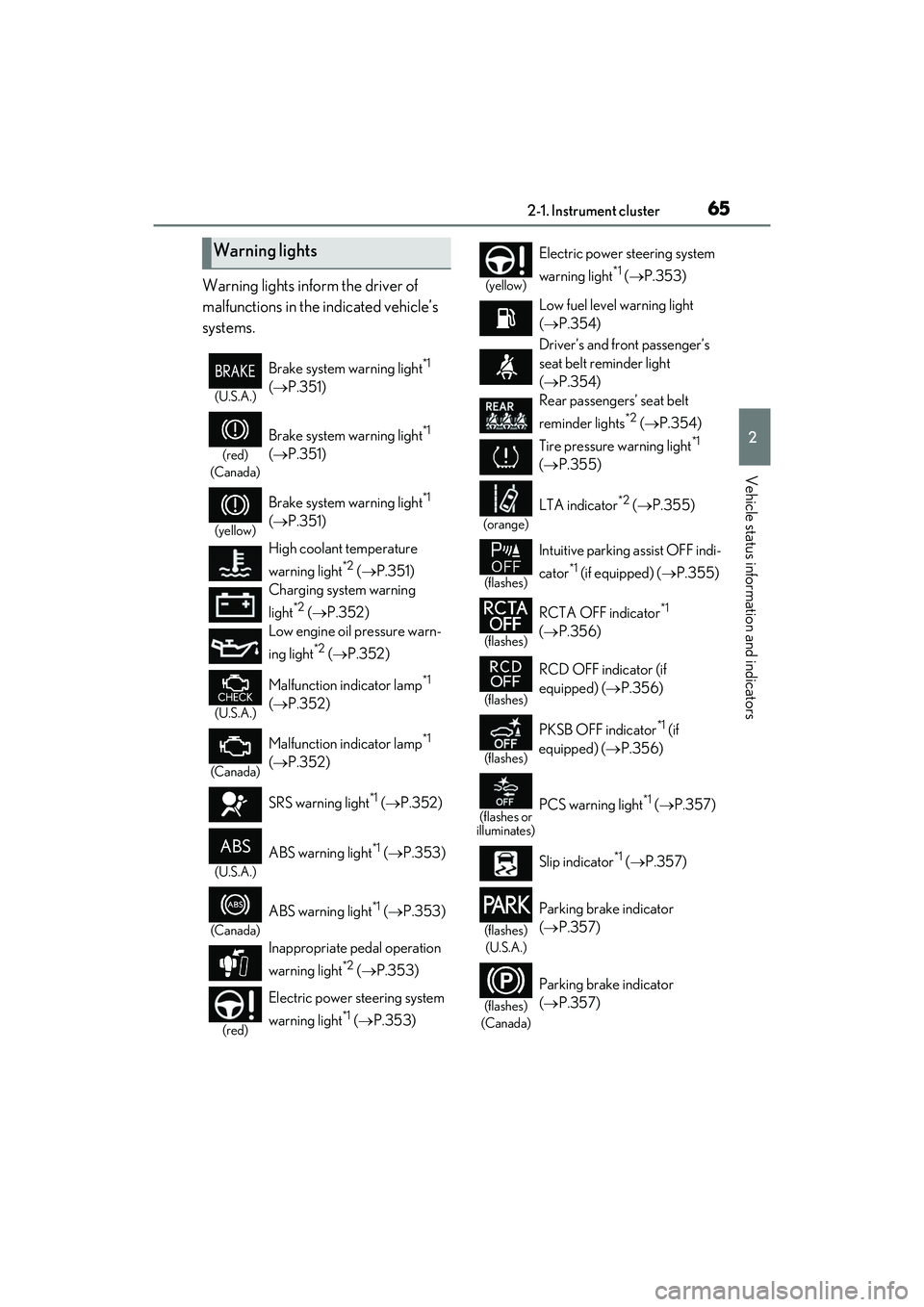
Warning lights inform the driver of
malfunctions in the indicated vehicle’s
systems.
Warning lights
(U.S.A.)
Brake system warning light*1
( P.351)
(red)
(Canada)
Brake system warning light*1
( P.351)
(yellow)
Brake system warning light*1
( P.351)
High coolant temperature
warning light
*2 ( P.351)
Charging system warning
light
*2 ( P.352)
Low engine oil pressure warn-
ing light
*2 ( P.352)
(U.S.A.)
Malfunction indicator lamp*1
( P.352)
(Canada)
Malfunction indicator lamp*1
( P.352)
SRS warning light
*1 ( P.352)
(U.S.A.)
ABS warning light*1 ( P.353)
(Canada)
ABS warning light*1 ( P.353)
Inappropriate pedal operation
warning light
*2 ( P.353)
(red)
Electric power steering system
warning light
*1 ( P.353)
(yellow)
Electric power steering system
warning light
*1 ( P.353)
Low fuel level warning light
( P.354)
Driver’s and front passenger’s
seat belt reminder light
( P.354)
Rear passengers’ seat belt
reminder lights
*2 ( P.354)
Tire pressure warning light
*1
( P.355)
(orange)
LTA indicator*2 ( P.355)
(flashes)
Intuitive parking assist OFF indi-
cator
*1 (if equipped) ( P.355)
(flashes)
RCTA OFF indicator*1
( P.356)
(flashes)
RCD OFF indicator (if
equipped) ( P.356)
(flashes)
PKSB OFF indicator*1 (if
equipped) ( P.356)
(flashes or
illuminates)PCS warning light*1 ( P.357)
Slip indicator
*1 ( P.357)
(flashes)
(U.S.A.)
Parking brake indicator
( P.357)
(flashes)
(Canada)
Parking brake indicator
( P.357)
Page 68 of 468
662-1. Instrument cluster
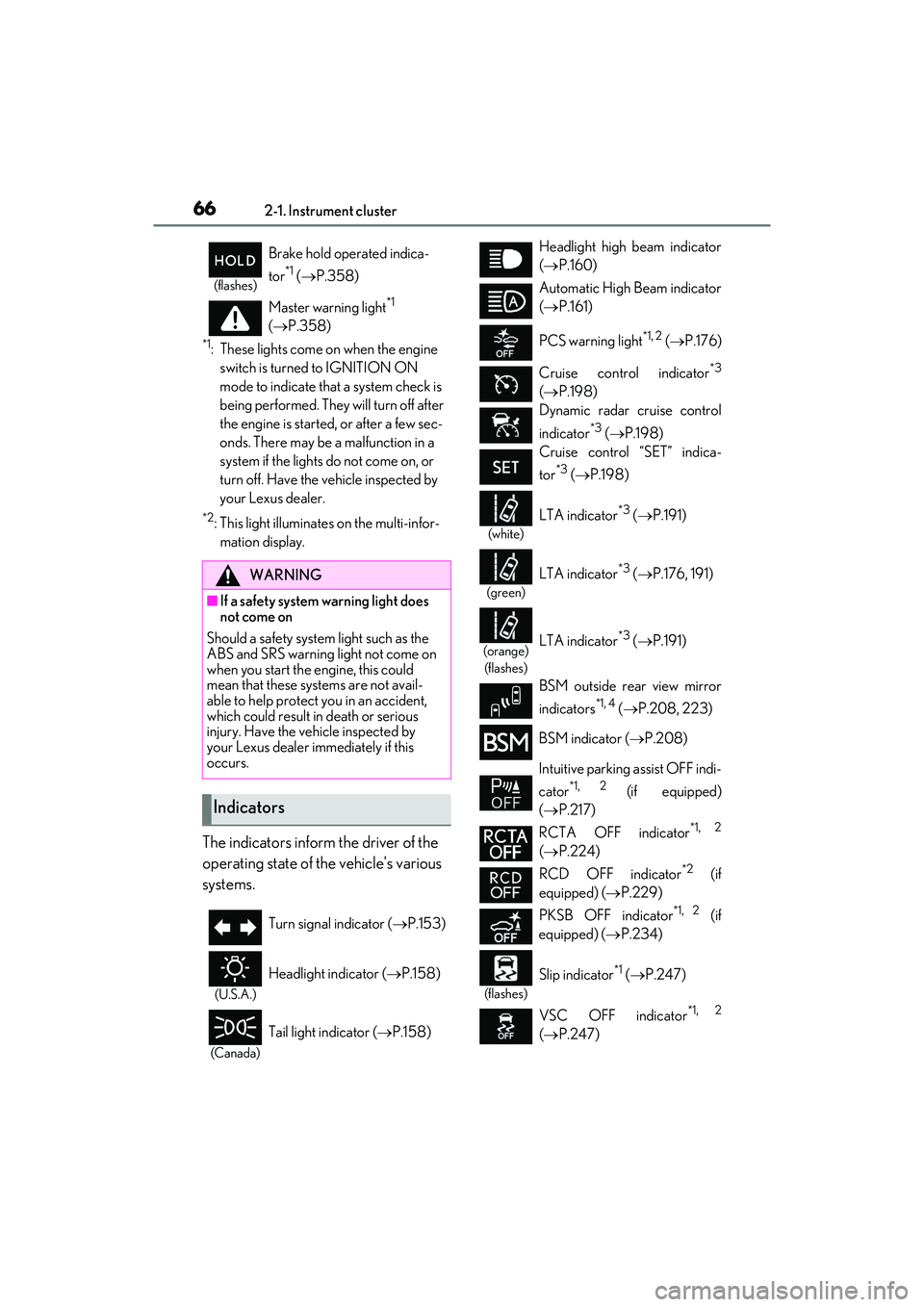
*1: These lights come on when the engine switch is turned to IGNITION ON
mode to indicate that a system check is
being performed. They will turn off after
the engine is started, or after a few sec-
onds. There may be a malfunction in a
system if the lights do not come on, or
turn off. Have the vehicle inspected by
your Lexus dealer.
*2: This light illuminates on the multi-infor-mation display.
The indicators inform the driver of the
operating state of the vehicle’s various
systems.
(flashes)
Brake hold operated indica-
tor
*1 ( P.358)
Master warning light
*1
( P.358)
WARNING
■If a safety system warning light does
not come on
Should a safety system light such as the
ABS and SRS warning light not come on
when you start the engine, this could
mean that these systems are not avail-
able to help protect you in an accident,
which could result in death or serious
injury. Have the vehicle inspected by
your Lexus dealer immediately if this
occurs.
Indicators
Turn signal indicator ( P.153)
(U.S.A.)
Headlight indicator ( P.158)
(Canada)
Tail light indicator ( P.158)
Headlight high beam indicator
( P.160)
Automatic High Beam indicator
( P.161)
PCS warning light
*1, 2 ( P.176)
Cruise control indicator
*3
( P.198)
Dynamic radar cruise control
indicator
*3 ( P.198)
Cruise control “SET” indica-
tor
*3 ( P.198)
(white)
LTA indicator*3 ( P.191)
(green)
LTA indicator*3 ( P.176, 191)
(orange)
(flashes)LTA indicator*3 ( P.191)
BSM outside rear view mirror
indicators
*1, 4 ( P.208, 223)
BSM indicator ( P.208)
Intuitive parking assist OFF indi-
cator
*1, 2 (if equipped)
( P.217)
RCTA OFF indicator
*1, 2
( P.224)
RCD OFF indicator
*2 (if
equipped) ( P.229)
PKSB OFF indicator
*1, 2 (if
equipped) ( P.234)
(flashes)
Slip indicator*1 ( P.247)
VSC OFF indicator
*1, 2
( P.247)
Page 69 of 468
672-1. Instrument cluster
2
Vehicle status information and indicators
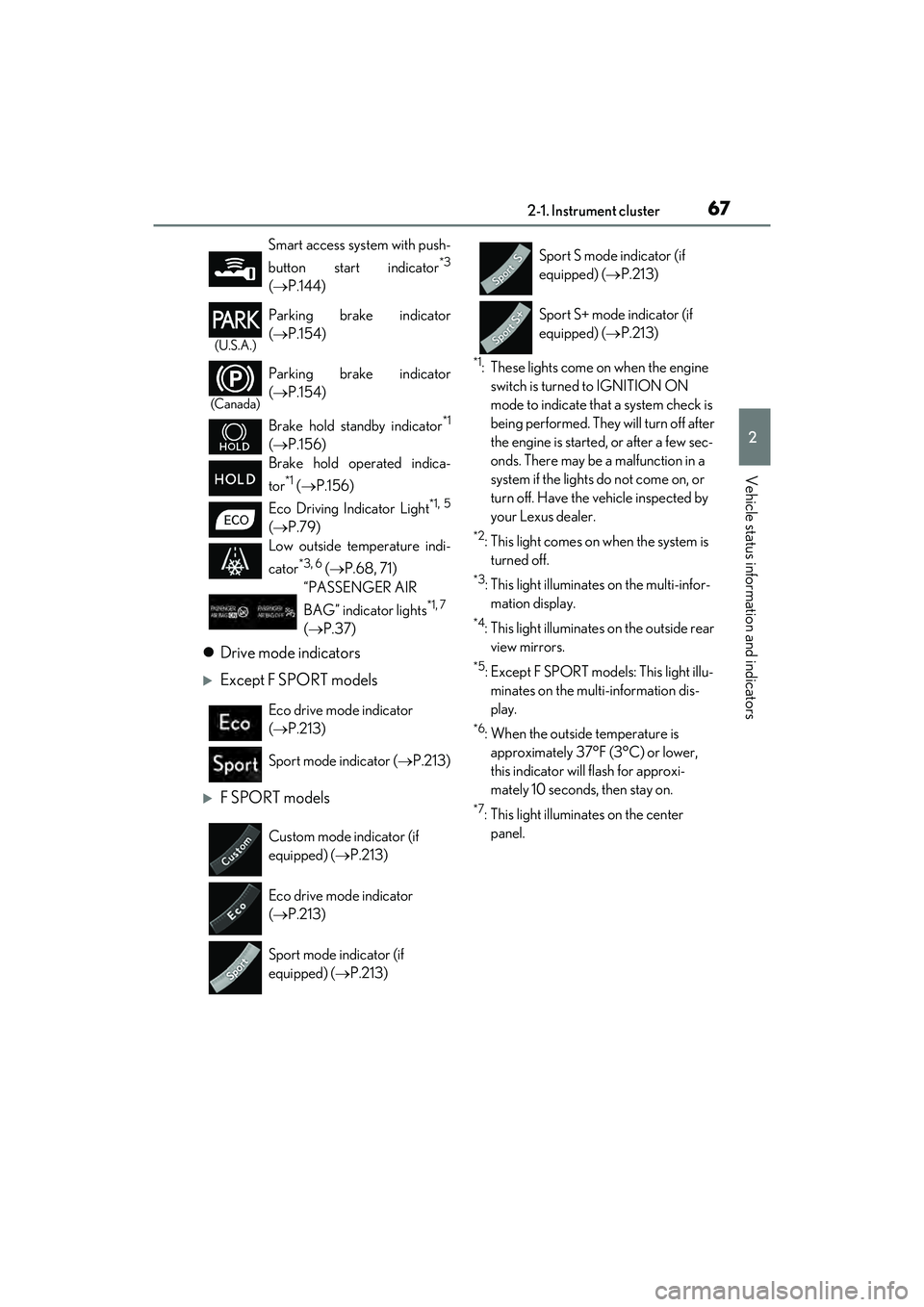
Drive mode indicators
Except F SPORT models
F SPORT models
*1: These lights come on when the engine
switch is turned to IGNITION ON
mode to indicate that a system check is
being performed. They will turn off after
the engine is started, or after a few sec-
onds. There may be a malfunction in a
system if the lights do not come on, or
turn off. Have the vehicle inspected by
your Lexus dealer.
*2: This light comes on when the system is turned off.
*3: This light illuminates on the multi-infor-mation display.
*4: This light illuminates on the outside rear view mirrors.
*5: Except F SPORT models: This light illu-minates on the multi-information dis-
play.
*6: When the outside temperature is approximately 37°F (3°C) or lower,
this indicator will flash for approxi-
mately 10 seconds, then stay on.
*7: This light illuminates on the center panel.
Smart access system with push-
button start indicator
*3
(
P.144)
(U.S.A.)
Parking brake indicator
( P.154)
(Canada)
Parking brake indicator
( P.154)
Brake hold standby indicator
*1
( P.156)
Brake hold operated indica-
tor
*1 ( P.156)
Eco Driving Indicator Light
*1, 5
( P.79)
Low outside temperature indi-
cator
*3, 6 ( P.68, 71)
“PASSENGER AIR
BAG” indicator lights
*1, 7
( P.37)
Eco drive mode indicator
( P.213)
Sport mode indicator ( P.213)
Custom mode indicator (if
equipped) ( P.213)
Eco drive mode indicator
( P.213)
Sport mode indicator (if
equipped) ( P.213)
Sport S mode indicator (if
equipped) ( P.213)
Sport S+ mode indicator (if
equipped) ( P.213)
Page 70 of 468
682-1. Instrument cluster
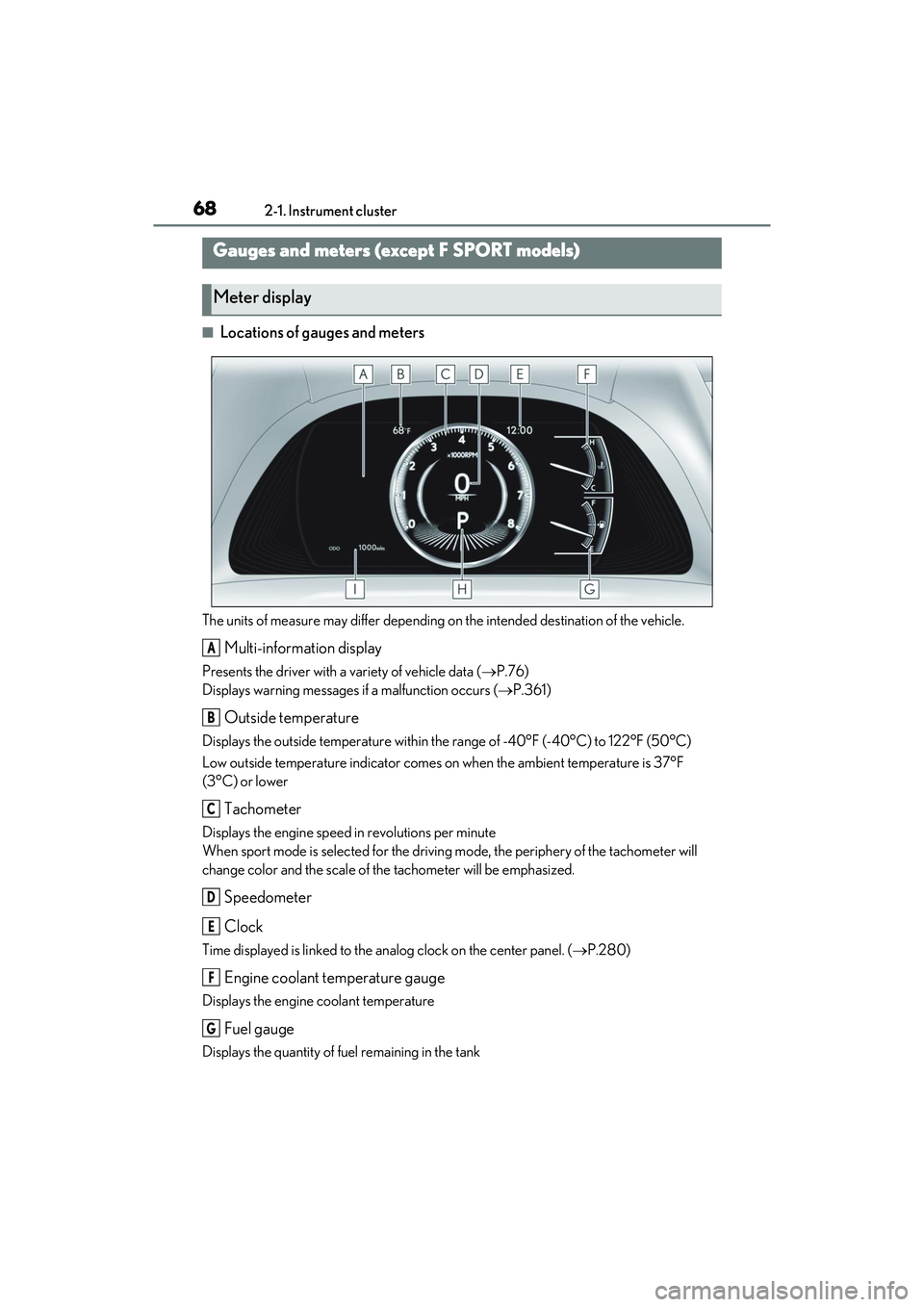
■Locations of gauges and meters
The units of measure may differ depending on the intended destination of the vehicle.
Multi-information display
Presents the driver with a variety of vehicle data (P.76)
Displays warning messages if a malfunction occurs (P.361)
Outside temperature
Displays the outside temperature within the range of -40°F (-40°C) to 122°F (50°C)
Low outside temperature indicator comes on when the ambient temperature is 37°F
(3°C) or lower
Tachometer
Displays the engine speed in revolutions per minute
When sport mode is selected for the drivin g mode, the periphery of the tachometer will
change color and the scale of the tachometer will be emphasized.
Speedometer
Clock
Time displayed is linked to the analog clock on the center panel. ( P.280)
Engine coolant temperature gauge
Displays the engine coolant temperature
Fuel gauge
Displays the quantity of fuel remaining in the tank
Gauges and meters (e xcept F SPORT models)
Meter display
A
B
C
D
E
F
G
Page 71 of 468
692-1. Instrument cluster
2
Vehicle status information and indicators
In the following situations, the actual quantity of fuel remaining in the tank may not be dis-
played correctly. Refer to P.69 if the actual quantity of fuel remaining in the tank is not dis-
played correctly.
• A small amount of fuel is added.
• Fuel is added with the fuel gauge near or at “F”.
• The vehicle is stopped on an uneven surface, such as a slope.
• The vehicle is driven on a slope or around a curve.
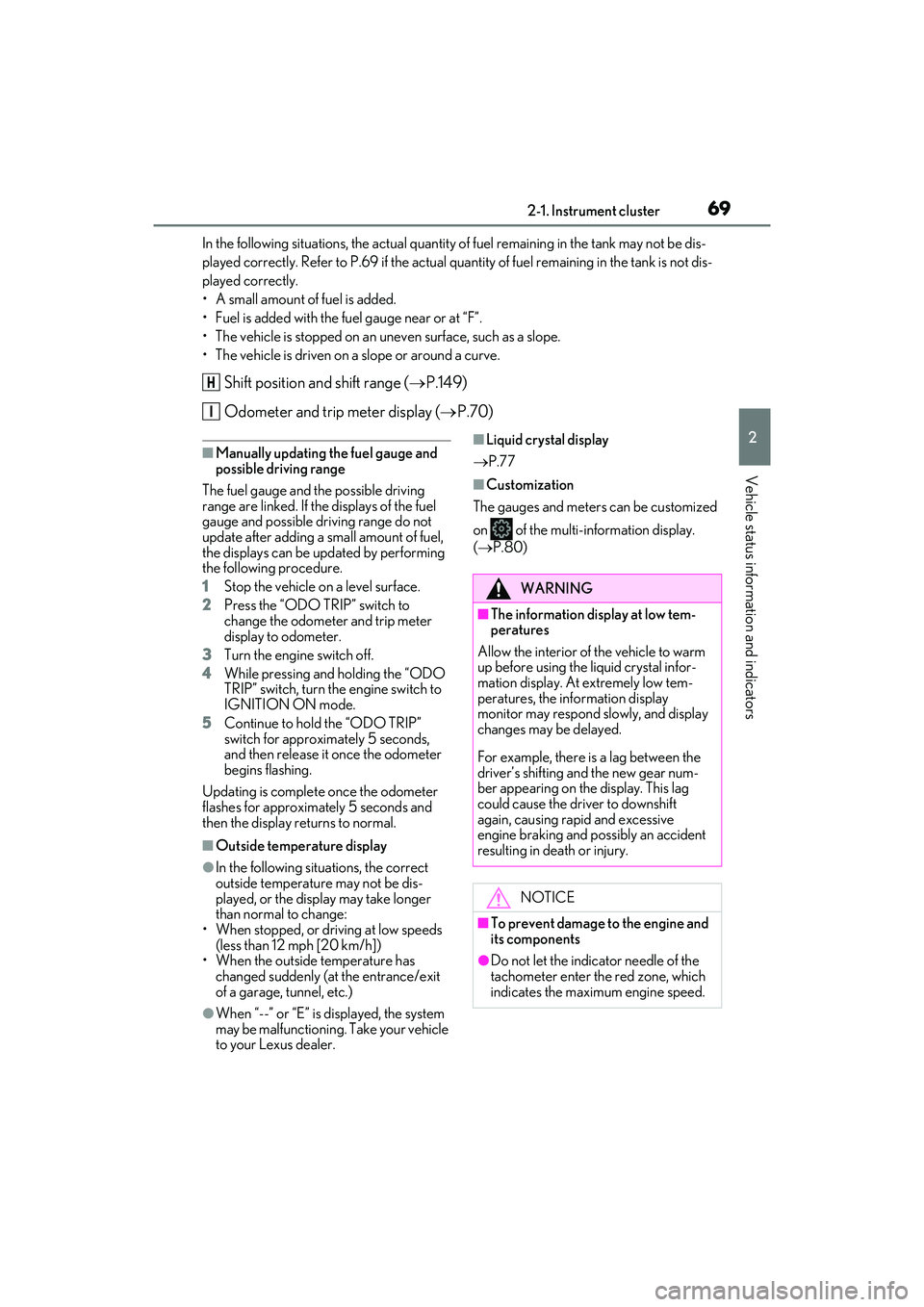
Shift position and shift range (P.149)
Odometer and trip meter display ( P.70)
■Manually updating the fuel gauge and
possible driving range
The fuel gauge and the possible driving
range are linked. If the displays of the fuel
gauge and possible driving range do not
update after adding a small amount of fuel,
the displays can be updated by performing
the following procedure.
1 Stop the vehicle on a level surface.
2 Press the “ODO TRIP” switch to
change the odometer and trip meter
display to odometer.
3 Turn the engine switch off.
4 While pressing and holding the “ODO
TRIP” switch, turn the engine switch to
IGNITION ON mode.
5 Continue to hold the “ODO TRIP”
switch for approximately 5 seconds,
and then release it once the odometer
begins flashing.
Updating is complete once the odometer
flashes for approximately 5 seconds and
then the display returns to normal.
■Outside temperature display
●In the following situations, the correct
outside temperature may not be dis-
played, or the display may take longer
than normal to change:
• When stopped, or driving at low speeds (less than 12 mph [20 km/h])
• When the outside temperature has
changed suddenly (at the entrance/exit
of a garage, tunnel, etc.)
●When “--” or “E” is displayed, the system
may be malfunctioning. Take your vehicle
to your Lexus dealer.
■Liquid crystal display
P.77
■Customization
The gauges and meters can be customized
on of the multi-information display.
( P.80)
H
I
WARNING
■The information display at low tem-
peratures
Allow the interior of the vehicle to warm
up before using the liquid crystal infor-
mation display. At extremely low tem-
peratures, the information display
monitor may respond slowly, and display
changes may be delayed.
For example, there is a lag between the
driver’s shifting and the new gear num-
ber appearing on the display. This lag
could cause the driver to downshift
again, causing rapid and excessive
engine braking and possibly an accident
resulting in death or injury.
NOTICE
■To prevent damage to the engine and
its components
●Do not let the indicator needle of the
tachometer enter the red zone, which
indicates the maximum engine speed.