instrument panel LEXUS ES350 2022 User Guide
[x] Cancel search | Manufacturer: LEXUS, Model Year: 2022, Model line: ES350, Model: LEXUS ES350 2022Pages: 468, PDF Size: 26.96 MB
Page 77 of 468
752-1. Instrument cluster
2
Vehicle status information and indicators
Displays the distance the vehicle has been
driven since the meter was last reset. Trip
meters A and B can be used to record and
display different distances independently.
Distance until next engine oil
change
Displays the distance the vehicle can be
driven until an oil change is necessary.
■Changing the display
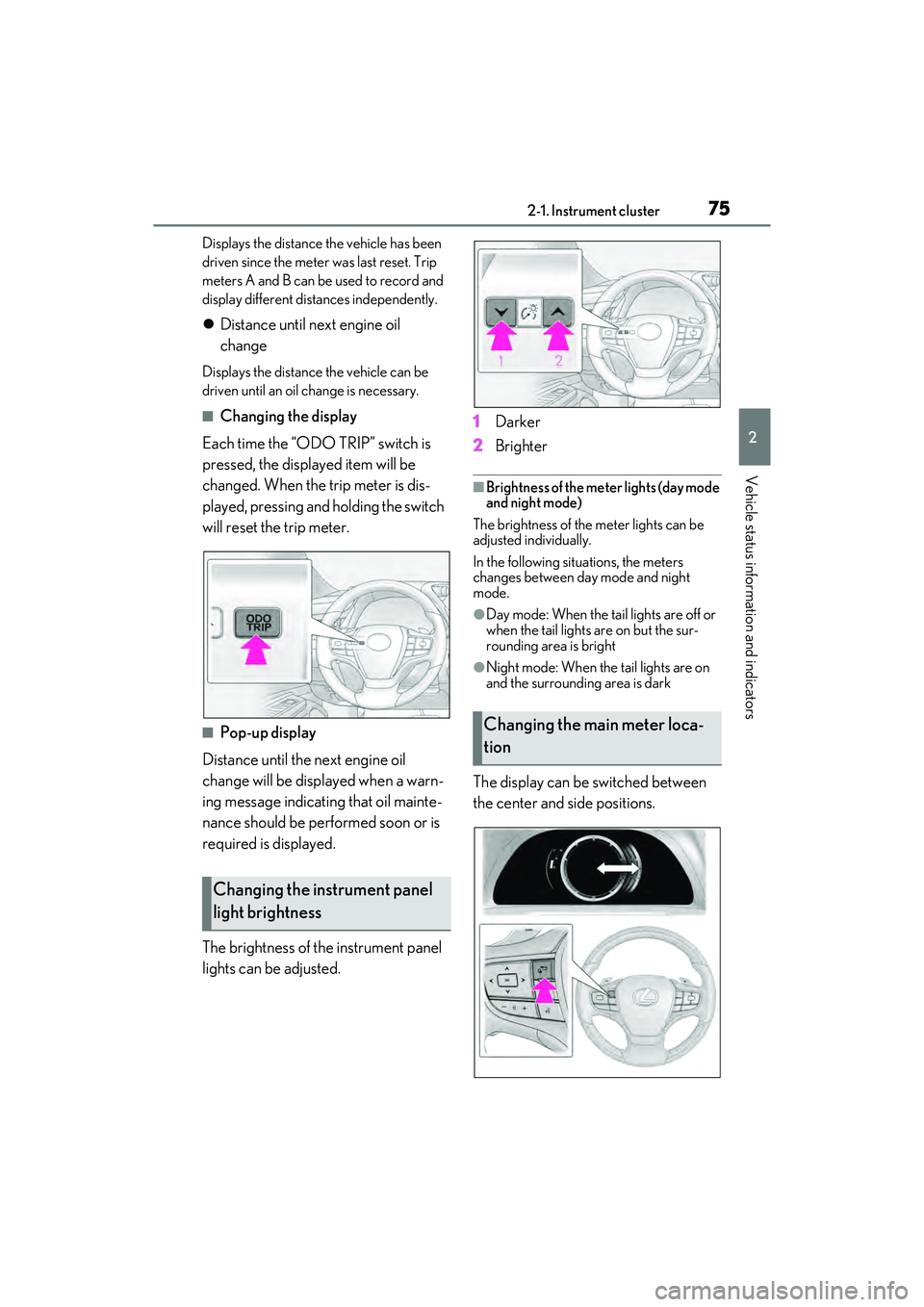
Each time the “ODO TRIP” switch is
pressed, the displayed item will be
changed. When the trip meter is dis-
played, pressing and holding the switch
will reset the trip meter.
■Pop-up display
Distance until the next engine oil
change will be displayed when a warn-
ing message indicating that oil mainte-
nance should be performed soon or is
required is displayed.
The brightness of the instrument panel
lights can be adjusted. 1
Darker
2 Brighter
■Brightness of the meter lights (day mode
and night mode)
The brightness of the meter lights can be
adjusted individually.
In the following situations, the meters
changes between day mode and night
mode.
●Day mode: When the tail lights are off or
when the tail lights are on but the sur-
rounding area is bright
●Night mode: When the tail lights are on
and the surrounding area is dark
The display can be switched between
the center and side positions.
Changing the instrument panel
light brightness
Changing the main meter loca-
tion
Page 112 of 468

1103-2. Opening, closing and locking the doors and trunk
effective range (detection areas), the sys-
tem may not operate properly in the fol-
lowing cases:
• The electronic key is too close to the win- dow or outside door handle, near the
ground, or in a high place when the doors
are locked or unlocked.
• The electronic key is near the ground or in a high place, or too close to the center
of the rear bumper when the trunk is
opened.
• The electronic key is on the instrument
panel, rear package tray or floor, or in the
door pockets or glove box when the
engine is started or engine switch modes
are changed.
●Do not leave the electronic key on top of
the instrument panel or near the door
pockets when exiting the vehicle.
Depending on the radio wave reception
conditions, it may be detected by the
antenna outside the cabin and the doors
will become lockable from the outside,
possibly trapping the electronic key
inside the vehicle.
●As long as the electronic key is within the
effective range, the doors may be locked
or unlocked by anyone. However, only
the doors detecting the electronic key
can be used to unlock the vehicle.
●Even if the electronic key is not inside the
vehicle, it may be possible to start the
engine if the electronic key is near the
window.
●The doors may unlock or lock if a large
amount of water splashes on the door
handle, such as in the rain or in a car
wash, when the electronic key is within
the effective range. (The doors will auto-
matically be locked after approximately
60 seconds if the doors are not opened
and closed.)
●If the wireless remote control is used to
lock the doors when the electronic key is
near the vehicle, there is a possibility that
the door may not be unlocked by the
entry function. (Use the wireless remote
control to unlock the doors.)
●Touching the door lock sensor while
wearing gloves may delay or prevent
lock operation. Remove the gloves and
touch the lock sensor again.
●When the lock operation is performed
using the lock sensor, recognition signals
will be shown up to two consecutive
times. After this, no recognition signals
will be given.
●Unlocking the vehicle may take more
time if another electronic key is within the
effective range.
●If the door handle becomes wet while the
electronic key is within the effective
range, the door may lock and unlock
repeatedly. In this case, follow the follow-
ing correction procedures to wash the
vehicle:
• Place the electronic key in a location 6 ft. (2 m) or more away from the vehicle.
(Take care to ensure that the key is not
stolen.)
• Set the electronic key to battery-saving
mode to disable the smart access system
with push-button start. ( P.109)
●If the electronic key is inside the vehicle
and a door handle becomes wet during a
car wash, a message may be shown on
the multi-information display and a
buzzer will sound outside the vehicle. To
turn off the alarm, lock all the doors.
●The lock sensor may not work properly if
it comes into contact with ice, snow, mud,
etc.
Clean the lock sensor and attempt to
operate it again.
●A sudden approach to the effective
range or door handle may prevent the
doors from being unlocked. In this case,
return the door handle to the original
position and check that the doors unlock
before pulling the door handle again.
■When the vehicle is not driven for
extended periods
●To prevent theft of the vehicle, do not
leave the electronic key within 6 ft. (2 m)
of the vehicle.
●The smart access system with push-but-
ton start can be deactivated in advance.
●Battery-saving mode can reduce the
power consumption of electronic keys.
( P.109)
Page 139 of 468
1374-1. Before driving
4
Driving
WARNING
■If you hear a squealing or scraping
noise (brake pad wear limit indica-
tors)
Have the brake pads checked and
replaced by your Lexus dealer as soon as
possible. Rotor damage may result if the
pads are not replaced when needed. It is
dangerous to drive the vehicle when the
wear limits of the brake pads and/or
those of the brake discs are exceeded.
■When the vehicle is stopped
●Do not race the engine.
If the vehicle is in any gear other than P
or N, the vehicle may accelerate sud-
denly and unexpectedly, causing an
accident.
●In order to prevent accidents due to
the vehicle rolling away, always keep
depressing the brake pedal while the
engine is running, and apply the park-
ing brake as necessary.
●If the vehicle is stopped on an incline,
in order to prevent accidents caused
by the vehicle rolling forward or back-
ward, always depress the brake pedal
and securely apply the parking brake
as needed.
●Avoid revving or racing the engine.
Running the engine at high speed
while the vehicle is stopped may cause
the exhaust system to overheat, which
could result in a fire if combustible
material is nearby.
■When the vehicle is parked
●Do not leave glasses, cigarette light-
ers, spray cans, or soft drink cans in the
vehicle when it is in the sun.
Doing so may result in the following:
• Gas may leak from a cigarette lighter or spray can, and may lead to a fire.
• The temperature inside the vehicle may cause the plastic lenses and plas-
tic material of glasses to deform or
crack.
• Soft drink cans may fracture, causing the contents to spray over the interior
of the vehicle, and may also cause a
short circuit in the vehicle’s electrical
components.
●Do not leave cigarette lighters in the
vehicle. If a cigarette lighter is in a
place such as the glove box or on the
floor, it may be lit accidentally when
luggage is loaded or the seat is
adjusted, causing a fire.
●Do not attach adhesive discs to the
windshield or windows. Do not place
containers such as air fresheners on
the instrument panel or dashboard.
Adhesive discs or containers may act
as lenses, causing a fire in the vehicle.
●Do not leave a door or window open if
the curved glass is coated with a met-
allized film such as a silver-colored
one. Reflected sunlight may cause the
glass to act as a lens, causing a fire.
●Always apply the parking brake, shift
the shift lever to P, stop the engine and
lock the vehicle.
Do not leave the vehicle unattended
while the engine is running.
If the vehicle is parked with the shift
lever in P but the parking brake is not
set, the vehicle may start to move, pos-
sibly leading to an accident.
●Do not touch the exhaust pipes while
the engine is running or immediately
after turning the engine off.
Doing so may cause burns.
Page 142 of 468
1404-1. Before driving
Cargo capacity depends on the total
weight of the occupants.
(Cargo capacity) = (Total load capac-
ity) (Total weight of occupants) Steps for Determining Correct Load
Limit
(1) Locate the statement “The com-
bined weight of occupants and cargo
should never exceed XXX kg or XXX
lbs.” on your vehicle’s placard.
(2) Determine the combined weight of
the driver and passengers that will be
riding in your vehicle.
(3) Subtract the combined weight of
the driver and passengers from XXX
kg or XXX lbs.
(4) The resulting figure equals the
available amount of cargo and luggage
load capacity.
For example, if the “XXX” amount
equals 1400 lbs. and there will be five
150 lb passengers in your vehicle, the
amount of available cargo and luggage
load capacity is 650 lbs. (1400 − 750
(5 150) = 650 lbs.)
(5) Determine the combined weight of
luggage and cargo being loaded on
the vehicle. That weight may not safely
exceed the available cargo and lug-
gage load capacity calculated in Step
4.
(6) If your vehicle will be towing a
trailer, load from your trailer will be
transferred to your vehicle. Consult
this manual to determine how this
reduces the available cargo and lug-
gage load capacity of your vehicle.
( P.142)Lexus does not recommend towing a
trailer with your vehicle. Your vehicle is not
designed for trailer towing.
Cargo and luggage
Take notice of the following infor-
mation about storage precautions,
cargo capacity and load:
WARNING
■Things that must not be carried in the
trunk
The following things may cause a fire if
loaded in the trunk:
●Receptacles containing gasoline
●Aerosol cans
■Storage precautions
Observe the following precautions.
Failure to do so may prevent the pedals
from being depressed properly, may
block the driver’s vision, or may result in
items hitting the driver or passengers,
possibly causing an accident.
●Stow cargo and luggage in the trunk
whenever possible.
●Do not place cargo or luggage in or on
the following locations.
• At the feet of the driver
• On the front passenger or rear seats (when stacking items)
• On the package tray
• On the instrument panel
• On the dashboard
• In front of the Center Display
●Secure all items in the occupant com-
partment.
Capacity and distribution
Page 160 of 468
1584-3. Operating the lights and wipers
4-3.Op erating the lights and wipers
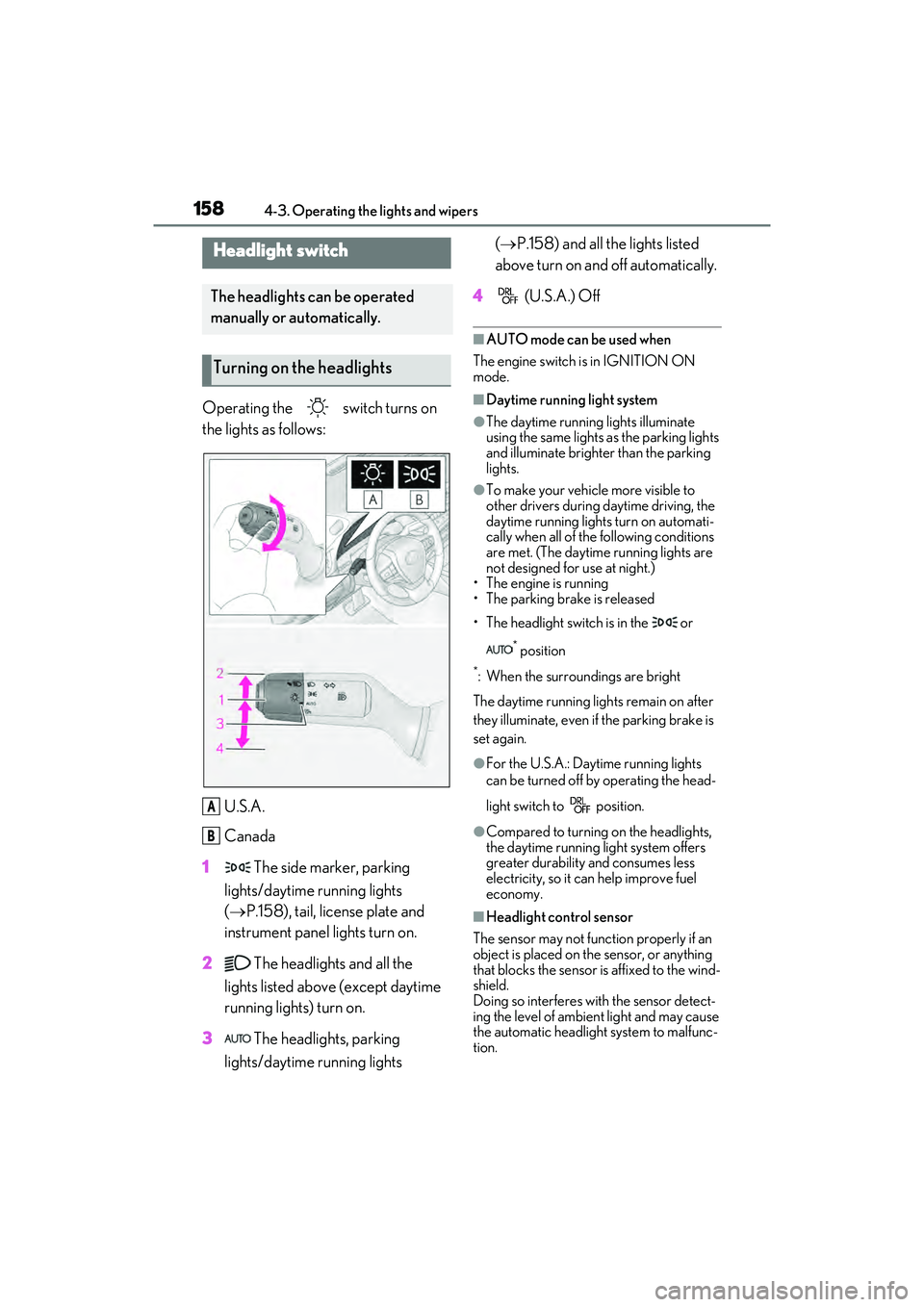
Operating the switch turns on
the lights as follows:U.S.A.
Canada
1 The side marker, parking
lights/daytime running lights
( P.158), tail, license plate and
instrument panel lights turn on.
2 The headlights and all the
lights listed above (except daytime
running lights) turn on.
3 The headlights, parking
lights/daytime running lights (
P.158) and all the lights listed
above turn on and off automatically.
4 (U.S.A.) Off
■AUTO mode can be used when
The engine switch is in IGNITION ON
mode.
■Daytime running light system
●The daytime running lights illuminate
using the same lights as the parking lights
and illuminate brighter than the parking
lights.
●To make your vehicle more visible to
other drivers during daytime driving, the
daytime running lights turn on automati-
cally when all of the following conditions
are met. (The daytime running lights are
not designed for use at night.)
• The engine is running
• The parking brake is released
• The headlight switch is in the or
* position
*: When the surroundings are bright
The daytime running lights remain on after
they illuminate, even if the parking brake is
set again.
●For the U.S.A.: Daytime running lights
can be turned off by operating the head-
light switch to position.
●Compared to turning on the headlights,
the daytime running light system offers
greater durability and consumes less
electricity, so it can help improve fuel
economy.
■Headlight control sensor
The sensor may not function properly if an
object is placed on the sensor, or anything
that blocks the sensor is affixed to the wind-
shield.
Doing so interferes with the sensor detect-
ing the level of ambient light and may cause
the automatic headlight system to malfunc-
tion.
Headlight switch
The headlights can be operated
manually or automatically.
Turning on the headlights
A
B
Page 271 of 468
2695-3. Using the air conditioning system
5
Interior features
*: If equipped
WARNING
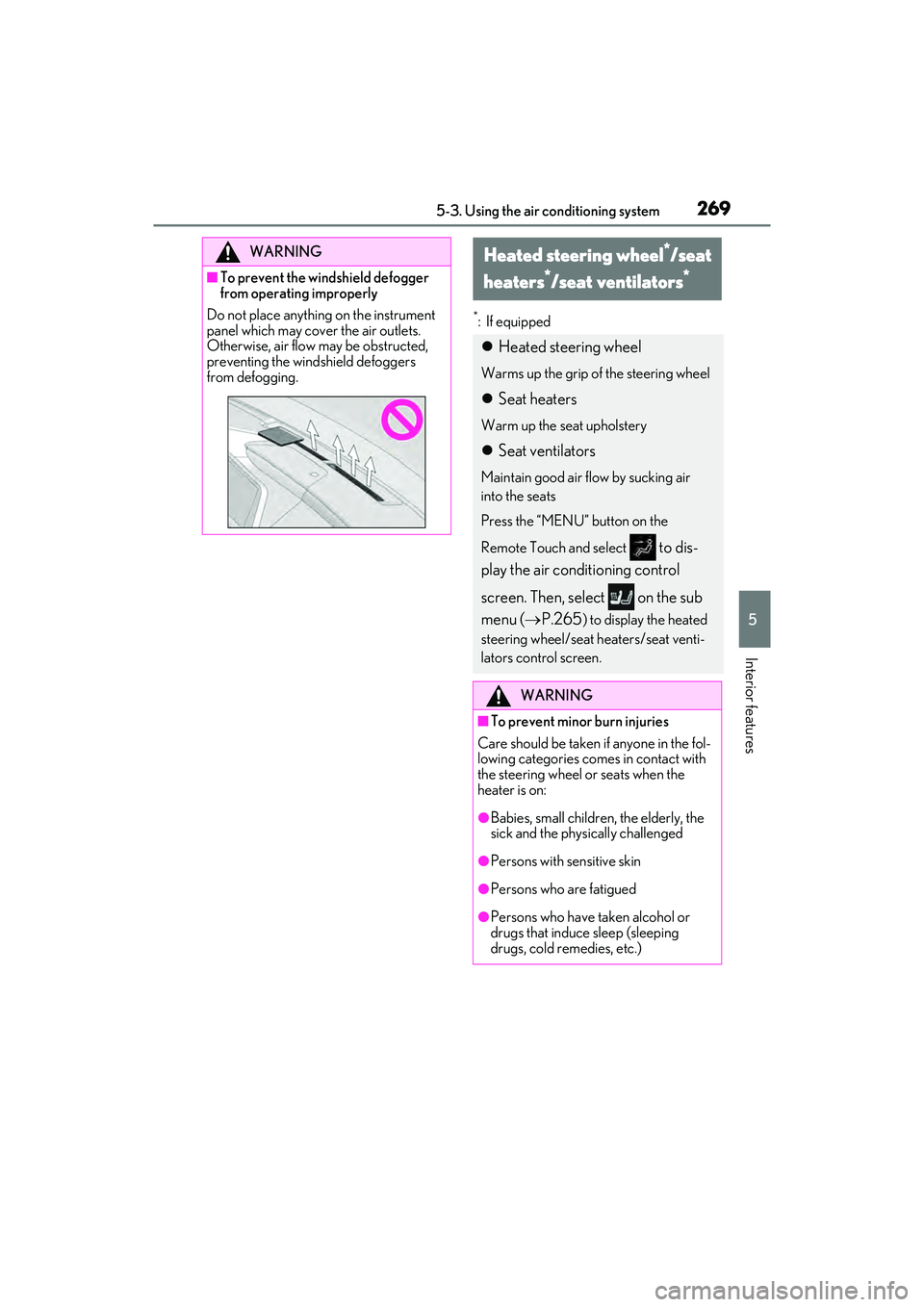
■To prevent the windshield defogger
from operating improperly
Do not place anything on the instrument
panel which may cover the air outlets.
Otherwise, air flow may be obstructed,
preventing the windshield defoggers
from defogging.
Heated steering wheel*/seat
heaters
*/seat ventilators*
Heated steering wheel
Warms up the grip of the steering wheel
Seat heaters
Warm up the seat upholstery
Seat ventilators
Maintain good air flow by sucking air
into the seats
Press the “MENU” button on the
Remote Touch and select
to dis-
play the air conditioning control
screen. Then, select on the sub
menu ( P.265
) to display the heated
steering wheel/seat heaters/seat venti-
lators control screen.
WARNING
■To prevent minor burn injuries
Care should be taken if anyone in the fol-
lowing categories comes in contact with
the steering wheel or seats when the
heater is on:
●Babies, small children, the elderly, the
sick and the physically challenged
●Persons with sensitive skin
●Persons who are fatigued
●Persons who have taken alcohol or
drugs that induce sleep (sleeping
drugs, cold remedies, etc.)
Page 275 of 468
2735-4. Using the interior lights
5
Interior features
5-4.Using the interior lights
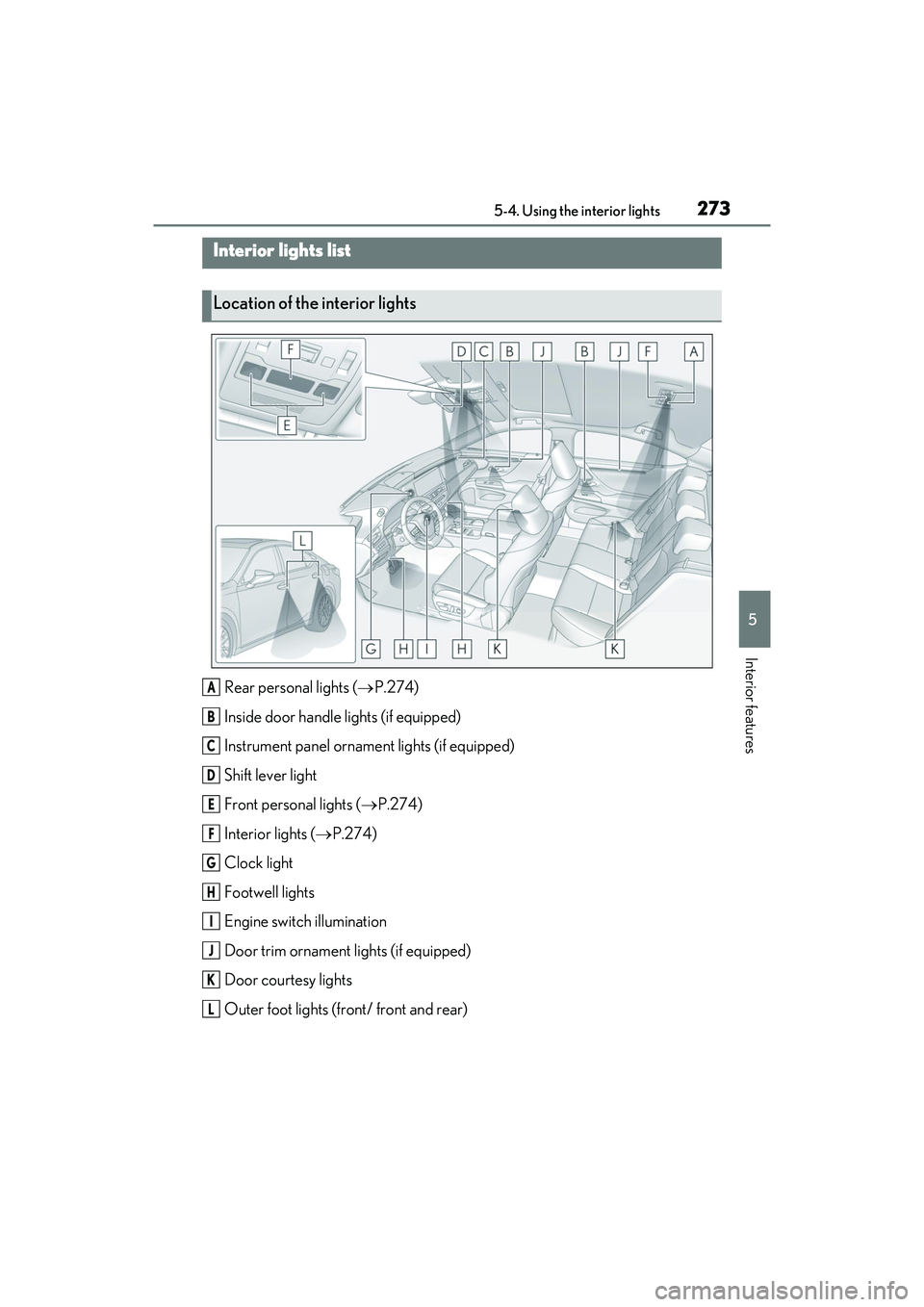
Rear personal lights (P.274)
Inside door handle lights (if equipped)
Instrument panel ornament lights (if equipped)
Shift lever light
Front personal lights ( P.274)
Interior lights ( P.274)
Clock light
Footwell lights
Engine switch illumination
Door trim ornament lights (if equipped)
Door courtesy lights
Outer foot lights (front/ front and rear)
Interior lights list
Location of the interior lights
A
B
C
D
E
F
G
H
I
J
K
L
Page 303 of 468
3016-1. Maintenance and care
6
Maintenance and care
Remove dirt and dust using a vac-
uum cleaner. Wipe dirty surfaces
with a cloth dampened with luke-
warm water.
If dirt cannot be removed, wipe it off
with a soft cloth dampened with
neutral detergent diluted to approx-
imately 1%.
Wring out any excess water from
the cloth and thoroughly wipe off
remaining traces of detergent and
water.
■Shampooing the carpets
There are several commercial foaming-
type cleaners available. Use a sponge or
brush to apply the foam. Rub in overlapping
circles. Do not use water. Wipe dirty sur-
faces and let them dry. Excellent results are
obtained by keeping the carpet as dry as
possible.
■Handling the seat belts
Clean with mild soap and lukewarm water
using a cloth or sponge. Also check the
belts periodically for excessive wear, fray-
ing or cuts.
■When cleaning the carpeted portions of
the glove box, console box, etc.
If a strong adhesive tape is used, there is a
possibility that the surface of the carpet
could be damaged.
Cleaning and protecting the
vehicle interior
Perform cleaning in a manner
appropriate to each component
and its material.
Protecting the vehicle interior
WARNING
■Water in the vehicle
●Do not splash or spill liquid in the vehi-
cle.
Doing so may cause electrical compo-
nents etc. to malfunction or catch fire.
●Do not get any of the SRS components
or wiring in the vehicle interior wet.
( P.28)
An electrical malfunction may cause
the airbags to deploy or not function
properly, resulting in death or serious
injury.
■Cleaning the interior (especially
instrument panel)
Do not use polish wax or polish cleaner.
The instrument panel may reflect off the
windshield, obstructin g the driver’s view
and leading to an accident, resulting in
death or serious injury.
NOTICE
■Cleaning detergents
●Do not use the following types of
detergent, as they may discolor the
vehicle interior or cause streaks or
damage to painted surfaces:
• Non-seat portions: Organic sub- stances such as benzene or gasoline,
alkaline or acidic solutions, dye, and
bleach
• Seats: Alkaline or acidic solutions, such as thinner, benzene, and alcohol
●Do not use polish wax or polish
cleaner. The instrument panel’s or
other interior part’s painted surface
may be damaged.
■Preventing damage to leather sur-
faces
Observe the following precautions to
avoid damage to and deterioration of
leather surfaces:
●Remove any dust or dirt from leather
surfaces immediately.
Page 337 of 468

3356-3. Do-it-yourself maintenance
6
Maintenance and care
1Turn the engine switch off.
2 Open the Fuse box cover.
Engine compartment: type A fuse
box
Push the tab in and lift the lid off.
Engine compartment: type B fuse
box
Push the tab in and lift the lid off.
Driver’s side instrument panel
Push the tab in and remove the lid. Make sure to push the tab in during
removal or installation.
3
Remove the fuse with the pullout
tool.
Only type A fuses can be removed using
the pullout tool.
4Check if the fuse is blown.
Type A and B:
Replace the blown fuse with a new fuse of
an appropriate amperage rating. The
amperage rating can be found on the fuse
box lid.
Type C:
Contact your Lexus dealer.
Type A
Checking and replacing
fuses
If any of the electrical components
do not operate, a fuse may have
blown. If this happens, check and
replace the fuses as necessary.
Checking and replacing fuses
Page 390 of 468
3888-1. Specifications
8-1 .S pec if ic ati on s
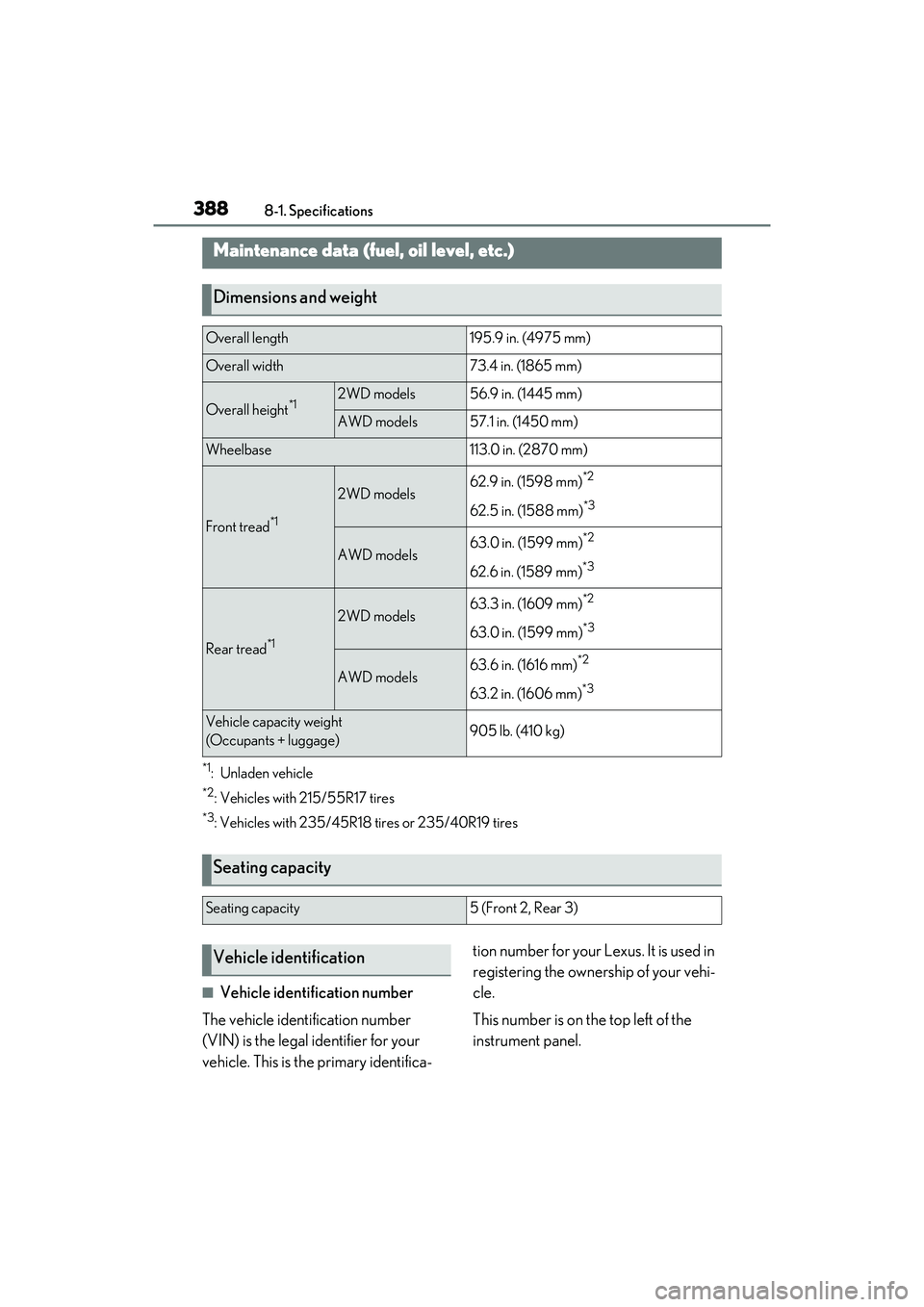
*1:Unladen vehicle
*2: Vehicles with 215/55R17 tires
*3: Vehicles with 235/45R18 tires or 235/40R19 tires
■Vehicle identification number
The vehicle identification number
(VIN) is the legal identifier for your
vehicle. This is the primary identifica- tion number for your Lexus. It is used in
registering the ownership of your vehi-
cle.
This number is on the top left of the
instrument panel.
Maintenance data (fuel, oil level, etc.)
Dimensions and weight
Overall length195.9 in. (4975 mm)
Overall width73.4 in. (1865 mm)
Overall height*12WD models56.9 in. (1445 mm)
AWD models57.1 in. (1450 mm)
Wheelbase113.0 in. (2870 mm)
Front tread*1
2WD models62.9 in. (1598 mm)*2
62.5 in. (1588 mm)*3
AWD models63.0 in. (1599 mm)*2
62.6 in. (1589 mm)*3
Rear tread*1
2WD models63.3 in. (1609 mm)*2
63.0 in. (1599 mm)*3
AWD models63.6 in. (1616 mm)*2
63.2 in. (1606 mm)*3
Vehicle capacity weight
(Occupants + luggage)905 lb. (410 kg)
Seating capacity
Seating capacity5 (Front 2, Rear 3)
Vehicle identification