sport mode LEXUS ES350 2022 User Guide
[x] Cancel search | Manufacturer: LEXUS, Model Year: 2022, Model line: ES350, Model: LEXUS ES350 2022Pages: 468, PDF Size: 26.96 MB
Page 82 of 468
802-1. Instrument cluster
generated, the G-force value display will
turn amber and be held for 2 seconds.
■Gear Position (F SPORT models)
Displays the current shift range or gear
position when the shift lever is in D or S.
■Units (F SPORT models)
The units of measure used can be
changed while driving.
Unlike the units setting performed on the
settings display, the units setting per-
formed on the drive information display
can be changed while driving.
■Eco Driving Indicator
Eco Driving Indicator will not operate
under the following conditions:
●The shift lever is in any position other than
D.
●A paddle shift switch is operated.
●The driving mode is set to other than nor-
mal mode or eco drive mode.
●The vehicle speed is approximately 80
mph (130 km/h) or higher.
Select to display the following naviga-
tion system-linked information.
Route guidance to destination
Compass display (heading-up dis-
play)
■Route guidance to destination display
When the route guidance to destination
display is enabled on the head-up display, it
will not be displayed on the multi-informa-
tion display. ( P.84)
Select to enable selection of an audio
source or track on the meter using the
meter control switches.
Select to display the operational status
of the following systems:
LTA (Lane Tracing Assist)
( P.186)
Dynamic radar cruise control with
full-speed range ( P.198)
RSA (Road Sign Assist) (if
equipped) ( P.195)
■Meter display settings that can be
changed
Language
Select to change the language displayed.
Units
Select to change the units of measure dis-
played.
Speedometer display (except F
SPORT models)
Select to set the display of the speedome-
ter to digital or analog.
Drive information 1/Drive informa-
tion 2
Select to select up to 2 items ( P.78) that
will be displayed on e ach Drive information
screen (Drive inform ation 1 screen and
Drive information 2 screen) respectively.
Clock
Navigation system-linked dis-
play (if equipped)
Audio system-linked display
Driving support system informa-
tion display
Settings display
Page 83 of 468
812-1. Instrument cluster
2
Vehicle status information and indicators
Select to switch between 12-hour display
and 24-hour display.
Pop-up display
Select to enable/disable some pop-up dis-
plays for each relevant system.
Accent color
Select to change the accent color on the
screen, such as the cursor color.
Rev indicator (F SPORT models)
• Select to enable/disable the rev indica-
tor.
• Select to set the engine speed at which the rev indicator (amber) will begin to be
displayed.
Rev peak (F SPORT models)
Select to enable/disable the rev peak.
Eco Driving Indicator Light
Select to enable/disable the Eco Driving
Indicator Light.
Default setting
Select to reset the meter display settings to
the default setting.
■Vehicle functions and settings that
can be changed
P.408
■Suspension of the settings display
●Some settings cannot be changed while
driving. When changing settings, park
the vehicle in a safe place.
●If a warning message is displayed, opera-
tion of the settings display will be sus-
pended.
Displays suggestions to the driver in
the following situations. To select a
response to a displayed suggestion,
use the meter control switches.
■Suggestion to turn on the head-
lights
If the headlights turn off, and the vehi-
cle speed is 3 mph (5 km/h) or higher
for a certain amount of time when the
surroundings are dark, a suggestion
message will be displayed.
■Suggestion to turn off the head-
lights
If the headlights are left on for a certain
amount of time with the headlight
switch in after the engine switch
has been turned off, a suggestion mes-
sage will be displayed asking if you
wish to turn the headlights off.
To turn the headlights off, select “Yes”.
WARNING
■Cautions during setting up the dis-
play
As the engine needs to be running
during setting up the display, ensure that
the vehicle is parked in a place with ade-
quate ventilation. In a closed area such as
a garage, exhaust gases including harm-
ful carbon monoxide (CO) may collect
and enter the vehicle. This may lead to
death or a serious health hazard.
NOTICE
■During setting up the display
To prevent battery discharge, ensure
that the engine is running while setting up
the display features.
Suggestion function
Page 151 of 468
1494-2. Driving procedures
4
Driving
*1: Shifting to the D position allows the sys-tem to select a gear suitable for the
driving conditions. Setting the shift lever
to the D position is recommended for
normal driving. You can choose shift
range suitable for your driving situation
by operating the paddle shift switches.
*2: Selecting shift ranges using S mode restricts the upper limit of the possible
gear ranges, controls engine braking
force, and prevents unnecessary
upshifting.
■When driving with dynamic radar cruise
control with full-speed range activated
Even when performing the following
actions with the intent of enabling engine
braking, engine braking will not be acti-
vated because dynamic radar cruise con-
trol with full-speed range will not be
canceled.
●While driving in the D position or S mode,
downshifting to S7, S6, S5 or S4.
( P.198)
●When switching the driving mode to
sport mode while driving in D position.
( P.213)
■Restraining sudden start (Drive-Start
Control)
P.139
■AI-SHIFT
The AI-SHIFT automatically selects the suit-
able gear according to driver performance
and driving conditions.
The AI-SHIFT automatically operates when
the shift lever is in D. (Shifting the shift lever
to the S position or using the paddle shift
cancels the function.)
Automatic transmission
Select the shift position depending
on your purpose and situation.
Shift position purpose and func-
tions
Shift posi- tionObjective or function
PParking the vehicle/starting the engine
RReversing
NNeutral
DNormal driving*1
SS mode driving*2 ( P.152)
WARNING
■When driving on slippery road sur-
faces
Do not accelerate or shift the shift lever
suddenly.
Sudden changes in engine braking may
cause the vehicle to spin or skid, resulting
in an accident.
Page 215 of 468
2134-5. Using the driving support systems
4
Driving
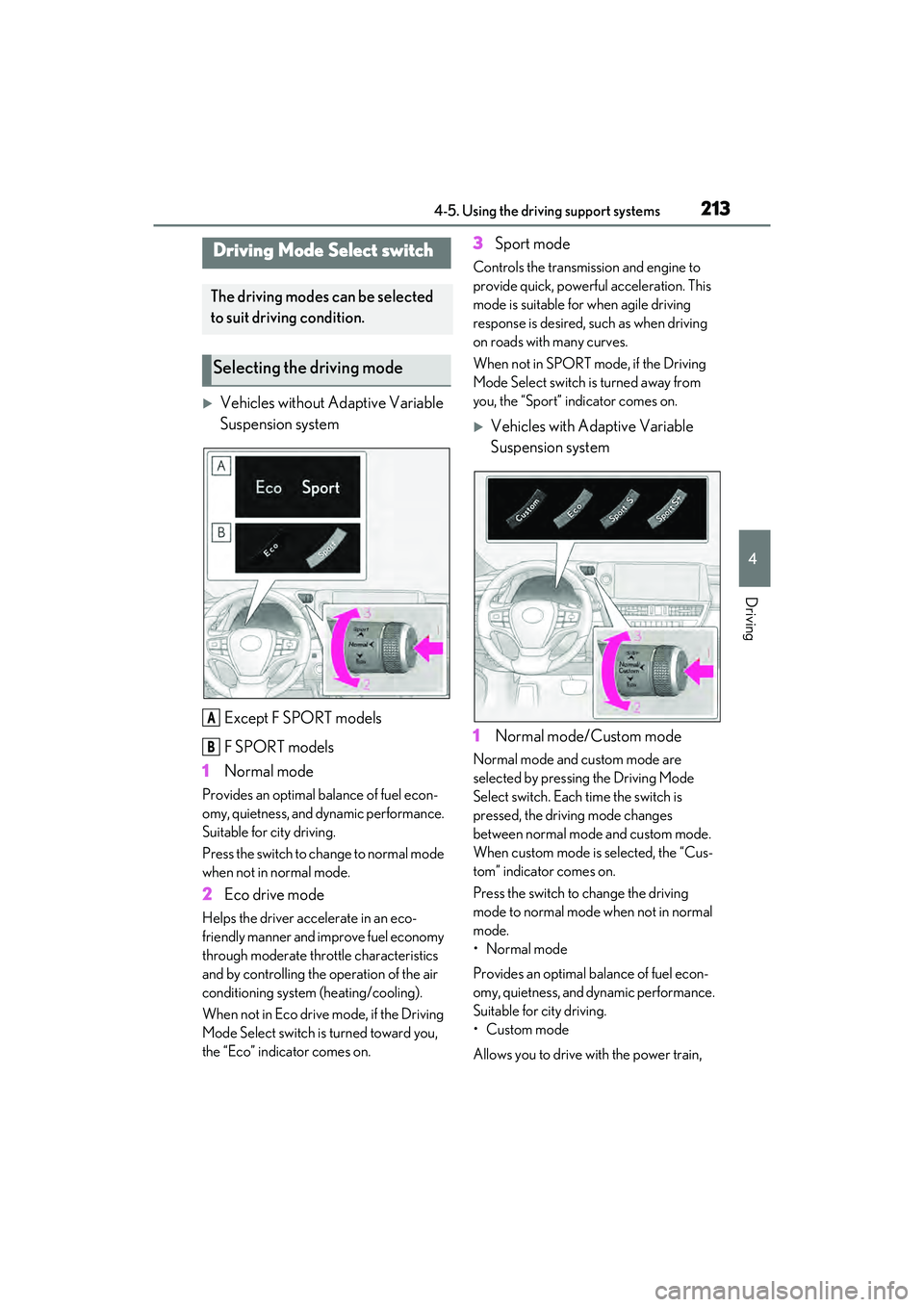
Vehicles without Adaptive Variable
Suspension systemExcept F SPORT models
F SPORT models
1 Normal mode
Provides an optimal balance of fuel econ-
omy, quietness, and dynamic performance.
Suitable for city driving.
Press the switch to change to normal mode
when not in normal mode.
2Eco drive mode
Helps the driver accelerate in an eco-
friendly manner and improve fuel economy
through moderate throttle characteristics
and by controlling the operation of the air
conditioning system (heating/cooling).
When not in Eco drive mode, if the Driving
Mode Select switch is turned toward you,
the “Eco” indicator comes on.
3Sport mode
Controls the transmission and engine to
provide quick, powerful acceleration. This
mode is suitable for when agile driving
response is desired, such as when driving
on roads with many curves.
When not in SPORT mode, if the Driving
Mode Select switch is turned away from
you, the “Sport” indicator comes on.
Vehicles with Adaptive Variable
Suspension system
1 Normal mode/Custom mode
Normal mode and custom mode are
selected by pressing the Driving Mode
Select switch. Each time the switch is
pressed, the driving mode changes
between normal mode and custom mode.
When custom mode is selected, the “Cus-
tom” indicator comes on.
Press the switch to change the driving
mode to normal mode when not in normal
mode.
• Normal mode
Provides an optimal balance of fuel econ-
omy, quietness, and dynamic performance.
Suitable for city driving.
•Custom mode
Allows you to drive with the power train,
Driving Mode Select switch
The driving modes can be selected
to suit driving condition.
Selecting the driving mode
A
B
Page 216 of 468
2144-5. Using the driving support systems
chassis and air conditioning system func-
tions set to your preferred settings.
Custom mode settings can only be
changed on the drive mode customization
display of the Center Display. (P.258)
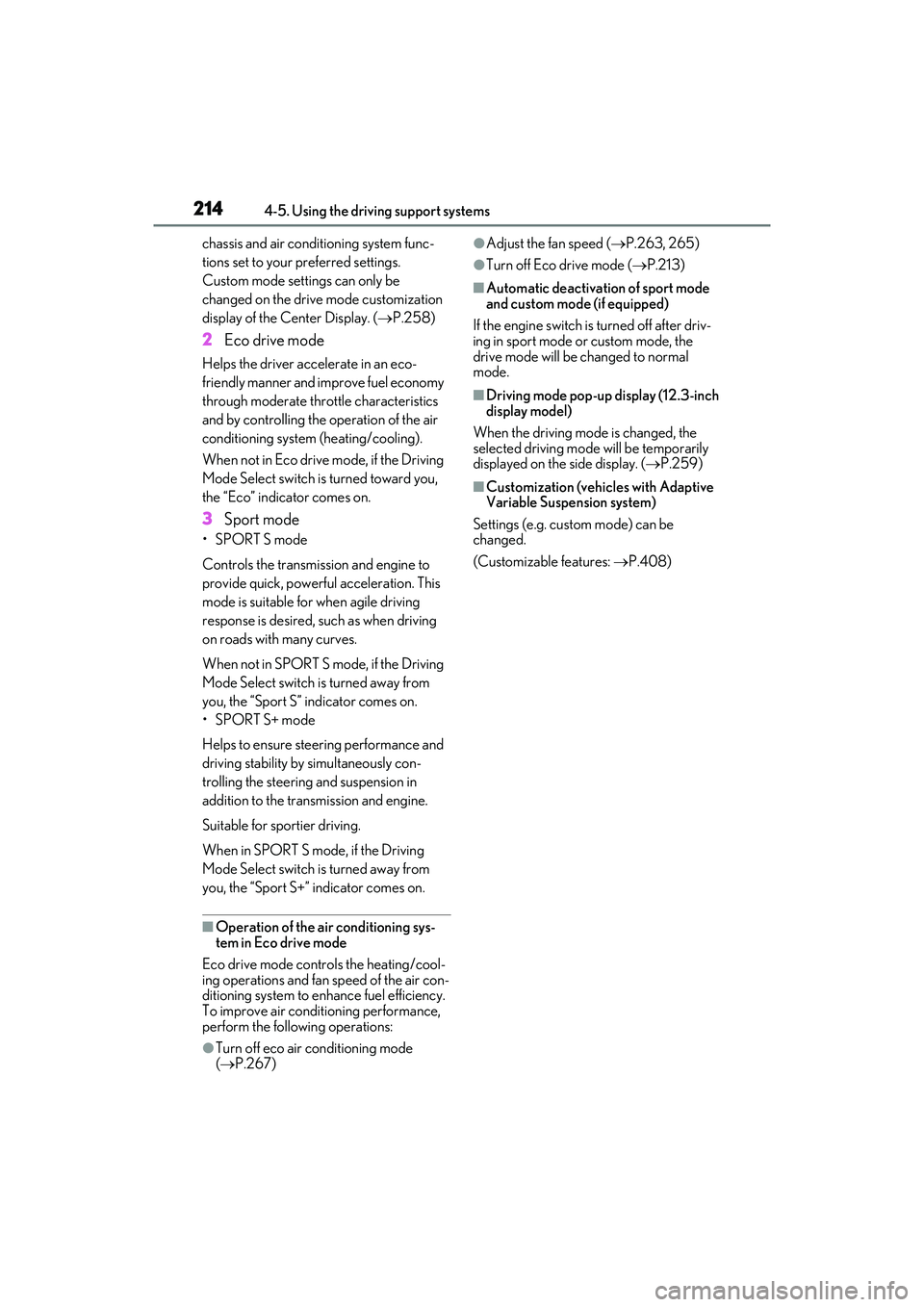
2 Eco drive mode
Helps the driver accelerate in an eco-
friendly manner and improve fuel economy
through moderate throttle characteristics
and by controlling the operation of the air
conditioning system (heating/cooling).
When not in Eco drive mode, if the Driving
Mode Select switch is turned toward you,
the “Eco” indicator comes on.
3Sport mode
•SPORT S mode
Controls the transmission and engine to
provide quick, powerful acceleration. This
mode is suitable for when agile driving
response is desired, such as when driving
on roads with many curves.
When not in SPORT S mode, if the Driving
Mode Select switch is turned away from
you, the “Sport S” indicator comes on.
•SPORT S+ mode
Helps to ensure steering performance and
driving stability by simultaneously con-
trolling the steering and suspension in
addition to the transmission and engine.
Suitable for sportier driving.
When in SPORT S mode, if the Driving
Mode Select switch is turned away from
you, the “Sport S+” indicator comes on.
■Operation of the air conditioning sys-
tem in Eco drive mode
Eco drive mode contro ls the heating/cool-
ing operations and fan speed of the air con-
ditioning system to enhance fuel efficiency.
To improve air conditioning performance,
perform the following operations:
●Turn off eco air conditioning mode
( P.267)
●Adjust the fan speed ( P.263, 265)
●Turn off Eco drive mode ( P.213)
■Automatic deactivation of sport mode
and custom mode (if equipped)
If the engine switch is turned off after driv-
ing in sport mode or custom mode, the
drive mode will be changed to normal
mode.
■Driving mode pop-up display (12.3-inch
display model)
When the driving mode is changed, the
selected driving mode will be temporarily
displayed on the side display. ( P.259)
■Customization (vehicles with Adaptive
Variable Suspension system)
Settings (e.g. custom mode) can be
changed.
(Customizable features: P.408)
Page 350 of 468
3487-2. Steps to take in an emergency
When using a flat-bed truck to trans-
port the vehicle, use tire strapping
belts. Refer to the owner’s manual of
the flat-bed truck for the tire strapping
method.
In order to suppress vehicle movement
during transportation, set the parking
brake and turn the engine switch off.
WARNING
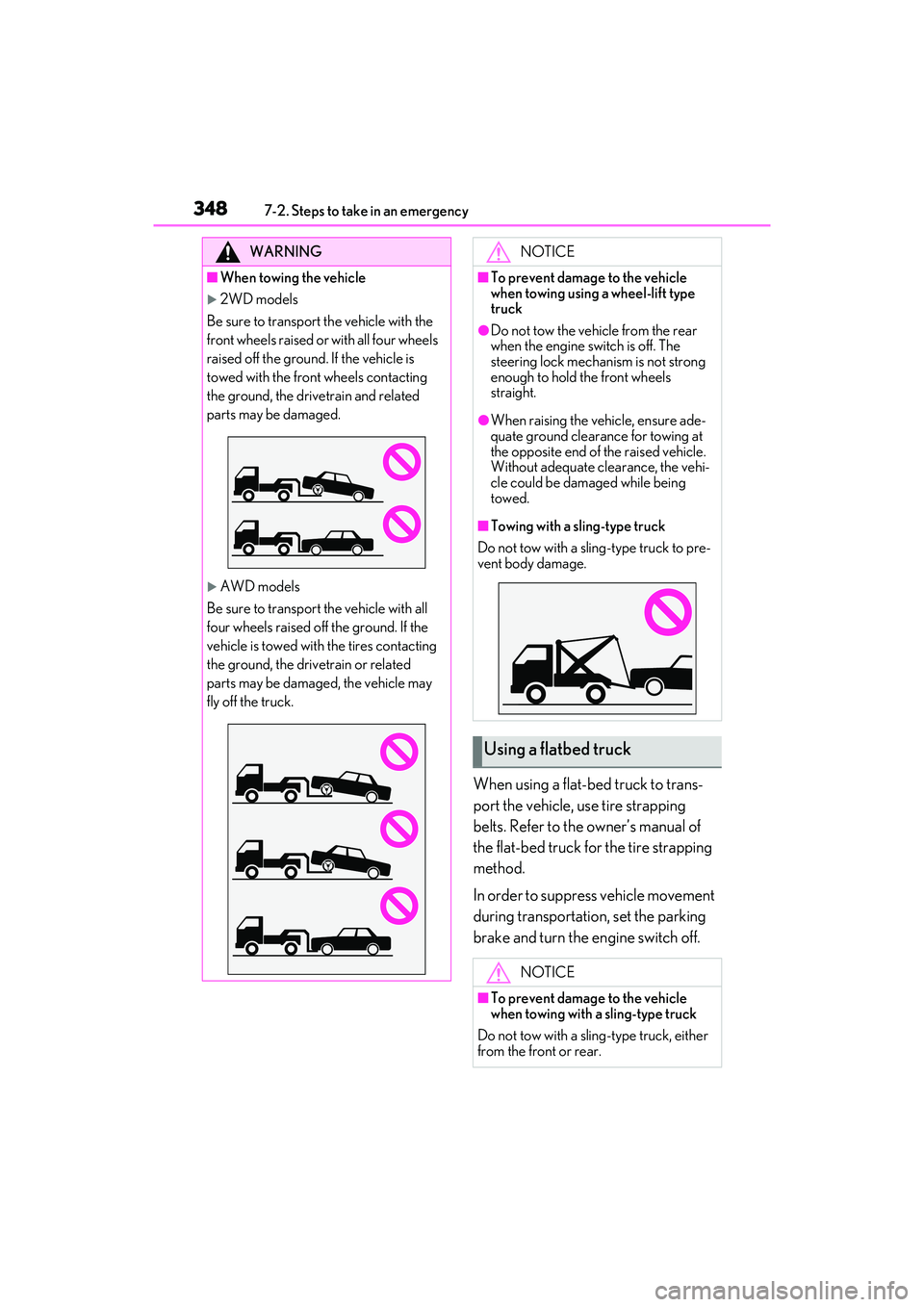
■When towing the vehicle
2WD models
Be sure to transport the vehicle with the
front wheels raised or with all four wheels
raised off the ground. If the vehicle is
towed with the front wheels contacting
the ground, the drivetrain and related
parts may be damaged.
AWD models
Be sure to transport the vehicle with all
four wheels raised off the ground. If the
vehicle is towed with the tires contacting
the ground, the drivetrain or related
parts may be damaged, the vehicle may
fly off the truck.
NOTICE
■To prevent damage to the vehicle
when towing using a wheel-lift type
truck
●Do not tow the vehicle from the rear
when the engine switch is off. The
steering lock mechan ism is not strong
enough to hold the front wheels
straight.
●When raising the vehicle, ensure ade-
quate ground clearance for towing at
the opposite end of the raised vehicle.
Without adequate clearance, the vehi-
cle could be damaged while being
towed.
■Towing with a sling-type truck
Do not tow with a sling-type truck to pre-
vent body damage.
Using a flatbed truck
NOTICE
■To prevent damage to the vehicle
when towing with a sling-type truck
Do not tow with a sling-type truck, either
from the front or rear.
Page 363 of 468
3617-2. Steps to take in an emergency
7
When trouble arises
If a warning message is dis-
played
The multi-information display
shows warnings of system malfunc-
tions, incorrectly performed opera-
tions, and messages that indicate a
need for maintenance. When a
message is shown, perform the cor-
rection procedure appropriate to
the message.
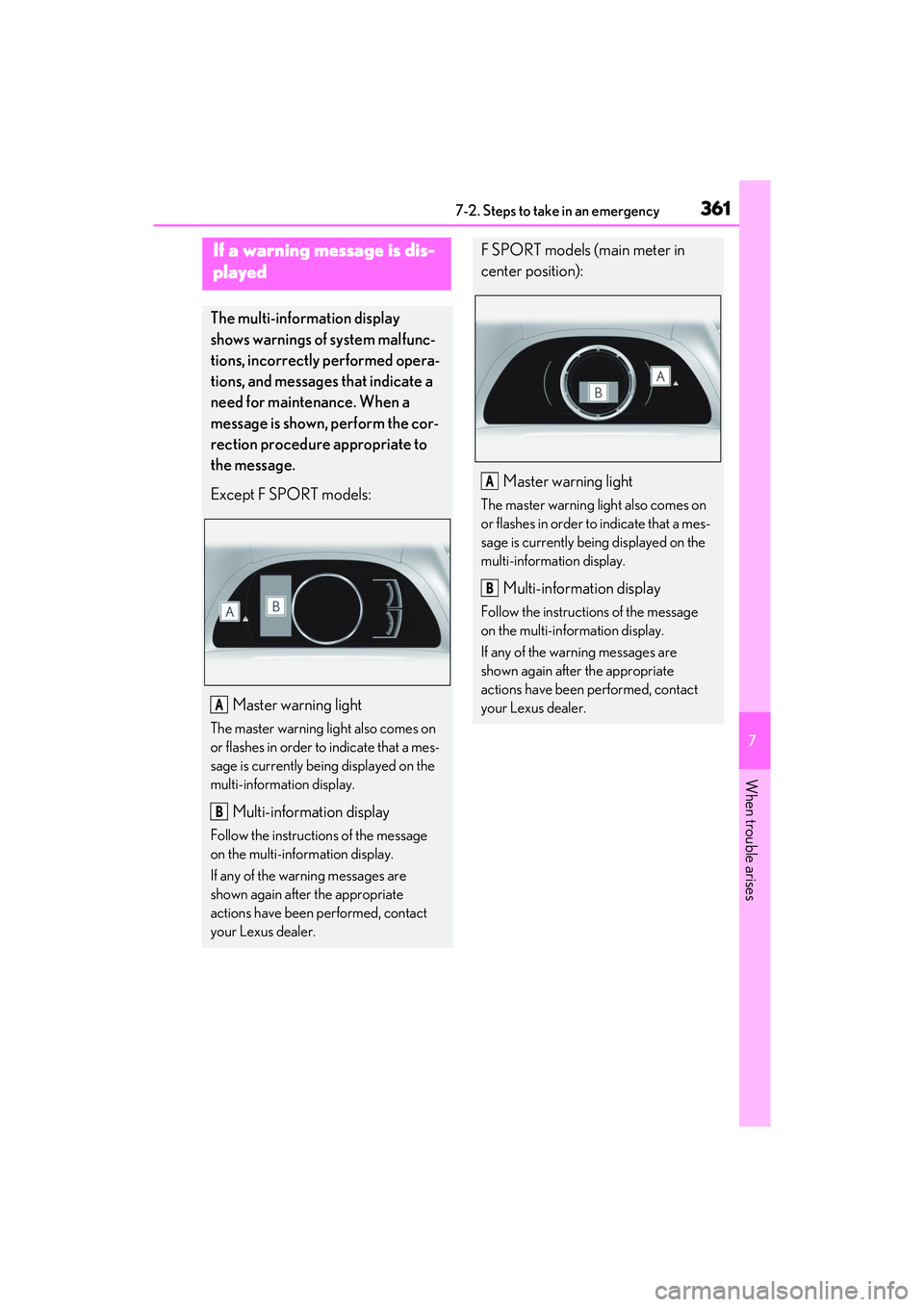
Except F SPORT models:
Master warning light
The master warning lig ht also comes on
or flashes in order to indicate that a mes-
sage is currently being displayed on the
multi-information display.
Multi-information display
Follow the instructions of the message
on the multi-information display.
If any of the warning messages are
shown again after the appropriate
actions have been performed, contact
your Lexus dealer.
A
B
F SPORT models (main meter in
center position):
Master warning light
The master warning light also comes on
or flashes in order to indicate that a mes-
sage is currently being displayed on the
multi-information display.
Multi-information display
Follow the instructions of the message
on the multi-information display.
If any of the warning messages are
shown again after the appropriate
actions have been performed, contact
your Lexus dealer.
A
B
Page 364 of 468
3627-2. Steps to take in an emergency
The master warning light and warning buzzers operate as follows depending on
the content of the message. If a message indicates the need for inspection by a
dealer, have the vehicle inspected by your Lexus dealer immediately.
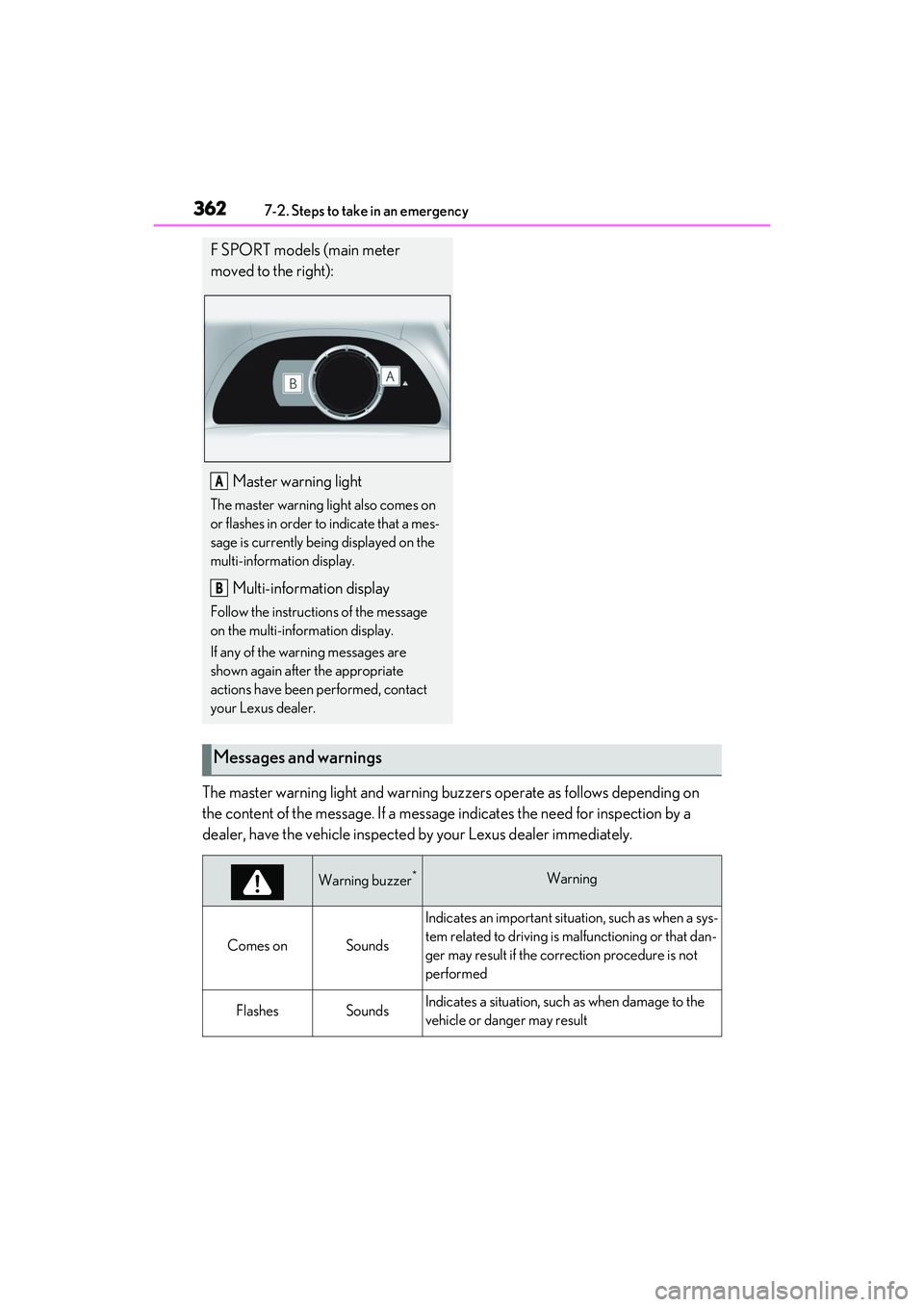
F SPORT models (main meter
moved to the right):
Master warning light
The master warning lig ht also comes on
or flashes in order to indicate that a mes-
sage is currently being displayed on the
multi-information display.
Multi-information display
Follow the instructions of the message
on the multi-information display.
If any of the warning messages are
shown again after the appropriate
actions have been performed, contact
your Lexus dealer.
A
B
Messages and warnings
Warning buzzer*Warning
Comes onSounds
Indicates an important situation, such as when a sys-
tem related to driving is ma lfunctioning or that dan-
ger may result if the correction procedure is not
performed
FlashesSoundsIndicates a situation, such as when damage to the
vehicle or danger may result
Page 412 of 468
4108-2. Customization
*2: The default setting varies according to country.
*3:Except F SPORT models
*4:F SPORT models
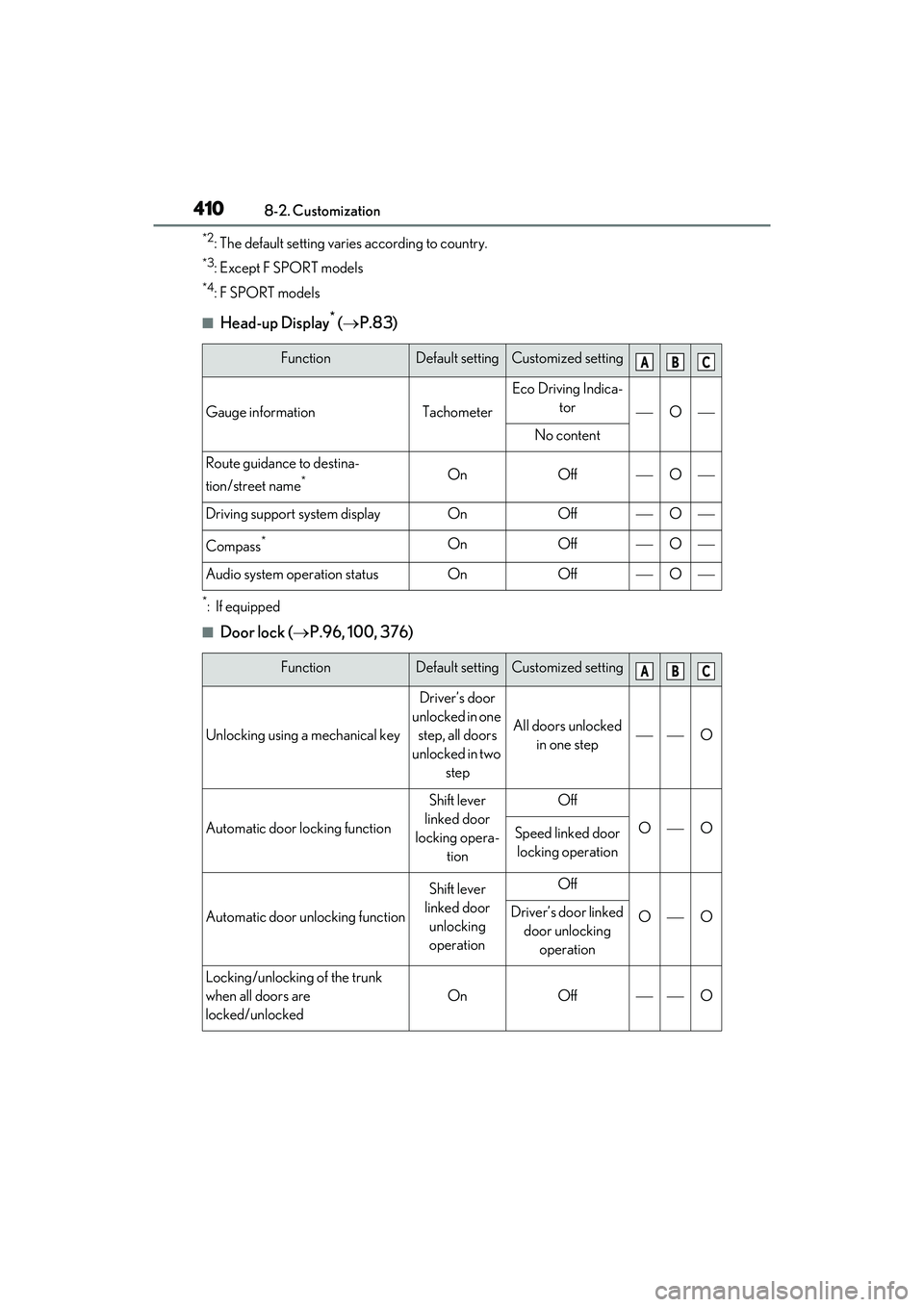
■Head-up Display* ( P.83)
*: If equipped
■Door lock ( P.96, 100, 376)
FunctionDefault settingCustomized setting
Gauge informationTachometer
Eco Driving Indica-
tor
O
No content
Route guidance to destina-
tion/street name
*OnOffO
Driving support system displayOnOffO
Compass*OnOffO
Audio system operation statusOnOffO
FunctionDefault settingCustomized setting
Unlocking using a mechanical key
Driver’s door
unlocked in one step, all doors
unlocked in two step
All doors unlocked in one stepO
Automatic door locking function
Shift lever
linked door
locking opera- tionOff
OOSpeed linked door locking operation
Automatic door unlocking function
Shift lever
linked door unlocking
operationOff
OODriver’s door linked door unlocking operation
Locking/unlocking of the trunk
when all doors are
locked/unlocked
OnOffO
ABC
ABC
Page 418 of 468
4168-2. Customization
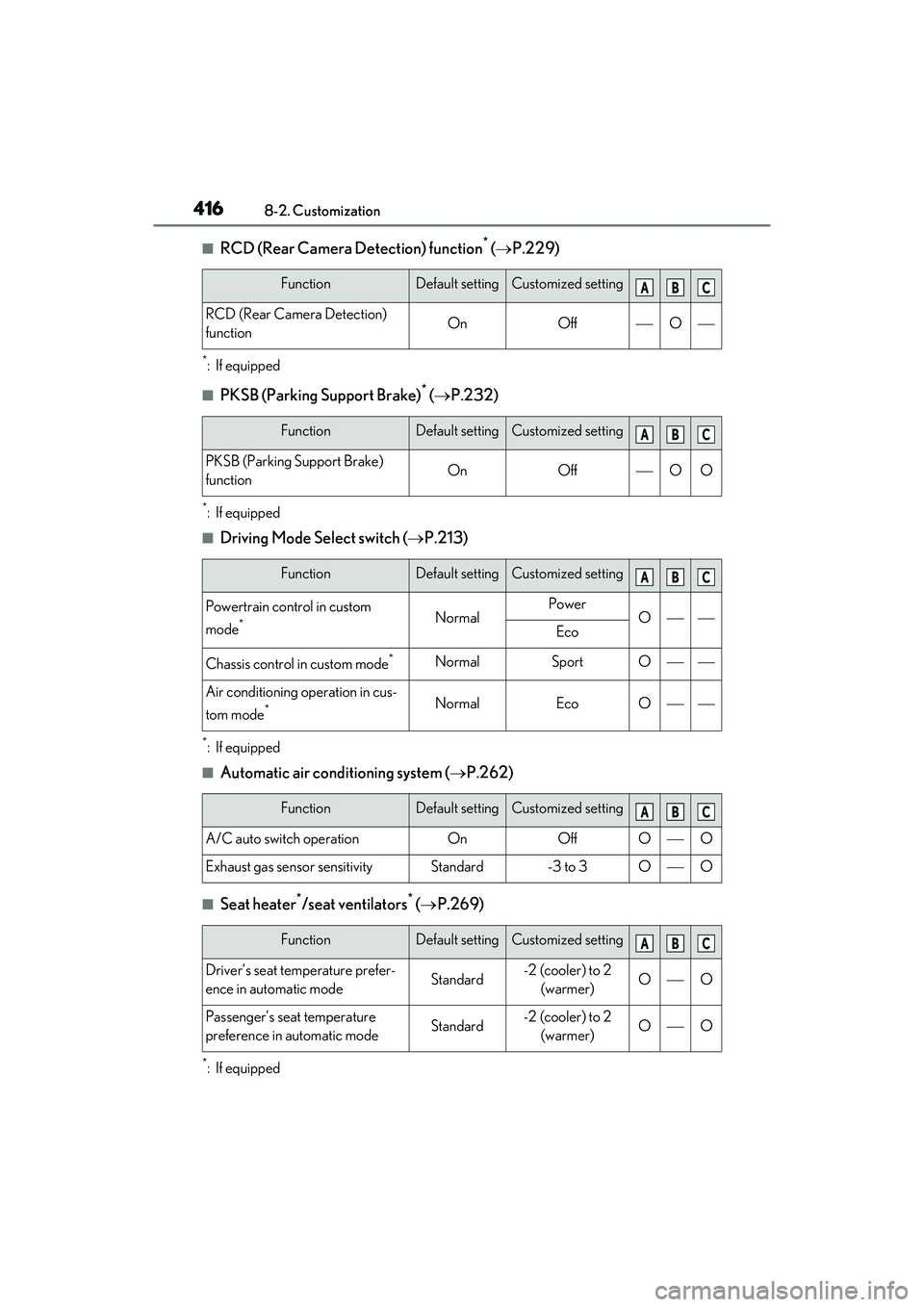
■RCD (Rear Camera Detection) function* ( P.229)
*: If equipped
■PKSB (Parking Support Brake)* ( P.232)
*: If equipped
■Driving Mode Select switch ( P.213)
*: If equipped
■Automatic air conditioning system ( P.262)
■Seat heater*/seat ventilators* ( P.269)
*: If equipped
FunctionDefault settingCustomized setting
RCD (Rear Camera Detection)
functionOnOffO
FunctionDefault settingCustomized setting
PKSB (Parking Support Brake)
functionOnOffOO
FunctionDefault settingCustomized setting
Powertrain control in custom
mode
*NormalPowerOEco
Chassis control in custom mode*NormalSportO
Air conditioning operation in cus-
tom mode
*NormalEcoO
FunctionDefault settingCustomized setting
A/C auto switch operationOnOffOO
Exhaust gas sensor sensitivityStandard-3 to 3OO
FunctionDefault settingCustomized setting
Driver’s seat temperature prefer-
ence in automatic modeStandard-2 (cooler) to 2
(warmer)OO
Passenger’s seat temperature
preference in automatic modeStandard-2 (cooler) to 2 (warmer)OO
ABC
ABC
ABC
ABC
ABC