light LEXUS ES350 2022 Owner's Guide
[x] Cancel search | Manufacturer: LEXUS, Model Year: 2022, Model line: ES350, Model: LEXUS ES350 2022Pages: 468, PDF Size: 26.96 MB
Page 69 of 468
672-1. Instrument cluster
2
Vehicle status information and indicators
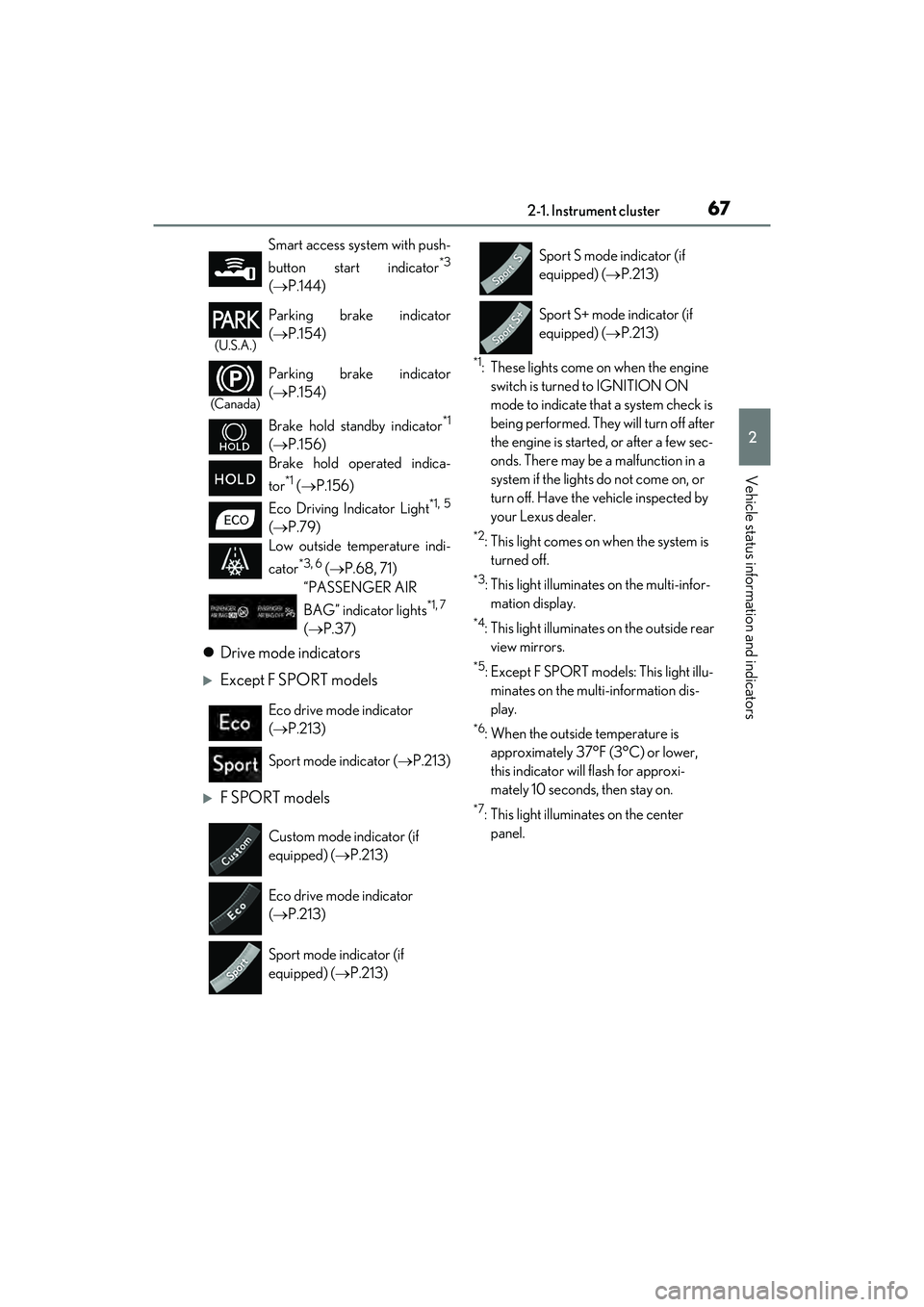
Drive mode indicators
Except F SPORT models
F SPORT models
*1: These lights come on when the engine
switch is turned to IGNITION ON
mode to indicate that a system check is
being performed. They will turn off after
the engine is started, or after a few sec-
onds. There may be a malfunction in a
system if the lights do not come on, or
turn off. Have the vehicle inspected by
your Lexus dealer.
*2: This light comes on when the system is turned off.
*3: This light illuminates on the multi-infor-mation display.
*4: This light illuminates on the outside rear view mirrors.
*5: Except F SPORT models: This light illu-minates on the multi-information dis-
play.
*6: When the outside temperature is approximately 37°F (3°C) or lower,
this indicator will flash for approxi-
mately 10 seconds, then stay on.
*7: This light illuminates on the center panel.
Smart access system with push-
button start indicator
*3
(
P.144)
(U.S.A.)
Parking brake indicator
( P.154)
(Canada)
Parking brake indicator
( P.154)
Brake hold standby indicator
*1
( P.156)
Brake hold operated indica-
tor
*1 ( P.156)
Eco Driving Indicator Light
*1, 5
( P.79)
Low outside temperature indi-
cator
*3, 6 ( P.68, 71)
“PASSENGER AIR
BAG” indicator lights
*1, 7
( P.37)
Eco drive mode indicator
( P.213)
Sport mode indicator ( P.213)
Custom mode indicator (if
equipped) ( P.213)
Eco drive mode indicator
( P.213)
Sport mode indicator (if
equipped) ( P.213)
Sport S mode indicator (if
equipped) ( P.213)
Sport S+ mode indicator (if
equipped) ( P.213)
Page 72 of 468
702-1. Instrument cluster
■Display items
Odometer
Displays the total distance the vehicle has
been driven.
Trip meter A/trip meter B
Displays the distance the vehicle has been
driven since the meter was last reset. Trip
meters A and B can be used to record and
display different distances independently.
Distance until next engine oil
change
Displays the distance the vehicle can be
driven until an oil change is necessary.
■Changing the display
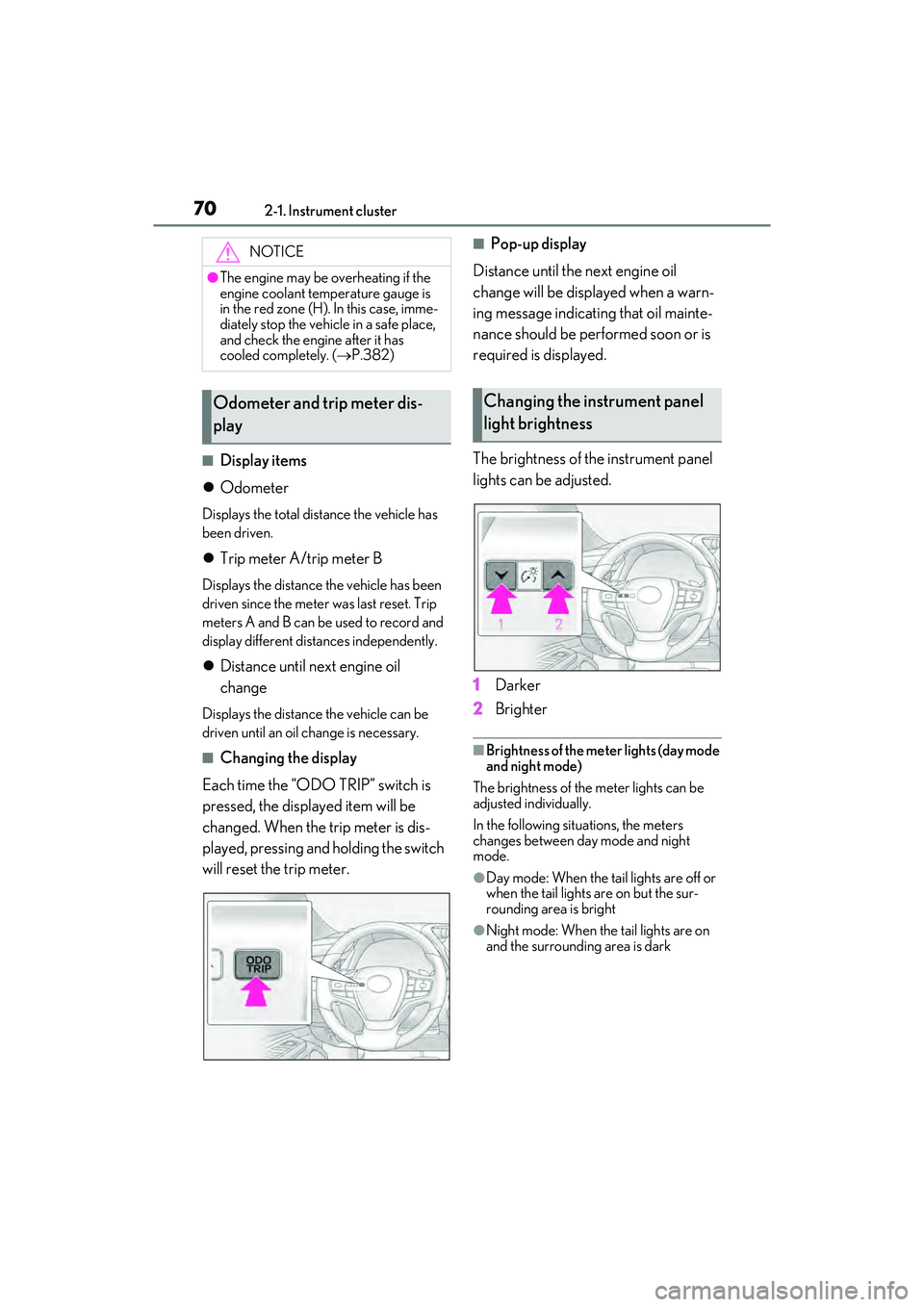
Each time the “ODO TRIP” switch is
pressed, the displayed item will be
changed. When the trip meter is dis-
played, pressing and holding the switch
will reset the trip meter.
■Pop-up display
Distance until the next engine oil
change will be displayed when a warn-
ing message indicating that oil mainte-
nance should be performed soon or is
required is displayed.
The brightness of the instrument panel
lights can be adjusted.
1 Darker
2 Brighter
■Brightness of the meter lights (day mode
and night mode)
The brightness of the meter lights can be
adjusted individually.
In the following situations, the meters
changes between day mode and night
mode.
●Day mode: When the tail lights are off or
when the tail lights are on but the sur-
rounding area is bright
●Night mode: When the tail lights are on
and the surrounding area is dark
NOTICE
●The engine may be overheating if the
engine coolant temperature gauge is
in the red zone (H). In this case, imme-
diately stop the vehicle in a safe place,
and check the engine after it has
cooled completely. ( P.382)
Odometer and trip meter dis-
playChanging the instrument panel
light brightness
Page 77 of 468
752-1. Instrument cluster
2
Vehicle status information and indicators
Displays the distance the vehicle has been
driven since the meter was last reset. Trip
meters A and B can be used to record and
display different distances independently.
Distance until next engine oil
change
Displays the distance the vehicle can be
driven until an oil change is necessary.
■Changing the display
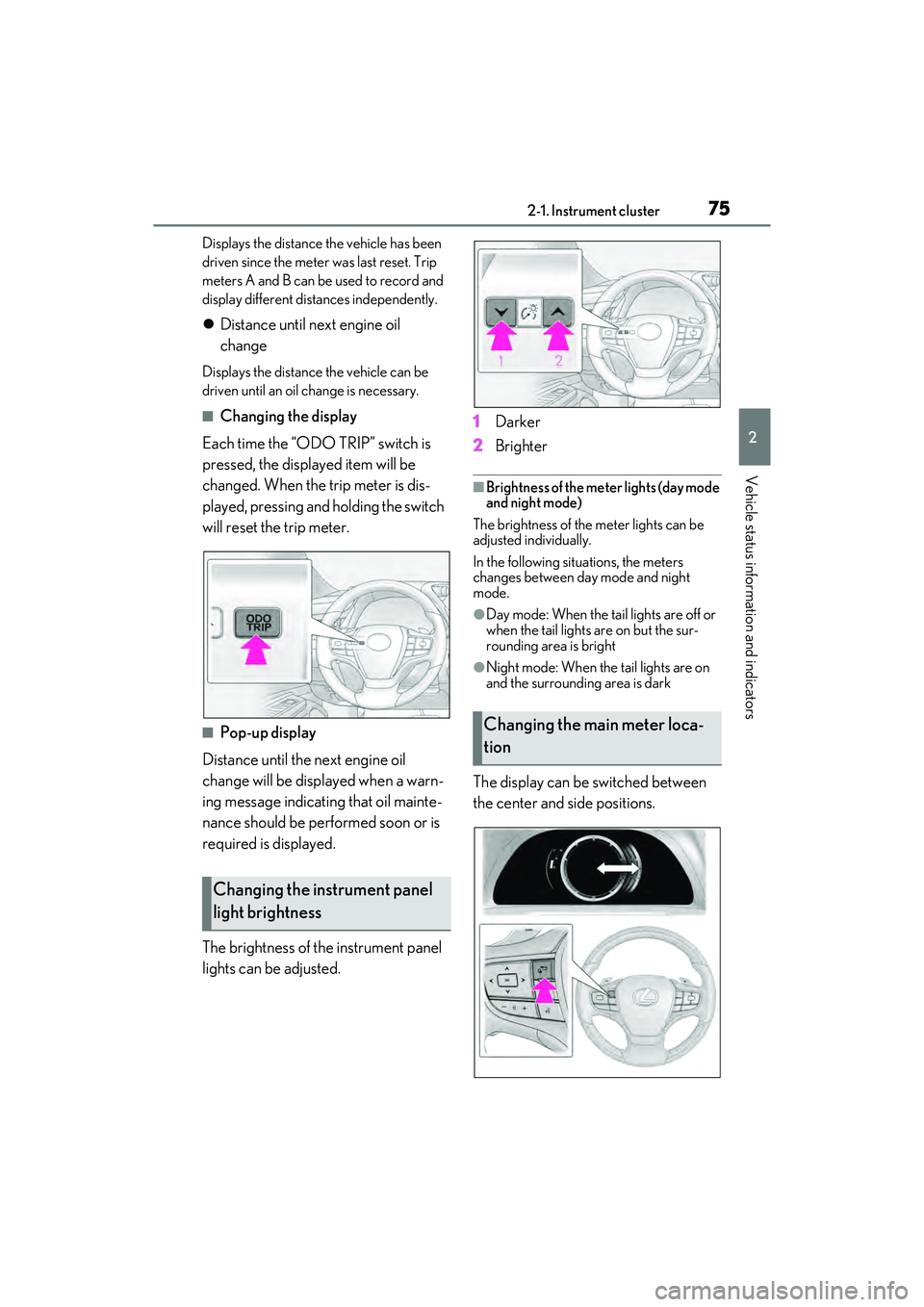
Each time the “ODO TRIP” switch is
pressed, the displayed item will be
changed. When the trip meter is dis-
played, pressing and holding the switch
will reset the trip meter.
■Pop-up display
Distance until the next engine oil
change will be displayed when a warn-
ing message indicating that oil mainte-
nance should be performed soon or is
required is displayed.
The brightness of the instrument panel
lights can be adjusted. 1
Darker
2 Brighter
■Brightness of the meter lights (day mode
and night mode)
The brightness of the meter lights can be
adjusted individually.
In the following situations, the meters
changes between day mode and night
mode.
●Day mode: When the tail lights are off or
when the tail lights are on but the sur-
rounding area is bright
●Night mode: When the tail lights are on
and the surrounding area is dark
The display can be switched between
the center and side positions.
Changing the instrument panel
light brightness
Changing the main meter loca-
tion
Page 79 of 468
772-1. Instrument cluster
2
Vehicle status information and indicators
■Liquid crystal display
Small spots or light spots may appear on the
display. This phenomenon is characteristic
of liquid crystal displays, and there is no
problem continuing to use the display.
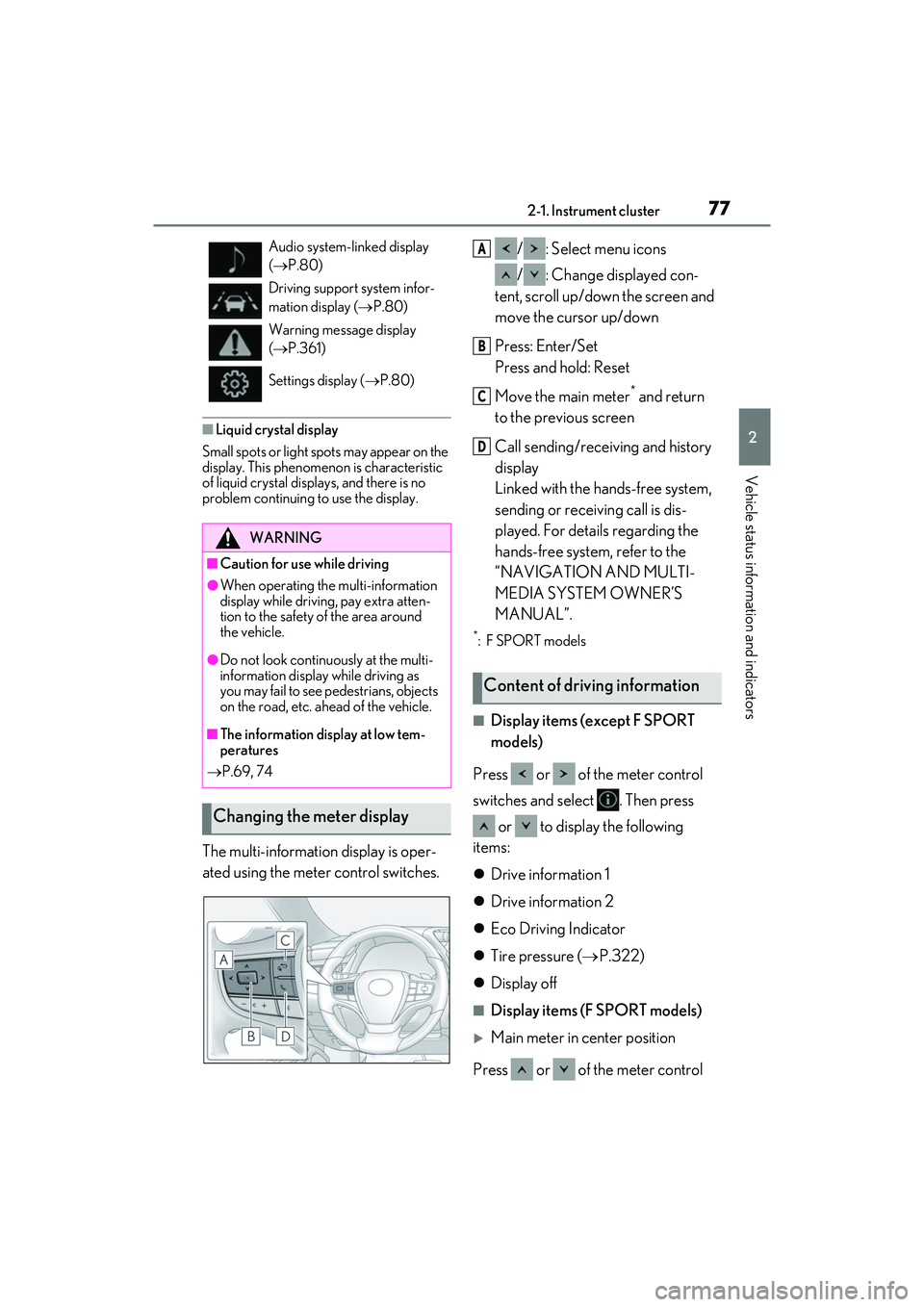
The multi-information display is oper-
ated using the meter control switches. / : Select menu icons
/ : Change displayed con-
tent, scroll up/down the screen and
move the cursor up/down
Press: Enter/Set
Press and hold: Reset
Move the main meter
* and return
to the previous screen
Call sending/receiving and history
display
Linked with the hands-free system,
sending or receiving call is dis-
played. For details regarding the
hands-free system, refer to the
“NAVIGATION AND MULTI-
MEDIA SYSTEM OWNER’S
MANUAL”.
*:F SPORT models
■Display items (except F SPORT
models)
Press or of the meter control
switches and select . Then press or to display the following
items:
Drive information 1
Drive information 2
Eco Driving Indicator
Tire pressure ( P.322)
Display off
■Display items (F SPORT models)
Main meter in center position
Press or of the meter control
Audio system-linked display
( P.80)
Driving support system infor-
mation display ( P.80)
Warning message display
( P.361)
Settings display ( P.80)
WARNING
■Caution for use while driving
●When operating the multi-information
display while driving, pay extra atten-
tion to the safety of the area around
the vehicle.
●Do not look continuously at the multi-
information display while driving as
you may fail to see pedestrians, objects
on the road, etc. ahead of the vehicle.
■The information display at low tem-
peratures
P.69, 74
Changing the meter display
Content of driving information
A
B
C
D
Page 81 of 468
792-1. Instrument cluster
2
Vehicle status information and indicators
added to the tank, the display may not
be updated.
When refueling, turn the engine switch
off. If the vehicle is refueled without
turning the engine switch off, the display
may not be updated.
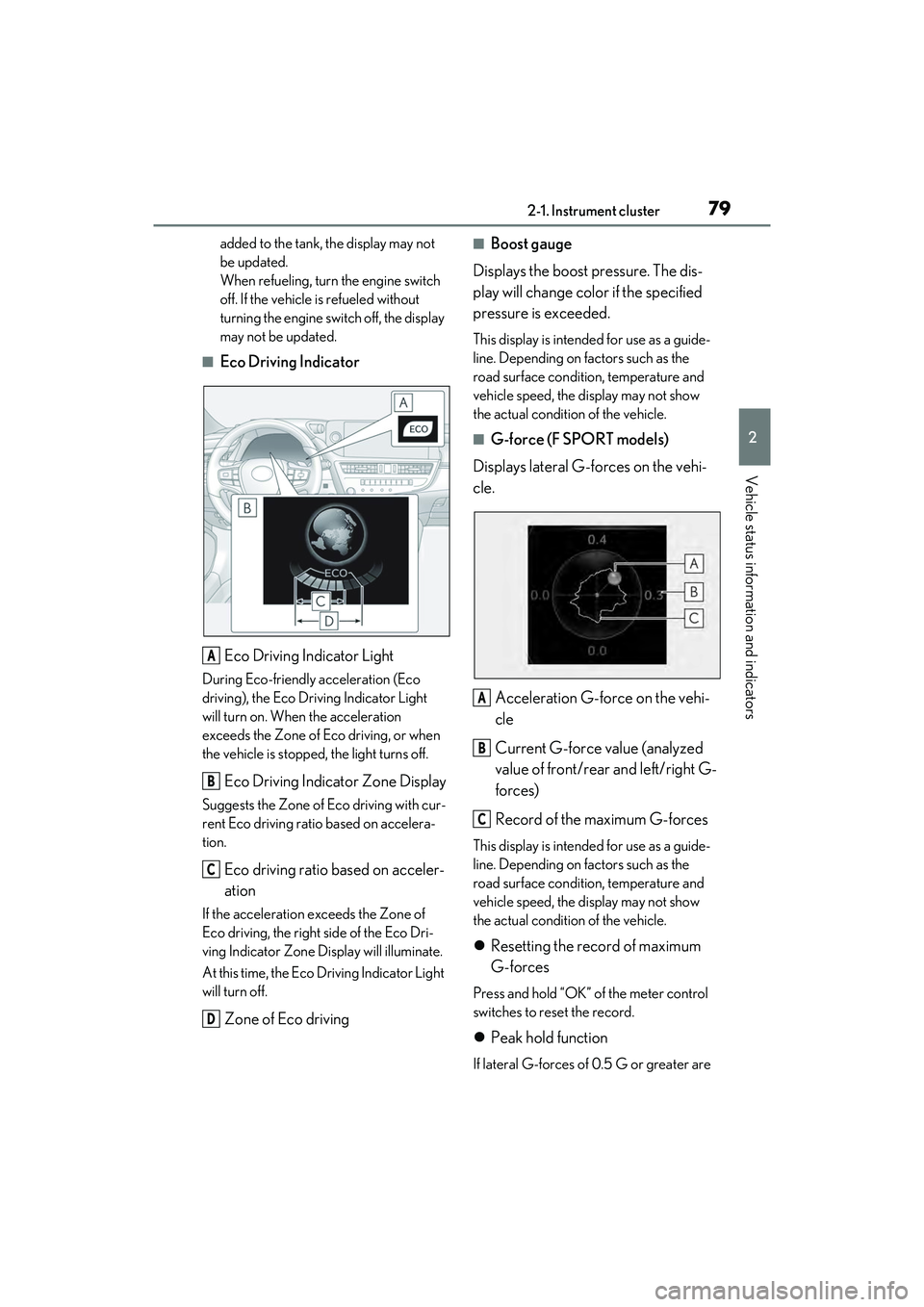
■Eco Driving IndicatorEco Driving Indicator Light
During Eco-friendly acceleration (Eco
driving), the Eco Driving Indicator Light
will turn on. When the acceleration
exceeds the Zone of Eco driving, or when
the vehicle is stopped, the light turns off.
Eco Driving Indicator Zone Display
Suggests the Zone of Eco driving with cur-
rent Eco driving ratio based on accelera-
tion.
Eco driving ratio based on acceler-
ation
If the acceleration exceeds the Zone of
Eco driving, the right side of the Eco Dri-
ving Indicator Zone Display will illuminate.
At this time, the Eco Driving Indicator Light
will turn off.
Zone of Eco driving
■Boost gauge
Displays the boost pressure. The dis-
play will change color if the specified
pressure is exceeded.
This display is intended for use as a guide-
line. Depending on factors such as the
road surface condition, temperature and
vehicle speed, the display may not show
the actual condition of the vehicle.
■G-force (F SPORT models)
Displays lateral G-forces on the vehi-
cle.
Acceleration G-force on the vehi-
cle
Current G-force value (analyzed
value of front/rear and left/right G-
forces)
Record of the maximum G-forces
This display is intended for use as a guide-
line. Depending on factors such as the
road surface condition, temperature and
vehicle speed, the display may not show
the actual condition of the vehicle.
Resetting the record of maximum
G-forces
Press and hold “OK” of the meter control
switches to reset the record.
Peak hold function
If lateral G-forces of 0.5 G or greater are
A
B
C
D
A
B
C
Page 83 of 468
812-1. Instrument cluster
2
Vehicle status information and indicators
Select to switch between 12-hour display
and 24-hour display.
Pop-up display
Select to enable/disable some pop-up dis-
plays for each relevant system.
Accent color
Select to change the accent color on the
screen, such as the cursor color.
Rev indicator (F SPORT models)
• Select to enable/disable the rev indica-
tor.
• Select to set the engine speed at which the rev indicator (amber) will begin to be
displayed.
Rev peak (F SPORT models)
Select to enable/disable the rev peak.
Eco Driving Indicator Light
Select to enable/disable the Eco Driving
Indicator Light.
Default setting
Select to reset the meter display settings to
the default setting.
■Vehicle functions and settings that
can be changed
P.408
■Suspension of the settings display
●Some settings cannot be changed while
driving. When changing settings, park
the vehicle in a safe place.
●If a warning message is displayed, opera-
tion of the settings display will be sus-
pended.
Displays suggestions to the driver in
the following situations. To select a
response to a displayed suggestion,
use the meter control switches.
■Suggestion to turn on the head-
lights
If the headlights turn off, and the vehi-
cle speed is 3 mph (5 km/h) or higher
for a certain amount of time when the
surroundings are dark, a suggestion
message will be displayed.
■Suggestion to turn off the head-
lights
If the headlights are left on for a certain
amount of time with the headlight
switch in after the engine switch
has been turned off, a suggestion mes-
sage will be displayed asking if you
wish to turn the headlights off.
To turn the headlights off, select “Yes”.
WARNING
■Cautions during setting up the dis-
play
As the engine needs to be running
during setting up the display, ensure that
the vehicle is parked in a place with ade-
quate ventilation. In a closed area such as
a garage, exhaust gases including harm-
ful carbon monoxide (CO) may collect
and enter the vehicle. This may lead to
death or a serious health hazard.
NOTICE
■During setting up the display
To prevent battery discharge, ensure
that the engine is running while setting up
the display features.
Suggestion function
Page 89 of 468
872-1. Instrument cluster
2
Vehicle status information and indicators
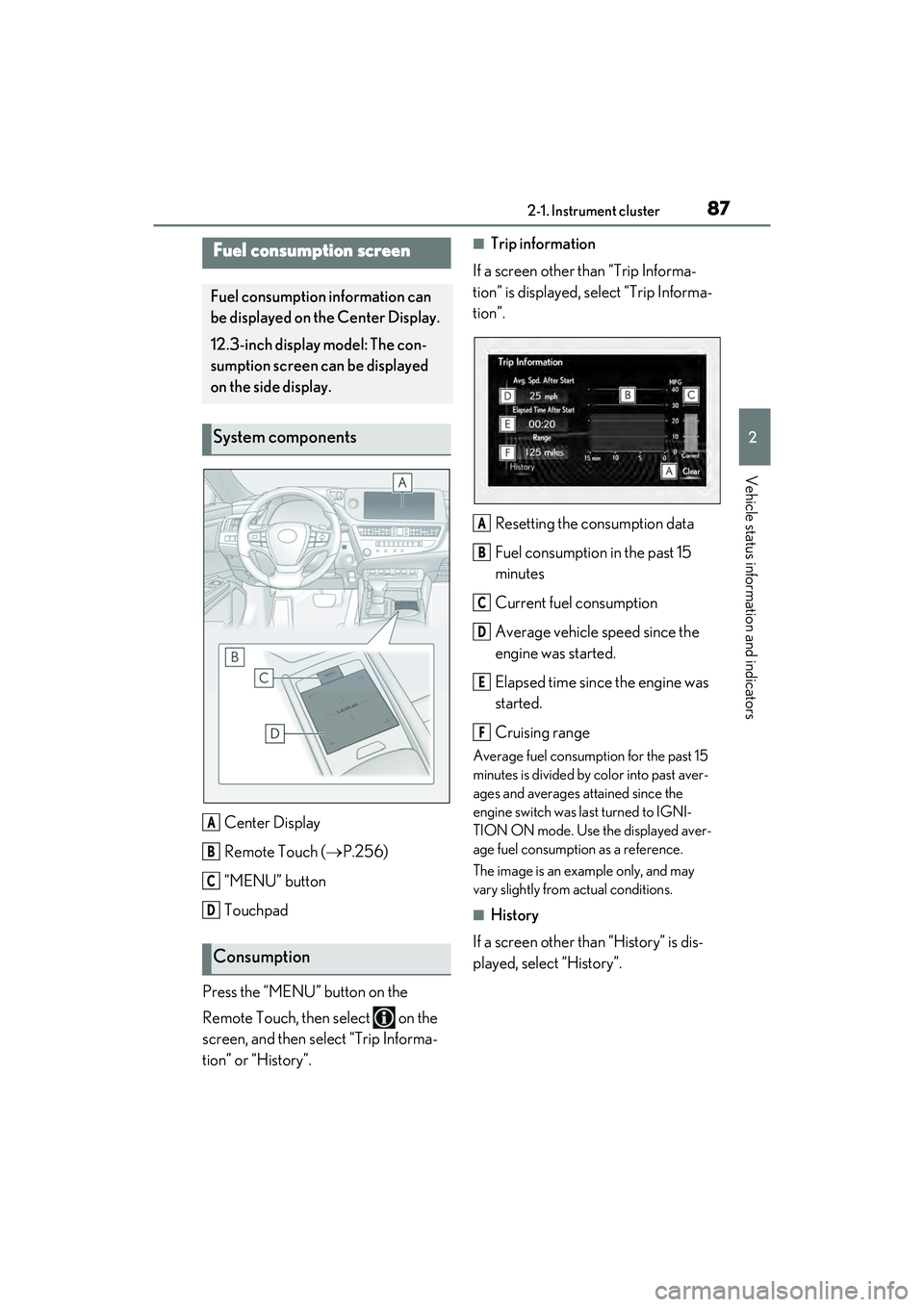
Center Display
Remote Touch (P.256)
“MENU” button
Touchpad
Press the “MENU” button on the
Remote Touch, then select on the
screen, and then select “Trip Informa-
tion” or “History”.
■Trip information
If a screen other than “Trip Informa-
tion” is displayed, select “Trip Informa-
tion”.
Resetting the consumption data
Fuel consumption in the past 15
minutes
Current fuel consumption
Average vehicle speed since the
engine was started.
Elapsed time since the engine was
started.
Cruising range
Average fuel consumption for the past 15
minutes is divided by color into past aver-
ages and averages attained since the
engine switch was last turned to IGNI-
TION ON mode. Use the displayed aver-
age fuel consumption as a reference.
The image is an example only, and may
vary slightly from actual conditions.
■History
If a screen other than “History” is dis-
played, select “History”.
Fuel consumption screen
Fuel consumption information can
be displayed on the Center Display.
12.3-inch display model: The con-
sumption screen can be displayed
on the side display.
System components
Consumption
A
B
C
D
A
B
C
D
E
F
Page 90 of 468
882-1. Instrument cluster
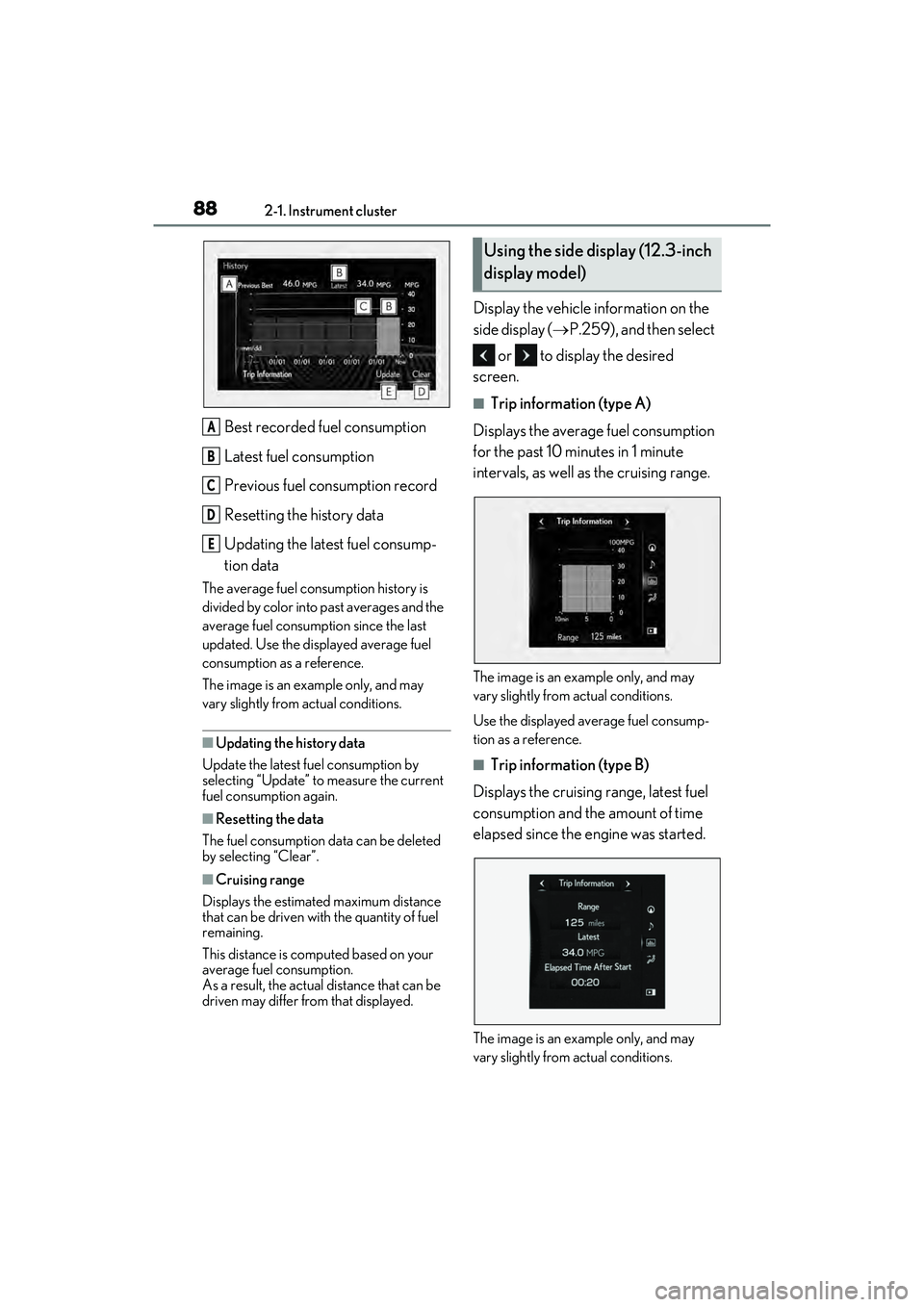
Best recorded fuel consumption
Latest fuel consumption
Previous fuel consumption record
Resetting the history data
Updating the latest fuel consump-
tion data
The average fuel consumption history is
divided by color into past averages and the
average fuel consumption since the last
updated. Use the displayed average fuel
consumption as a reference.
The image is an example only, and may
vary slightly from actual conditions.
■Updating the history data
Update the latest fuel consumption by
selecting “Update” to measure the current
fuel consumption again.
■Resetting the data
The fuel consumption data can be deleted
by selecting “Clear”.
■Cruising range
Displays the estimated maximum distance
that can be driven with the quantity of fuel
remaining.
This distance is computed based on your
average fuel consumption.
As a result, the actual distance that can be
driven may differ from that displayed.
Display the vehicle information on the
side display ( P.259), and then select
or to display the desired
screen.
■Trip information (type A)
Displays the average fuel consumption
for the past 10 minutes in 1 minute
intervals, as well as the cruising range.
The image is an example only, and may
vary slightly from actual conditions.
Use the displayed average fuel consump-
tion as a reference.
■Trip information (type B)
Displays the cruising range, latest fuel
consumption and the amount of time
elapsed since the engine was started.
The image is an example only, and may
vary slightly from actual conditions.
A
B
C
D
E
Using the side display (12.3-inch
display model)
Page 91 of 468
892-1. Instrument cluster
2
Vehicle status information and indicators
Use the displayed average fuel consump-
tion as a reference.
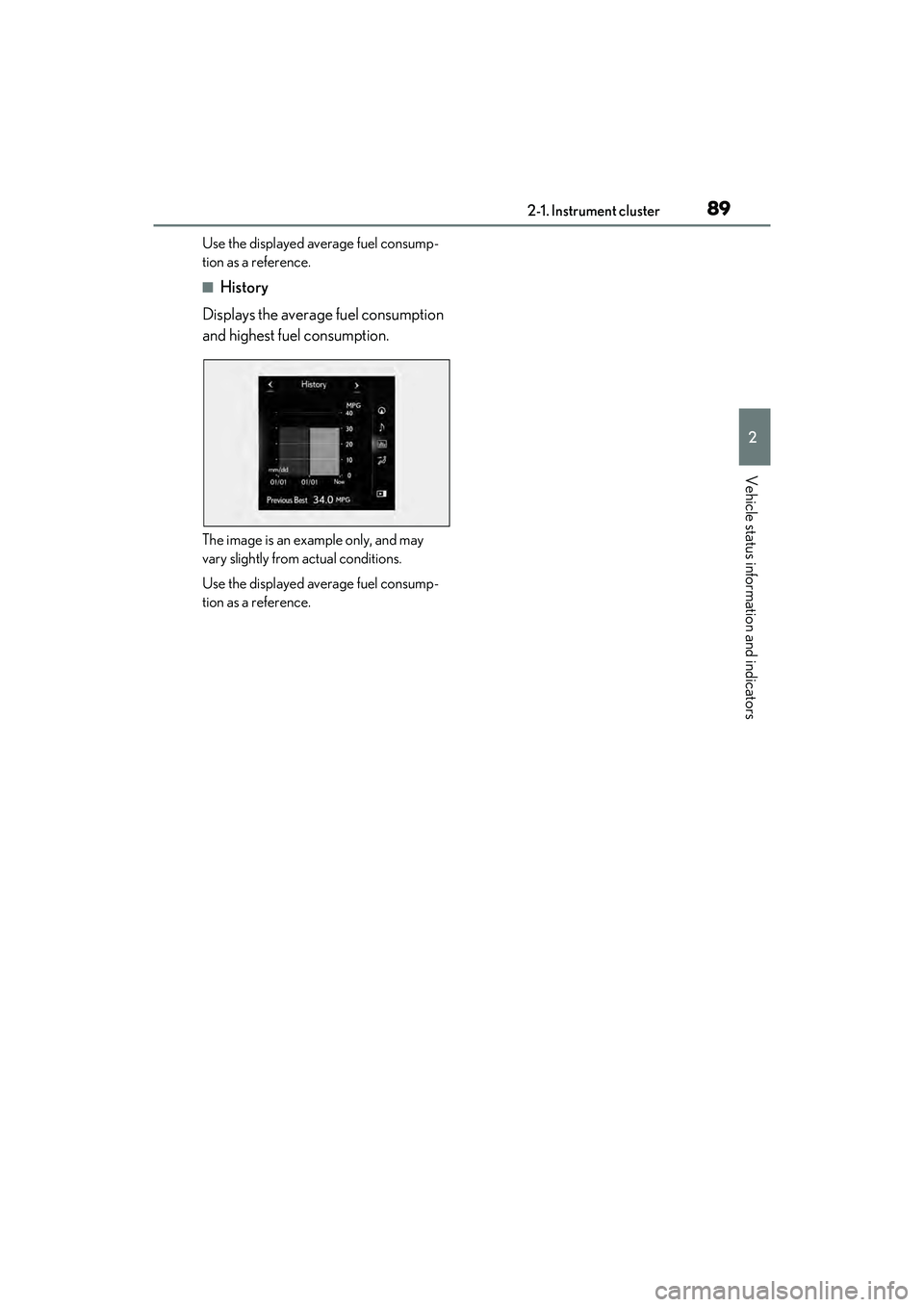
■History
Displays the average fuel consumption
and highest fuel consumption.
The image is an example only, and may
vary slightly from actual conditions.
Use the displayed average fuel consump-
tion as a reference.
Page 96 of 468

943-1. Key information
The electronic keys are equipped with
the following wireless remote control:Locks the doors (
P.96)
Unlocks the doors ( P.96)
Opens the windows and moon
roof
*1, 2 or panoramic moon roof*1,
2
( P.96)
Opens the trunk ( P.103)
Sounds the alarm ( P.94)
*1: If equipped
*2: This setting must be customized at your
Lexus dealer.
■Theft deterrent panic mode
When is pressed for longer than
about one second, an alarm will sound
intermittently and the vehicle lights will flash
to deter any person from trying to break
into or damage your vehicle.
To stop the alarm, press any button on the
electronic key.
To take out the mechanical key, push
NOTICE
■Handling the card key (if equipped)
●Do not apply excess force when
inserting the mechanical key into the
card key. Doing so may damage the
card key.
●If the battery or card key terminals get
wet, the battery may corrode and the
card key may stop working.
If the key is dropped into water, or if
drinking water, etc. is spilled on the
key, immediately remove the battery
cover and wipe the battery and termi-
nals. (To remove th e battery cover,
lightly grasp and pull it .) If the battery is
corroded, have your Lexus dealer
replace the battery.
●Do not crush the battery cover or use
a screwdriver to re move the battery
cover. Forcibly re moving the battery
cover may bend or damage the key.
●If the battery cover is frequently
removed, the battery cover may
become loose.
●When installing the battery, make sure
to check the direction of the battery.
Installing the battery in the wrong
direction may cause the battery to
deplete rapidly.
●The surface of the card key may be
damaged, or its coating may peel off in
the following situations:
• The card key is carried together with hard objects, such as coins and keys.
• The card key is scraped with a sharp object, such as the tip of a mechanical
pencil.
• The surface of the card key is wiped with thinner or benzene.
Wireless remote controlUsing the mechanical key
A
B
C
D
E