remote control LEXUS ES350 2022 Owner's Guide
[x] Cancel search | Manufacturer: LEXUS, Model Year: 2022, Model line: ES350, Model: LEXUS ES350 2022Pages: 468, PDF Size: 26.96 MB
Page 274 of 468
2725-3. Using the air conditioning system
When the sub function button on the
Remote Touch is pressed, the following
functions can be set to automatic mode.: Left-hand side seat heater/seat
ventilator
: Heated steering wheel
: Right-hand side seat heater/seat
ventilator
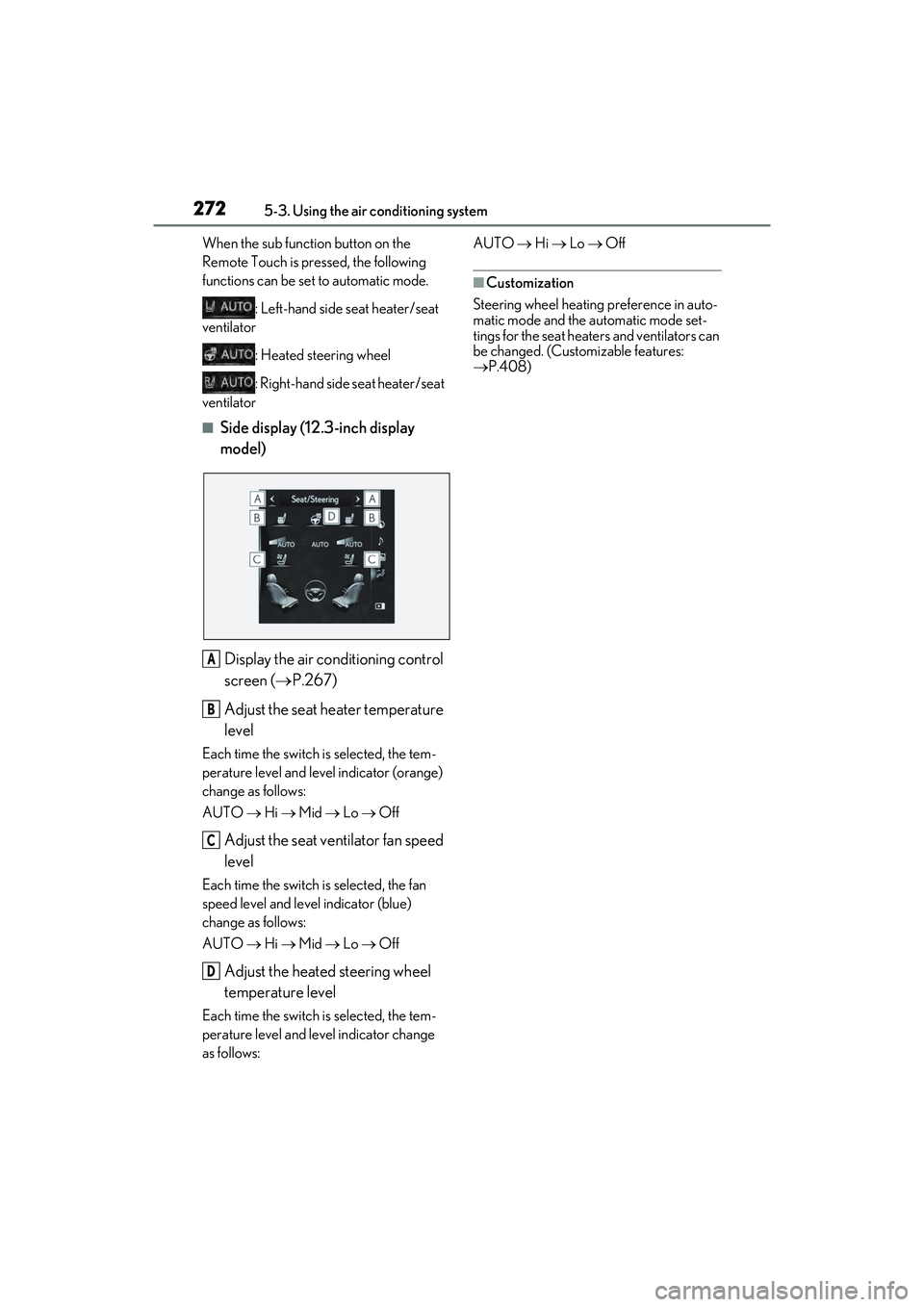
■Side display (12.3-inch display
model)
Display the air conditioning control
screen ( P.267)
Adjust the seat heater temperature
level
Each time the switch is selected, the tem-
perature level and level indicator (orange)
change as follows:
AUTO Hi Mid Lo Off
Adjust the seat ventilator fan speed
level
Each time the switch is selected, the fan
speed level and level indicator (blue)
change as follows:
AUTO Hi Mid Lo Off
Adjust the heated steering wheel
temperature level
Each time the switch is selected, the tem-
perature level and level indicator change
as follows: AUTO
Hi Lo Off
■Customization
Steering wheel heating preference in auto-
matic mode and the automatic mode set-
tings for the seat heaters and ventilators can
be changed. (Customizable features:
P.408)
A
B
C
D
Page 291 of 468

2895-6. Using the other interior features
5
Interior features
■HomeLink® programming procedure
The programming procedures can also be
found at the following URL.
Website: www.homelink.com/lexus
For support, contact customer support at
the following.
Help Line: 1-800-355-3515
The HomeLink® wireless control sys-
tem in your vehicle has 3 buttons
which can be programmed to operate
3 different devices. Refer to the pro-
gramming methods on the following
pages to determine the method which
is appropriate for the device. HomeLink
® indicator light
Garage door operation indicators
HomeLink
® icon
Illuminates while HomeLink® is operating.
Buttons
■Codes stored in the HomeLink® mem-
ory
●The registered codes are not erased
even if the battery cable is disconnected.
●If learning failed wh en registering a dif-
ferent code to a HomeLink® button that
already has a code registered to it, the
already registered code will not be
erased.
Garage door opener
The garage door opener can be
programmed using the
HomeLink
® to operate garage
doors, gates, entry doors, door
locks, home lighting systems, secu-
rity systems, and other devices.
System components
WARNING
■When programming a garage door
or other remote control device
The garage door or other device may
operate, so ensure people and objects
are out of danger to prevent potential
harm.
A
B
C
D
Page 292 of 468

2905-6. Using the other interior features
■Before programming HomeLink®
During programming, it is possible
that garage doors, gates, or other
devices may operate. For this rea-
son, make sure that people and
objects are clear of the garage door
or other devices to prevent injury or
other potential harm.
It is recommended that a new bat-
tery be placed in the remote control
transmitter for more accurate pro-
gramming.
Garage door opener motors manu-
factured after 1995 may be
equipped with rolling code protec-
tion. If this is the case, you may need
a stepladder or other sturdy, safe
device to reach the “Learn” or
“Smart” button on the garage door
opener motor.
■Programming HomeLink®
Steps 1 through 3 must be performed
within 60 seconds, otherwise the indi-
cator light will stop flashing and pro-
gramming will not be able to be
completed.
1 Press and release the HomeLink
®
button you want to program and
check that the HomeLink
® indica-
tor light flashes (orange).
2 Point the remote control transmit-
ter for the device at the rear view
mirror, 1 to 3 in. (25 to 75 mm)
from the HomeLink
® buttons.
Keep the HomeLink® indicator light in
view while programming.
3 Program a device.
Programming a device other than
an entry gate (for U.S.A. owners)
Press and hold the remote control
transmitter button until the
WARNING
■Conforming to federal safety stan-
dards
Do not use the HomeLink
® compatible
transceiver with any garage door opener
or device that lacks safety stop and
reverse features as required by federal
safety standards.
This includes any garage door that can-
not detect an interf ering object. A door
or device without these features
increases the risk of death or serious
injury.
■When operating or programming
HomeLink®
Never allow a child to operate or play
with the HomeLink® buttons.
Programming the HomeLink®
Page 293 of 468

2915-6. Using the other interior features
5
Interior features
HomeLink® indicator light changes
from slowly flashing orange to rapidly
flashing green (rolling code) or contin-
uously lit green (fixed code), then
release the button.
Programming an entry gate (for
U.S.A. owners)/Programming a
device in the Canadian market
Press and release the remote control
transmitter button at 2 second inter-
vals, repeatedly, until the HomeLink
®
indicator light changes from slowly
flashing (orange) to rapidly flashing
(green) (rolling code) or continuously
lit (green) (fixed code).
4 Test the HomeLink
® operation by
pressing the newly programmed
button and observing the indicator
light:
Indicator light illuminates: Program-
ming of a fixed code device has
completed. The garage door or
other device should operate when a
HomeLink
® button is pressed and
released.
Indicator light flashes rapidly: The
garage door opener motor or other
device is equipped with a rolling
code. To complete programming,
firmly press and hold the
HomeLink
® button for 2 seconds
then release it.
If the garage door or other device
does not operate, proceed to “Pro-
gramming a rolling code system”. 5
Repeat the steps above to program
another device for any of the
remaining HomeLink
® buttons.
■Programming a rolling code sys-
tem
2 or more people may be necessary to
complete rolling code programming.
1 Locate the “Learn” or “Smart” but-
ton on the garage door opener
motor in the garage.
This button can usually be found where the
hanging antenna wire is attached to the
unit. The name and color of the button may
vary by manufacturer. Refer to the owner’s
manual supplied with the garage door
opener motor for details.
2Press and release the “Learn” or
“Smart” button.
Perform 3 within 30 seconds after per-
forming 2.
3 Press and hold the desired
HomeLink
® button (inside the
vehicle) for 2 seconds and release
Page 320 of 468
3186-3. Do-it-yourself maintenance
■Before recharging
When recharging, the battery produces
hydrogen gas which is flammable and
explosive. Therefore, observe the following
precautions before recharging:
●If recharging with the battery installed on
the vehicle, be sure to disconnect the
ground cable.
●Make sure the power switch on the char-
ger is off when connecting and discon-
necting the charger cables to the battery.
■After recharging/reconnecting the bat-
tery
●The engine may not start.
Follow the procedure below to initialize
the system.
1 Shift the shift lever to P.
2 Open and close any of the doors.
3 Restart the engine.
●Unlocking the doors using the smart
access system with push-button start may
not be possible immediately after recon-
necting the battery. If this happens, use
the wireless remote control or the
mechanical key to lock/unlock the doors.
●Start the engine with the engine switch in
ACCESSORY mode. The engine may
not start with the engine switch turned off.
However, the engine will operate nor-
mally from the second attempt.
●The engine switch mode is recorded by
the vehicle. If the battery is reconnected,
the vehicle will return the engine switch
mode to the status it was in before the
battery was disconnected. Make sure to
turn off the engine switch before discon-
nect the battery. Take extra care when
connecting the battery if the engine
switch mode prior to discharge is
unknown.
If the engine will not start even after multiple
attempts at all methods above, contact your
Lexus dealer.
WARNING
■Chemicals in the battery
Battery contains poisonous and corro-
sive sulfuric acid and may produce
hydrogen gas which is flammable and
explosive. To reduce the risk of death or
serious injury, take the following precau-
tions while working on or near the bat-
tery:
●Do not cause sparks by touching the
battery terminals with tools.
●Do not smoke or light a match near the
battery.
●Avoid contact with eyes, skin and
clothes.
●Never inhale or swallow electrolyte.
●Wear protective safety glasses when
working near the battery.
●Keep children away from the battery.
■Where to safely charge the battery
Always charge the battery in an open
area. Do not charge the battery in a
garage or closed room where there is
insufficient ventilation.
■Emergency measures regarding
electrolyte
●If electrolyte gets in your eyes
Flush your eyes with clean water for at
least 15 minutes and get immediate
medical attention. If possible, continue
to apply water with a sponge or cloth
while traveling to the nearest medical
facility.
●If electrolyte gets on your skin
Wash the affected area thoroughly. If
you feel pain or burning, get medical
attention immediately.
●If electrolyte gets on your clothes
It can soak through clothing on to your
skin. Immediately take off the clothing
and follow the procedure above if nec-
essary.
Page 335 of 468
3336-3. Do-it-yourself maintenance
6
Maintenance and care
■If the electronic key battery is depleted
The following symptoms may occur:
●The smart access system with push-but-
ton start and wireless remote control will
not function properly.
●The operational range will be reduced.
■When the card key battery needs to be
replaced (if equipped)
The battery for the card key is available only
at Lexus dealers. Your Lexus dealer can
replace the battery for you.
Prepare the following before replacing
the battery:
Flathead screwdriver
Small flathead screwdriver
Lithium battery CR2032
■Use a CR2032 lithium battery
●Batteries can be purchased at your Lexus
dealer, local electrical appliance shops or
camera stores.
●Replace only with the same or equivalent
type recommended by the manufacturer.
●Dispose of used batteries according to
the local laws.
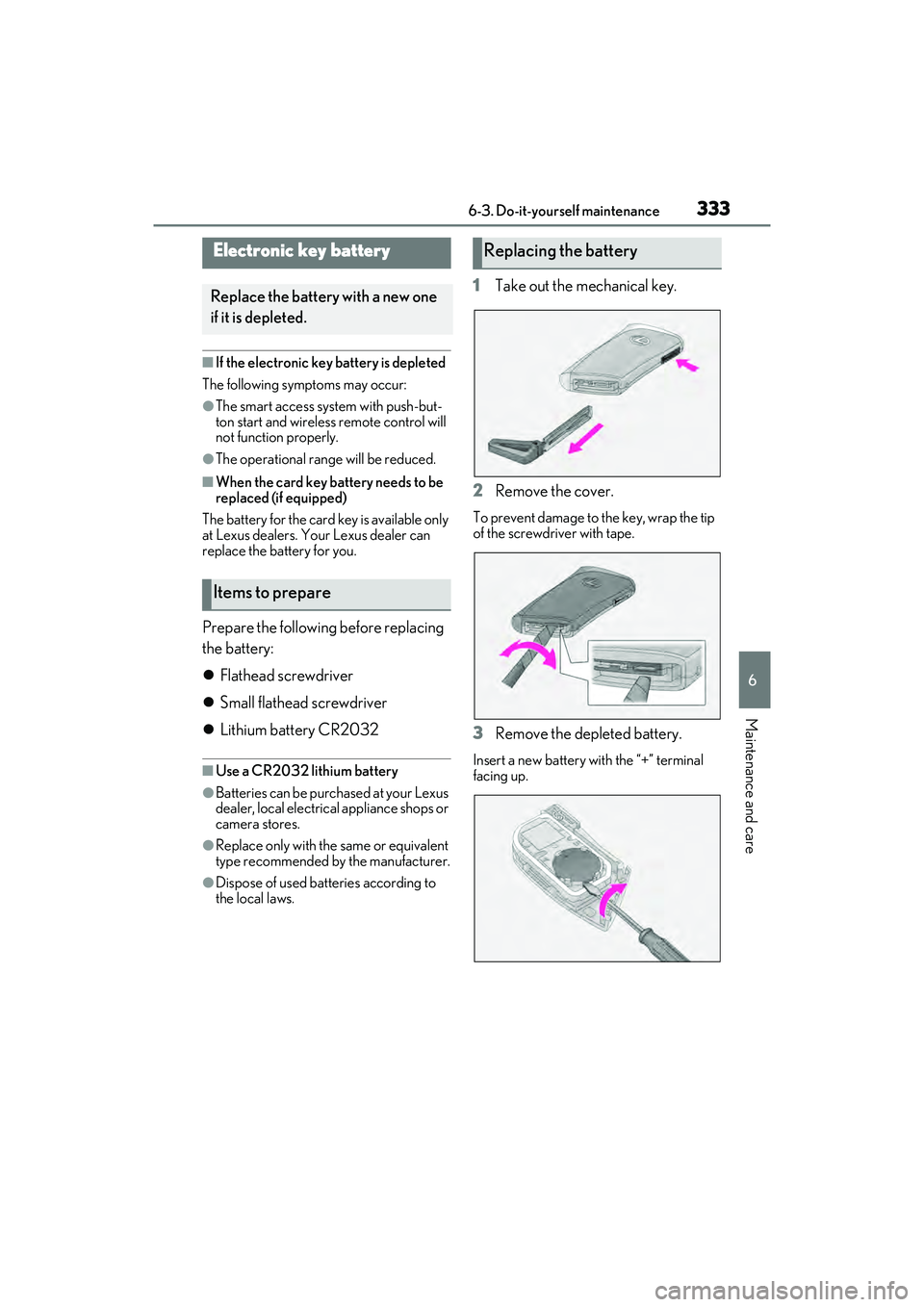
1 Take out the mechanical key.
2 Remove the cover.
To prevent damage to the key, wrap the tip
of the screwdriver with tape.
3Remove the depleted battery.
Insert a new battery with the “+” terminal
facing up.
Electronic key battery
Replace the battery with a new one
if it is depleted.
Items to prepare
Replacing the battery
Page 336 of 468
3346-3. Do-it-yourself maintenance
WARNING
■Battery precautions
Observe the following precautions. Fail-
ure to do so may result in death or seri-
ous injury.
●Do not swallow the battery. Doing so
may cause chemical burns.
●A coin battery or button battery is
used in the electronic key. If a battery
is swallowed, it may cause severe
chemical burns in as little as 2 hours
and may result in death or serious
injury.
●Keep away new and removed batter-
ies from children.
●If the cover cannot be firmly closed,
stop using the electr onic key and stow
the key in the place where children
cannot reach, and then contact your
Lexus dealer.
●If you accidentally swallow a battery or
put a battery into a part of your body,
get emergency medical attention
immediately.
■To prevent battery explosion or leak-
age of flammable liquid or gas
●Replace the battery with a new battery
of the same type. If a wrong type of
battery is used, it may explode.
●Do not expose batteries to extremely
low pressure due to high altitude or
extremely high temperatures.
●Do not burn, break or cut a battery.
NOTICE
■When replacing the battery
Use a screwdriver of appropriate size.
Applying excessive force may deform or
damage the cover.
■For normal operation after replacing
the battery
Observe the following precautions to
prevent accidents:
●Always work with dry hands.
Moisture may cause the battery to
rust.
●Do not touch or move any other com-
ponent inside the remote control.
●Do not bend either of the battery ter-
minals.
Page 378 of 468
3767-2. Steps to take in an emergency
Remove the cover inside the trunk and
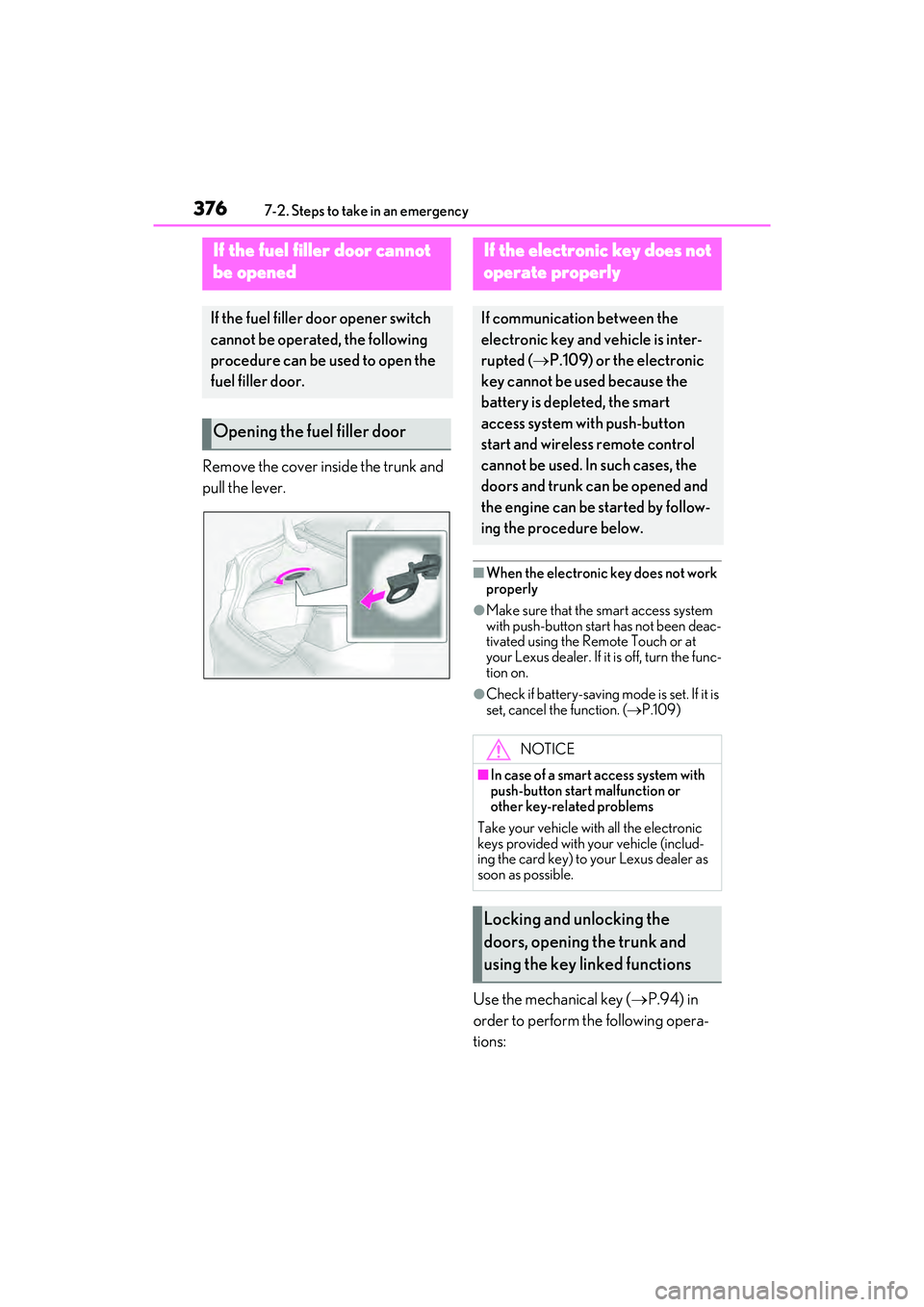
pull the lever.
■When the electronic key does not work
properly
●Make sure that the smart access system
with push-button start has not been deac-
tivated using the Remote Touch or at
your Lexus dealer. If it is off, turn the func-
tion on.
●Check if battery-saving mode is set. If it is
set, cancel the function. (P.109)
Use the mechanical key ( P.94) in
order to perform the following opera-
tions:
If the fuel fi ller door cannot
be opened
If the fuel filler door opener switch
cannot be operated, the following
procedure can be used to open the
fuel filler door.
Opening the fuel filler door
If the electronic key does not
operate properly
If communication between the
electronic key and vehicle is inter-
rupted ( P.109) or the electronic
key cannot be used because the
battery is depleted, the smart
access system with push-button
start and wireless remote control
cannot be used. In such cases, the
doors and trunk ca n be opened and
the engine can be started by follow-
ing the procedure below.
NOTICE
■In case of a smart access system with
push-button start malfunction or
other key-related problems
Take your vehicle with all the electronic
keys provided with your vehicle (includ-
ing the card key) to your Lexus dealer as
soon as possible.
Locking and unlocking the
doors, opening the trunk and
using the key linked functions
Page 383 of 468
3817-2. Steps to take in an emergency
7
When trouble arises
When the battery is depleted, have the
vehicle inspected at your Lexus dealer.
●Some systems may require initialization.
( P.419)
■When removing the battery terminals
When the battery terminals are removed,
the information stored in the ECU is
cleared. Before removing the battery termi-
nals, contact your Lexus dealer.
■Charging the battery
The electricity stored in the battery will dis-
charge gradually even when the vehicle is
not in use, due to natural discharge and the
draining effects of certain electrical appli-
ances. If the vehicle is left for a long time,
the battery may discharge, and the engine
may be unable to start. (The battery
recharges automatically during driving.)
■When recharging or replacing the bat-
tery
●In some cases, it may not be possible to
unlock the doors using the smart access
system with push-button start when the
battery is discharged. Use the wireless
remote control or the mechanical key to
lock or unlock the doors.
●The engine may not start on the first
attempt after the battery has recharged
but will start normally after the second
attempt. This is not a malfunction.
●The engine switch mode is memorized by
the vehicle. When the battery is recon-
nected, the system will return to the
mode it was in before the battery was dis-
charged. Before disconnecting the bat-
tery, turn the engine switch off.
If you are unsure what mode the engine
switch was in before the battery dis-
charged, be especially careful when
reconnecting the battery.
■When replacing the battery
●Use a battery that conforms to European
regulations.
●Use a battery that the case size is same as
the previous one (LN3), 20 hour rate
capacity (20HR) is equivalent (70Ah) or
greater, and performance rating (CCA)
is equivalent (592A) or greater.
• If the sizes differ, the battery cannot be properly secured.
• If the 20 hour rate capacity is low, even if the time period where the vehicle is not
used is a short time, the battery may dis-
charge and engine may not be able to
start.
●For details, consult your Lexus dealer.
WARNING
■When removing the battery termi-
nals
Always remove the negative (-) terminal
first. If the positive (+) terminal contacts
any metal in the surrounding area when
the positive (+) terminal is removed, a
spark may occur, leading to a fire in addi-
tion to electrical shocks and death or
serious injury.
■Avoiding battery fires or explosions
Observe the following precautions to
prevent accidentally igniting the flamma-
ble gas that may be emitted from the bat-
tery:
●Make sure each jumper cable is con-
nected to the correct terminal and that
it is not unintentionally in contact with
any other than the intended terminal.
●Do not allow the other end of the
jumper cable connected to the “+” ter-
minal to come into contact with any
other parts or metal surfaces in the
area, such as brackets or unpainted
metal.
●Do not allow the + and - clamps of the
jumper cables to come into contact
with each other.
●Do not smoke, use matches, cigarette
lighters or allow open flame near the
battery.
■Battery precautions
The battery contains poisonous and cor-
rosive acidic electrolyte, while related
parts contain lead and lead compounds.
Observe the following precautions when
handling the battery:
Page 410 of 468
4088-2. Customization
8-2.Customization
■Changing by using the meter con-
trol switches
1 Press or to select .
2 Operate the meter control
switches to select the desired item
to be customized.
3 According to the display, select the
desired setting.
To go back to the previous screen or exit
the customize mode, press .
■Changing by using the Remote
Touch ( P.256)
1 Press the “MENU” button on the
Remote Touch.
2 Select “Setup” on the menu screen
and select “Vehicle”. 3
Select “Vehicle Customization” or
“Drive Mode Customization”.
Various setting can be changed. Refer to
the list of settings that can be changed for
details.
For details on the Remote Touch, refer
to the “NAVIGATION AND MULTI-
MEDIA SYSTEM OWNER’S MAN-
UAL”.
■During customization
Stop the vehicle in a safe place, apply the
parking brake, and shift the shift lever to P.
Also, to prevent battery discharge, leave
the engine running while customizing the
features.
Some function settings are changed simult aneously with other functions being cus-
tomized. Contact your Lexus dealer for further details.
Settings that can be chan ged using the Remote Touch
Settings that can be changed using the meter control switches
Settings that can be changed by your Lexus dealer
Customizable features
Your vehicle includes a variety of
electronic features that can be per-
sonalized to your preferences. The
settings of these features can be
changed by using the meter control
switches, the Remote Touch or at
your Lexus dealer.
Customizing vehicle features
WARNING
■During customization
As the engine needs to be running
during customization, ensure that the
vehicle is parked in a place with ade-
quate ventilation. In a closed area such as
a garage, exhaust gases including harm-
ful carbon monoxide (CO) may collect
and enter the vehicle. This may lead to
death or a serious health hazard.
NOTICE
■During customization
To prevent battery discharge, ensure
that the engine is running while custom-
izing features.
Customizable features
A
B
C