trunk LEXUS ES350 2022 Owner's Guide
[x] Cancel search | Manufacturer: LEXUS, Model Year: 2022, Model line: ES350, Model: LEXUS ES350 2022Pages: 468, PDF Size: 26.96 MB
Page 231 of 468
2294-5. Using the driving support systems
4
Driving
*: If equipped
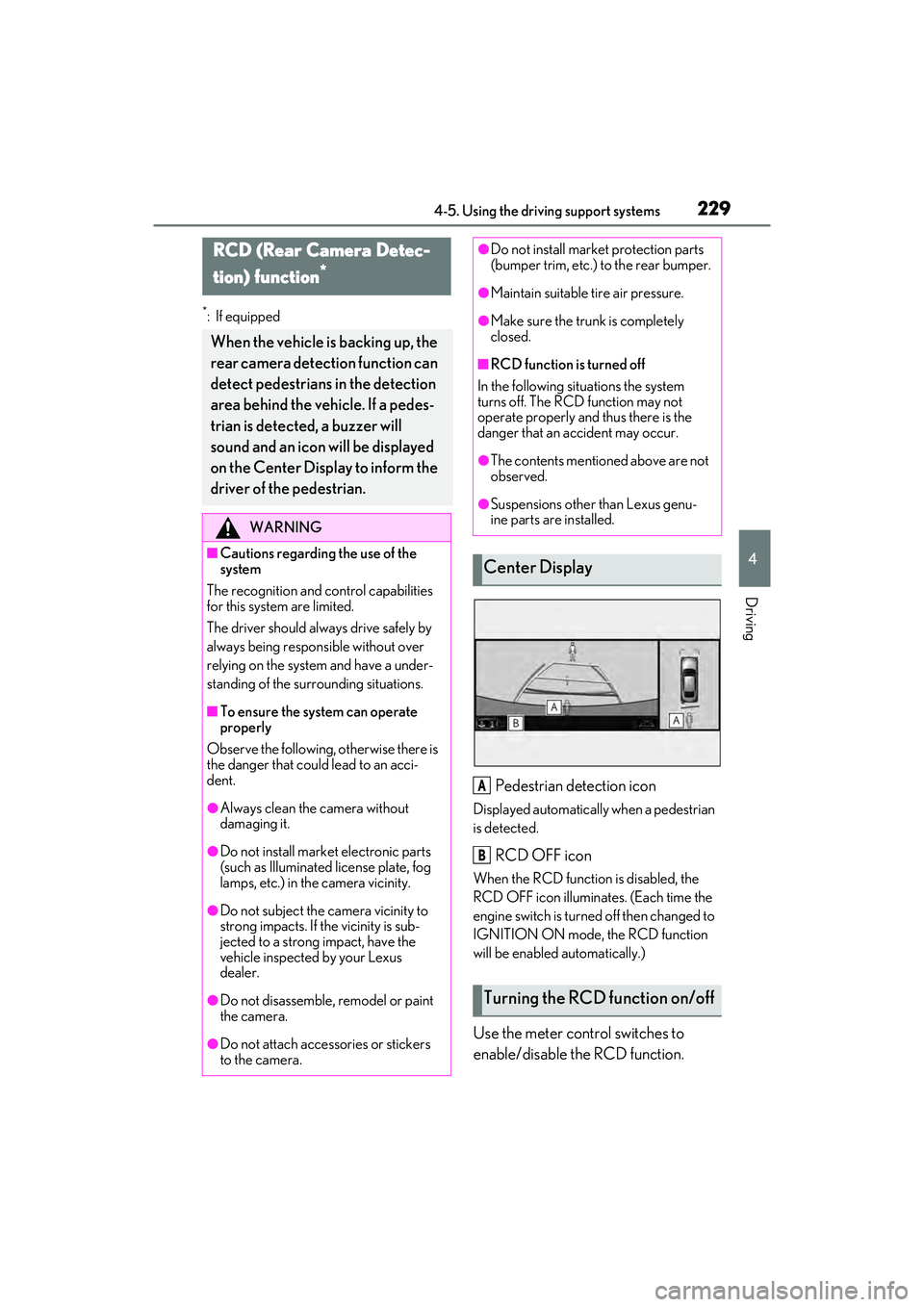
Pedestrian detection icon
Displayed automatically when a pedestrian
is detected.
RCD OFF icon
When the RCD function is disabled, the
RCD OFF icon illuminates. (Each time the
engine switch is turned off then changed to
IGNITION ON mode, the RCD function
will be enabled automatically.)
Use the meter control switches to
enable/disable the RCD function.
RCD (Rear Camera Detec-
tion) function
*
When the vehicle is backing up, the
rear camera detection function can
detect pedestrians in the detection
area behind the vehicle. If a pedes-
trian is detected, a buzzer will
sound and an icon will be displayed
on the Center Display to inform the
driver of the pedestrian.
WARNING
■Cautions regarding the use of the
system
The recognition and control capabilities
for this system are limited.
The driver should alwa ys drive safely by
always being responsible without over
relying on the system and have a under-
standing of the surrounding situations.
■To ensure the system can operate
properly
Observe the following, otherwise there is
the danger that could lead to an acci-
dent.
●Always clean the camera without
damaging it.
●Do not install market electronic parts
(such as Illuminated license plate, fog
lamps, etc.) in the camera vicinity.
●Do not subject the camera vicinity to
strong impacts. If the vicinity is sub-
jected to a strong impact, have the
vehicle inspected by your Lexus
dealer.
●Do not disassemble, remodel or paint
the camera.
●Do not attach accessories or stickers
to the camera.
●Do not install market protection parts
(bumper trim, etc.) to the rear bumper.
●Maintain suitable tire air pressure.
●Make sure the trunk is completely
closed.
■RCD function is turned off
In the following situations the system
turns off. The RCD function may not
operate properly and thus there is the
danger that an accident may occur.
●The contents mentioned above are not
observed.
●Suspensions other than Lexus genu-
ine parts are installed.
Center Display
Turning the RCD function on/off
A
B
Page 257 of 468
255
5
5
Interior features
Interior features
5-1. Remote Touch/DisplayRemote Touch ............................ 256
Center Display ........................... 258
5-2. Lexus Climate Concierge
Lexus Climate Concierge ..... 260
5-3. Using the air conditioning system
Automatic air conditioning system ......................................... 262
Heated steering wheel/seat heat- ers/seat ventilators ................ 269
5-4. Using the interior lights
Interior lights list......................... 273
5-5. Using the storage features
List of storage features............ 276
Trunk features............................. 279
5-6. Using the other interior features Other interior features ........... 280
Garage door opener............... 289
Compass....................................... 294
Page 279 of 468

2775-5. Using the storage features
5
Interior features
1Open (press the glove box opener)
2 Unlock with the mechanical key
3 Lock with the mechanical key
■Glove box light
The glove box light turns on when the tail
lights are on.
■Trunk opener main switch
P.106
Press a button to open the console
box.
The console box can be opened from
either side.
■Console box light
The console box light turns on when the tail
lights are on.
Front (type A)
To open, press down and release the
cup holder lid.
Front (type B)
Adjust the depth of the cup holder.
Shallow (press the button)
Glove box
Console box
WARNING
■Caution while driving
Keep the console box closed.
Injuries may result in the event of an acci-
dent or sudden braking.
NOTICE
■To prevent damage to the console
box
When the console box is open, do not
apply excessive force in the direction
that it was opened.
Cup holders
A
Page 281 of 468
2795-5. Using the storage features
5
Interior features
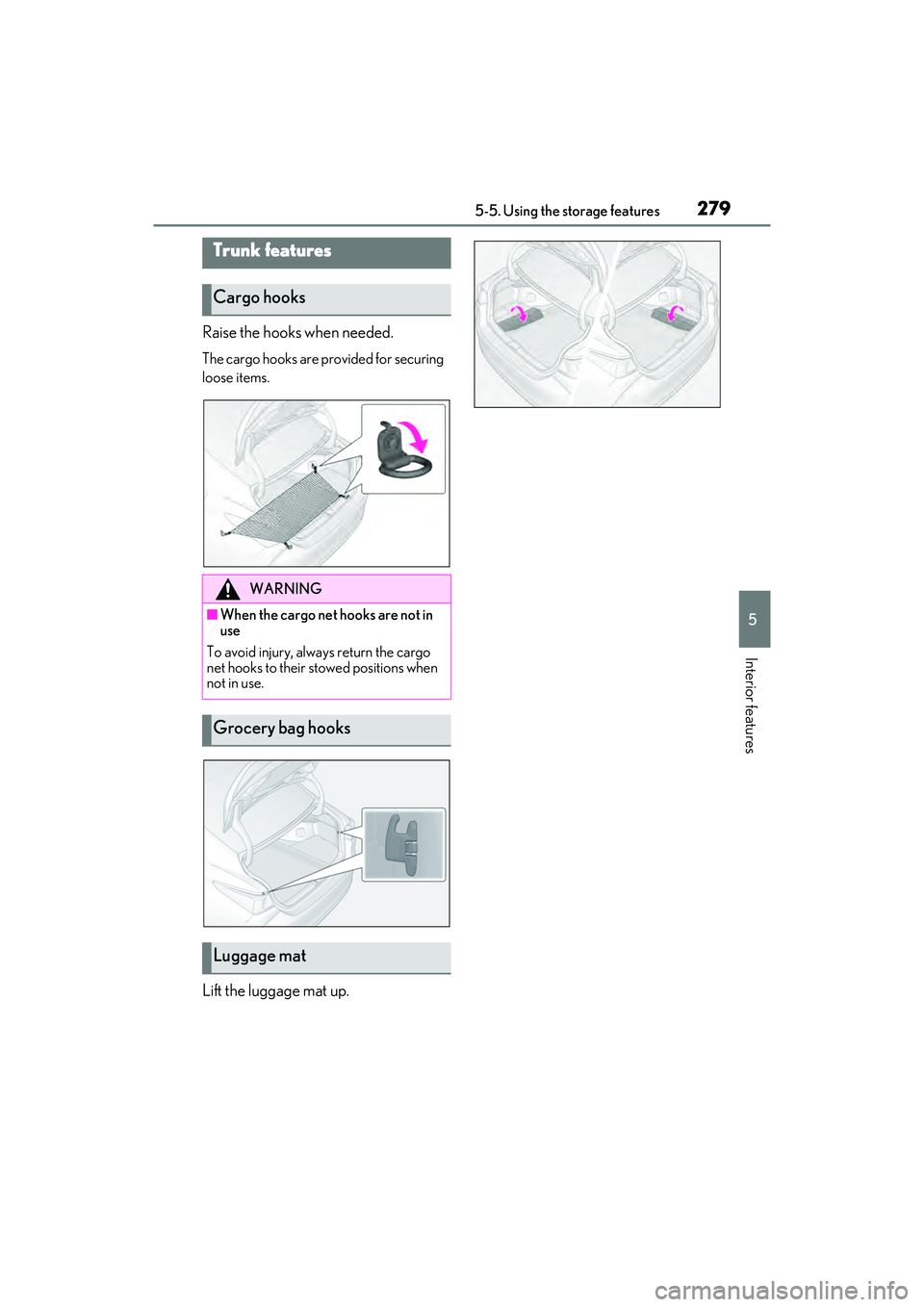
Raise the hooks when needed.
The cargo hooks are provided for securing
loose items.
Lift the luggage mat up.
Trunk features
Cargo hooks
WARNING
■When the cargo net hooks are not in
use
To avoid injury, always return the cargo
net hooks to their stowed positions when
not in use.
Grocery bag hooks
Luggage mat
Page 290 of 468

2885-6. Using the other interior features
Long objects can be loaded into the
vehicle by utilizing the trunk space and
rear seat area.
1Fold down the armrest.
2 Fold down the handle and open the
armrest door.
The armrest door can be locked and
unlocked using the mechanical key.
Unlock
Lock
The coat hooks are provided with the
rear assist grips.NOTICE
●To ensure normal operation of the rear
sunshade and rear door sunshades,
observe the following precautions:
• Do not place excessive load on the motor or other components of the rear
sunshade.
• Do not attach items to the rear sun- shade and rear door sunshades.
• Keep the opening clean and clear of obstructions.
• Do not operate the rear sunshade continuously for long periods of time.
Trunk storage extension
WARNING
■When not in use
Ensure that the armrest door is closed. In
the event of sudden braking, items stored
in the trunk may be thrown forward into
the cabin, resulting in injury.
Coat hooks
WARNING
■Items that should not be hanged
Do not hang coat hangers or other hard
or sharp objects on the hook. If the SRS
curtain shield airbags deploy, these items
may become projectiles, causing death
or serious injury.
A
B
Page 300 of 468

2986-1. Maintenance and care
6-1.Maintenance and care
Working from top to bottom, liber-
ally apply water to the vehicle body,
wheel wells and underside of the
vehicle to remove any dirt and dust.
Wash the vehicle body using a
sponge or soft cloth, such as a
chamois.
For hard-to-remove marks, use car
wash soap and rinse thoroughly with
water.
Wipe away any water.
Wax the vehicle when the water-
proof coating deteriorates.
If water does not bead on a clean surface,
apply wax when the vehicle body is cool.
■Self-restoring coat
The vehicle body has a self-restoring coat-
ing that is resistant to small surface
scratches caused in a car wash etc.
●The coating lasts for 5 to 8 years from
when the vehicle is delivered from the
plant.
●The restoration time differs depending on
the depth of the scratch and outside tem-
perature.
The restoration time may become
shorter when the coating is warmed by
applying warm water.
●Deep scratches caused by keys, coins,
etc. cannot be restored.
●Do not use wax that contain abrasives.
■Automatic car washes
●Before washing the vehicle:
• Fold the mirrors
• Turn off the power trunk lid (if equipped)
Start washing from the front of the vehicle.
Make sure to extend the mirrors before
driving.
●Brushes used in automatic car washes
may scratch the vehicle surface, parts
(wheel, etc.) and harm your vehicle’s
paint.
●Rear spoiler (if equipped) may not be
washable in some automatic car washes.
There may also be an increased risk of
damage to vehicle.
■High pressure car washes
As water may enter the cabin, do not bring
the nozzle tip near the gaps around the
doors or perimeter of windows, or spray
these areas continuously.
■Notes for the smart access system with
push-button start
If the door handle becomes wet while the
electronic key is within the effective range,
the door may lock and unlock repeatedly. In
that case, follow the following correction
procedures to wash the vehicle:
●Place the key in a position 6 ft. (2 m) or
more separate from the vehicle while the
vehicle is being washed. (Take care to
ensure that the key is not stolen.)
●Set the electronic key to battery-saving
mode to disable the smart access system
with push-button start. ( P.109)
■Wheels and wheel ornaments
●Remove any dirt immediately by using a
neutral detergent.
●Wash detergent off with water immedi-
ately after use.
●To protect the paint from damage, make
sure to observe the following precau-
tions.
• Do not use acidic, alkaline or abrasive detergent
• Do not use hard brushes
• Do not use detergent on the wheels when they are hot, such as after driving or
Cleaning and protecting the
vehicle exterior
Perform cleaning in a manner
appropriate to each component
and its material.
Cleaning instructions
Page 308 of 468
3066-2. Maintenance
Seats• Do the seat controls operate properly?
Steering wheel
• Does the steering wheel rotate
smoothly?
• Does the steering wheel have the cor-
rect amount of free
play?
•There should not be any strange sounds
coming from the
steering wheel.
Vehicle exterior
ItemsCheck points
Doors/trunk• Do the doors/trunk operate smoothly?
Engine hood
• Does the engine hood lock system
work properly?
Fluid leaks
•There should not be any signs of fluid
leakage after the
vehicle has been
parked.
ItemsCheck points
Tires
•Is the tire inflation pressure correct?
• The tires should not be damaged or
excessively worn.
• Have the tires been rotated according to
the maintenance
schedule?
• The wheel nuts should not be loose.
Windshield wip-
ers
• The wiper blades should not show any
signs of cracking,
splitting, wear, con-
tamination or defor-
mation.
• The wiper blades should clear the
windshield without
streaking or skip-
ping.
ItemsCheck points
Page 370 of 468
3687-2. Steps to take in an emergency
When replacing tires on a vehicle with
wheel lock nuts, use the following pro-
cedures to remove and install the
wheel lock nuts. The wheel lock key is
stored in the tray inside the luggage
compartment. Always return the wheel
lock key to its original position after
use, so that it does not get lost.
■Removal
For ease of removal, the wheel lock nut
should always be the first one loos-
ened.
1 Place the wheel lock key on top of
the wheel lock nut, turning until the
wheel lock key and wheel lock nut
patterns engage.
2 Place the wheel nut wrench on the
wheel lock key, and while applying
pressure on the wheel lock key,
loosen the wheel lock nut.
■Installation
For ease of installation, the wheel lock
nut should always be the last one tight-
ened.
1 By hand, Install a wheel lock nut on
the wheel to be installed.
2 Place the wheel lock key on top of
the wheel lock nut, turning until the
wheel lock key and wheel lock nut
patterns engage.
3 Place the wheel nut wrench on the
wheel lock key, and while applying
pressure on the wheel lock key,
tighten the wheel lock nut to the
recommended torque.
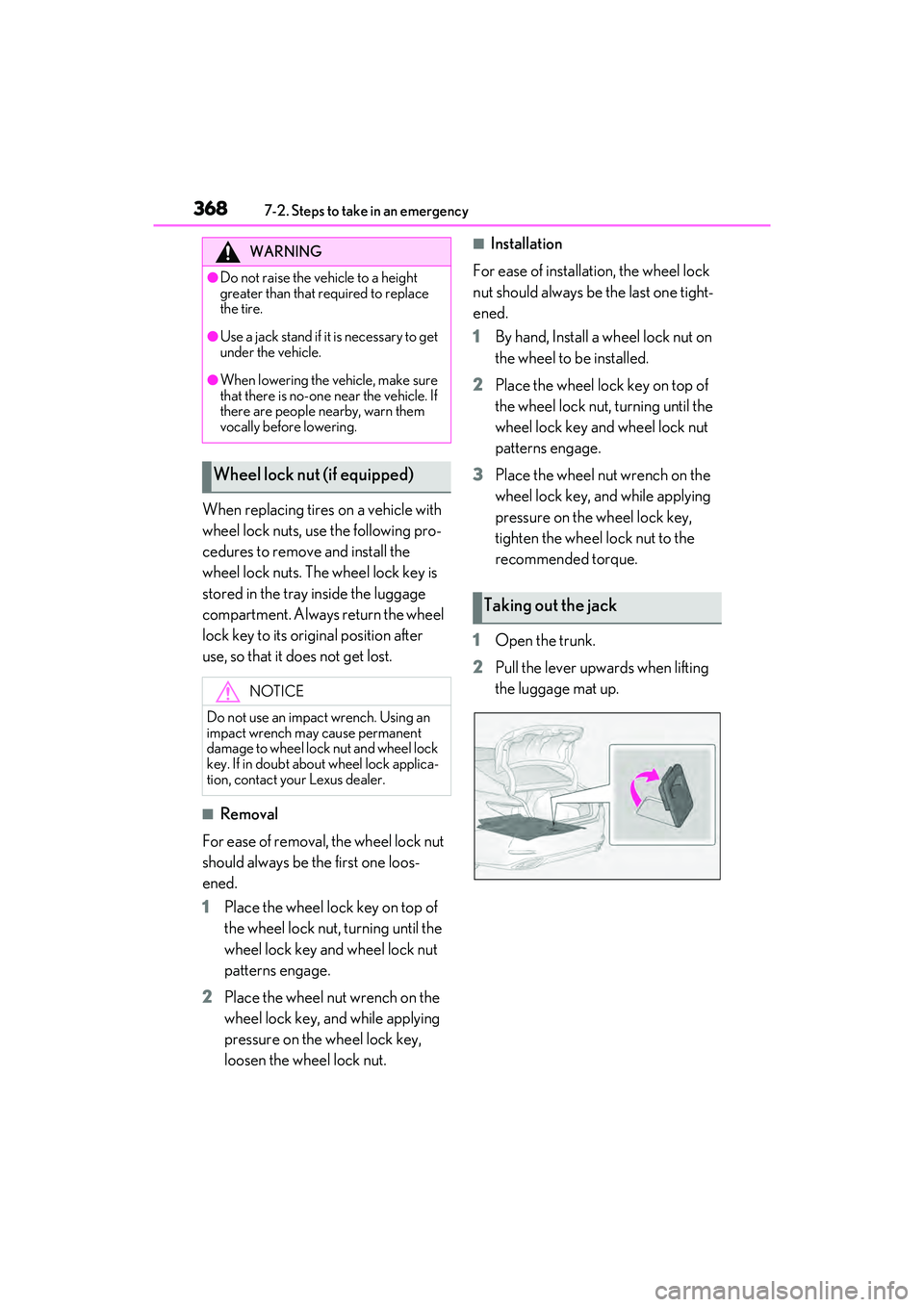
1 Open the trunk.
2 Pull the lever upwards when lifting
the luggage mat up.WARNING
●Do not raise the vehicle to a height
greater than that required to replace
the tire.
●Use a jack stand if it is necessary to get
under the vehicle.
●When lowering the vehicle, make sure
that there is no-one near the vehicle. If
there are people nearby, warn them
vocally before lowering.
Wheel lock nut (if equipped)
NOTICE
Do not use an impact wrench. Using an
impact wrench may cause permanent
damage to wheel lock nut and wheel lock
key. If in doubt about wheel lock applica-
tion, contact your Lexus dealer.
Taking out the jack
Page 371 of 468
3697-2. Steps to take in an emergency
7
When trouble arises
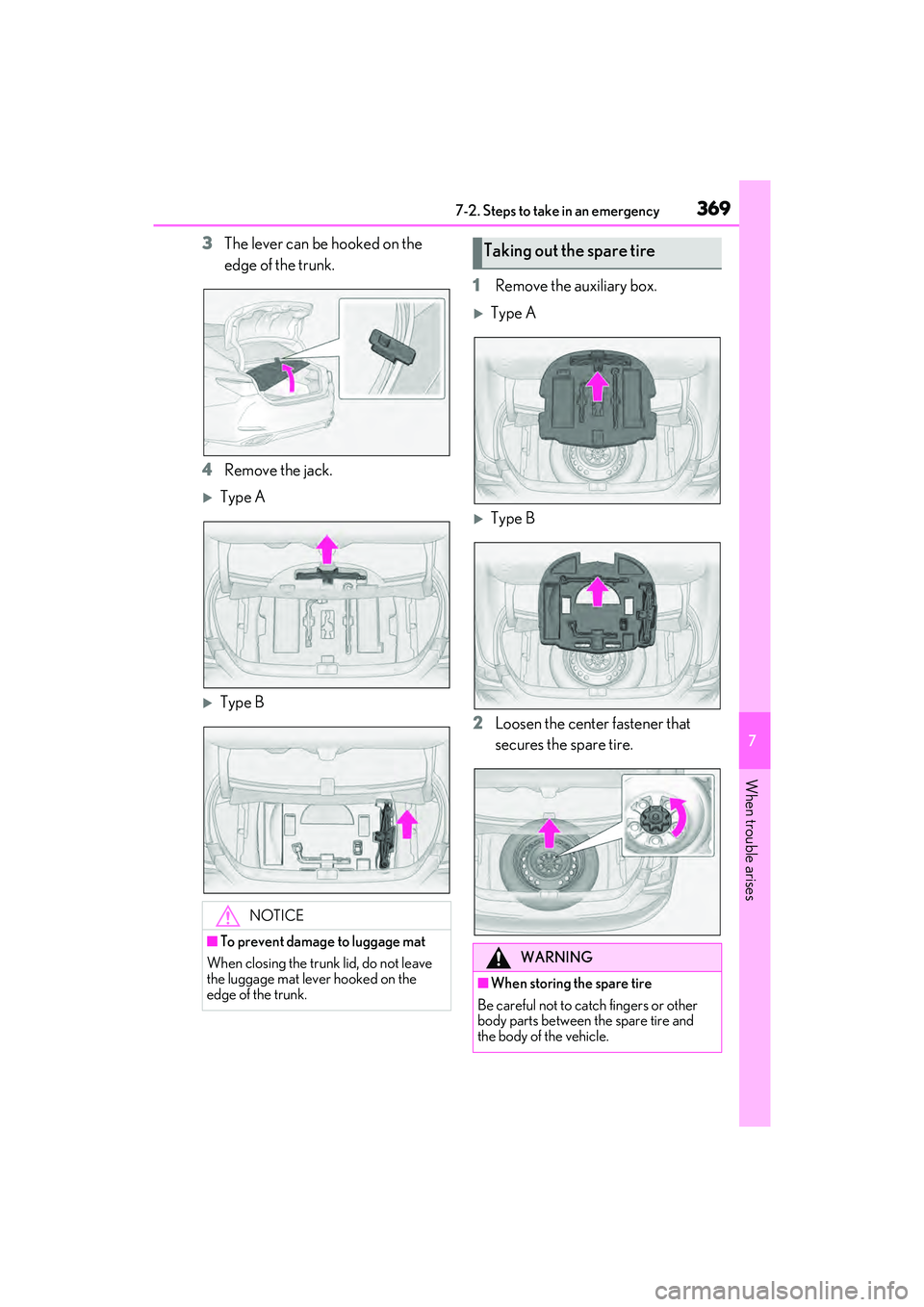
3The lever can be hooked on the
edge of the trunk.
4 Remove the jack.
Type A
Type B 1
Remove the auxiliary box.
Type A
Type B
2 Loosen the center fastener that
secures the spare tire.
NOTICE
■To prevent damage to luggage mat
When closing the trunk lid, do not leave
the luggage mat lever hooked on the
edge of the trunk.
Taking out the spare tire
WARNING
■When storing the spare tire
Be careful not to catch fingers or other
body parts between the spare tire and
the body of the vehicle.
Page 378 of 468
3767-2. Steps to take in an emergency
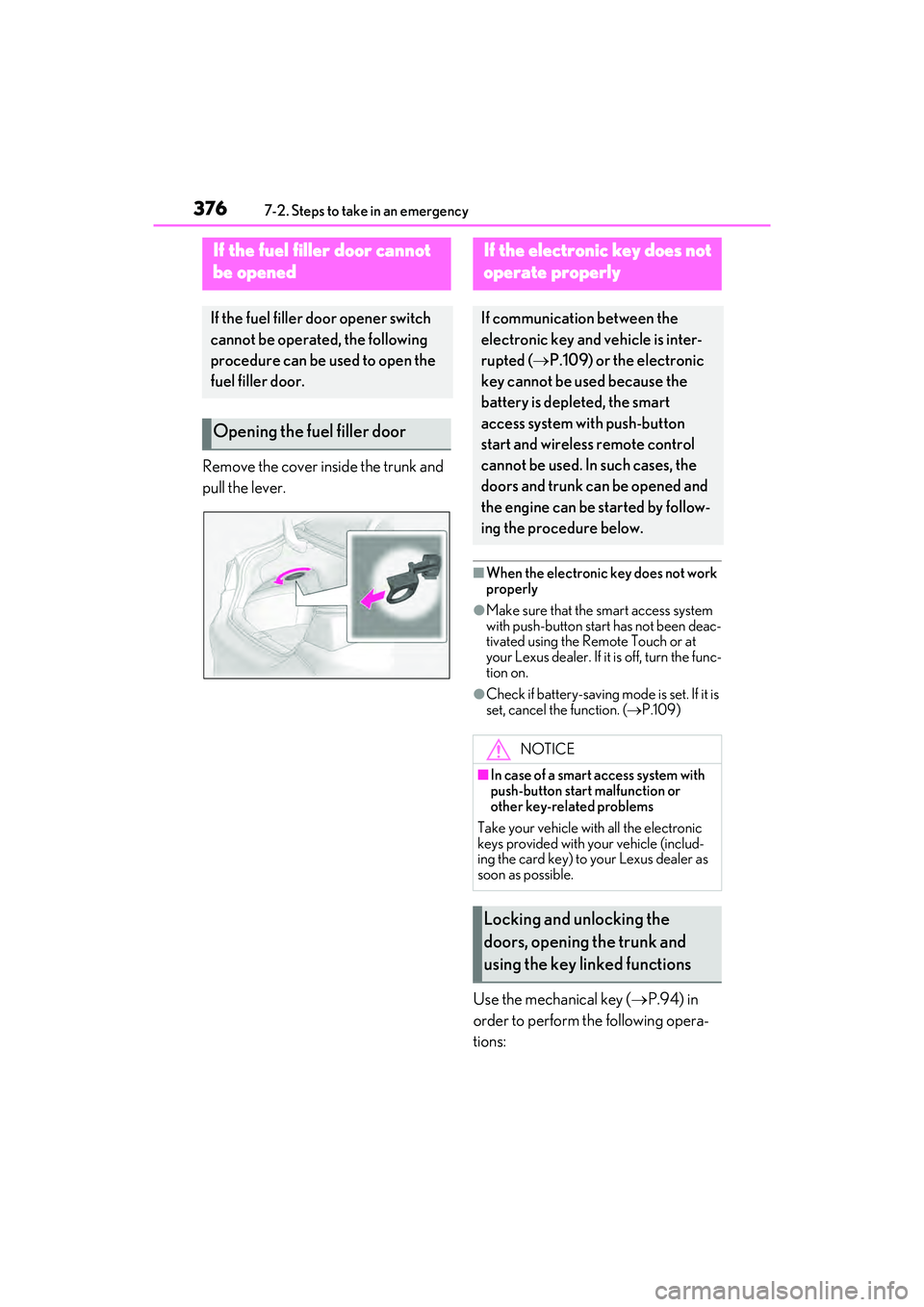
Remove the cover inside the trunk and
pull the lever.
■When the electronic key does not work
properly
●Make sure that the smart access system
with push-button start has not been deac-
tivated using the Remote Touch or at
your Lexus dealer. If it is off, turn the func-
tion on.
●Check if battery-saving mode is set. If it is
set, cancel the function. (P.109)
Use the mechanical key ( P.94) in
order to perform the following opera-
tions:
If the fuel fi ller door cannot
be opened
If the fuel filler door opener switch
cannot be operated, the following
procedure can be used to open the
fuel filler door.
Opening the fuel filler door
If the electronic key does not
operate properly
If communication between the
electronic key and vehicle is inter-
rupted ( P.109) or the electronic
key cannot be used because the
battery is depleted, the smart
access system with push-button
start and wireless remote control
cannot be used. In such cases, the
doors and trunk ca n be opened and
the engine can be started by follow-
ing the procedure below.
NOTICE
■In case of a smart access system with
push-button start malfunction or
other key-related problems
Take your vehicle with all the electronic
keys provided with your vehicle (includ-
ing the card key) to your Lexus dealer as
soon as possible.
Locking and unlocking the
doors, opening the trunk and
using the key linked functions