change time LEXUS ES350 2022 Service Manual
[x] Cancel search | Manufacturer: LEXUS, Model Year: 2022, Model line: ES350, Model: LEXUS ES350 2022Pages: 468, PDF Size: 26.96 MB
Page 272 of 468
2705-3. Using the air conditioning system
Each time the switch is pressed, the
operation condition changes as fol-
lows.
AUTO (lit) Hi (2 segments lit)
Lo (1 segment lit) Off
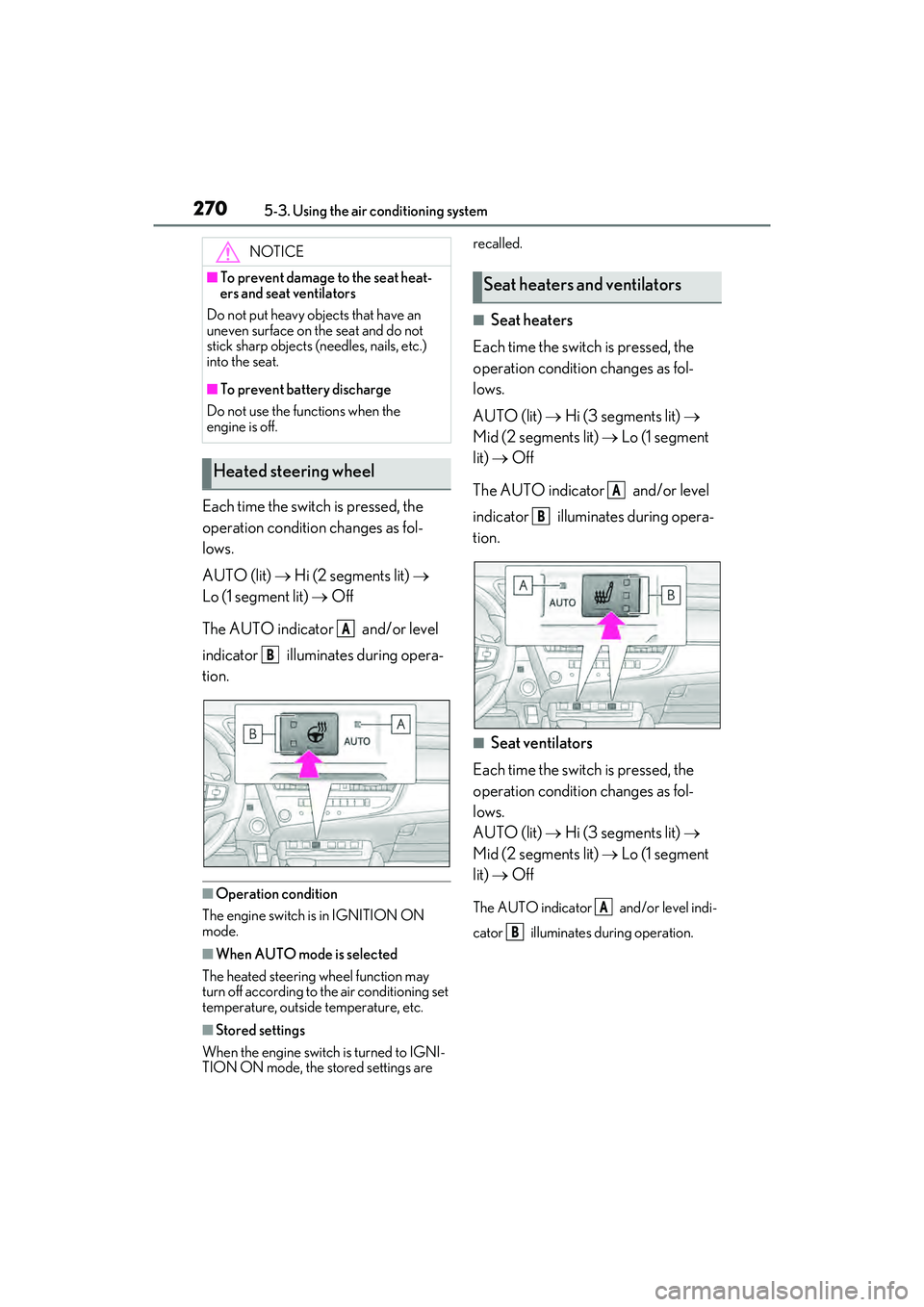
The AUTO indicator and/or level
indicator illuminates during opera-
tion.
■Operation condition
The engine switch is in IGNITION ON
mode.
■When AUTO mode is selected
The heated steering wheel function may
turn off according to the air conditioning set
temperature, outside temperature, etc.
■Stored settings
When the engine switch is turned to IGNI-
TION ON mode, the stored settings are recalled.
■Seat heaters
Each time the switch is pressed, the
operation condition changes as fol-
lows.
AUTO (lit) Hi (3 segments lit)
Mid (2 segments lit) Lo (1 segment
lit) Off
The AUTO indicator and/or level
indicator illuminates during opera-
tion.
■Seat ventilators
Each time the switch is pressed, the
operation condition changes as fol-
lows.
AUTO (lit) Hi (3 segments lit)
Mid (2 segments lit) Lo (1 segment
lit) Off
The AUTO indicator and/or level indi-
cator illuminates during operation.
NOTICE
■To prevent damage to the seat heat-
ers and seat ventilators
Do not put heavy objects that have an
uneven surface on the seat and do not
stick sharp objects (needles, nails, etc.)
into the seat.
■To prevent battery discharge
Do not use the functions when the
engine is off.
Heated steering wheel
A
B
Seat heaters and ventilators
A
B
A
B
Page 274 of 468
2725-3. Using the air conditioning system
When the sub function button on the
Remote Touch is pressed, the following
functions can be set to automatic mode.: Left-hand side seat heater/seat
ventilator
: Heated steering wheel
: Right-hand side seat heater/seat
ventilator
■Side display (12.3-inch display
model)
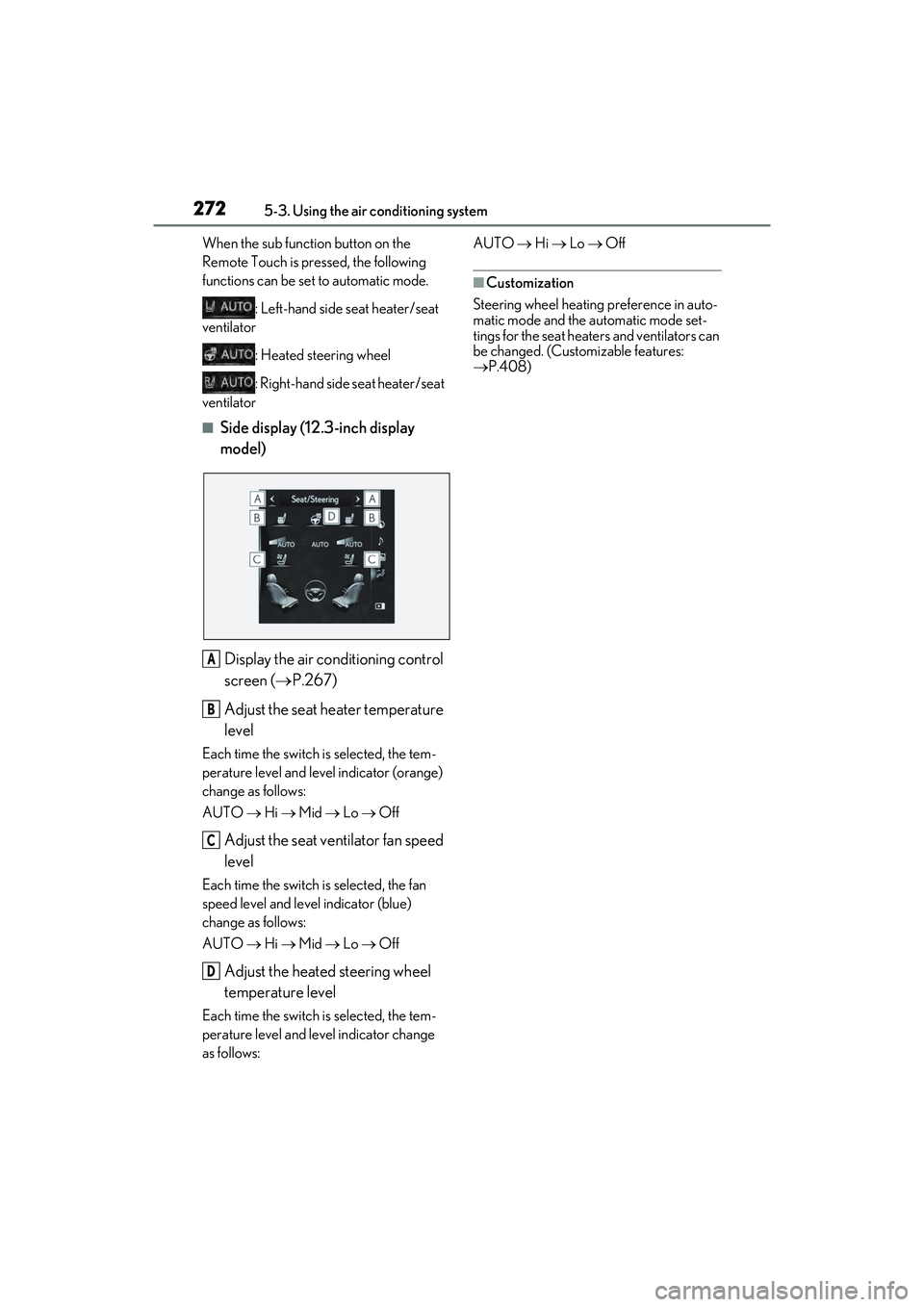
Display the air conditioning control
screen ( P.267)
Adjust the seat heater temperature
level
Each time the switch is selected, the tem-
perature level and level indicator (orange)
change as follows:
AUTO Hi Mid Lo Off
Adjust the seat ventilator fan speed
level
Each time the switch is selected, the fan
speed level and level indicator (blue)
change as follows:
AUTO Hi Mid Lo Off
Adjust the heated steering wheel
temperature level
Each time the switch is selected, the tem-
perature level and level indicator change
as follows: AUTO
Hi Lo Off
■Customization
Steering wheel heating preference in auto-
matic mode and the automatic mode set-
tings for the seat heaters and ventilators can
be changed. (Customizable features:
P.408)
A
B
C
D
Page 286 of 468

2845-6. Using the other interior features
*: Depending on the portable device, there are cases where the operation indicator
light will continue being lit up orange
even after the charging is complete.
When the operation indicator light
flashes
When an error occurs, the operation indi-
cator light flashes an orange color. Handle
the error based on the following tables.
• Flashing repeatedly once every second
(Orange)
• Repeatedly flashes 3 times continuously (Orange) • Repeatedly flashes 4 times continuously
(Orange)
■The wireless charger can be operated
when
The engine switch is in ACCESSORY or
IGNITION ON mode.
■Usable portable devices
●Qi standard wireless charge standard
can be used on compatible devices.
However, not all Qi standard devices and
compatibility are guaranteed.
●Starting with mobile phones and smart
phones, it is aimed for low power electri-
cally supplied portable devices of no
more than 5W.
■When covers and accessories are
attached to portable devices
Do not charge in situations where cover
and accessories not able to handle Qi are
attached to the portable device. Depending
on the type of cover and accessory, it may
not be possible to charge. When charging
is not performed even with the portable
device placed on the charge area, remove
the cover and accessories.
■While charging, noise enters the AM
radio
Turn off the wireless charger and confirm
that the noise has decreased. If the noise
decreases, continuously pushing the power
supply switch of the wireless charger for 2
seconds, the frequency of the charger can
be changed and the noise can be reduced.
Also, on that occasion, the operation indi-
cator light will flash orange 2 times.
■Important points of the wireless charger
●If the electronic key cannot be detected
within the vehicle interior, charging can-
not be done. When the door is opened
and closed, charging may be temporarily
Orange
(comes on)
When placing the portable
device on the charging area
(detecting the portable
device)
Charging
Suspected causeHandling method
Vehicle to charger
communication fail-
ure.Contact your Lexus
dealer.
Suspected causesHandling method
A foreign substance
is between the por-
table device and
charge area.Remove the foreign
substance from
between portable
device and the
charge area.
The portable device
is out of sync due to
the device being
shifted from the cen-
ter of the charge
area.
Place the portable
device near the cen-
ter of the charge
area.
Operation indicator light
Conditions
Suspected causeHandling method
Temperature rising
within the wireless
charger.Stop charging at
once and start
charging again after
for a while.
Page 325 of 468
3236-3. Do-it-yourself maintenance
6
Maintenance and care
●Tire inflation pressure changes with tem-
perature. The displayed values may also
be different from the values measured
using a tire pressure gauge.
■Situations in which the tire pressure
warning system may not operate prop-
erly
●In the following cases, the tire pressure
warning system may not operate prop-
erly.
• If non-genuine Lexus wheels are used.
• A tire has been replaced with a tire that is
not an OE (Original Equipment) tire.
• A tire has been replaced with a tire that is not of the specified size.
• Tire chains etc. are equipped.
• An auxiliary-supported run-flat tire is equipped.
• If a window tint that affects the radio wave signals is installed.
• If there is a lot of snow or ice on the vehi-
cle, particularly around the wheels or
wheel housings.
• If the tire inflation pressure is extremely
higher than the specified level.
• If wheel without tire pressure warning valves and transmitters are used.
• If the ID code on the tire pressure warn- ing valves and transmitters is not regis-
tered in the tire pressure warning
computer.
●Performance may be affected in the fol-
lowing situations.
• Near a TV tower, electric power plant, gas station, radio station, large display,
airport or other facility that generates
strong radio waves or electrical noise
• When carrying a portable radio, cellular
phone, cordless phone or other wireless
communication device
If tire position information is not correctly
displayed due to the radio wave conditions,
the display may be corrected by driving and
changing the radio wave conditions.
●When the vehicle is parked, the time
taken for the warning to start or go off
could be extended.
●When tire inflation pressure declines rap-
idly for example when a tire has burst, the
warning may not function.
■Warning performance of the tire pres-
sure warning system
The warning of the tire pressure warning
system will change in accordance with driv-
ing conditions. For this reason, the system
may give a warning even if the tire pressure
does not reach a low enough level, or if the
pressure is higher than the pressure that
was adjusted to when the system was initial-
ized.
When replacing tires or wheels, tire
pressure warning valves and transmit-
ters must also be installed.
When new tire pressure warning
valves and transmitters are installed,
new ID codes must be registered in the
tire pressure warning computer and
the tire pressure warning system must
be initialized. ( P.326)
■When replacing the tires and wheels
If the ID code of the tire pressure warning
valve and transmitter is not registered, the
tire pressure warning system will not work
properly. After driving for about 20 min-
utes, the tire pressure warning light blinks
for 1 minute and stays on to indicate a sys-
tem malfunction.
Installing tire pressure warning
valves and transmitters
NOTICE
■Repairing or replacing tires, wheels,
tire pressure warning valves, trans-
mitters and tire valve caps
●When removing or fitting the wheels,
tires or the tire pressure warning
valves and transmitters, contact your
Lexus dealer as the tire pressure warn-
ing valves and transmitters may be
damaged if not handled correctly.
Page 328 of 468
3266-3. Do-it-yourself maintenance
Every tire pressure warning valve and
transmitter has a unique ID code.
When replacing a tire pressure warn-
ing valve and transmitter, it is neces-
sary to register the ID code.
When registering the ID codes, per-
form the following procedure.
1Park the vehicle in a safe place, wait
for approximately 20 minutes, and
then start the engine. ( P.144)
2 Press or of the meter con-
trol switches and select .
3 Press or of the meter con-
trol switches and select “Vehicle
Settings”, and then press “OK”.
4 Press or of the meter con-
trol switches and select “TPWS”,
and then press “OK”.
5 Press or of the meter con-
trol switches and select “Change
Wheel Set”. Then press and hold
“OK” until the tire pressure warn-
ing light starts slowly blinking 3
times.
Then a message will be displayed on the
multi-information display.
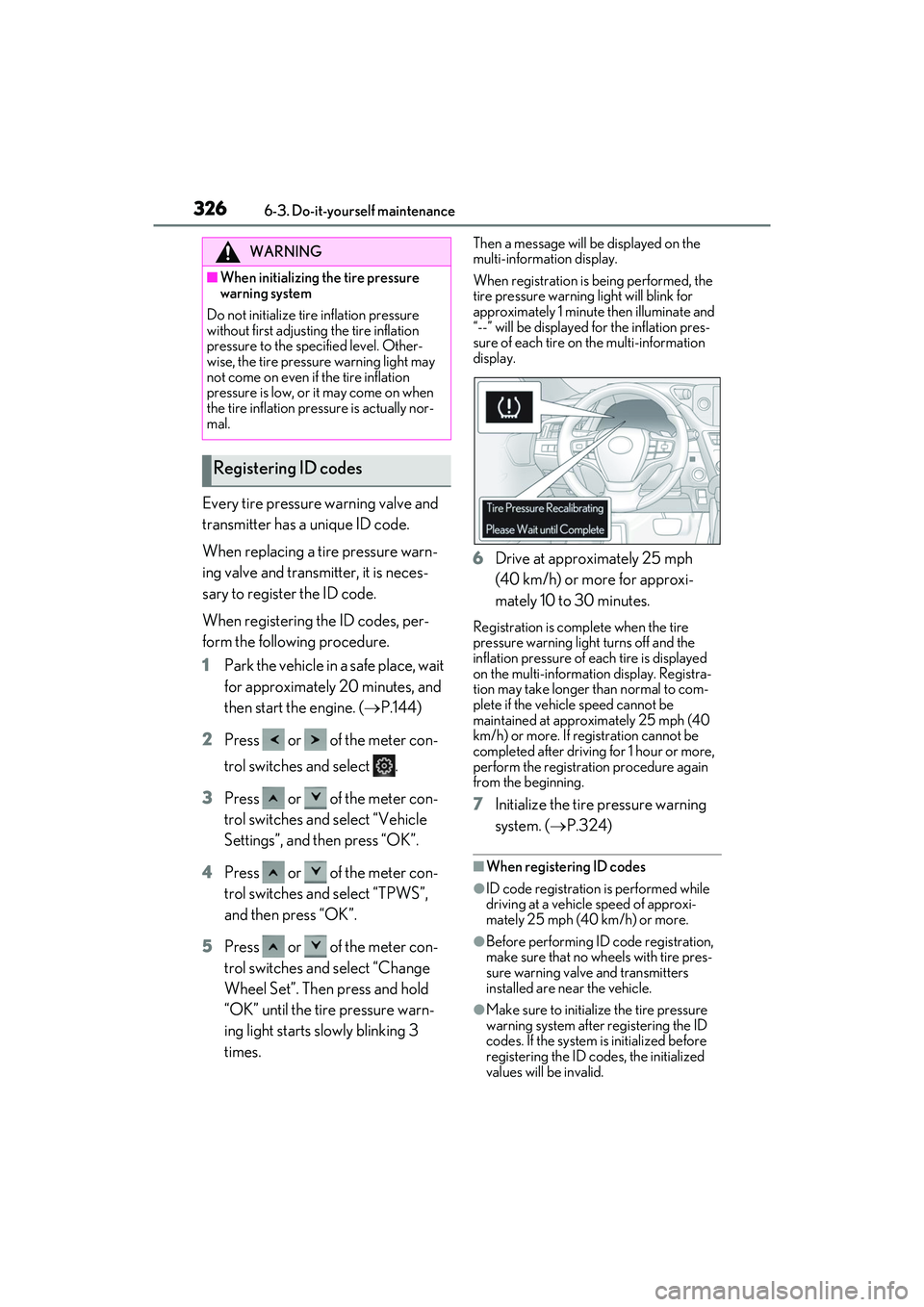
When registration is being performed, the
tire pressure warning light will blink for
approximately 1 minute then illuminate and
“--” will be displayed for the inflation pres-
sure of each tire on the multi-information
display.
6 Drive at approximately 25 mph
(40 km/h) or more for approxi-
mately 10 to 30 minutes.
Registration is complete when the tire
pressure warning light turns off and the
inflation pressure of each tire is displayed
on the multi-information display. Registra-
tion may take longer than normal to com-
plete if the vehicle speed cannot be
maintained at approximately 25 mph (40
km/h) or more. If registration cannot be
completed after driving for 1 hour or more,
perform the registration procedure again
from the beginning.
7 Initialize the tire pressure warning
system. ( P.324)
■When registering ID codes
●ID code registration is performed while
driving at a vehicle speed of approxi-
mately 25 mph (40 km/h) or more.
●Before performing ID code registration,
make sure that no wheels with tire pres-
sure warning valve and transmitters
installed are near the vehicle.
●Make sure to initialize the tire pressure
warning system after registering the ID
codes. If the system is initialized before
registering the ID codes, the initialized
values will be invalid.
WARNING
■When initializing the tire pressure
warning system
Do not initialize tire inflation pressure
without first adjusting the tire inflation
pressure to the specified level. Other-
wise, the tire pressure warning light may
not come on even if the tire inflation
pressure is low, or it may come on when
the tire inflation pressure is actually nor-
mal.
Registering ID codes
Page 374 of 468
3727-2. Steps to take in an emergency
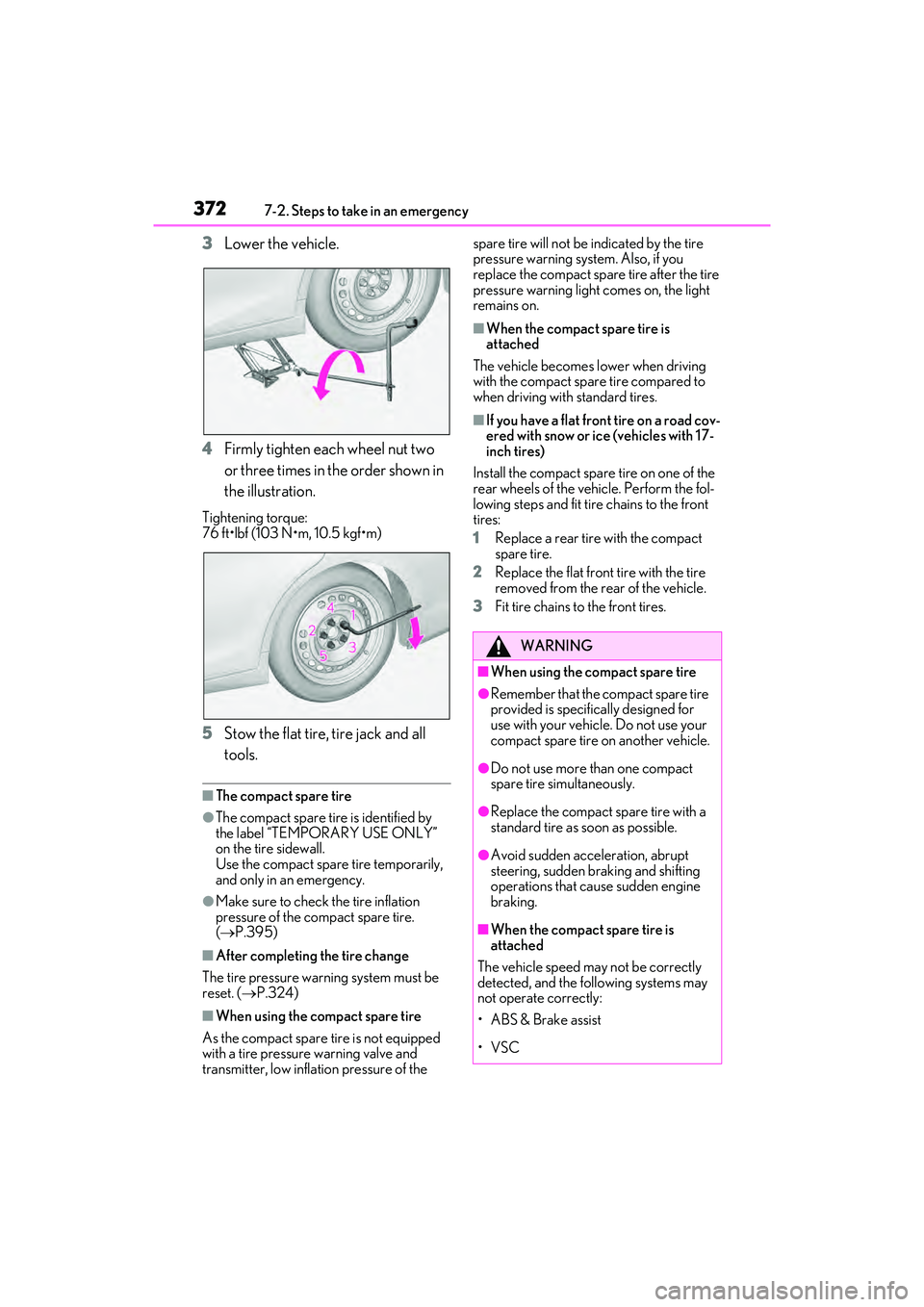
3Lower the vehicle.
4 Firmly tighten each wheel nut two
or three times in the order shown in
the illustration.
Tightening torque:
76 ft•lbf (103 N•m, 10.5 kgf•m)
5Stow the flat tire, tire jack and all
tools.
■The compact spare tire
●The compact spare tire is identified by
the label “TEMPORARY USE ONLY”
on the tire sidewall.
Use the compact spare tire temporarily,
and only in an emergency.
●Make sure to check the tire inflation
pressure of the compact spare tire.
( P.395)
■After completing the tire change
The tire pressure warning system must be
reset. ( P.324)
■When using the compact spare tire
As the compact spare tire is not equipped
with a tire pressure warning valve and
transmitter, low inflation pressure of the spare tire will not be indicated by the tire
pressure warning system. Also, if you
replace the compact spare tire after the tire
pressure warning light comes on, the light
remains on.
■When the compact spare tire is
attached
The vehicle becomes lower when driving
with the compact spare tire compared to
when driving with standard tires.
■If you have a flat front tire on a road cov-
ered with snow or ice (vehicles with 17-
inch tires)
Install the compact spare tire on one of the
rear wheels of the vehicle. Perform the fol-
lowing steps and fit tire chains to the front
tires:
1 Replace a rear tire with the compact
spare tire.
2 Replace the flat front tire with the tire
removed from the rear of the vehicle.
3 Fit tire chains to the front tires.
WARNING
■When using the compact spare tire
●Remember that the compact spare tire
provided is specifically designed for
use with your vehicle. Do not use your
compact spare tire on another vehicle.
●Do not use more than one compact
spare tire simultaneously.
●Replace the compact spare tire with a
standard tire as soon as possible.
●Avoid sudden acceleration, abrupt
steering, sudden braking and shifting
operations that cause sudden engine
braking.
■When the compact spare tire is
attached
The vehicle speed may not be correctly
detected, and the following systems may
not operate correctly:
• ABS & Brake assist
•VSC
Page 380 of 468
3787-2. Steps to take in an emergency
1Ensure that the shift lever is in P and
depress the brake pedal.
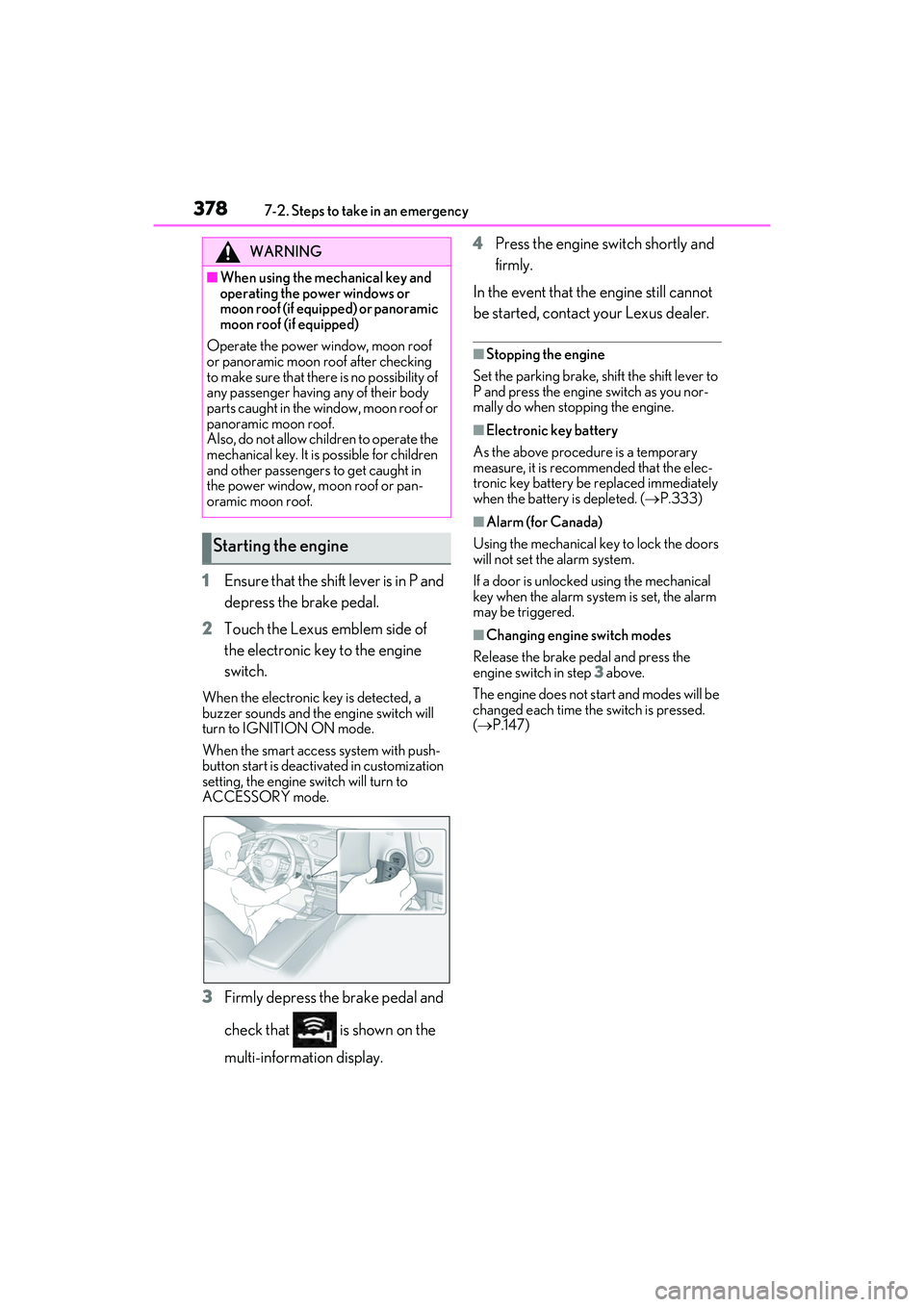
2 Touch the Lexus emblem side of
the electronic key to the engine
switch.
When the electronic key is detected, a
buzzer sounds and the engine switch will
turn to IGNITION ON mode.
When the smart access system with push-
button start is deactivated in customization
setting, the engine switch will turn to
ACCESSORY mode.
3Firmly depress the brake pedal and
check that is shown on the
multi-information display. 4
Press the engine switch shortly and
firmly.
In the event that the engine still cannot
be started, contact your Lexus dealer.
■Stopping the engine
Set the parking brake, shift the shift lever to
P and press the engine switch as you nor-
mally do when stopping the engine.
■Electronic key battery
As the above procedure is a temporary
measure, it is recommended that the elec-
tronic key battery be replaced immediately
when the battery is depleted. ( P.333)
■Alarm (for Canada)
Using the mechanical key to lock the doors
will not set the alarm system.
If a door is unlocked using the mechanical
key when the alarm system is set, the alarm
may be triggered.
■Changing engine switch modes
Release the brake pedal and press the
engine switch in step 3 above.
The engine does not start and modes will be
changed each time the switch is pressed.
( P.147)
WARNING
■When using the mechanical key and
operating the power windows or
moon roof (if equipped) or panoramic
moon roof (if equipped)
Operate the power window, moon roof
or panoramic moon roof after checking
to make sure that there is no possibility of
any passenger having any of their body
parts caught in the window, moon roof or
panoramic moon roof.
Also, do not allow children to operate the
mechanical key. It is possible for children
and other passengers to get caught in
the power window, moon roof or pan-
oramic moon roof.
Starting the engine
Page 420 of 468
4188-2. Customization
■Vehicle customization
●When the smart access system with
push-button start is off, the entry unlock
function cannot be customized.
●When the doors remain closed after
unlocking the doors and the timer acti-
vated automatic door lock function acti-
vates, signals will be generated in
accordance with the operation buzzer
volume and operational signal (Emer-
gency flashers) function settings.
●Some settings can be changed using a
switch or the Center Display. If a setting
is changed using a switch, the changed
setting will not be reflected on the Center
Display until the engine switch is turned
off and then turned back to IGNITION
ON mode.
■Clock settings
If the clock adjustment screen is displayed
continuously when attempting to change
the clock settings, the system may be mal-
functioning.
Have the vehicle inspected by your Lexus
dealer.
Page 441 of 468

Alphabetical index439
Warning message..................................... 224
Distance until next engine oil change .. 70, 74
Do-it-yourself maintenance .................... 304
Door courtesy lights ................................... 273
Door lock Doors.................................................................. 96
Smart access system with push-button start ..................................................................107
Wireless remote control........................... 94
Doors ................................................................... 96 Automatic door locking and unlocking system ............................................................. 99
Door glasses .................................................. 123
Door lock.......................................................... 96
Open door warning buzzer ................... 99
Outside rear view mirrors ......................120
Rear door child-protectors ..................... 99
Drive distance .................................................. 78
Drive info 1/Drive info 2 .............................. 78
Driver’s seat position memory .................. 113 Driving position memory.......................... 113
Memory recall function ............................. 115
Drive-Start Control (DSC) Sudden start restraint control................139
Driving................................................................134 Break-in tips ...................................................135
Correct driving posture .............................23
Driving Mode Select switch................... 213
Procedures .....................................................134
Winter drive tips...........................................251
Driving information display ......................... 77
Driving Mode Select switch......................213
Driving range ................................................... 78
Driving support system information display .............................................................................80
DSC (Drive-Start Control) Sudden start restraint control................139
Dynamic radar cruise control with full- speed range ................................................. 198 Warning message..................................... 207
Dynamic Torque Control AWD system .......................................................................... 246
E
Eco drive mode ..............................................213
Eco Driving Indicator................... 79, 80, 86
Eco Driving Indicator Light .........................79
EDR (Event data recorder) ........................... 8
Elapsed time ..................................................... 78
Electric Power Steering (EPS)
Function ..........................................................246
Warning light ...............................................353
Electronic key .................................................. 92 Battery-saving function............................ 109
If the electronic key does not operate properly .......................................................376
Replacing the battery...............................333
Electronic roof sunshade Jam protection function ............................129
Operation ....................................................... 128
Emergency, in case of If a warning buzzer sounds.................... 351
If a warning light turns on........................ 351
If a warning message is displayed ...... 361
If the battery is discharged ....................379
If the electronic key does not operate properly .......................................................376
If the engine will not start........................ 374
If the fuel filler door cannot be opened ..........................................................................376
If the vehicle is submerged or water on the road is rising ......................................345
If you have a flat tire ................................. 365
If you lose your keys ................................. 375
If you think something is wrong..........349
If your vehicle becomes stuck ............ 385
If your vehicle has to be stopped in an emergency................................................. 344
If your vehicle needs to be towed ..... 347
If your vehicle overheats ........................382
Emergency flashers .................................... 344
Engine ................................................................144 ACCESSORY mode................................147