charging LEXUS ES350 2022 Owners Manual
[x] Cancel search | Manufacturer: LEXUS, Model Year: 2022, Model line: ES350, Model: LEXUS ES350 2022Pages: 468, PDF Size: 26.96 MB
Page 63 of 468

611-4. Theft deterrent system
1
For safety and security
■Triggering of the alarm
The alarm may be triggered in the following
situations:
(Stopping the alarm deactivates the alarm
system.)
●For Canada: The doors are unlocked
using the mechanical key.
●The trunk is unlocked using the mechani-
cal key.
●A person inside the vehicle opens a door,
the trunk or hood, or unlocks the vehicle
using a door lock switch.
●The battery is recharged or replaced
when the vehicle is locked. ( P.381)
■Alarm-operated door lock
In the following cases, depending on the sit-
uation, the door may automatically lock to
prevent improper entry into the vehicle:
●When a person remaining in the vehicle
unlocks the door and the alarm is acti-
vated.
●While the alarm is activated, a person
remaining in the vehicle unlocks the door.
●When recharging or replacing the bat-
tery
NOTICE
■To ensure the system operates cor-
rectly
Do not modify or remove the system. If
modified or removed, the proper opera-
tion of the system cannot be guaranteed.
Page 67 of 468
652-1. Instrument cluster
2
Vehicle status information and indicators
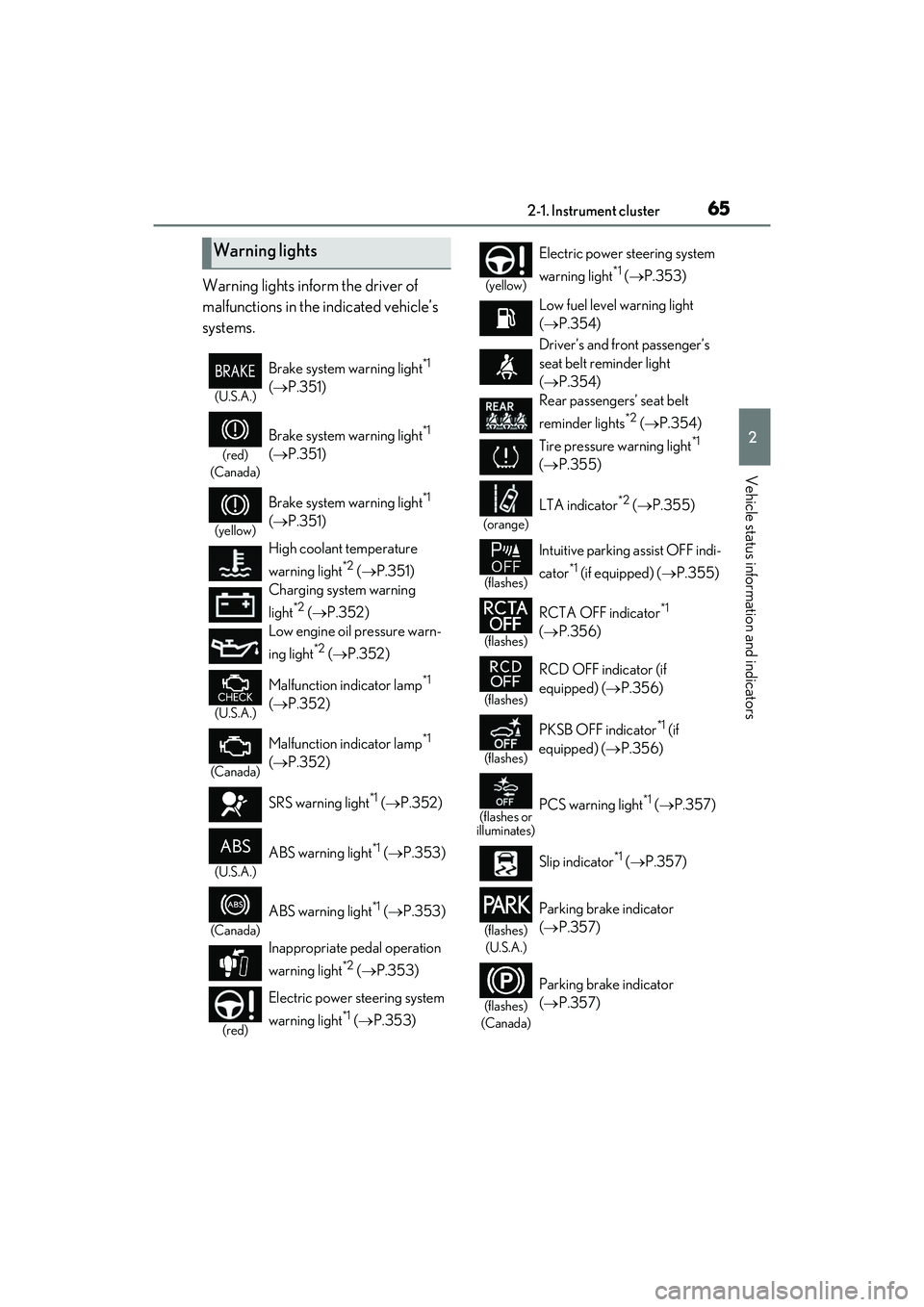
Warning lights inform the driver of
malfunctions in the indicated vehicle’s
systems.
Warning lights
(U.S.A.)
Brake system warning light*1
( P.351)
(red)
(Canada)
Brake system warning light*1
( P.351)
(yellow)
Brake system warning light*1
( P.351)
High coolant temperature
warning light
*2 ( P.351)
Charging system warning
light
*2 ( P.352)
Low engine oil pressure warn-
ing light
*2 ( P.352)
(U.S.A.)
Malfunction indicator lamp*1
( P.352)
(Canada)
Malfunction indicator lamp*1
( P.352)
SRS warning light
*1 ( P.352)
(U.S.A.)
ABS warning light*1 ( P.353)
(Canada)
ABS warning light*1 ( P.353)
Inappropriate pedal operation
warning light
*2 ( P.353)
(red)
Electric power steering system
warning light
*1 ( P.353)
(yellow)
Electric power steering system
warning light
*1 ( P.353)
Low fuel level warning light
( P.354)
Driver’s and front passenger’s
seat belt reminder light
( P.354)
Rear passengers’ seat belt
reminder lights
*2 ( P.354)
Tire pressure warning light
*1
( P.355)
(orange)
LTA indicator*2 ( P.355)
(flashes)
Intuitive parking assist OFF indi-
cator
*1 (if equipped) ( P.355)
(flashes)
RCTA OFF indicator*1
( P.356)
(flashes)
RCD OFF indicator (if
equipped) ( P.356)
(flashes)
PKSB OFF indicator*1 (if
equipped) ( P.356)
(flashes or
illuminates)PCS warning light*1 ( P.357)
Slip indicator
*1 ( P.357)
(flashes)
(U.S.A.)
Parking brake indicator
( P.357)
(flashes)
(Canada)
Parking brake indicator
( P.357)
Page 95 of 468

933-1. Key information
3
Before driving
power consumption of electronic keys
that are not used for long periods of time.
( P.109)
●As the electronic key always receives
radio waves, the battery will become
depleted even if the electronic key is not
used. The following symptoms indicate
that the electronic key battery may be
depleted. Replace the battery when nec-
essary. ( P.333)
• The smart access system with push-but-
ton start or the wireless remote control
does not operate.
• The detection area becomes smaller.
• The LED indicator on the key surface does not turn on.
You can replace the battery by yourself
( P.333). However, as there is a danger
that the electronic key may be damaged, it
is recommended that replacement be car-
ried out by your Lexus dealer.
●To avoid serious deterioration, do not
leave the electronic key within 3 ft. (1 m)
of the following electrical appliances that
produce a magnetic field:
•TVs
• Personal computers
• Cellular phones, cordless phones and battery chargers
• Recharging cellular phones or cordless phones
• Table lamps
• Induction cookers
■Replacing the battery
P.333
■Confirmation of the registered key
number
The number of keys already registered to
the vehicle can be confirmed. Ask your
Lexus dealer for details.
■If “A New Key has been Registered
Contact Your Dealer for Details” is
shown on the multi-information display
This message will be displayed each time
the driver’s door is opened when the doors
are unlocked from the outside for approxi-
mately 10 days after a new electronic key
has been registered.
If this message is displayed but you have not had a new electronic key registered, ask
your Lexus dealer to check if an unknown
electronic key (other than those in your
possession) has been registered.
NOTICE
■To prevent key damage
●Do not drop the keys, subject them to
strong shocks or bend them.
●Do not expose the keys to high tem-
peratures for long periods of time.
●Do not get the keys wet or wash them
in an ultrasonic washer etc.
●Do not attach metallic or magnetic
materials to the keys or place the keys
close to such materials.
●Do not disassemble the keys.
●Do not attach a sticker or anything else
to the surface of the electronic key.
●Do not place the keys near objects that
produce magnetic fields, such as TVs,
audio systems and induction cookers.
●Do not place the keys near medical
electrical equipment such as low-fre-
quency therapy equipment or micro-
wave therapy equipment, and do not
receive medical attention with the keys
on your person.
■Carrying the electronic key on your
person
Carry the electronic key 3.9 in. (10 cm)
or more away from electric appliances
that are turned on. Radio waves emitted
from electric appliances within 3.9 in. (10
cm) of the electronic key may interfere
with the key, causing the key to not func-
tion properly.
■In case of a smart access system with
push-button start malfunction or
other key-related problems
P.376
■When an electronic key is lost
P.375
Page 161 of 468

1594-3. Operating the lights and wipers
4
Driving
■Automatic light off system
●When the headlights come on: The head-
lights and tail lights turn off 30 seconds
after the driver’s door is opened and
closed if the engine switch is turned to
ACCESSORY mode or turned off. (The
lights turn off immediately if on
the key is pressed after all the doors are
locked.)
●When only the tail lights come on: The tail
lights turn off automatically if the engine
switch is turned to ACCESSORY mode
or turned off and the driver’s door is
opened.
For the U.S.A.: To turn the lights on again,
turn the engine switch to IGNITION ON
mode, or turn the ligh t switch off once and
then back to or .
For Canada: To turn the lights on again, turn
the engine switch to IGNITION ON mode,
or turn the light switch to position once
and then back to or .
■Light reminder buzzer
A buzzer sounds when the engine switch is
turned off or turned to ACCESSORY
mode and the driver’s door is opened while
the lights are turned on.
■Automatic headlight leveling system (if
equipped)
The level of the headlights is automatically
adjusted according to the number of pas-
sengers and the loading condition of the
vehicle to ensure that the headlights do not
interfere with other road users.
■Windshield wiper linked headlight illu-
mination
When driving during daytime with the
headlight switch turned to , if the wind-
shield wipers are used, the headlights will
turn on automatically after several seconds
to help enhance the visibility of your vehicle.
■Battery-saving function
In order to prevent the battery of the vehi-
cle from discharging, if the headlights
and/or tail lights are on when the engine
switch is turned off the battery saving func-
tion will operate and automatically turn off
all the lights after approximately 20 min-
utes.
When the engine switch is turned to IGNI-
TION ON mode, the battery-saving func-
tion will be disabled.
When any of the following are performed,
the battery-saving function is canceled
once and then reactivat ed. All the lights will
turn off automatically 20 minutes after the
battery-saving function has been reacti-
vated:
●When the headlight switch is operated
●When a door is opened or closed
■Welcome light illumination control
The parking lights, tail lights and license
plate lights automatically turn on at night
when the doors are unlocked using the
entry function or wireless remote control if
the light switch is in the position.
■If “Headlight System Malfunction Visit
Your Dealer” is displayed
P.363
■Customization
Settings (e.g. light sensor sensitivity) can be
changed.
(Customizable features: P.408)
Page 283 of 468
2815-6. Using the other interior features
5
Interior features
■The power outlet can be used when
The engine switch is in ACCESSORY or
IGNITION ON mode.
■When stopping the engine
Disconnect electrical devices with charging
functions, such as mobile battery packs.
If such devices are left connected, the
engine switch may not be turned off nor-
mally.
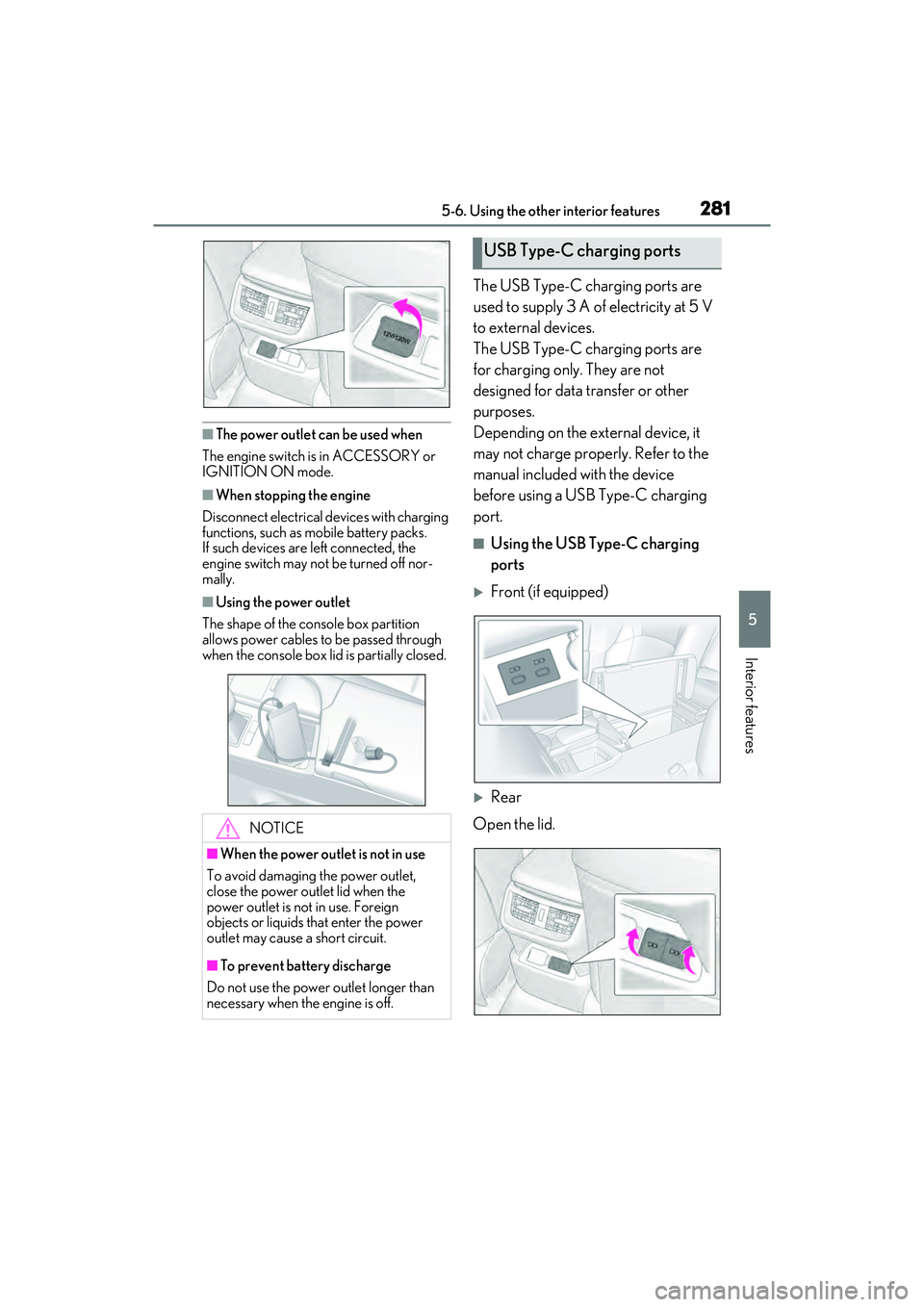
■Using the power outlet
The shape of the console box partition
allows power cables to be passed through
when the console box lid is partially closed.
The USB Type-C charging ports are
used to supply 3 A of electricity at 5 V
to external devices.
The USB Type-C charging ports are
for charging only. They are not
designed for data transfer or other
purposes.
Depending on the external device, it
may not charge properly. Refer to the
manual included with the device
before using a USB Type-C charging
port.
■Using the USB Type-C charging
ports
Front (if equipped)
Rear
Open the lid.
NOTICE
■When the power outlet is not in use
To avoid damaging the power outlet,
close the power outlet lid when the
power outlet is not in use. Foreign
objects or liquids that enter the power
outlet may cause a short circuit.
■To prevent battery discharge
Do not use the power outlet longer than
necessary when the engine is off.
USB Type-C charging ports
Page 284 of 468
2825-6. Using the other interior features
■The USB Type-C charging ports can be
used when
The engine switch is in ACCESSORY or
IGNITION ON mode.
■Situations in which the USB Type-C
charging ports may not operate cor-
rectly
●If a device which consumes more than 3
A at 5 V is connected
●If a device designed to communicate with
a personal computer, such as a USB
memory device, is connected
●If the connected external device is turned
off (depending on device)
●If the temperature inside the vehicle is
high, such as after the vehicle has been
parked in the sun
■About connected external devices
Depending on the connected external
device, charging may occasionally be sus-
pended and then start again. This is not a
malfunction.A portable device can be charged by
just placing Qi standard wireless
charge compatible portable devices
according to the Wireless Power Con-
sortium, such as smart phones and
mobile batteries, etc., on the charge
area.
This function cannot be used with por-
table devices that are larger than the
charging area. Also, depending on the
portable device, it may not operate as
normal. Please read the operation
manual for portable devices to be
used.
■The “Qi” logo
The “Qi” logo is a trademark of the
Wireless Power Consortium.
NOTICE
■To prevent damage to the USB Type-
C charging ports
●Do not insert foreign objects into the
ports.
●Do not spill water or other liquids into
the ports.
●Rear: When the USB Type-C
charging ports are not in use, close the
lids. If a foreign object or liquid enters a
port may cause a short circuit.
●Do not apply excessive force to or
impact the USB Type-C charging
ports.
●Do not disassemble or modify the USB
Type-C charging ports.
■To prevent damage to external
devices
●Do not leave external devices in the
vehicle. The temperature inside the
vehicle may become high, resulting in
damage to an external device.
●Do not push down on or apply unnec-
essary force to an external device or
the cable of an external device while it
is connected.
■To prevent battery discharge
Do not use the USB Type-C charging
ports for a long period of time with the
engine stopped.
Wireless charger (if equipped)
Page 285 of 468
2835-6. Using the other interior features
5
Interior features
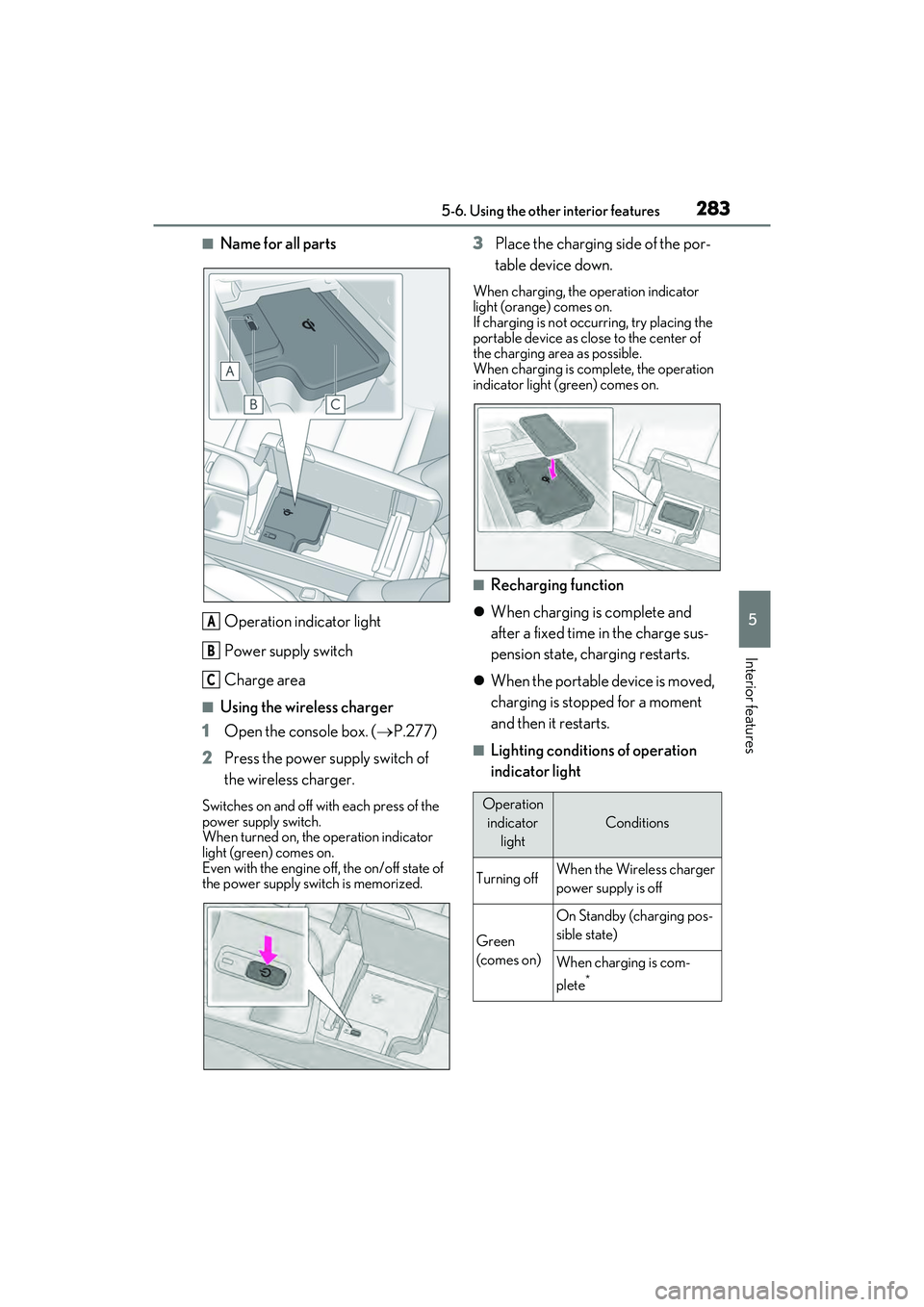
■Name for all partsOperation indicator light
Power supply switch
Charge area
■Using the wireless charger
1 Open the console box. ( P.277)
2 Press the power supply switch of
the wireless charger.
Switches on and off with each press of the
power supply switch.
When turned on, the operation indicator
light (green) comes on.
Even with the engine off, the on/off state of
the power supply switch is memorized.
3Place the charging side of the por-
table device down.
When charging, the operation indicator
light (orange) comes on.
If charging is not occurring, try placing the
portable device as close to the center of
the charging area as possible.
When charging is complete, the operation
indicator light (green) comes on.
■Recharging function
When charging is complete and
after a fixed time in the charge sus-
pension state, charging restarts.
When the portable device is moved,
charging is stopped for a moment
and then it restarts.
■Lighting conditions of operation
indicator light
A
B
C
Operation
indicator light
Conditions
Turning offWhen the Wireless charger
power supply is off
Green
(comes on)
On Standby (charging pos-
sible state)
When charging is com-
plete
*
Page 286 of 468

2845-6. Using the other interior features
*: Depending on the portable device, there are cases where the operation indicator
light will continue being lit up orange
even after the charging is complete.
When the operation indicator light
flashes
When an error occurs, the operation indi-
cator light flashes an orange color. Handle
the error based on the following tables.
• Flashing repeatedly once every second
(Orange)
• Repeatedly flashes 3 times continuously (Orange) • Repeatedly flashes 4 times continuously
(Orange)
■The wireless charger can be operated
when
The engine switch is in ACCESSORY or
IGNITION ON mode.
■Usable portable devices
●Qi standard wireless charge standard
can be used on compatible devices.
However, not all Qi standard devices and
compatibility are guaranteed.
●Starting with mobile phones and smart
phones, it is aimed for low power electri-
cally supplied portable devices of no
more than 5W.
■When covers and accessories are
attached to portable devices
Do not charge in situations where cover
and accessories not able to handle Qi are
attached to the portable device. Depending
on the type of cover and accessory, it may
not be possible to charge. When charging
is not performed even with the portable
device placed on the charge area, remove
the cover and accessories.
■While charging, noise enters the AM
radio
Turn off the wireless charger and confirm
that the noise has decreased. If the noise
decreases, continuously pushing the power
supply switch of the wireless charger for 2
seconds, the frequency of the charger can
be changed and the noise can be reduced.
Also, on that occasion, the operation indi-
cator light will flash orange 2 times.
■Important points of the wireless charger
●If the electronic key cannot be detected
within the vehicle interior, charging can-
not be done. When the door is opened
and closed, charging may be temporarily
Orange
(comes on)
When placing the portable
device on the charging area
(detecting the portable
device)
Charging
Suspected causeHandling method
Vehicle to charger
communication fail-
ure.Contact your Lexus
dealer.
Suspected causesHandling method
A foreign substance
is between the por-
table device and
charge area.Remove the foreign
substance from
between portable
device and the
charge area.
The portable device
is out of sync due to
the device being
shifted from the cen-
ter of the charge
area.
Place the portable
device near the cen-
ter of the charge
area.
Operation indicator light
Conditions
Suspected causeHandling method
Temperature rising
within the wireless
charger.Stop charging at
once and start
charging again after
for a while.
Page 287 of 468

2855-6. Using the other interior features
5
Interior features
suspended.
●When charging, the wireless charging
device and portable device will get
warmer, however this is not a malfunc-
tion.
When a portable device gets warm while
charging, charging may stop due to the
protection function on the portable
device side. In this case, when the tem-
perature of the portable device drops
significantly, charge again.
■Operation sounds
When the power supply is turned on, while
searching for the portable device a sound
will be produced, however this is not a mal-
function.
WARNING
■Caution while driving
When charging a portable device, for
safety reasons, the driver should not
operate the main the part of the portable
device while driving.
■Caution regarding interference with
electronic devices
People with implantable cardiac pace-
makers, cardiac resynchronization ther-
apy-pacemakers or implantable
cardioverter defibrillators, as well as any
other electrical medical device, should
consult their physician about the usage of
the wireless charger.
The operations of the wireless charger
may have an affect on medical devices.
■To prevent damage or burns
Observe the following precautions.
Failure to do so may result in a possibility
of equipment failure and damage, catch
fire, burns due to overheat.
●Do not insert any metallic objects
between the charging area and the
portable device while charging
●Do not attach stickers, metallic
objects, etc., to the charger area or
portable device
●Do not cover with cloth, etc., and
charge
●Do not charge portable devices other
than designated
●Do not attempt to dismantle for disas-
sembly or modifications
●Do not hit or apply a strong force
NOTICE
■Conditions in which the function may
not operate correctly
In the following conditions, it may not
operate correctly
●The portable device is fully charged
●There is foreign matter between the
charge area and portable device
●The temperature of the portable
device gets higher from charging
●The charging surface of the portable
device is facing up
●The placement of the portable device
is out of alignment with the charge
area
●Near a TV tower, electric power plant,
gas station, radio station, large display,
airport or other facility that generates
strong radio waves or electrical noise
●When the electronic key is in contact
with, or is covered by the following
metallic objects
• Cards to which aluminum foil is attached
• Cigarette boxes that have aluminum foil inside
• Metallic wallets or bags
•Coins
• Hand warmers made of metal
• Media such as CDs and DVDs
Page 288 of 468

2865-6. Using the other interior features
Fold down the armrest for use.An assist grip installed on the ceiling
can be used to support your body
while sitting on the seat.
■Rear sunshade
The rear sunshade can be raised and
lowered by operating the button
shown below.
Press the switch. (Raise/lower)
NOTICE
●When other wireless keys (that emit
radio waves) are being used nearby
In addition, excluding the above-men-
tioned, when the charger does not per-
form normally or the operation indicator
light is flashing continuously, it is consid-
ered that the wireless charger is malfunc-
tioning. Contact your Lexus dealer.
■To prevent failure or damage to data
●Do not bring magnetic cards, such as
credit cards, or magnetic recording
media, etc., close to the charger while
charging, otherwise, data may disap-
pear under the influence of magne-
tism. Also, do not bring precision
instruments such as wrist watches, etc.,
close to the charger, as such objects
may break.
●Do not leave portable devices in the
cabin. The temperature inside the
cabin may become high, when under
the sun, and cause damage to the
device.
■To prevent battery discharge
When the engine is stopped, do not use
the wireless charger for a long time.
Armrest
NOTICE
■To prevent damage to the armrest
Do not apply too much load on the arm-
rest.
Assist grips
WARNING
■Assist grips
Do not use the assist grip when getting in
or out of the vehicle or rising from your
seat.
NOTICE
■To prevent damage to the assist grip
Do not hang any heavy object or put a
heavy load on the assist grip.
Rear sunshade (if
equipped)/rear door sunshades
(if equipped)