suspension LEXUS ES350 2022 Owners Manual
[x] Cancel search | Manufacturer: LEXUS, Model Year: 2022, Model line: ES350, Model: LEXUS ES350 2022Pages: 468, PDF Size: 26.96 MB
Page 83 of 468
812-1. Instrument cluster
2
Vehicle status information and indicators
Select to switch between 12-hour display
and 24-hour display.
Pop-up display
Select to enable/disable some pop-up dis-
plays for each relevant system.
Accent color
Select to change the accent color on the
screen, such as the cursor color.
Rev indicator (F SPORT models)
• Select to enable/disable the rev indica-
tor.
• Select to set the engine speed at which the rev indicator (amber) will begin to be
displayed.
Rev peak (F SPORT models)
Select to enable/disable the rev peak.
Eco Driving Indicator Light
Select to enable/disable the Eco Driving
Indicator Light.
Default setting
Select to reset the meter display settings to
the default setting.
■Vehicle functions and settings that
can be changed
P.408
■Suspension of the settings display
●Some settings cannot be changed while
driving. When changing settings, park
the vehicle in a safe place.
●If a warning message is displayed, opera-
tion of the settings display will be sus-
pended.
Displays suggestions to the driver in
the following situations. To select a
response to a displayed suggestion,
use the meter control switches.
■Suggestion to turn on the head-
lights
If the headlights turn off, and the vehi-
cle speed is 3 mph (5 km/h) or higher
for a certain amount of time when the
surroundings are dark, a suggestion
message will be displayed.
■Suggestion to turn off the head-
lights
If the headlights are left on for a certain
amount of time with the headlight
switch in after the engine switch
has been turned off, a suggestion mes-
sage will be displayed asking if you
wish to turn the headlights off.
To turn the headlights off, select “Yes”.
WARNING
■Cautions during setting up the dis-
play
As the engine needs to be running
during setting up the display, ensure that
the vehicle is parked in a place with ade-
quate ventilation. In a closed area such as
a garage, exhaust gases including harm-
ful carbon monoxide (CO) may collect
and enter the vehicle. This may lead to
death or a serious health hazard.
NOTICE
■During setting up the display
To prevent battery discharge, ensure
that the engine is running while setting up
the display features.
Suggestion function
Page 141 of 468
1394-1. Before driving
4
Driving
When the following unusual operation
is performed with the accelerator
pedal depressed, the engine output
may be restrained.
When the shift lever is shifted to R
*.
When the shift lever is shifted from P or R to forward drive shift position
such as D
*.
When the system operates, a message
appears on the multi-information dis-
play. Read the message and follow the
instruction.
*: Depending on the situation, the shift position may not be changed.
■Drive-Start Control (DSC)
●When the TRAC is turned off ( P.247),
sudden start restraint control also does
not operate. If your vehicle have trouble
escaping from the mud or fresh snow due
to sudden start restraint control opera-
tion, deactivate TRAC ( P.247) so that
the vehicle may become able to escape
from the mud or fresh snow.
NOTICE
■When encountering flooded roads
Do not drive on a road that has flooded
after heavy rain etc. Doing so may cause
the following serious damage to the vehi-
cle:
●Engine stalling
●Short in electrical components
●Engine damage caused by water
immersion
In the event that you drive on a flooded
road and the vehicle is flooded, be sure
to have your Lexus dealer check the fol-
lowing:
●Brake function
●Changes in quantity and quality of oil
and fluid used for the engine, auto-
matic transmission, transfer (AWD
models), rear differential (AWD mod-
els), etc.
●Lubricant condition for the propeller
shaft (AWD models), bearings and
suspension joints (where possible),
and the function of all joints, bearings,
etc.
■When parking the vehicle
Always set the parking brake, and shift
the shift lever to P. Failure to do so may
cause the vehicle to move or the vehicle
may accelerate suddenly if the accelera-
tor pedal is accidentally depressed.
Sudden start restraint control
(Drive-Start Control [DSC])
Page 179 of 468
1774-5. Using the driving support systems
4
Driving
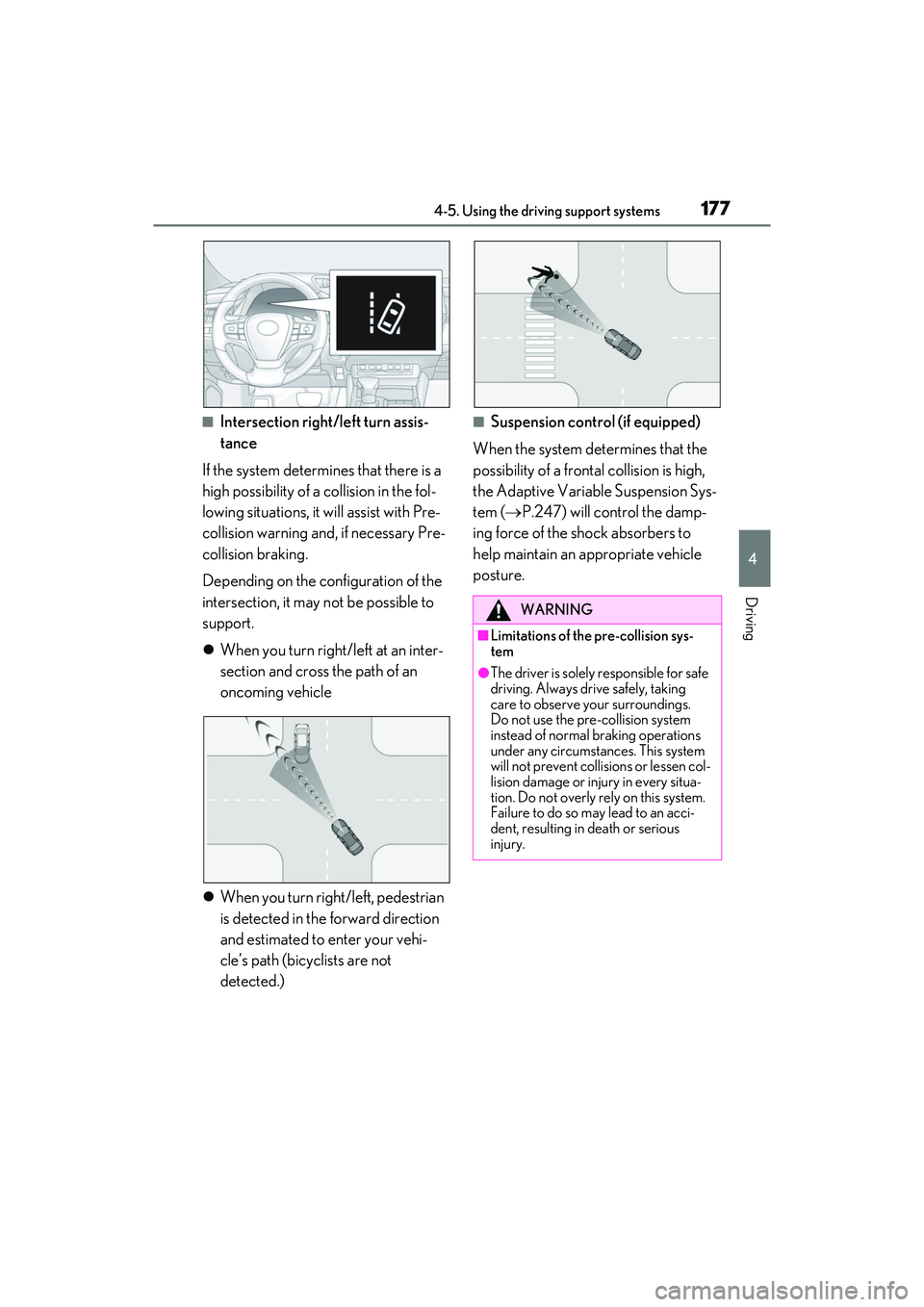
■Intersection right/left turn assis-
tance
If the system determines that there is a
high possibility of a collision in the fol-
lowing situations, it will assist with Pre-
collision warning and, if necessary Pre-
collision braking.
Depending on the configuration of the
intersection, it may not be possible to
support.
When you turn right/left at an inter-
section and cross the path of an
oncoming vehicle
When you turn right/left, pedestrian
is detected in the forward direction
and estimated to enter your vehi-
cle’s path (bicyclists are not
detected.)■Suspension control (if equipped)
When the system determines that the
possibility of a frontal collision is high,
the Adaptive Variable Suspension Sys-
tem ( P.247) will control the damp-
ing force of the shock absorbers to
help maintain an appropriate vehicle
posture.
WARNING
■Limitations of the pre-collision sys-
tem
●The driver is solely responsible for safe
driving. Always drive safely, taking
care to observe your surroundings.
Do not use the pre-collision system
instead of normal braking operations
under any circumstances. This system
will not prevent collisions or lessen col-
lision damage or injury in every situa-
tion. Do not overly rely on this system.
Failure to do so may lead to an acci-
dent, resulting in death or serious
injury.
Page 189 of 468
1874-5. Using the driving support systems
4
Driving
WARNING
■Before using LTA system
●Do not rely solely upon the LTA sys-
tem. The LTA system does not auto-
matically drive the vehicle or reduce
the amount of attention that must be
paid to the area in front of the vehicle.
The driver must always assume full
responsibility for driving safely by pay-
ing careful attention to the surround-
ing conditions and operating the
steering wheel to correct the path of
the vehicle. Also, the driver must take
adequate breaks when fatigued, such
as from driving for a long period of
time.
●Failure to perform appropriate driving
operations and pay careful attention
may lead to an accident, resulting in
death or serious injury.
■Situations unsuitable for LTA system
In the following situations, use the LTA
switch to turn the system off. Failure to do
so may lead to an acc ident, resulting in
death or serious injury.
●Vehicle is driven on a road surface
which is slippery due to rainy weather,
fallen snow, freezing, etc.
●Vehicle is driven on a snow-covered
road.
●White (yellow) lines are difficult to see
due to rain, snow, fog, dust, etc.
●Vehicle is driven in a temporary lane
or restricted lane due to construction
work.
●Vehicle is driven in a construction
zone.
●A spare tire, tire chains, etc. are
equipped.
●When the tires have been excessively
worn, or when the tire inflation pres-
sure is low.
●During emergency towing
■Preventing LTA system malfunctions
and operations performed by mistake
●Do not modify the headlights or place
stickers, etc. on the surface of the
lights.
●Do not modify the suspension etc. If
the suspension etc. needs to be
replaced, contact your Lexus dealer.
●Do not install or place anything on the
hood or grille. Also, do not install a
grille guard (bull bars, kangaroo bar,
etc.).
●If your windshield needs repairs, con-
tact your Lexus dealer.
■Conditions in which functions may
not operate properly
In the following situations, the functions
may not operate properly and the vehi-
cle may depart from its lane. Drive safely
by always paying careful attention to
your surroundings and operate the
steering wheel to correct the path of the
vehicle without relying solely on the func-
tions.
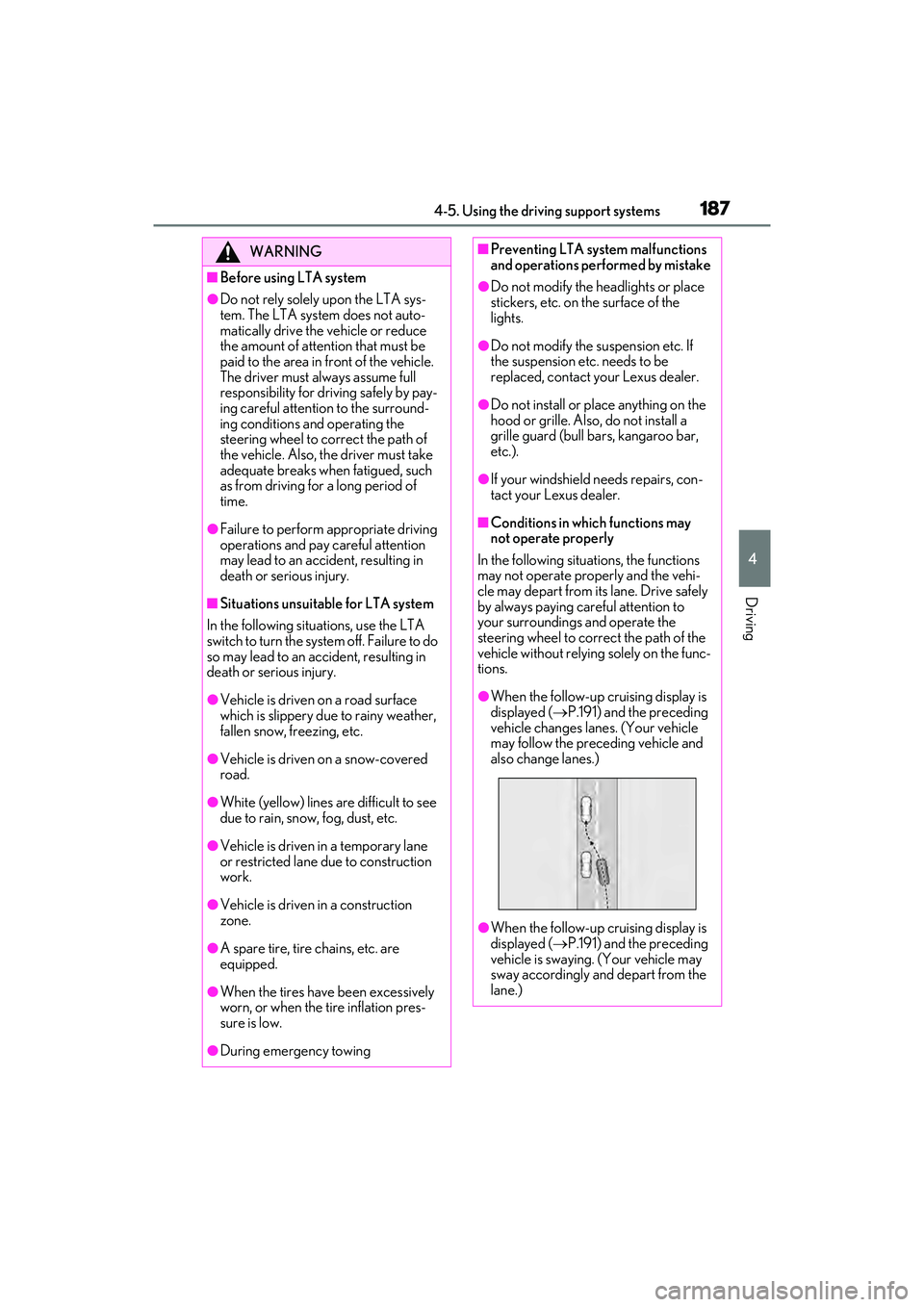
●When the follow-up cruising display is
displayed ( P.191) and the preceding
vehicle changes lanes. (Your vehicle
may follow the preceding vehicle and
also change lanes.)
●When the follow-up cruising display is
displayed ( P.191) and the preceding
vehicle is swaying. (Your vehicle may
sway accordingly and depart from the
lane.)
Page 215 of 468
2134-5. Using the driving support systems
4
Driving
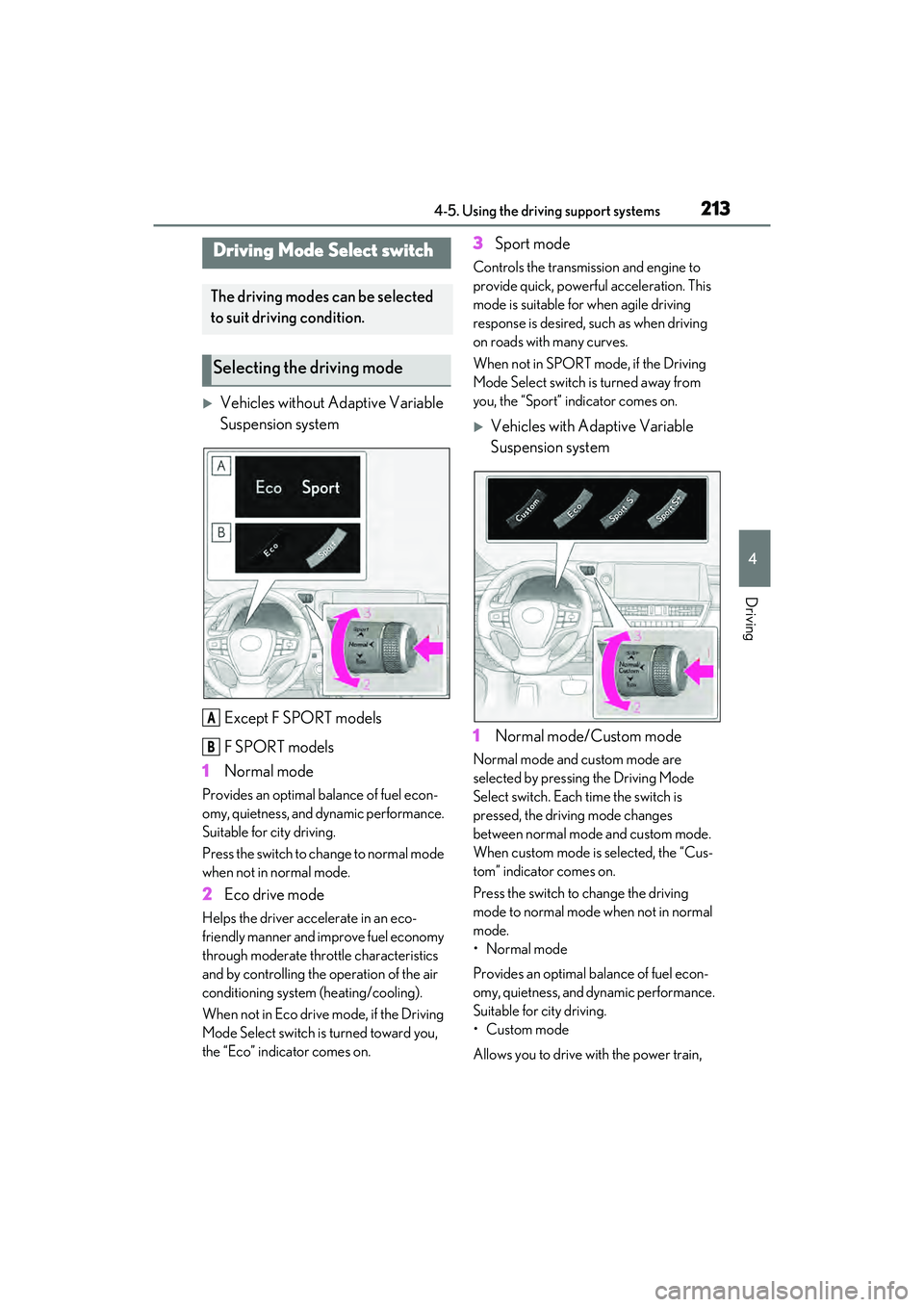
Vehicles without Adaptive Variable
Suspension systemExcept F SPORT models
F SPORT models
1 Normal mode
Provides an optimal balance of fuel econ-
omy, quietness, and dynamic performance.
Suitable for city driving.
Press the switch to change to normal mode
when not in normal mode.
2Eco drive mode
Helps the driver accelerate in an eco-
friendly manner and improve fuel economy
through moderate throttle characteristics
and by controlling the operation of the air
conditioning system (heating/cooling).
When not in Eco drive mode, if the Driving
Mode Select switch is turned toward you,
the “Eco” indicator comes on.
3Sport mode
Controls the transmission and engine to
provide quick, powerful acceleration. This
mode is suitable for when agile driving
response is desired, such as when driving
on roads with many curves.
When not in SPORT mode, if the Driving
Mode Select switch is turned away from
you, the “Sport” indicator comes on.
Vehicles with Adaptive Variable
Suspension system
1 Normal mode/Custom mode
Normal mode and custom mode are
selected by pressing the Driving Mode
Select switch. Each time the switch is
pressed, the driving mode changes
between normal mode and custom mode.
When custom mode is selected, the “Cus-
tom” indicator comes on.
Press the switch to change the driving
mode to normal mode when not in normal
mode.
• Normal mode
Provides an optimal balance of fuel econ-
omy, quietness, and dynamic performance.
Suitable for city driving.
•Custom mode
Allows you to drive with the power train,
Driving Mode Select switch
The driving modes can be selected
to suit driving condition.
Selecting the driving mode
A
B
Page 216 of 468
2144-5. Using the driving support systems
chassis and air conditioning system func-
tions set to your preferred settings.
Custom mode settings can only be
changed on the drive mode customization
display of the Center Display. (P.258)
2 Eco drive mode
Helps the driver accelerate in an eco-
friendly manner and improve fuel economy
through moderate throttle characteristics
and by controlling the operation of the air
conditioning system (heating/cooling).
When not in Eco drive mode, if the Driving
Mode Select switch is turned toward you,
the “Eco” indicator comes on.
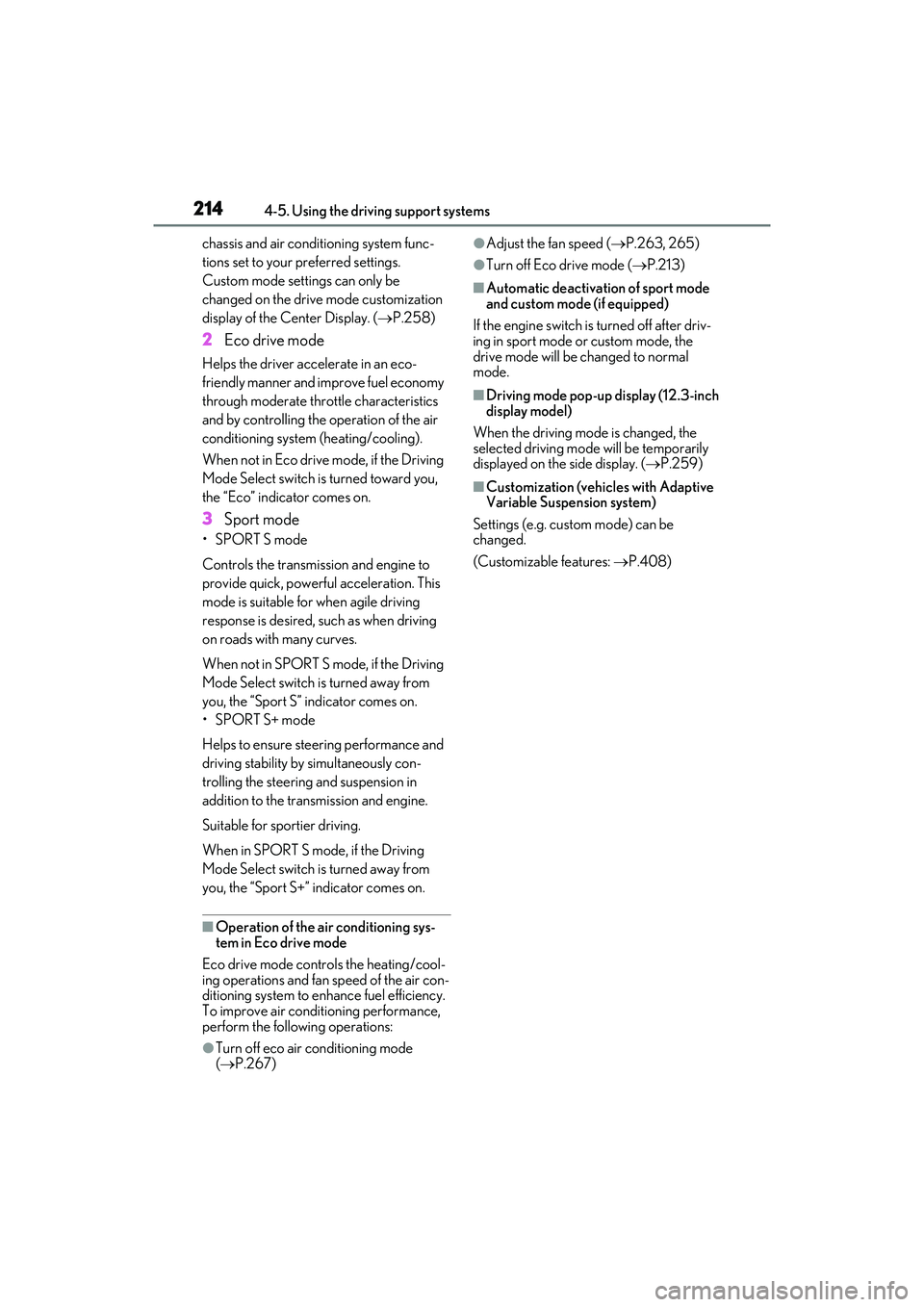
3Sport mode
•SPORT S mode
Controls the transmission and engine to
provide quick, powerful acceleration. This
mode is suitable for when agile driving
response is desired, such as when driving
on roads with many curves.
When not in SPORT S mode, if the Driving
Mode Select switch is turned away from
you, the “Sport S” indicator comes on.
•SPORT S+ mode
Helps to ensure steering performance and
driving stability by simultaneously con-
trolling the steering and suspension in
addition to the transmission and engine.
Suitable for sportier driving.
When in SPORT S mode, if the Driving
Mode Select switch is turned away from
you, the “Sport S+” indicator comes on.
■Operation of the air conditioning sys-
tem in Eco drive mode
Eco drive mode contro ls the heating/cool-
ing operations and fan speed of the air con-
ditioning system to enhance fuel efficiency.
To improve air conditioning performance,
perform the following operations:
●Turn off eco air conditioning mode
( P.267)
●Adjust the fan speed ( P.263, 265)
●Turn off Eco drive mode ( P.213)
■Automatic deactivation of sport mode
and custom mode (if equipped)
If the engine switch is turned off after driv-
ing in sport mode or custom mode, the
drive mode will be changed to normal
mode.
■Driving mode pop-up display (12.3-inch
display model)
When the driving mode is changed, the
selected driving mode will be temporarily
displayed on the side display. ( P.259)
■Customization (vehicles with Adaptive
Variable Suspension system)
Settings (e.g. custom mode) can be
changed.
(Customizable features: P.408)
Page 220 of 468
2184-5. Using the driving support systems
■The system can be operated when
●The engine switch is in IGNITION ON
mode.
●Intuitive parking assist function is on.
●The vehicle speed is less than about 6
mph (10 km/h).
●A shift lever is shifted to a position other
than P.
■Setting the buzzer volume
The buzzer volume can be adjusted on the
multi-information display. ( P.215)
■If “Parking Assist Unavailable Clean
Parking Assist Sensor” is displayed on
the multi-information display
A sensor may be covered with ice, snow,
dirt, etc. Remove the ice, snow, dirt, etc.,
from the sensor to return the system to nor-
mal.
Also, due to ice forming on a sensor at low
temperatures, a warning message may be
displayed or the sensor may not be able to
detect an object. Once the ice melts, the system will return to normal.
■If “Parking Assist Unavailable” is dis-
played on the multi-information display
●Water may be continuously flowing over
the sensor surface, such as in a heavy
rain. When the system determines that it
is normal, the system will return to nor-
mal.
●Initialization may not have been per-
formed after a battery terminal was dis-
connected and reconnected. Initialize the
system. (
P.218)
If this message continues to be displayed
even after initializati on, have the vehicle
inspected by your Lexus dealer.
■If a battery terminal has been discon-
nected and reconnected
The system needs to be initialized. To initial-
ize the system, drive the vehicle straight
ahead for 5 seconds or more at a speed of
approximately 22 mph (35 km/h) or more.
Additionally, for vehicles with the Parking
Support Brake function, turn the steering
wheel fully to the left and right with the vehi-
cle stopped.
■Sensor detection information
●The sensor’s detection areas are limited
to the areas around the vehicle’s front
and rear bumpers.
●The following situations may occur
during use.
• Depending on the shape of the object and other factors, the detection distance
may shorten, or detection may be impos-
sible.
• There will be a short delay between object detection and display. Even at low
speeds, there is a possibility that the
object will come within the sensor’s
detection areas before the display is
shown and the warning beep sounds.
• It might be difficult to hear the buzzer due to the volume of the audio system or air
flow noise of the air conditioning system.
• It may be difficult to hear the buzzer if
buzzers for other systems are sounding.
■Objects which the system may not prop-
erly detect
The shape of the object may prevent the
sensor from detecting it. Pay particular
WARNING
■When to disable the function
In the following situations, disable the
function as it may operate even though
there is no possibility of a collision.
●Failing to observe the warnings above.
●A non-genuine Lexus suspension
(lowered suspension, etc.) is installed.
■Notes when washing the vehicle
Do not apply intensive bursts of water or
steam to the sensor area. Doing so may
result in the sensor malfunctioning.
●When using a high pressure washer to
wash the vehicle, do not spray the sen-
sors directly, as doing so may cause a
sensor to malfunction.
●When using steam to clean the vehi-
cle, do not direct steam too close to
the sensors as doing so may cause a
sensor to malfunction.
Page 229 of 468
2274-5. Using the driving support systems
4
Driving
wet with standing water during bad
weather, such as heavy rain, snow, or fog.
●When multiple vehicles are approaching
with only a small gap between each vehi-
cle.
●When a vehicle is approaching at high
speed.
●When equipment that may obstruct a
sensor is installed, such as a towing eye-
let, bumper protector (an additional trim
strip, etc.), bicycle carrier, or snow plow.
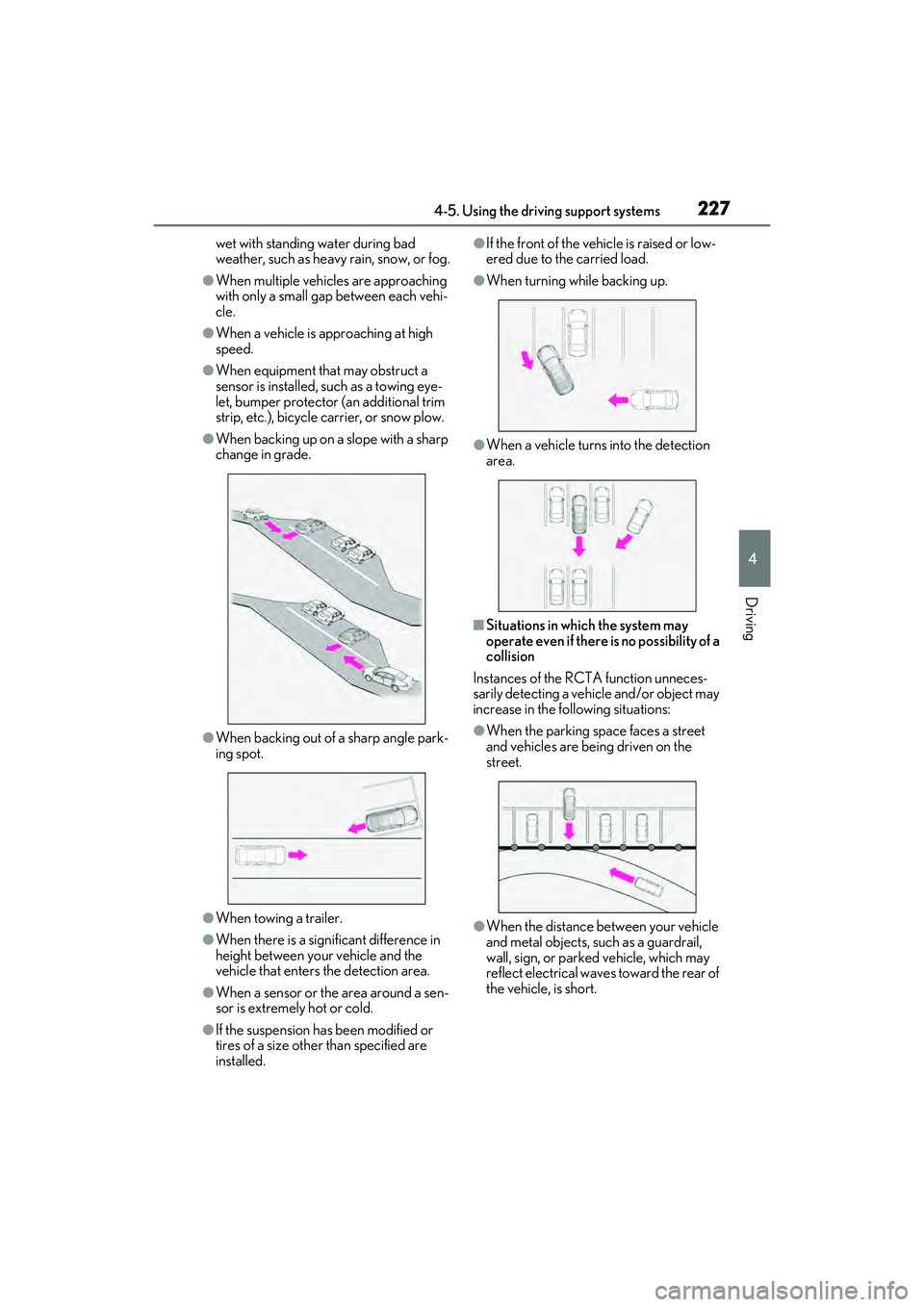
●When backing up on a slope with a sharp
change in grade.
●When backing out of a sharp angle park-
ing spot.
●When towing a trailer.
●When there is a significant difference in
height between your vehicle and the
vehicle that enters the detection area.
●When a sensor or the area around a sen-
sor is extremely hot or cold.
●If the suspension has been modified or
tires of a size other than specified are
installed.
●If the front of the vehicle is raised or low-
ered due to the carried load.
●When turning while backing up.
●When a vehicle turns into the detection
area.
■Situations in which the system may
operate even if there is no possibility of a
collision
Instances of the RCTA function unneces-
sarily detecting a vehicle and/or object may
increase in the following situations:
●When the parking space faces a street
and vehicles are being driven on the
street.
●When the distance between your vehicle
and metal objects, such as a guardrail,
wall, sign, or parked vehicle, which may
reflect electrical waves toward the rear of
the vehicle, is short.
Page 230 of 468
2284-5. Using the driving support systems
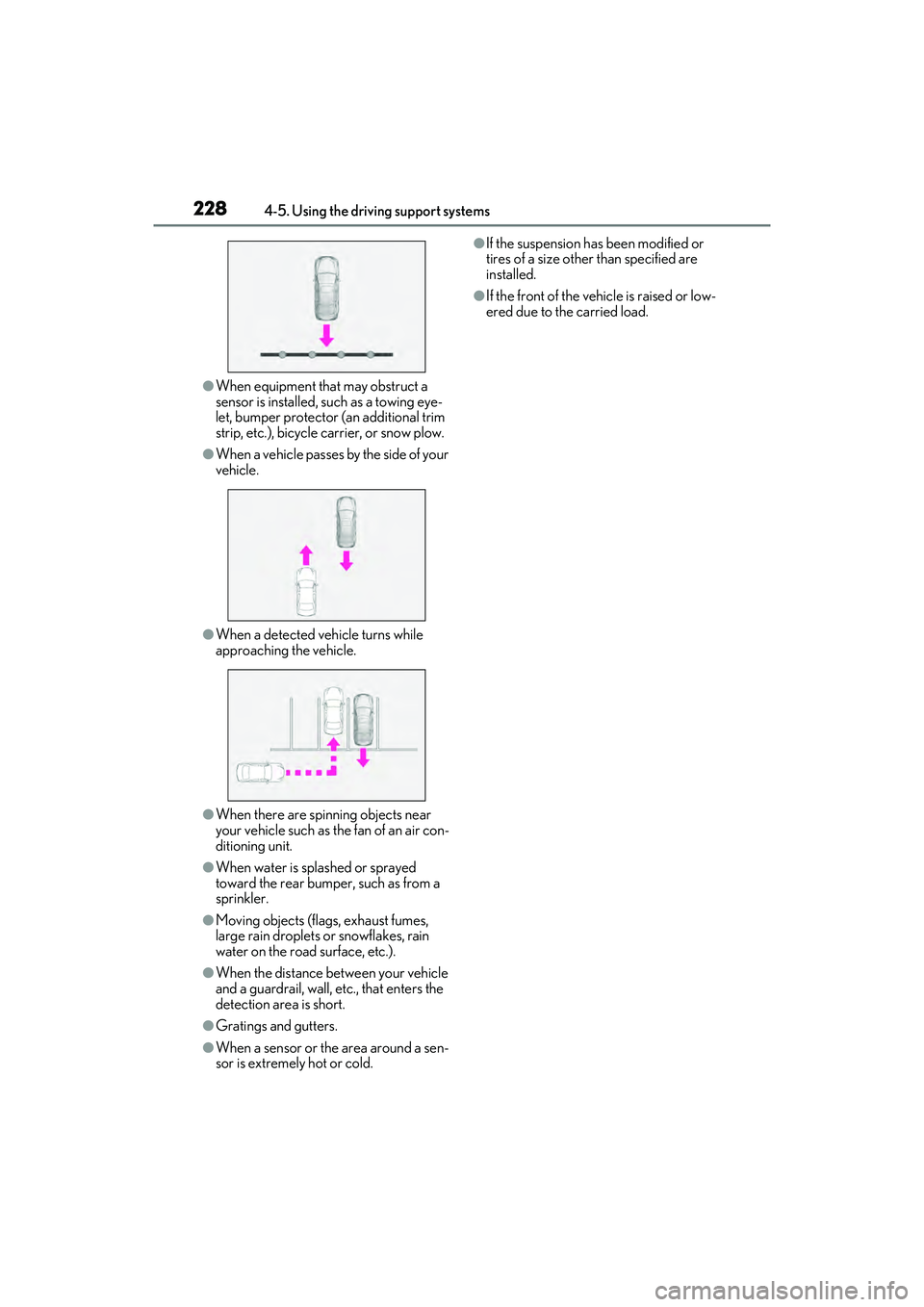
●When equipment that may obstruct a
sensor is installed, such as a towing eye-
let, bumper protector (an additional trim
strip, etc.), bicycle carrier, or snow plow.
●When a vehicle passes by the side of your
vehicle.
●When a detected vehicle turns while
approaching the vehicle.
●When there are spinning objects near
your vehicle such as the fan of an air con-
ditioning unit.
●When water is splashed or sprayed
toward the rear bumper, such as from a
sprinkler.
●Moving objects (flags, exhaust fumes,
large rain droplets or snowflakes, rain
water on the road surface, etc.).
●When the distance between your vehicle
and a guardrail, wall, etc., that enters the
detection area is short.
●Gratings and gutters.
●When a sensor or the area around a sen-
sor is extremely hot or cold.
●If the suspension has been modified or
tires of a size other than specified are
installed.
●If the front of the vehicle is raised or low-
ered due to the carried load.
Page 231 of 468
2294-5. Using the driving support systems
4
Driving
*: If equipped
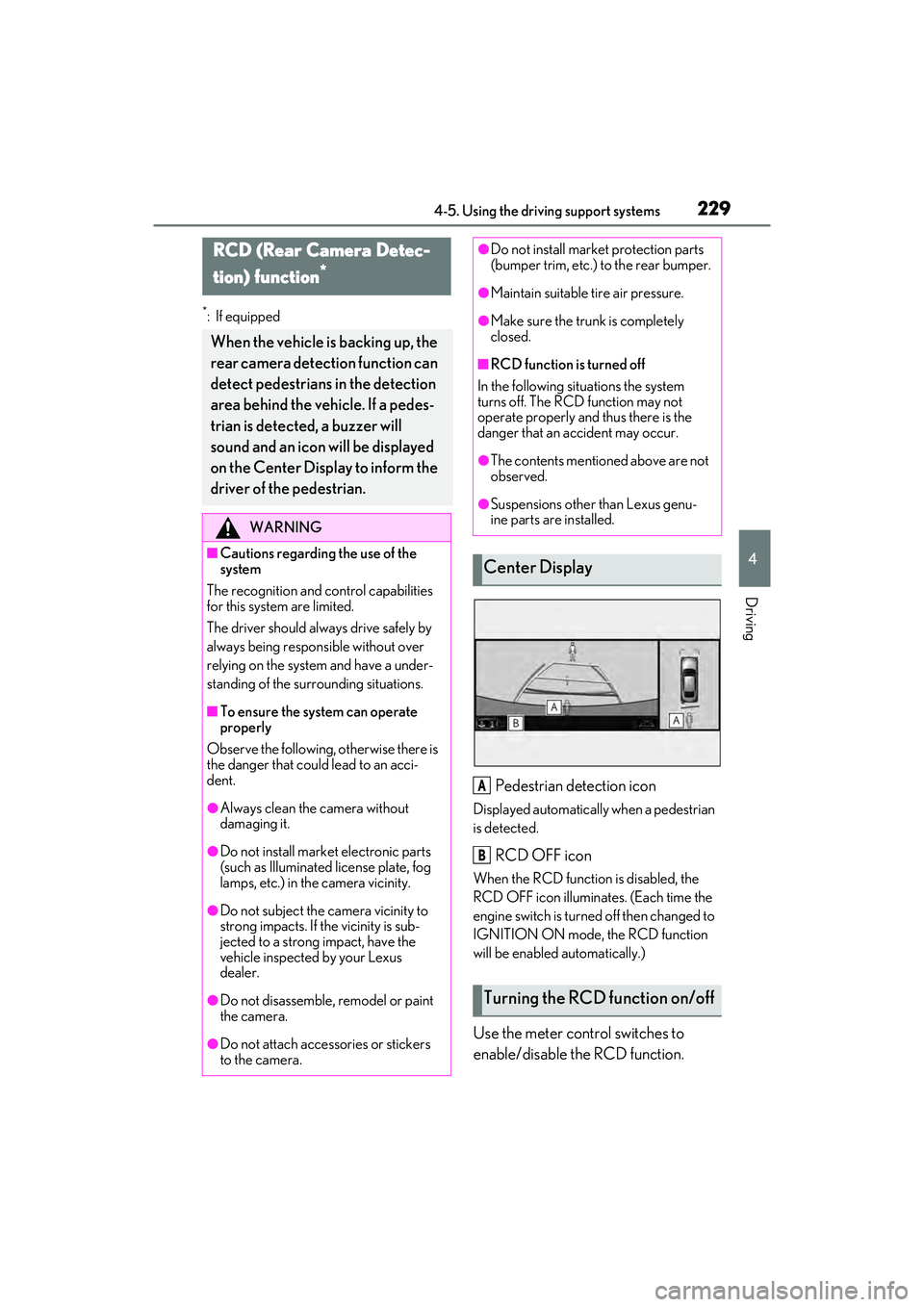
Pedestrian detection icon
Displayed automatically when a pedestrian
is detected.
RCD OFF icon
When the RCD function is disabled, the
RCD OFF icon illuminates. (Each time the
engine switch is turned off then changed to
IGNITION ON mode, the RCD function
will be enabled automatically.)
Use the meter control switches to
enable/disable the RCD function.
RCD (Rear Camera Detec-
tion) function
*
When the vehicle is backing up, the
rear camera detection function can
detect pedestrians in the detection
area behind the vehicle. If a pedes-
trian is detected, a buzzer will
sound and an icon will be displayed
on the Center Display to inform the
driver of the pedestrian.
WARNING
■Cautions regarding the use of the
system
The recognition and control capabilities
for this system are limited.
The driver should alwa ys drive safely by
always being responsible without over
relying on the system and have a under-
standing of the surrounding situations.
■To ensure the system can operate
properly
Observe the following, otherwise there is
the danger that could lead to an acci-
dent.
●Always clean the camera without
damaging it.
●Do not install market electronic parts
(such as Illuminated license plate, fog
lamps, etc.) in the camera vicinity.
●Do not subject the camera vicinity to
strong impacts. If the vicinity is sub-
jected to a strong impact, have the
vehicle inspected by your Lexus
dealer.
●Do not disassemble, remodel or paint
the camera.
●Do not attach accessories or stickers
to the camera.
●Do not install market protection parts
(bumper trim, etc.) to the rear bumper.
●Maintain suitable tire air pressure.
●Make sure the trunk is completely
closed.
■RCD function is turned off
In the following situations the system
turns off. The RCD function may not
operate properly and thus there is the
danger that an accident may occur.
●The contents mentioned above are not
observed.
●Suspensions other than Lexus genu-
ine parts are installed.
Center Display
Turning the RCD function on/off
A
B