door lock LEXUS ES350 2023 Owners Manual
[x] Cancel search | Manufacturer: LEXUS, Model Year: 2023, Model line: ES350, Model: LEXUS ES350 2023Pages: 84, PDF Size: 4.93 MB
Page 3 of 84
2
ES350_ES250_QG_OM06255U_(U)
Driving ComfortFuel Consumption Screen ........................................................................................................ 38
Basic Operation of Multimedia Syst em .............................................................................. 39
Navigation
*............................................................................................................................... ...... 40
Connecting a Smartphone or Communication Device
*............................................ 44
Basic Operation of Audio System
*...................................................................................... 49
Lexus Climate Concierge .........................................................................................................54
Automatic Air Conditioning System
*.................................................................................. 55
Interior features
Starting Voice Control
*............................................................................................................ 58
Connecting to the USB Port .................................................................................................... 6 2
Garage Door Opener ............................................................................................................. ... 63
Lexus Enform Safety Connect ................................................................................................................. ............. 68
Remote Connect........................................................................................................................... 70
Service Connect................................................................................................................ .............. 71
Opening and Closing Door Locks ..................................................................................................................... ..................72
Fuel Tank Cap .................................................................................................................. ...............73
What to do if... List of Warning/Indicator Lights..............................................................................................7 5
If the electronic key does not oper ate properly ................................................................79
If the engine will not start................................................................................................... ...........81
*: These features may be operated by Starting Voice Control (See P.58)
Depending on specifications, the vehicle shown in the illustration may
differ from your vehicle in terms of equipment.
Page 7 of 84
6
ES350_ES250_QG_OM06255U_(U)
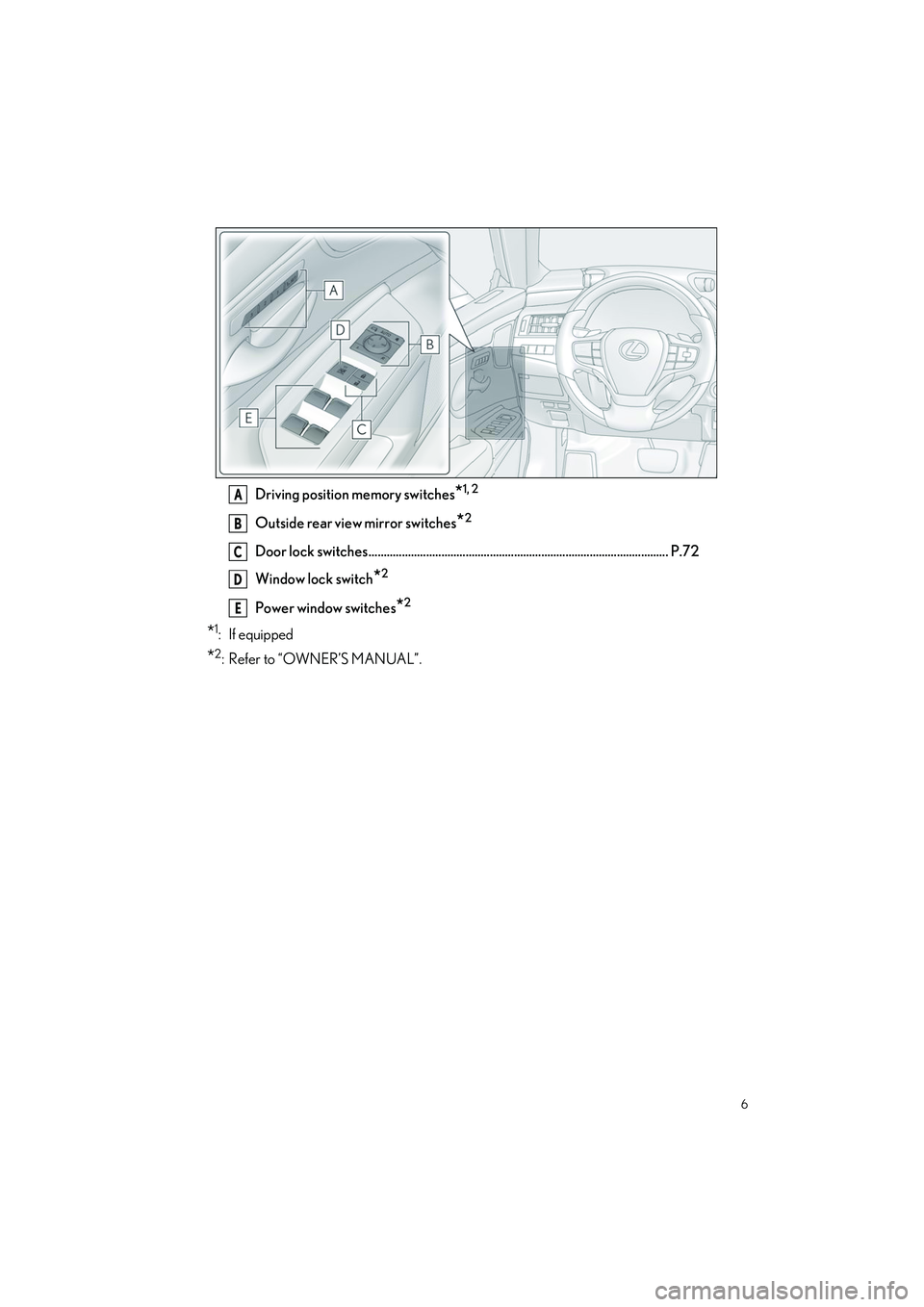
Driving position memory switches*1, 2
Outside rear view mirror switches*2
Door lock switches ................................................................................................... P.72
Window lock switch
*2
Power window switches*2
*1: If equipped
*2: Refer to “OWNER’S MANUAL”.
A
B
C
D
E
Page 14 of 84
13
ES350_ES250_QG_OM06255U_(U)
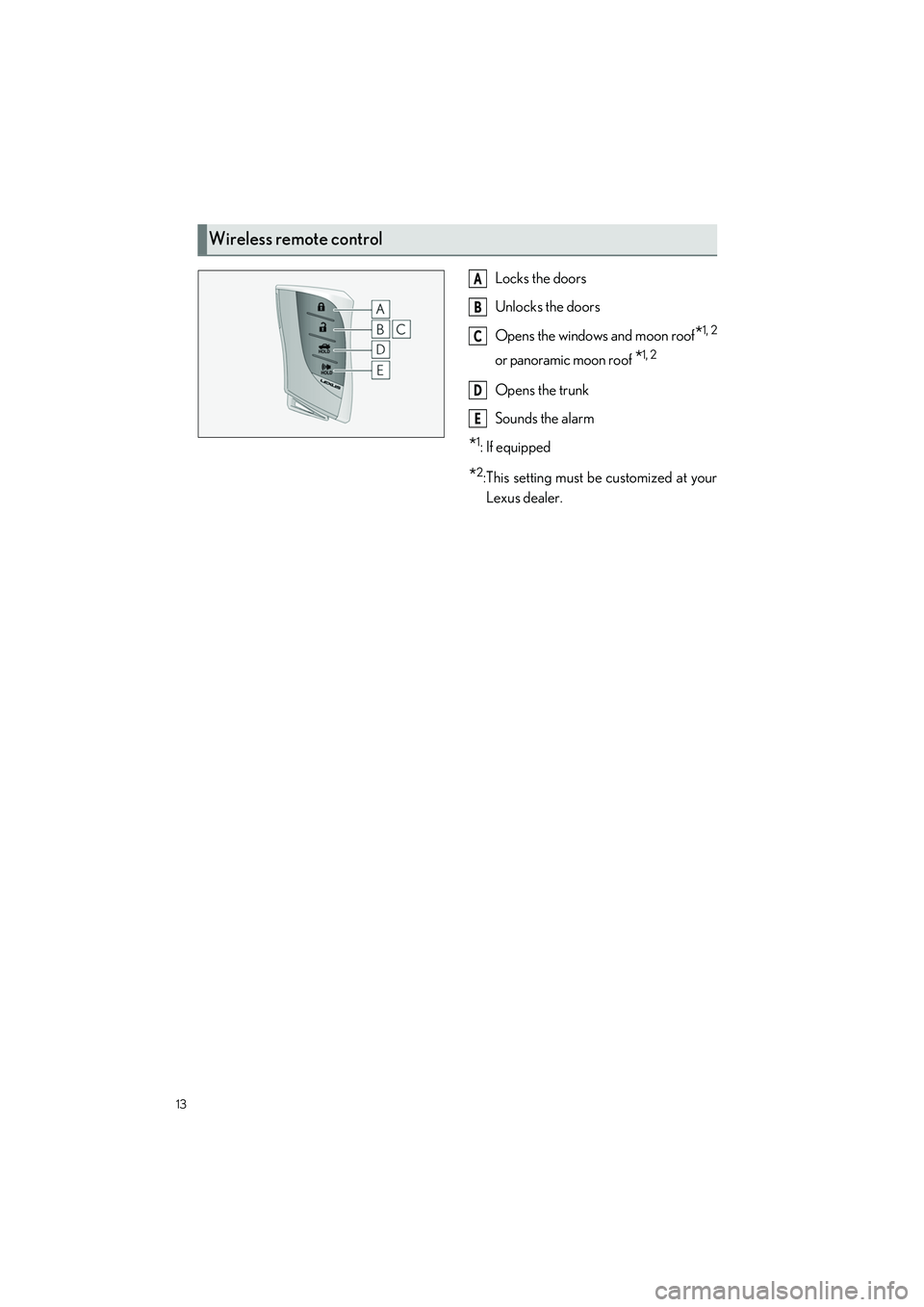
Locks the doors
Unlocks the doors
Opens the windows and moon roof
*1, 2
or panoramic moon roof *1, 2
Opens the trunk
Sounds the alarm
*1: If equipped
*2:This setting must be customized at yourLexus dealer.
Wireless remote control
A
B
C
D
E
Page 15 of 84
14
ES350_ES250_QG_OM06255U_(U)
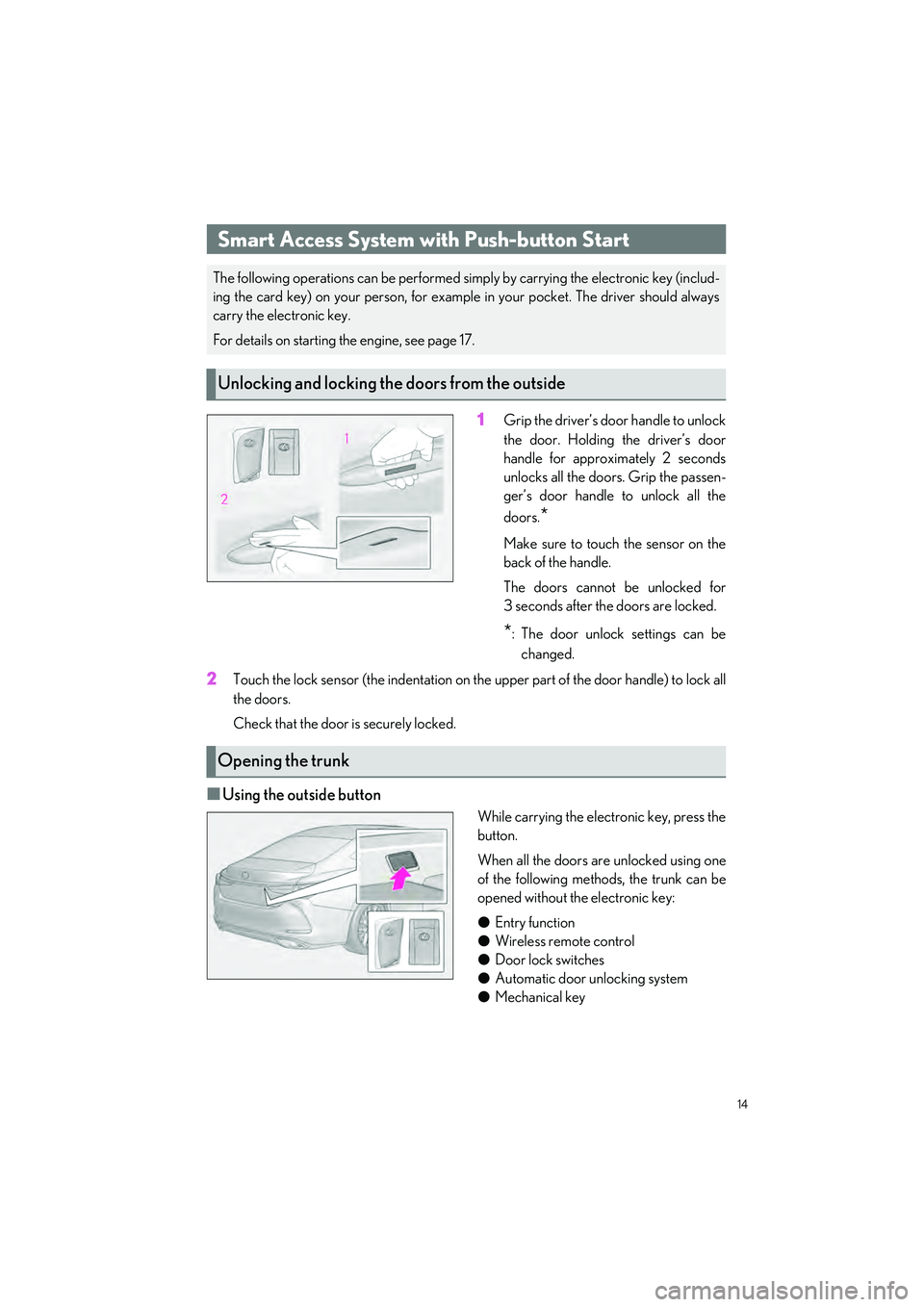
1Grip the driver’s door handle to unlock
the door. Holding the driver’s door
handle for approximately 2 seconds
unlocks all the doors. Grip the passen-
ger’s door handle to unlock all the
doors.
*
Make sure to touch the sensor on the
back of the handle.
The doors cannot be unlocked for
3 seconds after the doors are locked.
*: The door unlock settings can bechanged.
2Touch the lock sensor (the indentation on the upper part of the door handle) to lock all
the doors.
Check that the door is securely locked.
QUsing the outside button
While carrying the electronic key, press the
button.
When all the doors are unlocked using one
of the following methods, the trunk can be
opened without the electronic key:
O Entry function
O Wireless remote control
O Door lock switches
O Automatic door unlocking system
O Mechanical key
Smart Access System with Push-button Start
The following operations can be performed simply by carrying the electronic key (includ-
ing the card key) on your person, for example in your pocket. The driver should always
carry the electronic key.
For details on starting the engine, see page 17.
Unlocking and locking the doors from the outside
Opening the trunk
Page 64 of 84

63
ES350_ES250_QG_OM06255U_(U)
The HomeLink® wireless control system in your vehicle has 3 buttons which can be pro-
grammed to operate 3 different devices. Refer to the programming methods on the follow-
ing pages to determine the method which is appropriate for the device.
HomeLink
® indicator light
Garage door operation indicators
HomeLink
® icon
Illuminates while HomeLink
® is oper-
ating.
Buttons
QBefore programming HomeLink®
O During programming, it is possible that garage doors, gates, or other devices may oper-
ate. For this reason, make sure that people and objects are clear of the garage door or
other devices to prevent inju ry or other potential harm.
O It is recommended that a new battery be placed in the remote control transmitter for
more accurate programming.
O Garage door opener motors manufactured after 1995 may be equipped with rolling
code protection. If this is the case, you may need a stepladder or other sturdy, safe device
to reach the “Learn” or “Smart” button on the garage door opener motor.
Garage Door Opener
The garage door opener can be programmed using the HomeLink® to operate garage
doors, gates, entry doors, door locks, home lighting systems, security systems, and other
devices.
System components
A
B
C
D
Page 73 of 84
72
ES350_ES250_QG_OM06255U_(U)
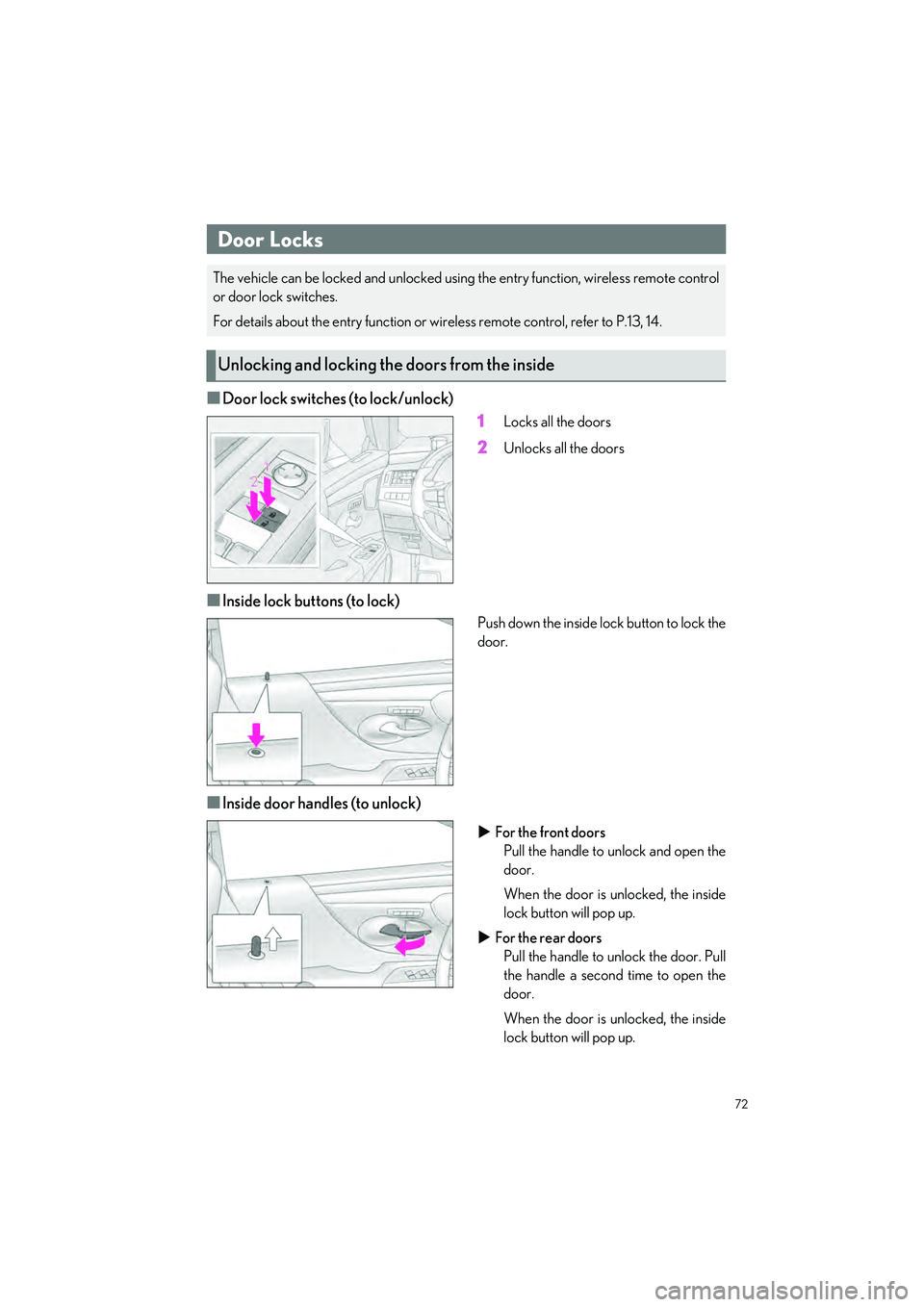
QDoor lock switches (to lock/unlock)1
Locks all the doors
2Unlocks all the doors
QInside lock buttons (to lock)
Push down the inside lock button to lock the
door.
QInside door handles (to unlock)
For the front doors
Pull the handle to unlock and open the
door.
When the door is unlocked, the inside
lock button will pop up.
For the rear doors
Pull the handle to unlock the door. Pull
the handle a second time to open the
door.
When the door is unlocked, the inside
lock button will pop up.
Door Locks
The vehicle can be locked and unlocked using the entry function, wireless remote control
or door lock switches.
For details about the entry function or wi reless remote control, refer to P.13, 14.
Unlocking and locking the doors from the inside
Page 80 of 84
What to do if...
79
ES350_ES250_QG_OM06255U_(U)
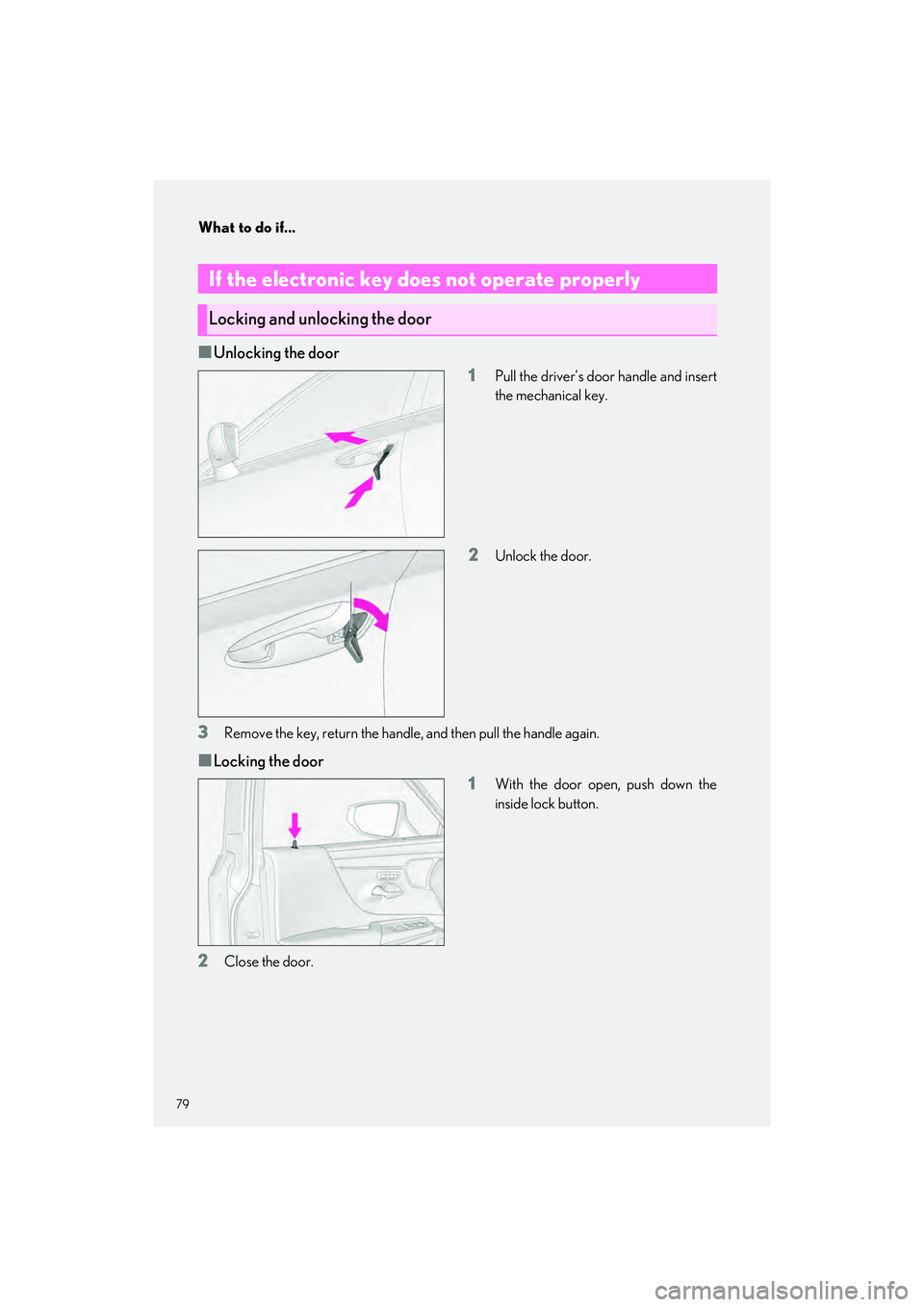
QUnlocking the door1
Pull the driver’s door handle and insert
the mechanical key.
2Unlock the door.
3Remove the key, return the handle, and then pull the handle again.
QLocking the door1
With the door open, push down the
inside lock button.
2Close the door.
If the electronic key does not operate properly
Locking and unlocking the door