sport mode Lexus GS F 2015 s User Guide
[x] Cancel search | Manufacturer: LEXUS, Model Year: 2015, Model line: GS F, Model: Lexus GS F 2015Pages: 668, PDF Size: 177.56 MB
Page 124 of 668
1242. Instrument cluster
GS350_200t_GS F_OM_OM30E87E_(EE)
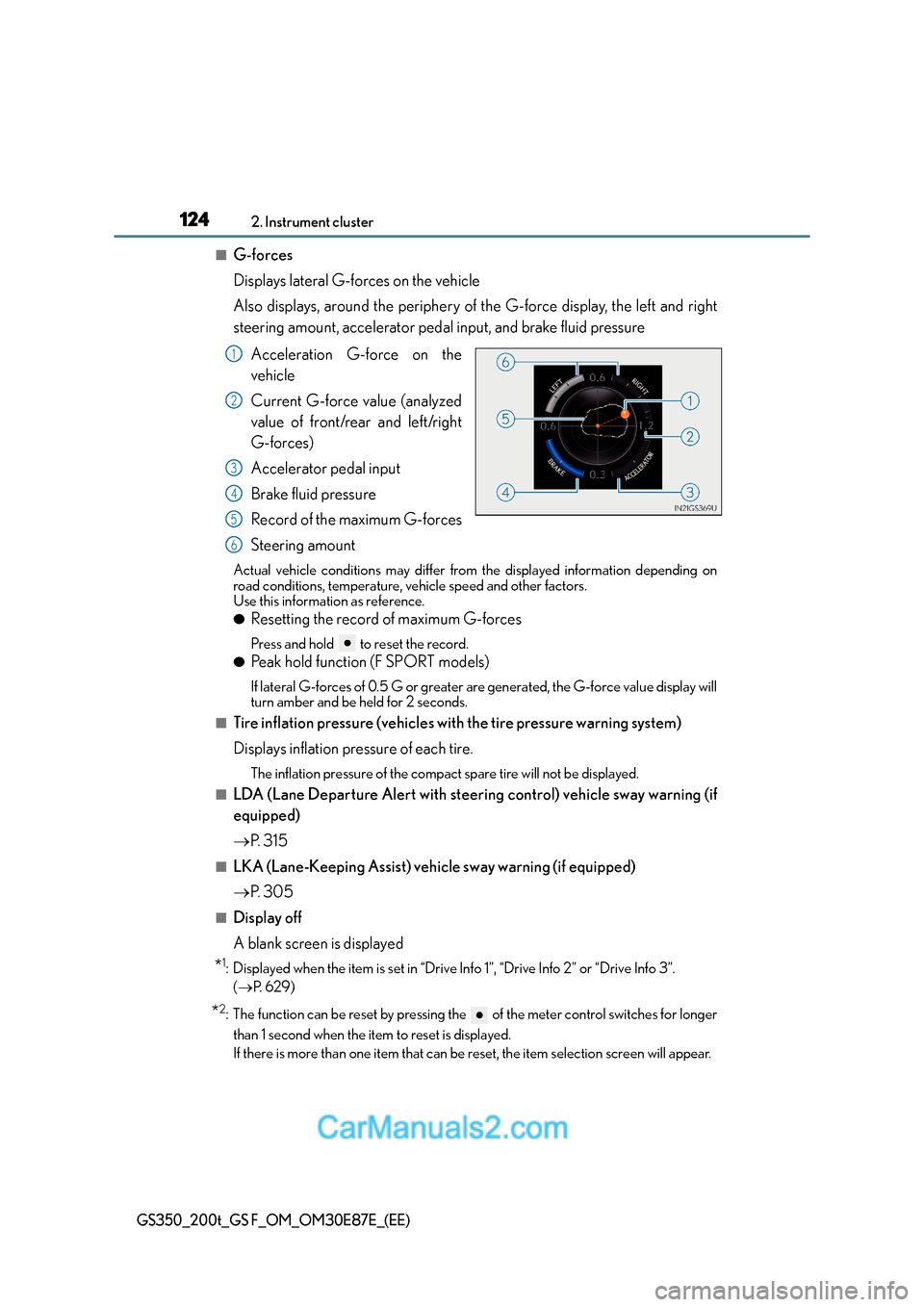
■G-forces
Displays lateral G-forces on the vehicle
Also displays, around the periphery of the G-force display, the left and right
steering amount, accelerator pedal input, and brake fluid pressureAcceleration G-force on the
vehicle
Current G-force value (analyzed
value of front/rear and left/right
G-forces)
Accelerator pedal input
Brake fluid pressure
Record of the maximum G-forces
Steering amount
Actual vehicle conditions may differ from the displayed information depending on
road conditions, temperature, vehicle speed and other factors.
Use this information as reference.
●Resetting the record of maximum G-forces
Press and hold to reset the record.
●Peak hold function (F SPORT models)
If lateral G-forces of 0.5 G or greater are generated, the G-force value display will
turn amber and be held for 2 seconds.
■Tire inflation pressure (vehicles with the tire pressure warning system)
Displays inflation pressure of each tire.
The inflation pressure of the compact spare tire will not be displayed.
■LDA (Lane Departure Alert with steering control) vehicle sway warning (if
equipped)
→P. 3 1 5
■LKA (Lane-Keeping Assist) vehi cle sway warning (if equipped)
→ P. 3 0 5
■Display off
A blank screen is displayed
*1: Displayed when the item is set in “Drive In fo 1”, “Drive Info 2” or “Drive Info 3”.
( → P. 6 2 9 )
*2: The function can be reset by pressing the of the meter control switches for longer
than 1 second when the item to reset is displayed.
If there is more than one item that can be reset, the item selection screen will appear.
1
2
3
4
5
6
Page 126 of 668
1262. Instrument cluster
GS350_200t_GS F_OM_OM30E87E_(EE)
■●
Language
Select to change the language on the display.
●Units
Select to change the unit of measure
●Eco Driving Indicator Light
Select to activate/deactivate the Eco Driving Indicator Light
● switch
Displays a procedure to register a desired screen to .
You can register 1 screen as a shortcut, which can be displayed by pressing .
●Drive information 1 /2 /3
Select to select up to 2 items that will be displayed on a Drive information screen,
up to 3 Drive information screens can be set.
●Po p - u p d i s p l a y
Select to set the following pop-up displa ys, which may appear in some situations,
on/off. • Route guidance of the navigation system-linked display (if equipped)
• Incoming call display of the hands-free phone system
• Instrument panel brightness adjustment display
●Accent color (except F SPORT models)
Select to change the accent colors on the screen, such as the cursor color.
●Needle (F SPORT models)
Select to change the needle color for the tachometer.
●Rev indicator (F SPORT models)
Select to set the rev indicator on/off.
When set to on, proceed to set the engine speed at which the rev indicator will be
displayed.
Selectable engine speed range:
GS350: 2000 r/min. to 6800 r/min.
GS200t: 2000 r/min. to 6100 r/min.
●Rev peak (F SPORT models)
Select to set the rev peak on/off.
●Default settings
Registered or changed meter settings will be deleted or returned to their default
setting.
Page 138 of 668
1382. Instrument cluster
GS350_200t_GS F_OM_OM30E87E_(EE)
● switch
Displays a procedure to register a desired screen to .
You can register 1 screen as a shortcut, which can be displayed by pressing .
●Drive information 1 /2 /3
Select to select up to 2 items that will be displayed on a Drive information screen,
up to 3 Drive information screens can be set.
●Po p - u p d i s p l a y
Select to set the following pop-up displa ys, which may appear in some situations,
on/off. • Route guidance of the navigation system-linked display (if equipped)
• Incoming call display of the hands-free phone system
• Instrument panel brightness adjustment display
• TVD control mode change display (if equipped)
●Rev indicator
Select to set the rev indicator on/off.
When set to on, proceed to set the engine speed at which the rev indicator will be
displayed.
●Rev peak
Select to set the rev peak on/off.
●SPORT gauges
The SPORT S or SPORT S+ mode meter display can be selected and set as the
customized display for either SPORT S or SPORT S+ mode.
●Default settings
Registered or changed meter settings will be deleted or returned to their default
setting.
Page 143 of 668
1432. Instrument cluster
2
Instrument cluster
GS350_200t_GS F_OM_OM30E87E_(EE)
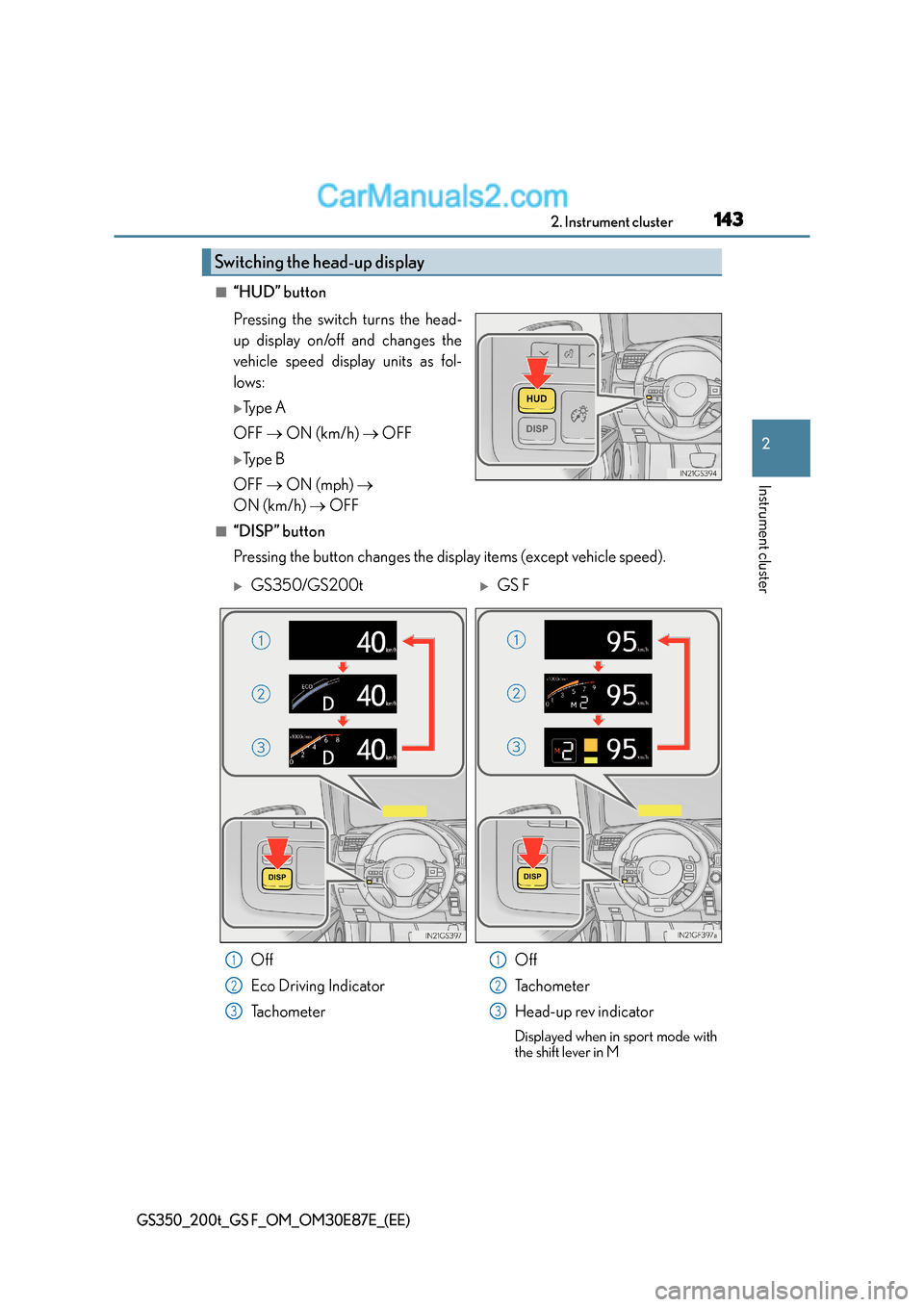
■“HUD” button
Pressing the switch turns the head-
up display on/off and changes the
vehicle speed display units as fol-
lows:
XTy p e A
OFF → ON (km/h) → OFF
XTy p e B
OFF → ON (mph) →
ON (km/h) → OFF
■“DISP” button
Pressing the button changes the display items (except vehicle speed).
Switching the head-up display
XGS350/GS200tXGS F
Off
Eco Driving Indicator
Tachometer Off
Tachometer
Head-up rev indicator
Displayed when in sport mode with
the shift lever in M
1
2
3
1
2
3
Page 145 of 668
1452. Instrument cluster
2
Instrument cluster
GS350_200t_GS F_OM_OM30E87E_(EE)
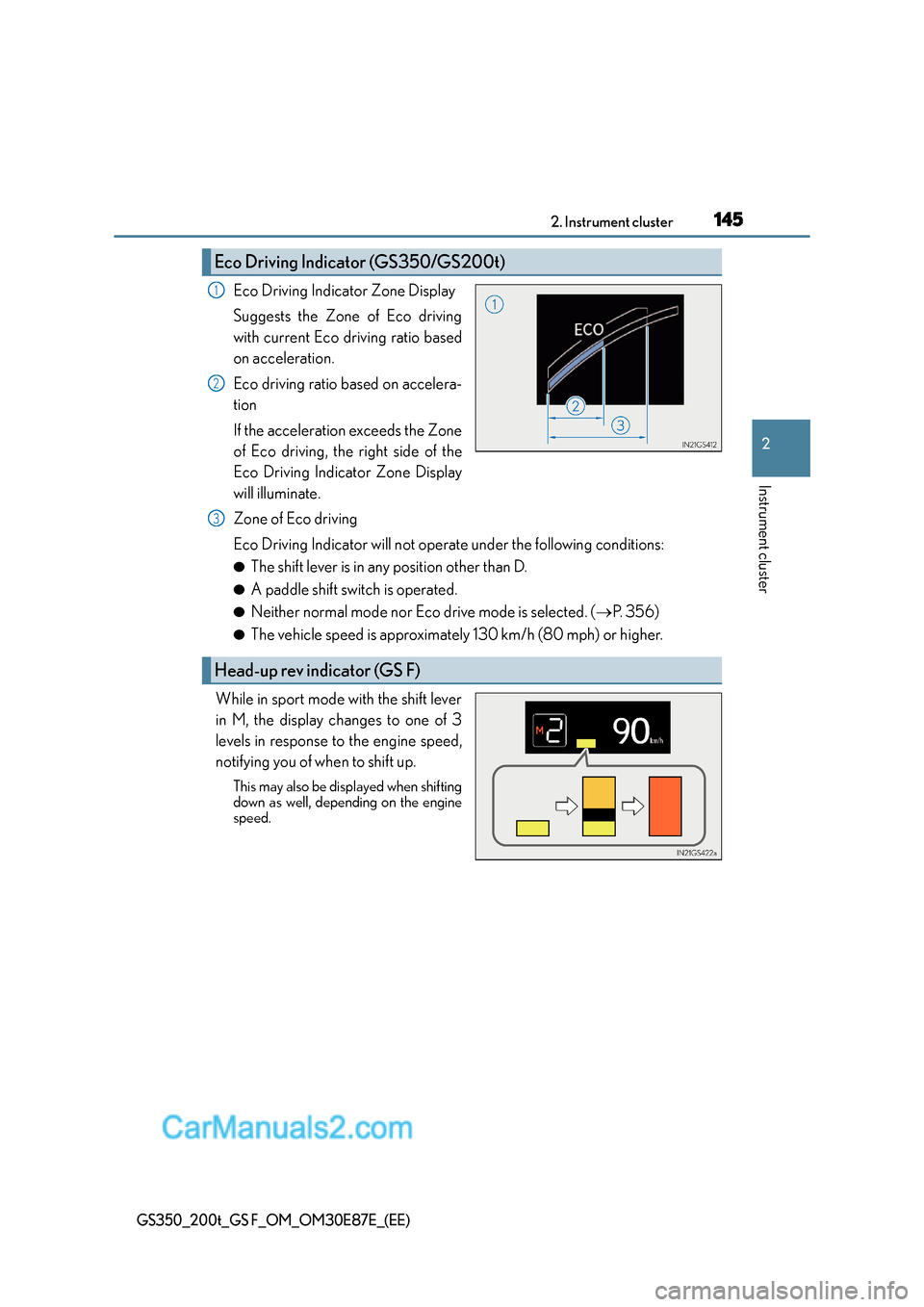
Eco Driving Indicator Zone Display
Suggests the Zone of Eco driving
with current Eco driving ratio based
on acceleration.
Eco driving ratio based on accelera-
tion
If the acceleration exceeds the Zone
of Eco driving, the right side of the
Eco Driving Indicator Zone Display
will illuminate.
Zone of Eco driving
Eco Driving Indicator will not operate under the following conditions:
●The shift lever is in any position other than D.
●A paddle shift switch is operated.
●Neither normal mode nor Eco drive mode is selected. (→P. 3 5 6 )
●The vehicle speed is approximately 130 km/h (80 mph) or higher.
While in sport mode with the shift lever
in M, the display changes to one of 3
levels in response to the engine speed,
notifying you of when to shift up.
This may also be displayed when shifting
down as well, depending on the engine
speed.
Eco Driving Indicator (GS350/GS200t)
1
2
Head-up rev indicator (GS F)
3
Page 223 of 668
2234-1. Before driving
4
Driving
GS350_200t_GS F_OM_OM30E87E_(EE)
■When starting off on a uphill
The hill-start assist control is available. (→P. 3 7 5 )
■Driving in the rain
●Drive carefully when it is raining, becaus e visibility will be reduced, the windows may
become fogged-up, and the road will be slippery.
●Drive carefully when it starts to rain, beca use the road surface will be especially slip-
pery.
●Refrain from high speeds when driving on an expressway in the rain, because there may
be a layer of water between the tires and the road surface, preventing the steering and
brakes from operating properly.
■Engine speed while driving
In the following conditions, the engine speed may become high while driving. This is due
to automatic up-shifting control or down-shi fting implementation to meet driving condi-
tions. It does not indicate sudden acceleration.
●The vehicle is judged to be driving uphill or downhill
●When the accelerator pedal is released
●When the brake pedal is depressed while sport mode is selected (→P. 3 5 6 )
■Restraining engine output (Brake Override System)
●When the accelerator and brake pedals are depressed at the same time, the engine
output may be restrained.
●A warning message is displayed on the mult i-information display while the system is
operating. ( →P. 5 4 0 )
■Restraining sudden start (Drive-Start Control)
●When the following unusual operation is performed, the engine output may be
restrained.
• When the shift lever is shifted from R to D, D to R, N to R, P to D, or P to R (D
includes M) with the accelerator pedal depressed, a warning message appears on
the multi-information display. ( →P. 5 2 4 )
• When the accelerator pedal is depressed too much while the vehicle is in reverse.
●While Drive-Start Control is being activated, your vehicle may have trouble escaping
from the mud or fresh snow. In such case, deactivate TRC ( →P. 376) to cancel Drive-
Start Control so that the vehicle may become able to escape from the mud or fresh
snow.
Page 246 of 668
2464-2. Driving procedures
GS350_200t_GS F_OM_OM30E87E_(EE)
■Sport mode/Eco drive mode
→P. 3 5 6
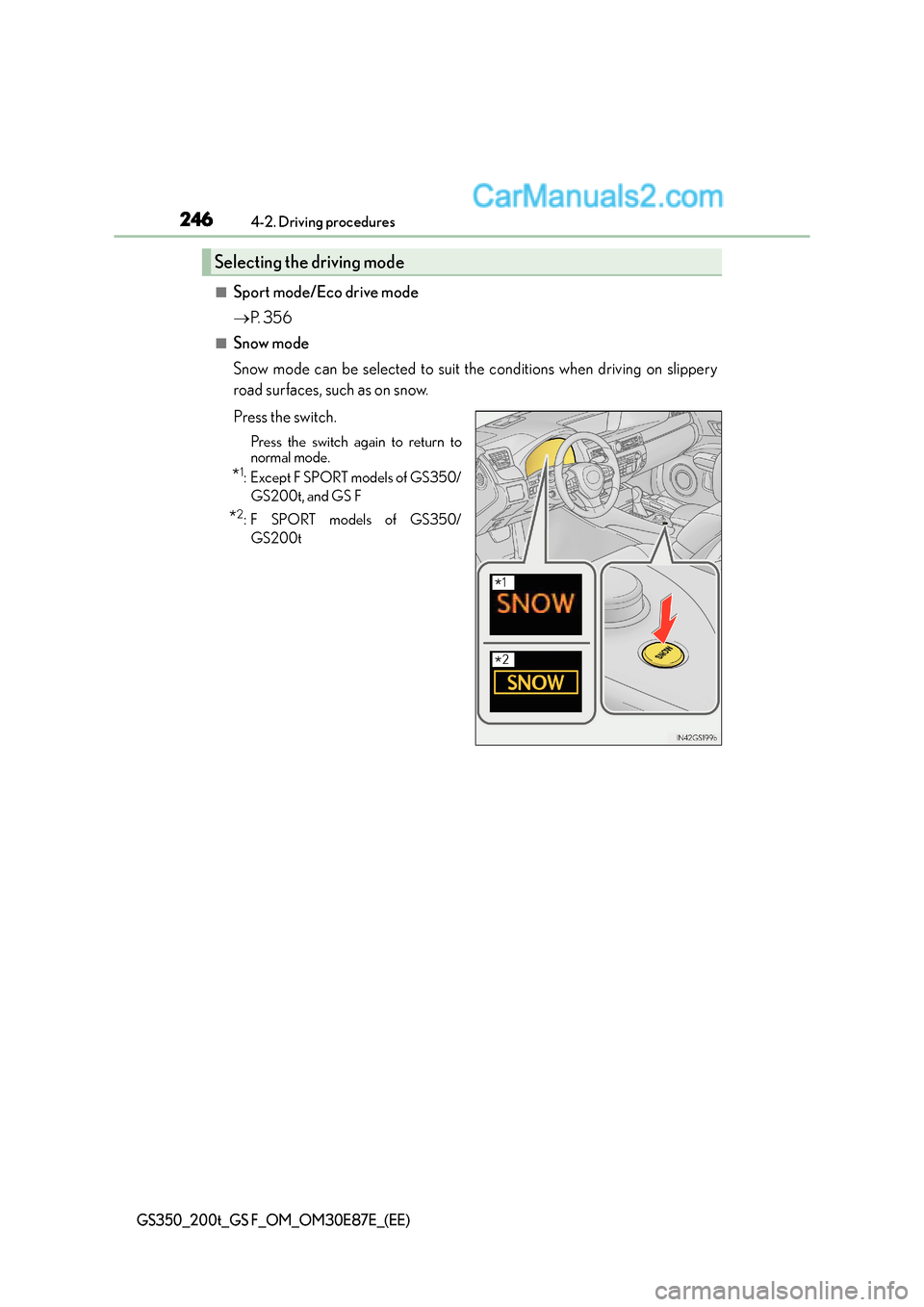
■Snow mode
Snow mode can be selected to suit the conditions when driving on slippery
road surfaces, such as on snow.
Press the switch.
Press the switch again to return to
normal mode.
*1:Except F SPORT models of GS350/
GS200t, and GS F
*2:F SPORT models of GS350/GS200t
Selecting the driving mode
*1
*2
Page 251 of 668
2514-2. Driving procedures
4
Driving
GS350_200t_GS F_OM_OM30E87E_(EE)
■Automatic deactivation of shift range selection in the D position
Shift range selection in the D position will be deactivated in the following situations:
●When the vehicle comes to a stop
●If the accelerator pedal is depressed for more than a certain period of time
●When the shift lever is shifted to other than D
■To protect automatic transmission
When the temperature of the transmission fluid becomes high, protection control is per-
formed temporarily. When “Transmission Fluid Temp High See Owner’s Manual” is dis-
played on the multi-information display, ha ve the vehicle inspected by any authorized
Lexus dealer or repairer, or another duly qualified and equipped professional.
■Downshifting restrictions warning buzzer
To help ensure safety and driving performa nce, downshifting operation may sometimes
be restricted. In some circumstances, downsh ifting may not be possible even when the
shift lever or paddle shift switch is operated. (A buzzer will sound twice.)
■Snow mode automatic deactivation
Snow mode is automatically deactivated if the engine switch is turned off after driving in
snow mode.
■When driving with cruise control, dynamic radar cruise control or dynamic radar
cruise control with full-speed range activated
Even when performing the following actions with the intent of enabling engine braking,
engine braking will not activate because cruise control, dynamic radar cruise control or
dynamic radar cruise control with full-speed range will not be canceled.
●6-speed models: While driving in the D position, downshifting to 5 or 4.
( → P. 329, 341, 353)
●8-speed models: While driving in the D position, downshifting to 7, 6, 5 or 4.
(→ P. 329, 341, 353)
●When switching th e driving mode to sport mode while driving in D position. ( →P. 3 5 6 )
■Restraining sudden start (Drive-Start Control)
●When the following unusual operation is performed, the engine output may be
restrained.
• When the shift lever is shifted from R to D, D to R, N to R, P to D, or P to R (D
includes M) with the accelerator pedal depressed, a warning message appears on
the multi-information display. ( →P. 5 1 8 )
• When the accelerator pedal is depressed too much while the vehicle is in reverse.
■If the shift lever cannot be shifted from P
→ P. 5 8 5
Page 252 of 668
2524-2. Driving procedures
GS350_200t_GS F_OM_OM30E87E_(EE)
■AI-SHIFT
●The AI-SHIFT automatically selects the suitable gear according to driver performance
and driving conditions.
The AI-SHIFT automatically operates when the shift lever is in D. (Shifting the shift
lever to the M position cancels the function.)
●8-speed models: G AI-SHIFT automatically selects a suitable gear for sporty driving
according to driver’s input and driving co nditions. G AI-SHIFT operates automatically
when the shift lever is in D and sport mode is selected for the driving mode. (Selecting
normal mode with the driving mode select switch or shifting the shift lever to the M
position cancels this function.)
WA R N I N G
■When driving on slippery road surfaces
Be careful of downshifting and sudden acceler ation, as this could result in the vehicle
skidding to the side or spinning.
■Gear Shift Indicator display
For safety, the driver should not look only at the display. Refer to the display when it is
safe to do so while considering actual traffic and road conditions.
Failure to do so may lead to an accident.
Page 259 of 668
259
4
4-2. Driving procedures
Driving
GS350_200t_GS F_OM_OM30E87E_(EE)
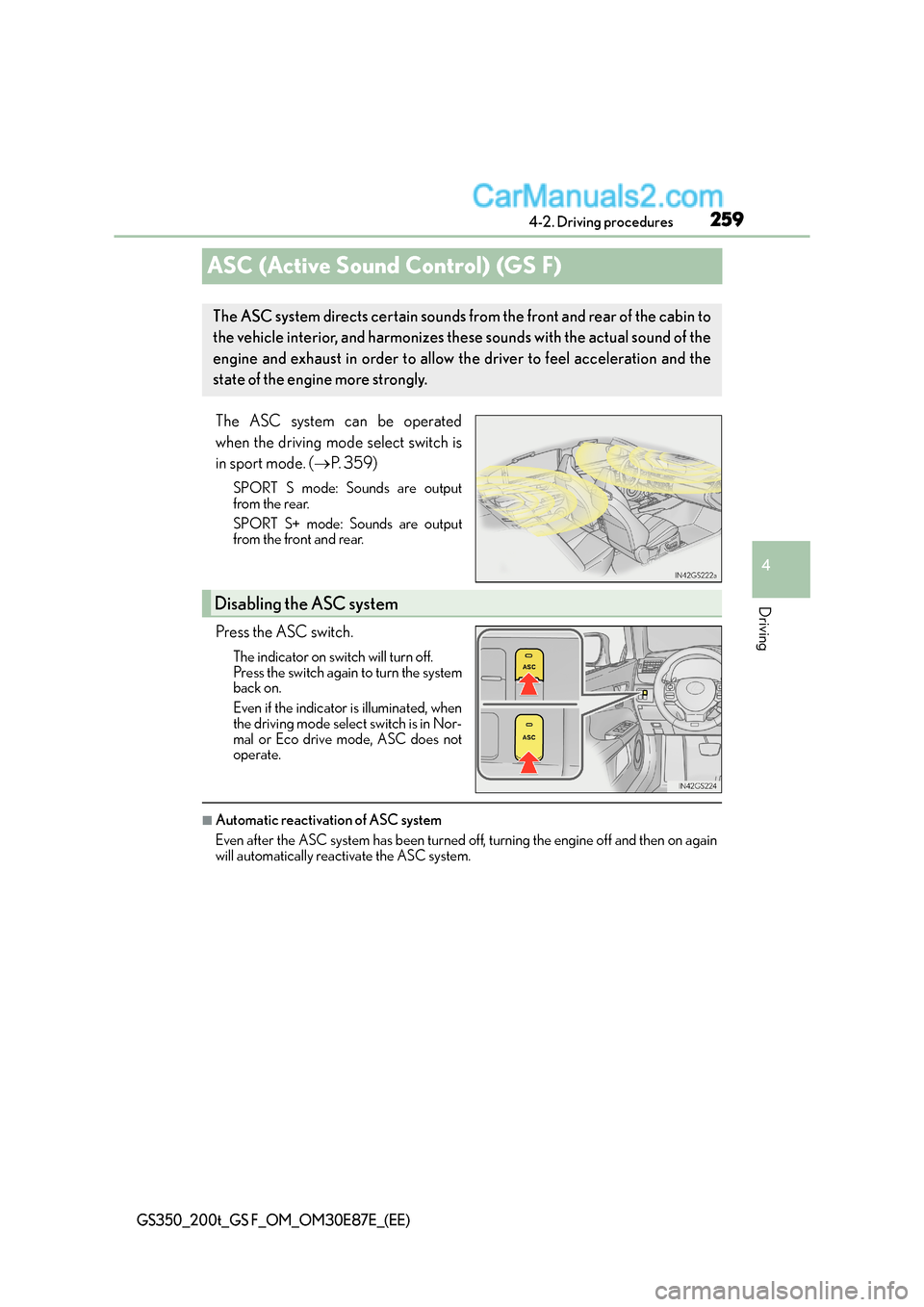
ASC (Active Sound Control) (GS F)
The ASC system can be operated
when the driving mode select switch is
in sport mode. (
→P. 3 5 9 )
SPORT S mode: Sounds are output
from the rear.
SPORT S+ mode: Sounds are output
from the front and rear.
Press the ASC switch.
The indicator on switch will turn off.
Press the switch again to turn the system
back on.
Even if the indicator is illuminated, when
the driving mode select switch is in Nor-
mal or Eco drive mode, ASC does not
operate.
■Automatic reactivation of ASC system
Even after the ASC system has been turned off, turning the engine off and then on again
will automatically reactivate the ASC system.
The ASC system directs certain sounds from the front and rear of the cabin to
the vehicle interior, and harmonizes these sounds with the actual sound of the
engine and exhaust in order to allow th e driver to feel acceleration and the
state of the engine more strongly.
Disabling the ASC system