Trunk Lexus GS F 2017 User Guide
[x] Cancel search | Manufacturer: LEXUS, Model Year: 2017, Model line: GS F, Model: Lexus GS F 2017Pages: 676, PDF Size: 67.73 MB
Page 153 of 676
153
3
Operation of
each component
GS350_200t_GS F_OM_OM30F83E_(EE)
3-1. Key information Keys .................................................. 154
3-2. Opening, closing and locking the doors and trunk
Doors ............................................... 159
Trunk .................................................166
Smart entry & start system .......173
3-3. Adjusting the seats Front seats...................................... 196
Driving position memory ......... 199
Head restraints ........................... 204
3-4. Adjusting the steering wheel and mirrors
Steering wheel ............................ 207
Inside rear view mirror ............209
Outside rear view mirrors......... 211
3-5. Opening, closing the windows and moon roof
Power windows ............................214
Moon roof ....................................... 217
Page 156 of 676
1563-1. Key information
GS350_200t_GS F_OM_OM30F83E_(EE)
■When required to leave the vehicl e’s key with a parking attendant
Turn the trunk opener main switch off, lock the glove box and armrest door as circum-
stances demand. ( P. 168, 420, 433)
Remove the mechanical key for your own use and provide the attendant with the elec-
tronic key only.
■If you lose your mechanical keys
New genuine mechanical keys can be made by any authorized Lexus retailer or Lexus
authorized repairer, or any reliable repairer using the other mechanical key and the key
number stamped on your key number plate. K eep the plate in a safe place such as your
wallet, not in the vehicle.
■When riding in an aircraft
When bringing an electronic key onto an aircraft, make sure you do not press any but-
tons on the electronic key while inside the ai rcraft cabin. If you are carrying an electronic
key in your bag etc., ensure that the buttons are not likely to be pressed accidentally.
Pressing a button may cause the electronic key to emit radio waves that could interfere
with the operation of the aircraft.
■Electronic key battery depletion
●The standard battery life is 1 to 2 years. (The card key battery life is about a year and a
half.)
●If the battery becomes low, an alarm will sound in the cabin when the engine stops.
( P. 555)
●As the electronic key always receives ra dio waves, the battery will become depleted
even if the electronic key is not used. The following symptoms indicate that the elec-
tronic key battery may be depleted. Replace the battery when necessary. ( P. 491)
Page 159 of 676
159
3
3-2. Opening, closing and locking the doors and trunk
Operation of each component
GS350_200t_GS F_OM_OM30F83E_(EE)
Doors
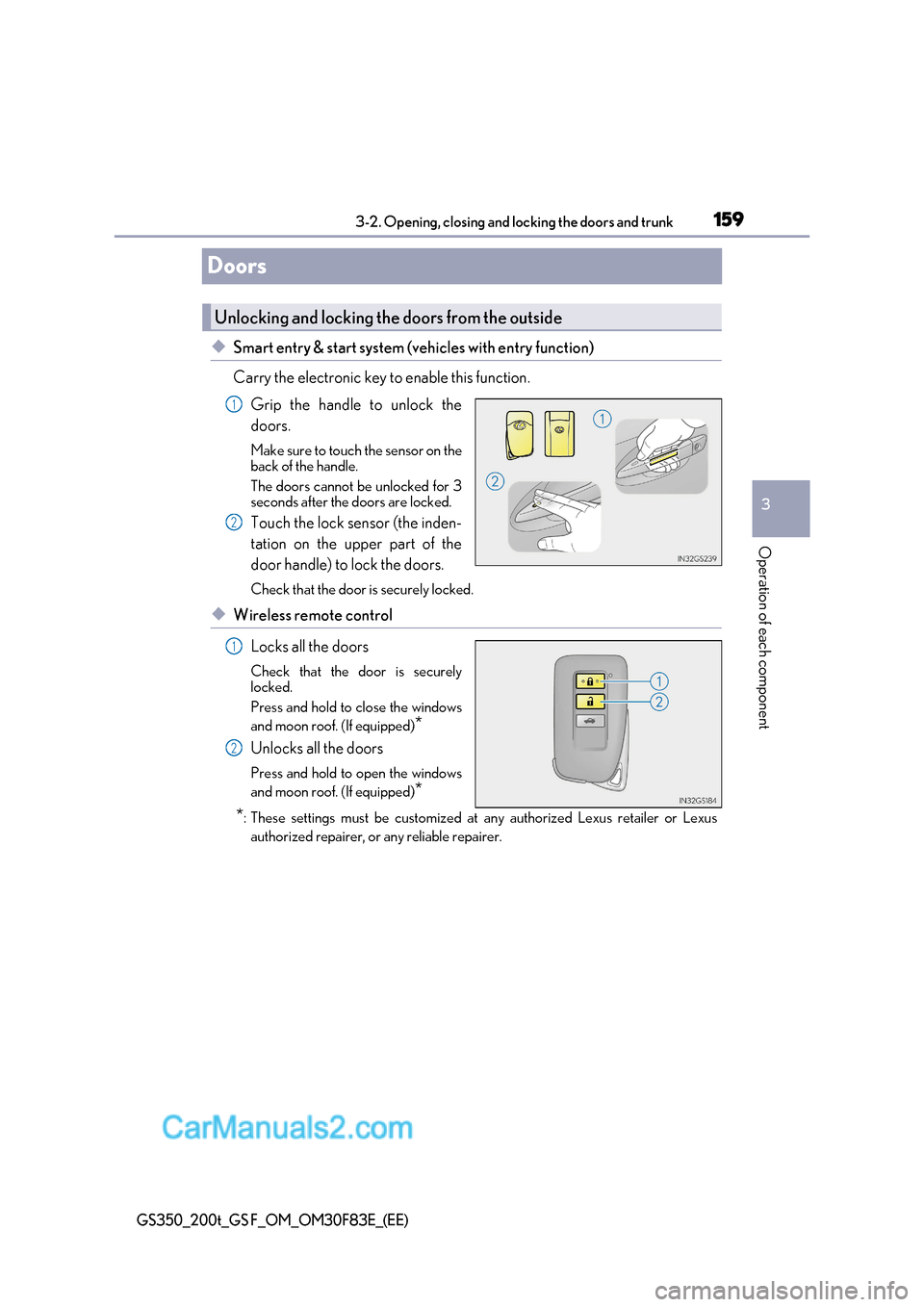
◆Smart entry & start system (vehicles with entry function)
Carry the electronic key to enable this function.Grip the handle to unlock the doors.
Make sure to touch the sensor on the
back of the handle.
The doors cannot be unlocked for 3
seconds after the doors are locked.
Touch the lock sensor (the inden-
tation on the upper part of the
door handle) to lock the doors.
Check that the door is securely locked.
◆Wireless remote control
Locks all the doors
Check that the door is securely
locked.
Press and hold to close the windows
and moon roof. (If equipped) *
Unlocks all the doors
Press and hold to open the windows
and moon roof. (If equipped) *
* : These settings must be customized at any authorized Lexus retailer or Lexus
authorized repairer, or any reliable repairer.
Unlocking and locking the doors from the outside
1
2
1
2
Page 160 of 676
1603-2. Opening, closing and locking the doors and trunk
GS350_200t_GS F_OM_OM30F83E_(EE)
■Operation signals
The emergency flashers flash to indicate that the doors have been locked/unlocked.
(Locked: once; Unlocked: twice)
■Security feature
If a door is not opened within approximately 30 seconds after the vehicle is unlocked, the
security feature automatically locks the vehicle again.
■Welcome light illumination control
The front position, tail and license plate lights automatically turn on at night when the
doors are unlocked using the entry function or wireless remote control if the light switch
is in the “AUTO” position.
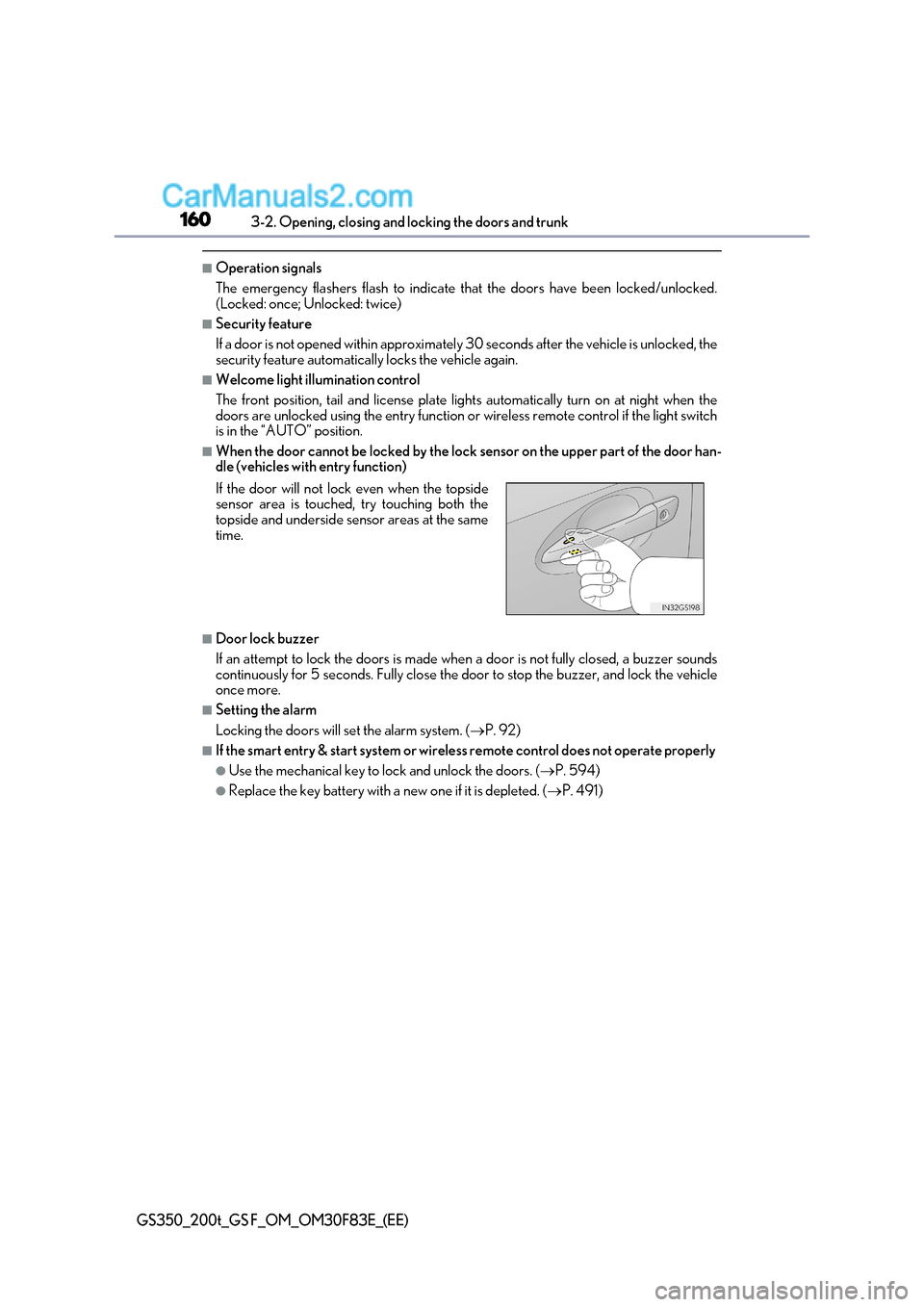
■When the door cannot be locked by the lock sensor on the upper part of the door han-
dle (vehicles with entry function)
■Door lock buzzer
If an attempt to lock the doors is made when a door is not fully closed, a buzzer sounds
continuously for 5 seconds. Fully close the door to stop the buzzer, and lock the vehicle once more.
■Setting the alarm
Locking the doors will set the alarm system. ( P. 92)
■If the smart entry & start system or wireless remote control does not operate properly
●Use the mechanical key to lock and unlock the doors. ( P. 594)
●Replace the key battery with a new one if it is depleted. (P. 491)
If the door will not lock even when the topside
sensor area is touched, try touching both the
topside and underside sensor areas at the same
time.
Page 161 of 676
161
3-2. Opening, closing and locking the doors and trunk
3
Operation of each component
GS350_200t_GS F_OM_OM30F83E_(EE)
WARNING
Observe the following precautions.
Failing to do so may result in death or serious injury.
■When using the wireless remote control and operating the power windows or moon
roof (if equipped)
Operate the power window or moon roof afte r checking to make sure that there is no
possibility of any passenger having any of their body parts caught in the window or
moon roof. Also, do not allow children to oper ate the wireless remote control. It is pos-
sible for children and other passengers to get caught in the power window or moon roof.
■Jam protection function
●Never try jamming any part of your body to activate the jam protection function
intentionally.
●The jam protection function may not work if something gets caught just before the
window or moon roof fully closes.
Page 162 of 676

1623-2. Opening, closing and locking the doors and trunk
GS350_200t_GS F_OM_OM30F83E_(EE)
◆Door lock switches
Locks all the doors
Unlocks all the doors
◆Inside lock buttonsLocks the door
Unlocks the door
The front doors can be opened by
pulling the inside ha ndle even if the
lock buttons are in the lock position.
Move the inside lock button to the lock position.
Close the door while pulling the door handle.
The door cannot be locked if the engine switch is in ACCESSORY or IGNITION
ON mode, or the electronic key is left insi de the vehicle. However, the key may not be
detected correctly and the door may be locked.
Unlocking and locking th e doors from the inside
1
2
1
2
Locking the front doors from the outside without a key
1
2
Page 163 of 676

163
3-2. Opening, closing and locking the doors and trunk
3
Operation of each component
GS350_200t_GS F_OM_OM30F83E_(EE)
The door cannot be opened from inside
the vehicle when the lock is set.
Unlock
Lock
These locks can be set to prevent chil-
dren from opening the rear doors. Push
down on each rear door switch to lock
both rear doors.
The following functions can be set or canceled: For instructions on customizing, refer to P. 634.
Rear door child-protector lock
1
2
Automatic door locking and unlocking systems
FunctionOperation
Speed linked door locking function
All doors are automatically locked when vehi-
cle speed is approximately 20 km/h (12 mph)
or higher.
Shift position linked door locking
functionAll doors are automatically locked when shift-
ing the shift lever to position other than P.
Shift position linked door unlocking
functionAll doors are automatically unlocked when
shifting the shift lever to P.
Driver’s door linked door unlocking
functionAll the doors are unlocked when the driver’s
door is opened within approximately 45 sec-
onds after turning the engine switch off.
Page 164 of 676
1643-2. Opening, closing and locking the doors and trunk
GS350_200t_GS F_OM_OM30F83E_(EE)
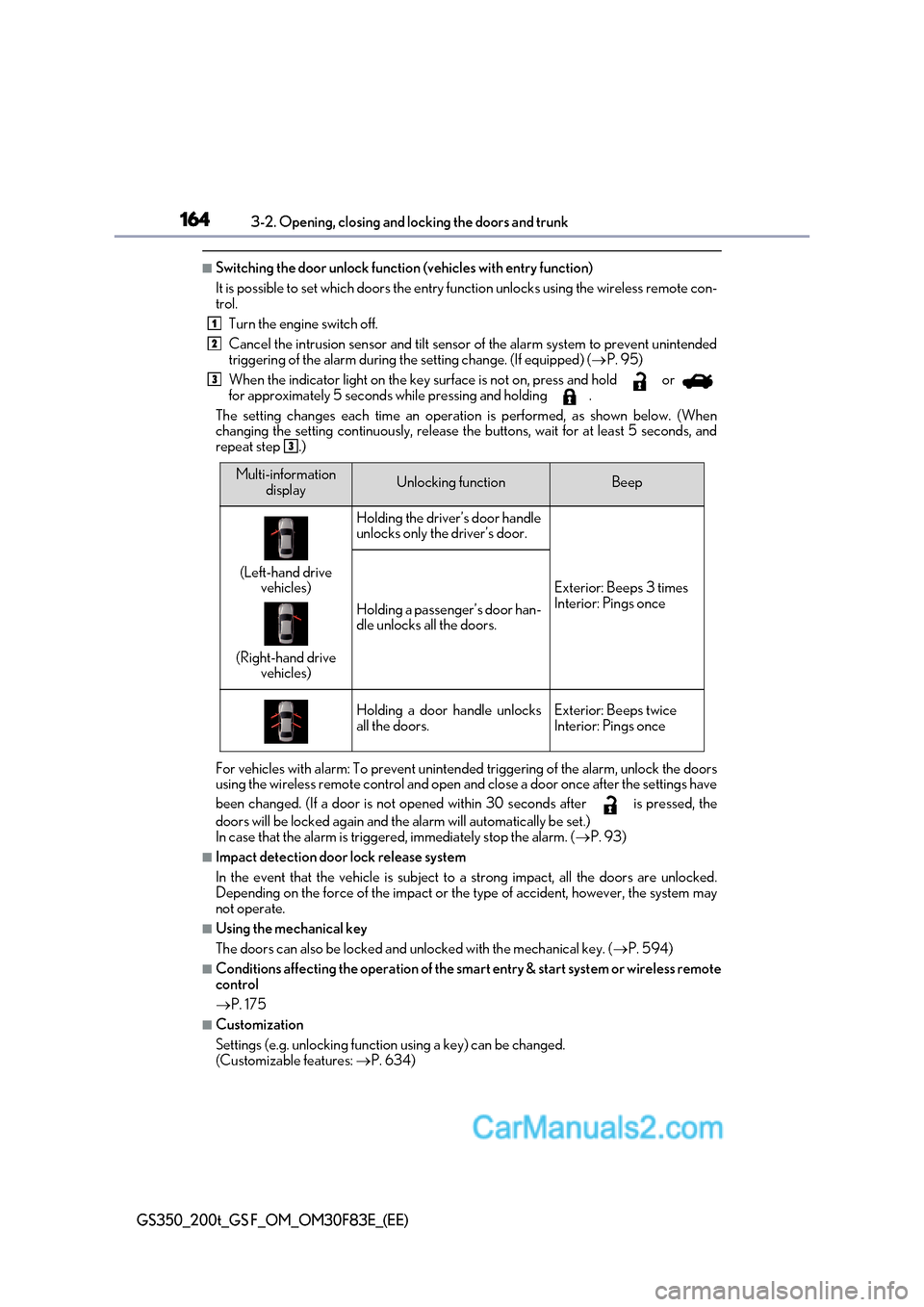
■Switching the door unlock function (vehicles with entry function)
It is possible to set which doors the entry fu nction unlocks using the wireless remote con-
trol.
Turn the engine switch off.
Cancel the intrusion sensor and tilt sensor of the alarm system to prevent unintended
triggering of the alarm during the setting change. (If equipped) ( P. 95)
When the indicator light on the key su rface is not on, press and hold or
for approximately 5 seconds while pressing and holding .
The setting changes each time an operatio n is performed, as shown below. (When
changing the setting continuously, release the buttons, wait for at least 5 seconds, and
repeat step .)
For vehicles with alarm: To prevent unintended triggering of the alarm, unlock the doors
using the wireless remote control and open and close a door once after the settings have
been changed. (If a door is not opened within 30 seconds after is pressed, the
doors will be locked again and the alarm will automatically be set.)
In case that the alarm is triggered, immediately stop the alarm. ( P. 93)
■Impact detection door lock release system
In the event that the vehicle is subject to a strong impact, all the doors are unlocked.
Depending on the force of the impact or the type of accident, however, the system may
not operate.
■Using the mechanical key
The doors can also be locked and unlocked with the mechanical key. ( P. 594)
■Conditions affecting the operation of the smart entry & start system or wireless remote
control P. 175
■Customization
Settings (e.g. unlocking function using a key) can be changed.
(Customizable features: P. 634)
1
2
3
3
Multi-information
displayUnlocking functionBeep
(Left-hand drive vehicles)
(Right-hand drive vehicles)
Holding the driver’s door handle
unlocks only the driver’s door.
Exterior: Beeps 3 times
Interior: Pings once
Holding a passenger’s door han-
dle unlocks all the doors.
Holding a door handle unlocks
all the doors.Exterior: Beeps twice
Interior: Pings once
Page 165 of 676

165
3-2. Opening, closing and locking the doors and trunk
3
Operation of each component
GS350_200t_GS F_OM_OM30F83E_(EE)
WARNING
■To prevent an accident
Observe the following precautions while driving the vehicle.
Failure to do so may result in a door openin g and an occupant throwing out of the vehi-
cle, resulting in death or serious injury.
●Ensure that all doors are properly closed.
●Do not pull the inside handle of the doors while driving.
Be especially careful for the front doors, as the doors may be opened even if the
inside lock buttons are in locked position.
●Set the rear door child-protector locks when children are seated in the rear seats.
Page 166 of 676
1663-2. Opening, closing and locking the doors and trunk
GS350_200t_GS F_OM_OM30F83E_(EE)
Trunk
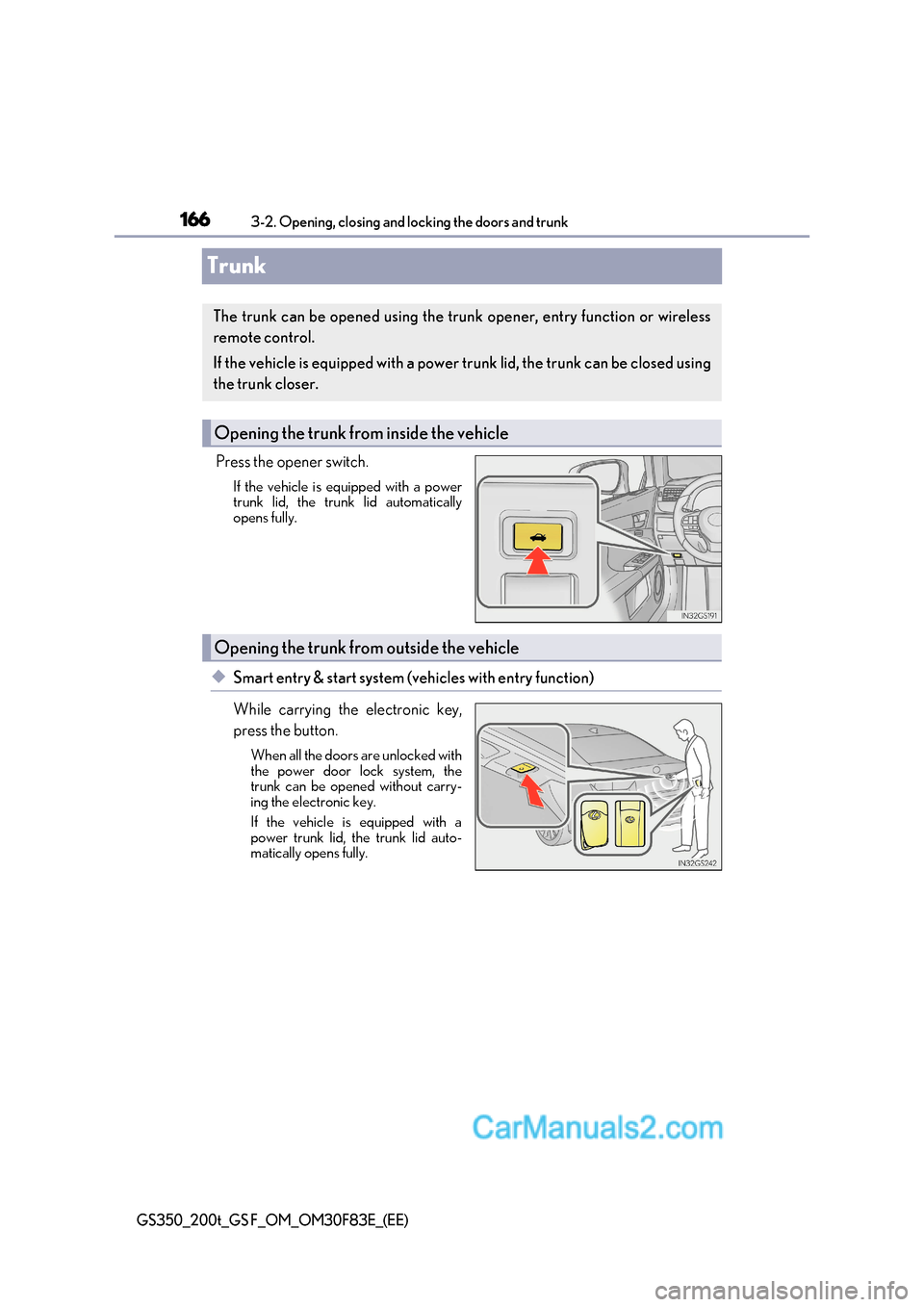
Press the opener switch.If the vehicle is equipped with a power
trunk lid, the trunk lid automatically
opens fully.
◆Smart entry & start system (vehicles with entry function)
While carrying the electronic key,
press the button.When all the doors are unlocked with
the power door lock system, the
trunk can be opened without carry-
ing the electronic key.
If the vehicle is equipped with a
power trunk lid, the trunk lid auto-
matically opens fully.
The trunk can be opened using the trun k opener, entry function or wireless
remote control.
If the vehicle is equipped with a power trunk lid, the trunk can be closed using
the trunk closer.
Opening the trunk from inside the vehicle
Opening the trunk from outside the vehicle