steering Lexus GS F 2017 User Guide
[x] Cancel search | Manufacturer: LEXUS, Model Year: 2017, Model line: GS F, Model: Lexus GS F 2017Pages: 676, PDF Size: 67.73 MB
Page 55 of 676
55
1-1. For safe use
1
For safety and security
GS350_200t_GS F_OM_OM30F83E_(EE)
WARNING
■SRS airbag precautions
●Do not hang coat hangers or other hard obje cts on the coat hooks. All of these items
could become projectiles and may cause deat h or serious injury, should the SRS cur-
tain shield airbags deploy.
●If a vinyl cover is put on the area where the SRS knee airbag will deploy, be sure to
remove it.
●Do not use seat accessories which cover the parts where the SRS side airbags inflate
as they may interfere with inflation of th e airbags. Such accessories may prevent the
side airbags from activating correctly, disable the system or cause the side airbags to
inflate accidentally, resulting in death or serious injury.
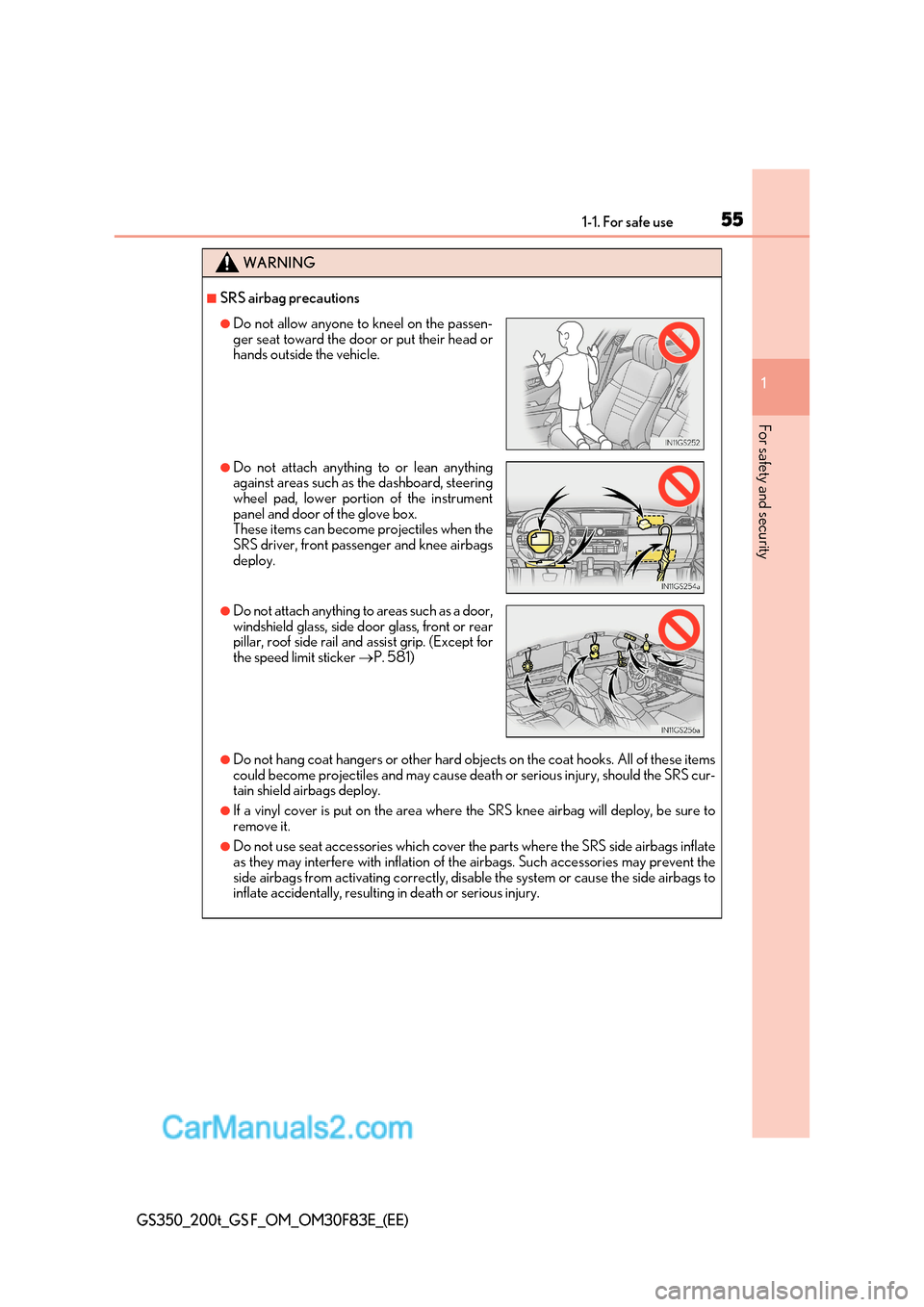
●Do not allow anyone to kneel on the passen-
ger seat toward the door or put their head or
hands outside the vehicle.
●Do not attach anything to or lean anything
against areas such as the dashboard, steering
wheel pad, lower portion of the instrument
panel and door of the glove box.
These items can become projectiles when the
SRS driver, front passenger and knee airbags deploy.
●Do not attach anything to areas such as a door,
windshield glass, side door glass, front or rear
pillar, roof side rail and assist grip. (Except for
the speed limit sticker P. 581)
Page 56 of 676
561-1. For safe use
GS350_200t_GS F_OM_OM30F83E_(EE)
WARNING
■SRS airbag precautions
●Do not strike or apply significant levels of force to the area of the SRS airbag compo-
nents.
Doing so can cause the SRS airbags to malfunction.
●Do not touch any of the component parts immediately after the SRS airbags have
deployed (inflated) as they may be hot.
●If breathing becomes difficult after the SRS airbags have deployed, open a door or
window to allow fresh air in, or leave the vehicle if it is safe to do so. Wash off any resi-
due as soon as possible to prevent skin irritation.
●If the areas where the SRS airbags are stored, such as the steering wheel pad, door of
the glove box and front and rear pillar garnishes are damaged or cracked, have them
replaced by any authorized Lexus retailer or Lexus authorized repairer, or any reli-
able repairer.
■Modification and disposal of SRS airbag system components
Do not dispose of your vehicle or perform any of the following modifications without
consulting any authorized Lexus retailer or Lexus authorized repairer, or any reliable
repairer. The SRS airbags may malfunction or deploy (inflate) accidentally, causing
death or serious injury.
●Installation, removal, disassembly and repair of the SRS airbags
●Repairs, modifications, removal or repl acement of the steering wheel, instrument
panel, dashboard, glove box, seats or seat upholstery, front, side and rear pillars or
roof side rails
●Repairs or modifications of the front fender, front bumper, or side of the occupant
compartment
●Installation of a grille guard (bull bars, kangaroo bar, etc.), snow plows or winches
●Modifications to the vehicle’s suspension system
●Installation of electronic devices such as mobile two-way radios (RF-transmitter) and
CD players
●Modifications to your vehicle for a person with a physical disability
Page 57 of 676
57
1-1. For safe use
1
For safety and security
GS350_200t_GS F_OM_OM30F83E_(EE)
■If the SRS airbags deploy (inflate)
●Slight abrasions, burns, bruising etc., may be sustained from SRS airbags, due to the
extremely high speed deployment (inflation) by hot gases.
●A loud noise and white powder will be emitted.
●Parts of the airbag module (steering wheel hub, airbag cover and inflator) as well as the
seats, the glove box, parts of the front and rear pillars, and roof side rails may be hot for
several minutes. The airbag itself may also be hot.
●The windshield may crack.
●Vehicles with ERA-GLONASS: If the SRS ai rbags deploy, the system is designed to
send an emergency call * to the Public Safety Answer ing Point (PSAP), notifying them
of the vehicle’s location (without needing to push the “SOS” button) and an agent will
attempt to speak with the occupants to ascertain the level of emergency and assistance
required. If the occupants are unable to communicate, the agent automatically treats
the call as an emergency and helps to di spatch the necessary emergency services.
( P. 435)
* : In some cases, the call cannot be made. ( P. 437)
■SRS airbag deployment conditions (SRS front airbags)
●The SRS front airbags will deploy in the event of an impact that exceeds the set thresh-
old level (the level of force corresponding to an approximately 20 - 30 km/h [12 - 18
mph] frontal collision with a fixed wall that does not move or deform).
However, this threshold velocity will be cons iderably higher in the following situations:
Page 59 of 676
59
1-1. For safe use
1
For safety and security
GS350_200t_GS F_OM_OM30F83E_(EE)
The SRS side and curtain shield airbags do not generally inflate if the vehicle is involved in
a rear collision, if it rolls over, or if it is involved in a low-speed side or low-speed frontal
collision.
■When to contact any authorized Lexus reta iler or Lexus authorized repairer, or any
reliable repairer
In the following cases, the vehicle will requ ire inspection and/or repair. Contact any
authorized Lexus retailer or Le xus authorized repairer, or any reliable repairer as soon as
possible.
●Any of the SRS airbags have been inflated.
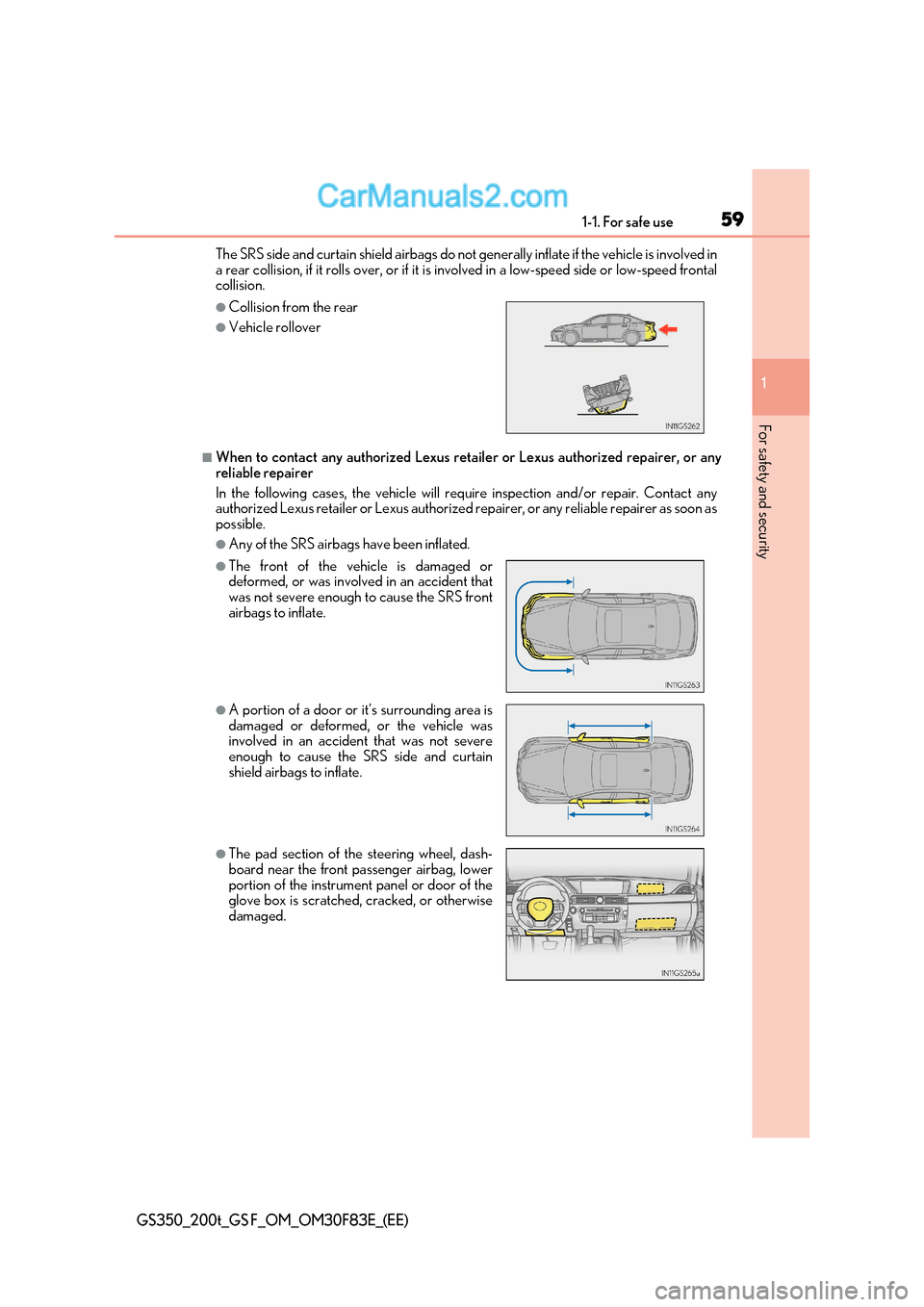
●Collision from the rear
●Vehicle rollover
●The front of the vehicle is damaged or
deformed, or was involved in an accident that
was not severe enough to cause the SRS front
airbags to inflate.
●A portion of a door or it’s surrounding area is
damaged or deformed, or the vehicle was
involved in an accident that was not severe
enough to cause the SRS side and curtain
shield airbags to inflate.
●The pad section of the steering wheel, dash-
board near the front passenger airbag, lower
portion of the instrument panel or door of the
glove box is scratched, cracked, or otherwise
damaged.
Page 102 of 676
1022. Instrument cluster
GS350_200t_GS F_OM_OM30F83E_(EE)
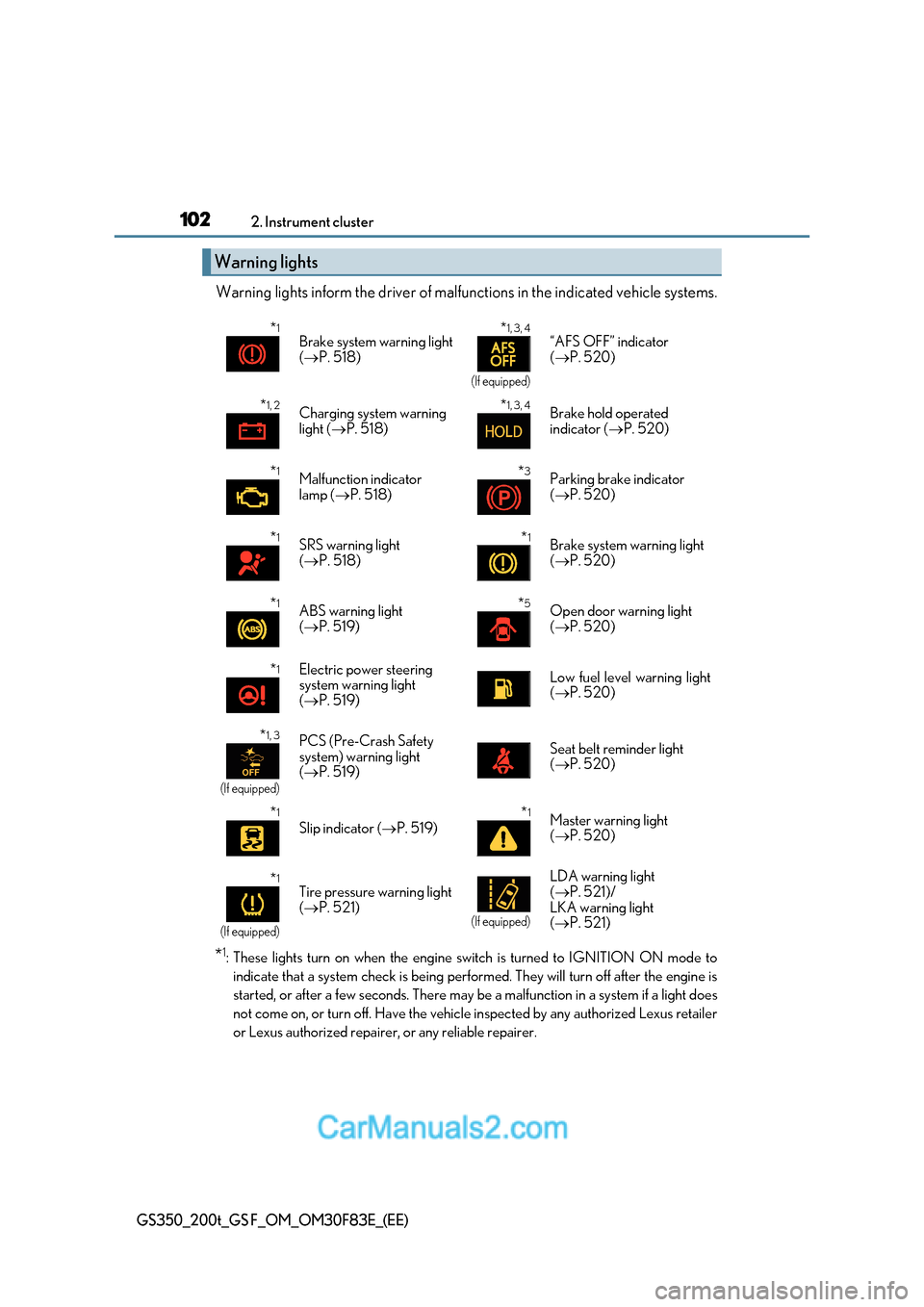
Warning lights inform the driver of malfunctions in the indicated vehicle s ystems.
* 1
: These lights turn on when the engine switch is turned to IG NITION ON mode to
indicate that a system check is being performed. They will turn off after the engine is
started, or after a few seconds. There may be a malfunction in a system if a light does
not come on, or turn off. Have the vehicle inspected by any authorized Lexus retailer
or Lexus authorized repairer, or any reliable repairer.
Warning lights
* 1
Brake system warning light ( P. 518) *
1, 3, 4
(If equipped)
“AFS OFF” indicator (
P. 520)
* 1, 2
Charging system warning
light (P. 518) *
1, 3, 4
Brake hold operated
indicator (
P. 520)
* 1
Malfunction indicator
lamp ( P. 518) *
3
Parking brake indicator (
P. 520)
* 1
SRS warning light ( P. 518) *
1
Brake system warning light (
P. 520)
* 1
ABS warning light ( P. 519) *
5
Open door warning light (
P. 520)
* 1
Electric power steering
system warning light (
P. 519)Low fuel level warning light ( P. 520)
* 1, 3
(If equipped)
PCS (Pre-Crash Safety
system) warning light (
P. 519)Seat belt reminder light ( P. 520)
* 1
Slip indicator (
P. 519) *
1
Master warning light ( P. 520)
* 1
(If equipped)
Tire pressure warning light (
P. 521)
(If equipped)
LDA warning light ( P. 521)/
LKA warning light ( P. 521)
Page 124 of 676
1242. Instrument cluster
GS350_200t_GS F_OM_OM30F83E_(EE)
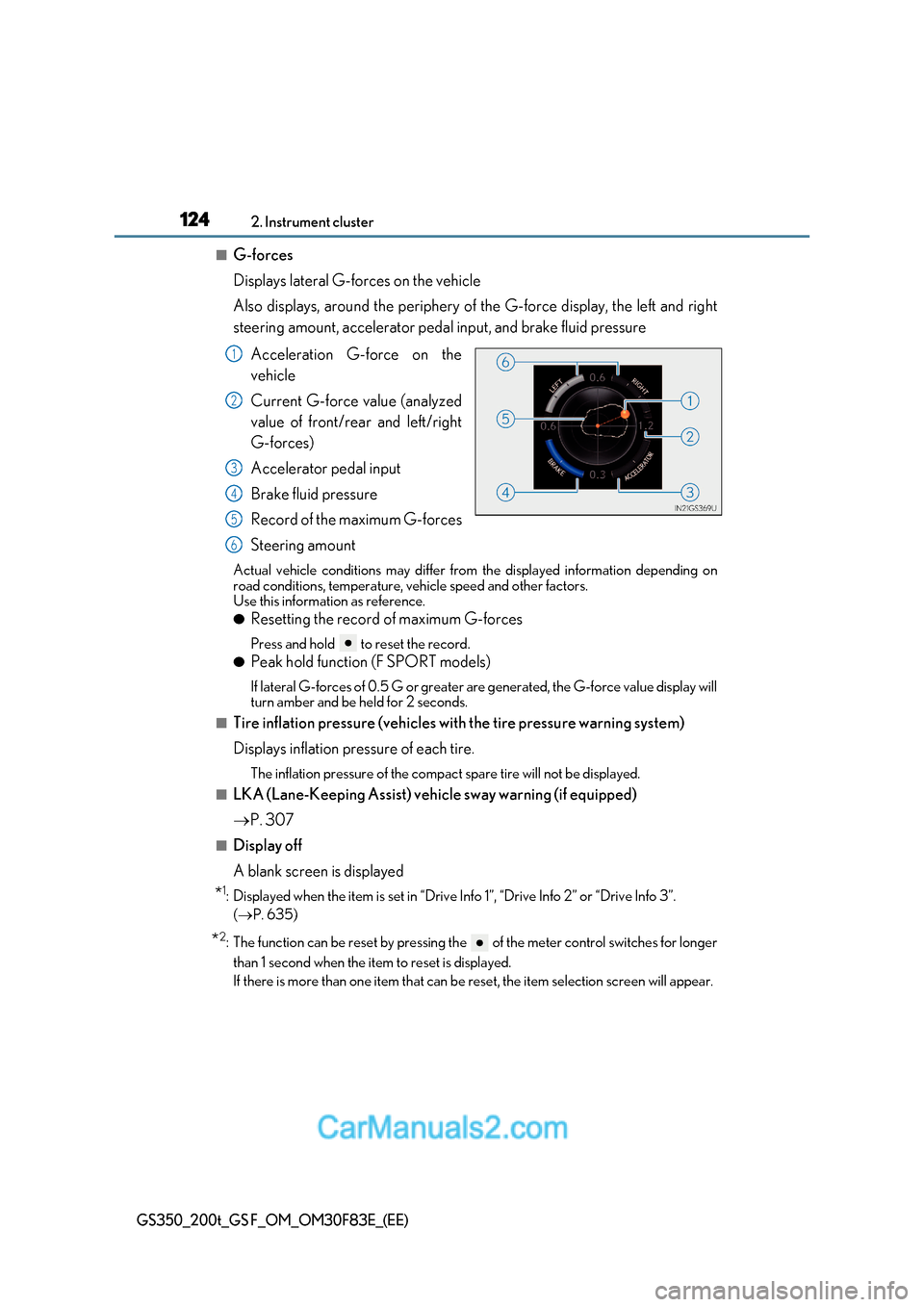
■G-forces
Displays lateral G-forces on the vehicle
Also displays, around the periphery of the G-force display, the left and right
steering amount, accelerator pedal input, and brake fluid pressure
Acceleration G-force on the
vehicle
Current G-force value (analyzed
value of front/rear and left/right
G-forces)
Accelerator pedal input
Brake fluid pressure
Record of the maximum G-forces
Steering amount
Actual vehicle conditions may differ from the displayed information depending on
road conditions, temperature, vehicle speed and other factors.
Use this information as reference. ● Resetting the record of maximum G-forces
Press and hold to reset the record.
● Peak hold function (F SPORT models)
If lateral G-forces of 0.5 G or greater are generated, the G-force value display will
turn amber and be held for 2 seconds.
■Tire inflation pressure (vehicles with the tire pressure warning system)
Displays inflation pressure of each tire.
The inflation pressure of the compac t spare tire will not be displayed.
■LKA (Lane-Keeping Assist) vehi cle sway warning (if equipped)
P. 307
■Display off
A blank screen is displayed
* 1
: Displayed when the item is set in “Drive Info 1”, “Drive Info 2” or “Drive Info 3”.
( P. 635)
* 2
: The function can be reset by pressing the of the meter control switches for longer
than 1 second when the item to reset is displayed.
If there is more than one item that can be reset, the item selection screen will appear.
1
2
3
4
5
6
Page 127 of 676
127
2. Instrument cluster
2
Instrument cluster
GS350_200t_GS F_OM_OM30F83E_(EE)
■G-force display
●The G-force values may not be zero even when the vehicle is parked, such as when it is
parked on an incline.
●Depending on the vehicle usage conditions, the brake fluid pressure display may not
reach its maximum reading even though the brake pedal is fully depressed.
●If a battery terminal is disconnected and reconnected, the steering amount display may
be disabled temporarily. After driving the ve hicle for a while, the display will be enabled.
■Suspension of the settings display
In the following situations, the settings disp lay using the meter control switches will be
suspended.
●When a warning message appears on the multi-information display
●When the vehicle begins to move
■Tire inflation pressure (if equipped)
●It may take a few minutes to display the tire inflation pressure afte r the engine switch is
turned to IGNITION ON mode. It may also take a few minutes to display the tire infla-
tion pressure after inflation pressure has been adjusted.
●“---” may be displayed if the tire information cannot be determined due to unfavorable
radio wave conditions.
●Tire inflation pressure changes with temperature. The displayed values may also be dif-
ferent from the values measured using a tire pressure gauge.
■When disconnecting and reconnecting battery terminals
The drive information will be reset.
■Liquid crystal display P. 111
Page 135 of 676
135
2. Instrument cluster
2
Instrument cluster
GS350_200t_GS F_OM_OM30F83E_(EE)
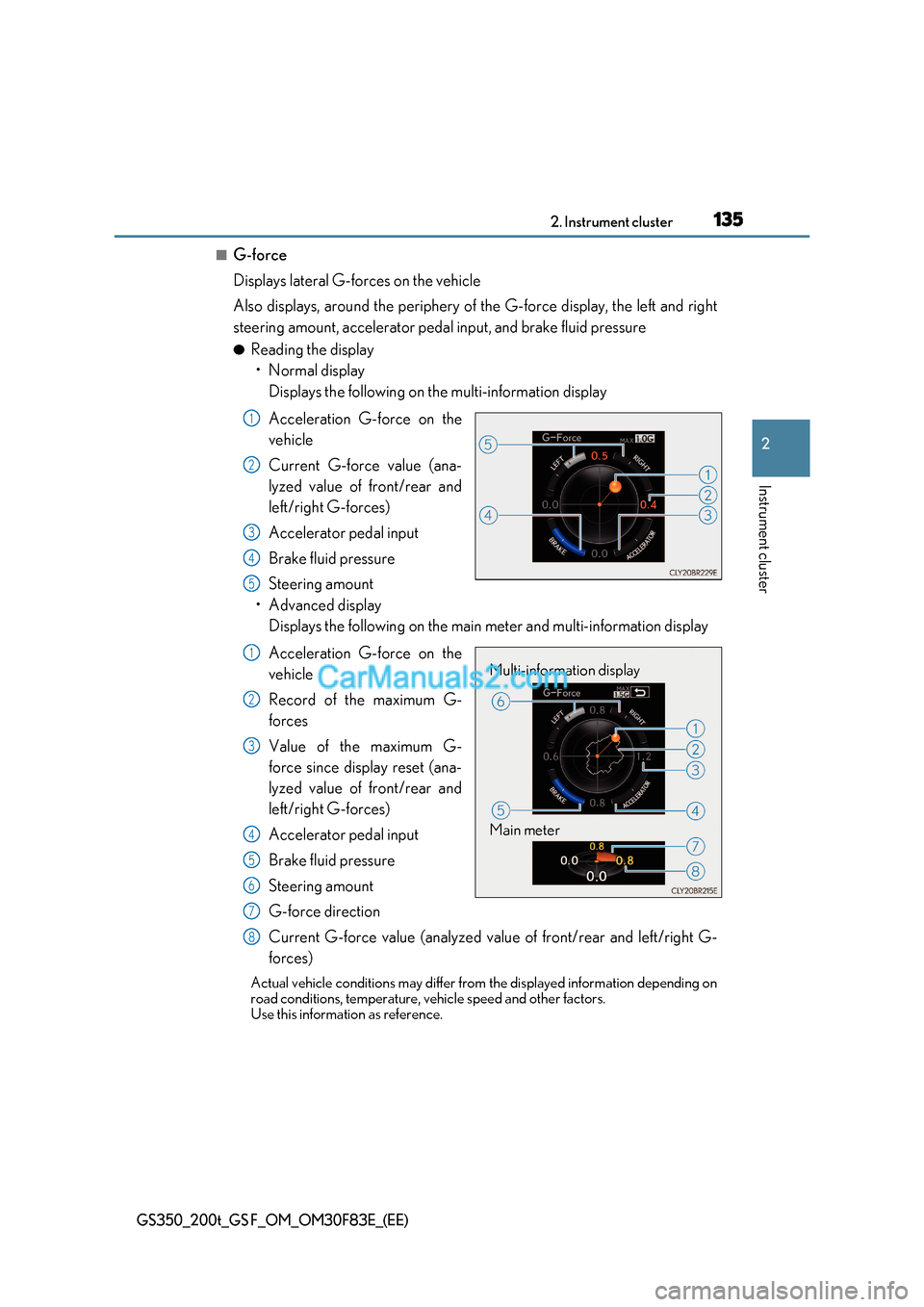
■G-force
Displays lateral G-forces on the vehicle
Also displays, around the periphery of the G-force display, the left and right
steering amount, accelerator pedal input, and brake fluid pressure ● Reading the display
Page 139 of 676
139
2. Instrument cluster
2
Instrument cluster
GS350_200t_GS F_OM_OM30F83E_(EE)
■Start-up display
When the engine is started, the name of the vehicle is displayed on the multi-information
display.
While the start-up display is being displayed, the meter display cannot be changed even
if the drive mode is changed. When the start-up display is finished, the meter display for
the currently selected mode will be displayed.
■Torque distribution display (if equipped)
Torque distribution may not be displayed correctly in some cases, such as when the vehi-
cle passes over road expansion joints.
■G-force display
●The G-force values may not be zero even when the vehicle is parked, such as when it is
parked on an incline.
●The steering amount, accelerator pedal input, and brake fluid pressure displays are dis-
abled until the engine has warmed up (the variable red zone of the tachometer has
retracted to 7300 r/min).
After the engine has warmed up, these displays will be enabled.
●Depending on the vehicle usage conditions, the brake fluid pressure display may not
reach its maximum reading even though the brake pedal is fully depressed.
●If a battery terminal is disconnected and reconnected, the steering amount display may
be disabled temporarily. After driving the ve hicle for a while, the display will be enabled.
■Suspension of the settings display
In the following situations, operation of th e settings display will be temporarily sus-
pended.
●When a warning message appears on the multi-information display
●When the vehicle begins to move
■Tire inflation pressure
●It may take a few minutes to display the tire inflation pressure afte r the engine switch is
turned to IGNITION ON mode. It may also take a few minutes to display the tire infla-
tion pressure after inflation pressure has been adjusted.
●“---” may be displayed if the tire positi on information cannot be determined due to
unfavorable radio wave conditions.
●Tire inflation pressure changes with temperature. The displayed values may also be dif-
ferent from the values measured using a tire pressure gauge.
■When disconnecting and reconnecting battery terminals
The following information data will be reset:
●Lap timer: Measured lap times, history
●G-force: Record of the maximum G-forces
■Using the lap timer
If the engine is stopped while a lap is being timed, the lap timer will stop and the lap time
up to that point will be recorded.
■Liquid crystal display P. 119
Page 142 of 676
1422. Instrument cluster
GS350_200t_GS F_OM_OM30F83E_(EE)
●Vehicle speed
● Tachometer
● Shift position and shift range
Displays the selected shift posi tion or selected shift range ( P. 246)
● Eco Driving Indicator (GS350/GS200t) ( P. 145)
● Road signs recognized by the RSA (Road Sign Assist)
(if equipped) ( P. 326)
● Head-up rev indicator (GS F) ( P. 145)
● Audio display *
Displays audio information for approximat ely 3 seconds when the audio system is
operated
● Route guidance display (vehicles with navigation system) ( P. 146)
When approaching an intersection while the navigation system is giving route guid-
ance, an arrow will automatically be displa yed to indicate the direction of travel.
● Lane departure warning display (L DA [Lane Departure Alert with
steering control], LKA [Lane-Keeping Assist]) (if equipped) ( P. 525)
● Approach warning display (dynamic radar cruise control, dynamic
radar cruise control with full-speed range) (if equipped) ( P. 525)
● Pre-crash warning message (PCS [Pre-Crash Safety system])
(if equipped) ( P. 525)
* : The default setting is off
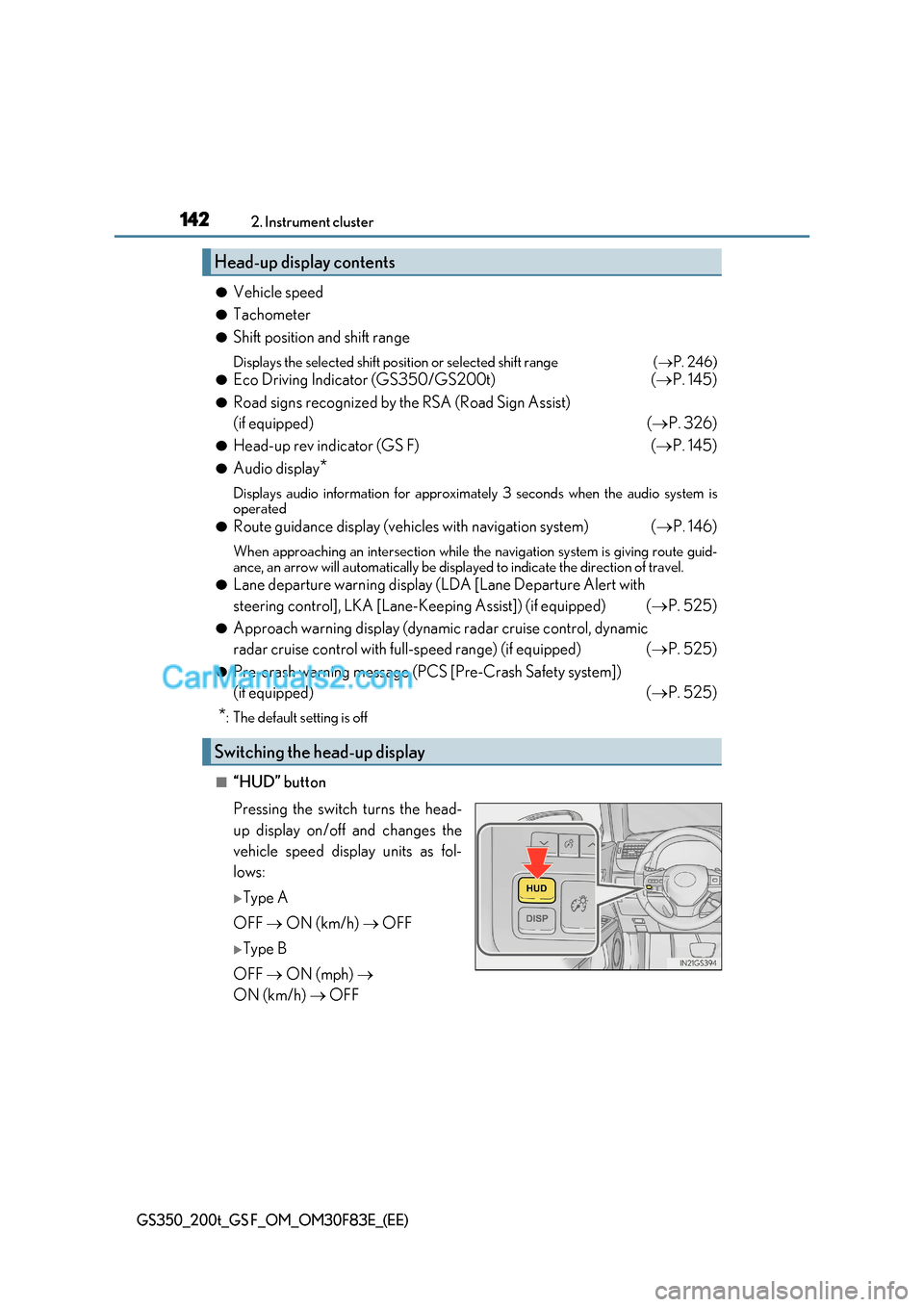
■“HUD” button
Pressing the switch turns the head-
up display on/off and changes the
vehicle speed display units as fol-
lows:
Type A
OFF ON (km/h) OFF
Type B
OFF ON (mph)
ON (km/h) OFF
Head-up display contents
Switching the head-up display