display Lexus GS F 2018 Owner's Manuals
[x] Cancel search | Manufacturer: LEXUS, Model Year: 2018, Model line: GS F, Model: Lexus GS F 2018Pages: 602, PDF Size: 13.37 MB
Page 470 of 602
4687-2. Steps to take in an emergency
GS350_300_GS F_OM_OM30G34U_(U)
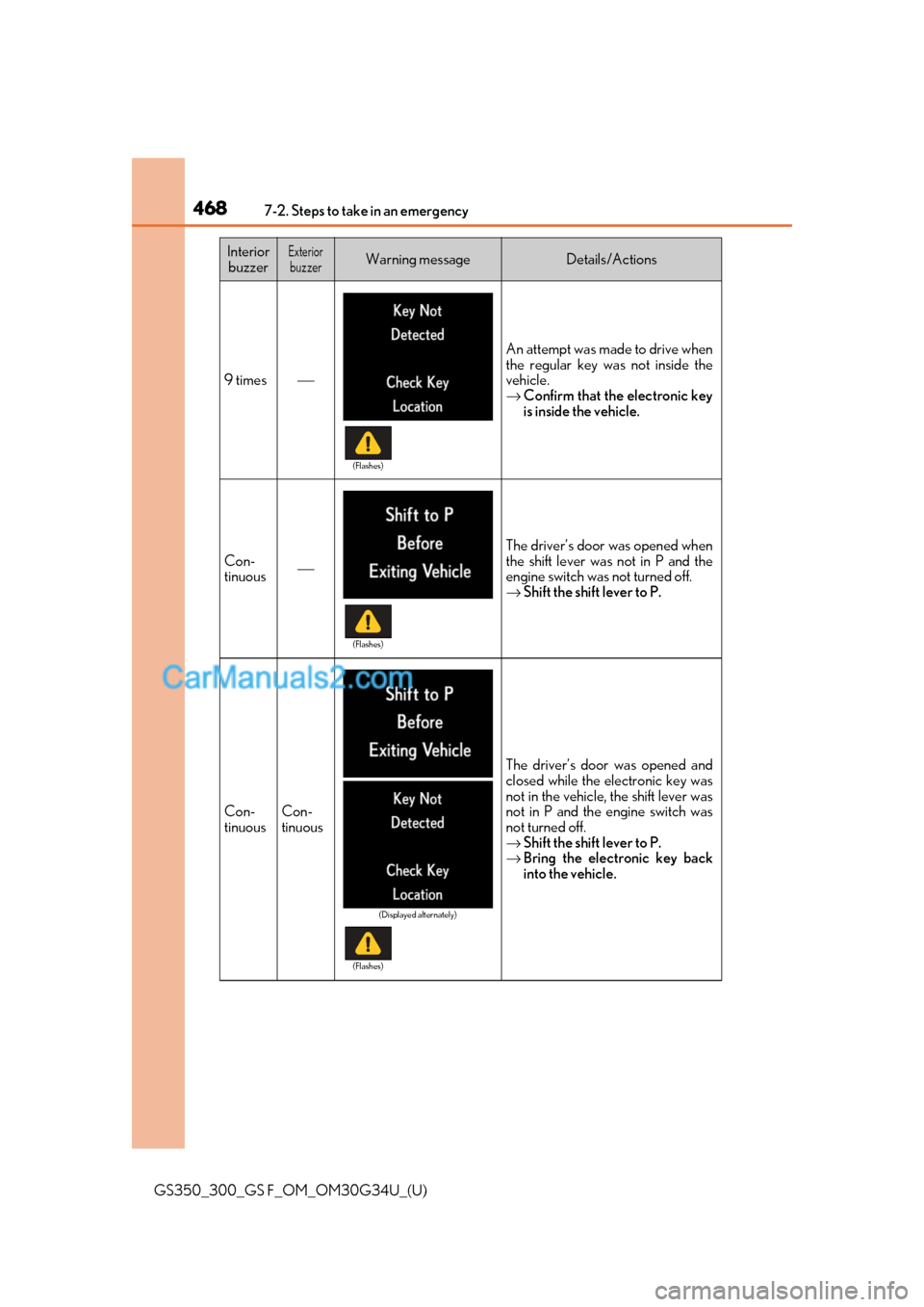
9 times⎯
An attempt was made to drive when
the regular key was not inside the
vehicle.
→Confirm that the electronic key
is inside the vehicle.
Con-
tinuous⎯
The driver’s door was opened when
the shift lever was not in P and the
engine switch was not turned off.
→ Shift the shift lever to P.
Con-
tinuousCon-
tinuous
The driver’s door was opened and
closed while the electronic key was
not in the vehicle, the shift lever was
not in P and the engine switch was
not turned off.
→Shift the shift lever to P.
→ Bring the electronic key back
into the vehicle.
Interior
buzzerExteriorbuzzerWarning messageDetails/Actions
(Flashes)
(Flashes)
(Displayed alternately)
(Flashes)
Page 504 of 602
5027-2. Steps to take in an emergency
GS350_300_GS F_OM_OM30G34U_(U)
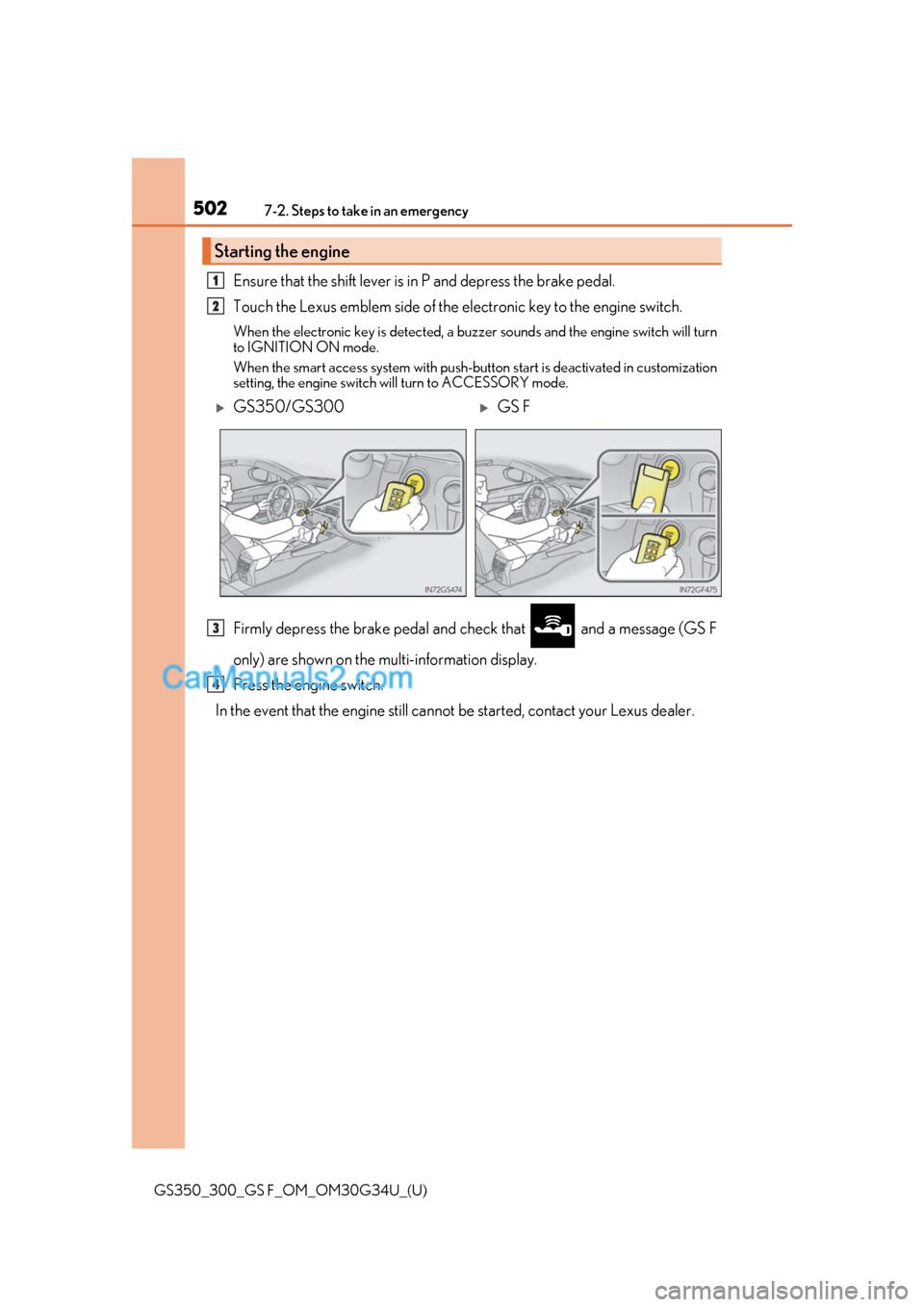
Ensure that the shift lever is in P and depress the brake pedal.
Touch the Lexus emblem side of the electronic key to the engine switch.
When the electronic key is detected, a buzzer sounds and the engine switch will turn
to IGNITION ON mode.
When the smart access system with push-button start is deactivated in customization
setting, the engine switch w ill turn to ACCESSORY mode.
Firmly depress the brake pedal and check that and a message (GS F
only) are shown on the multi-information display.
Press the engine switch.
In the event that the engine still cannot be started, contact your Lexus dealer.
Starting the engine
1
2
GS350/GS300GS F
3
4
Page 511 of 602
509
GS350_300_GS F_OM_OM30G34U_(U)
7
When trouble arises
7-2. Steps to take in an emergency
If your vehicle overheats
●The needle of the engine coolant temperature gauge (→P. 86, 92) enters the
red zone or a loss of engine power is experienced. (For example, the vehicle
speed does not increase.)
●“Engine Coolant Temp High Stop in a Safe Place See Owner’s Manual” is
shown on the multi-information display.
●Steam is coming from under the hood.
Stop the vehicle in a safe place and tu rn off the air conditioning system, and
then stop the engine.
If you see steam:
Carefully lift the hood after the steam subsides.
If you do not see steam:
Carefully lift the hood.
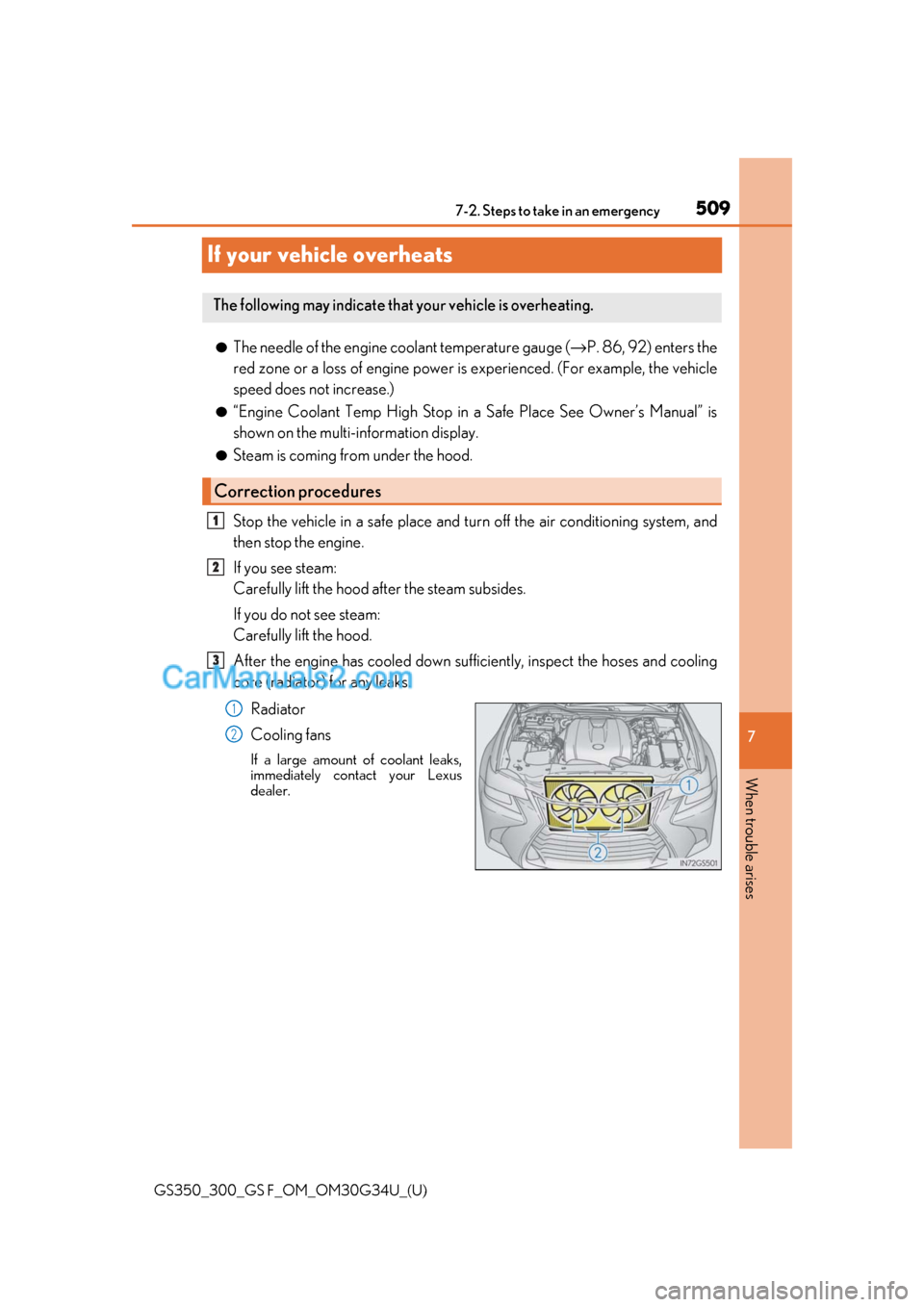
After the engine has cooled down sufficiently, inspect the hoses and cooling
core (radiator) for any leaks.
Radiator
Cooling fans
If a large amount of coolant leaks,
immediately contact your Lexus
dealer.
The following may indicate that your vehicle is overheating.
Correction procedures
1
2
3
1
2
Page 548 of 602
546
GS350_300_GS F_OM_OM30G34U_(U)8-2. Customization
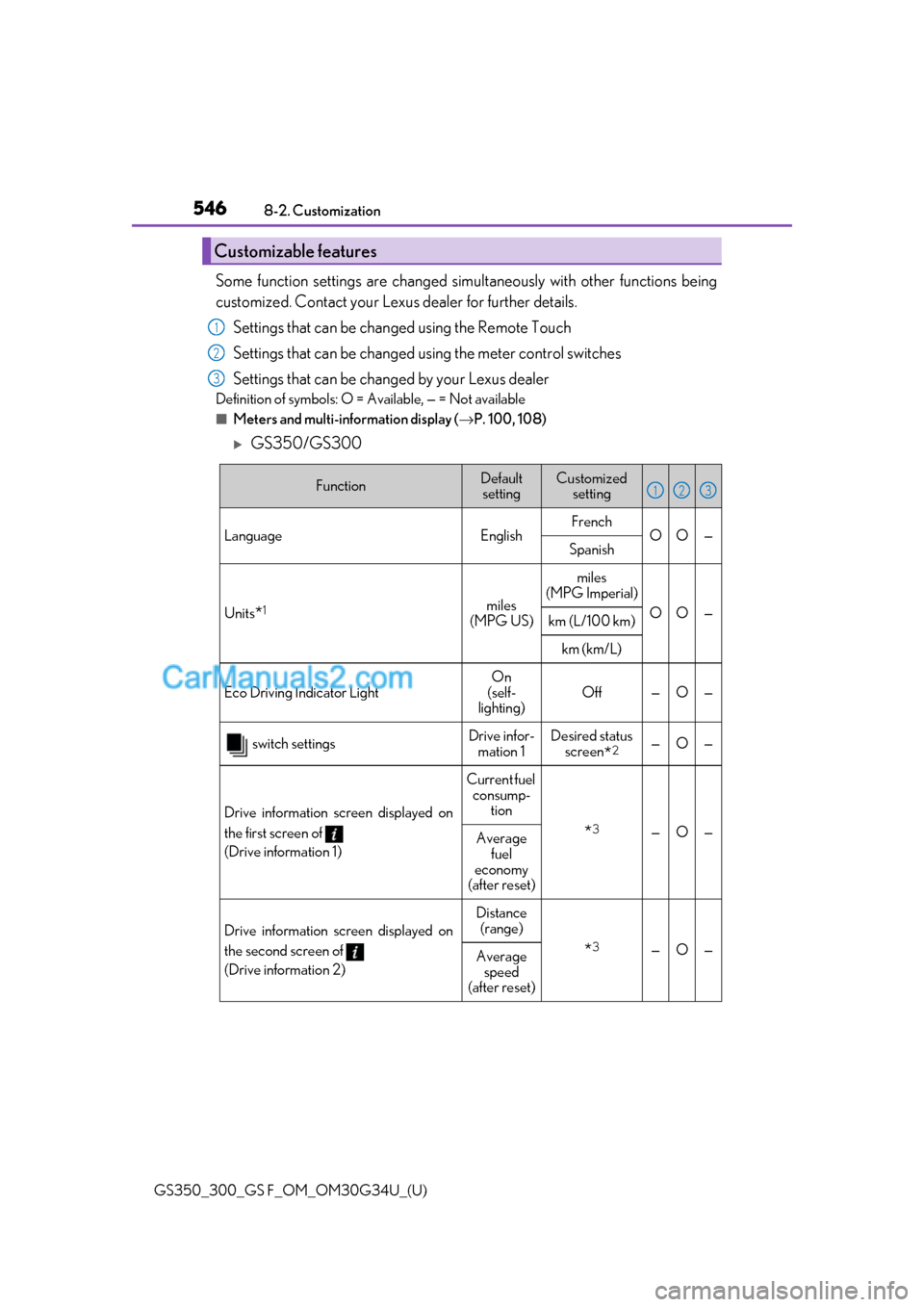
Some function settings are changed simultaneously with other functions being
customized. Contact your Lexu
s dealer for further details.
Settings that can be changed using the Remote Touch
Settings that can be changed using the meter control switches
Settings that can be changed by your Lexus dealer
Definition of symbols: O = Available, — = Not available
■Meters and multi-information display ( →P. 100, 108)
GS350/GS300
Customizable features
1
2
3
FunctionDefault
settingCustomized setting
LanguageEnglishFrenchOO—Spanish
Units*1miles
(MPG US)
miles
(MPG Imperial)
OO—km (L/100 km)
km (km/L)
Eco Driving Indicator Light On
(self-
lighting) Off — O —
switch settingsDrive infor-
mation 1Desired status screen
*2—O—
Drive information screen displayed on
the first screen of
(Drive information 1)
Current fuel
consump- tion
*3—O—Average fuel
economy
(after reset)
Drive information screen displayed on
the second screen of
(Drive information 2)
Distance (range)
*3—O—Average speed
(after reset)
123
Page 549 of 602
GS350_300_GS F_OM_OM30G34U_(U)
5478-2. Customization
8
Vehicle specifications
*1: The default setting varies according to countries.
*2: Some status screens cannot be registered (indicated on the multi-information display)
*3: 2 of the following items: current fuel consumption, average fuel economy (after reset),
average fuel economy (after refuel), average fuel economy (after start), average vehi-
cle speed (after reset), average vehicle spee d (after start), distance (driving range),
distance (after start), elapsed time (after reset), elapsed time (after start), blank
*4:Except F SPORT models
*5:F SPORT models
*6:GS350
*7:GS300
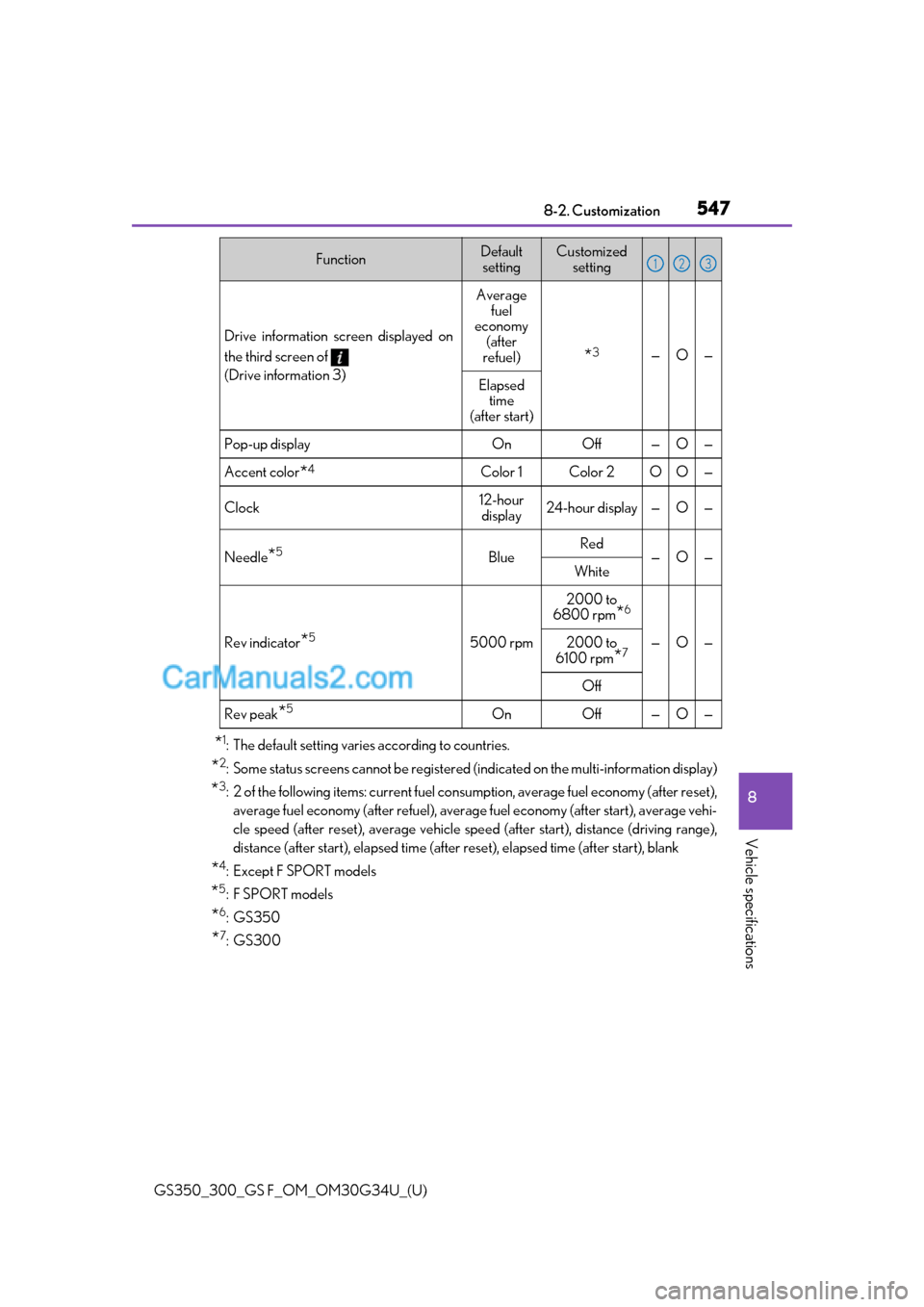
Drive information screen displayed on
the third screen of
(Drive information 3)
Average
fuel
economy (after
refuel)
*3—O—
Elapsed time
(after start)
Pop-up displayOnOff —O—
Accent color*4Color 1Color 2OO—
Clock12-hour
display24-hour display —O—
Needle*5BlueRed—O—White
Rev indicator*55000 rpm
2000 to
6800 rpm
*6
—O—2000 to
6100 rpm*7
Off
Rev peak*5OnOff —O—
FunctionDefault settingCustomized setting123
Page 550 of 602
548
GS350_300_GS F_OM_OM30G34U_(U)8-2. Customization
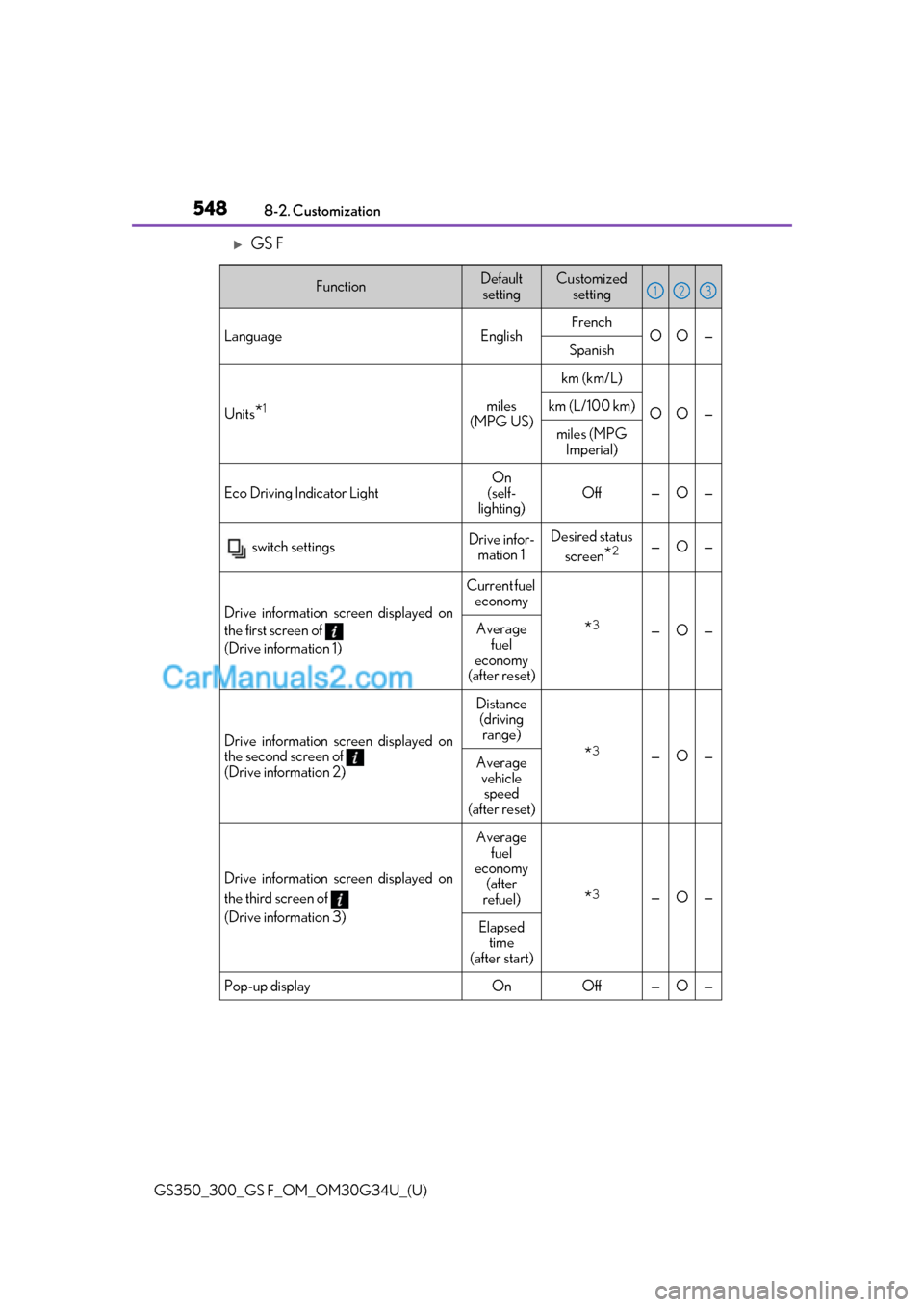
GS F
FunctionDefault
settingCustomized setting
LanguageEnglishFrenchOO—Spanish
Units*1miles
(MPG US)
km (km/L)
OO—km (L/100 km)
miles (MPG Imperial)
Eco Driving Indicator LightOn
(self-
lighting)Off—O—
switch settingsDrive infor- mation 1Desired status
screen
*2—O—
Drive information screen displayed on
the first screen of
(Drive information 1)
Current fuel economy
*3—O—Average
fuel
economy
(after reset)
Drive information screen displayed on
the second screen of
(Drive information 2)
Distance (driving
range)
*3—O—Average vehicle speed
(after reset)
Drive information screen displayed on
the third screen of
(Drive information 3)
Average fuel
economy
(after
refuel)
*3—O—
Elapsed time
(after start)
Pop-up displayOnOff—O—
123
Page 551 of 602
GS350_300_GS F_OM_OM30G34U_(U)
5498-2. Customization
8
Vehicle specifications
*1: The default setting varies according to country.
*2: Some status screens cannot be registered (indicated on multi-information display).
*3: 2 of the following items: current fuel cons umption, average fuel economy (after reset),
average fuel economy (after refuel), average fuel economy (after start), average vehi-
cle speed (after reset), average vehicle spee d (after start), distance (driving range),
distance (after start), elapsed time (after reset), elapsed time (after start), blank.
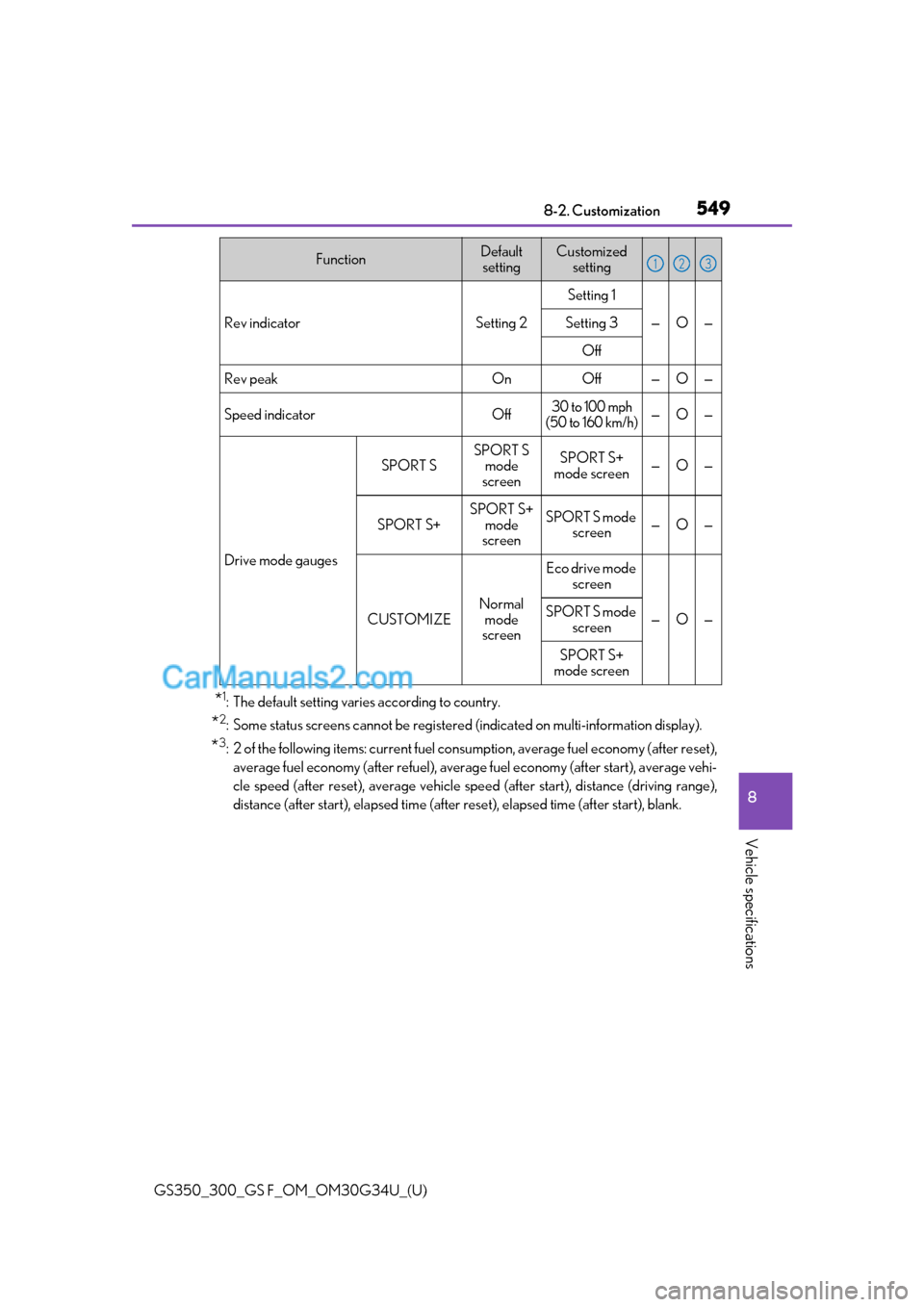
Rev indicatorSetting 2
Setting 1
—O—Setting 3
Off
Rev peakOnOff—O—
Speed indicatorOff30 to 100 mph
(50 to 160 km/h)—O—
Drive mode gauges
SPORT S
SPORT S mode
screenSPORT S+
mode screen—O—
SPORT S+
SPORT S+ mode
screenSPORT S mode screen—O—
CUSTOMIZE
Normal
mode
screen
Eco drive mode screen
—O—SPORT S mode
screen
SPORT S+
mode screen
FunctionDefault settingCustomized setting123
Page 557 of 602
GS350_300_GS F_OM_OM30G34U_(U)
5558-2. Customization
8
Vehicle specifications
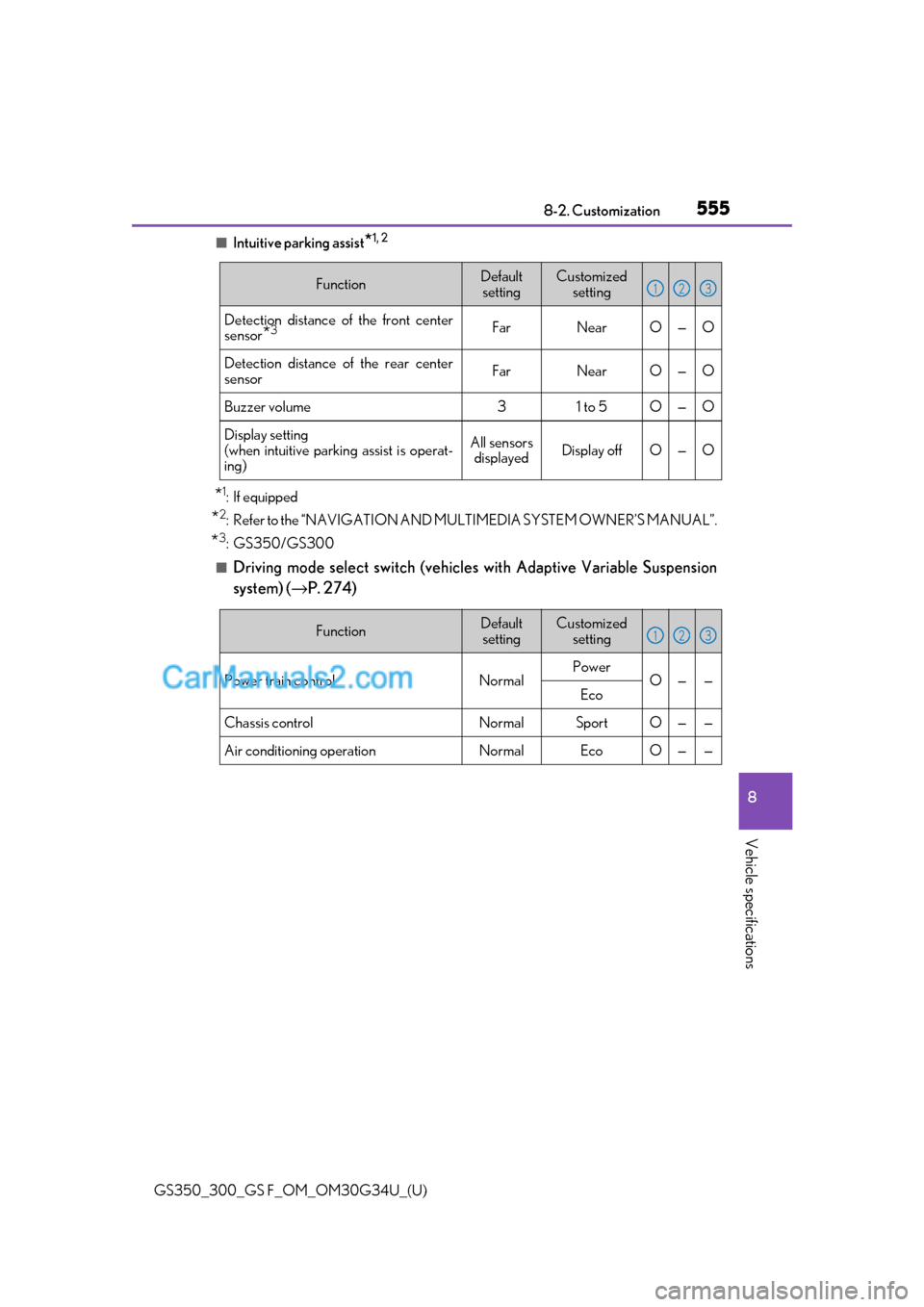
■Intuitive parking assist*1, 2
*1: If equipped
*2: Refer to the “NAVIGATION AND MULTIMEDIA SYSTEM OWNER’S MANUAL”.
*3: GS350/GS300
■Driving mode select switch (vehicles with Adaptive Variable Suspension
system) (→P. 274)
FunctionDefault
settingCustomized setting
Detection distance of the front center
sensor
*3FarNearO—O
Detection distance of the rear center
sensorFarNearO—O
Buzzer volume31 to 5O—O
Display setting
(when intuitive parkin g assist is operat-
ing)All sensors displayedDisplay offO—O
123
FunctionDefault
settingCustomized setting
Power train controlNormalPowerO——Eco
Chassis controlNormalSportO——
Air conditioning operationNormalEcoO——
123
Page 580 of 602
578What to do if... (Troubleshooting)
GS350_300_GS F_OM_OM30G34U_(U)
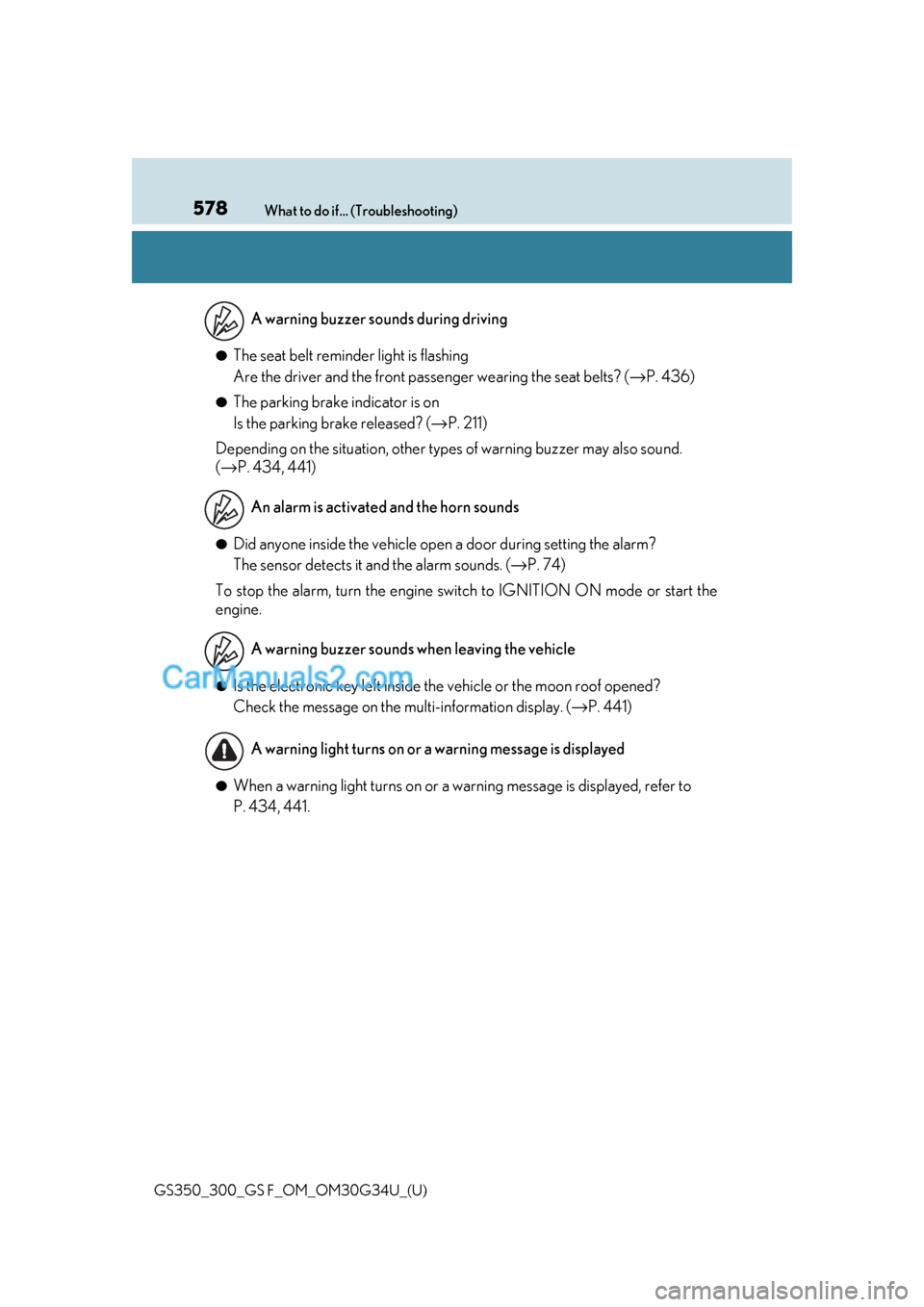
●The seat belt reminder light is flashing
Are the driver and the front passe nger wearing the seat belts? (→P. 436)
●The parking brake indicator is on
Is the parking brake released? ( →P. 211)
Depending on the situation, other types of warning buzzer may also sound.
(→ P. 434, 441)
●Did anyone inside the vehicle open a door during setting the alarm?
The sensor detects it and the alarm sounds. (→ P. 74)
To stop the alarm, turn the engine switch to IGNITION ON mode or start the
engine.
●Is the electronic key left inside the vehicle or the moon roof opened?
Check the message on the multi-information display. (→ P. 441)
●When a warning light turns on or a warning message is displayed, refer to
P. 434, 441.A warning buzzer sounds during driving
An alarm is activated and the horn sounds
A warning buzzer sounds when leaving the vehicle
A warning light turns on or a warning message is displayed
Page 585 of 602
583Alphabetical index
GS350_300_GS F_OM_OM30G34U_(U)
Dimensions .............................................. 518
Dinghy towing..........................................196
Display12.3-inch display................................ 306
Drive information ..................... 102, 109
Dynamic radar cruise control with full-speed range ................... 258
Energy monitor ..................................... 127
LKA (Lane-Keeping Assist) .........253
Multi-information display .....100, 108
Trip information ............................ 78, 92
Warning message .............................. 441
Do-it-yourself maintenance ............... 371
Door courtesy lights Location .................................................. 327
Door lock Doors .........................................................137
Smart access system with push-button start ............................. 150
Wireless remote control ..................137
Doors........................................................... 137 Automatic door locking and unlocking system.................... 140
Door glasses ......................................... 175
Door lock ................................................ 139
Open door warning buzzer............ 151
Open door warning light...............436
Outside rear view mirrors ................ 171
Rear door child-protector.............. 140 Drive info 1/Drive info 2/
Drive info 3................................... 105, 116 Drive information...................... 102, 109
Resetting ....................................... 102, 109
Drive-Start Control................... 183, 207
Driver’s seat position memory.......... 160 Driving position memory.................. 161
Memory recall function .................... 162
Power easy access system ............ 160
Driving ........................................................ 182 Break-in tips .......................................... 183
Correct driving posture .................... 34
Driving mode select switch ...........273
Procedures .............................................182
Winter drive tips ................................ 296
DRS (Dynamic Rear Steering) ....... 289 Function .................................................. 289
Warning message............................... 441
DVD player
*
Dynamic radar cruise control with full-speed range Function ..................................................258
Warning message............................... 441
Dynamic Rear Steering (DRS) ....... 289 Function .................................................. 289
Warning message............................... 441
*: Refer to the “NAVIGATION AND MULTIMEDIA SYSTEM OWNER’S MANUAL”.