fuel Lexus GS F 2018 s User Guide
[x] Cancel search | Manufacturer: LEXUS, Model Year: 2018, Model line: GS F, Model: Lexus GS F 2018Pages: 602, PDF Size: 13.37 MB
Page 97 of 602
GS350_300_GS F_OM_OM30G34U_(U)
972. Instrument cluster
2
Instrument cluster
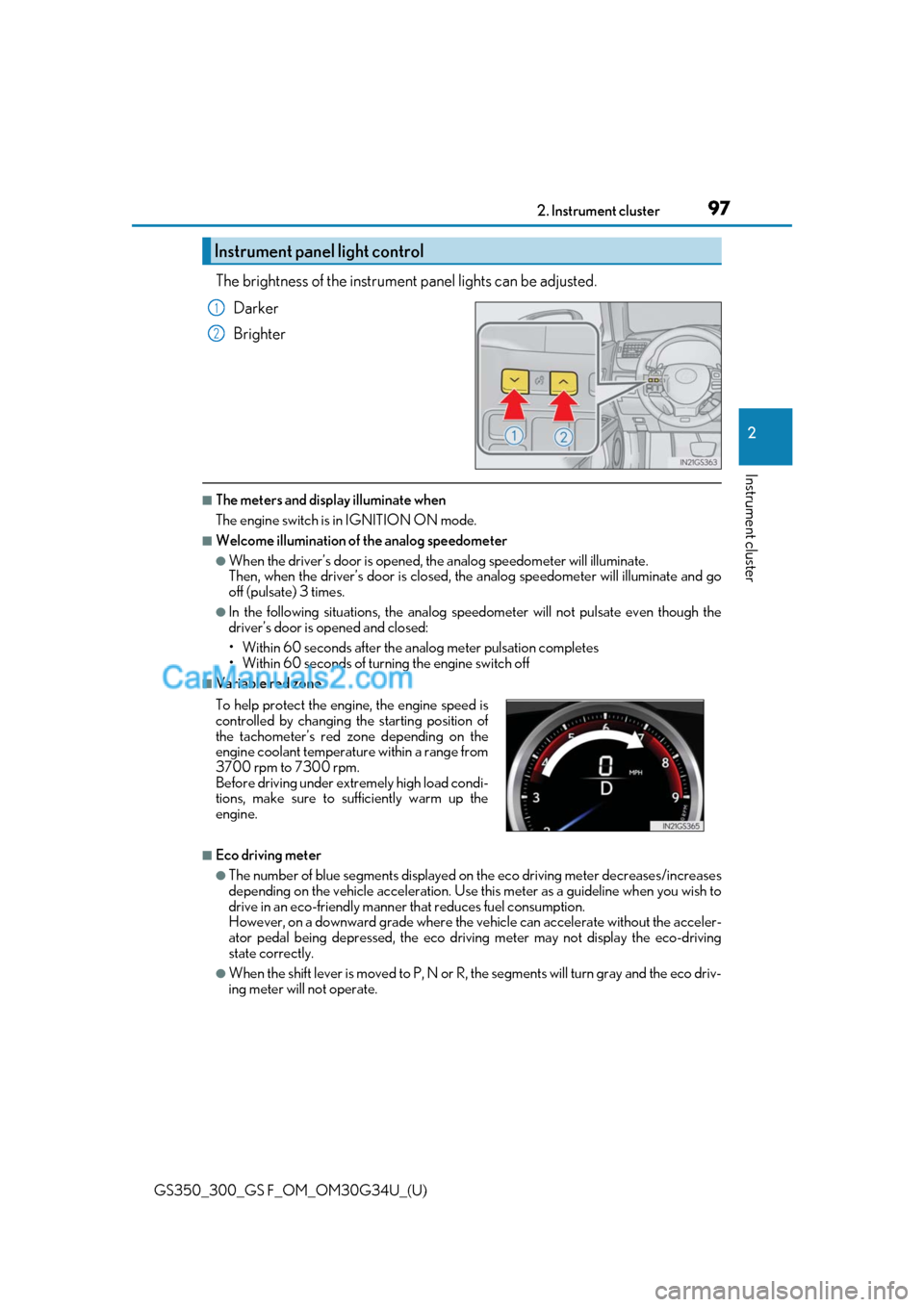
The brightness of the instrument panel lights can be adjusted.
Darker
Brighter
■The meters and display illuminate when
The engine switch is in IGNITION ON mode.
■Welcome illumination of the analog speedometer
●When the driver’s door is opened, the analog speedometer will illuminate.
Then, when the driver’s door is closed, the analog speedometer will illuminate and go
off (pulsate) 3 times.
●In the following situations, the analog sp eedometer will not pulsate even though the
driver’s door is opened and closed:
• Within 60 seconds after the an alog meter pulsation completes
• Within 60 seconds of turning the engine switch off
■Variable red zone
■Eco driving meter
●The number of blue segments displayed on the eco driving meter decreases/increases
depending on the vehicle acceleration. Use this meter as a guideline when you wish to
drive in an eco-friendly manner that reduces fuel consumption.
However, on a downward grade where the ve hicle can accelerate without the acceler-
ator pedal being depressed, the eco driv ing meter may not display the eco-driving
state correctly.
●When the shift lever is moved to P, N or R, the segments will turn gray and the eco driv-
ing meter will not operate.
Instrument panel light control
1
2
To help protect the engine, the engine speed is
controlled by changing the starting position of
the tachometer’s red zone depending on the
engine coolant temperature within a range from
3700 rpm to 7300 rpm.
Before driving under extremely high load condi-
tions, make sure to su fficiently warm up the
engine.
Page 102 of 602
102
GS350_300_GS F_OM_OM30G34U_(U)2. Instrument cluster
Items displayed can be switched by pr
essing or of the meter control
switches to select and pressing or .
■Current fuel consumption*1
Displays the current rate of fuel consumption
■Average fuel economy (after reset*2/after start/after refuel)*1
Displays the average fuel consumption since the function was reset, the
engine was started, and the vehicle was refueled, respectively
Use the displayed average fuel consumption as a reference.
■Average speed (after reset*2/after start)*1
Displays the average vehicle speed since the function was reset and the
engine was started, respectively
■Elapsed time (after reset*2/after start)*1
Displays the elapsed time since the function was reset and the engine was
started, respectively
■Distance (range/after start)*1
Displays the estimated maximum distance that can be driven with the quantity
of fuel remaining and the distance driv en after the engine was started respec-
tively.
• This distance is computed based on your average fuel consumption. As a result, the actual distance that can be driv en may differ from that displayed.
• When only a small amount of fuel is added to the tank, the display may not be updated.
When refueling, turn the engine switch off. If the vehicle is refueled without turning
the engine switch off, the display may not be updated.
■Eco Driving Indicator Zone Display
→ P. 85
Drive information
Page 109 of 602
GS350_300_GS F_OM_OM30G34U_(U)
1092. Instrument cluster
2
Instrument cluster
Settings display
Select to change the meter display settings. (→P. 548)
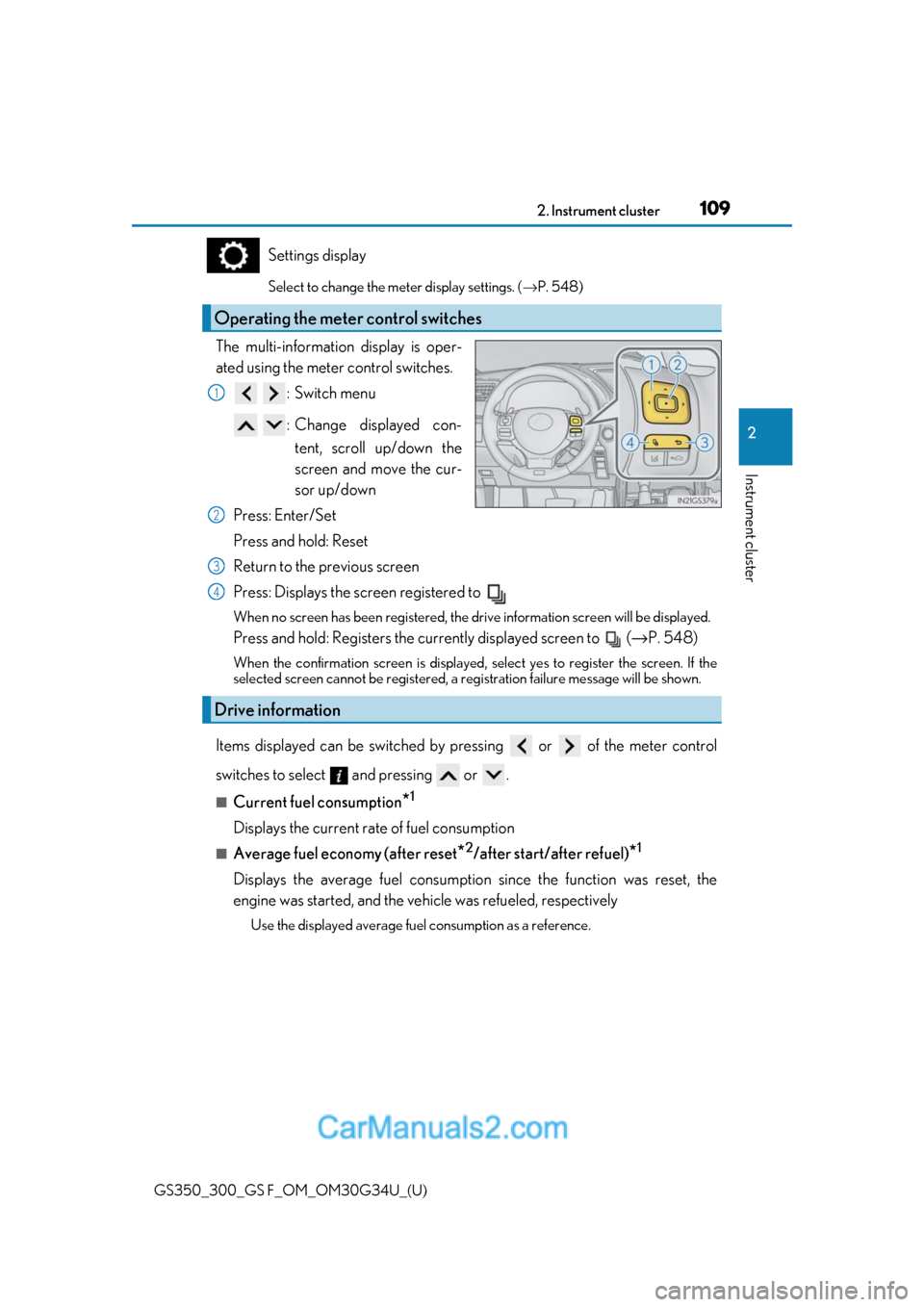
The multi-information display is oper-
ated using the meter control switches.
:Switch menu
: Change displayed con-tent, scroll up/down the
screen and move the cur-
sor up/down
Press: Enter/Set
Press and hold: Reset
Return to the previous screen
Press: Displays the screen registered to
When no screen has been registered, the dr ive information screen will be displayed.
Press and hold: Registers the currently displayed screen to ( →P. 548)
When the confirmation screen is displayed, select yes to register the screen. If the
selected screen cannot be registered, a re gistration failure message will be shown.
Items displayed can be switched by pr essing or of the meter control
switches to select and pressing or .
■Current fuel consumption*1
Displays the current rate of fuel consumption
■Average fuel economy (after reset*2/after start/after refuel)*1
Displays the average fuel consumption since the function was reset, the
engine was started, and the vehicle was refueled, respectively
Use the displayed average fuel consumption as a reference.
Operating the meter control switches
1
2
Drive information
3
4
Page 110 of 602
110
GS350_300_GS F_OM_OM30G34U_(U)2. Instrument cluster
■Average speed (after reset*2/after start)*1
Displays the average vehicle speed since the function was reset and the
engine was started, respectively
■Elapsed time (after reset*2/after start)*1
Displays the elapsed time since the function was reset and the engine was
started, respectively
■Distance (range/after start)*1
Displays the estimated maximum distance
that can be driven with the quantity
of fuel remaining and the distance driv en after the engine was started respec-
tively.
• This distance is computed based on your average fuel consumption. As a result, the actual distance that can be driv en may differ from that displayed.
• When only a small amount of fuel is added to the tank, the display may not be
updated.
When refueling, turn the engine switch off. If the vehicle is refueled without turning
the engine switch off, the display may not be updated.
■Tire inflation pressure
Displays inflation pressure of each tire.
The inflation pressure of the spare tire will not be displayed.
■Gear positions
Displays the current gear position when the shift lever is in D or M.
■LKA (Lane-Keeping Assist) vehicl e sway warning (if equipped)
→ P. 249
■Display off
A blank screen is displayed
*1: Displayed when the item is se t in “Drive Info 1”, “Drive Info 2” or “Drive Info 3”.
( → P. 548)
*2: The function can be reset by pressing th e of the meter control switches for longer
than 1 second when the item to reset is displayed.
If there is more than one item that can be reset, the item selection screen will appear.
Page 127 of 602
127
GS350_300_GS F_OM_OM30G34U_(U)2. Instrument cluster
2
Instrument cluster
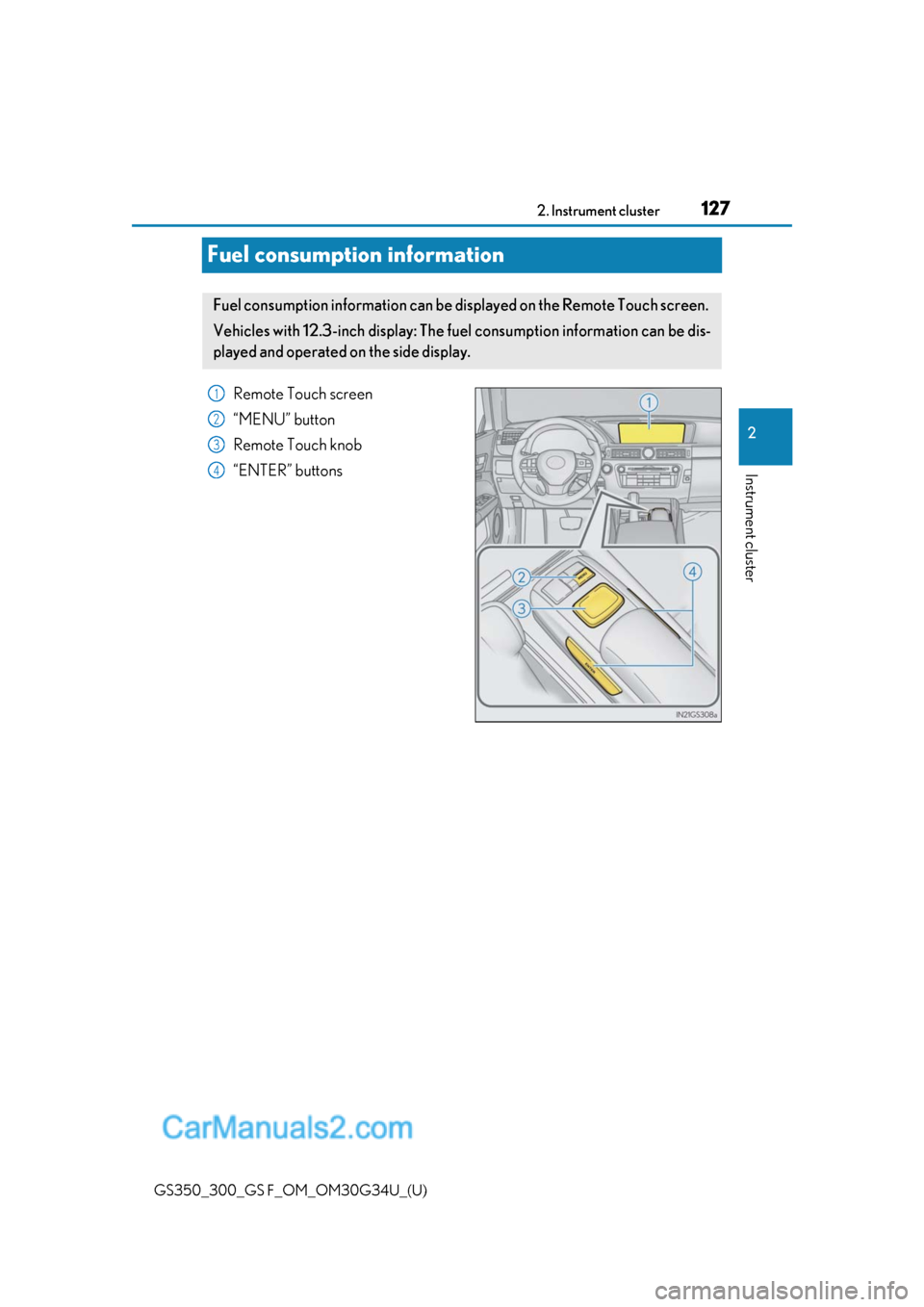
Fuel consumption information
Remote Touch screen
“MENU” button
Remote Touch knob
“ENTER” buttons
Fuel consumption information can be di
splayed on the Remote Touch screen.
Vehicles with 12.3-inch display: The fu el consumption information can be dis-
played and operated on the side display.
1
2
3
4
Page 128 of 602
128
GS350_300_GS F_OM_OM30G34U_(U)2. Instrument cluster
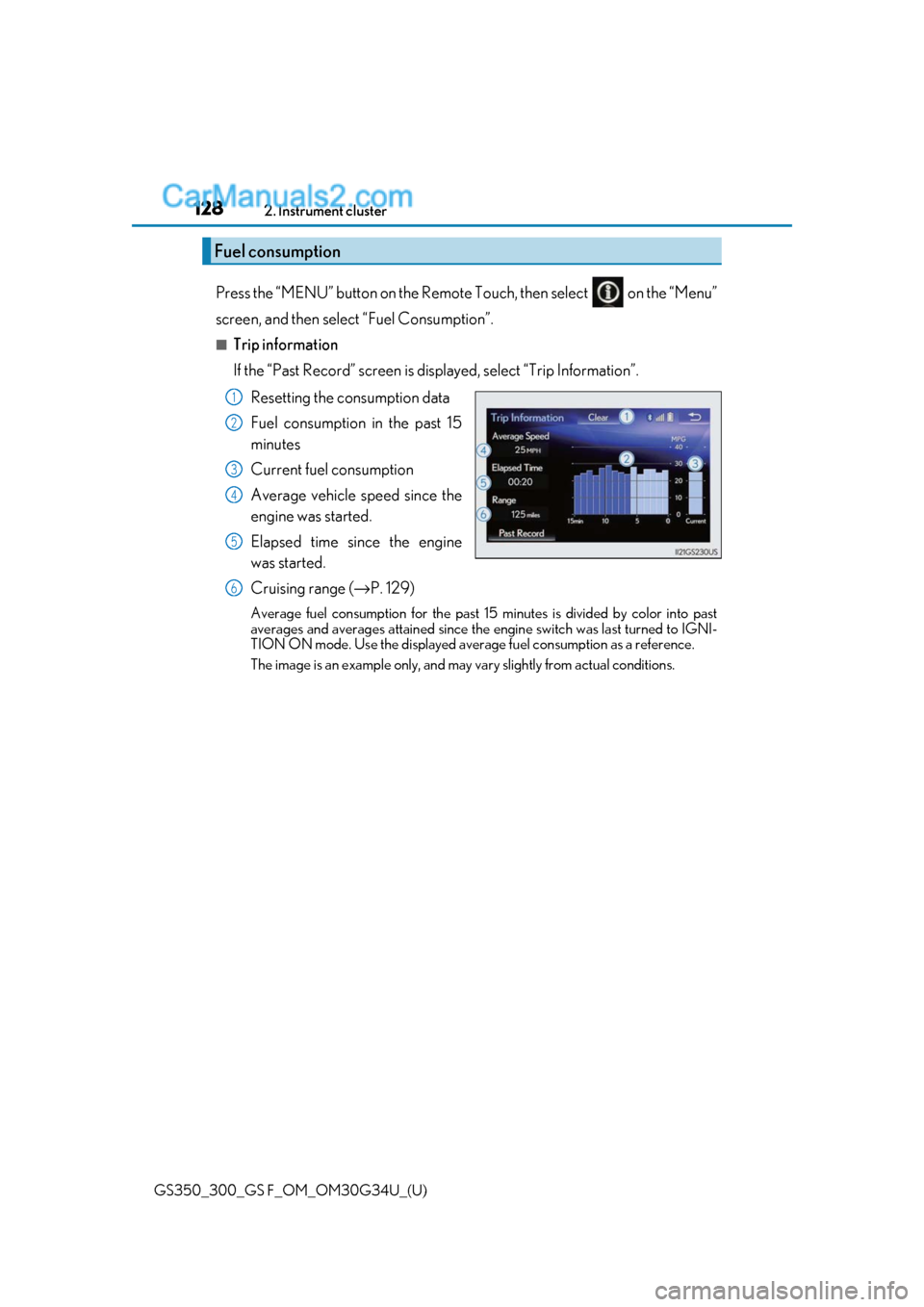
Press the “MENU” button on the Remote
Touch, then select on the “Menu”
screen, and then select “Fuel Consumption”.
■Trip information
If the “Past Record” screen is displayed, select “Trip Information”.
Resetting the consumption data
Fuel consumption in the past 15
minutes
Current fuel consumption
Average vehicle speed since the
engine was started.
Elapsed time since the engine
was started.
Cruising range (→ P. 129)
Average fuel consumption for the past 15 minutes is divided by color into past
averages and averages attained since the engine switch was last turned to IGNI-
TION ON mode. Use the displayed average fuel consumption as a reference.
The image is an example only, and may va ry slightly from actual conditions.
Fuel consumption
1
2
3
4
5
6
Page 129 of 602
GS350_300_GS F_OM_OM30G34U_(U)
1292. Instrument cluster
2
Instrument cluster
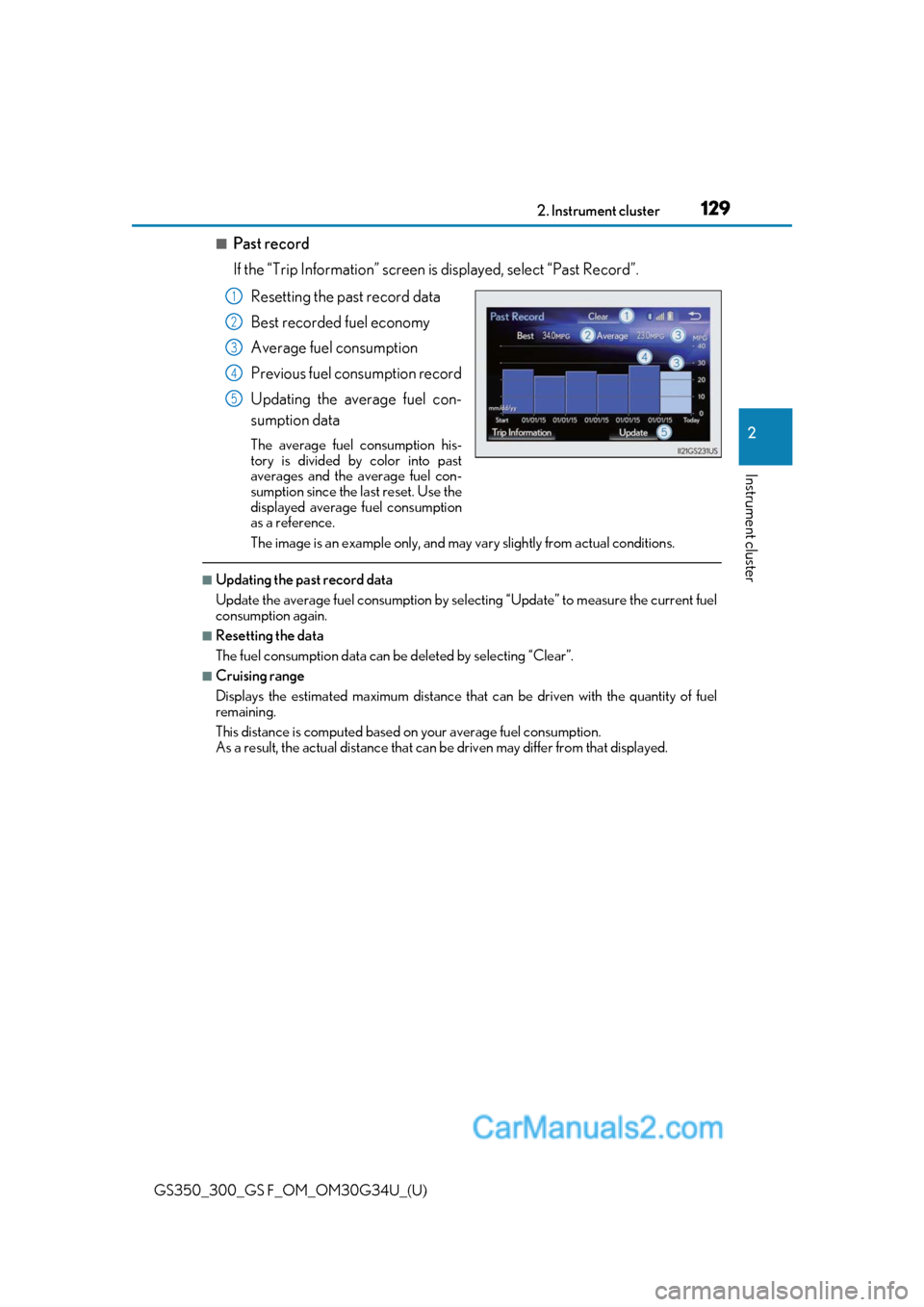
■Past record
If the “Trip Information” screen is displayed, select “Past Record”.
Resetting the past record data
Best recorded fuel economy
Average fuel consumption
Previous fuel consumption record
Updating the average fuel con-
sumption data
The average fuel consumption his-
tory is divided by color into past
averages and the average fuel con-
sumption since the last reset. Use the
displayed average fuel consumption
as a reference.
The image is an example only, and may va ry slightly from actual conditions.
■Updating the past record data
Update the average fuel consumption by selecting “Update” to measure the current fuel
consumption again.
■Resetting the data
The fuel consumption data can be deleted by selecting “Clear”.
■Cruising range
Displays the estimated maximum distance that can be driven with the quantity of fuel
remaining.
This distance is computed based on your average fuel consumption.
As a result, the actual distance that can be driven may differ from that displayed.
1
2
3
4
5
Page 130 of 602
130
GS350_300_GS F_OM_OM30G34U_(U)2. Instrument cluster
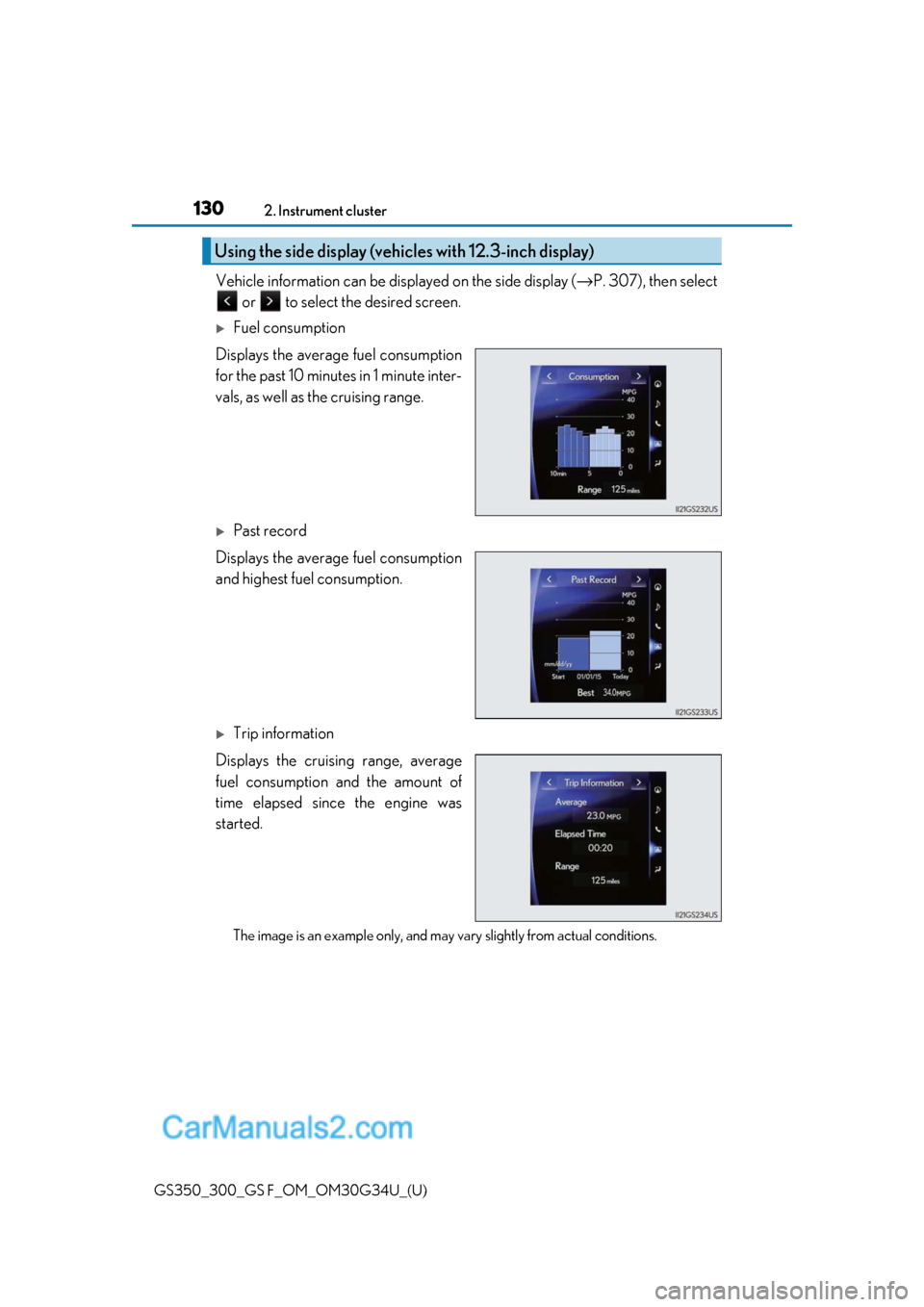
Vehicle information can be displayed on the side display (
→P. 307), then select
or to select the desired screen.
Fuel consumption
Displays the average fuel consumption
for the past 10 minutes in 1 minute inter-
vals, as well as the cruising range.
Past record
Displays the average fuel consumption
and highest fuel consumption.
Trip information
Displays the cruising range, average
fuel consumption and the amount of
time elapsed since the engine was
started.
The image is an example only, and may va ry slightly from actual conditions.
Using the side display (vehicles with 12.3-inch display)
Page 183 of 602
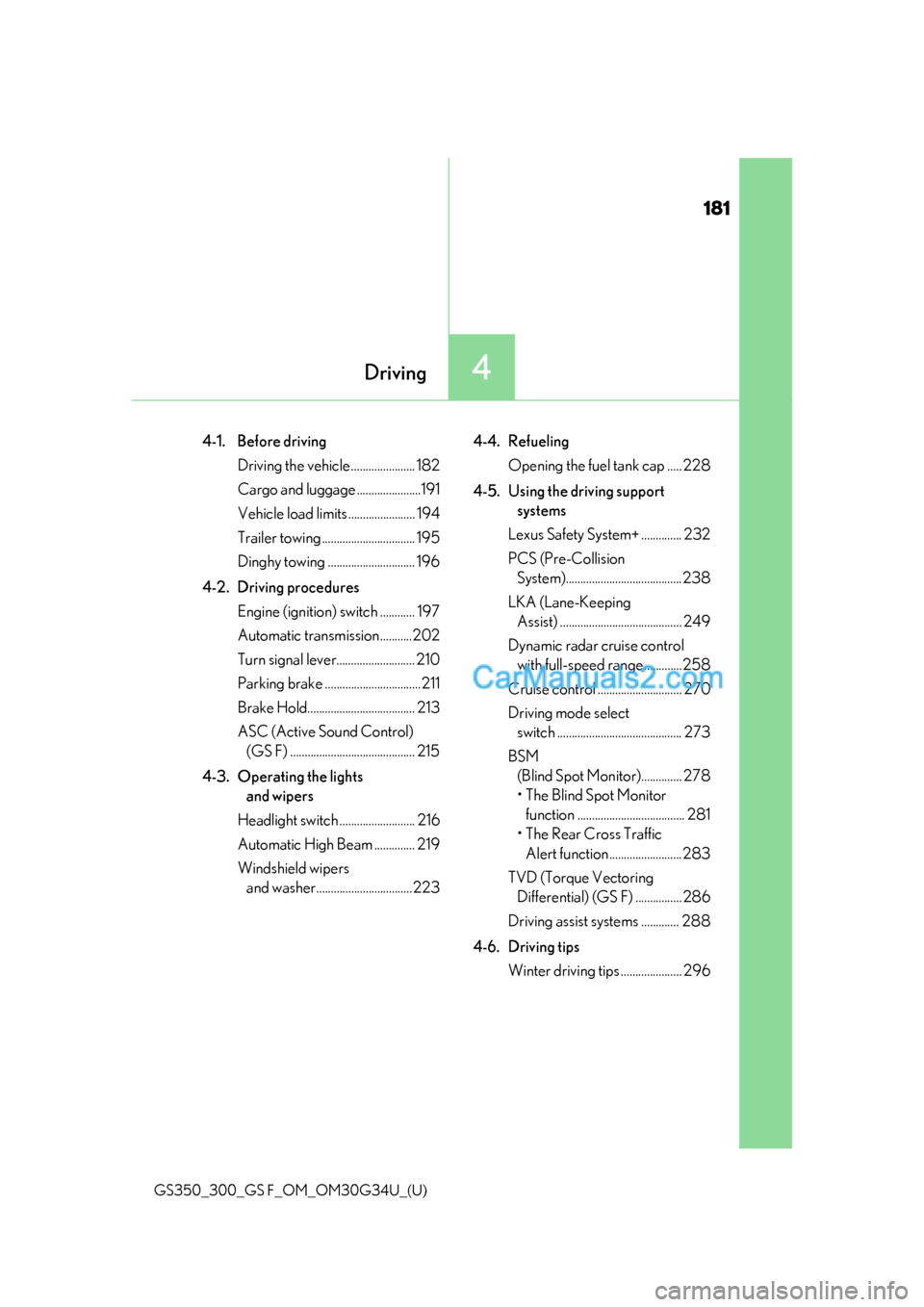
181
GS350_300_GS F_OM_OM30G34U_(U)
4Driving
4-1. Before drivingDriving the vehicle ...................... 182
Cargo and luggage ......................191
Vehicle load limits ....................... 194
Trailer towing ................................ 195
Dinghy towing .............................. 196
4-2. Driving procedures Engine (ignition) switch ............ 197
Automatic transmission...........202
Turn signal lever........................... 210
Parking brake .................................211
Brake Hold..................................... 213
ASC (Active Sound Control) (GS F) ........................................... 215
4-3. Operating the lights and wipers
Headlight switch .......................... 216
Automatic High Beam .............. 219
Windshield wipers and washer.................................223 4-4. Refueling
Opening the fuel tank cap ..... 228
4-5. Using the driving support systems
Lexus Safety System+ .............. 232
PCS (Pre-Collision System)........................................238
LKA (Lane-Keeping Assist) .......................................... 249
Dynamic radar cruise control with full-speed range .............258
Cruise control ............................. 270
Driving mode select switch ........................................... 273
BSM (Blind Spot Moni tor).............. 278
• The Blind Spot Monitor function ..................................... 281
• The Rear Cross Traffic
Alert function .........................283
TVD (Torque Vectoring Differential) (GS F) ................ 286
Driving assist systems ............. 288
4-6. Driving tips Winter driving tips ..................... 296
Page 186 of 602
184
GS350_300_GS F_OM_OM30G34U_(U)4-1. Before driving
■Drum-in-disc type parking brake system
Your vehicle has a drum-in-disc type parking brake system. This type of brake system
needs bedding-down of the brake shoes peri
odically or whenever the parking brake
shoes and/or drum are replaced. Have your Lexus dealer perform the bedding down
operation.
■Operating your vehicle in a foreign country
Comply with the relevant vehicle registration laws and confirm the availability of the cor-
rect fuel. ( →P. 521)
■Brake pads and discs
●F SPORT models of GS350/GS300, and GS F: The brake pads and discs are
designed for use under high load conditions . Therefore, brake noise may be generated
depending on the vehicle speed, braking force and vehicle environment (temperature,
humidity, etc.).
●GS F: In order to achieve steady braking performance even during high-load sporty
driving, brake pads that include a large amount of iron are used. As a result, rust may
form if the vehicle is parked for a long time with wet brake pads or disc rotors, causing
them to stick. When parts are stuck, abnormal noise or vibration may occur during
driving, so lightly depress the accelerator pedal and drive slowly. (Before parking the
vehicle after it is washed, drive slowly an d apply the brakes several times to dry the
parts.)
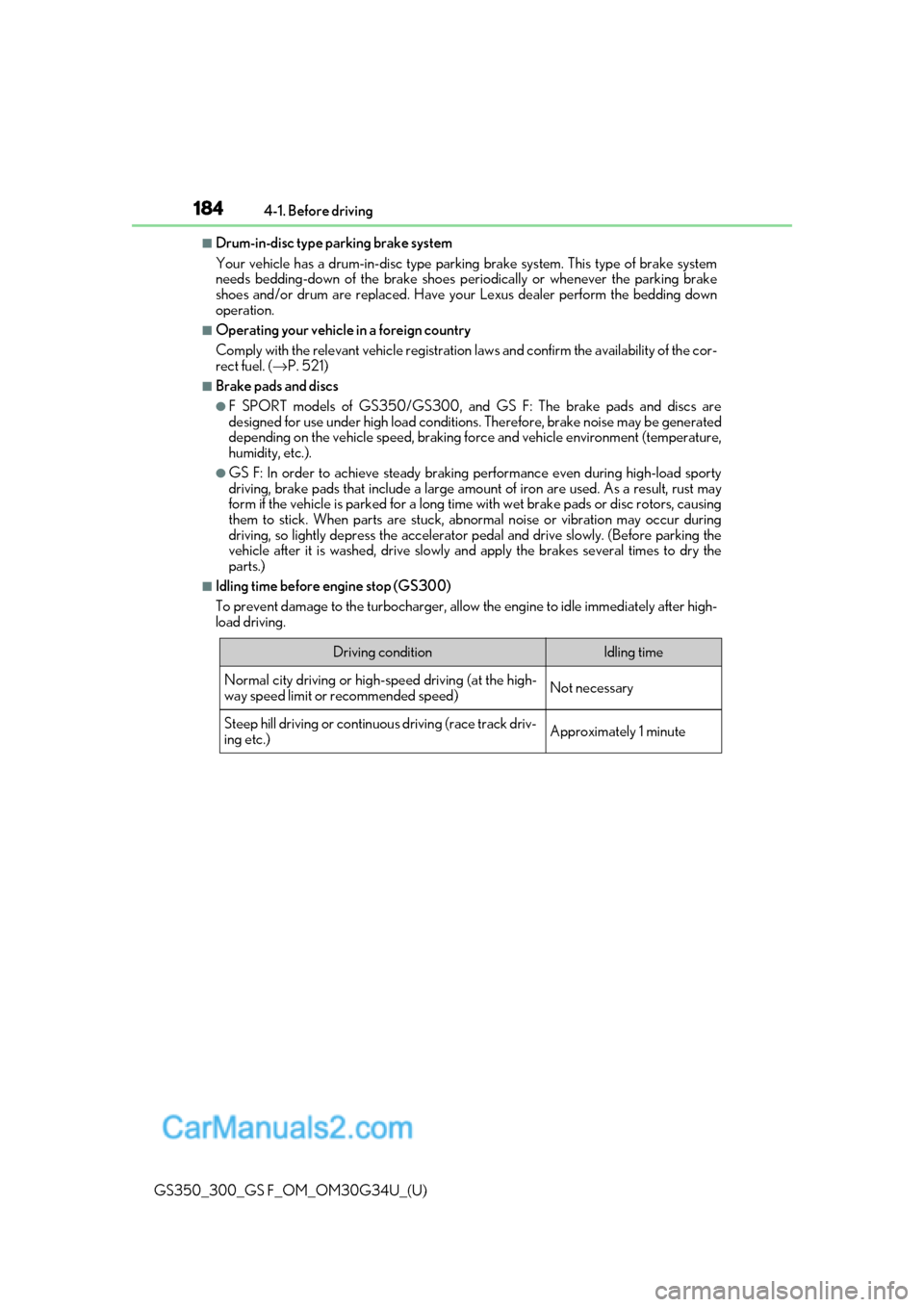
■Idling time before engine stop (GS300)
To prevent damage to the turbocharger, allow the engine to idle immediately after high-
load driving.
Driving conditionIdling time
Normal city driving or high-speed driving (at the high-
way speed limit or recommended speed)Not necessary
Steep hill driving or continuo us driving (race track driv-
ing etc.)Approximately 1 minute