warning Lexus GS F 2019 Owner's Manuals
[x] Cancel search | Manufacturer: LEXUS, Model Year: 2019, Model line: GS F, Model: Lexus GS F 2019Pages: 600, PDF Size: 13.04 MB
Page 266 of 600
266
GS F_OM_OM30G90U_(U)4-5. Using the driving support systems
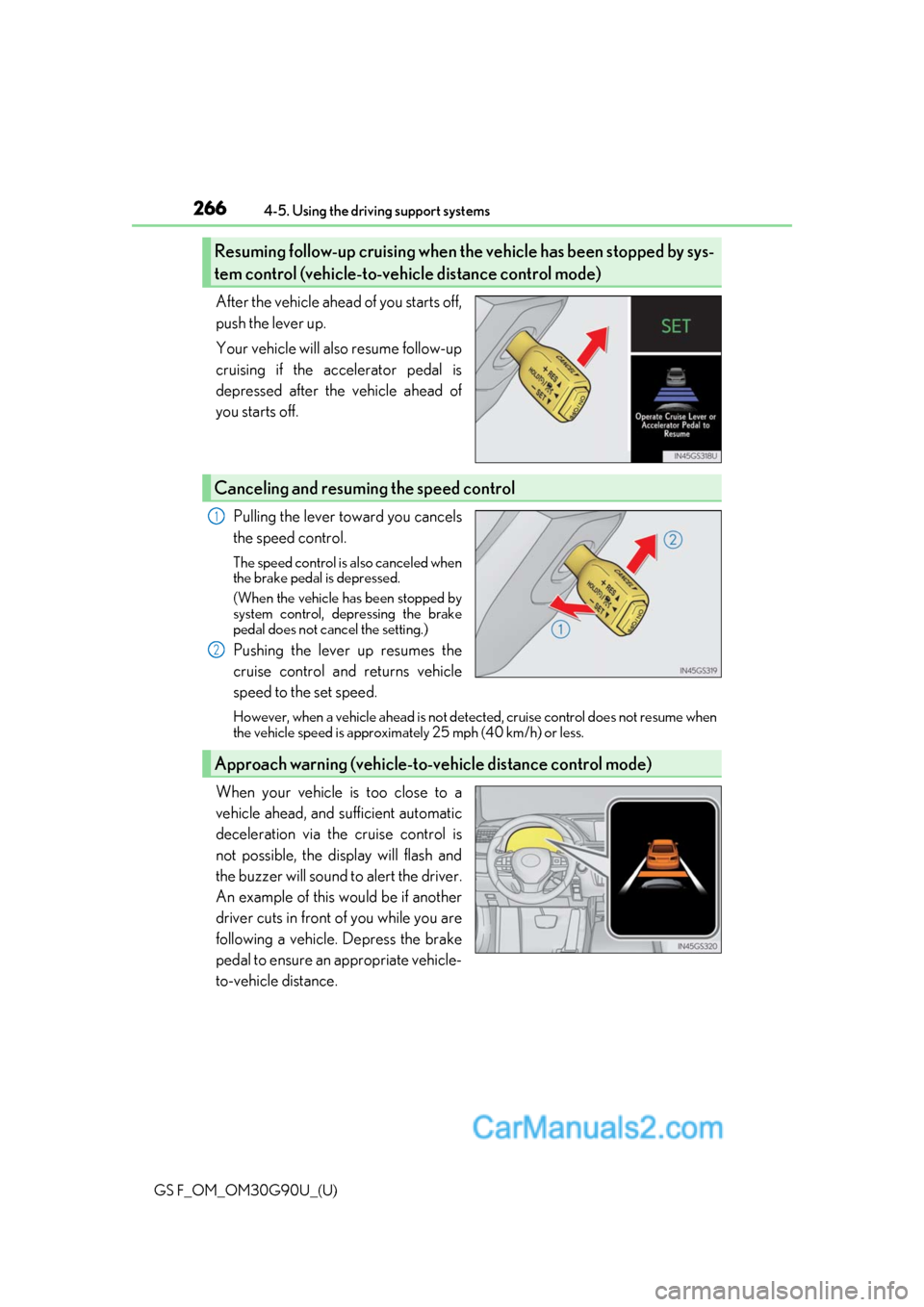
After the vehicle ahead of you starts off,
push the lever up.
Your vehicle will also resume follow-up
cruising if the accelerator pedal is
depressed after the vehicle ahead of
you starts off.
Pulling the lever toward you cancels
the speed control.
The speed control is also canceled when
the brake pedal is depressed.
(When the vehicle has been stopped by
system control, depressing the brake
pedal does not cancel the setting.)
Pushing the lever up resumes the
cruise control and returns vehicle
speed to the set speed.
However, when a vehicle ahead is not detected, cruise control does not resume when
the vehicle speed is approximately 25 mph (40 km/h) or less.
When your vehicle is too close to a
vehicle ahead, and sufficient automatic
deceleration via the cruise control is
not possible, the display will flash and
the buzzer will sound to alert the driver.
An example of this would be if another
driver cuts in front of you while you are
following a vehicle. Depress the brake
pedal to ensure an appropriate vehicle-
to-vehicle distance.
Resuming follow-up cruising when the vehicle has been stopped by sys-
tem control (vehicle-to-vehicle distance control mode)
Canceling and resuming the speed control
1
2
Approach warning (vehicle-to-vehicle distance control mode)
Page 267 of 600
GS F_OM_OM30G90U_(U)
2674-5. Using the driving support systems
4
Driving
■Warnings may not occur when
In the following instances, warnings may not occur even when the vehicle-to-
vehicle distance is small.
●When the speed of the preceding vehicle matches or exceeds your vehicle
speed
●When the preceding vehicle is traveling at an extremely slow speed
●Immediately after the crui se control speed was set
●When depressing the accelerator pedal
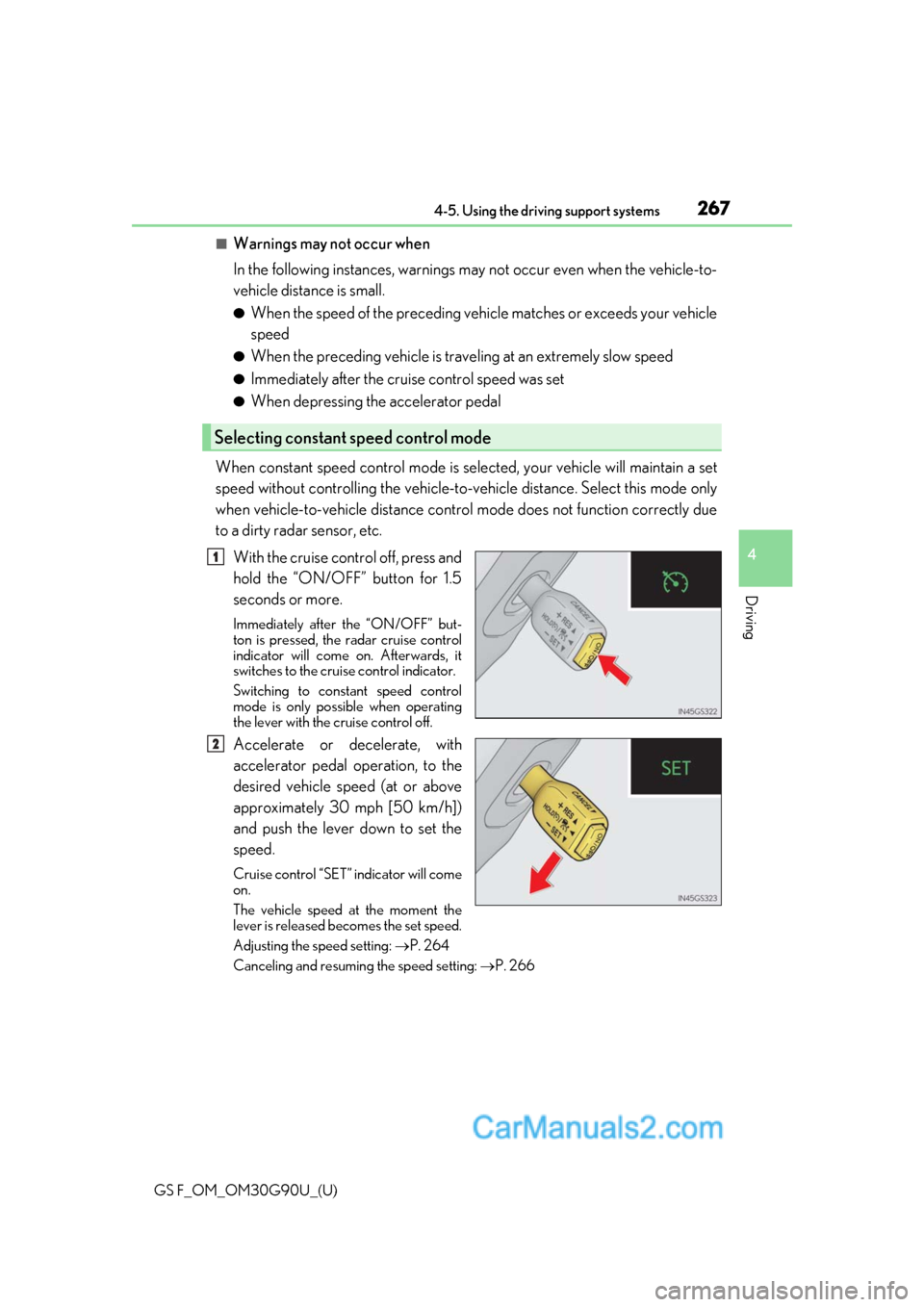
When constant speed control mode is se lected, your vehicle will maintain a set
speed without controlling the vehicle-to-veh icle distance. Select this mode only
when vehicle-to-vehicle distance control mode does not function correctly due
to a dirty radar sensor, etc.
With the cruise control off, press and
hold the “ON/OFF” button for 1.5
seconds or more.
Immediately after the “ON/OFF” but-
ton is pressed, the radar cruise control
indicator will come on. Afterwards, it
switches to the cruise control indicator.
Switching to constant speed control
mode is only possible when operating
the lever with the cruise control off.
Accelerate or decelerate, with
accelerator pedal operation, to the
desired vehicle speed (at or above
approximately 30 mph [50 km/h])
and push the lever down to set the
speed.
Cruise control “SET” indicator will come
on.
The vehicle speed at the moment the
lever is released becomes the set speed.
Adjusting the speed setting: P. 264
Canceling and resuming the speed setting: P. 266
Selecting constant speed control mode
1
2
Page 269 of 600
GS F_OM_OM30G90U_(U)
2694-5. Using the driving support systems
4
Driving
■Automatic cancelation of constant speed control mode
Constant speed control mode is automatica lly canceled in the following situations:
●Actual vehicle speed is more than approxim ately 10 mph (16 km/h) below the set vehi-
cle speed.
●Actual vehicle speed falls below approximately 25 mph (40 km/h).
●VSC is activated.
●TRAC is activated for a period of time.
●When the VSC or TRAC system is turned off.
●Pre-collision braking is activated.
If constant speed control mode is automati cally canceled for any other reason, there may
be a malfunction in the system . Contact your Lexus dealer.
■Brake system operation sound
If the brakes are applied automatically while the vehicle is in vehicle-to-vehicle distance
control mode, a brake system operation soun d may be heard. This does not indicate a
malfunction.
■Warning messages and buzzers for dynamic radar cruise control with full-speed range
Warning messages and buzzers are used to indicate a system malfunction or to inform
the driver of the need for ca ution while driving. If a warning message is shown on the
multi-information display, read the message and follow the instructions. ( P. 441)
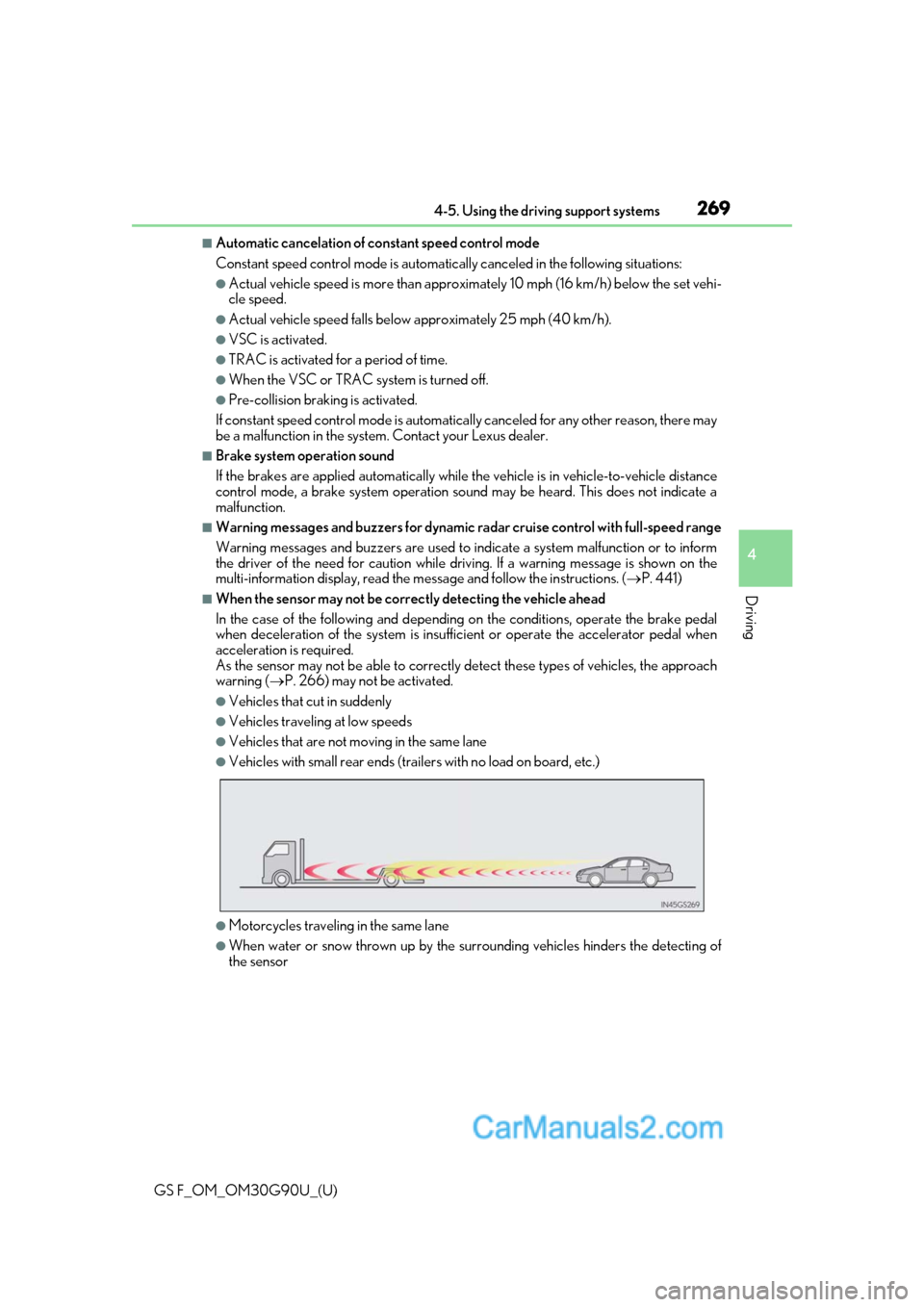
■When the sensor may not be correctly detecting the vehicle ahead
In the case of the following and depending on the conditions, operate the brake pedal
when deceleration of the system is insuff icient or operate the accelerator pedal when
acceleration is required.
As the sensor may not be able to correctly detect these types of vehicles, the approach
warning ( P. 266) may not be activated.
●Vehicles that cut in suddenly
●Vehicles traveling at low speeds
●Vehicles that are not moving in the same lane
●Vehicles with small rear ends (traile rs with no load on board, etc.)
●Motorcycles traveling in the same lane
●When water or snow thrown up by the surrounding vehicles hinders the detecting of
the sensor
Page 273 of 600
GS F_OM_OM30G90U_(U)
2734-5. Using the driving support systems
4
Driving
■Automatic cruise control cancelation
Cruise control will stop maintaining the vehicle speed in an y of the following situations.
●Actual vehicle speed falls more than appr oximately 10 mph (16 km/h) below the preset
vehicle speed.
At this time, the memorized set speed is not retained.
●Actual vehicle speed is below approximately 25 mph (40 km/h).
●VSC is activated.
●TRAC is activated for a period of time.
●When the VSC or TRAC system is turned off by pressing the VSC OFF switch.
■If the warning message for the cruise contro l is shown on the multi-information display
Press the “ON/OFF” button once to deactiv ate the system, and then press the button
again to reactivate the system.
If the cruise control speed cannot be set or if the cruise control cancels immediately after
being activated, there may be a malfunction in the cruise control system. Have the vehi-
cle inspected by your Lexus dealer.
WARNING
■To avoid operating the cruise control by mistake
Switch the cruise control off using th e “ON/OFF” button when not in use.
■Situations unsuitable for cruise control
Do not use cruise control in any of the following situations.
Doing so may result in loss of control and could cause an accident resulting in death or
serious injury.
●In heavy traffic
●On roads with sharp bends
●On winding roads
●On slippery roads, such as thos e covered with rain, ice or snow
●On steep hills
Vehicle speed may exceed the set speed when driving down a steep hill.
●During emergency towing
Page 280 of 600
280
GS F_OM_OM30G90U_(U)4-5. Using the driving support systems
■The outside rear view mi
rror indicators visibility
When under strong sunlight, the outside rear view mirror indicator may be difficult to
see.
■Rear Cross Traffic Alert buzzer hearing
Rear Cross Traffic Alert function may be diffic ult to hear over loud noises such as high
audio volume.
■When there is a malfunction in the Blind Spot Monitor
If a system malfunctio n is detected due to any of th e following reasons, warning mes-
sages will be displayed: ( P. 441)
●There is a malfunction with the sensors
●The sensors have become dirty
●The outside temperature is extremely high or low
●The sensor voltage has become abnormal
■Switching the Blind Spot Monitor function and Rear Cross Traffic Alert function on and
off
Settings can be changed from on the multi-information display (P. 100, 108).
Press or on the meter control switch and select “BSM”.
Each time on the meter control switch is pressed, the function switches between
“On” and “Off”.
■Certification for the Blind Spot Monitor
For vehicles sold in the U.S.A., Hawaii, Guam and Puerto Rico
For vehicles sold in Canada
1
2
Page 281 of 600
GS F_OM_OM30G90U_(U)
2814-5. Using the driving support systems
4
Driving
WARNING
■Handling the radar sensor
●Keep the sensor and its surrounding area on the bumper clean at all times.
●Do not subject the sensor or surrounding area on the bumper to a strong impact. If
the sensor moves even slightly off position, the system may malfunction and vehicles
that enter the detection area may not be detected. If the sensor or surrounding area is
subject to a strong impact, always have the area inspected by your Lexus dealer.
●Do not disassemble the sensor.
●Do not attach accessories or stickers to the sensor or surrounding area on the
bumper.
●Do not modify the sensor or su rrounding area on the bumper.
●Do not paint the rear bumper any colo r other than an official Lexus color.
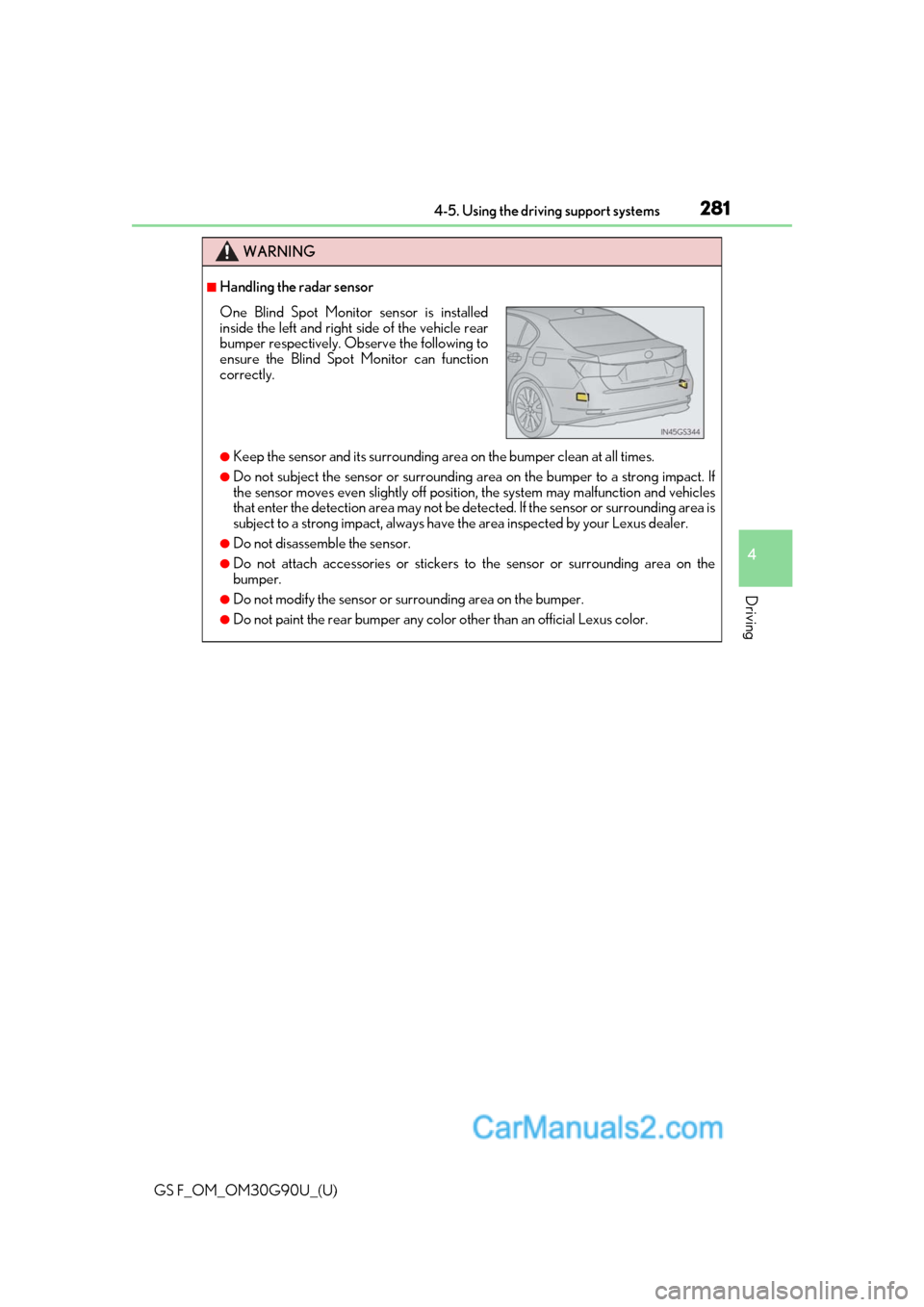
One Blind Spot Monitor sensor is installed
inside the left and right side of the vehicle rear
bumper respectively. Observe the following to
ensure the Blind Spot Monitor can function
correctly.
Page 282 of 600
282
GS F_OM_OM30G90U_(U)4-5. Using the driving support systems
The Blind Spot Monitor function uses rada
r sensors to detect vehicles that are
traveling in an adjacent lane in the area that is not reflected in the outside rear
view mirror (the blind spot), and advises the driver of the vehicle’s existence via
the outside rear view mirror indicator.
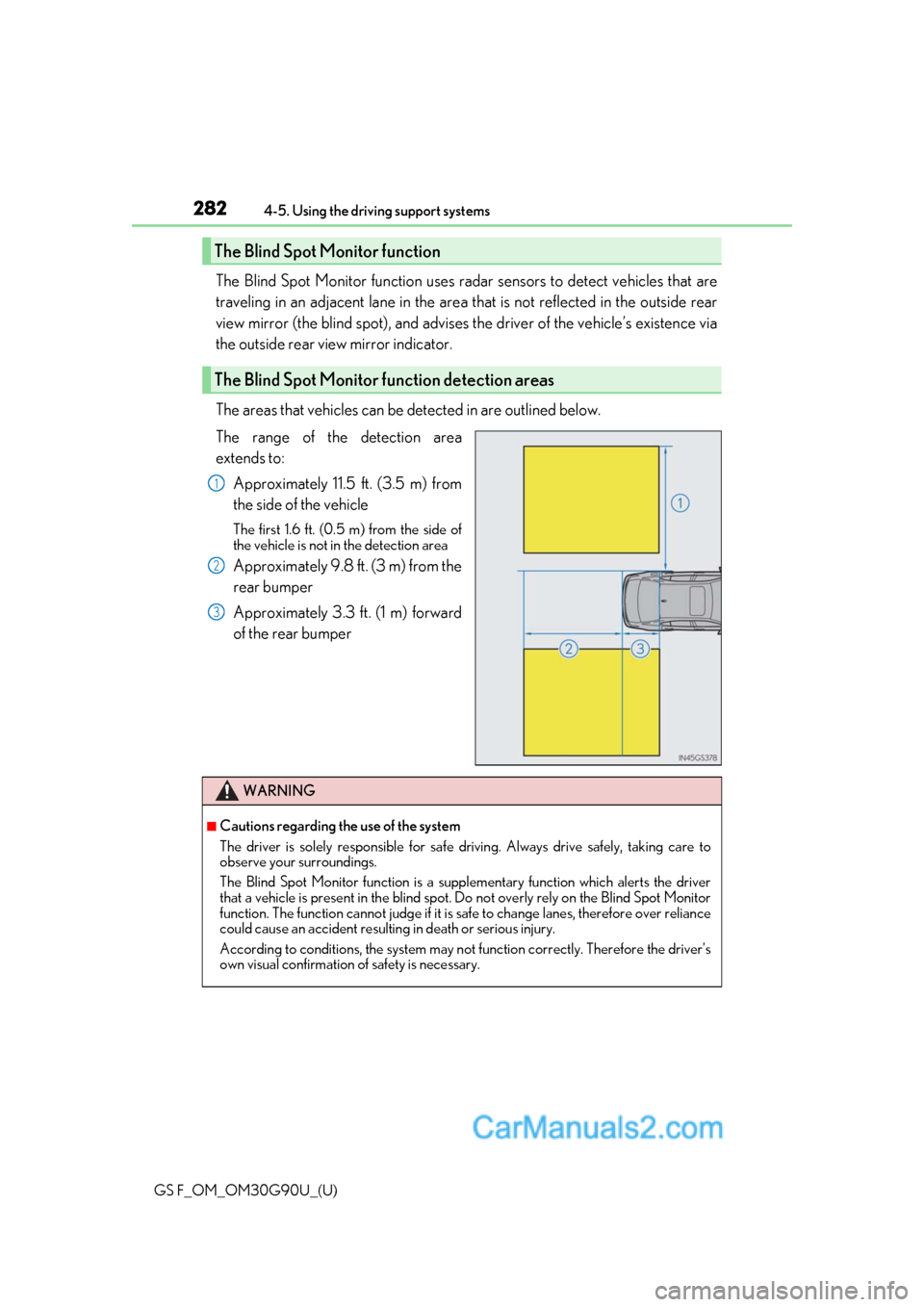
The areas that vehicles can be detected in are outlined below.
The range of the detection area
extends to:
Approximately 11.5 ft. (3.5 m) from
the side of the vehicle
The first 1.6 ft. (0.5 m) from the side of
the vehicle is not in the detection area
Approximately 9.8 ft. (3 m) from the
rear bumper
Approximately 3.3 ft. (1 m) forward
of the rear bumper
The Blind Spot Monitor function
The Blind Spot Monitor function detection areas
1
2
3
WARNING
■Cautions regarding the use of the system
The driver is solely responsible for safe driving. Always drive safely, taking care to
observe your surroundings.
The Blind Spot Monitor function is a supp lementary function which alerts the driver
that a vehicle is present in the blind spot. Do not overly rely on the Blind Spot Monitor
function. The function cannot judg e if it is safe to change lanes, therefore over reliance
could cause an accident resultin g in death or serious injury.
According to conditio ns, the system may not function correctly. Therefore the driver’s
own visual confirmation of safety is necessary.
Page 284 of 600
284
GS F_OM_OM30G90U_(U)4-5. Using the driving support systems
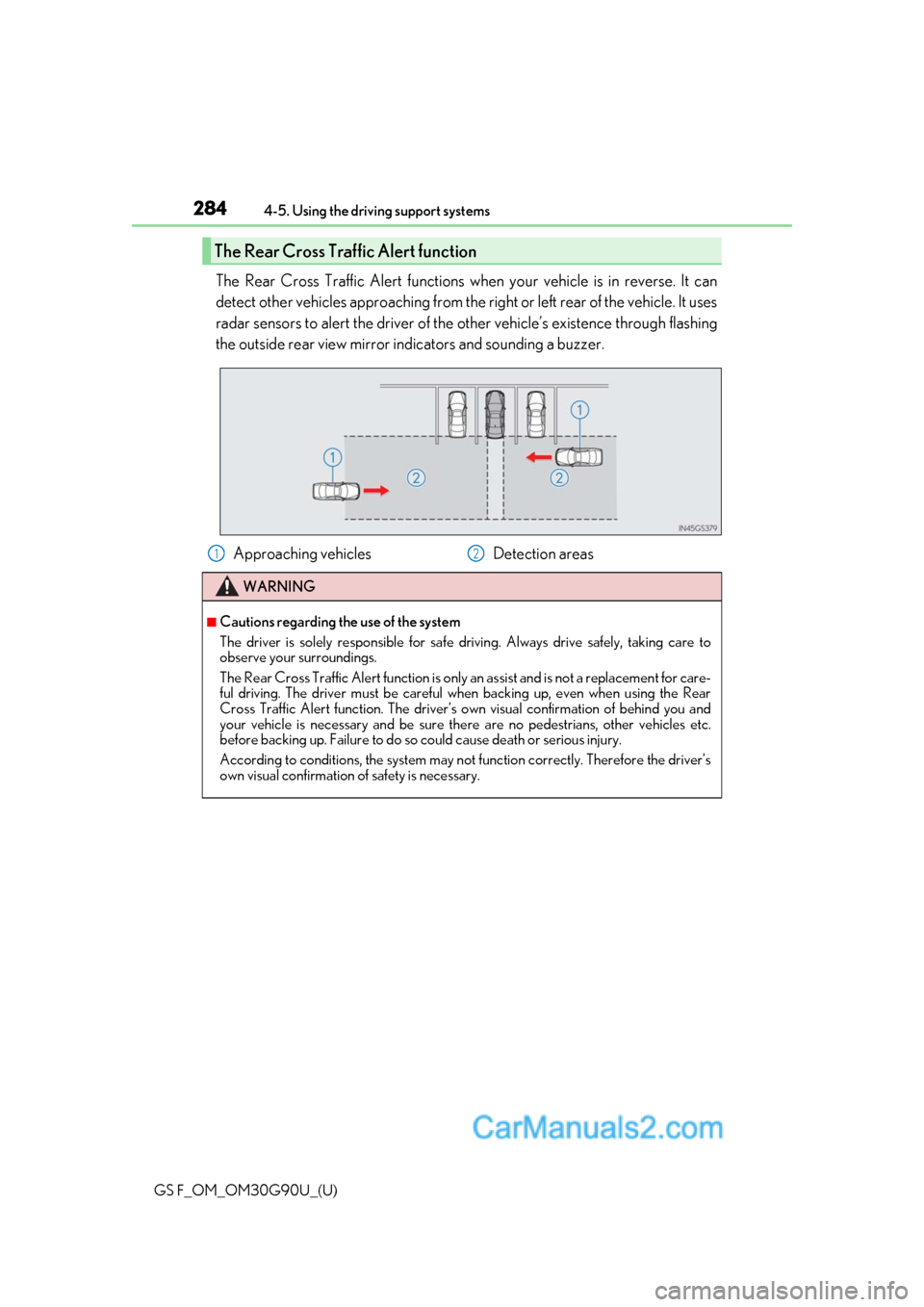
The Rear Cross Traffic Alert functions when your vehicle is in reverse. It can
detect other vehicles approaching from the ri
ght or left rear of the vehicle. It uses
radar sensors to alert the driver of the other vehicle’s existence through flashing
the outside rear view mirror indicators and sounding a buzzer.
The Rear Cross Traffic Alert function
Approaching vehicles Detection areas
WARNING
■Cautions regarding the use of the system
The driver is solely responsible for safe driving. Always drive safely, taking care to
observe your surroundings.
The Rear Cross Traffic Alert function is only an assist and is not a replacement for care-
ful driving. The driver must be careful when backing up, even when using the Rear
Cross Traffic Alert function. The driver’s ow n visual confirmation of behind you and
your vehicle is necessary and be sure ther e are no pedestrians, other vehicles etc.
before backing up. Failure to do so could cause death or serious injury.
According to conditio ns, the system may not function correctly. Therefore the driver’s
own visual confirmation of safety is necessary.
12
Page 288 of 600
288
GS F_OM_OM30G90U_(U)4-5. Using the driving support systems
■Automatic cancelation of the selected TVD control mode
SLALOM and TRACK mode are canceled when the engine switch is turned off. When
the engine switch is turned to IGNITION ON mode, the TVD system will be in STAN-
DARD mode.
■Automatic disabling of the TVD system
If a malfunction is de
tected in the TVD system, a warn ing message will be displayed on
the multi-information display ( P. 441) and the TVD system will be disabled automati-
cally. If the system is disabled, driving force will not be distributed by the TVD but through
normal differential operation.
■To protect the system
If the TVD fluid temperature becomes excessively high due to driving for a long time
under extremely high load conditions, a warn ing message will be displayed on the multi-
information display. ( P. 441)
WARNING
■Cautions regarding the use of the system
The driver is solely responsible for safe driv ing. Do not overly rely on the TVD system.
Always drive safely, taking care to observe your surroundings.
Page 292 of 600

292
GS F_OM_OM30G90U_(U)4-5. Using the driving support systems
To turn the TRAC system off, quickly press and release .
GS350/GS300: The “Traction Control Turned
Off” will be shown on the multi-infor-
mation display.
GS F: The “TRAC OFF” indicator light will come on.
Press again to turn the system back on.
■Turning off both TRAC/VSC systems
GS350/GS300
To turn the TRAC/VSC systems off, press and hold for more than 3 seconds while
the vehicle is stopped.
The VSC OFF indicator light will come on an d the “Traction Control Turned Off” will
be shown on the multi-information display.
*1
Press again to turn the systems back on.
GS F
To turn the TRAC and VSC systems off, press and hold for more than 3 seconds. The “TRAC OFF” indicator light and the VSC OFF indicator light will come on.
*2
Press again to turn the systems back on.
*1: On vehicles with PCS (Pre-Collision System ), pre-collision brake assist, pre-collision
braking, and steering control (performed through cooperative control of PCS [Pre-
Collision System] and LDH) (if equipped) will also be disabled. The pre-collision sys-
tem warning light will come on and a message will be displayed on the multi-informa-
tion display. ( P. 441)
*2: On vehicles with PCS (Pre-Collision System), pre-collision brake assist and pre-colli-
sion braking will also be di sabled. The PCS (Pre-Collision System) warning light will
come on and a message will be displaye d on the multi-information display. (P. 441)