sport mode Lexus GS F 2019 s User Guide
[x] Cancel search | Manufacturer: LEXUS, Model Year: 2019, Model line: GS F, Model: Lexus GS F 2019Pages: 600, PDF Size: 13.04 MB
Page 103 of 600
GS F_OM_OM30G90U_(U)
1032. Instrument cluster
2
Instrument cluster
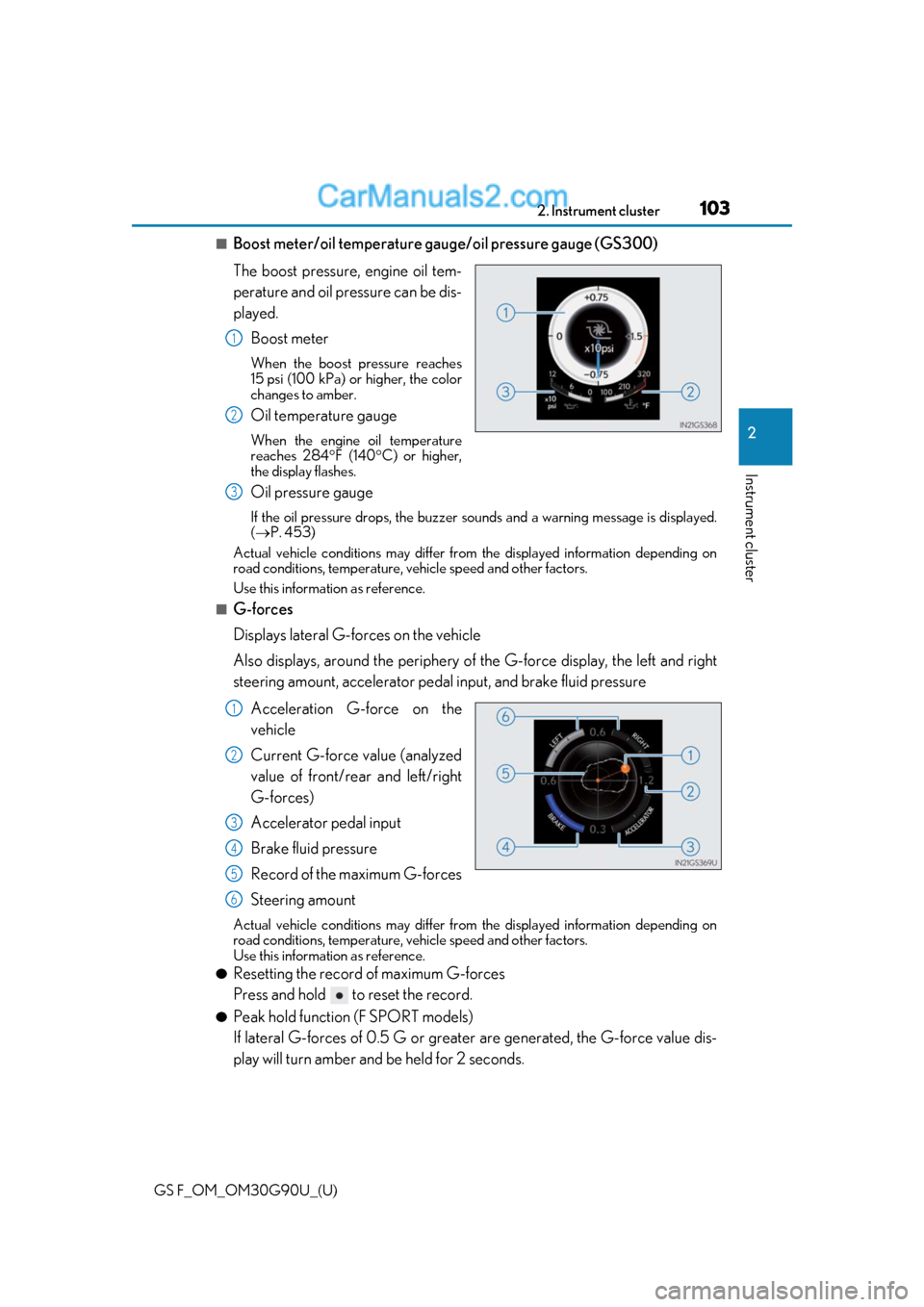
■Boost meter/oil temperature gauge/oil pressure gauge (GS300)
The boost pressure, engine oil tem-
perature and oil pressure can be dis-
played.Boost meter
When the boost pressure reaches
15 psi (100 kPa) or higher, the color
changes to amber.
Oil temperature gauge
When the engine oil temperature
reaches 284 F (140 C) or higher,
the display flashes.
Oil pressure gauge
If the oil pressure drops, the buzzer sounds and a warning message is displayed.
( P. 453)
Actual vehicle conditions may differ fr om the displayed information depending on
road conditions, temperature, vehicle speed and other factors.
Use this informat ion as reference.
■G-forces
Displays lateral G-forces on the vehicle
Also displays, around the periphery of the G-force display, the left and right
steering amount, accelerator pedal input, and brake fluid pressure
Acceleration G-force on the
vehicle
Current G-force value (analyzed
value of front/rear and left/right
G-forces)
Accelerator pedal input
Brake fluid pressure
Record of the maximum G-forces
Steering amount
Actual vehicle conditions may differ fr om the displayed information depending on
road conditions, temperature, vehicle speed and other factors.
Use this informat ion as reference.
●Resetting the record of maximum G-forces
Press and hold to reset the record.
●Peak hold function (F SPORT models)
If lateral G-forces of 0.5 G or greater are generated, the G-force value dis-
play will turn amber and be held for 2 seconds.
1
2
3
1
2
3
4
5
6
Page 105 of 600
GS F_OM_OM30G90U_(U)
1052. Instrument cluster
2
Instrument cluster
■●
Scheduled Maintenance ( P. 366)
●Oil Maintenance ( P. 384)
●TPMS (Tire pressure warning system) ( P. 395)
■
●
Language
Select to change the la nguage on the display.
●Units
Select to change the unit of measure.
●Eco Driving Indicator Light
Select to activate/deactivate the Eco Driving Indicator Light.
● switch
Displays a procedure to register a desired screen to .
You can register 1 screen as a shortcut , which can be displayed by pressing .
●Drive information 1/2/3
Select to select up to 2 items that will be displayed on a Drive information screen,
up to 3 Drive informat ion screens can be set.
●Pop-up display
Select to set the following pop-up displays, which may appear in some situations,
on/off.
• Route guidance of the navigation system-linked display (if equipped)
• Incoming call display of the hands-free phone system
• Instrument panel brightness adjustment display
●Accent color (except F SPORT models)
Select to change the accent colors on the screen, such as the cursor color.
●Needle (F SPORT models)
Select to change the needle color for the tachometer.
●Rev indicator (F SPORT models)
Select to set the rev indicator on/off.
When set to on, proceed to set the engine speed at which the rev indicator will be
displayed.
Selectable engine speed range:
GS350: 2000 rpm to 6800 rpm
GS300: 2000 rpm to 6100 rpm
●Rev peak (F SPORT models)
Select to set the rev peak on/off.
●Default settings
Registered or changed meter settings will be deleted or returned to their default
setting.
Page 117 of 600
GS F_OM_OM30G90U_(U)
1172. Instrument cluster
2
Instrument cluster
●Pop-up display
Select to set the following pop-up displays, which may appear in some situations,
on/off.• Route guidance of the navigation system-linked display (if equipped)
• Incoming call display of the hands-free phone system
• Instrument panel brightness adjustment display
• TVD control mode change display
●Rev indicator
Select to set the rev indicator on/off.
When set to on, proceed to set the engine speed at which the rev indicator will be
displayed.
●Rev peak
Select to set the rev peak on/off.
●Drive gauges
The meter display when in SPORT S, SPORT S+ or customized mode can be
selected and set from the Eco drive mode screen*/normal mode screen*/SPORT
S mode screen/SPORT S+ mode screen.
*: Only customized mode can be selected.
●Default settings
Registered or changed meter settings will be deleted or returned to their default
setting.
Page 122 of 600
122
GS F_OM_OM30G90U_(U)2. Instrument cluster
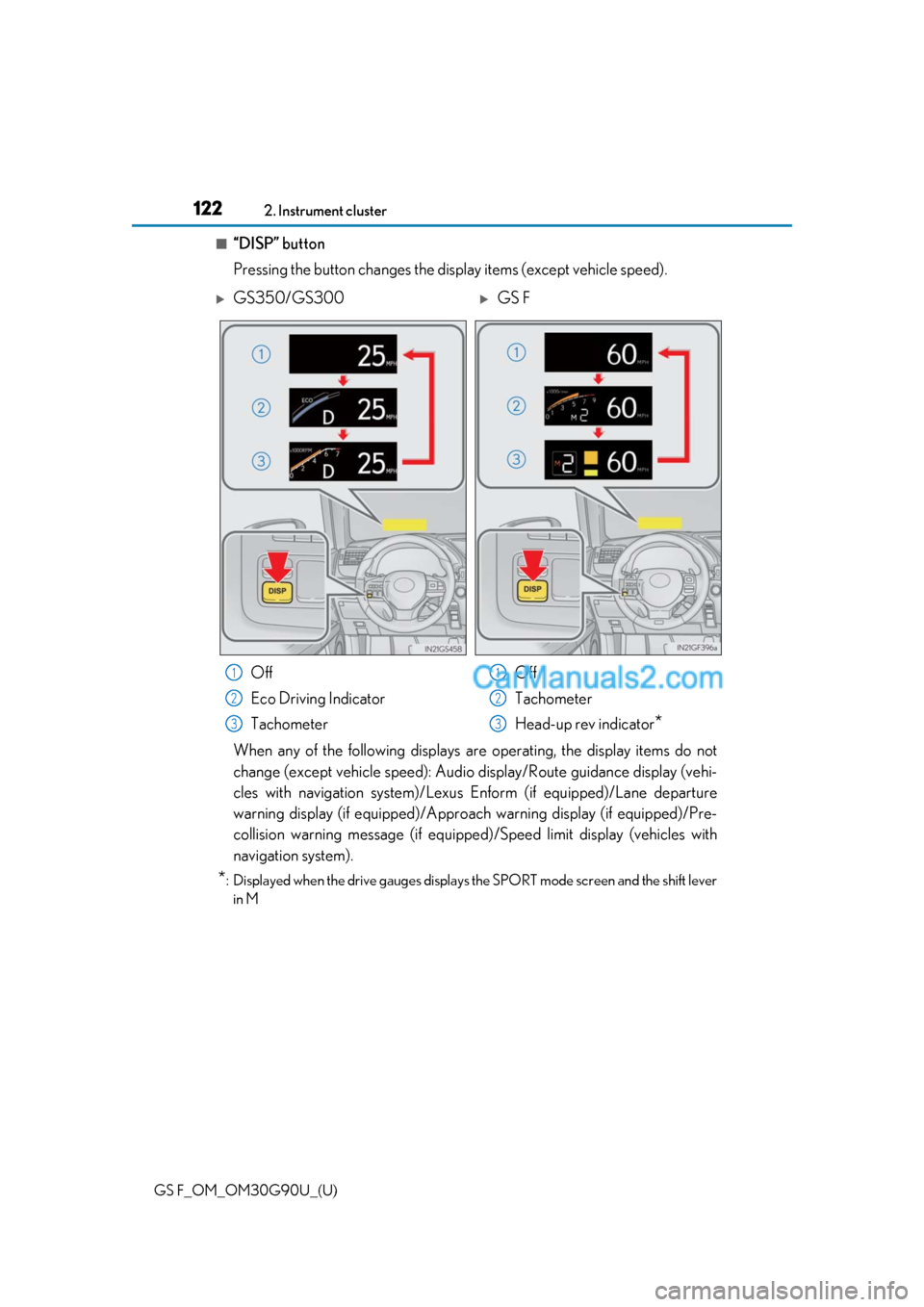
■“DISP” button
Pressing the button changes the display items (except vehicle speed).
When any of the following displays ar
e operating, the display items do not
change (except vehicle speed): Audio display/Route guidance display (vehi-
cles with navigation system)/Lexus Enform (if equipped)/Lane departure
warning display (if equipped)/Approach warning display (if equipped)/Pre-
collision warning message (if equipped )/Speed limit display (vehicles with
navigation system).
*: Displayed when the drive gauges displays the SPORT mode screen and the shift lever in M
GS350/GS300GS F
Off
Eco Driving Indicator
Tachometer Off
Tachometer
Head-up rev indicator
*
1
2
3
1
2
3
Page 124 of 600
124
GS F_OM_OM30G90U_(U)2. Instrument cluster
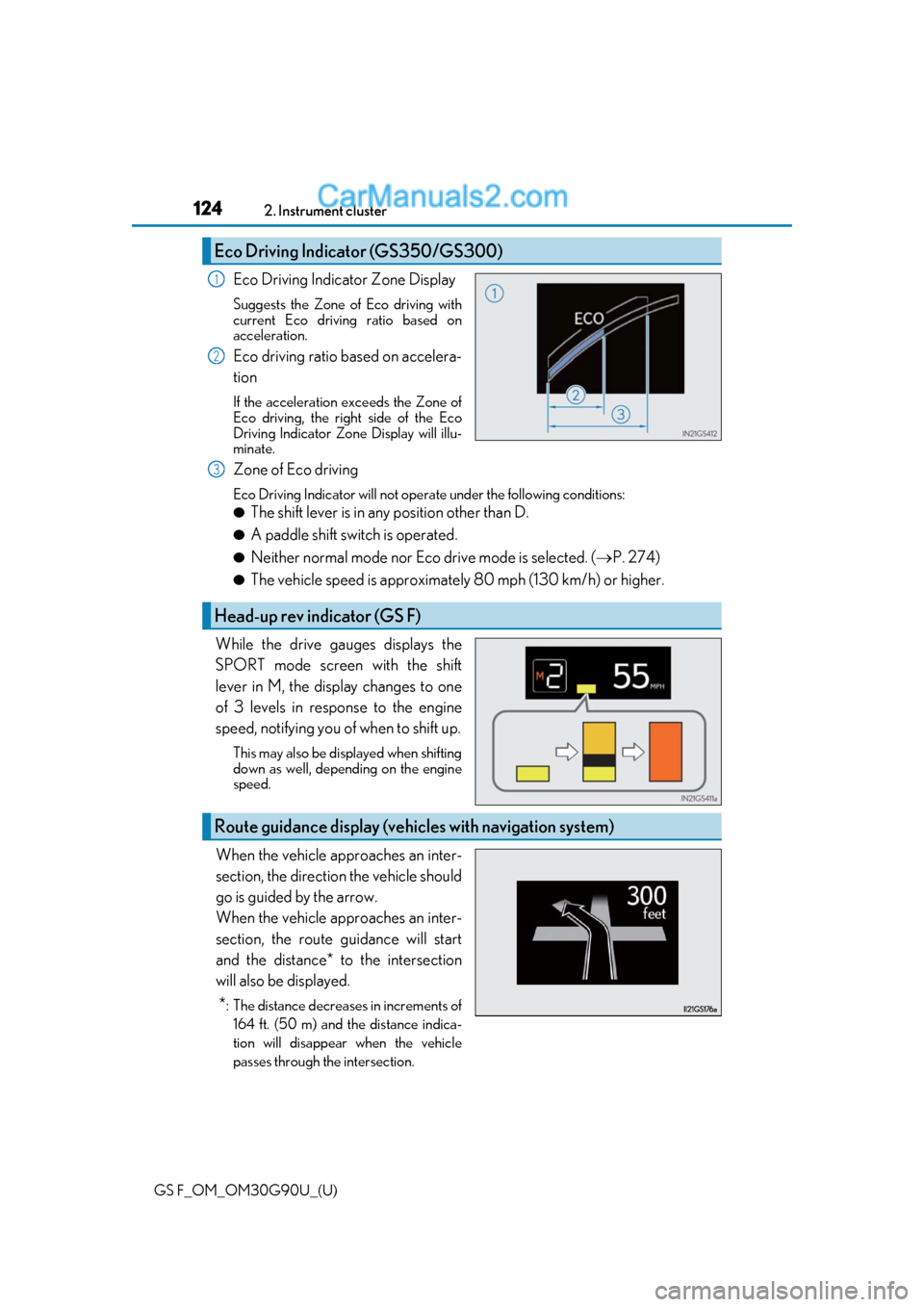
Eco Driving Indicator Zone Display
Suggests the Zone of Eco driving with
current Eco driving ratio based on
acceleration.
Eco driving ratio based on accelera-
tion
If the acceleration exceeds the Zone of
Eco driving, the right side of the Eco
Driving Indicator Zone
Display will illu-
minate.
Zone of Eco driving
Eco Driving Indicator will not oper ate under the following conditions:
●The shift lever is in any position other than D.
●A paddle shift switch is operated.
●Neither normal mode nor Eco drive mode is selected. ( P. 274)
●The vehicle speed is approximately 80 mph (130 km/h) or higher.
While the drive gauges displays the
SPORT mode screen with the shift
lever in M, the display changes to one
of 3 levels in resp onse to the engine
speed, notifying you of when to shift up.
This may also be displayed when shifting
down as well, depending on the engine
speed.
When the vehicle approaches an inter-
section, the direction the vehicle should
go is guided by the arrow.
When the vehicle approaches an inter-
section, the route guidance will start
and the distance* to the intersection
will also be displayed.
*: The distance decreases in increments of 164 ft. (50 m) and the distance indica-
tion will disappear when the vehicle
passes through the intersection.
Eco Driving Indicator (GS350/GS300)
1
2
Head-up rev indicator (GS F)
3
Route guidance display (vehicles with navigation system)
Page 183 of 600
GS F_OM_OM30G90U_(U)
1834-1. Before driving
4
Driving
■When starting off on a uphill
The hill-start assist control is available. (P. 289)
■Driving in the rain
●Drive carefully when it is raining, because visibility will be reduced, the windows may
become fogged-up, and the road will be slippery.
●Drive carefully when it starts to rain, beca use the road surface will be especially slip-
pery.
●Refrain from high speeds when driving on an expressway in the rain, because there may
be a layer of water between the tires and th e road surface, preventing the steering and
brakes from operating properly.
■Engine speed while driving
In the following conditions, th e engine speed may become high while driving. This is due
to automatic up-shifting control or down-shi fting implementation to meet driving condi-
tions. It does not indica te sudden acceleration.
●The vehicle is judged to be driving uphill or downhill
●When the accelerator pedal is released
●When the brake pedal is depressed while sport mode is selected ( P. 274)
■Restraining engine output (Brake Override System)
●When the accelerator and brake pedals are depressed at the same time, the engine
output may be restrained.
●A warning message is displayed on the mult i-information display while the system is
operating. ( P. 461)
■Restraining sudden start (Drive-Start Control)
●When the following unusual operation is performed, the engine output may be
restrained.
• When the shift lever is shifted from R to D, D to R, N to R, P to D, or P to R (D
includes M) with the accelerator pedal depressed, a warning message appears on
the multi-information display. ( P. 446)
• When the accelerator pedal is depressed t oo much while the vehicle is in reverse.
●While Drive-Start Control is being activated, your vehicle may have trouble escaping
from the mud or fresh snow. In such case, deactivate TRAC ( P. 291) to cancel Drive-
Start Control so that the vehicle may beco me able to escape from the mud or fresh
snow.
■Breaking in your new Lexus
To extend the life of the vehicle, observin g the following precautions is recommended:
●For the first 186 miles (300 km):
Avoid sudden stops.
●For the first 621 miles (1000 km):
• Do not drive at extremely high speeds.
• Avoid sudden acceleration.
• Do not drive continuously in low gears.
• Do not drive at a constant speed for extended periods.
Page 184 of 600
184
GS F_OM_OM30G90U_(U)4-1. Before driving
■Drum-in-disc type parking brake system
Your vehicle has a drum-in-disc type parking brake system. This type of brake system
needs bedding-down of the brake shoes peri
odically or whenever the parking brake
shoes and/or drum are replaced. Have your Lexus dealer perform the bedding down
operation.
■Operating your vehicle in a foreign country
Comply with the relevant vehicle registration laws and confirm the availability of the cor-
rect fuel. ( P. 521)
■Brake pads and discs
●F SPORT models of GS350/GS300, and GS F: The brake pads and discs are
designed for use under high load conditions . Therefore, brake noise may be generated
depending on the vehicle speed, braking force and vehicle environment (temperature,
humidity, etc.).
●GS F: In order to achieve steady braking performance even during high-load sporty
driving, brake pads that include a large amount of iron are used. As a result, rust may
form if the vehicle is parked for a long time with wet brake pads or disc rotors, causing
them to stick. When parts are stuck, abnormal noise or vibration may occur during
driving, so lightly depress the accelerator pedal and drive slowly. (Before parking the
vehicle after it is washed, drive slowly an d apply the brakes several times to dry the
parts.)
■Idling time before engine stop (GS300)
To prevent damage to the turbocharger, allow the engine to idle immediately after high-
load driving.
Driving conditionIdling time
Normal city driving or high-speed driving (at the high-
way speed limit or recommended speed)Not necessary
Steep hill driving or continuo us driving (race track driv-
ing etc.)Approximately 1 minute
Page 186 of 600
186
GS F_OM_OM30G90U_(U)4-1. Before driving
WARNING
Observe the following precautions.
Failure to do so may result in death or serious injury.
■When driving on slippery road surfaces
●Sudden braking, acceleration and steering
may cause tire slippage and reduce your
ability to control the vehicle.
●Sudden acceleration, engine braking due to shifting, or changes in engine speed
could cause the vehicle to skid, resulting in an accident.
●After driving through a puddle , lightly depress the brake pedal to make sure that the
brakes are functioning properly. Wet brake pads may prevent the brakes from func-
tioning properly. If the brakes on only on e side are wet and not functioning properly,
steering control may be affected.
■When shifting the shift lever
●Do not let the vehicle roll backward while the shift lever is in a driving position, or roll
forward while the shift lever is in R.
Doing so may cause the engine to stall or lead to poor brake and steering perfor-
mance, resulting in an accide nt or damage to the vehicle.
●Do not shift the shift lever to P while the vehicle is moving.
Doing so can damage the transmission and may result in a loss of vehicle control.
●Do not shift the shift lever to R while the vehicle is moving forward.
Doing so can damage the transmission and may result in a loss of vehicle control.
●Do not shift the shift lever to a driving position while the vehicle is moving backward.
Doing so can damage the transmission and may result in a loss of vehicle control.
●Moving the shift lever to N while the vehicle is moving will disengage the engine from
the transmission. Engine braking is not available when N is selected.
●Be careful not to shift the shift lever with the accelerator pedal depressed. Shifting the
shift lever to a gear other than P or N may lead to unexpected rapid acceleration of
the vehicle that may cause an accident and result in death or serious injury.
■If you hear a squealing or scraping noise (brake pad wear limit indicators) (GS350/
GS300)
Have the brake pads checked and replaced by your Lexus dealer as soon as possible.
Rotor damage may result if the pads are not replaced when needed.
Front brakes of F SPORT models: Moderate levels of brake pad and disc wear allow
enhanced front braking power. As a result, the discs may wear more quickly than con-
ventional brake discs. Therefore, when replacing the brake pads, Lexus recommends
that you also have the thic kness of the discs measured.
It is dangerous to drive the vehicle when the wear limits of the brake pads and/or those
of the brake discs are exceeded.
Page 203 of 600
GS F_OM_OM30G90U_(U)
2034-2. Driving procedures
4
Driving
■Sport mode/Eco drive mode
P. 274
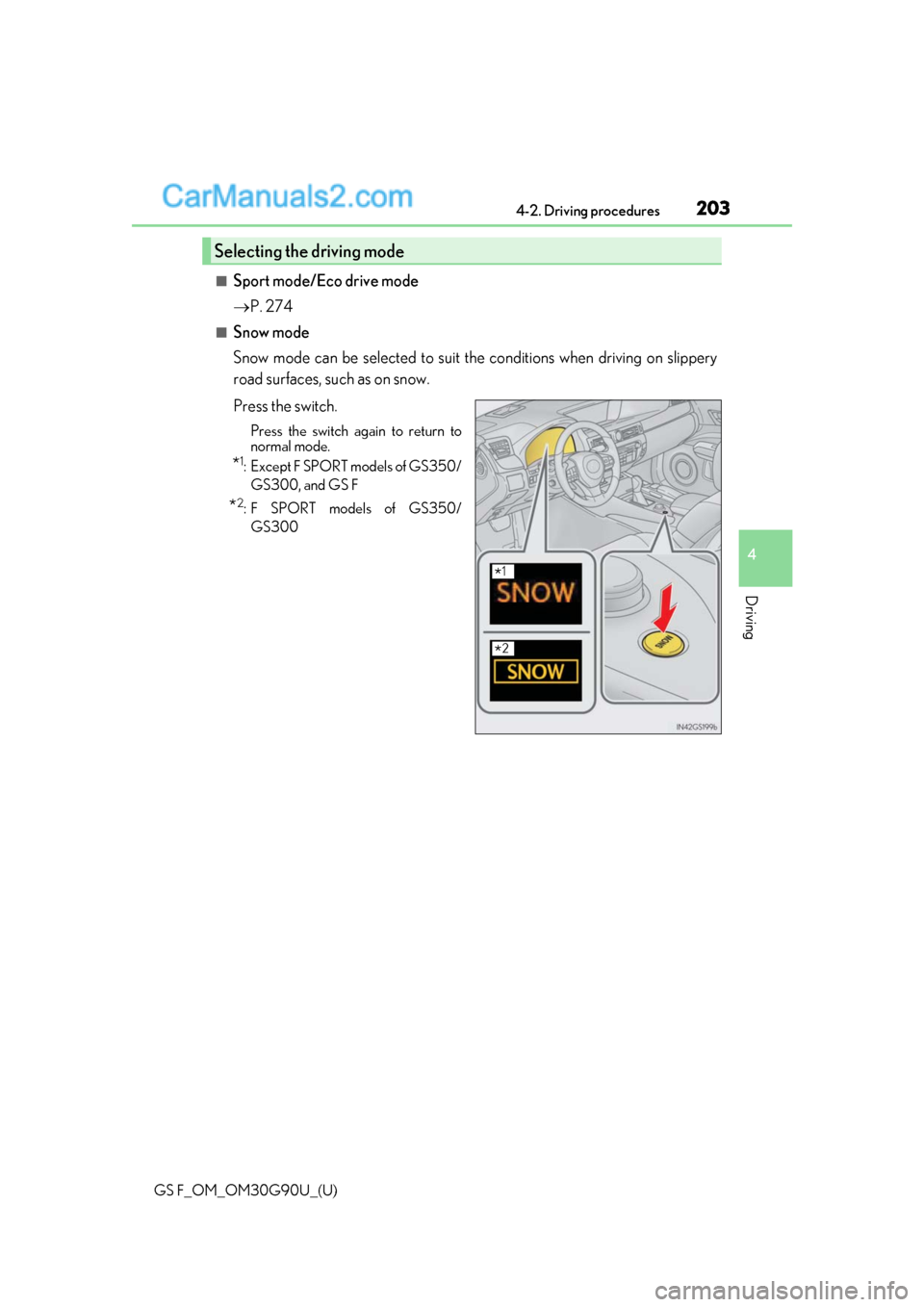
■Snow mode
Snow mode can be selected to suit th e conditions when driving on slippery
road surfaces, such as on snow.
Press the switch.
Press the switch again to return to
normal mode.
*1: Except F SPORT models of GS350/ GS300, and GS F
*2: F SPORT models of GS350/GS300
Selecting the driving mode
*1
*2
Page 208 of 600
208
GS F_OM_OM30G90U_(U)4-2. Driving procedures
■If the shift lever cannot be shifted from P
First, check whether the brak
e pedal is being depressed.
If the shift lever cannot be shifted with your foot on the brake pedal, there may be a prob-
lem with the shift lock system. Have the vehi cle inspected by your Lexus dealer immedi-
ately.
The following steps may be used as an emergency measure to ensure that the shift lever
can be shifted.
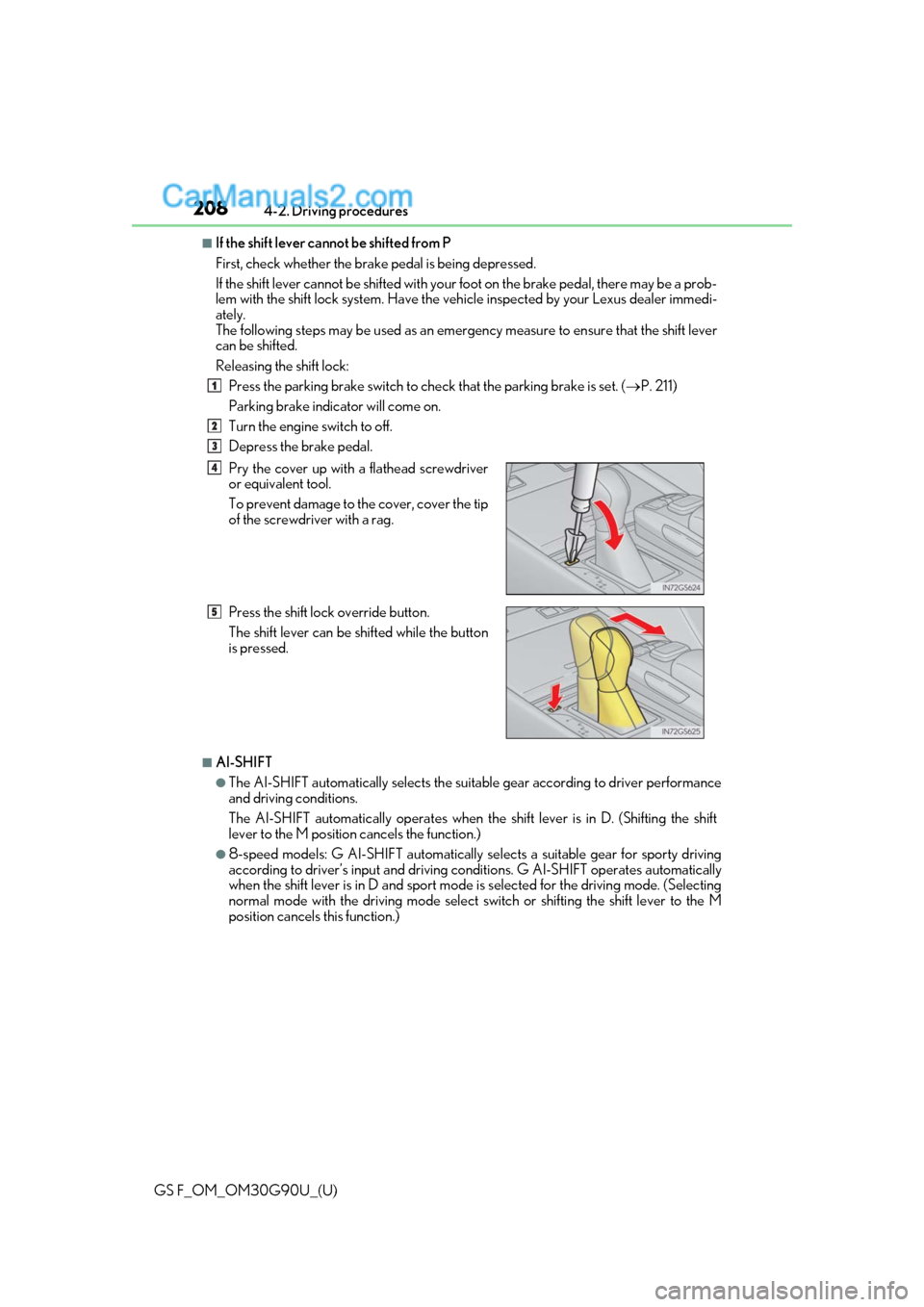
Releasing the shift lock:
Press the parking brake switch to chec k that the parking brake is set. (P. 211)
Parking brake indicator will come on.
Turn the engine switch to off.
Depress the brake pedal.
■AI-SHIFT
●The AI-SHIFT automatically selects the suitab le gear according to driver performance
and driving conditions.
The AI-SHIFT automatically operates when th e shift lever is in D. (Shifting the shift
lever to the M position cancels the function.)
●8-speed models: G AI-SHIFT automatically selects a suitable gear for sporty driving
according to driver’s input and driving co nditions. G AI-SHIFT operates automatically
when the shift lever is in D and sport mode is selected for the driving mode. (Selecting
normal mode with the driving mode select switch or shifting the shift lever to the M
position cancels this function.) Pry the cover up with a flathead screwdriver
or equivalent tool.
To prevent damage to the cover, cover the tip
of the screwdriver with a rag.
Press the shift lock override button.
The shift lever can be shifted while the button
is pressed.
1
2
3
4
5