lock Lexus GS200t 2015 Owners Manual
[x] Cancel search | Manufacturer: LEXUS, Model Year: 2015, Model line: GS200t, Model: Lexus GS200t 2015Pages: 668, PDF Size: 177.56 MB
Page 262 of 668
2624-3. Operating the lights and wipers
GS350_200t_GS F_OM_OM30E87E_(EE)
■Daytime running light system
To make your vehicle more visible to other drivers during daytime driving, the daytime
running lights turn on automatically whenever the engine is started and the parking
brake is released with the headlight switch is in the “AUTO” position. (Illuminate brighter
than the front position lights.)
Daytime running lights are not designed for use at night.
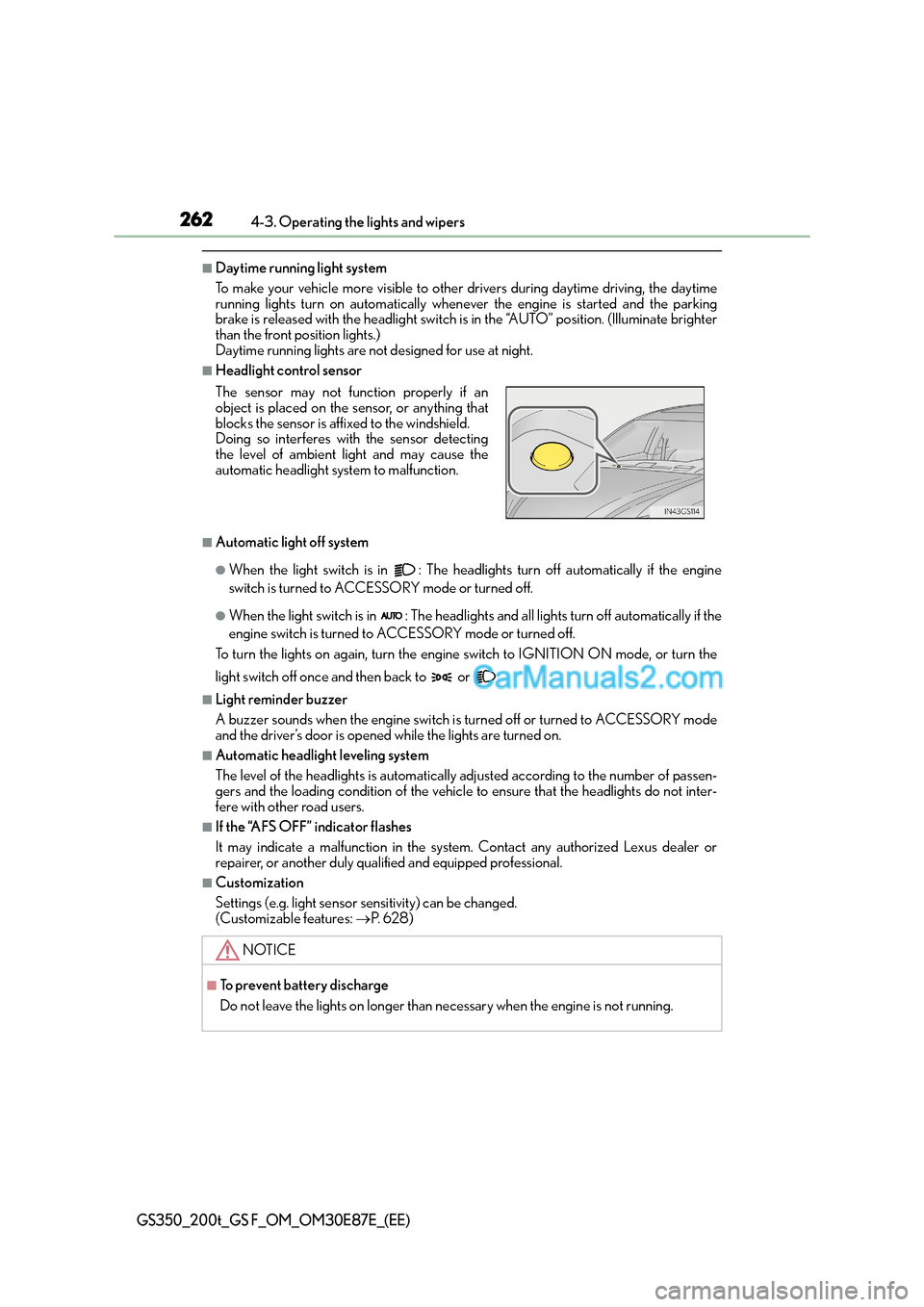
■Headlight control sensor
■Automatic light off system
●When the light switch is in : The headlig hts turn off automatically if the engine
switch is turned to ACCESSORY mode or turned off.
●When the light switch is in : The headlights and all lights turn off automatically if the
engine switch is turned to ACCESSORY mode or turned off.
To turn the lights on again, turn the engine switch to IGNITION ON mode, or turn the
light switch off once and then back to or .
■Light reminder buzzer
A buzzer sounds when the engine switch is turned off or turned to ACCESSORY mode
and the driver’s door is opened while the lights are turned on.
■Automatic headlight leveling system
The level of the headlights is automatically adjusted according to the number of passen-
gers and the loading condition of the vehicle to ensure that the headlights do not inter-
fere with other road users.
■If the “AFS OFF” indicator flashes
It may indicate a malfunction in the system. Contact any authorized Lexus dealer or
repairer, or another duly qualified and equipped professional.
■Customization
Settings (e.g. light sensor se nsitivity) can be changed.
(Customizable features: →P. 6 2 8 )
The sensor may not function properly if an
object is placed on the sensor, or anything that
blocks the sensor is affixed to the windshield.
Doing so interferes with the sensor detecting
the level of ambient light and may cause the
automatic headlight system to malfunction.
NOTICE
■To prevent battery discharge
Do not leave the lights on longer than necessary when the engine is not running.
Page 278 of 668

2784-3. Operating the lights and wipers
GS350_200t_GS F_OM_OM30E87E_(EE)
■Raindrop sensor (vehicles with rain-sensing windshield wipers)
●If AUTO mode is selected while the engine switch is in IGNITION ON mode, the wip-
ers will operate once to show that AUTO mode is activated.
●If the temperature of the raindrop sensor is 85°C (185°F) or higher, or -30°C
(-22°F) or lower, automatic operation may not occur. In this case, operate the wip-
ers in any mode other than AUTO mode.
■When the windshield wipers are in temporary operation
AUTO mode cannot be activated even if is pressed.
■If no windshield washer fluid sprays
Check that the washer nozzles are not blocked if there is washer fluid in the windshield
washer fluid reservoir.
●The raindrop sensor judges the amount of
raindrops.
An optical sensor is adopted. It may not oper-
ate properly when sunlight from the rising or
setting of the sun intermittently strikes the
windshield, or if bugs etc. are present on the
windshield.
WA R N I N G
■Caution regarding the use of windshield wipers in AUTO mode
The windshield wipers may operate unexpectedly if the sensor is touched or the wind-
shield is subject to vibration in AUTO mode. Take care that your fingers or anything
else do not become caught in the windshield wipers.
■Caution regarding the use of washer fluid
When it is cold, do not use the washer fl uid until the windshield becomes warm. The
fluid may freeze on the windshield and cause low visibility. This may lead to an accident,
resulting in death or serious injury.
Page 279 of 668
2794-3. Operating the lights and wipers
4
Driving
GS350_200t_GS F_OM_OM30E87E_(EE)
NOTICE
■When the windshield is dry
Do not use the wipers, as they may damage the windshield.
■When there is no washer fluid spray from the nozzle
Damage to the washer fluid pump may be caused if the lever is pulled toward you and
held continually.
■When a nozzle becomes blocked
In this case, contact any authorized Lexus dealer or repairer, or another duly qualified
and equipped professional.
Do not try to clear it with a pin or other object. The nozzle will be damaged.
■When standing the windshield wipers up
Raise the wipers in line with the windshield. (→P. 3 8 4 )
Failure to do so may result in damage to the wipers and/or the hood.
Page 282 of 668
2824-4. Refueling
GS350_200t_GS F_OM_OM30E87E_(EE)
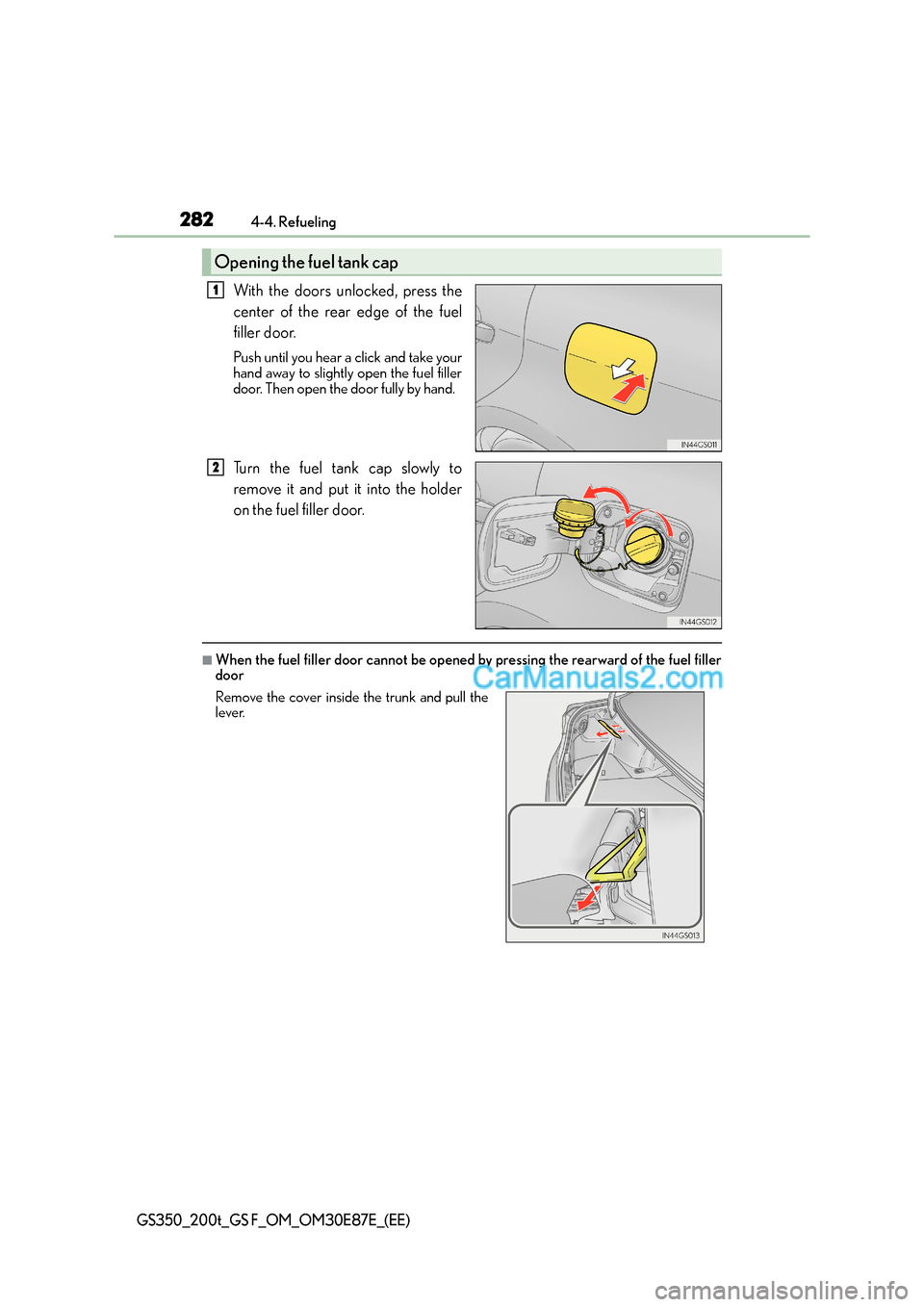
With the doors unlocked, press the
center of the rear edge of the fuel
filler door.
Push until you hear a click and take your
hand away to slightly open the fuel filler
door. Then open the door fully by hand.
Turn the fuel tank cap slowly to
remove it and put it into the holder
on the fuel filler door.
■When the fuel filler door cannot be opened by pressing the rearward of the fuel filler
door
Opening the fuel tank cap
1
2
Remove the cover inside the trunk and pull the
lever.
Page 283 of 668
2834-4. Refueling
4
Driving
GS350_200t_GS F_OM_OM30E87E_(EE)
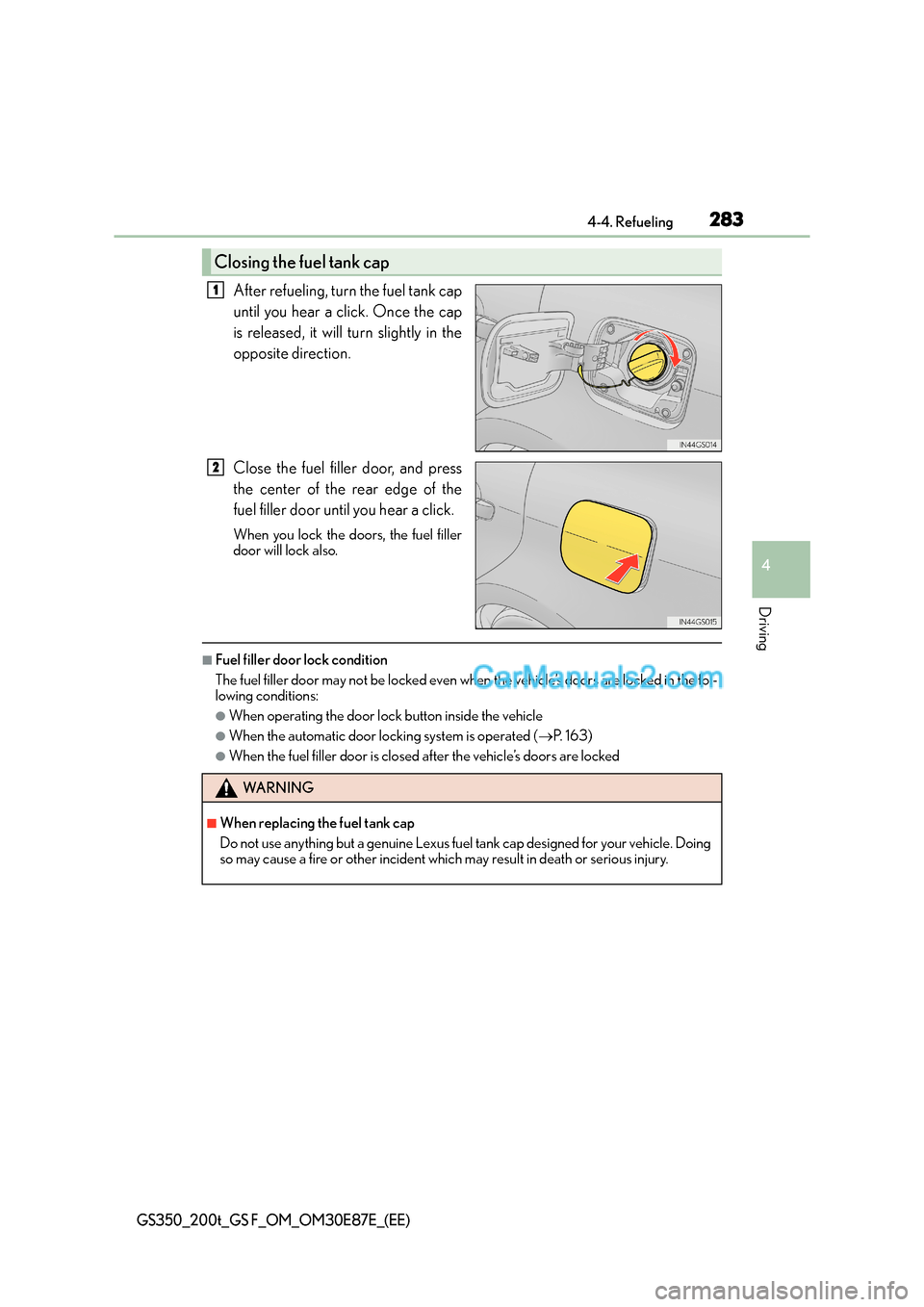
After refueling, turn the fuel tank cap
until you hear a click. Once the cap
is released, it will turn slightly in the
opposite direction.
Close the fuel filler door, and press
the center of the rear edge of the
fuel filler door until you hear a click.
When you lock the doors, the fuel filler
door will lock also.
■Fuel filler door lock condition
The fuel filler door may not be locked even when the vehicle’s doors are locked in the fol-
lowing conditions:
●When operating the door lock button inside the vehicle
●When the automatic door locking system is operated (→P. 1 6 3 )
●When the fuel filler door is closed after the vehicle’s doors are locked
Closing the fuel tank cap
1
2
WA R N I N G
■When replacing the fuel tank cap
Do not use anything but a genuine Lexus fuel tank cap designed for your vehicle. Doing
so may cause a fire or other incident which may result in death or serious injury.
Page 303 of 668
3034-5. Using the driving support systems
4
Driving
GS350_200t_GS F_OM_OM30E87E_(EE)
• After the engine has started the vehicle has not been driven for a certain amount oftime
• While making a left/right turn and for a few seconds after making a left/right turn
• While driving on a curve and for a few seconds after driving on a curve
• If your vehicle is skidding
• If the front of the vehicle is raised or lowered
• If the wheels are misaligned
• If a wiper blade is blocking the camera sensor
• The vehicle is wobbling.
• The vehicle is being driven at extremely high speeds.
• When driving on a hill
• If the radar sensor or camera sensor is misaligned
●In some situations such as the following, su fficient braking force may not be obtained,
preventing the system from performing properly:
• If the braking functions cannot operate to their full extent, such as when the brake parts are extremely cold, extremely hot, or wet
• If the vehicle is not properly maintained (brakes or tires are excessively worn,
improper tire inflation pressure, etc.)
• When the vehicle is being driven on a gravel road or other slippery surface
●Some pedestrians such as the following may not be detected by the radar sensor and
camera sensor, preventing the system from operating properly
*4:
• Pedestrians shorter than approximately 1 m (3.2 ft.) or taller than approximately 2 m (6.5 ft.)
• Pedestrians wearing oversized clothing (a rain coat, long skirt, etc.), making their sil- houette obscure
• Pedestrians who are carrying large baggage, holding an umbrella, etc., hiding part
of their body
• Pedestrians who are bending forward or squatting
• Pedestrians who are pushing a stroller, wheelchair, bicycle or other vehicle
• Groups of pedestrians which are close together
• Pedestrians who are wearing white and look extremely bright
• Pedestrians in the dark, such as at night or while in a tunnel
• Pedestrians whose clothing appears to be nearly the same color or brightness as their surroundings
• Pedestrians near walls, fences, guardrails, or large objects
• Pedestrians who are on a metal object (manhole cover, steel plate, etc.) on the road
• Pedestrians who are walking fast
• Pedestrians who are changing speed abruptly
• Pedestrians running out from behind a vehicle or a large object
• Pedestrians who are extremely close to th e side of the vehicle (outside rear view
mirror, etc.)
*4: Depending on the region in which the vehicle was sold, the pedestrian detection
function may not be available.
Page 374 of 668
3744-5. Using the driving support systems
GS350_200t_GS F_OM_OM30E87E_(EE)
Driving assist systems
◆ABS (Anti-lock Brake System)
Helps to prevent wheel lock when the brakes are applied suddenly, or if the
brakes are applied while driving on a slippery road surface
◆Brake assist
Generates an increased level of braking force after the brake pedal is
depressed when the system detects a panic stop situation
◆VSC (Vehicle Stability Control)
Helps the driver to control skidding when swerving suddenly or turning on
slippery road surfaces
◆VSC+ (Vehicle Stability Control+)
Provides cooperative control of the ABS, TRC, VSC and EPS. Helps to main-
tain directional stability when swerving on slippery road surfaces by control-
ling steering performance.
◆TRC (Traction Control)
Helps to maintain drive power and prevent the drive wheels from spinning
when starting the vehicle or accelerating on slippery roads
To help enhance driving safety and performance, the following systems oper-
ate automatically in response to various driving situations. Be aware, however,
that these systems are supplementary and should not be relied upon too
heavily when operating the vehicle.
Page 383 of 668
3834-6. Driving tips
4
Driving
GS350_200t_GS F_OM_OM30E87E_(EE)
Perform the following according to the driving conditions:
●Do not try to forcibly open a window or move a wiper that is frozen. Pour
warm water over the frozen area to melt the ice. Wipe away the water imme-
diately to prevent it from freezing.
●To ensure proper operation of the climate control system fan, remove any
snow that has accumulated on the air inlet vents in front of the windshield.
●Check for and remove any excess ice or snow that may have accumulated on
the exterior lights, vehicle’s roof, chassis, around the tires or on the brakes.
●Remove any snow or mud from the bottom of your shoes before getting in the
vehicle.
Accelerate the vehicle slowly, keep a safe distance between you and the vehicle
ahead, and drive at a reduced speed suitable to road conditions.
Park the vehicle and move the shift leve r to P without setting the parking brake.
The parking brake may freeze up, preventing it from being released. If necessary,
block the wheels to prevent inadvertent sliding or creeping.
XVehicles with front and rear tires of the same size
Use the correct tire chain size when mounting the tire chains.
Chain size is regulated for each tire size.
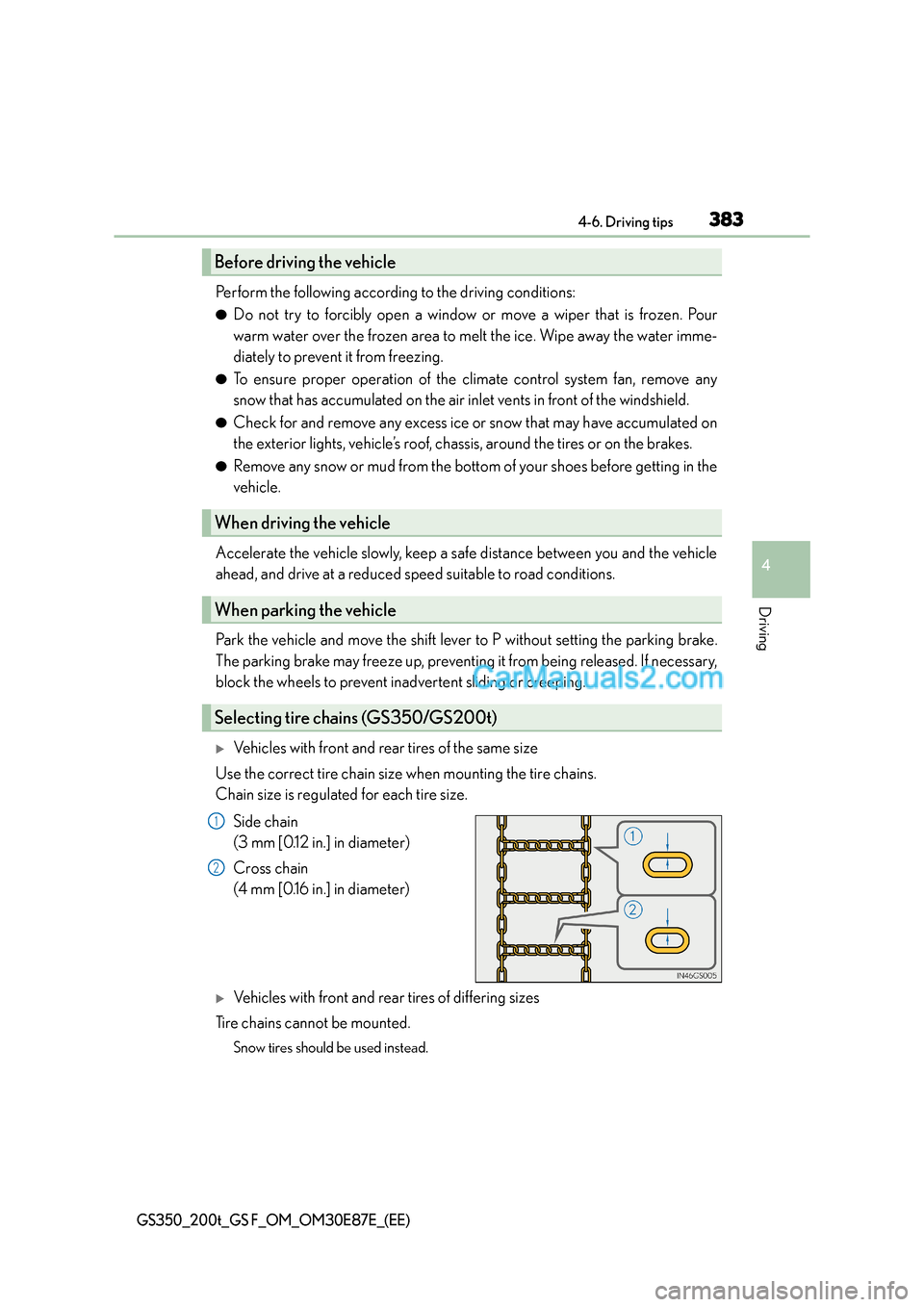
Side chain
(3 mm [0.12 in.] in diameter)
Cross chain
(4 mm [0.16 in.] in diameter)
XVehicles with front and rear tires of differing sizes
Tire chains cannot be mounted.
Snow tires should be used instead.
Before driving the vehicle
When driving the vehicle
When parking the vehicle
Selecting tire chains (GS350/GS200t)
1
2
Page 387 of 668
387
5Interior features
GS350_200t_GS F_OM_OM30E87E_(EE)
5-1. Remote Touch screenRemote Touch/12.3-inch display ......................................... 388
5-2. Using the air conditioning system and defogger
Front automatic air conditioning system ......... 394
Rear air conditioning system .........406
Heated steering wheel/ seat heaters/
seat ventilators ........................ 409 5-3. Using the interior lights
Interior lights list ...........................414• Interior lights ........................... 415
• Personal lights ........................ 415
5-4. Using the storage features List of storage features .............. 417• Glove box ................................ 418
• Console box............................ 418
• Cup holders ............................ 419
• Auxiliary boxes .......................421
Trunk features .............................. 422
5-5. Using the other interior features
Other interior features ............ 426 • Sun visors ................................ 426
• Vanity mirrors ........................ 426
• Clock .........................................427
• Ashtrays ....................................427
• Power outlets ......................... 428
• Armrest.................................... 428
• Rear sunshade/ rear door sunshades........... 429
• Trunk storage extension ..... 431
• Coat hooks ............................. 432
• Assist grips.............................. 432
Page 401 of 668
4015-2. Using the air conditioning system and defogger
5
Interior features
GS350_200t_GS F_OM_OM30E87E_(EE)
Select on the control screen to display the rear air conditioning control
screen.
■Using the automatic modeSelect “REAR AUTO” on the screen.
The air conditioning system will operate, and air outlets and speed will be set auto-
matically.
When the rear seat heaters are set to automatic mode, the system is operated
automatically according to the set temperature, outside temperature, etc.
Adjust the temperature setting.
To stop the operation, select “REAR OFF”.
■Adjusting the temperature setting
Select to increase the temperature and to decrease the tempera-
ture.
The air conditioning system switches between individual and simultaneous modes
each time “3-ZONE” on the control screen is selected.
■Disabling the switches on the rear armrest.
Select .
Rear seat heater switches ( →P. 410) are also locked.
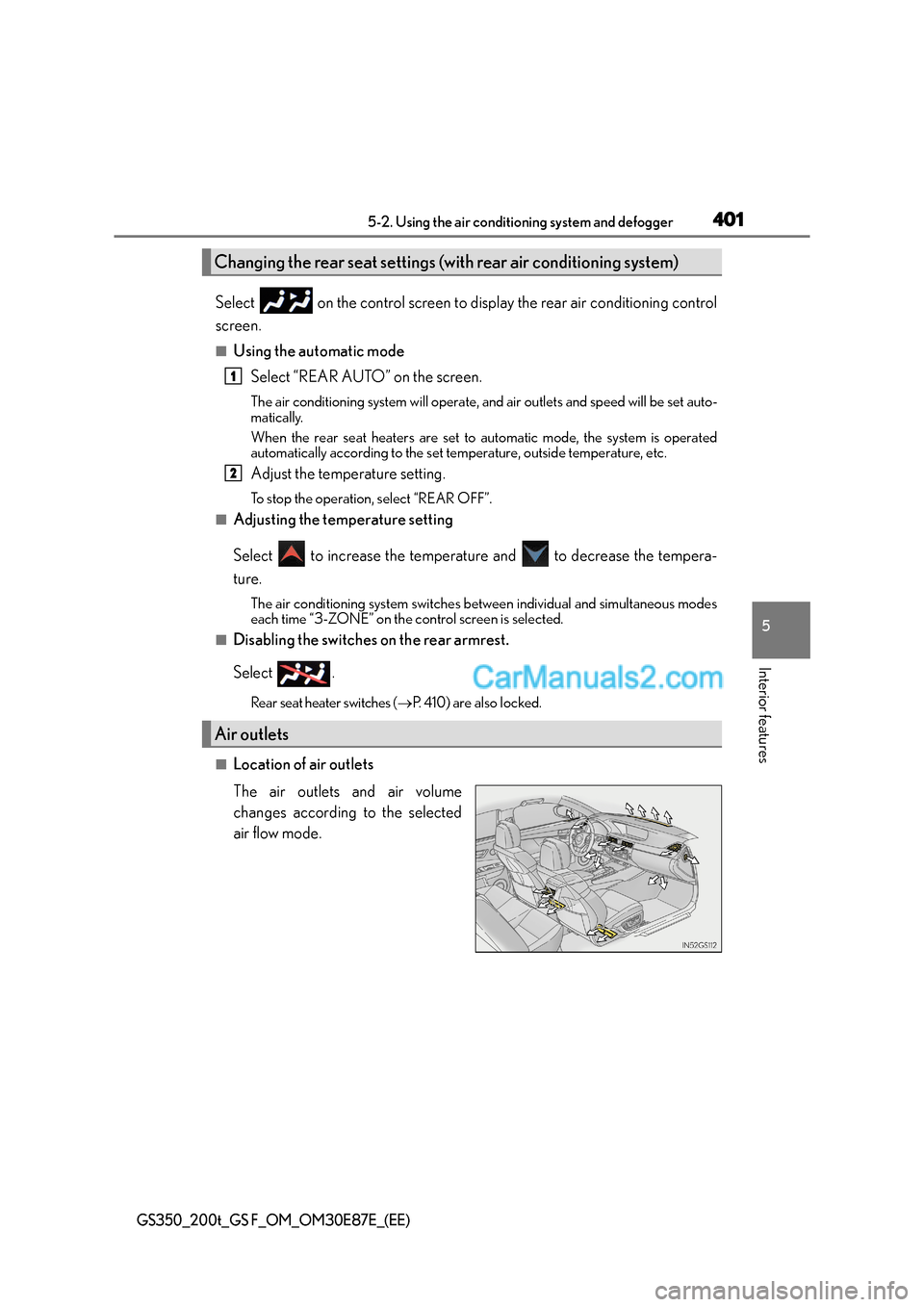
■Location of air outlets
The air outlets and air volume
changes according to the selected
air flow mode.
Changing the rear seat settings (w ith rear air conditioning system)
Air outlets
1
2