audio Lexus GS200t 2015 User Guide
[x] Cancel search | Manufacturer: LEXUS, Model Year: 2015, Model line: GS200t, Model: Lexus GS200t 2015Pages: 668, PDF Size: 177.56 MB
Page 175 of 668

1753-2. Opening, closing and locking the doors and trunk
3
Operation of each component
GS350_200t_GS F_OM_OM30E87E_(EE)
■Electronic Key Battery-Saving Function
When battery-saving mode is set, battery depletion is minimized by stopping the elec-
tronic key from receiving radio waves.
■Conditions affecting operation
The smart entry & start system uses weak radio waves. In the following situations, the
communication between the electronic key and the vehicle may be affected, preventing
the smart entry & start system, wireless remote control and engine immobilizer system
from operating properly. (Ways of coping: →P. 5 8 8 )
●When the electronic key battery is depleted
●Near a TV tower, electric power plant, gas station, radio station, large display, airport or
other facility that generates strong radio waves or electrical noise
●When the electronic key is in contact wi th, or is covered by the following metallic
objects
• Cards to which aluminum foil is attached
• Cigarette boxes that have aluminum foil inside
• Metallic wallets or bags
•Coins
• Hand warmers made of metal
• Media such as CDs and DVDs
●When other wireless keys (that emit radio waves) are being used nearby
●When carrying the electronic key together with the following devices that emit radio
waves
• When carrying a portable radio, cellular phone, cordless phone or other wireless communication device
• Another vehicle’s electronic key or a wireless key that emits radio waves
• Personal computers or personal digital assistants (PDAs)
• Digital audio players
• Portable game systems
●If window tint with a metallic content or me tallic objects are attached to the rear win-
dow
●When the electronic key is placed near a battery charger or electronic devices
Press twice while pressing and holding
. Confirm that the electronic key indica-
tor flashes 4 times.
While the battery-saving mode is set, the smart
entry & start system cannot be used. To cancel
the function, press any of the electronic key but-
tons.
Page 240 of 668

2404-2. Driving procedures
GS350_200t_GS F_OM_OM30E87E_(EE)
Stop the vehicle.
Shift the shift lever to P.
Set the parking brake. (→P. 2 5 4 )
Press the engine switch.
Release the brake pedal and check that “POWER ON” on the multi-informa-
tion display is off.
Modes can be changed by pressing the engine switch with brake pedal released.
(The mode changes each time the switch is pressed.)
Off
*
The emergency flashers can be used.
“POWER ON” will not be displayed on
the multi-information display.
ACCESSORY mode
Some electrical components such as the
audio system can be used.
“POWER ON” will be displayed on the
multi-information display.
IGNITION ON mode
All electrical components can be used.
“POWER ON” will be displayed on the
multi-information display.
*: If the shift lever is in a position other than P when turning off the engine, the
engine switch will be turned to ACCES-
SORY mode, not to off.
Stopping the engine
Changing engine switch modes
1
2
3
4
5
Page 312 of 668
3124-5. Using the driving support systems
GS350_200t_GS F_OM_OM30E87E_(EE)
●Lane centering function
This function operates when all of the following conditions are met.
• LKA is turned on.
• Setting for “Steering Assist” and “Lane Center” in of the multi-information
display are set to “On”. ( →P. 1 2 1 )
•System recognizes wh ite (yellow) lines.
• Dynamic radar cruise control with full-speed range is operating.
• Width of traffic lane is approximately 2.5 to 4.1 m (8.2 to 13.5 ft.).
• Turn signal lever is not operated.
• Vehicle is driven on a straight road or around a gentle curve with a radius of more
than approximately 200 m (656 ft.).
• No system malfunctions are detected. ( →P. 3 1 3 )
• Vehicle does not accelerate or decelerate by a fixed amount or more.
• Steering wheel is not operated with a steering force level suitable for changing lanes.
• ABS, VSC, TRC and PCS (Pre-Crash Safety system) are not operating.
• TRC or VSC is not turned off.
• Hands off steering wheel alert ( →P. 312) is not displayed.
• Lane departure control function is not operating.
■Temporary cancellation of functions
When operation conditions are no longer met, a function may be temporarily canceled.
However, when the operation conditions are met again, operation of the function is auto-
matically restored. ( →P. 3 1 1 )
■Lane departure control function/lane centering function
Depending on the vehicle speed, lane departure situation, road conditions, etc., the
operation of the functions may not be reco gnized or the functions may not operate.
■Lane departure alert function
The warning buzzer may be difficult to hear due to external noise, audio playback, etc.
Also, it may be difficult to feel steering wheel vibrations due to the road conditions, etc.
■Hands off steering wheel alert
When the system determines that the driver has removed their hands from the steering
wheel while the lane departure control function or lane centering function is operating, a
warning message is displayed on the multi-information display.
If the driver continues to keep their hands off of the steering wheel, the buzzer sounds, a
warning message is displayed and the function is temporarily canceled. This alert also
operates in the same way when the vehicle is driven with the steering wheel lightly
gripped. However, depending on the road conditions, etc., the function may not cancel.
■White (yellow) lines are only on one side of road
The LKA system will not operate for the side on which white (yellow) lines could not be
recognized.
Page 321 of 668
3214-5. Using the driving support systems
4
Driving
GS350_200t_GS F_OM_OM30E87E_(EE)
■Temporary cancellation of functions
When operation conditions are no longer met, a function may be temporarily canceled.
However, when the operation conditions are met again, operation of the function is auto-
matically restored. (→P. 3 2 0 )
■Steering control function
Depending on the vehicle speed, lane departure situation, road conditions, etc., the
operation of the functions may not be reco gnized or the functions may not operate.
■Lane departure alert function
The warning buzzer may be difficult to hear due to external noise, audio playback, etc.
Also, it may be difficult to feel steering wheel vibrations due to the road conditions, etc. (if
equipped)
■Hands off steering wheel alert
Except for Israel: When the system determines that the driver has removed their hands
from the steering wheel while the steering co ntrol function is operating, a warning mes-
sage is displayed on the multi-information display.
If the driver continues to keep their hands off of the steering wheel, the buzzer sounds, a
warning message is displayed and the function is temporarily canceled. This alert also
operates in the same way when the vehicle is driven with the steering wheel lightly
gripped. However, depending on the road conditions, etc., the function may not cancel.
For Israel: When the system determines that the driver has removed their hands from the
steering wheel while the lane departure control function or lane centering function is
operating, a warning message is displayed on the multi-information display and the
buzzer sounds.
■White (yellow) lines are only on one side of road
The LDA system will not operate for the side on which white (yellow) lines could not be
recognized.
Page 362 of 668
3624-5. Using the driving support systems
GS350_200t_GS F_OM_OM30E87E_(EE)
■The outside rear view mirror indicators visibility
When under strong sunlight, the outside rear view mirror indicator may be difficult to
see.
■Rear Crossing Traffic Alert buzzer hearing
Rear Crossing Traffic Alert function may be difficult to hear over loud noises such as high
audio volume.
■When there is a malfunction in the Blind Spot Monitor
If a system malfunction is detected due to any of the following reasons, warning mes-
sages will be displayed: ( →P. 5 1 8 )
●There is a malfunction with the sensors
●The sensors have become dirty
●The outside temperature is extremely high or low
●The sensor voltage has become abnormal
■Switching the Blind Spot Monitor function and Rear Crossing Traffic Alert function on
and off
Settings can be changed from on the multi-information display (→P. 121, 129).
Press or on the meter control switch and select “BSM”.
Each time on the meter control switch is pressed, the function switches between
“On” and “Off”.
■Certification for the Blind Spot Monitor
1
2
Page 392 of 668
3925-1. Remote Touch screen
GS350_200t_GS F_OM_OM30E87E_(EE)
*1: Refer to the “NAVIGATION AND MULTIMEDIA SYSTEM OWNER’S MANUAL”.
*2: If equipped
■Full screen display
The following functions can be displayed full screen:
*: Refer to the “NAVIGATION AND MULTIMEDIA SYSTEM OWNER’SMANUAL”.
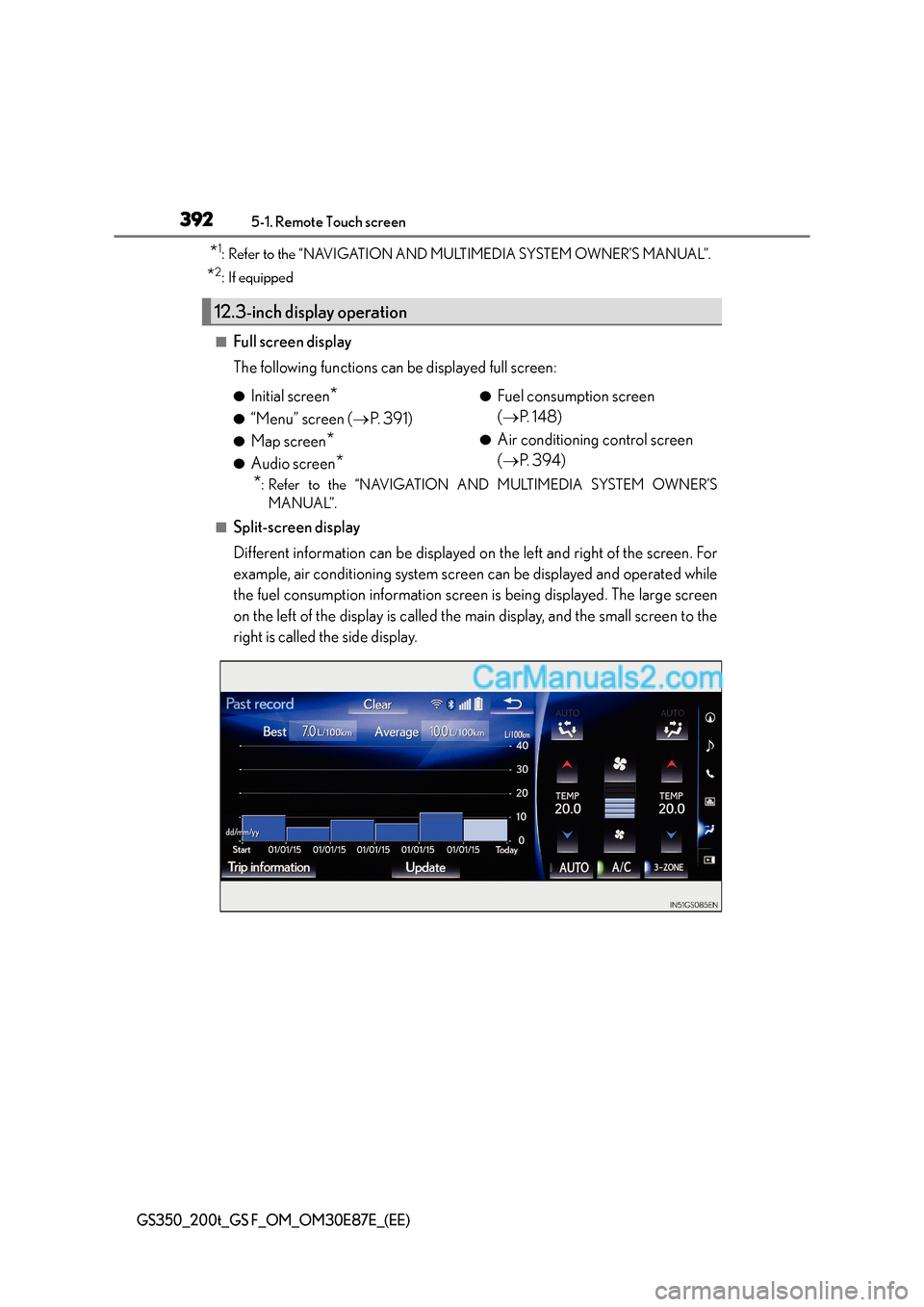
■Split-screen display
Different information can be displayed on the left and right of the screen. For
example, air conditioning system screen can be displayed and operated while
the fuel consumption information screen is being displayed. The large screen
on the left of the display is called the main display, and the small screen to the
right is called the side display.
12.3-inch display operation
●Initial screen*
●“Menu” screen ( →P. 3 9 1 )
●Map screen*
●Audio screen*
●Fuel consumption screen
(→ P. 1 4 8 )
●Air conditioning control screen
(→ P. 3 9 4 )
Page 393 of 668
3935-1. Remote Touch screen
5
Interior features
GS350_200t_GS F_OM_OM30E87E_(EE)
For details of the functions and operation of the main display, refer to the respec-
tive section.
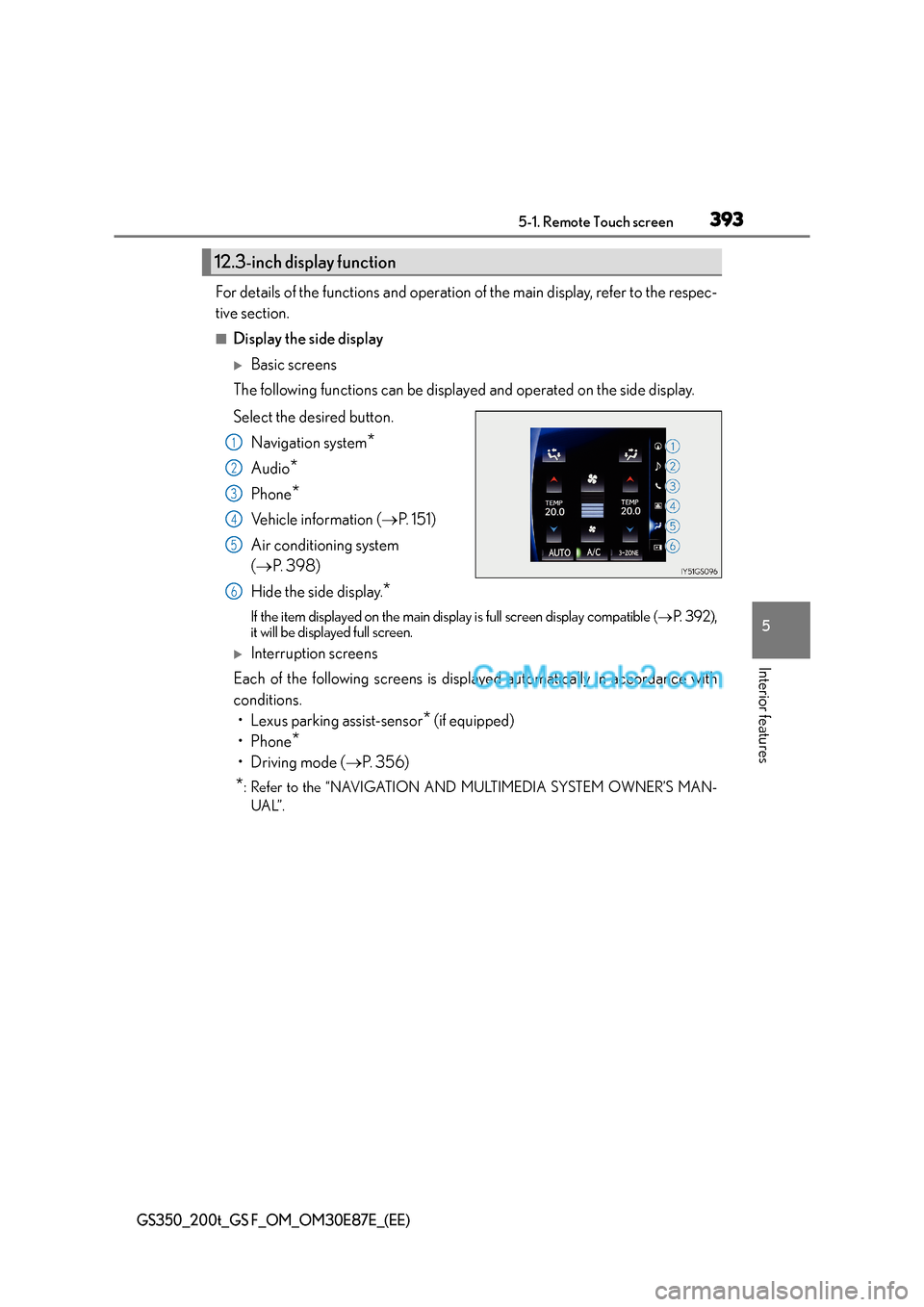
■Display the side display
XBasic screens
The following functions can be displayed and operated on the side display.
Select the desired button.
Navigation system
*
Audio*
Phone*
Vehicle information ( →P. 151)
Air conditioning system
( → P. 3 9 8 )
Hide the side display.
*
If the item displayed on the main disp lay is full screen display compatible (→P. 3 9 2 ) ,
it will be displayed full screen.
XInterruption screens
Each of the following screens is disp layed automatically in accordance with
conditions. • Lexus parking assist-sensor
* (if equipped)
•Phone
*
•Driving mode ( →P. 3 5 6 )
*: Refer to the “NAVIGATION AND MULTIMEDIA SYSTEM OWNER’S MAN-
UAL”.
12.3-inch display function
1
2
3
4
5
6
Page 440 of 668
4406-1. Maintenance and care
GS350_200t_GS F_OM_OM30E87E_(EE)
NOTICE
■Cleaning detergents
●Do not use the following types of detergent, as they may discolor the vehicle interior
or cause streaks or damage to painted surfaces:
• Non-seat portions: Organic substances such as benzene or gasoline, alkaline oracidic solutions, dye, and bleach
• Seats: Alkaline or acidic solutions, such as thinner, benzene, and alcohol
●Do not use polish wax or polish cleaner. The instrument panel’s or other interior part’s
painted surface may be damaged.
■Preventing damage to leather surfaces
Observe the following precautions to avoid damage to and deterioration of leather
surfaces:
●Remove any dust or dirt from leather surfaces immediately.
●Do not expose the vehicle to direct sunlight for extended periods of time. Park the
vehicle in the shade, especially during summer.
●Do not place items made of vinyl, plastic, or containing wax on the upholstery, as they
may stick to the leather surface if the vehicle interior heats up significantly.
■Water on the floor
Do not wash the vehicle floor with water.
Vehicle systems such as the audio system may be damaged if water comes into contact
with electrical components such as the audio system above or under the floor of the
vehicle. Water may also cause the body to rust.
■When cleaning the inside of the windshield (vehicles with Lexus Safety System+)
Do not allow glass cleaner to contact the lens. Also, do not touch the lens. ( →P. 2 8 6 )
■Cleaning the inside of the rear window
●Do not use glass cleaner to clean the rear window, as this may cause damage to the
rear window defogger heater wires or antenna. Use a cloth dampened with luke-
warm water to gently wipe the window clean. Wipe the window in strokes running
parallel to the heater wires or antenna.
●Be careful not to scratch or damage the heater wires or antenna.
Page 516 of 668

5167-2. Steps to take in an emergency
GS350_200t_GS F_OM_OM30E87E_(EE)
■Electric power steering system warning light (warning buzzer)
When the battery charge becomes insufficient or the voltage temporarily drops, the
electric power steering system warning light may come on and the warning buzzer may
sound.
■When the tire pressure warning light comes on
Carry out the following procedure after the tire temperature has lowered sufficiently.
●Check the tire inflation pressure and adjust to the appropriate level.
●If the warning light does not go out even after several minutes, check that the tire infla-
tion pressure is at the specifie d level and carry out initialization.
The warning light may come on again if the above operations are conducted without first
allowing the tire temperature to lower sufficiently.
■The tire pressure warning light may come on due to natural causes
The tire pressure warning light may come on due to natural causes such as natural air
leaks and tire inflation pressure changes caused by temperature. In this case, adjusting
the tire inflation pressure will turn off the warning light (after a few minutes).
■When a tire is replaced with a spare tire
Vehicles with a compact spare tire: The compact spare tire is not equipped with a tire
pressure warning valve and transmitter. If a tire goes flat, the tire pressure warning light
will not turn off even though the flat tire has been replaced with the spare tire.
Vehicles with full-size spare tire: The spare tire is also equipped with a tire pressure warn-
ing valve and transmitter. The tire pressure warn ing light will turn on if the tire inflation
pressure of the spare tire is low. If a tire go es flat, the tire pressure warning light will not
turn off even though the flat tire has been replaced with the spare tire.
■Conditions that the tire pressure warning system may not function properly
→ P. 4 7 0
■If the tire pressure warning light frequently comes on after blinking for 1 minute
If the tire pressure warning light frequently comes on after blinking for 1 minute when the
engine switch is turned to IGNITION ON mode, have it checked by any authorized
Lexus dealer or repairer, or another duly qualified and equipped professional.
■Warning buzzer
In some cases, the buzzer may not be heard because of noisy place or an audio sound.
Page 545 of 668
5457-2. Steps to take in an emergency
7
When trouble arises
GS350_200t_GS F_OM_OM30E87E_(EE)
■Warning message in radar cruise mode (if equipped)
In the following cases, the warning message may not be displayed even if vehicle-to-vehi-
cle distance decreases:
●When your vehicle and the vehicle ahead are traveling at the same speed or the vehicle
ahead is traveling more quickly than your vehicle
●When the vehicle ahead is traveling at a very low speed
●Immediately after cruise control speed is set
●At the instant the accelerator pedal is depressed
■Open door warning message (GS350/GS200t only)
The open door warning message continues to display until a door or the trunk is fully
closed, even if the engine switch is turned off. However, approximately 20 minutes after a
door or the trunk is not fully closed, the ba ttery-saving function operates and the display
turns off even though a door or the trunk is not fully closed.
■Warning buzzer
In some cases, the buzzer may not be heard because of noisy place or an audio sound.