steering Lexus GS200t 2015 Workshop Manual
[x] Cancel search | Manufacturer: LEXUS, Model Year: 2015, Model line: GS200t, Model: Lexus GS200t 2015Pages: 668, PDF Size: 177.56 MB
Page 295 of 668
2954-5. Using the driving support systems
4
Driving
GS350_200t_GS F_OM_OM30E87E_(EE)
WA R N I N G
■Pre-crash braking*3
●The pre-crash braking function may not operate if certain operations are performed
by the driver. If the accelerator pedal is being depressed strongly or the steering
wheel is being turned, the system may determine that the driver is taking evasive
action and possibly prevent the pre-crash braking function from operating.
●In some situations, while the pre-crash braking function is operating, operation of the
function may be canceled if the accelerator pedal is depressed strongly or the steer-
ing wheel is turned and the system determines that the driver is taking evasive action.
●A large amount of braking force is applied while the pre-crash braking function is
operating. As the pre-crash braking function will be canceled after the vehicle has
been stopped for approximately 2 seconds, the driver should depress the brake
pedal as necessary.
●If the brake pedal is being depressed, the system may determine that the driver is tak-
ing evasive action and possibly delay the operation timing of the pre-crash braking
function.
*3: Depending on the region in which the vehicle was sold, the pre-crash braking func-
tion may not be available.
■When to disable the pre-crash safety system
In the following situations, disable the system, as it may not operate properly, possibly
leading to an accident resulting in death or serious injury:
●When the vehicle is being towed
●When your vehicle is towing another vehicle
●When transporting the vehicle via truck, boat, train or similar means of transportation
●When the vehicle is raised on a lift with the engine running and the tires are allowed to
rotate freely
●When inspecting the vehicle using a drum tester such as a chassis dynamometer or
speedometer tester, or when using an on vehicle wheel balancer
●When a strong impact is applied to the front bumper or front grille, due to an accident
or other reasons
●If the vehicle cannot be driven in a stable manner, such as when the vehicle has been
in an accident or is malfunctioning
●When the vehicle is driven in a sporty manner or off-road
●When the tires are not properly inflated
●When the tires are very worn
●When tires of a size other than specified are installed
●When tire chains are installed
●GS350/GS200t: When a compact spare tire or an emergency tire puncture repair
kit is used
●GS F: When a spare tire or an emergency tire puncture repair kit is used
Page 299 of 668
2994-5. Using the driving support systems
4
Driving
GS350_200t_GS F_OM_OM30E87E_(EE)
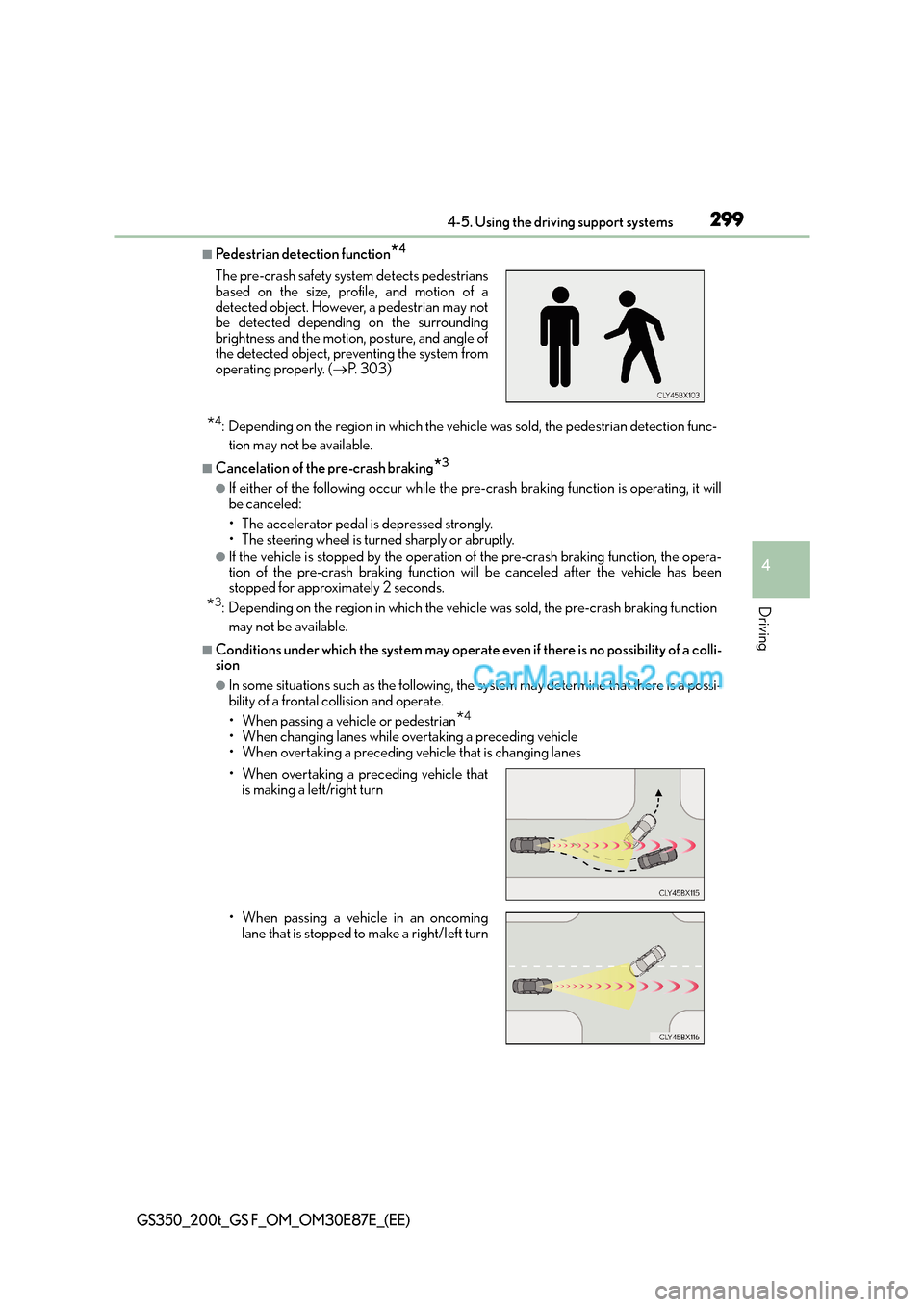
■Pedestrian detection function*4
*4: Depending on the region in which the vehicle was sold, the pedestrian detection func-tion may not be available.
■Cancelation of the pre-crash braking*3
●If either of the following occur while the pre- crash braking function is operating, it will
be canceled:
• The accelerator pedal is depressed strongly.
• The steering wheel is turned sharply or abruptly.
●If the vehicle is stopped by the operation of the pre-crash braking function, the opera-
tion of the pre-crash braking function will be canceled after the vehicle has been
stopped for approximately 2 seconds.
*3: Depending on the region in which the vehicle was sold, the pre-crash braking function
may not be available.
■Conditions under which the syst em may operate even if there is no possibility of a colli-
sion
●In some situations such as the following, the system may determine that there is a possi-
bility of a frontal collision and operate.
• When passing a vehicle or pedestrian
*4
• When changing lanes while overtaking a preceding vehicle
• When overtaking a preceding vehicle that is changing lanes
The pre-crash safety system detects pedestrians
based on the size, profile, and motion of a
detected object. However, a pedestrian may not
be detected depending on the surrounding
brightness and the motion, posture, and angle of
the detected object, preventing the system from
operating properly. (
→P. 303)
• When overtaking a preceding vehicle that is making a left/right turn
• When passing a vehicle in an oncoming lane that is stopped to make a right/left turn
Page 305 of 668
305
4
4-5. Using the driving support systems
Driving
GS350_200t_GS F_OM_OM30E87E_(EE)
LKA (Lane-Keeping Assist)∗
When driving on highways and freeways with white or yellow lines, this function
alerts the driver when the vehicle might depart from its lane and provides assis-
tance by operating the steering wheel to keep the vehicle in its lane. Further-
more, the system also provides steering assistance when dynamic radar cruise
control with full-speed range is operating to keep the vehicle in its lane.
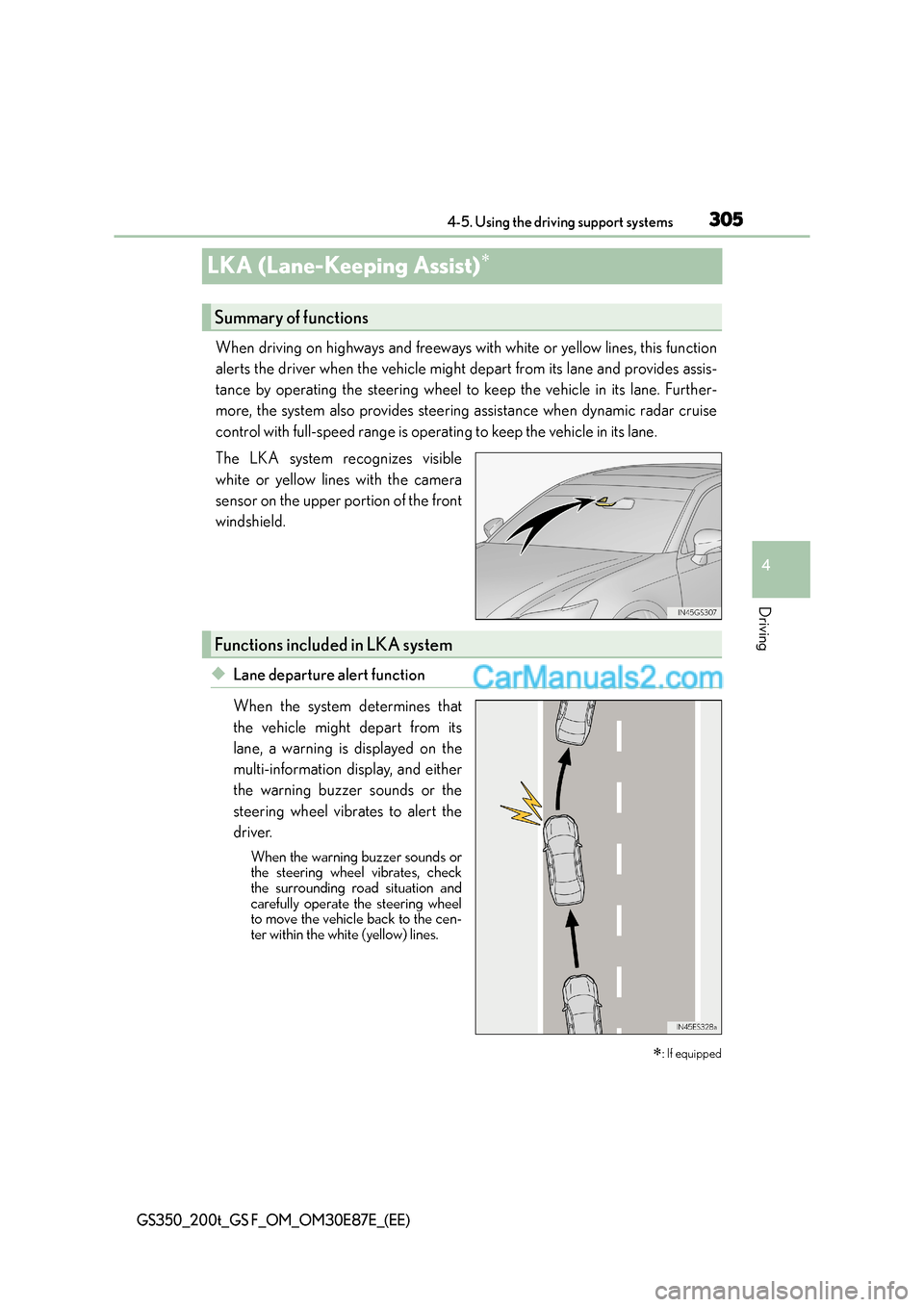
The LKA system recognizes visible
white or yellow lines with the camera
sensor on the upper portion of the front
windshield.
◆Lane departure alert function
When the system determines that
the vehicle might depart from its
lane, a warning is displayed on the
multi-information display, and either
the warning buzzer sounds or the
steering wheel vibrates to alert the
driver.
When the warning buzzer sounds or
the steering wheel vibrates, check
the surrounding road situation and
carefully operate the steering wheel
to move the vehicle back to the cen-
ter within the white (yellow) lines.
∗: If equipped
Summary of functions
Functions included in LKA system
Page 306 of 668
3064-5. Using the driving support systems
GS350_200t_GS F_OM_OM30E87E_(EE)
◆Lane departure control function
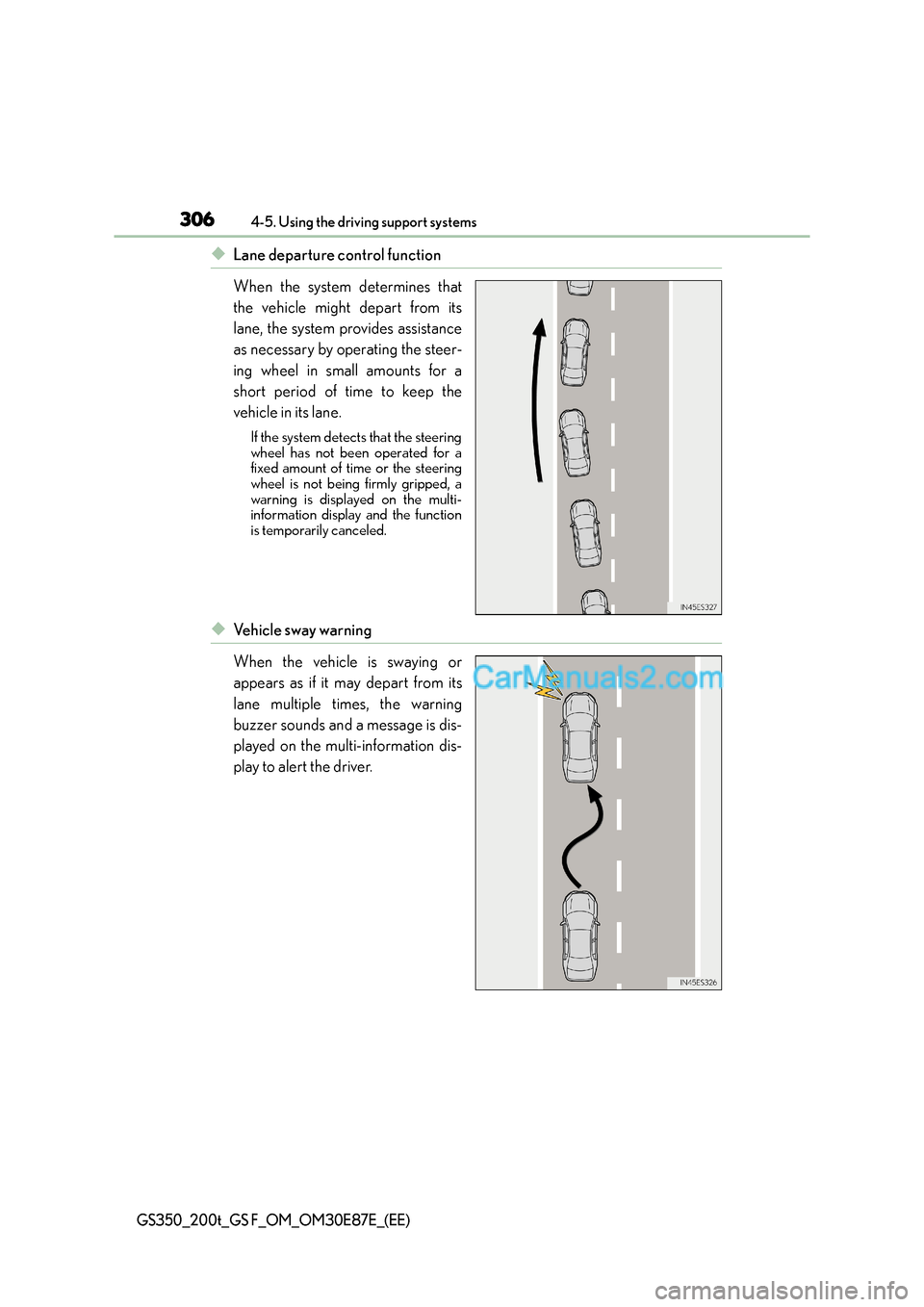
When the system determines that
the vehicle might depart from its
lane, the system provides assistance
as necessary by operating the steer-
ing wheel in small amounts for a
short period of time to keep the
vehicle in its lane.
If the system detects that the steering
wheel has not been operated for a
fixed amount of time or the steering
wheel is not being firmly gripped, a
warning is displayed on the multi-
information display and the function
is temporarily canceled.
◆Ve h i c l e s w a y w a r n i n g
When the vehicle is swaying or
appears as if it may depart from its
lane multiple times, the warning
buzzer sounds and a message is dis-
played on the multi-information dis-
play to alert the driver.
Page 307 of 668
3074-5. Using the driving support systems
4
Driving
GS350_200t_GS F_OM_OM30E87E_(EE)
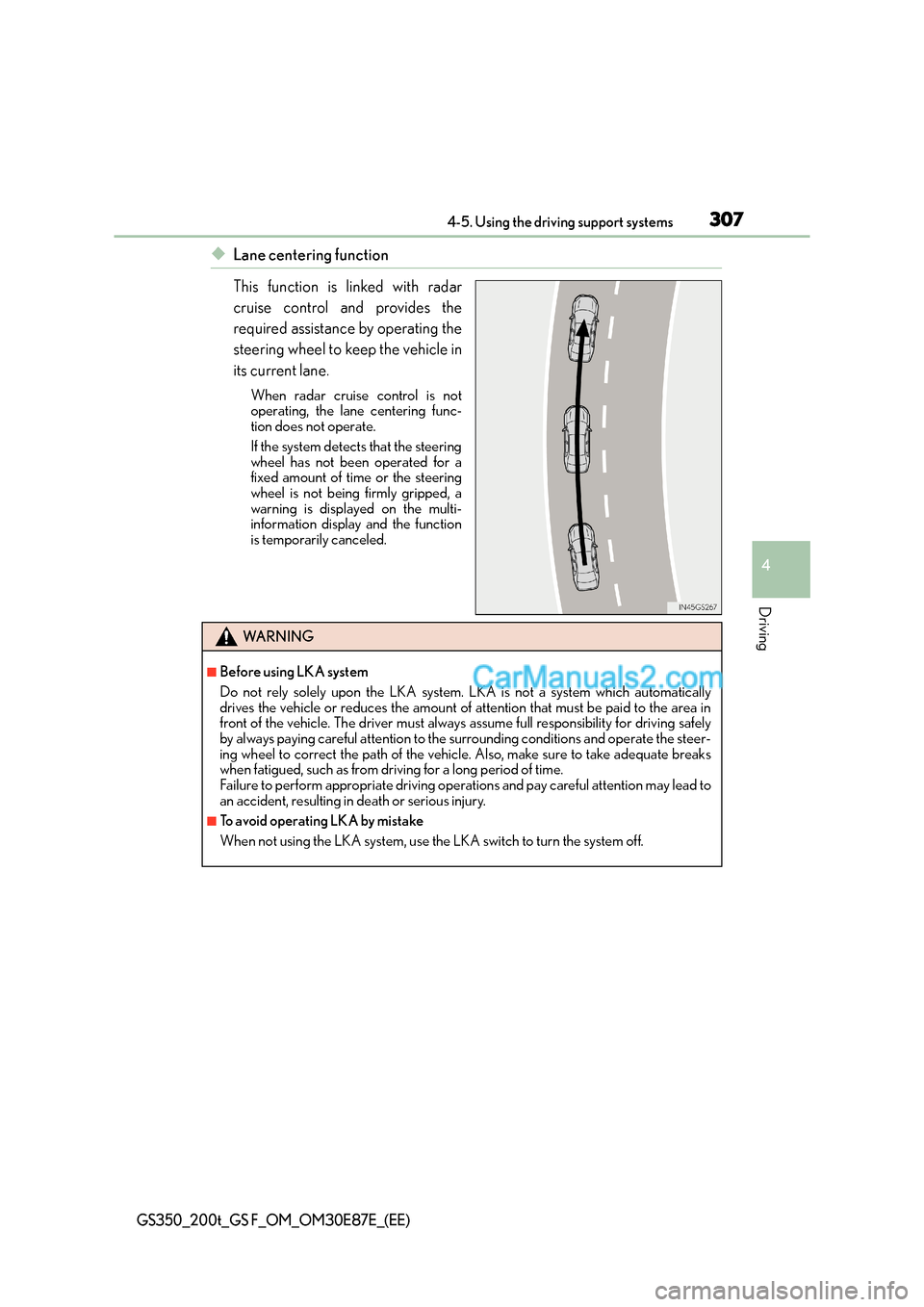
◆Lane centering function
This function is linked with radar
cruise control and provides the
required assistance by operating the
steering wheel to keep the vehicle in
its current lane.
When radar cruise control is not
operating, the lane centering func-
tion does not operate.
If the system detects that the steering
wheel has not been operated for a
fixed amount of time or the steering
wheel is not being firmly gripped, a
warning is displayed on the multi-
information display and the function
is temporarily canceled.
WA R N I N G
■Before using LKA system
Do not rely solely upon the LKA system. LKA is not a system which automatically
drives the vehicle or reduces the amount of attention that must be paid to the area in
front of the vehicle. The driver must always assume full responsibility for driving safely
by always paying careful attention to the surrounding conditions and operate the steer-
ing wheel to correct the path of the vehicle. Also, make sure to take adequate breaks
when fatigued, such as from driving for a long period of time.
Failure to perform appropriate driving operations and pay careful attention may lead to
an accident, resulting in death or serious injury.
■To avoid operating LKA by mistake
When not using the LKA system, use the LKA switch to turn the system off.
Page 310 of 668
3104-5. Using the driving support systems
GS350_200t_GS F_OM_OM30E87E_(EE)
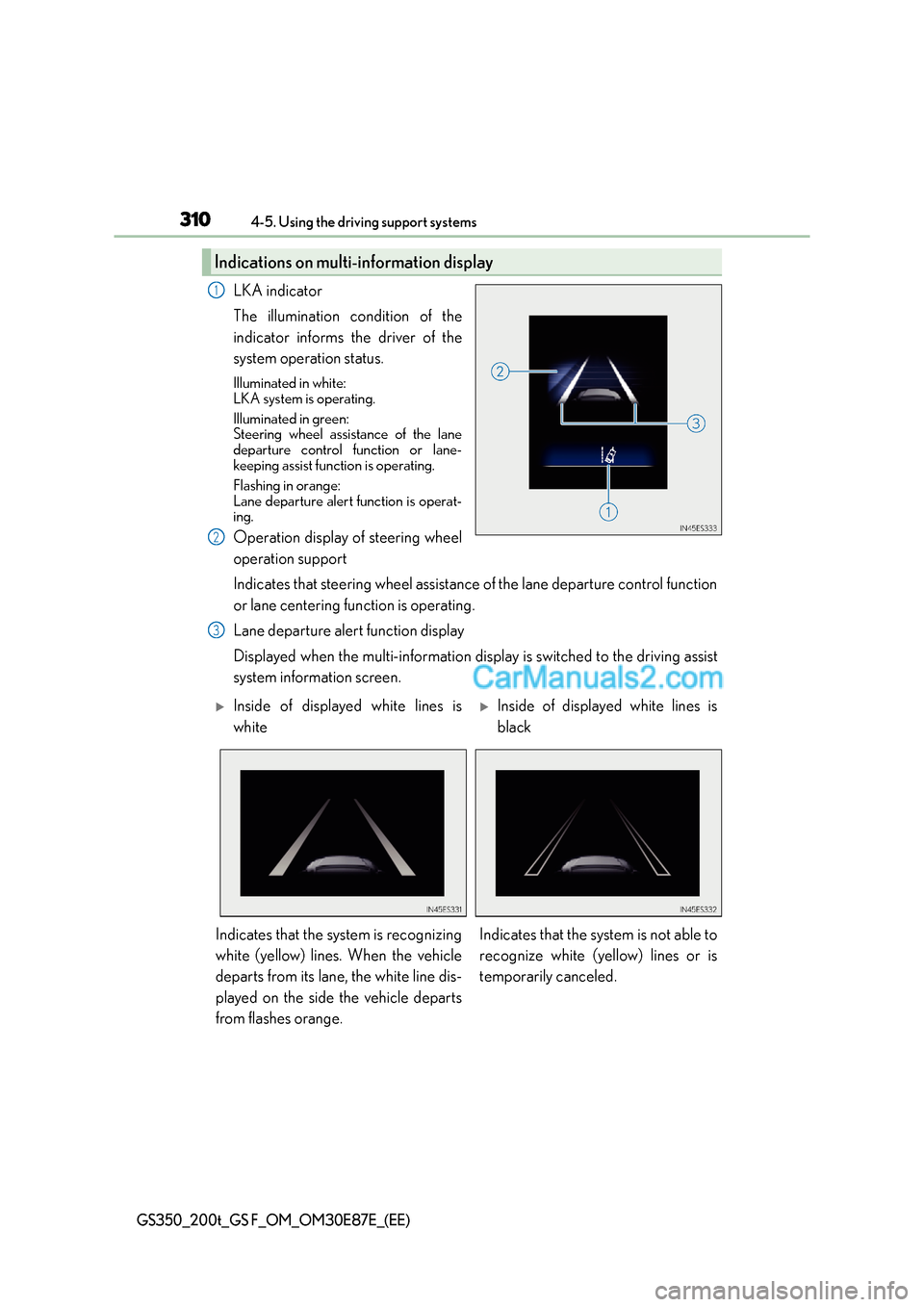
LKA indicator
The illumination condition of the
indicator informs the driver of the
system operation status.
Illuminated in white:
LKA system is operating.
Illuminated in green:
Steering wheel assistance of the lane
departure control function or lane-
keeping assist function is operating.
Flashing in orange:
Lane departure alert function is operat-
ing.
Operation display of steering wheel
operation support
Indicates that steering wheel assistance of the lane departure control function
or lane centering function is operating.
Lane departure alert function display
Displayed when the multi-information display is switched to the driving assist
system information screen.
Indications on multi-information display
1
2
3
XInside of displayed white lines is
whiteXInside of displayed white lines is
black
Indicates that the system is recognizing
white (yellow) lines. When the vehicle
departs from its lane, the white line dis-
played on the side the vehicle departs
from flashes orange. Indicates that the system is not able to
recognize white (yellow) lines or is
temporarily canceled.
Page 311 of 668
3114-5. Using the driving support systems
4
Driving
GS350_200t_GS F_OM_OM30E87E_(EE)
■Operation conditions of each function
●Lane departure alert function
This function operates when all of the following conditions are met.
• LKA is turned on.
• Vehicle speed is approximately 50 km/h (32 mph) or more.
•System recognizes white (yellow) lines.
• Width of traffic lane is approximately 3 m (9.8 ft.) or more.
• Turn signal lever is not operated.
• Vehicle is driven on a straight road or around a gentle curve with a radius of more
than approximately 150 m (492 ft.).
• No system malfunctions are detected. ( →P. 3 1 3 )
●Lane departure control function
This function operates when all of the follo wing conditions are met in addition to the
operation conditions for the lane departure alert function.
• Setting for “Steering Assist” in of the multi-information display is set to “On”.
(→ P. 121)
• Vehicle is not accelerated or decelerated by a fixed amount or more.
• Steering wheel is not operated with a steering force level suitable for changing lanes.
• ABS, VSC, TRC and PCS (Pre-Crash Safety system) are not operating.
• TRC or VSC is not turned off.
• Hands off steering wheel alert is not displayed. ( →P. 3 1 2 )
●Ve h i c l e s w a y w a r n i n g
This function operates when all of the following conditions are met.
• Setting for “Sway Warning” in of the multi-information display is set to “On”.
( → P. 121)
• Vehicle speed is approximately 50 km/h (32 mph) or more.
• Width of traffic lane is approximately 3 m (9.8 ft.) or more.
• No system malfunctions are detected. ( →P. 3 1 3 )
Page 312 of 668
3124-5. Using the driving support systems
GS350_200t_GS F_OM_OM30E87E_(EE)
●Lane centering function
This function operates when all of the following conditions are met.
• LKA is turned on.
• Setting for “Steering Assist” and “Lane Center” in of the multi-information
display are set to “On”. ( →P. 1 2 1 )
•System recognizes wh ite (yellow) lines.
• Dynamic radar cruise control with full-speed range is operating.
• Width of traffic lane is approximately 2.5 to 4.1 m (8.2 to 13.5 ft.).
• Turn signal lever is not operated.
• Vehicle is driven on a straight road or around a gentle curve with a radius of more
than approximately 200 m (656 ft.).
• No system malfunctions are detected. ( →P. 3 1 3 )
• Vehicle does not accelerate or decelerate by a fixed amount or more.
• Steering wheel is not operated with a steering force level suitable for changing lanes.
• ABS, VSC, TRC and PCS (Pre-Crash Safety system) are not operating.
• TRC or VSC is not turned off.
• Hands off steering wheel alert ( →P. 312) is not displayed.
• Lane departure control function is not operating.
■Temporary cancellation of functions
When operation conditions are no longer met, a function may be temporarily canceled.
However, when the operation conditions are met again, operation of the function is auto-
matically restored. ( →P. 3 1 1 )
■Lane departure control function/lane centering function
Depending on the vehicle speed, lane departure situation, road conditions, etc., the
operation of the functions may not be reco gnized or the functions may not operate.
■Lane departure alert function
The warning buzzer may be difficult to hear due to external noise, audio playback, etc.
Also, it may be difficult to feel steering wheel vibrations due to the road conditions, etc.
■Hands off steering wheel alert
When the system determines that the driver has removed their hands from the steering
wheel while the lane departure control function or lane centering function is operating, a
warning message is displayed on the multi-information display.
If the driver continues to keep their hands off of the steering wheel, the buzzer sounds, a
warning message is displayed and the function is temporarily canceled. This alert also
operates in the same way when the vehicle is driven with the steering wheel lightly
gripped. However, depending on the road conditions, etc., the function may not cancel.
■White (yellow) lines are only on one side of road
The LKA system will not operate for the side on which white (yellow) lines could not be
recognized.
Page 314 of 668
3144-5. Using the driving support systems
GS350_200t_GS F_OM_OM30E87E_(EE)
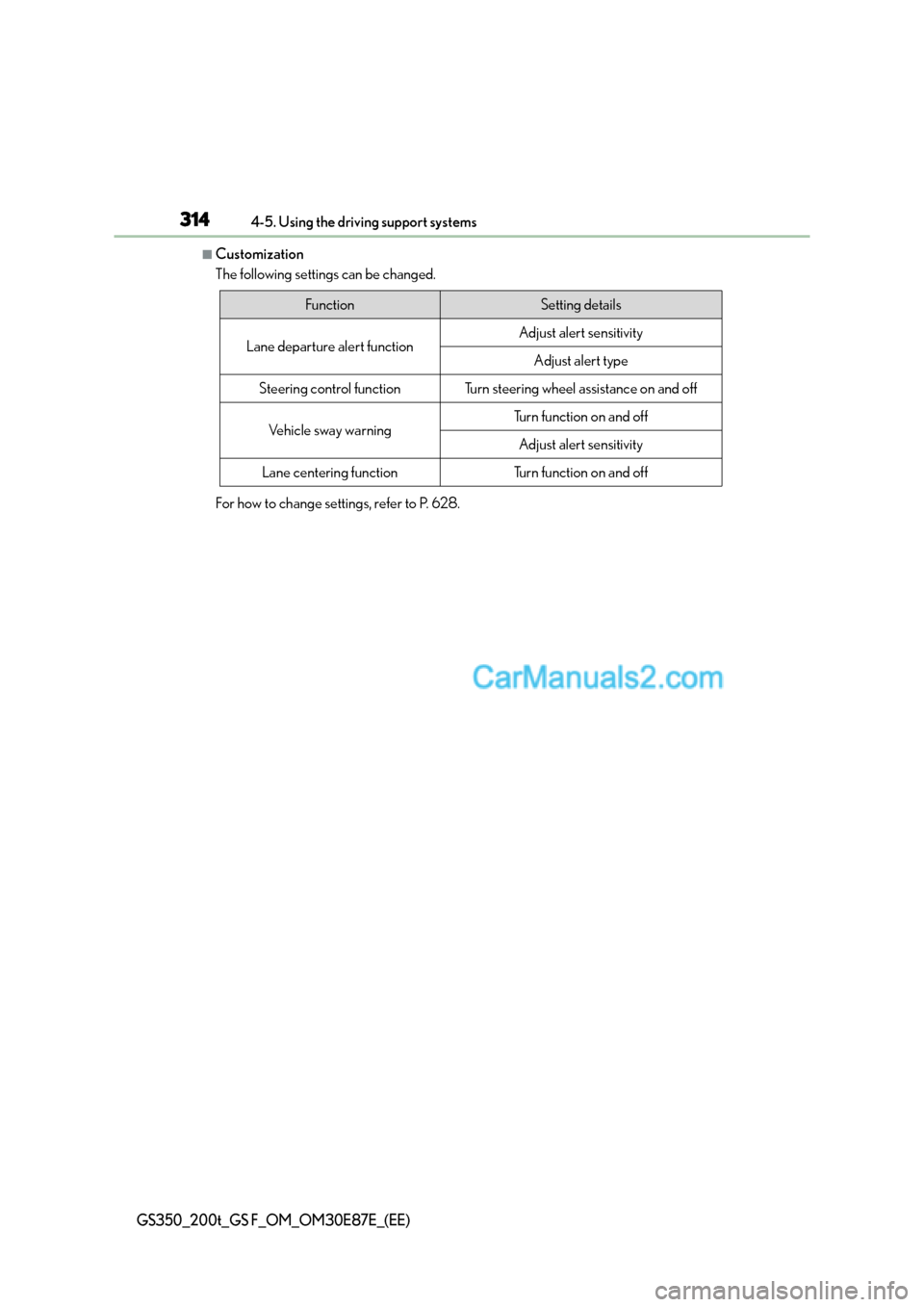
■Customization
The following settings can be changed.
For how to change settings, refer to P. 628.
FunctionSetting details
Lane departure alert functionAdjust alert sensitivity
Adjust alert type
Steering control functionTurn steering wheel assistance on and off
Vehicle sway warningTurn function on and off
Adjust alert sensitivity
Lane centering functionTurn function on and off
Page 315 of 668
315
4
4-5. Using the driving support systems
Driving
GS350_200t_GS F_OM_OM30E87E_(EE)
LDA (Lane Departure Alert with steering control)∗
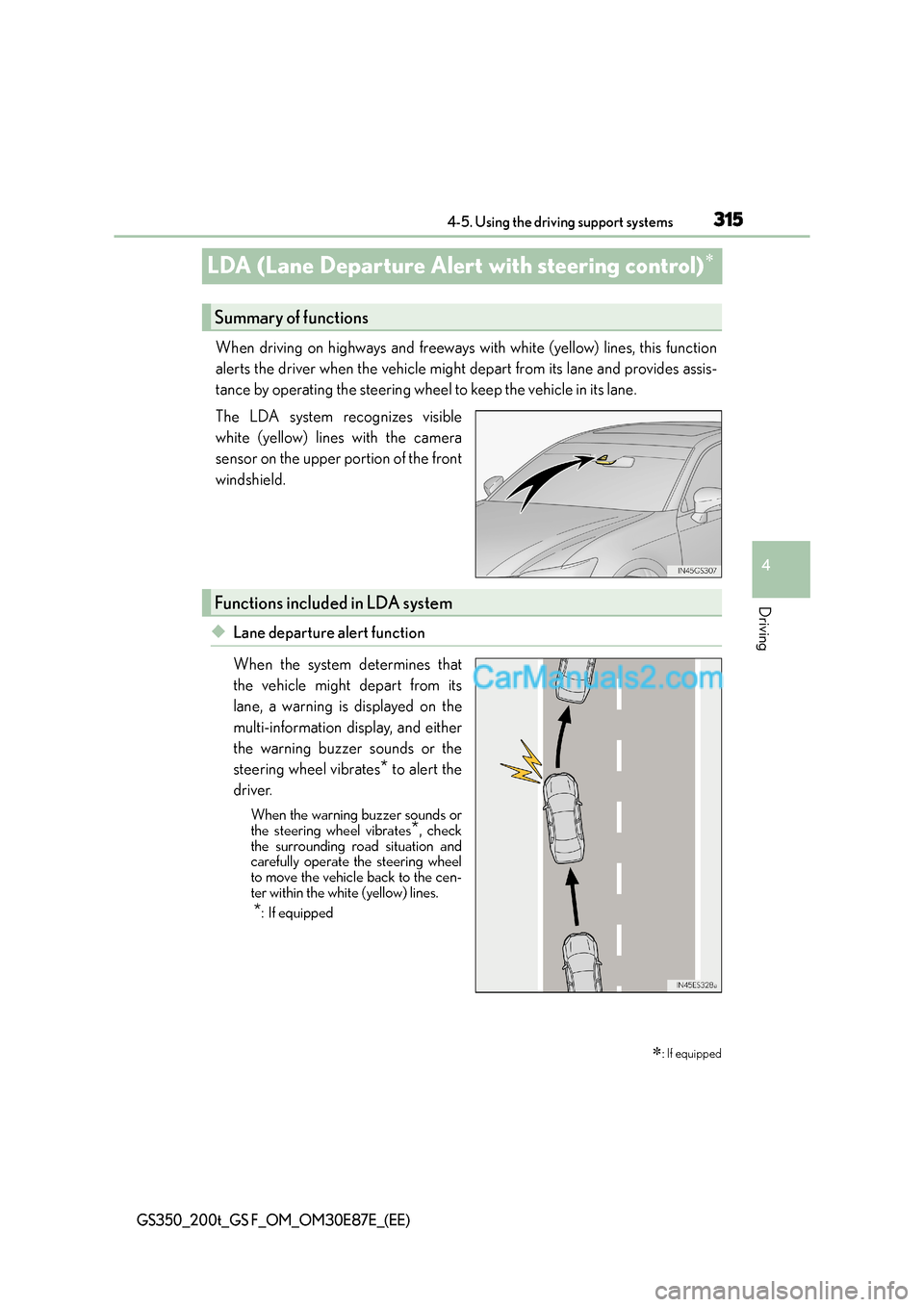
When driving on highways and freeways with white (yellow) lines, this function
alerts the driver when the vehicle might depart from its lane and provides assis-
tance by operating the steering wheel to keep the vehicle in its lane.
The LDA system recognizes visible
white (yellow) lines with the camera
sensor on the upper portion of the front
windshield.
◆Lane departure alert function
When the system determines that
the vehicle might depart from its
lane, a warning is displayed on the
multi-information display, and either
the warning buzzer sounds or the
steering wheel vibrates
* to alert the
driver.
When the warning buzzer sounds or
the steering wheel vibrates*, check
the surrounding road situation and
carefully operate the steering wheel
to move the vehicle back to the cen-
ter within the white (yellow) lines.
*: If equipped
∗: If equipped
Summary of functions
Functions included in LDA system